



Claude Fable 5.1 is designed for demanding coding, long-running agent work, multistep research and document-heavy knowledge tasks. Anthropic lists a 1M-token context window, 128K maximum output and adaptive thinking that is always on. The model is available through the Claude API, Amazon Bedrock, Google Cloud and Microsoft Foundry.
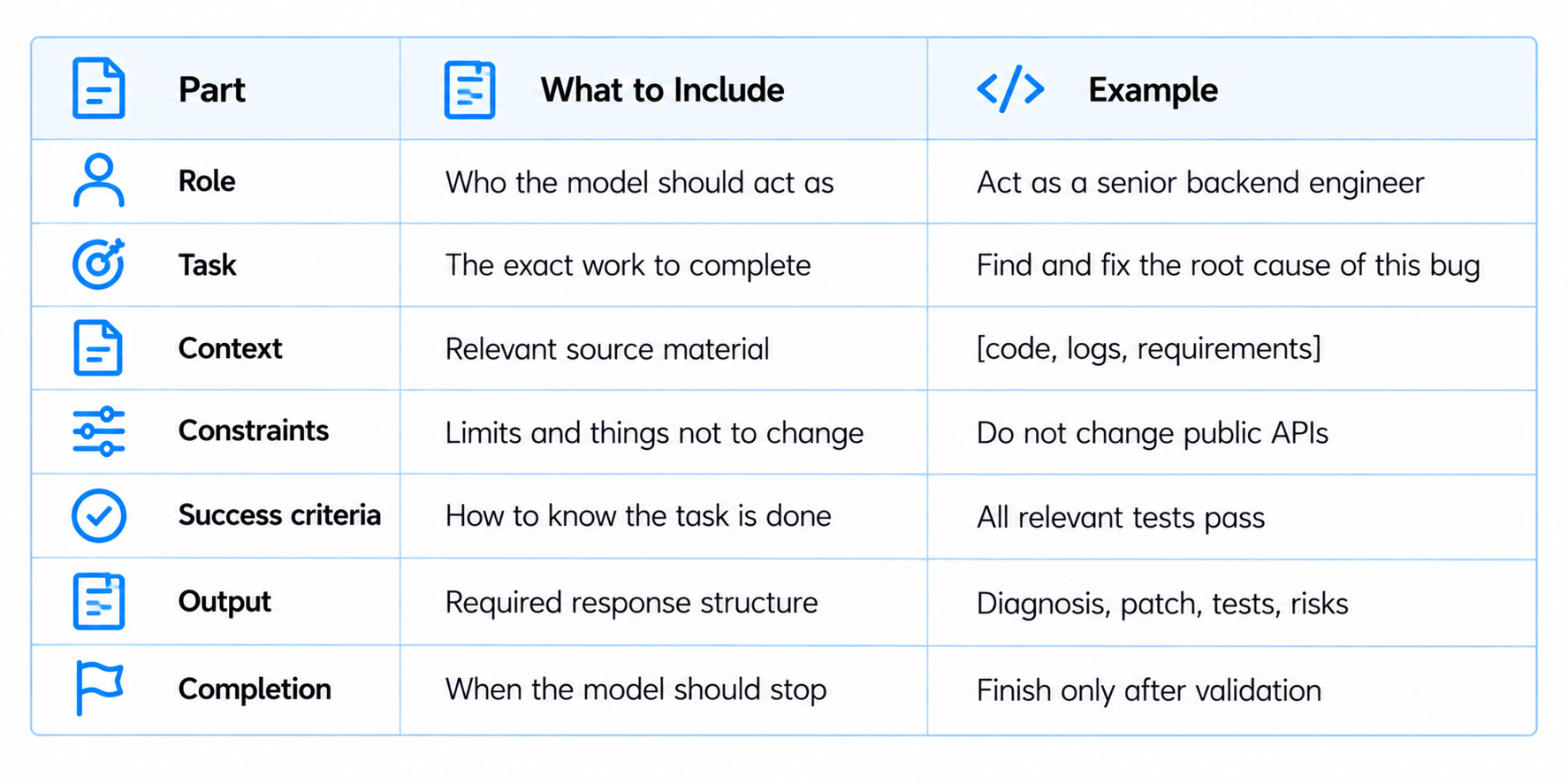
That makes prompt design more about task structure than clever wording. A useful Fable 5.1 prompt should tell the model what role to take, what needs to be done, what context matters, what must not change, how success will be judged and when the task is complete. Anthropic's dedicated Fable 5.1 prompting guide also documents several practical behavior changes around effort levels, progress updates, tool-call batching, search, targeted edits, compaction and long outputs.
The 25 prompts below turn those ideas into a compact copy-paste library. They cover coding, agents, research, documents, data, writing and final verification. Replace the bracketed placeholders with your own inputs and use the same prompts as repeatable tests when comparing effort levels or model versions.

QUICK ANSWER
The strongest Claude Fable 5.1 prompts are explicit about the job, the evidence and the finish line. Give the model the role, task, relevant context, constraints, success criteria and output format. For agents, also define the tools available, what can be changed and what must be verified before completion.
Anthropic recommends testing all Fable 5.1 effort levels, low through max, against your own evaluations. High is the default, while lower effort can reduce latency and cost when quality remains acceptable.
Fable 5.1 also behaves differently around long tool runs. Anthropic recommends user-facing progress updates for long workflows, batching independent tool calls, targeted file edits rather than whole-file rewrites, explicit search instructions at low effort, and clear completion requirements so the model does not stop after only planning the work.
Use the 25 prompts below as a practical test pack. They are intentionally written so the output can be checked, not merely admired.
THE FABLE 5.1 PROMPT FORMULA
How to Use These Prompts
- Copy a prompt and replace every bracketed placeholder.
- Provide the actual files, logs, documents or datasets the task depends on.
- Use the lowest effort level that reliably completes the task, then confirm that choice with your own evals.
- For long agent runs, request concise progress updates rather than a silent sequence of tool calls.
- For small code changes, explicitly request targeted edits.
- For research, require evidence and source locations for important claims.
- For high-stakes tasks, require verification before the final answer.
CODING & SOFTWARE ENGINEERING
1. Debug a Production Error
Act as a senior software engineer. Debug this production failure: [error]. Context: [code, logs, traceback, expected behavior]. Identify the root cause, give the smallest safe fix, return the corrected code, and add three regression tests. Do not change unrelated behavior.
2. Refactor Without Breaking APIs
Act as a staff engineer. Refactor [module or codebase] to improve [goal]. Preserve public APIs and existing behavior. Before editing, identify dependencies and affected tests. Output: plan, targeted changes, tests and validation results.
3. Fix a Repository-Level Bug
Act as a repository coding agent. Fix this issue: [issue]. Repository: [tree and key files]. Inspect the relevant files, implement the smallest complete fix, run the relevant tests, fix failures and report exactly what changed. Do not stop after proposing a patch.
4. Review a Pull Request
Act as a strict production code reviewer. Review this diff: [diff]. Focus on correctness, security, performance, reliability and maintainability. Ignore harmless style nitpicks. Rank findings by severity and give a concrete fix for every high-severity issue.
5. Build a Test Suite
Act as a senior test engineer. Create runnable tests for [feature or module] using [framework]. Cover normal cases, edge cases, invalid inputs, regressions and integration behavior. Output the tests, fixtures required and any remaining coverage gaps.
CODING AGENTS & TOOL USE
6. Complete a Multi-Step Coding Task
Act as an autonomous coding agent. Complete this task: [task]. Use available tools to inspect the repository, edit only required files, run relevant tests, fix failures and verify the final state. Give concise progress updates between major phases. Do not ask for permission for steps already included in the task.
7. Design a Safe Agent Loop
Act as an AI systems architect. Design an agent loop for [workflow]. Define state, tools, permissions, retries, validation, stopping conditions, human approval points and failure handling. Output a step-by-step execution flow and flag unnecessary tools.
8. Batch Independent Tool Calls
Act as a coding agent. For this task, identify tool calls that can run independently: [task]. Batch independent calls when possible and keep dependent actions ordered. Afterward, summarize what each call returned and how it changed the next action.
9. Verify Whether a Task Is Finished
Act as the verification stage of a coding agent. Evaluate this task state: [task, changed files, test output]. Decide whether the requested result is actually complete. List missing evidence, failed assumptions, untested paths and required next actions. Do not declare success without validation.
10. Create an Agent Handoff
Act as an agent handoff writer. Convert this work state into a handoff for another agent: [state]. Include goal, constraints, files inspected, changes, tests, failures, unresolved questions, decisions and exact next action.
RESEARCH & LONG-CONTEXT REASONING
11. Research a Topic With Evidence
Act as a senior research analyst. Research [topic] using [sources]. Separate verified facts, interpretations and unresolved claims. Output an evidence table with claim, source, confidence and implications, followed by a concise conclusion. Do not present inference as fact.
12. Analyze a Long Document
Act as a document research analyst. Analyze this document: [document]. Extract thesis, major evidence, important numbers, contradictions, unresolved questions and actions. For every major claim, cite the relevant section or page from the provided material.
13. Compare Two Technologies
Act as a technical research analyst. Compare [A] and [B] for [use case]. Evaluate capability, reliability, cost, performance, ecosystem, integration difficulty and risk. Output a comparison table, best fit by user profile and a final recommendation with assumptions.
14. Challenge My Conclusion
Act as a skeptical expert. Stress-test this conclusion: [conclusion]. Evidence: [evidence]. Identify hidden assumptions, counterexamples, missing evidence and conditions where the conclusion would fail. Separate strong objections from weak ones, then give a revised conclusion.
15. Synthesize Conflicting Sources
Act as a fact-checking research editor. Reconcile these sources: [sources]. Identify agreement, conflicts and likely reasons for differences. State which claims have the strongest support, preserve uncertainty and produce one coherent evidence-backed answer.
DOCUMENTS, DATA & KNOWLEDGE WORK
16. Extract Structured Data
Act as a document-intelligence specialist. Extract these fields from [document]: [fields]. Return valid JSON matching [schema]. Preserve exact numbers and dates, use null when information is absent, and never invent missing values.
17. Review a Contract
Act as a contract-analysis assistant. Review [contract]. Extract obligations, payment terms, termination, renewal, liability, unusual clauses and deadlines. Flag ambiguous or high-risk language for human review and identify the supporting section.
18. Analyze a Dataset
Act as a senior data analyst. Analyze [dataset]. First check missingness, duplicates and suspicious values. Then identify the most important trends, outliers and business implications. Output data-quality findings, key insights, useful charts and three actions.
19. Compare Two Documents
Act as a document comparison specialist. Compare [document A] and [document B]. Identify changes to claims, numbers, deadlines, responsibilities, requirements and omissions. Output a structured change log and separate meaningful changes from wording-only edits.
20. Turn Research Into an Execution Plan
Act as an operations strategist. Convert this research into an execution plan: [research]. Prioritize actions by impact and effort, define dependencies, owners, success metrics and stop conditions, and flag decisions requiring human approval.
WRITING, COMMUNICATION & VERIFICATION
21. Write a Technical Article
Act as a senior technical writer. Write an article about [topic] for [audience] using [sources]. Focus on the real problem, explanation, examples and tradeoffs. Avoid filler and unsupported superlatives. Mark claims that cannot be established from the supplied evidence.
22. Rewrite for Clarity
Act as a precise editor. Rewrite this text: [text]. Preserve meaning, facts and important qualifications. Remove repetition and vague language. Keep the tone [tone] and do not add new claims.
23. Create an Executive Decision Memo
Act as an executive analyst. Evaluate this decision: [decision]. Evidence: [data]. Output: situation, options, recommendation, tradeoffs, assumptions, risks and the evidence that would change the recommendation.
24. Write Useful Agent Progress Updates
Act as an agent working on [task]. After each major work phase, provide a brief user-facing update saying what was completed, what was learned, what happens next and whether anything is blocked. Keep updates concise and do not narrate every tool call.
25. Red-Team the Final Answer
Act as a final verification specialist. Solve [task] and prepare the answer. Before returning it, independently check factual claims, arithmetic, logic, source support, edge cases and missing requirements. Return the corrected final answer followed by a short verification summary. Do not invent evidence.
Claude Fable 5.1 Prompting Tips That Actually Matter
Use effort as a control: Anthropic recommends testing low, medium, high, xhigh and max effort on your own evaluations. Higher effort can help difficult work, while lower effort may reduce latency and cost when quality holds.
Ask for progress updates: For long tool-driven workflows, explicitly request concise user-facing progress updates so the user can follow the work.
Batch independent tools: When tool calls do not depend on each other, ask the agent to batch them instead of serializing every call.
Define completion: Tell the model to continue through implementation and validation rather than stopping after a plan or asking permission for work already requested.
Prefer targeted edits: For small code changes, tell Fable 5.1 to edit only the necessary sections instead of rewriting whole files.
Trigger search explicitly at low effort: Anthropic notes that Fable 5.1 searches and retrieves less often at low effort. For evidence-dependent tasks, explicitly require the relevant search or retrieval step.
Preserve important details during compaction: Specify which constraints, decisions, exact values and unresolved questions must survive long-session compaction.
Give vision tasks crop and zoom tools: For charts and dense images, Anthropic recommends giving Fable 5.1 tools to crop and zoom so the model can inspect details accurately.
How to Turn These 25 Prompts Into a Reusable Benchmark
Pick one or two prompts from each category, keep the input fixed and run them across Fable 5.1 effort levels. Record both quality and completion behavior.
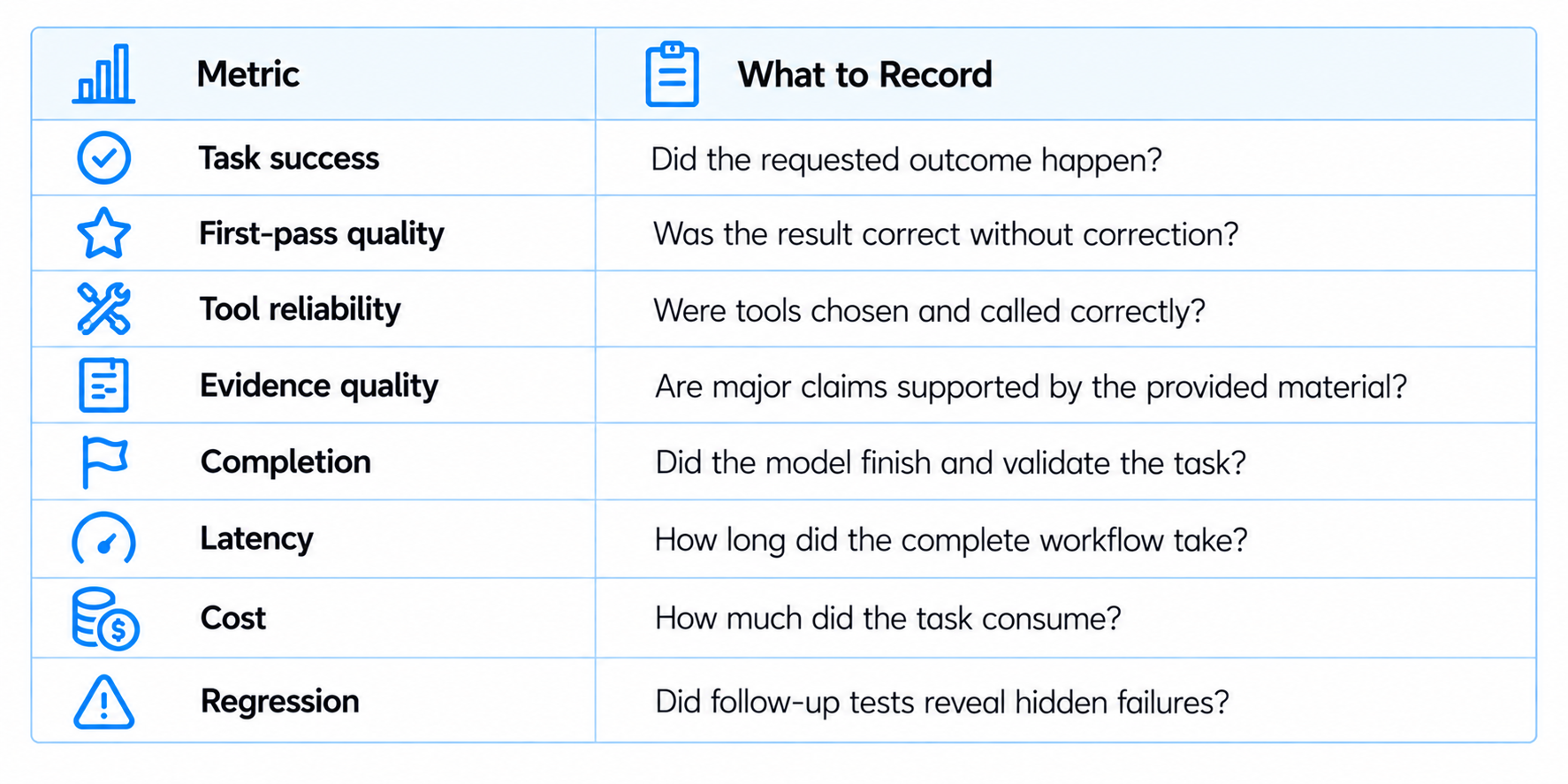
This turns the prompts into an actual evaluation set. Coding tasks can be scored by tests passed and retries. Research tasks can be scored by evidence accuracy. Agent tasks can be scored by tool success, recovery and completion. The result is much more useful than judging a model from a single demo.
Frequently Asked Questions
What makes a good Claude Fable 5.1 prompt?
Define the role, task, context, constraints, success criteria and output format. For agents, add tools, permissions and completion conditions.
Should I reuse Claude Fable 5 prompts?
Yes. Anthropic says existing Fable 5 prompts should generally work on Fable 5.1, while its dedicated guide documents behavior changes around effort, tool batching, progress updates, search, formatting and file edits.
Which effort level should I use?
Start with high, then test low, medium, xhigh and max on your own evaluation set. Use the lowest setting that reliably meets your quality bar.
How do I prompt Fable 5.1 for coding agents?
Give it repository context, define what can change, provide the available tools, require validation and explicitly state the completion condition.
How do I get better research results?
Give the relevant evidence, tell the model what needs to be established, require source locations and explicitly request search or retrieval when the workflow supports those tools.
How do I stop it from rewriting an entire file?
Ask for targeted edits and preservation of unrelated code and behavior. Anthropic specifically calls out this prompting pattern for Fable 5.1.
How do I use the 1M-token context effectively?
Put the most relevant material in context, define what the model must retrieve, preserve important constraints and avoid filling the window with irrelevant information.
Can these prompts work on other Claude models?
Yes. The basic role-task-context-constraints-output structure transfers well, while the model-specific behavioral tips here are based on Anthropic's Fable 5.1 documentation.
Recommended Blogs
Claude Fable 5.1 Review: Benchmarks, Pricing, Features & Is It Worth It? (2026)
Gemini 3.8 Flash Review: Accuracy, Price & Is It Worth It? (2026)
Meta Muse Spark 1.3 Review: Coding, Price & Is It Worth It? (2026)
Quasar 438B Review: Benchmarks, Speed, Price & Is It Worth It? (2026)
MiniMax FastH3 Review: Speed, Quality, VRAM & Is It Worth It? (2026)
How to Secure AI Coding Agents: Permissions, Sandboxing, MCP & Secrets
Resources & Community
Join our community of 70,000+ AI enthusiasts and learn to build powerful AI applications. Whether you're a beginner or an experienced developer, Build Fast with AI helps you understand and implement AI in your projects.
Agentic AI Launchpad 2026
A structured 6-week cohort program that takes you from AI basics to building and deploying real-world agentic AI systems. Includes live sessions, expert mentorship, project reviews and a builder community network.
Ready to go from learning to building? Join the next cohort: Agentic AI Launchpad 2026
Free AI Resources
Access free tools, workshops and micro-learning to keep building.

