



MiniMax FastH3 Review: Can This 4-Step H3 Distillation Make Local Video Generation Fast Enough for Real Work?
FastH3 is one of the most interesting ways to accelerate MiniMax H3 because it attacks the biggest practical problem with the open-weight model: inference time. Built by the FastVideo team with Nuva Lab and NVIDIA FastGen collaboration, FastH3 Preview v1 distills the MiniMax H3 text-to-video-and-audio path into four transformer forwards and pairs that with 90% sparse video attention on the recommended VSA checkpoint.
The headline number is significant. FastVideo's controlled benchmark on NVIDIA B200 hardware measured a 15-second, 1344x768, 24 FPS video with native audio in 47.2 seconds on one B200, versus 678.7 seconds for the dense Base H3 setup. That is a 14.38x end-to-end speedup under the published test configuration. On eight B200 GPUs, the same 15-second clip completed in 12.88 seconds. These measurements include encoding, denoising, decoding, audio processing, muxing and file output, while model loading and compilation are excluded.
FastH3 is not a new MiniMax foundation model and it is not simply a faster hosted version of H3. It is a FastVideo post-training release built from the open MiniMax H3 weights. That distinction matters because the current Preview v1 scope is narrower than the full H3 model: the released distilled checkpoint targets text-to-video-and-audio, while first-and-last-frame and reference-to-video distilled checkpoints are separate follow-up work.
QUICK ANSWER
FastH3 Preview v1 is the FastVideo team's four-step, open-weight acceleration of MiniMax H3 for text-to-video-and-audio generation. The recommended VSA/Data-Free checkpoint uses four DiT calls and 90% sparse video attention with tile size 64. FastVideo reports up to 14.38x end-to-end speedup on one NVIDIA B200 compared with its dense Base H3 benchmark, with a 15-second 1344x768 clip falling from 678.7 seconds to 47.2 seconds.
The speedup is the main reason to care. FastH3 can turn H3 from a model that is difficult to iterate on locally into something much closer to an interactive generation pipeline on the hardware it targets. The quality side is more nuanced. FastVideo says the checkpoint was trained with more than 1,000 B200 training hours and real-world synchronized video-and-audio data, but it also states that motion, fine detail and some audio remain areas for improvement.
The current release also has a clear boundary: Preview v1 supports text-to-audio-video only. First-and-last-frame and reference-to-video variants were not included in the released preview checkpoint. That means FastH3 is a powerful speed upgrade for pure T2VA generation, but it is not a complete drop-in replacement for every MiniMax H3 workflow.
My verdict: 9.5/10 for speed, 8.2/10 for quality, 8.5/10 for local practicality and 9.0/10 overall. For rapid T2VA generation, FastH3 is one of the most significant H3 optimizations available right now.
1. What Is MiniMax FastH3?
FastH3 is a FastVideo post-training project built on MiniMax H3. The FastVideo team distilled the H3 base transformer with DMD2 into a four-step student and then combined it with its Video Sparse Attention implementation. The recommended release is available as both full weights and a pre-extracted LoRA.
The underlying H3 model remains important because FastH3 reuses the H3 text encoder, video VAE, audio VAE, tokenizers and schedulers. The result is therefore closer to an accelerated H3 path than a completely separate model family.
The current preview is specifically for T2VA, meaning text-to-video-and-audio. FastVideo's announcement says the FL2VA and Ref2VA distilled checkpoints are being developed separately.
2. FastH3 Preview v1 Specifications
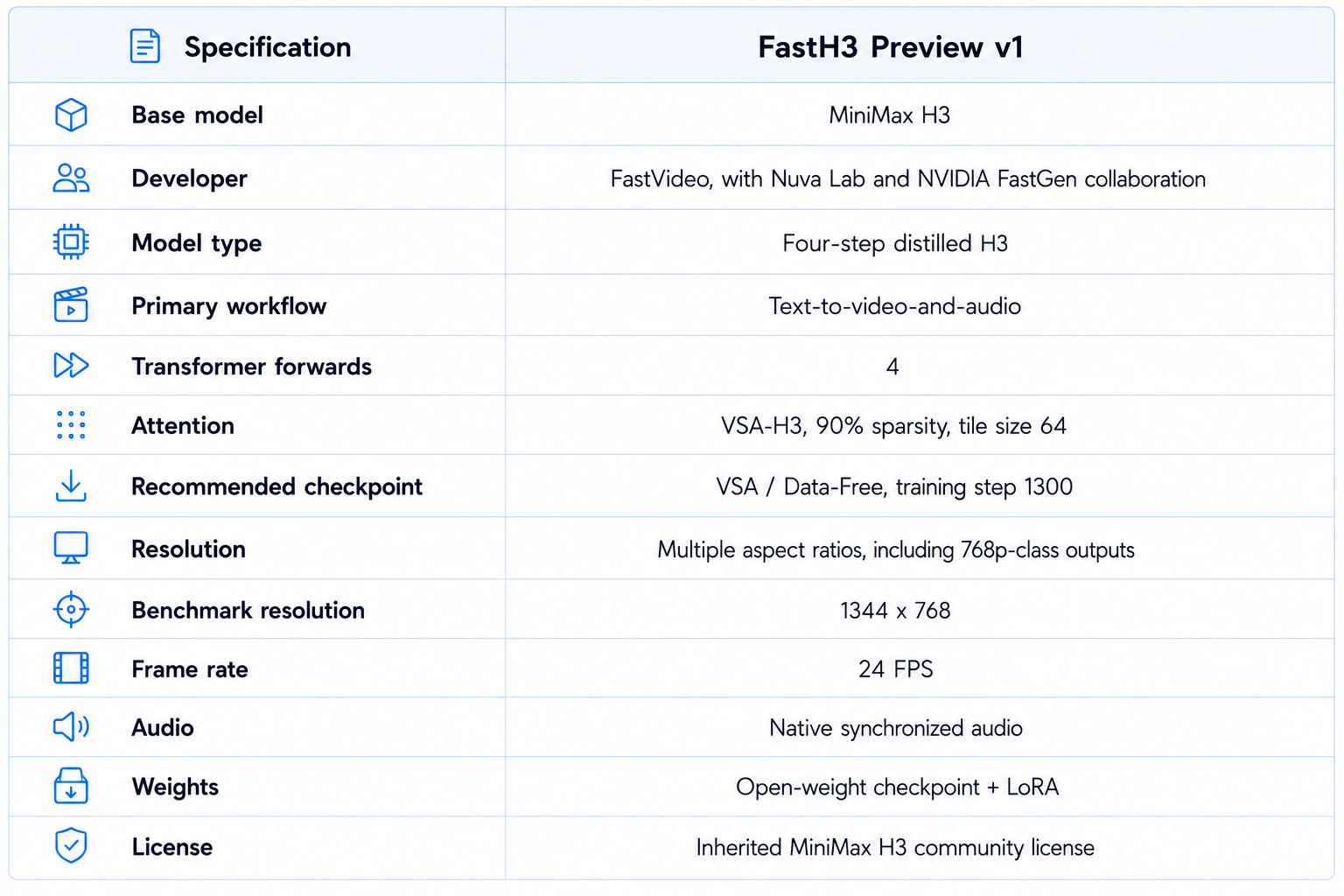
The recommended VSA/Data-Free checkpoint was trained from prompts without target videos and is the configuration FastVideo uses for its headline benchmark results. The published release also includes dense and synthetic-data variants for comparison and research.
3. How FastH3 Works
The core idea is simple: reduce the amount of denoising work. FastVideo's published description says the original H3 sampling path uses a long sequence of transformer evaluations, while FastH3 is distilled to four DiT calls. DMD2 is used to teach the student to approximate the behavior of the larger teacher with far fewer steps.
The second optimization is sparse attention. The recommended VSA checkpoint uses 90% sparse video attention, meaning the runtime does not compute every eligible attention interaction. FastVideo combines the distilled four-step model with a specialized VSA-H3 kernel to get the reported speed.
That combination is important. Four steps alone reduce the number of transformer evaluations, while VSA reduces the work inside each evaluation. The published benchmark therefore represents a complete model-and-runtime stack rather than a single algorithmic trick.
4. FastH3 Speed: The 14x Number Explained
FastVideo's B200 results are the clearest public speed benchmark for the current release. The tests use 1344x768 output, 24 FPS, native audio, and end-to-end timing after one warmup. Model loading and compilation are excluded.
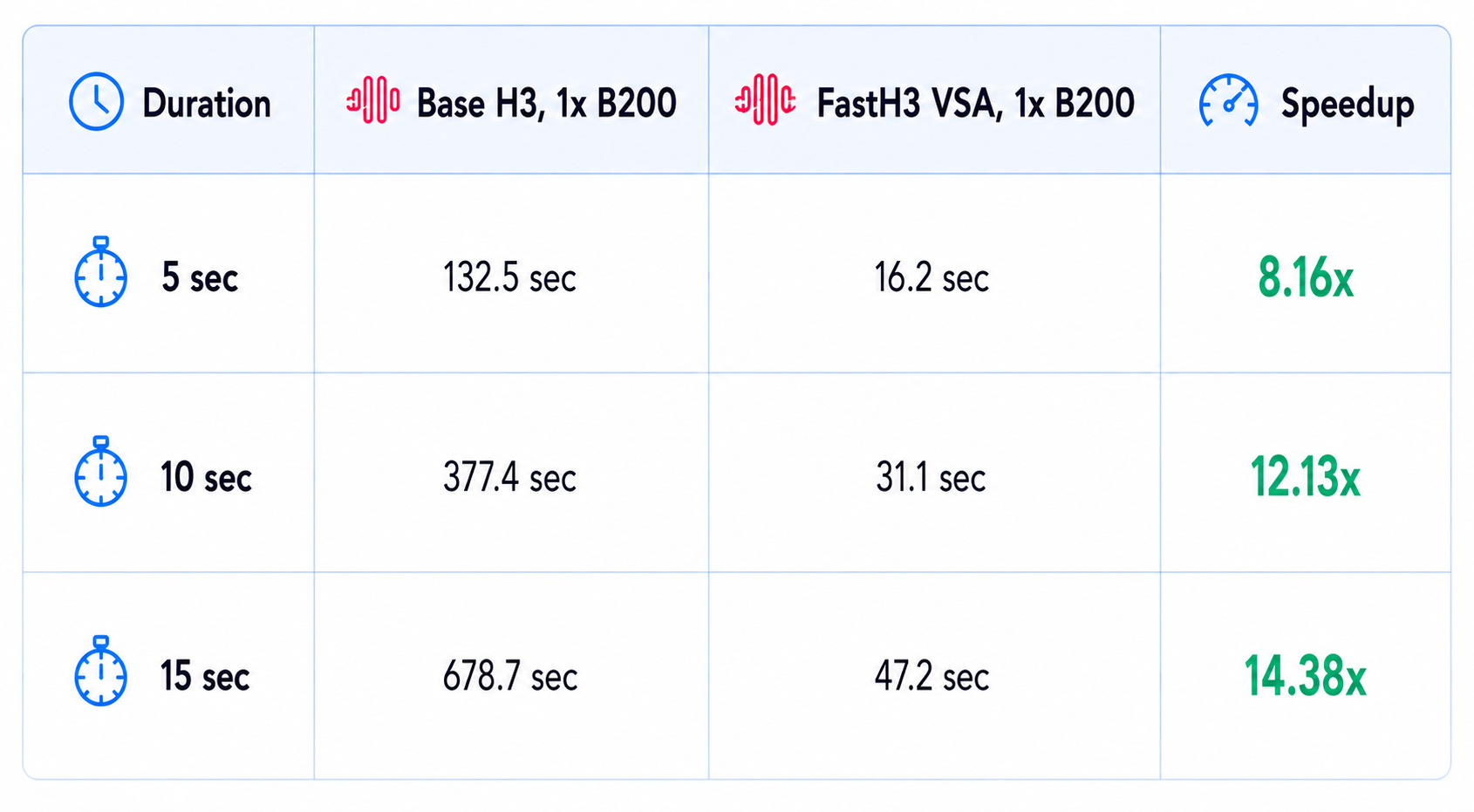
The scaling result is also notable. FastH3 reaches 15.5 seconds for a 15-second clip on four B200s and 12.88 seconds on eight B200s in the same benchmark table. At eight B200s, the generated clip takes less wall-clock time than its duration, which is what FastVideo describes as sub-realtime generation.
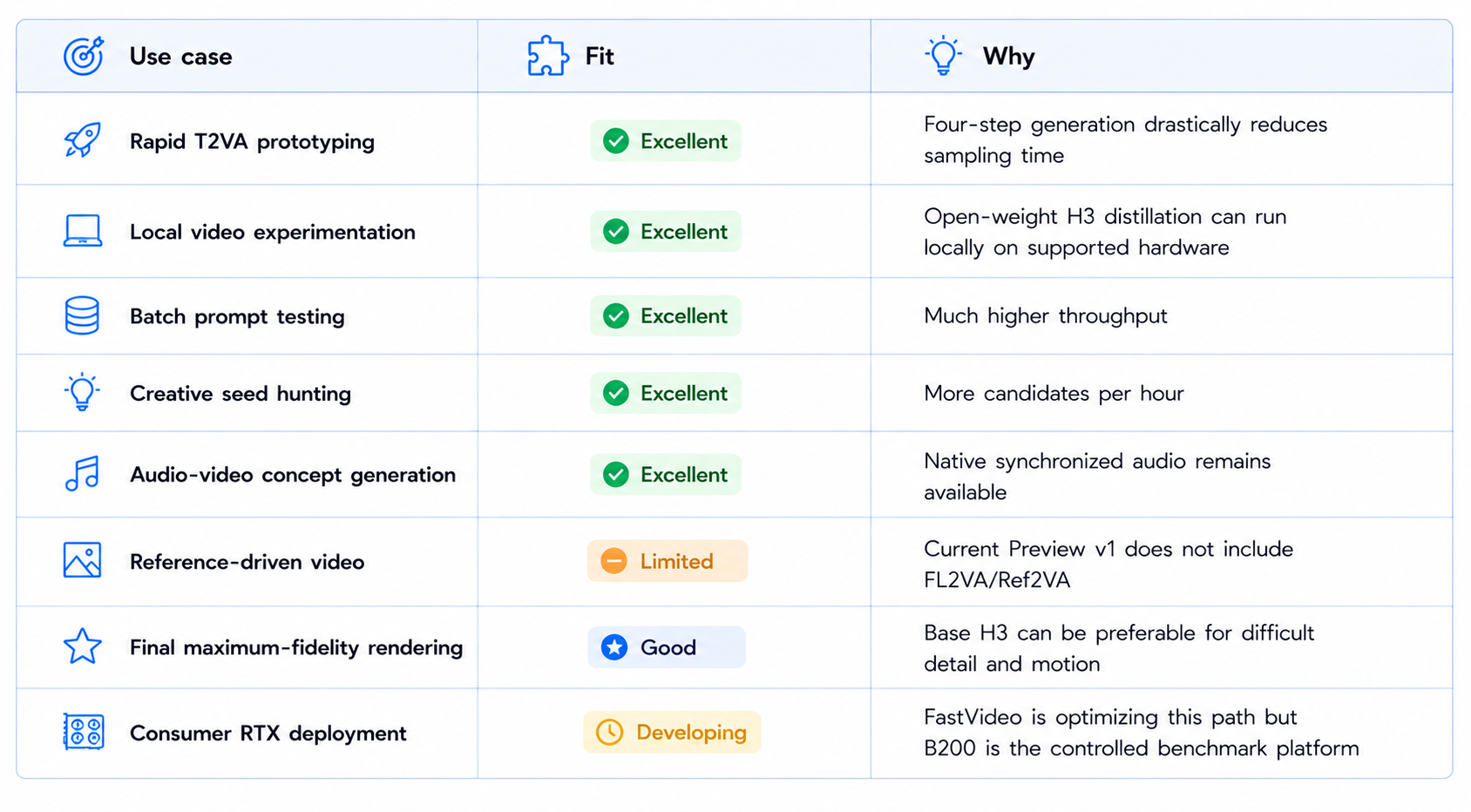
The important qualification is hardware. These are controlled B200 measurements, not a promise that a consumer RTX card will achieve the same multiplier. FastVideo explicitly says the weights are hardware-independent but the VSA speed depends on a compatible kernel and optimized runtime.
5. Does FastH3 Actually Generate Faster Than Playback?
On the eight-B200 configuration, yes. A 15-second clip is measured at 12.88 seconds end to end in FastVideo's published table. That means the complete generation pipeline runs faster than the duration of the generated media under that configuration.
The one-B200 result is also transformative even though it is slower than real time. At 47.2 seconds for a 15-second clip, a developer can run far more attempts than the 11-minute-plus baseline shown by the 678.7-second Base H3 benchmark.
This is where speed becomes a creative feature. Faster generation changes how many prompts, seeds and camera directions can be tested during a production session.
6. Video Quality: What Does FastH3 Give Up?
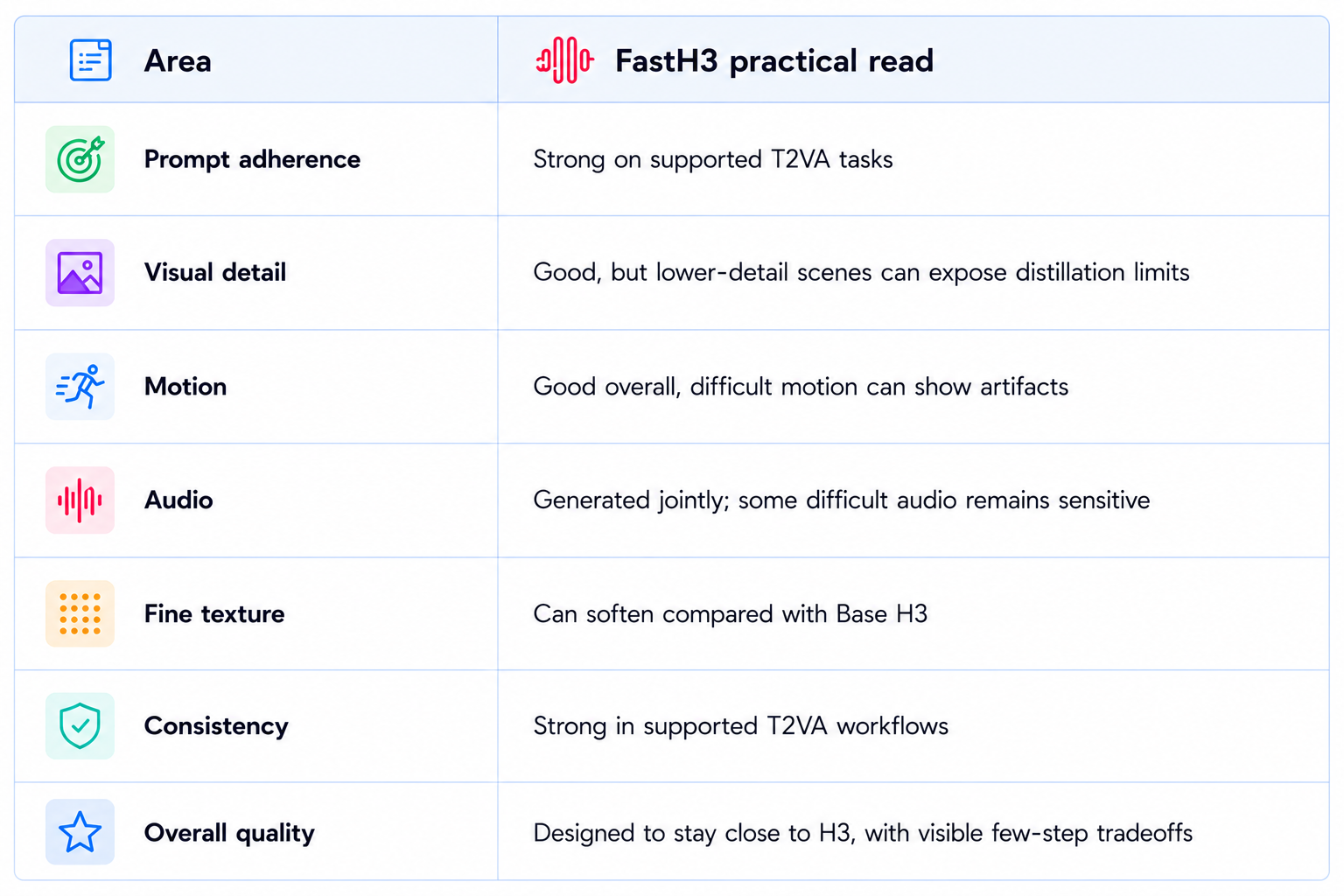
FastH3 is designed to preserve as much H3 behavior as possible while cutting the sampling budget. FastVideo says it trained with more than 1,000 B200 hours and real-world multi-shot, synchronized visual and audio data. That is strong evidence that quality preservation was a major training objective.
At the same time, the release itself documents remaining quality gaps. FastVideo lists difficult motion, fine detail and some audio as areas still being improved, and it describes the four-step model as the minimum-latency configuration. The team is working on a possible eight-step version and additional training designed to improve motion and final-step quality.
7. Native Audio Is Preserved
One of the strongest parts of MiniMax H3 is joint video and stereo-audio generation, and FastH3 keeps that capability. FastVideo's preview uses the H3 audio pipeline and produces synchronized video and audio together in a single T2VA generation.
This matters because an accelerated silent video model would only solve half of H3's problem. FastH3 keeps the audio path in the benchmark, so the speed numbers represent actual video-plus-audio generation rather than video-only inference.
For production, audio should still be checked independently. Dialogue clarity, sound-effect timing and subtle ambience can reveal quality differences that are not visible from a single frame.
8. FastH3 and the Current Workflow Scope
The current Preview v1 checkpoint supports T2VA only. That means you can start with a text prompt and generate video plus audio, but the distilled release does not yet include the H3 first-and-last-frame or omni-reference workflows.
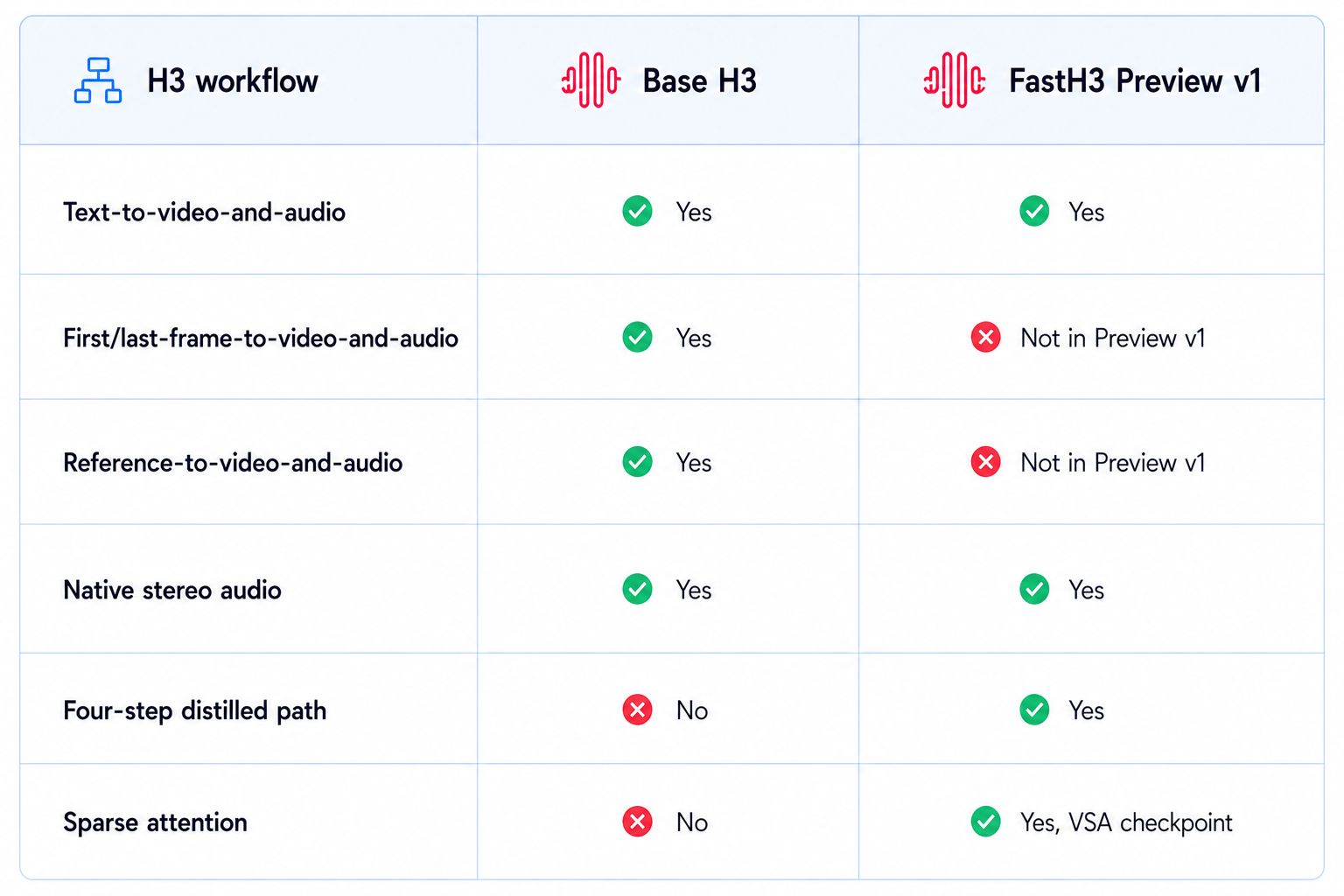
This is probably the most important capability distinction in the whole review. If your workflow is pure text-to-video-and-audio, FastH3 is immediately relevant. If your workflow depends on a reference image, first frame, last frame or H3's broader multimodal reference system, the current preview does not replace the original model.
9. FastH3 vs MiniMax H3
The choice between the two is really a choice between flexibility and throughput.
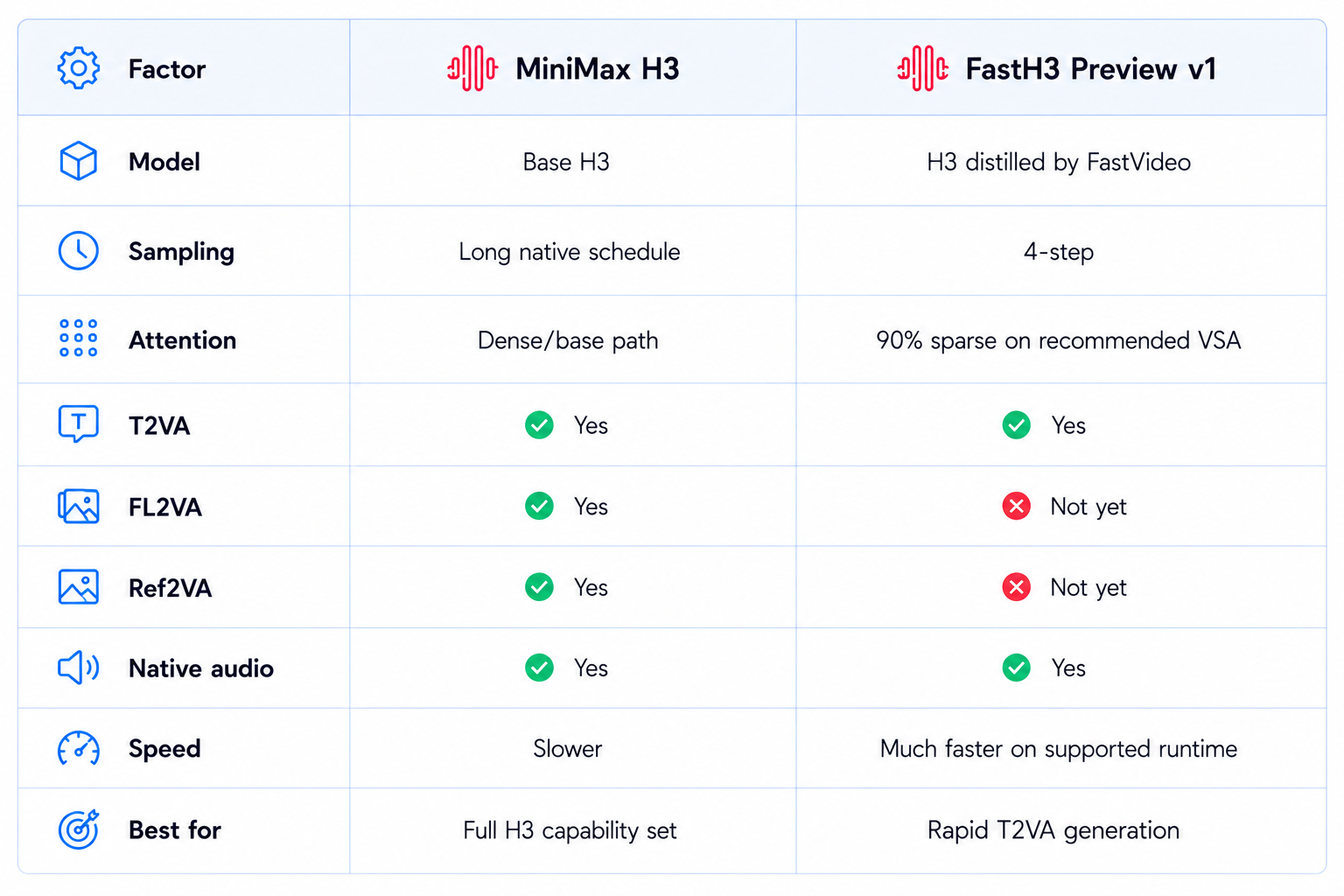
Choose H3 when the reference and editing workflows matter more than inference time. Choose FastH3 when the job is text-driven video and audio generation and the model's sampling time is holding you back.
10. FastH3 vs MiniMax H3 Turbo
FastH3 and H3 Turbo both accelerate MiniMax H3, but they come from different communities and use different runtime strategies. H3 Turbo is a broader community ecosystem of LoRA distillations, often used in ComfyUI workflows. FastH3 Preview v1 is a FastVideo release built around its own four-step checkpoint and VSA runtime.
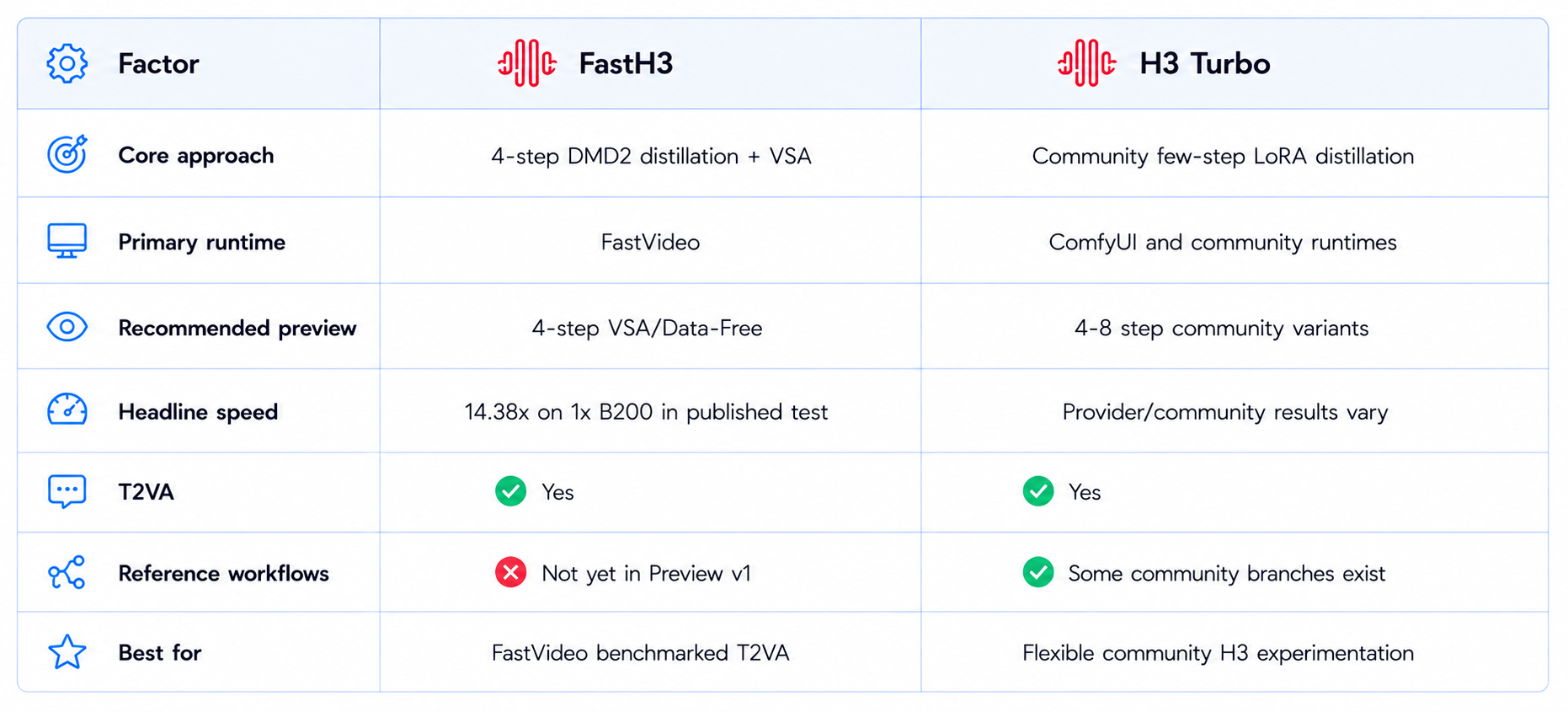
Read our MiniMax H3 Turbo Review for the community-LoRA approach.
11. VRAM and Local Hardware
FastH3 changes compute requirements, but it does not make H3 a small model. The weights, text encoder, video VAE and audio VAE still represent a substantial local workload. FastVideo's published benchmark platform is NVIDIA B200, not a consumer 24GB GPU.
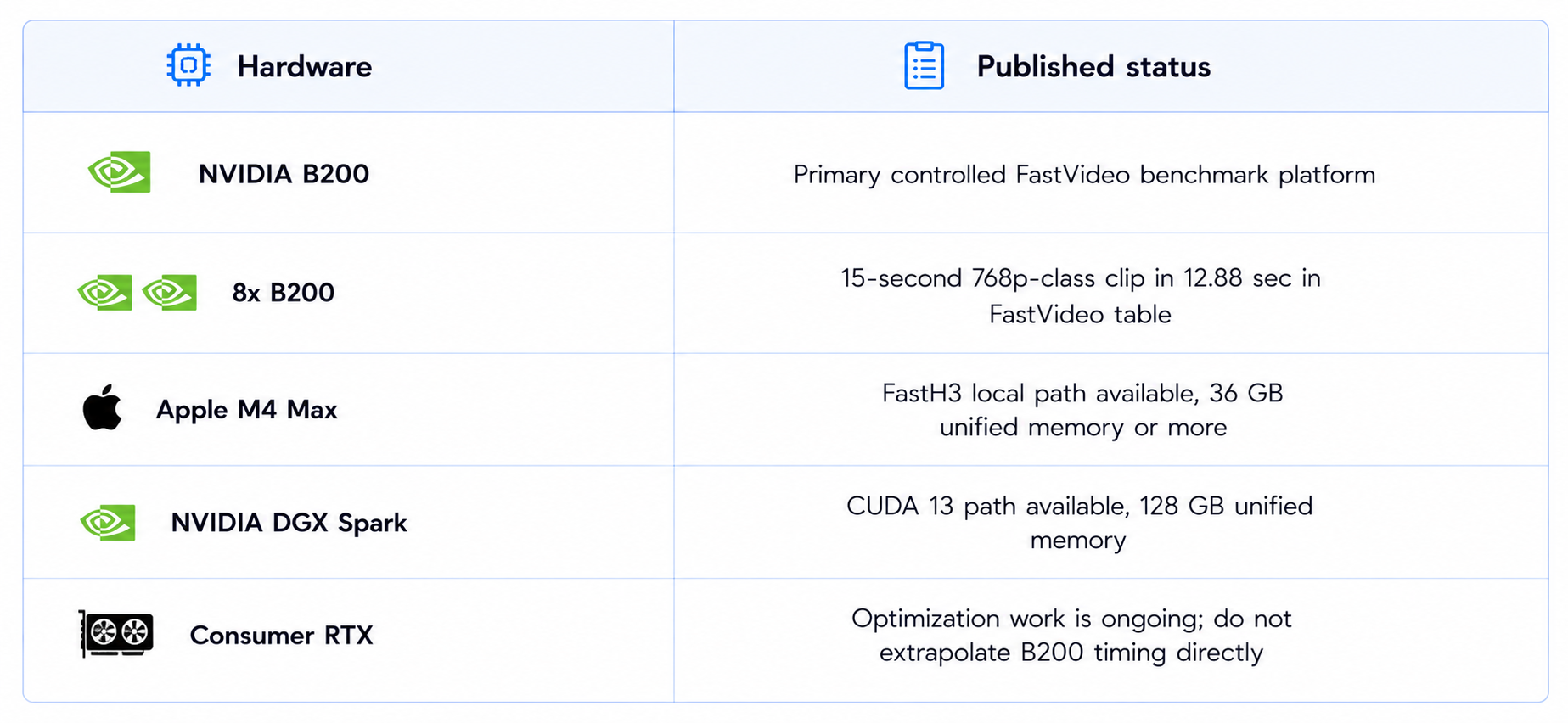
The current FastVideo release also includes local work on Apple Silicon and NVIDIA DGX Spark. The Apple path is documented on an M4 Max with at least 36 GB of unified memory, while DGX Spark uses a 128 GB unified-memory architecture. The published M4 Max tests show INT6 around 19.5 GiB peak memory in one four-step run, but generation remains much slower than the B200 path because the hardware and runtime are fundamentally different.
12. Can FastH3 Run on Apple Silicon?
Yes. FastVideo published an Apple Silicon path through MLX on September 1, 2026. The tested machine is an M4 Max with 36 GB of unified memory or more.
In FastVideo's published M4 Max test, the same 832x480, 124-frame, four-step recipe took about 504 seconds cold and 465 seconds for the first request after setup. INT8, INT6 and INT4 runs stayed in a similar wall-clock range while peak memory changed materially, with INT6 around 19.5 GiB and INT4 around 14.8 GiB.
This is useful because it expands FastH3 beyond data-center GPUs. It is still much slower than the B200 results, but it demonstrates that the distilled H3 path can be adapted to unified-memory local hardware.
13. FastH3 on DGX Spark
FastVideo also published a CUDA 13 path for NVIDIA DGX Spark. The system has a GB10 GPU and 128 GB of unified LPDDR5X memory. The team uses phased loading so the text encoder, transformer and VAE are not all resident at once.
In the published Spark measurements, a full-VAE 832x480 run took about 243 seconds on one Spark and 209 seconds on two Sparks, while TAEH3 preview decoding reduced the total to about 134 seconds on one Spark and 119 seconds on two. At 768x1344, two Sparks completed a 124-frame clip in about 195 seconds with the optimized decoder path.
These measurements are useful as evidence that the model can run on desktop unified-memory systems, but they should not be treated as a direct proxy for consumer RTX performance.
14. ComfyUI and Local Ecosystem
FastH3 is more tightly coupled to the FastVideo runtime than ordinary community LoRAs. The recommended VSA adapters include learned sparse-attention gates, and FastVideo's documentation says to use its launchers and VSA-H3 kernel rather than treating the adapter as a generic PEFT LoRA.
That makes the setup more specialized than a standard ComfyUI checkpoint swap. Community ComfyUI work is moving quickly, but the cleanest published path for the performance numbers is FastVideo's own stack.
For developers, this is a tradeoff. The dedicated runtime gives FastH3 the ability to optimize sparse attention, compilation and other system-level pieces together. The downside is that you have fewer drop-in options than with a generic H3 LoRA.
15. FastH3 Benchmark: What the Numbers Actually Mean
The headline 14.38x number is real within its benchmark contract. It is measured on one B200 at 1344x768, 24 FPS, with audio, after warmup, and includes the end-to-end generation stages from encoding through file output. Model loading and compilation are excluded.
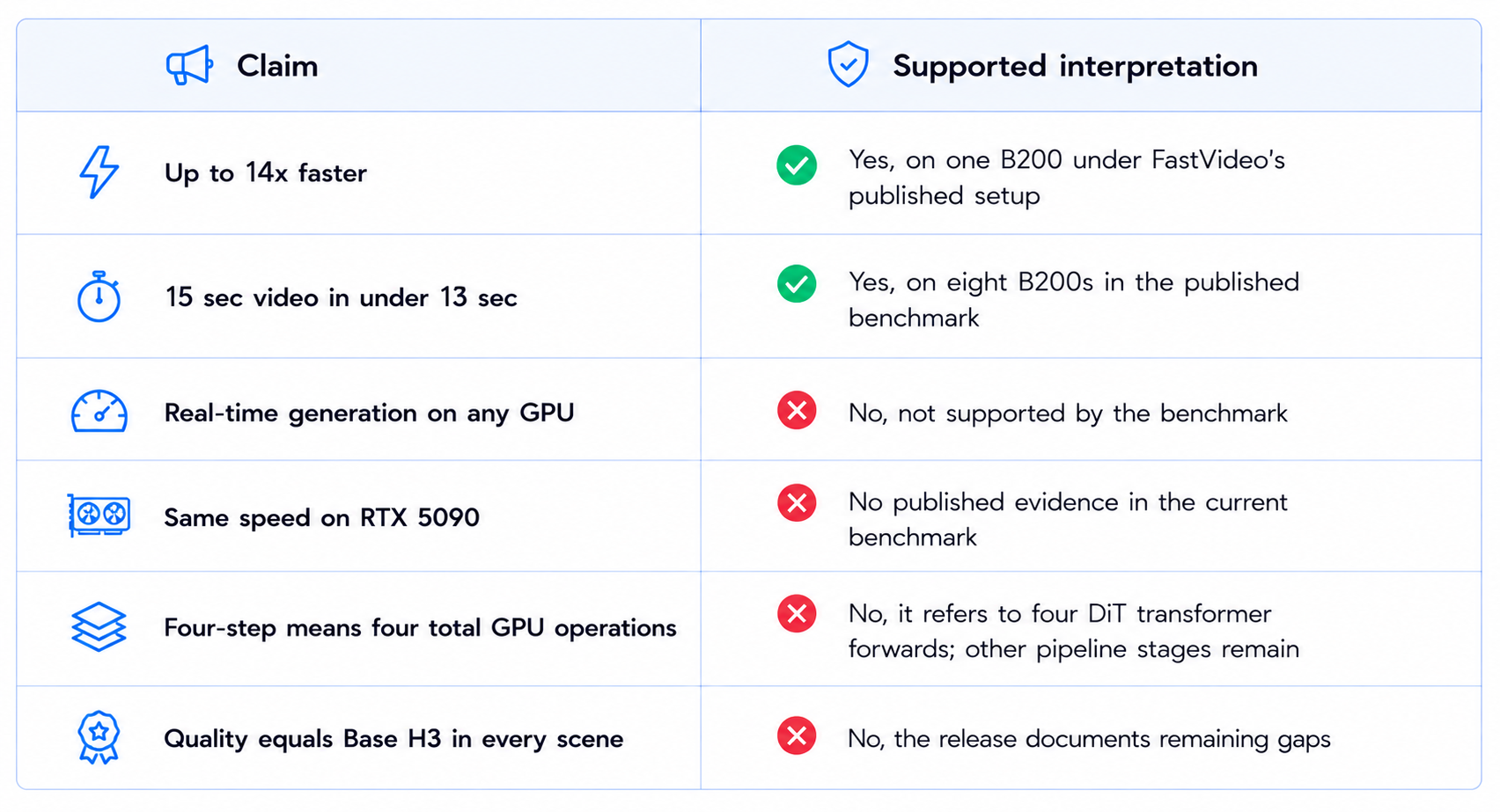
This distinction is important because the model has attracted a lot of 14x headlines. The number is best understood as an end-to-end B200 benchmark, not a universal multiplier for every computer.
16. Limitations You Should Know
- FastH3 Preview v1 currently targets text-to-video-and-audio only.
- First-and-last-frame and reference-to-video distilled checkpoints are not part of the current preview release.
- Four-step distillation can reduce motion quality, fine detail and some audio fidelity.
- The strongest speed benchmark uses NVIDIA B200 hardware and a specialized VSA kernel.
- Consumer RTX performance should not be inferred from the B200 14.38x result.
- The FastVideo VSA adapter is not a generic drop-in PEFT LoRA.
- Local setup remains technically heavier than a normal consumer video workflow.
- FastH3 inherits the MiniMax H3 community license and its applicable restrictions.
17. Best Use Cases
18. Recommended Production Workflow
The best workflow is to separate fast exploration from final rendering.
- Use FastH3 four-step T2VA to explore prompts, compositions and seeds.
- Generate several candidates before spending time on higher-quality refinement.
- Use the full VAE path when you need the strongest detail available from the local pipeline.
- Keep Base H3 available for reference-driven FL2VA or Ref2VA workflows.
- Use the FastVideo launcher and the checkpoint's intended VSA configuration rather than a generic LoRA loader.
- Measure your own generation time on the exact GPU and resolution you plan to use.
- Review motion, faces, fine detail and audio before accepting a FastH3 shot as final.
19. How to Evaluate FastH3 Yourself
Do not judge FastH3 only from the 14x speed headline. Run a controlled comparison against Base H3 using identical prompts and seeds.
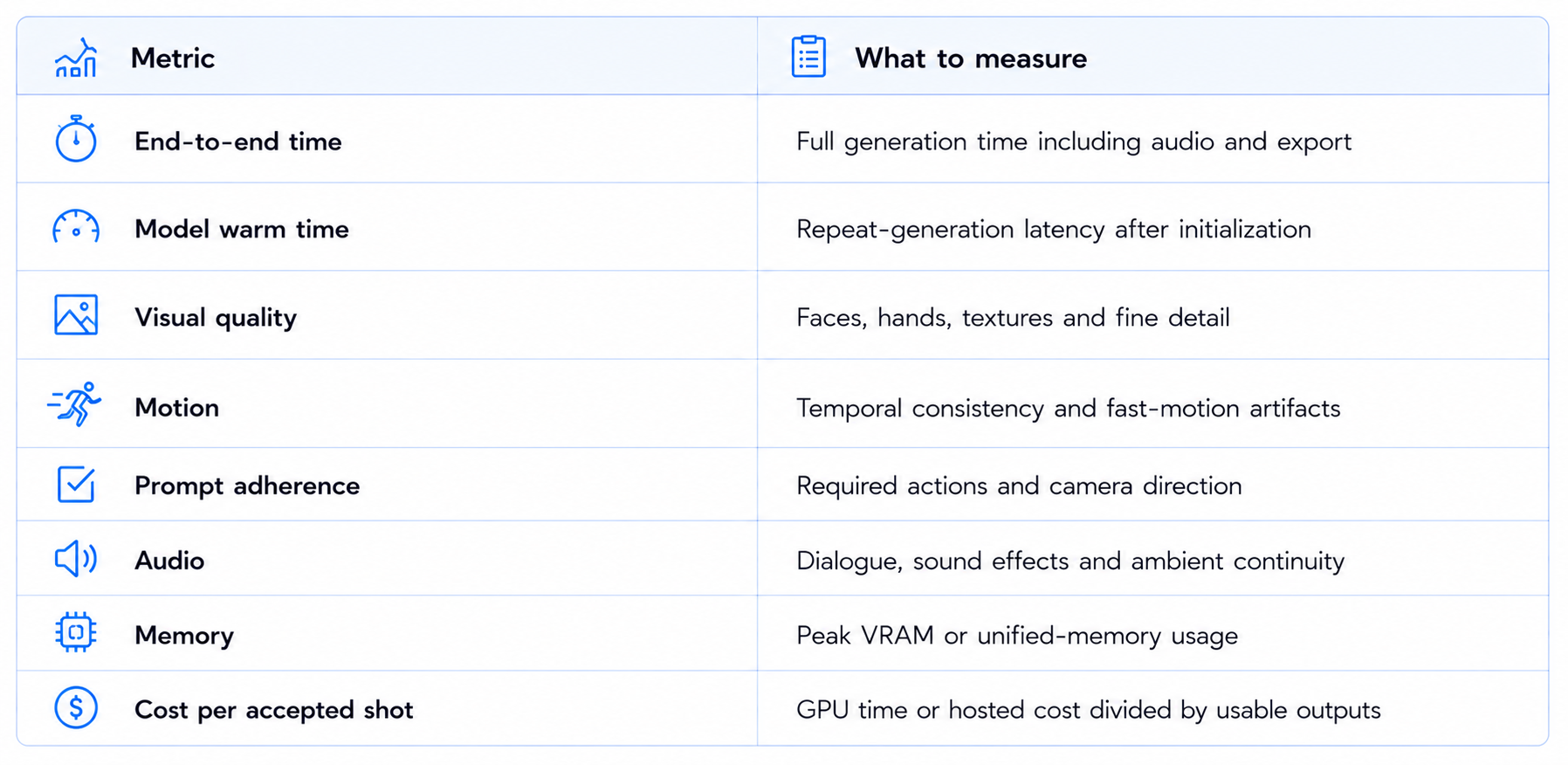
A good result is not simply 'FastH3 is faster.' The useful result is 'FastH3 lets me produce more acceptable shots per hour without unacceptable quality loss.'
20. Is MiniMax FastH3 Worth It?
Yes, particularly if the slow sampling speed of MiniMax H3 is stopping you from using it. FastH3's four-step distilled path is a serious engineering improvement, and the published B200 numbers show that it can move H3 from multi-minute generation toward sub-minute and sub-realtime workflows.
The best reason to use FastH3 is throughput. A creator can test more seeds, camera movements and prompts. A developer can run larger local evaluation suites. A production pipeline can reserve Base H3 for the shots where quality or reference control is more important.
The main limitation is scope. Preview v1 is T2VA only, and the strongest speed configuration requires FastVideo's specialized runtime. That makes it less convenient than a simple hosted H3 endpoint or generic H3 LoRA, but much more interesting as a dedicated acceleration stack.
21. Final Verdict
FastH3 is one of the most important performance developments around MiniMax H3 because it solves a practical problem rather than adding another surface-level feature. FastVideo distilled the H3 T2VA path to four transformer forwards and paired it with 90% sparse attention, then published the weights and inference stack for local use.
The speed results justify the attention. On one B200, a 15-second 1344x768 clip falls from 678.7 seconds on the Base H3 benchmark to 47.2 seconds with FastH3, a 14.38x end-to-end improvement. On eight B200s, the same clip finishes in 12.88 seconds. These numbers include the complete warm generation pipeline rather than only the denoising stage.
Quality is the tradeoff. FastVideo is explicit that difficult motion, fine detail and some audio still have room for improvement, and the current four-step checkpoint is the minimum-latency path. That makes FastH3 a superb exploration model, while Base H3 remains the better choice whenever its broader reference workflows or maximum-quality path is required.
The hardware story is also expanding. FastVideo now has local paths for Apple Silicon and DGX Spark, while RTX optimization is an active direction. That matters because the long-term value of FastH3 will depend on how well the same four-step approach translates to the GPUs that creators actually own.
My rating: 9.5/10 for speed, 8.2/10 for quality, 8.5/10 for local practicality and 9.0/10 overall.
Bottom line: FastH3 is worth using for fast MiniMax H3 text-to-video-and-audio generation. Start with the four-step VSA path when throughput matters, keep Base H3 for reference-heavy workflows and difficult final shots, and judge the model by cost per accepted clip rather than speed alone.
Frequently Asked Questions
What is FastH3?
FastH3 is FastVideo's four-step distilled acceleration of the open MiniMax H3 model, designed for text-to-video-and-audio generation.
Is FastH3 an official MiniMax model?
No. MiniMax H3 is the underlying model. FastH3 is a FastVideo post-training release built from the H3 weights.
How many steps does FastH3 use?
The recommended Preview v1 checkpoint uses four DiT transformer forwards.
How fast is FastH3?
FastVideo measured 47.2 seconds for a 15-second 1344x768 clip on one B200, compared with 678.7 seconds for its Base H3 benchmark, which is 14.38x faster.
Can FastH3 generate audio?
Yes. The current Preview v1 is a text-to-video-and-audio model and generates synchronized audio with the video.
Does FastH3 support image-to-video?
The current Preview v1 release is focused on text-to-video-and-audio. FastVideo is developing separate distilled checkpoints for first/last-frame and reference workflows.
Can FastH3 run locally?
Yes. FastVideo provides local inference code and weights. Published local paths include NVIDIA B200, Apple Silicon and DGX Spark.
Can FastH3 run on an RTX 5090?
FastVideo is working on RTX optimization, but the published 14.38x benchmark is on B200 hardware. Do not assume the B200 timing applies to a 5090.
Does FastH3 work with ComfyUI?
The community ecosystem is developing ComfyUI integrations, but the recommended VSA release relies on FastVideo's specialized runtime and kernel rather than a generic LoRA loader.
Is FastH3 better than MiniMax H3?
It is faster, not universally better. H3 remains broader, while FastH3 is strongest when rapid T2VA generation is the priority.
Is FastH3 worth it?
Yes for fast T2VA generation and local experimentation, especially when H3's inference time is the bottleneck.
Recommended Blogs
MiniMax H3 Turbo Review: Speed, Quality, Price & Is It Worth It? (2026)
MiniMax H3 Max Review: Accuracy, Price & Is It Worth It? (2026)
Best AI Video Models 2026: Ranked by Quality, Speed, Price & Use Case
Gemini Omni 1.1 Flash Review: Accuracy, Price & Is It Worth It? (2026)
Google Pics Review: Features, Price & Is It Worth It? (2026)
Resources & Community
Join our community of 70,000+ AI enthusiasts and learn to build powerful AI applications. Whether you're a beginner or an experienced developer, Build Fast with AI helps you understand and implement AI in your projects.
Agentic AI Launchpad 2026
A structured 6-week cohort program that takes you from AI basics to building and deploying real-world agentic AI systems. Includes live sessions, expert mentorship, project reviews and a builder community network.
Ready to go from learning to building? Join the next cohort: Agentic AI Launchpad 2026
Free AI Resources
Access free tools, workshops and micro-learning to keep building.

