



Google Pics Review: Is Google's New AI Design Tool Good Enough to Replace Canva?
Google Pics is Google's new AI-first image creation and editing tool for 2026, and its most important feature is not image generation alone. It is the ability to create an image and then keep working on specific pieces of that image without starting over.
Google launched Pics for Workspace and eligible Google AI subscribers on September 1, 2026. The product uses Google's Nano Banana image generation and editing technology and is designed for everyday professional creative work such as social media graphics, posters, presentations, product visuals and illustrations.
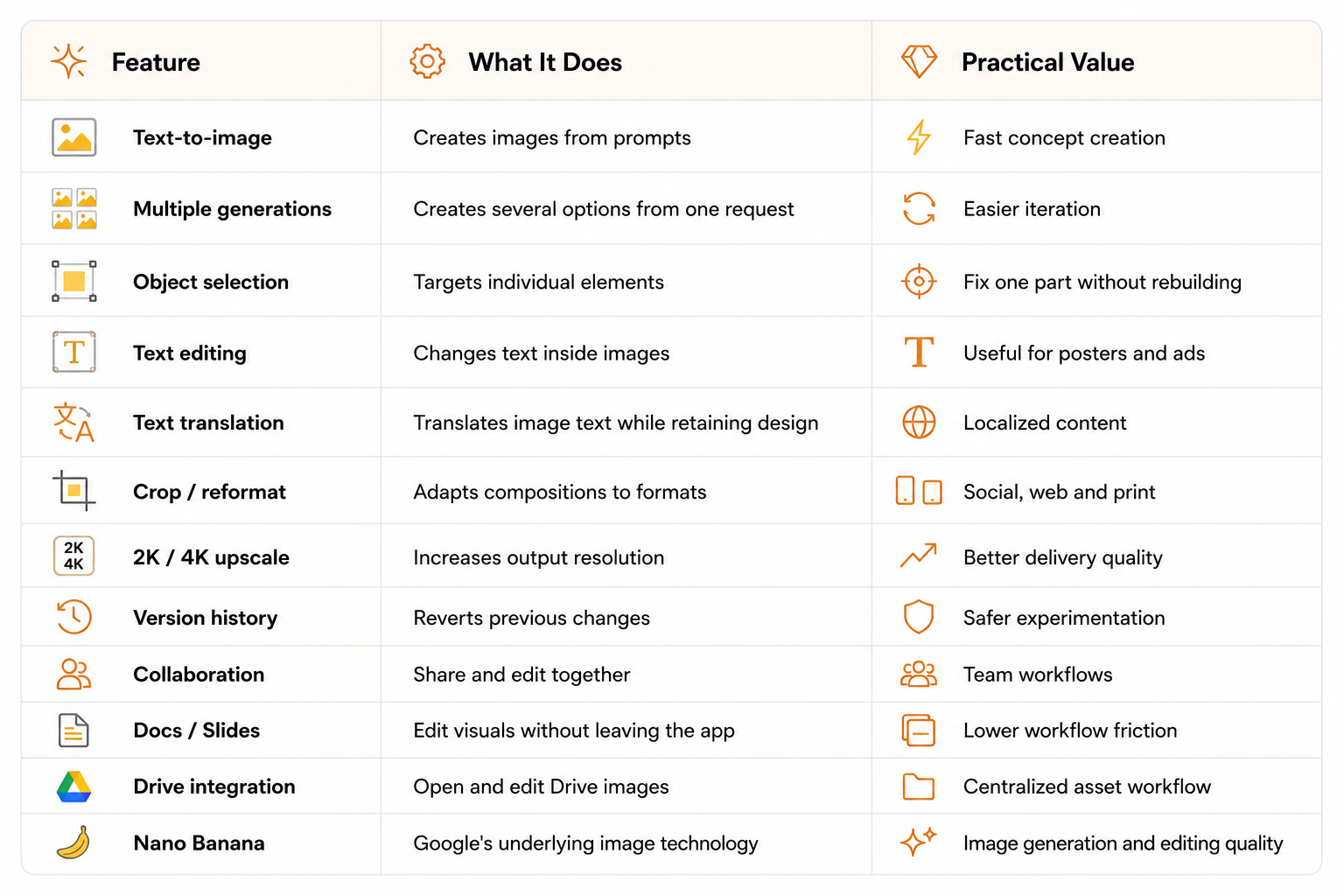
The interesting part is the editing model. Pics can isolate objects, edit individual text elements, translate text while preserving design, crop for different formats, generate multiple variations, upscale to 2K or 4K and maintain version history. It also brings the editor directly into Google Docs and Slides, with Drive integration expanding.

QUICK ANSWER
Google Pics is one of the more practical AI design launches of 2026 because it combines generation with precise editing and puts the workflow inside Google Workspace. It is strongest for marketers, presentation-heavy teams and non-designers who need professional-looking visuals without switching between an image generator, editor and document tool. It is less likely to replace Canva or Adobe for advanced manual design work.
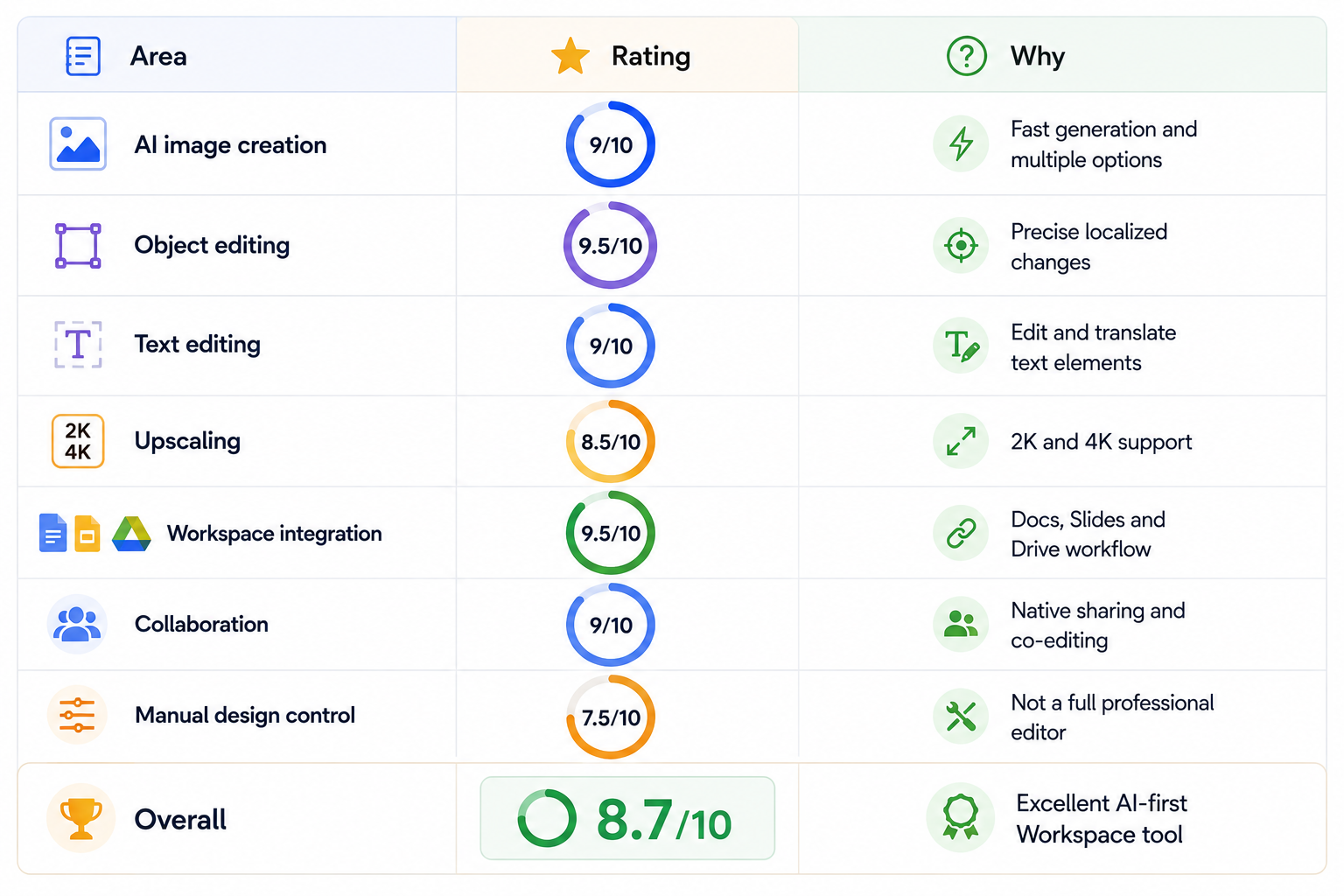
My verdict: 9/10 for AI image editing, 9/10 for Workspace integration, 8.5/10 for ease of use, 8/10 for advanced design control, and 8.7/10 overall. For Google-centric teams, it is worth using. For professional designers with mature Adobe or Canva workflows, it is better viewed as another AI production tool than a complete replacement.
1. What Is Google Pics?
Google Pics is a generative AI image creation and editing app from Google. You can create a visual from a prompt or import an existing image from your computer, Google Drive or Google Photos and then make AI-powered changes. Google positions the product around precision rather than one-shot generation.
At first glance that sounds similar to other AI image tools. The difference is the workflow. Pics treats elements inside an image as editable objects, so a user can focus on one part of the composition instead of regenerating everything.
2. Google Pics Features at a Glance
The current feature set is broad enough to cover most everyday business image work. Google's launch documentation lists the following capabilities.
3. Why Object-Level Editing Matters
The most important idea behind Google Pics is object-level editing. Google explicitly describes the product as allowing specific elements to be selected and edited.
That solves one of the biggest problems with generative image tools. Imagine creating a product poster that is nearly perfect except the background object is the wrong color. In a typical workflow, you regenerate the entire image. In Pics, the intended workflow is to select that object and change only it.
That makes generation more deterministic from a user's perspective. You are not asking the model to rediscover the entire composition every time you want a small correction.
4. Text Editing Inside Images
Text is another area where AI-generated graphics have historically been frustrating. A generated poster can have the right layout but the wrong wording, spelling or language.
Google Pics lets users edit, reformat or translate individual text elements. Google says the design and font style can be retained while the content is changed.
For marketers this is a significant workflow improvement. Instead of generating separate artwork for each language or campaign variant, the underlying visual can stay consistent while individual text elements are adapted.
5. Image Generation and Multiple Variations
Pics can generate images from simple text prompts and provide multiple options from a single request. Google positions this as a way to create professional visuals such as social media posts, posters and digital illustrations without requiring advanced design skills.
Multiple generation is more important than it sounds. Creative work is rarely about finding one perfect output immediately. Seeing several directions lets the user select a strong composition and then invest editing effort only where it matters.
6. Google Pics and Nano Banana
Google says Pics is built on its Nano Banana image generation and editing model. Google had already positioned Nano Banana as a major part of its image-generation ecosystem before Pics reached general availability.
The product distinction matters, though. Nano Banana is the underlying image technology; Pics is the user-facing creation and editing environment around it.
7. 2K and 4K Upscaling
Google Pics can upscale images to 2K or 4K. That gives users a straightforward path from concept creation to higher-resolution delivery, particularly for marketing graphics, presentation visuals and digital assets.
Upscaling is useful, but it should not be interpreted as a guarantee that every tiny detail will become professionally perfect. Logos, small text, faces and fine product details should still be checked at final output size.
8. Google Workspace Integration Is the Real Advantage
Google Pics becomes much more compelling once it is used inside Workspace. Google says users can select an image in Google Docs or Slides and edit it with Pics without switching applications. Drive integration is also being rolled out.
This changes the workflow from 'generate somewhere else and import the asset' to 'create and edit where the asset is already being used.' For organizations that spend much of their day inside Docs, Slides and Drive, that can save a surprising amount of friction.
9. Google Pics for Marketing Teams
Marketing is probably the strongest business use case. A team can generate a campaign graphic, create several variations, replace an object, update a headline, translate the message and export the finished visual.
That workflow is particularly valuable for fast-moving content teams where the problem is not a lack of design software but the number of small visual requests arriving every day.
10. Google Pics for Presentations
Presentation work is another natural fit. Users can generate diagrams, conceptual visuals, illustrations and product scenes, then refine them directly in the Workspace environment.
Google is effectively reducing the distance between writing a presentation and designing its visuals. That makes visual experimentation more accessible to people who are not professional designers.
11. Google Pics for Social Media
Social media requires many variations of the same creative. A single campaign concept may need square, portrait, landscape and presentation versions, plus different headlines and language variants.
Pics is well suited to that pattern because the user can generate one strong base visual and make localized changes instead of recreating every version.
12. Collaboration and Version History
Google Pics includes collaboration and persistent version history. Users can share creations, work together and revert changes.
This is important because generative editing is naturally iterative. A good AI design system should make experimentation reversible rather than forcing users to protect every version manually.
13. Google Pics Pricing and Availability
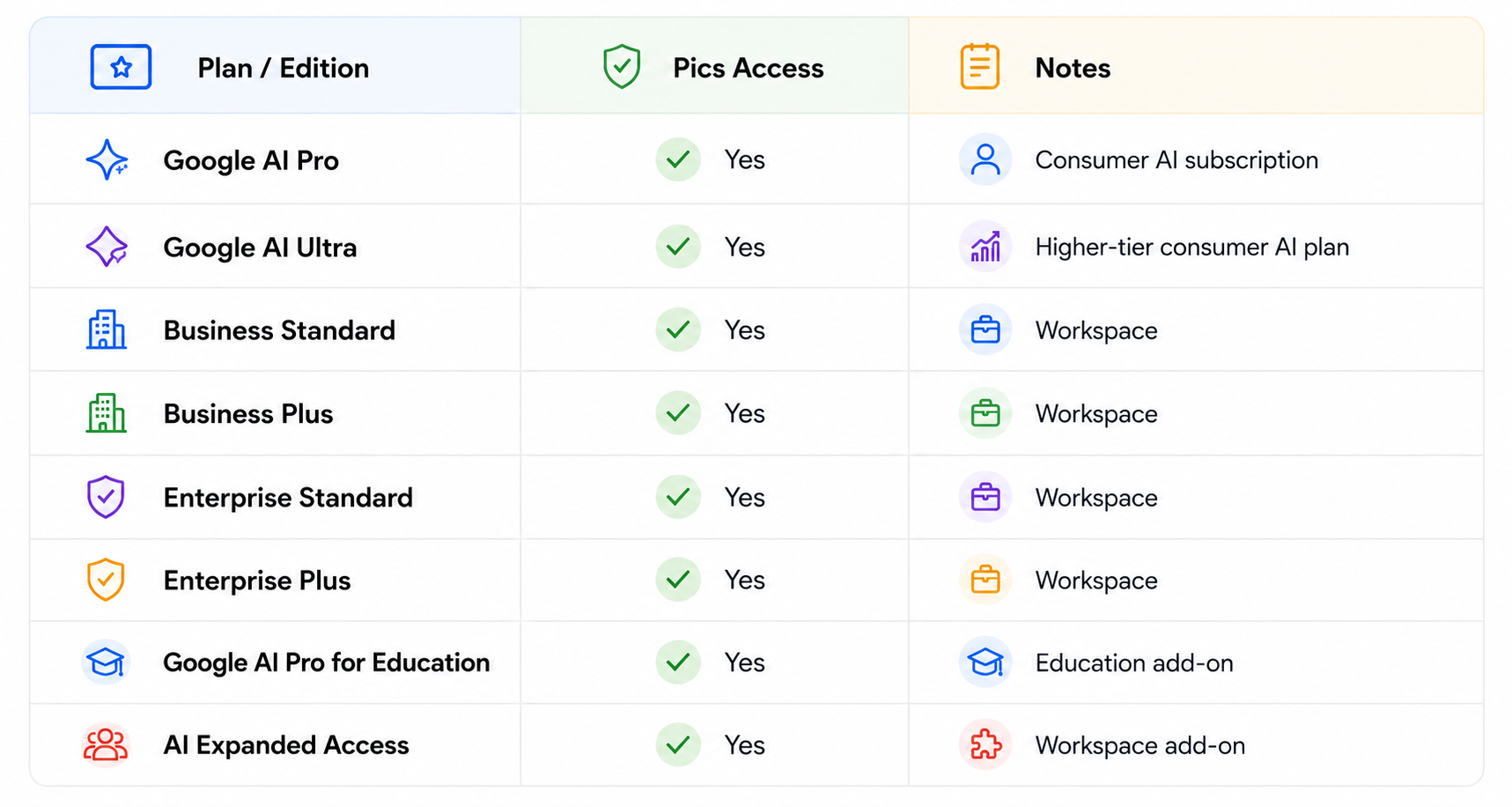
Google announced general availability on September 1, 2026. For Workspace, the eligible editions listed by Google include Business Standard and Plus, Enterprise Standard and Plus, Google AI Pro for Education and AI Expanded Access. Consumer access is available with Google AI Pro and Ultra.
Pics is therefore not simply a separate flat-price design application. Its practical cost depends on the Google subscription or Workspace plan required for access.
14. Is Google Pics Free?
Google Pics is not an unlimited free image editor. Access is linked to eligible Google AI or Workspace plans, and generative AI features are subject to usage limits. Google says higher access is available for a promotional period through at least February 28, 2027, after which limits may change with notice.
For users already paying for a qualifying plan, Pics can feel like an included productivity feature. For someone choosing a new subscription solely for image editing, the total plan cost becomes part of the comparison.
15. Google Pics vs Canva
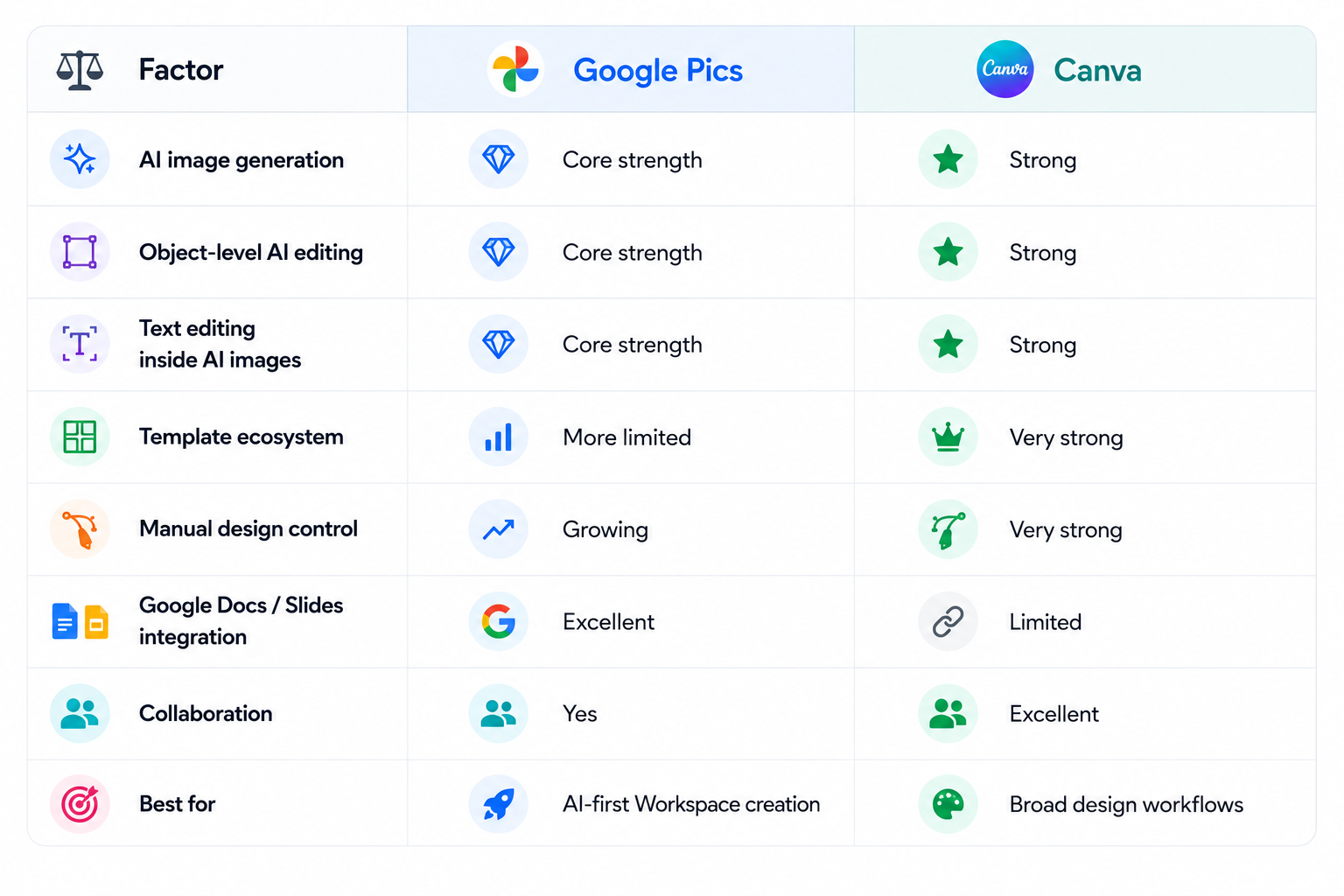
Google Pics and Canva overlap, but they are designed around different workflows. Canva starts from a mature design-system mindset with templates, layouts, assets and manual controls. Pics starts from AI generation and AI editing, then adds collaborative Workspace integration.
16. Google Pics vs Adobe Express
Adobe Express is another important comparison because it bridges simple design and Adobe's professional ecosystem. Express gives teams familiar layout and brand workflows, while Pics puts more emphasis on prompt-based creation and object-level AI editing.
For organizations already using Adobe Creative Cloud, Express can be the more natural extension. For organizations already centered on Google Workspace, Pics has the stronger native integration story.
17. What Google Pics Does Better Than Typical AI Generators
The biggest advantage is controlled iteration. A normal image generator often treats every request as a new composition. Pics is designed to preserve more of the existing image while changing the part you actually care about.
That makes it closer to a production editor than a simple generator. The distinction becomes more valuable as images become more complex and as the number of revisions increases.
18. Limitations You Should Know
Google Pics is not a complete replacement for advanced graphic-design software. Professional users may still need tools for precise vector editing, complex typography, sophisticated print workflows, detailed brand systems and large template libraries.
AI edits can also introduce unwanted changes outside the selected area. Small text, product details and brand assets should be reviewed before publication. And although 4K upscaling is useful, it does not turn every generated image into a native professional photograph.
Finally, access is tied to the Google ecosystem. If your team does not already use Workspace or Google AI subscriptions, the integration advantage is smaller.
19. Privacy and Business Use
Organizations should evaluate Google Pics through the same governance lens as other generative AI features. Before uploading confidential creative assets, teams should review the Workspace terms, administrator controls, applicable AI data policies and usage limits for their edition.
The practical advantage for Workspace teams is that the feature sits inside an existing managed environment rather than requiring another standalone creative service. But that does not remove the need for internal policy.
20. The Best Google Pics Workflow
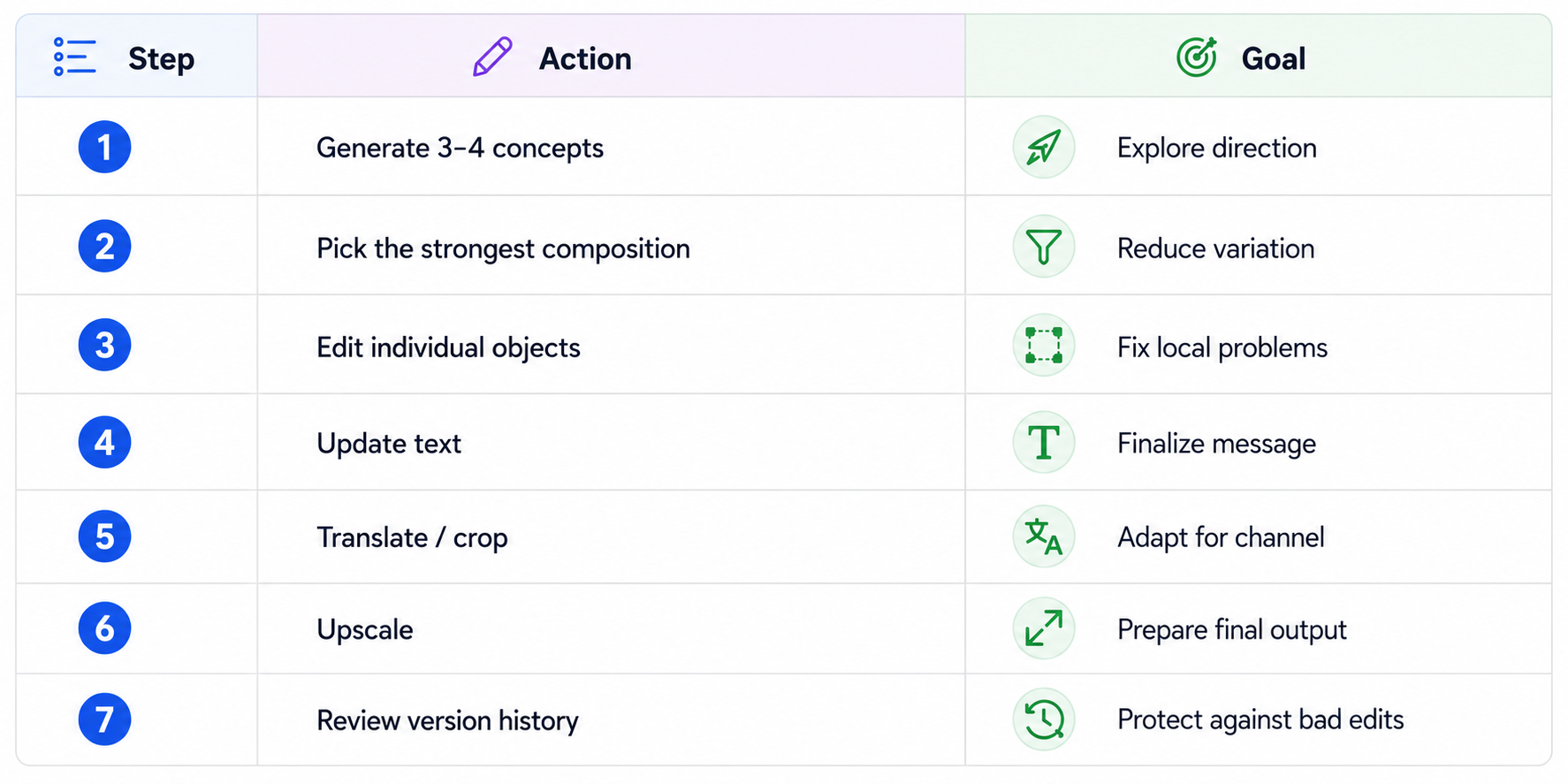
The most effective workflow is iterative. Start with a clear concept, generate multiple options, select the strongest composition, then make narrow edits.
Generate the main image first. Fix individual objects second. Edit text once the composition is stable. Translate or resize after the message is final. Upscale at the end. Keep versions so failed experiments are reversible.
This is more efficient than trying to write a single giant prompt that describes a finished asset perfectly.
21. Is Google Pics Good Enough for Professional Work?
For everyday professional content, yes. For advanced production design, not by itself. The strongest value of Pics is speed from idea to usable asset.
A small team can create presentation visuals, promotional graphics, campaign variations and localized assets without moving between multiple applications. That is a meaningful productivity improvement even when a separate design tool remains part of the stack.
22. Who Should Use Google Pics?
Google Workspace teams, marketers, founders, sales teams, educators, presentation-heavy businesses and non-designers are the clearest audience.
It is especially attractive for people who want high-quality visual output but do not want to learn a complex design application or manage a separate image-generation workflow.
23. Who Should Not Switch to Google Pics?
Professional designers with mature Adobe or Canva systems may not gain enough from switching. Teams that depend on deep manual control, complex layouts, advanced typography or large template ecosystems should continue using their existing design stack and add Pics where its AI capabilities are useful.
24. Final Verdict
Google Pics is a strong AI design product because it focuses on the hard part of image generation: revision. Generation gets you close. Object-level editing, text modification, translation, cropping, versioning and upscaling help you finish the job.
The Workspace integration makes that value considerably stronger. Google Docs and Slides users can edit visuals in the same environment where those visuals are being used, while Drive integration further reduces asset-handling friction.
At 8.7/10, Google Pics is worth trying for Google-centric teams and creators. It is not a universal Canva or Adobe replacement, but it may eliminate a large amount of repetitive image-generation and editing work.
Frequently Asked Questions
What is Google Pics?
Google Pics is Google's AI image creation and editing tool for Workspace and eligible Google AI subscribers. It combines generation with precise object-based editing.
How much does Google Pics cost?
There is no single standalone Pics price. Access is included with eligible Google AI and Workspace plans, with generative AI usage limits applying.
Is Google Pics free?
It is not an unlimited free tool. Availability depends on the qualifying Google plan or Workspace edition.
What AI model powers Google Pics?
Google says Pics is built on its Nano Banana image generation and editing technology.
Can Google Pics edit existing images?
Yes. You can import images and use AI editing tools to modify selected elements.
Can Google Pics edit text inside images?
Yes. Google specifically lists editing, reformatting and translation of individual text elements.
Does Google Pics support 4K?
Yes. Google lists 2K and 4K upscaling as supported features.
Can Google Pics work with Google Slides and Docs?
Yes. Google announced direct editing from Docs and Slides, with Drive integration expanding.
Is Google Pics better than Canva?
It depends on the job. Pics is stronger for AI-first creation and localized editing inside Workspace; Canva is broader for templates and traditional design.
Is Google Pics worth it?
For Google Workspace teams and eligible Google AI subscribers, it is a strong AI design tool worth testing in 2026.
Recommended Blogs
- 100 Best AI Image Prompts 2026 (Copy-Paste)
- Best AI Video Models 2026: Ranked by Quality, Speed, Price & Use Case
- 100 Best Veo 3 Prompts 2026 (Copy-Paste)
- Best Open Source AI Models August 2026: Full Collection
Resources & Community
Join our community of 70,000+ AI enthusiasts and learn to build powerful AI applications. Build Fast with AI helps creators, founders and teams understand and implement practical AI.
- Website - buildfastwithai.com
- LinkedIn - Build Fast with AI
- Instagram - @buildfastwithai
- Founder Twitter - @satvikps
- Twitter - @BuildFastWithAI
- Agentic AI Launchpad 2026
- AI Workshops
- Unrot - Learn AI in 5 minutes a day
References
- Google Blog: Try Google Pics, September 1, 2026
- Google Workspace Updates: Google Pics general availability
- Google Workspace Blog: Google Pics brings pro-level AI image creation and editing
- Google I/O 2026: Sundar Pichai keynote
- Google AI subscription updates from I/O 2026
- Google Photos AI editing in India
- TechCrunch: Google's answer to Canva

