



Which AI Video Model Should You Use in 2026?
There is no single best AI video model in August 2026. The current frontier is too competitive for one model to dominate every job. On the latest Artificial Analysis text-to-video leaderboard with audio, Wan 3.0 leads at 1,242 Elo, Gemini Omni Flash sits at 1,237 and MiniMax H3 Max at 1,235. On image-to-video with audio, MiniMax H3 Max currently leads at 1,202 Elo. Arena.ai's August 25 text-to-video snapshot also puts Gemini Omni 1.1 Flash and Gemini Omni Flash at the top, with FLUX 3 Video and Seedance 2.0 close behind.
The rankings are close enough that the use case matters more than the exact position. Wan 3.0 is the strongest current quality pick in blind text-to-video preference, Gemini Omni Flash is a strong all-round API choice, MiniMax H3 Max is unusually strong for image-to-video and fast iteration, and Veo 3.1 remains a premium choice when 4K output and Google's production ecosystem matter.
The table below is therefore not a fake universal leaderboard. It is a practical ranking that combines current blind preference data, published specifications, pricing and the workflows that make each model useful.
QUICK ANSWER
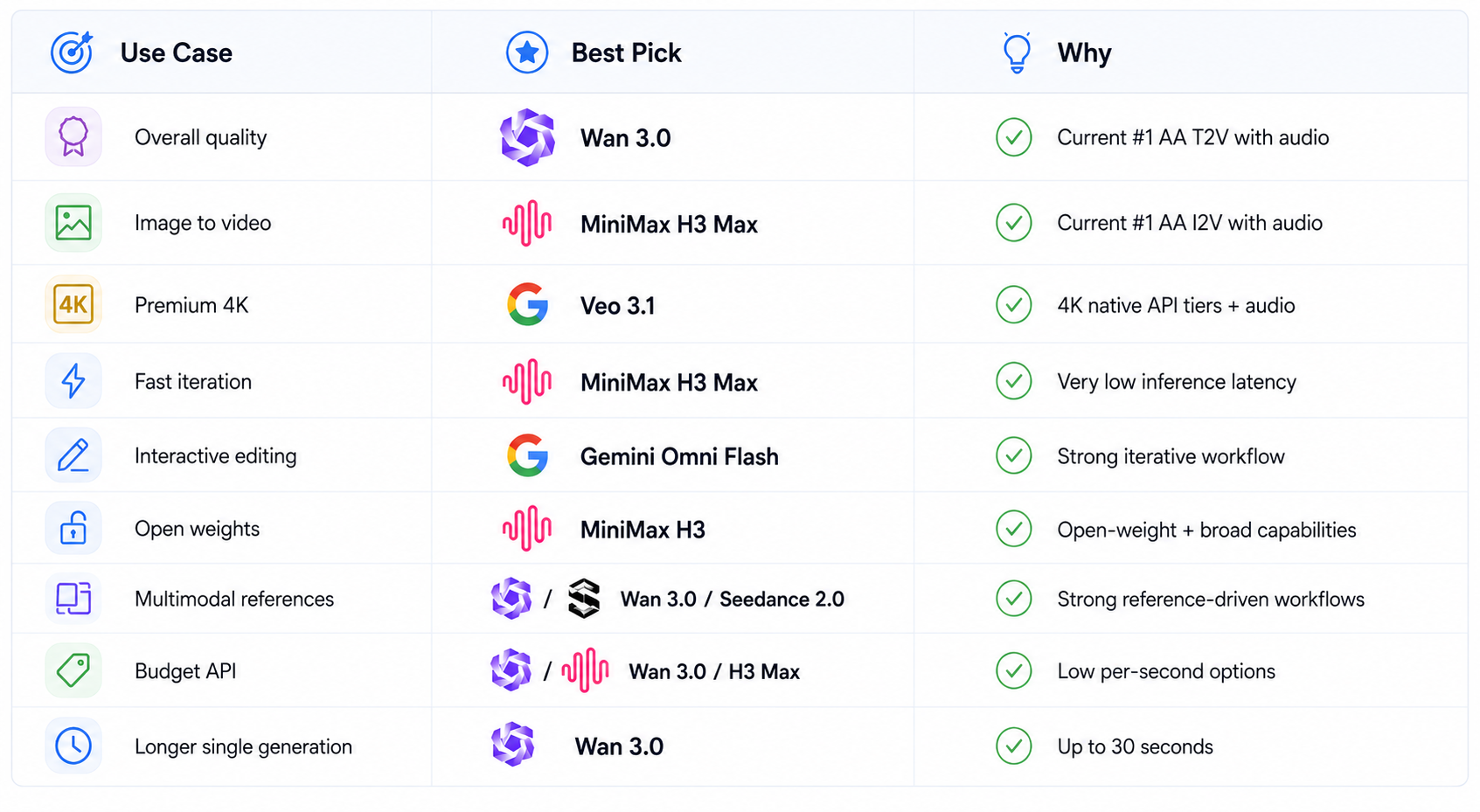
For the best current blind-preference quality, start with Wan 3.0. For fast image-to-video iteration, MiniMax H3 Max is the standout. For premium 4K production with native audio, Veo 3.1 is the safer high-end choice. For long, reference-heavy multimodal production, Wan 3.0 is hard to beat. For interactive editing, Gemini Omni Flash is especially attractive. For creators who care about open weights and local experimentation, MiniMax H3 and Wan's open ecosystem are more interesting than closed-only systems.
The Latest AI Video Model Rankings
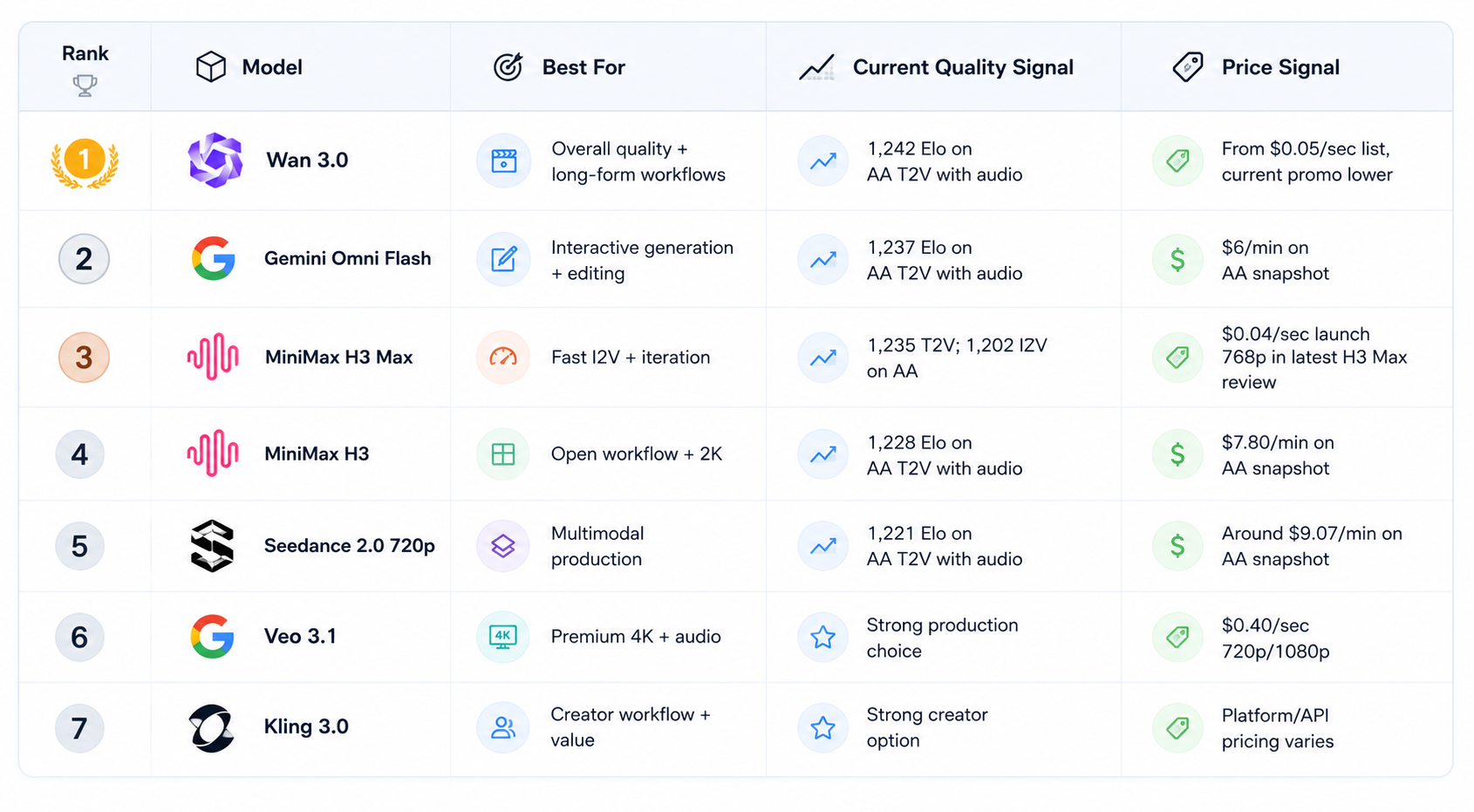
Artificial Analysis rankings move continuously, and price fields can reflect different APIs or promotional rates. Treat the table as a current map, not a permanent order.
Best Overall: Wan 3.0
Wan 3.0 is the clearest overall quality pick at the moment because it sits first on the current Artificial Analysis text-to-video leaderboard with audio at 1,242 Elo. Its appeal is broader than a leaderboard number. Wan 3.0 supports up to 30-second generation, accepts text, images, audio, video and documents as input, and is available through Alibaba Cloud's Model Studio API.
The multimodal input story is unusually strong. A workflow can start from a script, reference image, existing video, audio or even a document such as a PDF or presentation. That makes Wan 3.0 better suited to production workflows where the source material already exists rather than every shot being invented from text alone.
Pricing is also transparent. Alibaba's current Model Studio page lists Wan 3.0 Standard at $0.05 per second for 480p, $0.10 for 720p and $0.20 for 1080p, with a current 30% promotion bringing those rates to $0.035, $0.07 and $0.14 per second. The API is generally available rather than restricted to an invitation-only preview.
Read the full Wan 3.0 Review: Accuracy, Price & Is It Worth It? (2026) before choosing it for production.
Best for Fast Iteration: MiniMax H3 Max
MiniMax H3 Max is the speed specialist. It currently ranks near the top of Artificial Analysis's text-to-video leaderboard and first on its image-to-video with audio board, at 1,235 and 1,202 Elo respectively.
The practical advantage is latency. fal reports a five-second 768p generation in under three seconds of backend inference. That makes H3 Max unusually well suited to creators who need to test many prompts or image-to-video variants rapidly rather than waiting for one final render. Its current launch pricing is $0.025 per second at 480p and $0.04 per second at 768p, with standard rates of $0.05 and $0.08 per second.
The tradeoff is scope. H3 Max tops out at 768p and is more focused than standard MiniMax H3. It is the model I would choose when speed and iterative creative search matter more than 2K output or a broader editing feature set.
See our MiniMax H3 Max Review for the detailed benchmarks and pricing breakdown.
Best Premium 4K Choice: Veo 3.1
Veo 3.1 remains a compelling premium option because Google offers a clear production-oriented API with native audio and up to 4K output. The current Gemini API pricing lists Veo 3.1 Standard at $0.40 per second for 720p and 1080p, and $0.60 per second for 4K. Veo 3.1 Fast costs $0.10 per second at 720p, $0.12 at 1080p and $0.30 at 4K, while Veo 3.1 Lite starts at $0.05 per second at 720p.
That price ladder is useful because it gives teams a draft-to-final workflow. You can use Fast or Lite for exploration and move to Standard when fidelity matters. Veo 3.1 is the safer choice when the delivery specification itself requires 4K and you want an established Google API path.
It is not the cheapest model in this list. If your workflow is mostly social clips and rapid ideation, paying premium 4K rates for every generation makes little sense. Veo earns its price when resolution and final-production quality justify it.
Best Interactive Editing: Gemini Omni Flash
Gemini Omni Flash sits second on the latest Artificial Analysis text-to-video-with-audio snapshot at 1,237 Elo and also ranks near the top of the broader arena. Its bigger differentiation is workflow. The current Gemini video ecosystem emphasizes generation plus iterative editing, scene extension and frame control rather than treating every shot as a completely new generation.
That makes Omni Flash particularly useful when a creator wants to keep modifying one scene. Instead of generating ten unrelated clips, the user can build a visual sequence and adjust it. The tradeoff is that the most attractive workflow features can matter more than the raw benchmark score, and teams should test the exact editing capabilities they need.
We already reviewed Gemini Omni 1.1 Flash in detail.
Best Open-Weight Video Model: MiniMax H3
MiniMax H3 is one of the strongest choices for builders who care about open weights and broader local or self-hosted experimentation. It currently sits fourth on the Artificial Analysis text-to-video-with-audio leaderboard at 1,228 Elo, behind Wan 3.0, Gemini Omni Flash and H3 Max.
Its advantage is not simply quality. Standard H3 combines native audio, longer generations and 2K output with an open-weight release, making it useful for teams that want more control over deployment than closed API-only models provide.
The obvious downside is infrastructure. Open weights move the cost from API calls to hardware, deployment and operations. That makes H3 interesting for serious builders and researchers, but unnecessary for a creator who just needs ten clips for a campaign.
Best Multimodal Production Model: Seedance 2.0
Seedance 2.0 remains a strong production choice because it combines video generation with multimodal references. Artificial Analysis currently places the 720p version fifth on the text-to-video-with-audio leaderboard at 1,221 Elo. It also ranks high in image-to-video comparisons.
Its strength is control through references. When a project depends on keeping a character, product or visual world consistent, reference-heavy generation can be more useful than chasing a small difference in raw text-to-video preference.
Seedance is therefore a good production pick when the job starts from existing visual material. It is less compelling when the only requirement is the cheapest short text-to-video generation.
Best Creator Workflow: Kling 3.0
Kling 3.0 remains a practical choice for creators who care about a polished interface, multimodal generation and straightforward production workflows. It does not currently occupy the very top of the latest Artificial Analysis ranking, but rankings are only part of the decision. Creator workflow, editing controls, access and price can easily matter more for a specific project.
Kling is particularly useful as a second model in a creator stack. Keep one model optimized for maximum quality and another optimized for fast experimentation or a different style of control. That makes the overall workflow more resilient than relying on a single provider.
What About Sora 2?
Do not build a new production workflow around Sora 2. OpenAI says the Sora web and app experiences were discontinued on April 26, 2026, and the Sora API is scheduled to be discontinued on 24, 2026.
That makes Sora useful as historical context and for existing projects that need export, but not as a sensible new dependency for a 2026 model shortlist.
Best AI Video Model by Use Case
Best AI Video Models by Price
Price is difficult to compare because vendors use different billing units, resolutions, tiers and promotional discounts. Still, a few patterns are clear.
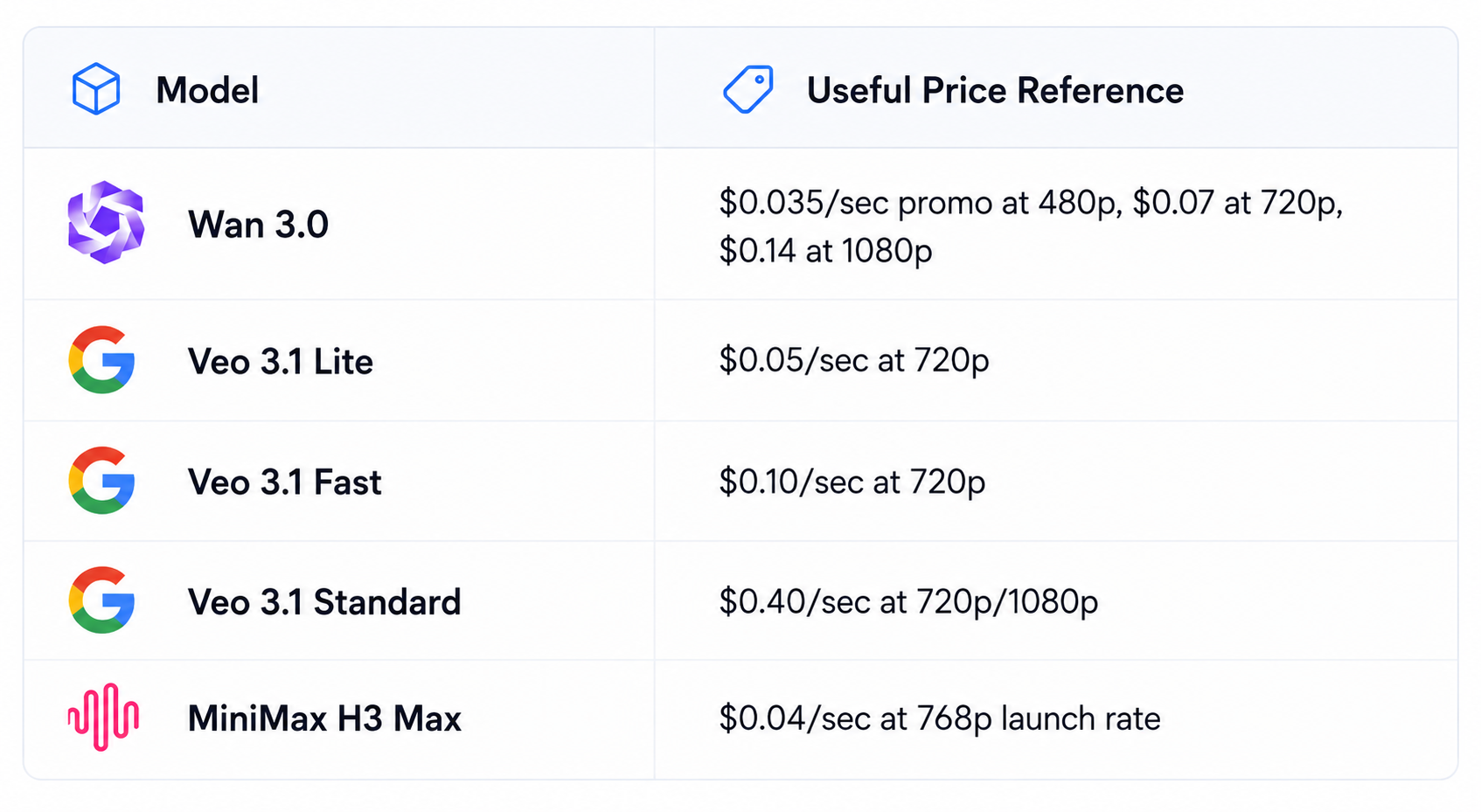
Wan 3.0 currently has the clearest low-cost path among the top-ranked models if you can work within its API and billing rules. Google has a useful tiered ladder through Veo 3.1 Lite, Fast and Standard. H3 Max is particularly compelling for 768p rapid iteration.
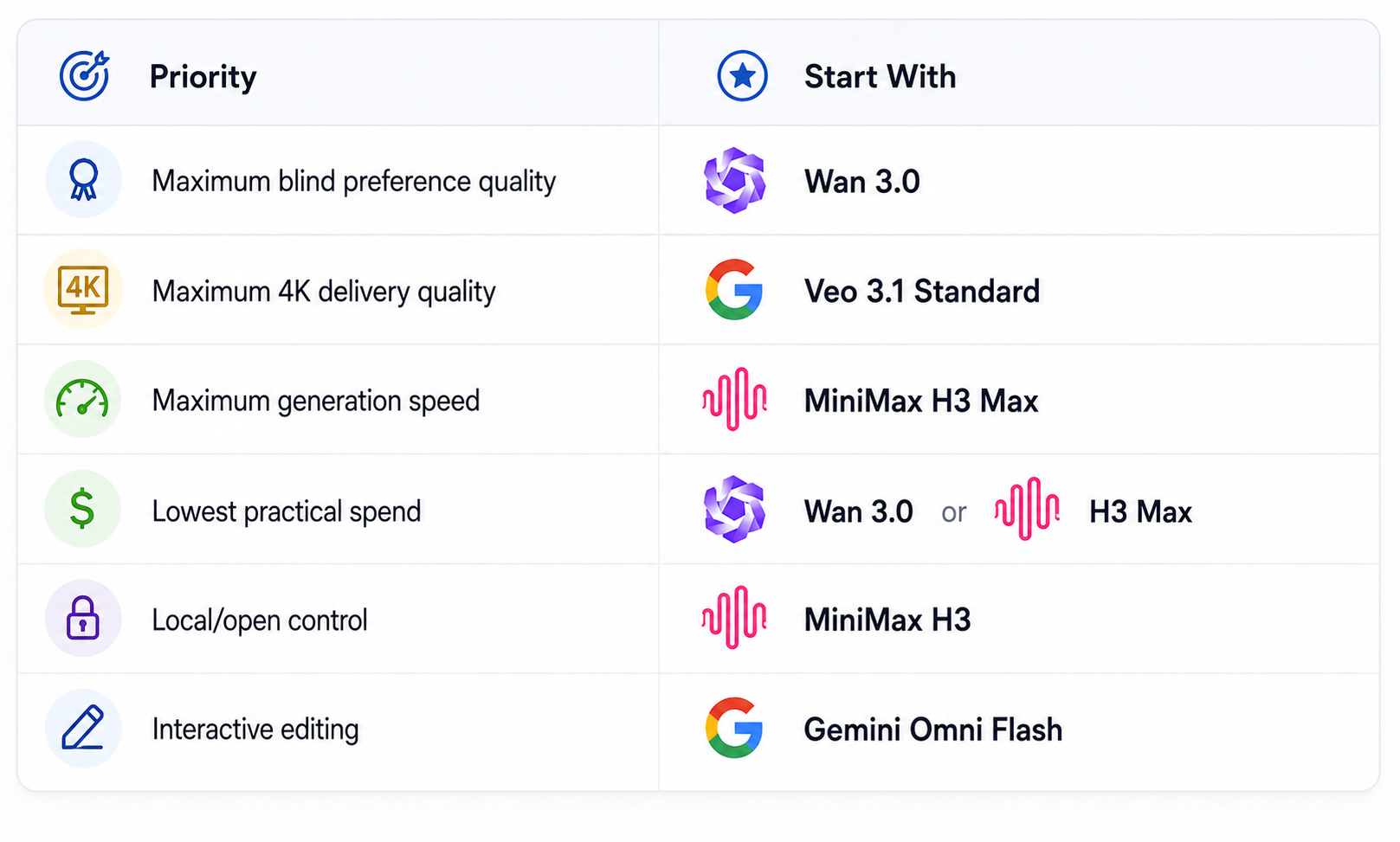
Quality vs Speed vs Cost
A useful way to choose is to stop asking which model has the highest score and instead decide which constraint matters most.
How to Test AI Video Models Properly
Do not compare models by watching each vendor's showcase reel. Those demos are selected to make the model look good. Use the same prompts and reference inputs across every model.
- Create five text-to-video prompts covering people, products, environments, camera movement and complex action.
- Create five image-to-video prompts where identity and composition must remain stable.
- Test dialogue, ambience and sound effects separately.
- Include one exact-text scene to test typography.
- Measure generation time from submission to usable output.
- Record price for the complete workflow, including failed generations.
- Score prompt adherence, motion, consistency, audio, artifacts and editability.
The winner for your team is the model that produces the best accepted shots at an acceptable cost and turnaround time. A three-point leaderboard advantage is meaningless if the model costs twice as much or fails the specific shots your project needs.
Build a Two-Model Stack Instead of Chasing One Winner
For most professional workflows, one model is not enough. A better setup is a premium model for difficult final shots plus a cheaper or faster model for exploration.
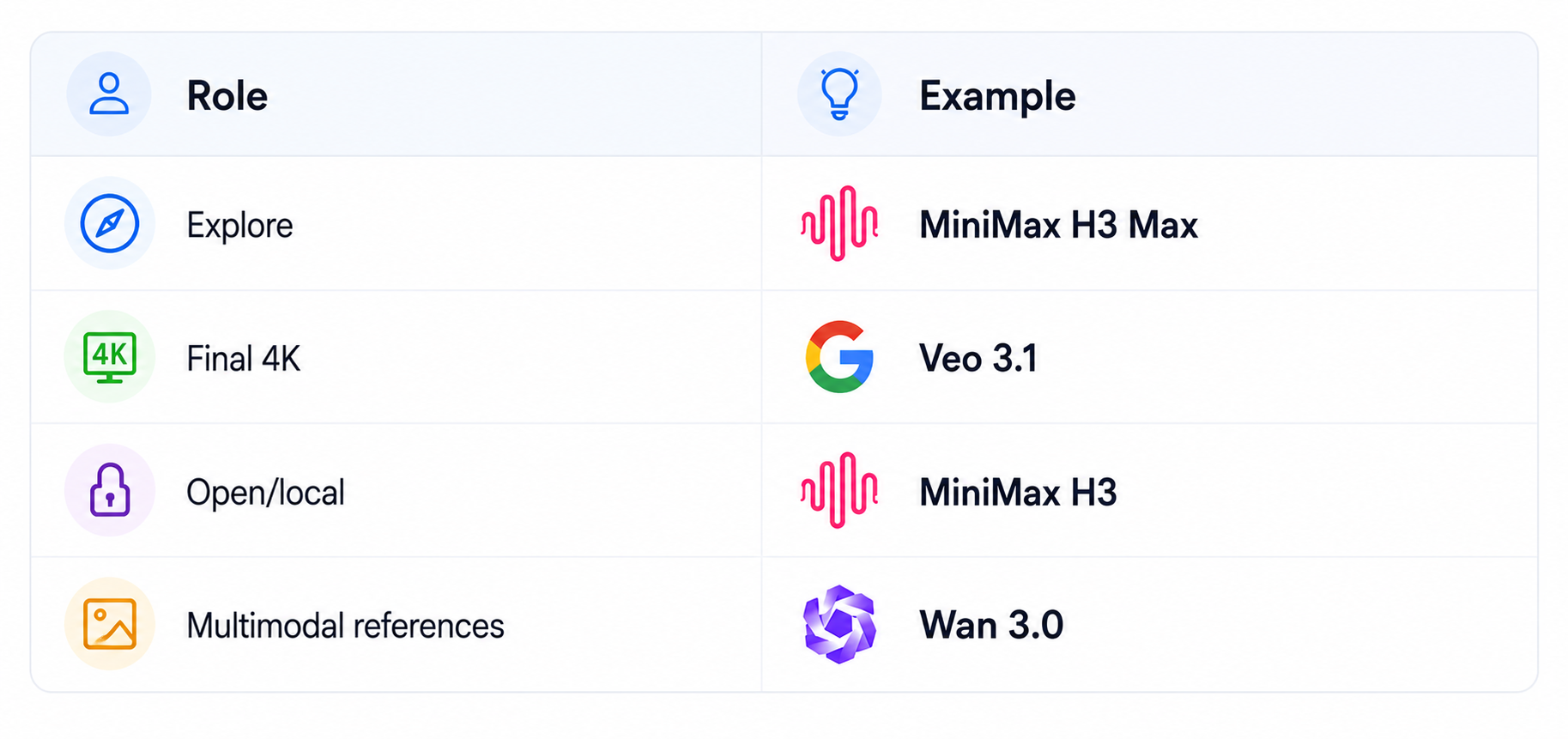
This reduces dependency on one provider and lets you spend premium inference only when the shot justifies it. Your prompt library also becomes more reusable because the creative brief can stay fixed while the generation backend changes.
Final Recommendation
Right now, I would not tell a creator to subscribe to every major video model. Pick one based on the job.
- Choose Wan 3.0 when you want the strongest current overall blind-preference result, longer single generations and broad multimodal references.
- Choose MiniMax H3 Max when speed and rapid image-to-video iteration are the bottleneck.
- Choose Veo 3.1 when 4K, native audio and a premium Google production stack matter.
- Choose Gemini Omni Flash when interactive editing and iterative scene development matter more than raw generation.
- Choose MiniMax H3 when open weights, 2K and deployment control matter.
- Keep Seedance 2.0 and Kling 3.0 as strong alternatives when their reference, workflow or style fit is better.
This ranking intentionally separates model quality from product convenience. A model can rank highly in blind preference tests and still be a poor business choice because it is expensive, slow, difficult to access or missing a feature your workflow needs. We therefore look at four layers: independent preference evidence, generation controls and output specifications, current pricing and the practical workflow around the model. Current arena scores are useful because they compare outputs from the same type of prompt-driven task, but they are not a substitute for testing your own footage. A creator making short social clips should weigh speed and iteration differently from a production team delivering 4K advertising footage. The ranking is designed to make that difference obvious rather than hide it behind one overall score.
How We Rank AI Video Models
The biggest mistake is paying for the most expensive model on every generation. Video workflows usually have at least two stages: exploration and final delivery. Exploration rewards speed, low cost and many iterations. Final delivery rewards consistency, resolution, audio quality and precise control. Using the same premium model for both stages wastes budget. A better workflow is to create several candidates with a fast model, select the strongest concept, then generate the final version on the premium model that best fits the delivery requirement. This also makes model switching less painful because the creative brief and reference assets stay constant.
Frequently Asked Questions
What is the best AI video model in 2026?
Wan 3.0 is the current strongest overall quality pick on the latest Artificial Analysis text-to-video-with-audio leaderboard, but the best model still depends on your use case.
Which AI video model is best for image to video?
MiniMax H3 Max currently leads the Artificial Analysis image-to-video-with-audio leaderboard in the latest snapshot.
Which AI video model is best for 4K?
Veo 3.1 is the clearest premium 4K API choice because Google supports 4K output and native audio, with Standard and Fast tiers.
Which AI video model is cheapest?
Among the top-ranked models with clear current API pricing, Wan 3.0 and MiniMax H3 Max offer particularly competitive per-second pricing. Promotional rates can change.
Which AI video model has the best audio?
Wan 3.0, Gemini Omni Flash, MiniMax H3 Max, MiniMax H3 and Veo 3.1 all support native audio, so the right choice should be based on actual dialogue and sound-effect tests.
What is the best AI video model for creators?
MiniMax H3 Max is excellent for fast iteration, Gemini Omni Flash is strong for interactive editing, and Wan 3.0 is the strongest overall quality option.
What is the best open-source AI video model?
MiniMax H3 is one of the strongest open-weight choices in the current frontier group, particularly when 2K output and deployment control matter.
Is Sora 2 still worth using?
Not for a new production dependency. OpenAI says the Sora web and app experiences were discontinued in April 2026 and the API is scheduled to shut down on 24, 2026.
Should I use more than one AI video model?
Yes. A two-model stack is often more efficient: use a fast or cheap model for exploration and a premium model for the shots that need maximum fidelity.
How should I compare AI video models?
Use the same prompts and references, measure quality, prompt adherence, motion, audio, failure rate, generation time and total cost. Avoid judging from vendor demo reels alone.
Recommended Blogs
- MiniMax H3 Max Review: Accuracy, Price & Is It Worth It? (2026)
- Wan 3.0 Review: Accuracy, Price & Is It Worth It? (2026)
- Gemini Omni 1.1 Flash Review: Accuracy, Price & Is It Worth It? (2026)
- 100 Best Veo 3 Prompts 2026 (Copy-Paste)
- Best Open Source AI Models August 2026: Full Collection
- What Is an AI Agent? Beginner Guide With Examples (2026)
Resources & Community
Join our community of 70,000+ AI enthusiasts and learn to build powerful AI applications. Whether you're a beginner or an experienced developer, Build Fast with AI helps you understand and implement AI in your projects.
- Website - buildfastwithai.com
- LinkedIn - Build Fast with AI
- Instagram - @buildfastwithai
- Founder Twitter - @satvikps
- Twitter - @BuildFastWithAI
Agentic AI Launchpad 2026
A structured 6-week cohort program that takes you from AI basics to building and deploying real-world agentic AI systems. Includes live sessions, expert mentorship, project reviews and a builder community network.
Ready to go from learning to building? Join the next cohort: Agentic AI Launchpad 2026
Free AI Resources
Access free tools, workshops and micro-learning to keep building.
- AI Workshops - Free resources, upcoming events and past recordings
- Unrot - Learn AI in 5 minutes a day

