



75 Best ChatGPT Images 2.5 Prompts 2026: The Ultimate Copy-Paste Image Prompt Library
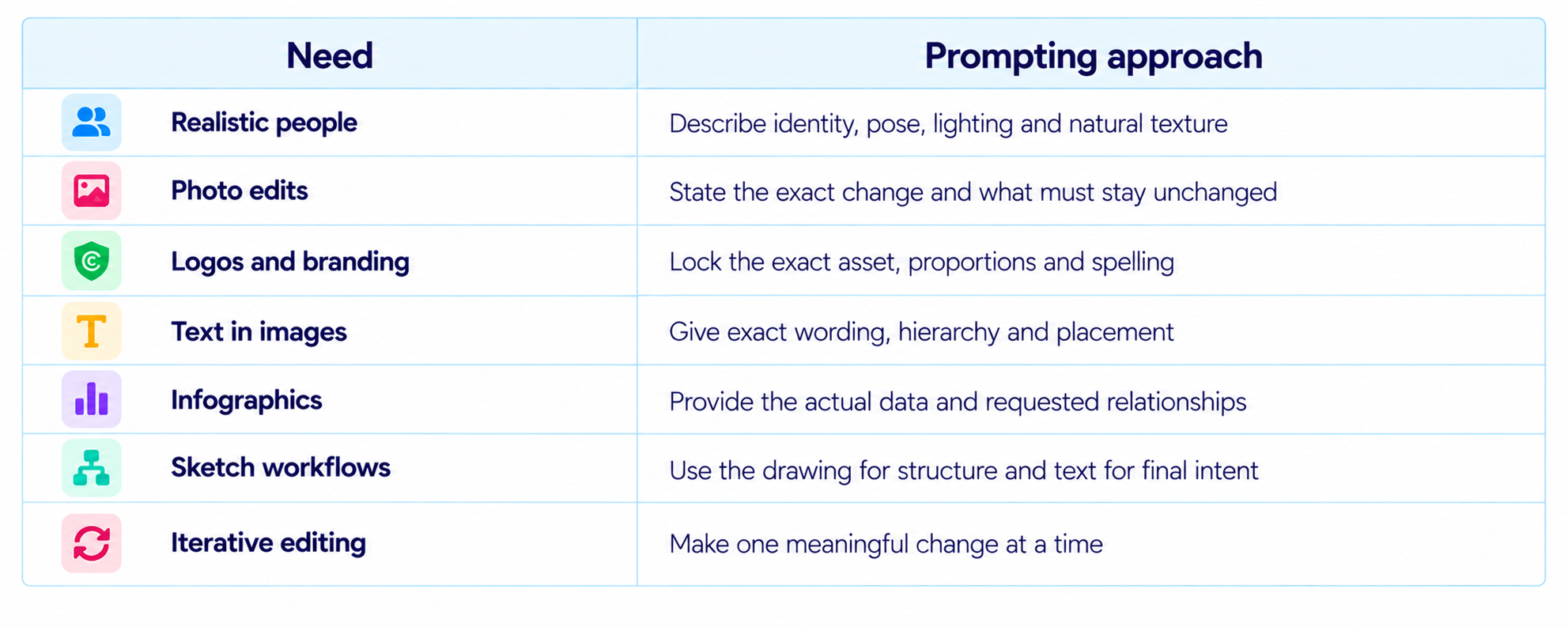
ChatGPT Images 2.5 is easier to control when you treat the prompt as a compact creative specification. OpenAI says the latest image model improves detail, lighting, editing precision, reference preservation and consistency across multiple edits, while reducing image-generation latency by up to 50% compared with Images 2.0. The update also adds Templates, Sketch, image comments and shared prompts, giving users more ways to communicate what they want.
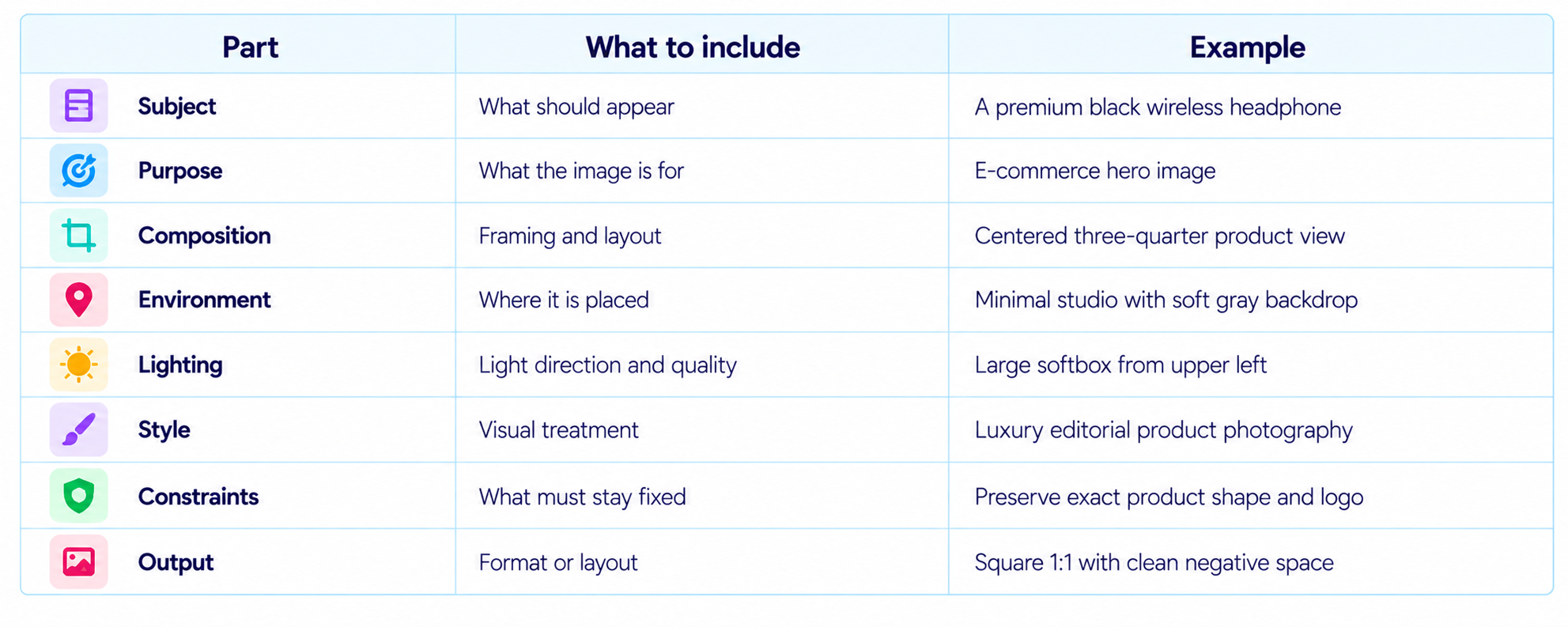
That makes prompt structure especially important. A strong image prompt identifies the subject, purpose, composition, environment, lighting, style and constraints. For an edit, the prompt should also state exactly what changes and what must remain untouched. This is particularly useful for faces, products, brand assets, text and multi-turn image editing.
The 75 prompts below are organized as a practical copy-paste library. Replace bracketed values such as [subject], [brand], [product], [headline], [background], [color] and [audience]. For existing-image edits, upload the source image first and then use the matching prompt.
QUICK ANSWER
The best ChatGPT Images 2.5 prompts are specific about the visual goal and the details that matter. Start with the subject and purpose, then define composition, setting, lighting, style and fixed constraints. When editing an existing image, say what should change and what should stay the same.
ChatGPT Images 2.5 is especially useful for realistic portraits, product photography, logos, posters, infographics, social graphics, UI mockups, sketches, illustrations and iterative image edits. OpenAI's new Sketch feature also lets you draw directly in ChatGPT as a visual reference, while Templates give you a starting point for common formats.
These 75 prompts cover the most useful image-generation and image-editing workflows, including professional portraits, product shots, branding, marketing graphics, information design, cinematic scenes, concept art and precise edits.
For the best results, replace every placeholder and keep important constraints explicit. When preserving an uploaded image, identify the elements that must remain unchanged instead of assuming the editor will infer them.
THE CHATGPT IMAGES 2.5 PROMPT FORMULA
How to Use These Prompts
- Copy the prompt and replace every bracketed placeholder.
- Upload a source image first for an edit, restoration or reference-based transformation.
- Use comments or the selection tool when you need to target a specific area.
- For text-heavy designs, provide exact wording and specify hierarchy, placement and alignment.
- For likeness preservation, explicitly request that the face and distinctive features remain unchanged.
- For multi-turn editing, make focused changes instead of rewriting the entire prompt.
- When using Sketch, draw the rough structure first, then describe the desired final image.
Realistic Portraits & People
1. Professional Headshot
Create a realistic professional headshot of [person description]. Preserve natural facial proportions, skin texture and distinctive features. Use soft window light from the left, a neutral studio background, subtle depth of field and a polished editorial photography look.
2. LinkedIn Profile Photo
Turn this reference photo into a professional LinkedIn portrait. Preserve the person's exact identity, face shape, hairline and recognizable features. Use clean studio lighting, a softly blurred neutral background and business-casual clothing.
3. Editorial Fashion Portrait
Create a high-end editorial fashion portrait of [person] wearing [outfit]. Use three-quarter framing, dramatic side lighting, a textured studio backdrop, subtle film grain and magazine-quality color grading.
4. Natural Lifestyle Portrait
Create a candid lifestyle portrait of [person] in [location]. Use natural daylight, realistic skin texture, imperfect hair strands and authentic body posture. Make it feel like a professionally photographed real moment.
5. Cinematic Character Portrait
Create a cinematic close-up of [character/person] in [environment]. Use practical lighting from [light source], atmospheric depth, realistic skin and fabric textures and shallow depth of field. Keep anatomy natural.
6. Corporate Team Portrait
Create a realistic corporate team photograph with [number] people from [company/team]. Arrange everyone naturally with believable spacing and varied expressions. Use soft office lighting and realistic skin tones.
7. Historical Portrait Recreation
Recreate a portrait inspired by [historical era]. Use period-appropriate clothing, props, architecture and lighting. Keep the image historically grounded and exclude modern objects.
Photo Editing & Restoration
8. Remove an Unwanted Object
Edit this image by removing [object] from [location]. Reconstruct the background naturally so the edit is seamless. Preserve every other object, person, shadow, texture and lighting condition.
9. Change the Background
Replace only the background with [new background]. Preserve the subject's identity, pose, clothing, proportions, lighting direction and edges. Match the new perspective and light naturally.
10. Restore an Old Photograph
Restore this old photograph by repairing scratches, dust, fading, tears and damaged areas. Recover contrast and detail while preserving the original faces, expressions and historical character.
11. Improve the Lighting
Improve the lighting in this photo by adding soft natural light from [direction]. Preserve the original composition, facial features, clothing and background. Correct harsh shadows without removing realistic texture.
12. Colorize a Black-and-White Photo
Colorize this black-and-white photograph with historically plausible colors. Preserve the original facial features, clothing patterns, architecture and tonal detail. Keep the color treatment subtle and photographic.
13. Remove the Background
Remove the background and create a clean cutout appearance around [person/product]. Preserve fine hair, edges, contours and small details without halos or accidental cropping.
14. Change Clothing Color
Change only the color of [clothing item] to [new color]. Preserve fabric texture, folds, shadows, highlights, seams and exact shape. Keep everything else unchanged.
15. Fix Reflections
Reduce unwanted reflections on [surface/object] while preserving the object's true material, texture and lighting. Keep every unrelated element unchanged.
Product Photography & E-Commerce
16. Luxury Product Hero Shot
Create a premium e-commerce hero image of [product]. Place it on [background] with soft directional studio lighting, realistic reflections, crisp material texture and generous negative space for headline text. Preserve exact product shape and branding.
17. Product on Studio Sweep
Photograph [product] against a seamless studio sweep with soft shadows beneath it. Use clean commercial lighting, realistic materials and a high-end catalog aesthetic. Do not alter the logo or product proportions.
18. Lifestyle Product Scene
Place [product] naturally inside [room/environment] while it is being used for [activity]. Use believable scale, realistic contact shadows and matching ambient light. Preserve the product's exact design.
19. Cosmetic Campaign Shot
Create a premium beauty campaign image for [cosmetic]. Use [surface/background], elegant soft lighting, realistic packaging reflections and luxury editorial styling. Keep the packaging text and logo unchanged.
20. Food Product Photography
Create a professional food advertisement featuring [dish/product]. Use appetizing natural textures, controlled highlights and commercial food photography lighting. Avoid plastic-looking surfaces.
21. Fashion Flat Lay
Create a premium flat-lay image featuring [clothing/accessories]. Arrange the items in a balanced editorial composition on [surface]. Use soft overhead lighting and realistic fabric texture.
22. Packaging Mockup
Place the [product/packaging design] into a realistic retail mockup on [surface/environment]. Preserve the exact label, typography, proportions and brand colors. Match perspective, reflections and shadows.
23. Multiple Product Variants
Create a clean catalog layout showing [product] in these exact variants: [variants]. Keep each variant identical in shape and scale, with consistent lighting and spacing.
Logos, Branding & Marketing Graphics
24. Minimal Logo Concept
Design a clean modern logo for [brand name], a [business type]. Use [symbol/concept], simple geometry and a premium minimal aesthetic. Make the logo legible at small sizes and avoid decorative clutter.
25. Logo on Packaging
Create a realistic packaging mockup for [brand] using this exact logo. Preserve the logo's shape, proportions and lettering. Place it on [package type] with realistic print texture and studio lighting.
26. Brand Moodboard
Create a cohesive visual moodboard for [brand] using [brand colors], [materials], [photography style], [typography direction] and [visual motifs]. Organize it like a premium brand presentation.
27. Social Media Announcement
Create a polished social media announcement graphic for [brand] announcing [message]. Use the exact headline '[headline]' and supporting text '[subtext]'. Use [brand colors] and clear visual hierarchy.
28. Sale Banner
Design a high-converting promotional banner for [product/store]. Headline: '[headline]'. Offer: '[offer]'. CTA: '[CTA]'. Use strong hierarchy and premium product imagery.
29. Event Poster
Design a modern event poster for [event name]. Include the exact text '[date]', '[location]', '[headline]' and '[CTA]'. Use [style], [color palette] and a clear focal image.
30. YouTube Thumbnail
Create a high-click-through YouTube thumbnail for '[video title]'. Use one strong visual idea, bold readable text limited to [text], dramatic lighting and clear subject separation. Optimize for 16:9.
31. App Launch Graphic
Create a premium product-launch graphic for [app/product]. Show the product interface on a device or visual mockup with headline '[headline]' and subheadline '[subheadline]'. Use a modern technology editorial style.
Infographics, Diagrams & Information Design
32. Statistics Infographic
Create a clean horizontal infographic explaining [topic]. Include these exact statistics: [data]. Use large numbers, short labels, simple icons and generous spacing. Make all text legible and accurate.
33. Comparison Chart
Design a polished comparison graphic between [A] and [B]. Compare them across [criteria]. Use a clean two-column layout, clear labels and concise text. Keep every value exactly as provided.
34. Process Diagram
Create a professional process diagram showing these steps: [steps]. Use numbered stages, arrows, concise labels and a clear left-to-right flow.
35. Timeline Graphic
Create a horizontal timeline for [topic] with these dates and events: [timeline]. Use consistent spacing, clear date labels and a premium information-design style.
36. Framework Diagram
Visualize this framework: [framework]. Organize it into clearly labeled sections with logical connections and hierarchy. Use minimal text and clean shapes.
37. AI Architecture Diagram
Create a clean technical diagram showing an AI system with these components: [components]. Show data flow with arrows and label every component precisely. Use a modern engineering presentation style.
38. Data Dashboard Concept
Create a visual dashboard concept for [use case]. Include cards for [metrics], a main chart for [metric] and supporting indicators. Use realistic UI spacing and clear hierarchy.
Posters, Editorial & Social Content
39. Magazine Cover
Create a premium magazine cover about [topic]. Main headline: '[headline]'. Supporting lines: '[supporting text]'. Use a striking central image, editorial typography and realistic print composition.
40. Travel Poster
Design a premium travel poster for [destination]. Show [landmark/scene] in a sophisticated illustrated or photographic style. Include exact text '[destination]' and '[tagline]'.
41. Restaurant Promo
Create a premium restaurant promotional graphic for [restaurant]. Feature [dish]. Include exact text '[offer]' and '[CTA]'. Use warm lighting, realistic food texture and an upscale layout.
42. Podcast Cover
Create a professional podcast cover for '[podcast name]' about [topic]. Include exact title and subtitle '[subtitle]'. Use a distinctive central visual and typography that remains readable as a thumbnail.
43. Course Thumbnail
Create a modern educational thumbnail for a course titled '[course title]'. Include [key visual]. Use bold but minimal typography, clean hierarchy and a premium online-learning aesthetic.
44. Newsletter Header
Design a wide newsletter header for [publication/topic]. Use exact headline '[headline]' and a visual representing [concept]. Make it wide and clean for email use.
45. Instagram Carousel Slide
Create slide [number] of a social media carousel about [topic]. Headline: '[headline]'. Supporting text: '[text]'. Use a consistent visual system and strong hierarchy.
46. Blog Hero Image
Create a premium blog hero image for an article titled '[title]'. Visualize [concept] with a clean editorial composition. Leave intentional negative space on [left/right] for title placement.
Illustrations, 3D & Creative Concepts
47. Editorial Illustration
Create a sophisticated editorial illustration about [concept]. Use [visual metaphor], layered composition and a refined contemporary illustration style. Keep the idea immediately understandable.
48. Isometric 3D Scene
Create a clean isometric 3D illustration of [system/environment]. Include [objects]. Use soft lighting, realistic materials and clear separation between objects.
49. Clay 3D Style
Create a friendly clay-style 3D scene showing [subject/action]. Use soft rounded materials, studio lighting and subtle shadows. Keep the visual playful but professional.
50. Glassmorphism Concept
Create a futuristic glassmorphism visual for [product/concept]. Use translucent surfaces, soft gradients, subtle reflections and clean depth.
51. Paper Cut Illustration
Create a layered paper-cut illustration of [subject]. Use [color palette], visible paper layers, soft shadows and a handcrafted editorial feel.
52. Watercolor Illustration
Create a refined watercolor illustration of [subject/scene]. Use natural pigment variation, soft edges and paper texture. Keep the subject recognizable.
53. Anime Character Sheet
Create an anime-style character reference sheet for [character]. Show front, side and three-quarter views plus expressions for [expressions]. Keep all features consistent.
54. Children's Book Illustration
Create a warm children's book illustration of [scene]. Use expressive characters, soft colors, hand-painted texture and a clear storytelling composition.
Cinematic, Sci-Fi & Fantasy
55. Cinematic Film Still
Create a cinematic film still of [subject] in [location]. Use [time of day], practical lighting, atmospheric depth, realistic materials and a subtle filmic color grade.
56. Sci-Fi City
Create a futuristic city at [time]. Show [architecture], [transport], [street details] and [lighting]. Make the environment believable and richly layered.
57. Fantasy Landscape
Create an epic fantasy landscape featuring [environment], [landmark] and [creature/object]. Use dramatic natural lighting, layered depth and realistic environmental textures.
58. Cyberpunk Street
Create a dense cyberpunk street scene in [city concept]. Include neon signs, rain reflections, pedestrians, vehicles and layered storefronts with cinematic night lighting.
59. Space Colony
Visualize a realistic human settlement on [planet/moon]. Include habitat structures, vehicles, people and environmental systems. Use plausible lighting and materials.
60. Ancient World Scene
Create a historically grounded scene set in [civilization/era] showing [activity]. Use period-appropriate architecture, clothing, tools and materials and exclude modern objects.
61. Hero Poster
Create a cinematic poster for [fictional film/game]. Feature [hero/character] in the foreground with [environment] behind them and title text '[title]'. Use dramatic lighting and a blockbuster composition.
Sketch, UI & Concept Design
62. Sketch to Product Concept
Use this sketch as the structural reference. Turn it into a polished concept for [product]. Preserve the major proportions and layout of the sketch while adding realistic materials and functional detail.
63. UI Mockup from Sketch
Use this sketch as the wireframe. Convert it into a polished [app/website] interface for [use case]. Preserve the layout hierarchy and component positions while adding realistic typography and spacing.
64. Website Landing Page
Create a high-end landing page mockup for [product/company]. Hero headline: '[headline]'. Include sections for [sections]. Use a modern responsive web design aesthetic.
65. Mobile App Screen
Create a polished mobile app screen for [app/use case]. Include [elements]. Use a clean modern interface, realistic spacing and consistent components.
66. Dashboard Redesign
Redesign this dashboard to improve hierarchy and readability while preserving the underlying information. Simplify clutter, improve spacing and group related metrics without changing meaning.
67. Product Design Sketch
Create a professional industrial-design concept sheet for [product]. Show front, side and three-quarter views with material callouts, dimensions and component details.
68. Architecture Concept
Create a conceptual architectural visualization of [building/project] based on [requirements]. Show the structure, materials, landscaping and surrounding context with realistic daylight.
Advanced Editing & Creative Control
69. Change Scene, Preserve Subject
Transform this image from [original scene] to [new scene]. Preserve the subject's exact identity, facial features, body proportions, clothing, pose and key accessories. Match lighting and perspective.
70. Add a New Object
Add [object] to the image at [location]. Match the existing perspective, scale, lighting, shadows, reflections and image quality. Do not change unrelated parts.
71. Preserve Brand Assets
Edit this image while preserving the exact [logo/product/brand asset]. Do not redraw, simplify, recolor or distort it. Change only [requested area].
72. Multi-Turn Consistency Edit
Keep the image exactly the same except for this change: [change]. Preserve all existing subjects, identities, colors, composition, text, objects, lighting and camera angle.
73. Add Exact Text
Create an image for [purpose] with the exact headline '[headline]' and supporting text '[supporting text]'. Preserve spelling, capitalization and punctuation. Arrange text with clear hierarchy.
74. Visual Style Transfer
Transform this image into a [style] while preserving the subject's identity, composition, pose and important objects. Apply the new visual treatment consistently.
75. Final Production-Ready Polish
Polish this image for professional delivery. Improve local contrast, lighting balance, texture clarity and composition only where needed. Preserve identity, objects, branding and text. Remove accidental artifacts without introducing new elements.
How to Get Better Results From ChatGPT Images 2.5
OpenAI's guidance emphasizes clear, descriptive prompts. In practice, the strongest prompts answer five questions: what is the subject, what is happening, where is it happening, what should it look like, and what must remain fixed. The goal is not maximum word count. It is useful specificity.
ChatGPT Images 2.5 vs Images 2.0
OpenAI says Images 2.5 improves detail, lighting, editing precision, reference preservation and multi-turn consistency, while reducing image-generation latency by up to 50% versus Images 2.0. The ChatGPT experience also adds Templates, Sketch, comments on images and prompt sharing.
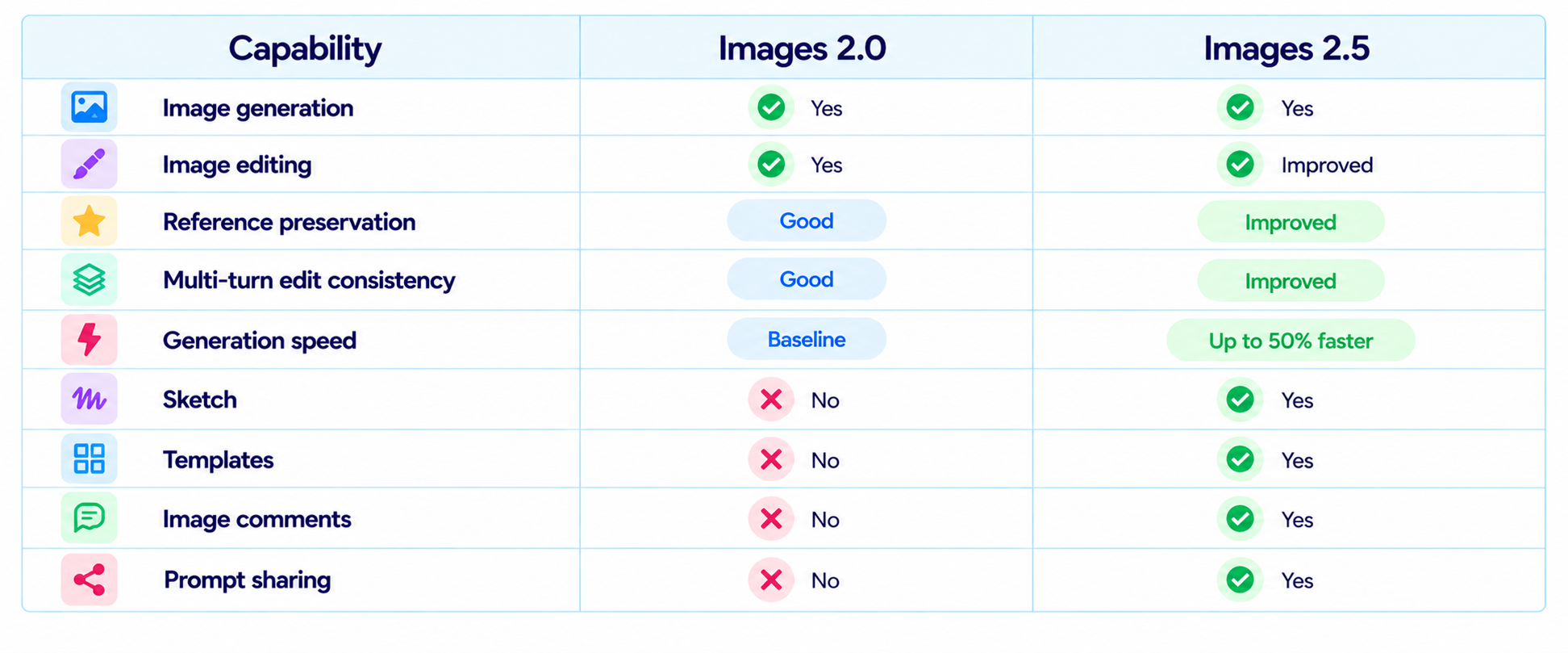
Best Prompt Structure for Image Editing
Use this template for precise edits:
Edit this image by changing [specific element] in [specific location]. Preserve [identity/composition/product/logo/text/lighting] exactly. Match the existing perspective, shadows, texture and color so the edit looks native to the original image.
This works particularly well for ChatGPT Images 2.5 because the new release is designed around iterative editing. You can make a focused change while explicitly locking the important parts of the image.
Frequently Asked Questions
What is ChatGPT Images 2.5?
ChatGPT Images 2.5 is OpenAI's latest image-generation and image-editing model in ChatGPT, with improvements to detail, editing precision, reference preservation and generation speed.
Can ChatGPT Images 2.5 edit existing photos?
Yes. Upload an image and describe the change. You can also target areas with the editor or make the edit conversationally.
What is the best prompt structure?
State the purpose, subject, composition, environment, lighting, style and constraints. For edits, explicitly identify what changes and what stays fixed.
Can ChatGPT Images 2.5 create logos?
Yes. Describe the brand, concept and visual direction. For an existing logo, upload it and explicitly request that the asset remain unchanged.
Can ChatGPT Images 2.5 add text to images?
Yes. Provide the exact wording and specify placement, size hierarchy, alignment and contrast.
What is Sketch?
Sketch lets you draw directly in ChatGPT and use the drawing as a reference for the generated image.
Can Images 2.5 preserve a person's likeness?
OpenAI says the model is better at preserving subjects in reference photos. Explicitly lock facial identity and distinctive features in your prompt.
Can I use Templates?
Yes. OpenAI added Templates for common image formats such as flyers and product photos.
How should I make multi-turn edits?
Make one focused change per turn and state which existing details must remain unchanged.
Are longer prompts better?
Not automatically. Clear, relevant instructions are more useful than unnecessary detail.
What is the best product photography prompt?
Define the product, framing, surface, lighting, reflections, background and fixed branding.
What is a good infographic prompt?
Provide exact data, text and relationships, then specify the layout and hierarchy.
Recommended Blogs
Google Pics Review: Features, Price & Is It Worth It? (2026)
Best AI Video Models 2026: Ranked by Quality, Speed, Price & Use Case
Gemini Omni 1.1 Flash Review: Accuracy, Price & Is It Worth It? (2026)
Resources & Community
Join our community of 70,000+ AI enthusiasts and learn to build powerful AI applications. Whether you're a beginner or an experienced developer, Build Fast with AI helps you understand and implement AI in your projects.
Agentic AI Launchpad 2026
A structured 6-week cohort program that takes you from AI basics to building and deploying real-world agentic AI systems. Includes live sessions, expert mentorship, project reviews and a builder community network.
Ready to go from learning to building? Join the next cohort: Agentic AI Launchpad 2026
Free AI Resources
Access free tools, workshops and micro-learning to keep building.

