



What Is MCP (Model Context Protocol)? The Complete 2026 Guide for AI Developers
Three months ago, every AI developer I talked to had the same problem. You'd build an agent, connect it to your database with custom code, connect it to GitHub with different custom code, connect it to Slack with yet another custom integration, and by the time you were done, you had a spaghetti of one-off connectors that broke every time a dependency updated.
Then MCP happened.
In November 2024, Anthropic quietly open-sourced the Model Context Protocol (MCP) — a universal standard for connecting AI models to external tools, data sources, and services. By April 2026, there are over 2,300+ MCP servers in public directories. Claude, Cursor, Windsurf, VS Code, and 200+ other tools support it natively. And the 2026 MCP roadmap, published March 9, is focused on one thing: making it production-ready at enterprise scale.
I've spent a few weeks deep in the MCP ecosystem, building servers, testing integrations, and pulling apart how this thing actually works. This guide is everything I learned, written for developers who want practical knowledge, not just theory.
1. The N x M Problem MCP Was Built to Solve
Before MCP, building AI agents that talked to external tools meant writing a custom integration for every single combination of AI model and data source. If you had 5 models and 10 data sources, you needed up to 50 different integrations. That's the N x M problem.
Think about what that looks like in practice. Your Claude agent needs GitHub access? Write a custom connector. Your GPT-5 agent needs the same GitHub access? Write another custom connector, from scratch, using a completely different API. Your Gemini agent needs it too? Third connector. Same tool, three incompatible implementations.
And every time GitHub updates their API, you fix it three times.
The more formal version: if you have N AI models and M external tools, the naive approach requires up to N x M custom integrations. At scale, this is not just annoying. It's an architectural disaster that makes switching AI providers almost impossible and keeps most teams locked into whichever model they wrote connectors for first.
MCP flips N x M to N + M. Build one MCP server for GitHub, and every MCP-compatible AI model connects to it instantly. Build one MCP client in your agent, and it connects to every MCP-compatible server.
That's the whole pitch. And it's the right pitch.
2. What Is MCP? The One-Paragraph Answer
MCP (Model Context Protocol) is an open standard, created by Anthropic and released in November 2024, that defines exactly how AI models communicate with external tools, data sources, and services. It uses JSON-RPC 2.0 as its message format, supports both local (stdio) and remote (HTTP with Server-Sent Events) transport, and is completely model-agnostic. Any AI that speaks MCP can talk to any tool that speaks MCP, regardless of who made either of them.
The analogy I keep coming back to is USB-C. Before USB-C, every device had its own proprietary cable. Chargers, data transfer, display output — all different connectors. USB-C created one universal standard. Now one cable works for your phone, your laptop, your monitor, and your external drive.
MCP is USB-C for AI. One protocol. Any model, any tool.
As of March 2026, the MCP ecosystem includes over 2,300 public servers covering databases (PostgreSQL, MySQL, MongoDB), version control (GitHub, GitLab), browsers (BrowserMCP), productivity tools (Google Drive, Slack, Notion, Jira), code editors, and hundreds of domain-specific integrations.
3. How MCP Works: Architecture in Plain English
MCP has three components. Understanding how they relate to each other makes everything else click.
The MCP Host
The host is the AI application the user interacts with. Claude Desktop, Cursor, Windsurf, VS Code with Continue, a custom Python script — these are all MCP hosts. The host is responsible for managing security, authentication, and which servers are available in a given session.
The MCP Client
The client lives inside the host and handles the protocol-level communication with MCP servers. When you ask Claude Desktop to query your database, the MCP client in Claude Desktop is translating that request into JSON-RPC messages and sending them to the right server.
The MCP Server
The server is where the actual tool lives. It exposes capabilities through the MCP protocol. Your GitHub MCP server knows how to read repos, list issues, and create pull requests. Your database MCP server knows how to run SQL queries. The server doesn't care which AI is talking to it — as long as it speaks MCP.
Servers expose three types of capabilities:
- Resources: Read-only data the AI can access (file contents, API responses, database records)
- Tools: Functions the AI can call that take action (run a query, create a task, send a message)
- Prompts: Pre-written templates the host can use to structure common workflows
The communication flow looks like this:
User RequestMCP Host (Claude Desktop / Cursor / Your App)MCP Client (protocol handler inside the host)
JSON-RPC 2.0 over stdio or HTTP/SSEMCP Server (GitHub / Postgres / Slack / etc.)Actual Data / Action ResultOne thing I find genuinely elegant about this design: the AI model itself never directly touches your database or your GitHub account. It talks to the MCP client, which talks to the server, which has its own auth and access controls. The model is isolated from direct credential access by design.
4. MCP vs REST API: When to Use Which
This is the question I get most often from developers evaluating MCP. The short answer: MCP and REST APIs solve different problems and often work best together.
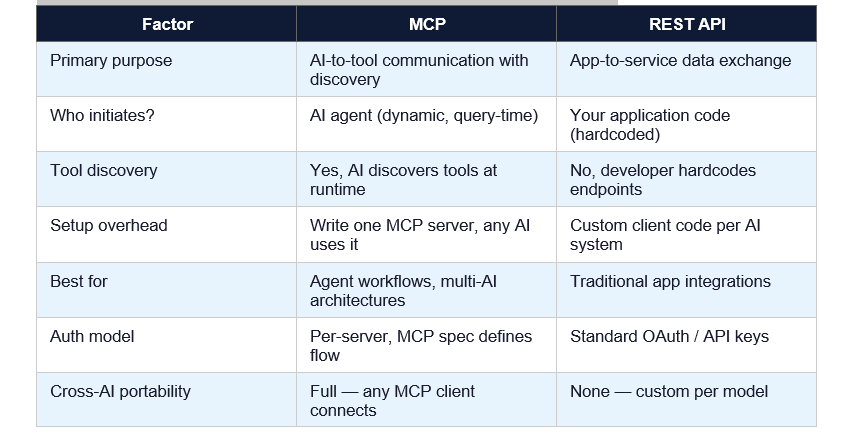
My honest take: if you're building an AI agent that needs to talk to multiple tools, use MCP for the agent-tool connections. Your internal microservices can still use REST APIs to talk to each other. They're not competing architectures — they occupy different layers of the stack.
The one scenario where I'd stick with pure REST: when you're building a single-tool, single-model integration that you know will never expand. Custom REST code is faster to prototype when you don't need the generality. But in 2026, most agent workflows eventually expand, so MCP usually wins out in the long run.
5. Build Your First MCP Server in Python (Full Tutorial)
Here's a working MCP server in Python that exposes a tool to query a SQLite database. I'll build this from scratch so you can see exactly how each piece fits together.
Step 1: Install the MCP Python SDK
pip install modelcontext
# or with uv (recommended for faster installs)
uv pip install modelcontext
Step 2: Create Your Server File
# db_mcp_server.py
import sqlite3
from modelcontext.server import Server
from modelcontext.server.stdio import StdioServerTransport
from modelcontext.types import Tool, ListToolsRequest, CallToolRequest

server = Server(name='database-server', version='1.0.0')

@server.list_tools()
async def list_tools(request: ListToolsRequest):
    return [
        Tool(
            name='query_database',
            description='Run a read-only SQL query on the SQLite database',
            input_schema={
                'type': 'object',
                'properties': {
                    'sql': {'type': 'string', 'description': 'SQL SELECT query'},
                    'limit': {'type': 'integer', 'default': 50}
                },
                'required': ['sql']
            }
        )
    ]

@server.call_tool()
async def call_tool(request: CallToolRequest):
    if request.params.name == 'query_database':
        sql = request.params.arguments['sql']
        limit = request.params.arguments.get('limit', 50)
        # Safety: only allow SELECT queries
        if not sql.strip().upper().startswith('SELECT'):
            return [{'type': 'text', 'text': 'Error: Only SELECT queries allowed'}]
        conn = sqlite3.connect('your_database.db')
        cursor = conn.execute(sql)
        rows = cursor.fetchmany(limit)
        cols = [d[0] for d in cursor.description]
        result = [dict(zip(cols, row)) for row in rows]
        conn.close()
        return [{'type': 'text', 'text': str(result)}]

async def main():
    transport = StdioServerTransport()
    await server.run(transport)

if __name__ == '__main__':
    import asyncio
    asyncio.run(main())
Step 3: Register With Claude Desktop
# macOS: ~/Library/Application Support/Claude/claude_desktop_config.json
# Windows: %APPDATA%/Claude/claude_desktop_config.json

{
  "mcpServers": {
    "database": {
      "command": "python",
      "args": ["/path/to/db_mcp_server.py"]
    }
  }
Step 4: Test It
Restart Claude Desktop. You should see a small database icon or indicator that MCP tools are available. Type: 'List all tables in the database' and watch Claude automatically call your query_database tool.
That's it. Your AI agent now has direct, structured access to your database without you ever exposing raw credentials to the model.
Security note: Always restrict your MCP server to read-only operations when possible. Follow the principle of least privilege — grant the minimum permissions the server actually needs. Use environment variables for credentials, never hardcode them.
6. Top 10 MCP Servers in 2026 Worth Knowing
As of April 2026, the Reaking MCP Directory lists over 2,300 servers. Here are the 10 I'd install first for any serious development workflow:
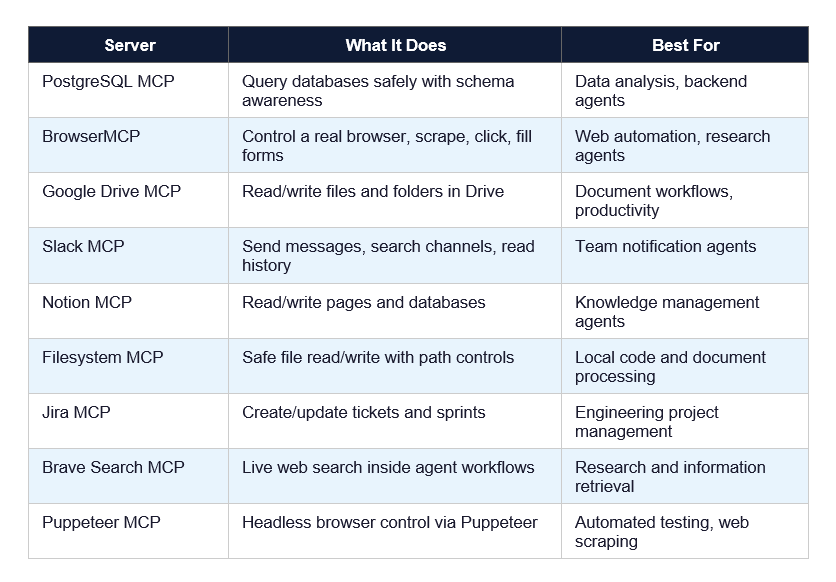
The GitHub MCP server is the one I'd start with. It's the best-maintained server in the ecosystem, has extensive documentation, and covers the most common agentic workflows developers actually want to automate: reading issues, creating PRs, understanding codebase structure.
7. MCP + Claude Code: The Full Developer Workflow
Claude Code is one of the best environments for MCP-powered workflows right now. Here's how I actually use it day to day.
The typical workflow looks like this:
- Open Claude Code in your terminal from your project directory
- Your claude_desktop_config.json (or the Claude Code equivalent) loads your registered MCP servers automatically
- Ask Claude Code a task that requires external tool access: 'Find all open GitHub issues labelled bug, pull the relevant files, and suggest fixes'
- Claude Code uses the GitHub MCP server to list issues, the Filesystem MCP server to read relevant code, and the PostgreSQL MCP server to check if any issues are database-related
- You review the plan, Claude Code executes, and you get a PR draft with suggested fixes linked to the right issues
What makes this different from just giving Claude Code your GitHub credentials directly? Three things.
First, Claude Code itself never holds your credentials. The MCP server holds credentials. If you revoke the MCP server's GitHub token, Claude Code immediately loses GitHub access without any code changes.
Second, the MCP server can enforce constraints the AI can't override. Your PostgreSQL MCP server can be read-only at the server level. Even if Claude Code tries to run DELETE FROM users, the server rejects it before the database ever sees the query.
Third, you can swap Claude Code for Cursor or Windsurf and your MCP servers keep working. No migration, no reconfiguration, no rewriting integrations.
One workflow I find genuinely useful: pair the GitHub MCP server with the Jira MCP server. Ask Claude Code: 'Look at all Jira tickets in the current sprint and show me which ones have open GitHub issues but no associated PRs.' That kind of cross-tool query
used to require a custom script. Now it's a single natural language request.
8. What the 2026 MCP Roadmap Actually Means for You
The MCP team published their 2026 roadmap on March 9, 2026. I read it carefully. Here are the four priority areas and what they actually mean in practice.
Priority 1: Transport Scalability
Current MCP deployments hit performance walls at scale because the protocol was designed primarily for local (stdio) transport. The 2026 roadmap focuses on making HTTP/SSE transport fast and reliable enough for production enterprise deployments serving thousands of concurrent requests.
For you: expect MCP to become viable for high-throughput production systems in H2 2026, not just developer tooling.
Priority 2: Agent-to-Agent Communication
This is the exciting one. The roadmap explicitly calls out enabling agents to discover and communicate with other agents through MCP. Right now, MCP is AI-to-tool. The roadmap is building toward AI-to-AI, which overlaps heavily with the emerging A2A (Agent-to-Agent) protocol landscape.
For you: if you're building multi-agent systems now, design them to be MCP-compatible. The protocol is about to extend upward into agent orchestration.
Priority 3: Governance Maturation
The MCP governance model moved to a community Working Group structure in 2025. In 2026, the focus is on enterprise readiness: audit trails, SSO-integrated auth, gateway behavior standards, and configuration portability across environments.
Priority 4: Enterprise Readiness
This is the least-defined priority, intentionally. The MCP team is explicitly inviting enterprises experiencing deployment pain to help define what needs to be built. An Enterprise Working Group is being formed.
Bottom line: MCP in April 2026 is production-ready for developer tooling and small-to-medium agent workflows. Enterprise-scale, high-throughput, compliance-grade deployments are the 2026 project.
9. MCP vs OpenAI Function Calling: Key Differences
If you've used OpenAI's function calling, you might be wondering whether MCP is just a different name for the same concept. It isn't. Here's the real difference.
OpenAI function calling is a model-level feature. You define functions in your API request, the model decides when to call them, and you handle the execution in your application code. The tool definitions and execution logic live entirely in YOUR code and are tightly coupled to OpenAI's API.
MCP is a protocol-level standard. The tool definitions live in a separate MCP server process. Any MCP-compatible model — Claude, GPT-5, Gemini, a local LLM — can discover and use the same server without any changes to the server itself.
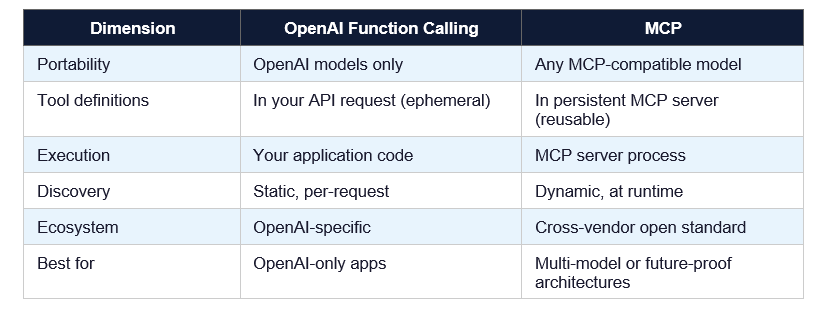
The practical upshot: if you're 100% committed to OpenAI models forever, function calling is simpler to set up today. If you want to be able to swap models, add new models, or build tools that work across AI providers, MCP is the right choice.
10. Honest Limitations of MCP (Yes, There Are Some)
I'd be doing you a disservice if I only told you the good stuff. Here's what MCP doesn't do well right now.
Latency. Every tool call goes through the MCP client-server round-trip. For local servers running over stdio, this is negligible. For remote servers over HTTP/SSE, you're adding network latency to every single tool invocation. In latency-sensitive workflows, this adds up.
Multimodal support is still limited. MCP was designed around text-based tool interactions. Passing images, audio, or video through MCP is awkward and not well-standardized yet. The 2026 roadmap addresses this, but it's not solved yet.
Security model complexity. MCP's security story is good, but it puts responsibility on the server implementer. A poorly implemented MCP server can still expose sensitive data or accept dangerous commands. The protocol doesn't enforce safety — you have to.
Debugging is harder than REST. When something breaks in a REST integration, you have curl, Postman, browser DevTools. When something breaks in an MCP integration, you're debugging JSON-RPC messages over stdio or SSE. The tooling is improving but it's not there yet.
My contrarian take: MCP is not a replacement for good software architecture. I've seen developers use 'we're using MCP' as an excuse to skip proper access control, error handling, and rate limiting. The protocol doesn't do those things for you. You still have to build a secure, robust system.
Frequently Asked Questions
What is Model Context Protocol (MCP)?
MCP (Model Context Protocol) is an open standard created by Anthropic in November 2024 that defines how AI models connect to external tools, data sources, and services. It uses JSON-RPC 2.0 as its message format and supports both local (stdio) and remote (HTTP with SSE) transport. As of April 2026, over 2,300 public MCP servers exist, and major AI tools including Claude, Cursor, and Windsurf support it natively.
What is MCP in the context of artificial intelligence?
In AI, MCP is the infrastructure protocol that allows AI agents to take actions in the real world — reading files, querying databases, calling APIs, browsing the web — through a standardized interface. Instead of each AI model needing custom code to connect to each external tool, MCP provides a universal connector layer that any model can use with any MCP-compatible server.
What is the MCP protocol for OpenAI?
MCP is an open standard, not an OpenAI-specific protocol. It was created by Anthropic but is model-agnostic — OpenAI's models can use MCP servers, as can Google Gemini, Meta Llama, and open-source models. OpenAI has its own tool-use mechanism (function calling), but MCP servers built for Claude also work with GPT-5 and other MCP-compatible clients without modification.
What is MCP in AI vs API? What is the difference?
A REST API is a communication protocol for application-to-service data exchange. MCP is specifically designed for AI-to-tool communication, adding capabilities REST APIs lack: dynamic tool discovery (the AI finds available tools at runtime), built-in security isolation (credentials stay in the server, not the model), and cross-model portability (one MCP server works with any MCP-compatible AI). REST APIs and MCP often work together — your MCP server might internally call REST APIs to fulfill requests.
When should I use MCP and when should I NOT use it?
Use MCP when you're building AI agents that need structured access to external tools, especially if you want those integrations to work across multiple AI models or AI providers. Avoid MCP when you're building a single-purpose, single-model integration that will never need to work with other AI systems. Also avoid it when latency is extremely critical — the protocol adds overhead compared to direct API calls. For enterprise-scale, high-throughput deployments, wait for the H2 2026 roadmap improvements.
How do I build an MCP server?
Install the MCP Python SDK with 'pip install modelcontext'. Create a Python file that initializes a Server instance, defines list_tools() and call_tool() handlers using the SDK decorators, and runs over a StdioServerTransport or HTTP transport. Register the server in your Claude Desktop config (claude_desktop_config.json) by specifying the command and path. The full working code example is in Section 5 of this guide.
What is Claude MCP and how is it different from regular Claude?
Claude MCP refers to using Claude with MCP servers enabled — giving Claude access to external tools through the MCP protocol. Regular Claude operates only on text within the conversation context. Claude with MCP can read your files, query your databases, search GitHub, browse the web, and take actions in connected systems. Claude Desktop and Claude Code both support MCP natively as of 2026.
Is MCP production-ready in 2026?
MCP is production-ready for developer tooling workflows and small-to-medium agent applications as of April 2026. Enterprise-grade features — including improved transport scalability, SSO-integrated auth, audit trails, and governance tooling — are the focus of the 2026 MCP roadmap, with improvements expected in H2 2026. For mission-critical, high-throughput enterprise deployments, evaluate each use case individually until the roadmap items land.
Recommended Blogs
These are real posts that exist on buildfastwithai.com right now — worth reading alongside this guide:
- Claude Code Source Code Leak: The Full Story 2026
- Claude Code Auto Mode: Unlock Safer, Faster AI Coding (2026 Guide)
- Claude Code vs Codex: Which Terminal AI Tool Wins in 2026?
- Claude AI 2026: Models, Features, Desktop & More
- What Is Perplexity Computer? The 2026 AI Agent Explained
References
1. Anthropic — Model Context Protocol Official Documentation
2. MCP GitHub Repository — Source Code and SDKs
3. MCP Blog — The 2026 MCP Roadmap (March 9, 2026)
4. Anthropic — Model Context Protocol Announcement
5. The New Stack — MCP's Growing Pains for Production Use (March 14, 2026)
6. DEV Community — Complete Guide to MCP: Building AI-Native Applications in 2026

