





Claude Code Auto Mode: End Permission Fatigue in 2026
Every developer who has used Claude Code knows the routine. You kick off a task. Claude writes two lines. It asks permission to save a file. You click yes. It writes three more lines. It asks permission to run a bash command. You click yes again. Repeat this for 45 minutes, and you start wondering whether you are the developer or the approval button.
Anthropic shipped auto mode for Claude Code on March 24, 2026, and it directly solves this. The idea is simple: let Claude make low-risk permission decisions on its own, while a dedicated AI safety classifier watches every tool call before it runs. No more permission fatigue. No more babysitting a terminal.
I think this is one of the most practical Claude Code updates since the tool launched. Not because it is flashy, but because it fixes a real workflow pain point that was quietly driving developers toward the much riskier --dangerously-skip-permissions flag. Let me break down exactly what it does, how it works, and what you should actually know before you turn it on.
What Is Claude Code Auto Mode?
Claude Code auto mode is a new permission setting that allows Claude to autonomously approve and execute file edits and bash commands without requiring a human confirmation for each action. It is positioned as a middle path between Claude Code's cautious default behavior (approve everything) and the all-or-nothing --dangerously-skip-permissions flag (approve nothing, skip everything).
Before auto mode existed, developers had two real options: accept constant approval prompts, or flip the danger flag and hope nothing went sideways. Auto mode gives you a third choice. Claude makes the low-stakes permission calls itself, and a background classifier catches anything that looks risky before it ever executes.
Anthropic describes it as: a mode where Claude makes permission decisions on your behalf, with safeguards monitoring actions before they run. The key word is before. The safety check happens prior to execution, not as a post-audit.
I think the framing here is important. This is not Anthropic saying "trust Claude blindly." It is Anthropic saying "here is a structured way to give Claude more autonomy with a guardrail layer built in." That is a meaningful distinction.
How the Auto Mode Safety Classifier Works
The safety classifier is a dedicated AI model that reviews every tool call before Claude executes it. Think of it as a second AI sitting alongside Claude Code, scanning each proposed action against a checklist of potentially destructive behaviors.
Safe actions proceed automatically. Risky ones get blocked, and Claude is redirected to attempt a different approach. If Claude keeps trying to take actions that are repeatedly blocked, the system eventually surfaces a human permission prompt.
The classifier evaluates each action in real time, before execution. This is not a log-review system. It is a pre-execution gate.
There are some practical side effects worth knowing: auto mode may have a small impact on token consumption, cost, and latency for tool calls, since each tool call now involves an additional model evaluation. Anthropic has not published exact overhead figures, but they describe it as a small impact.
One thing I find genuinely clever about this design: the classifier is separate from Claude itself. Claude is not self-policing, which means you are not relying on the same model to both propose and evaluate an action. That independent review layer is a more robust safety architecture than asking a single model to check its own work.
Auto Mode vs Default Mode vs --dangerously-skip-permissions
Here is a direct comparison of all three permission modes in Claude Code:
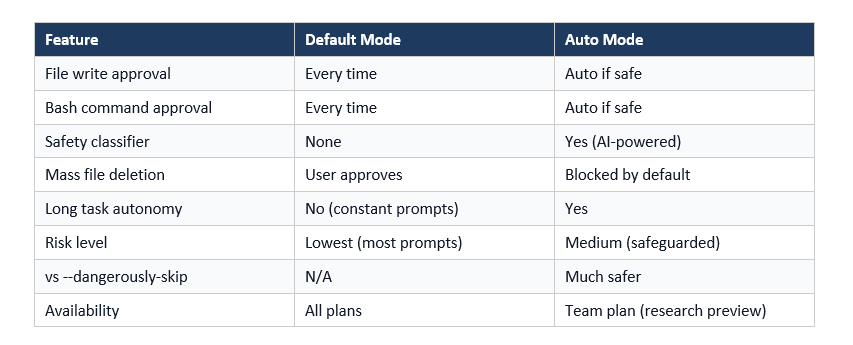
The --dangerously-skip-permissions flag has its legitimate uses. Sandboxed CI pipelines, Docker containers, and isolated testing environments where data loss is irrelevant are valid cases. But developers should not run it on a live codebase or production environment, and Anthropic explicitly says so.
Auto mode changes the calculus. You get the workflow speed of skipping prompts for routine tasks, but you keep a safety net for actions that genuinely warrant human review. For most real development work on actual codebases, auto mode is the right choice over the danger flag.
What Auto Mode Blocks by Default
The classifier targets a specific set of high-risk actions. According to Anthropic's documentation, the default block list includes:
- Mass file deletion (wiping multiple files or directories at once)
- Sensitive data exfiltration (attempts to read and transmit private credentials, API keys, or personal data)
- Malicious code execution (running scripts that attempt to damage systems or escalate privileges)
- Actions that create ambiguous or irreversible consequences in unclear environments
Critically, the classifier is not a static rules engine. It uses an AI model to assess context, which means it can reason about ambiguous situations. If the user's intent is unclear, the classifier errs on the side of caution.
That said, it is not perfect. Anthropic is transparent about this: the classifier may still allow some risky actions when user intent is ambiguous, or when Claude lacks enough context about the environment to assess risk accurately. It may also occasionally block benign actions. This is a research preview, not a production-hardened security system.
My take: the occasional false positive (a safe action getting blocked) is a far better outcome than a false negative (a destructive action getting approved). I will gladly click one extra confirmation per session to avoid an accidental mass delete.
Don't just use ChatGPT. Learn to build custom LLM agents, RAG pipelines, and full-stack Agentic AI apps in our intensive 6-week program.
How to Enable Claude Code Auto Mode
Getting auto mode running depends on where you are using Claude Code. Here are the steps for each environment:
Command Line (CLI)
- Run: claude --enable-auto-mode to activate auto mode
- Once enabled, cycle to it within a session using Shift+Tab
- Auto mode persists across commands in the session until you switch back
VS Code Extension
- Open VS Code Settings and navigate to Claude Code settings
- Toggle auto mode to On
- In an active session, select auto mode from the permission mode dropdown
Claude Desktop App
- Auto mode is disabled by default on the desktop app
- Go to Organization Settings, then Claude Code to toggle it on
- Requires Team plan access as of March 2026
For Enterprise Admins
Admins who want to disable auto mode organization-wide can set "disableAutoMode": "disable" in managed settings. This blocks both the CLI flag and the VS Code extension toggle for all users in the organization.
Enterprise and API rollout was described by Anthropic as coming in the days immediately following the March 24 launch. If you are on an API plan and do not see it yet, it is likely in the queue.
Who Can Use Auto Mode and When It Is Rolling Out
As of March 25, 2026, auto mode is available as a research preview on the Claude Team plan. It works with both Claude Sonnet 4.6 and Opus 4.6.
Anthropic's rollout schedule:
- Team plan users: Available now (March 24, 2026)
- Enterprise plan users: Rolling out in the days after launch
- API users: Rolling out in the days after launch
- Claude Desktop app: Disabled by default, toggleable via Organization Settings
The research preview label matters. Anthropic is actively collecting feedback and plans to improve the classifier over time. Expect changes to the block list and classifier behavior as real-world usage surfaces edge cases.
If you are a Team plan subscriber and do not see the option, check for a Claude Code update. The feature requires the latest version of the CLI and VS Code extension.
What to Watch Out For: Honest Limitations
I want to be direct here because the developer community deserves a straight read, not a press release rewrite.
Auto mode is not a sandbox. Anthropic recommends using it in isolated environments. That means containers, VMs, or dedicated dev environments, not directly on your production machine or live codebase if you can avoid it. The classifier reduces risk, it does not eliminate it.
The classifier can be wrong. Ambiguous intent is the primary failure mode. If Claude does not have enough context about your environment, a risky action might slip through. Always review what Claude has done after a long autonomous run, especially file deletions or network calls.
Token cost goes up slightly. Every tool call now involves an additional classifier evaluation. For small tasks this is negligible. For a 200-tool-call session, the overhead adds up. Not a dealbreaker, but worth budgeting for.
None of these limitations make auto mode a bad feature. They make it a responsible preview. Anthropic shipping this with caveats and a clear block list, rather than overpromising, is the right approach.
Frequently Asked Questions
What is Claude Code auto mode?
Claude Code auto mode is a permission setting launched by Anthropic on March 24, 2026 that allows Claude to execute file writes and bash commands without requesting user approval for each action. A dedicated AI safety classifier reviews every tool call before execution, blocking high-risk actions like mass file deletion or sensitive data exfiltration.
How do I enable Claude Code auto mode?
In the CLI, run claude --enable-auto-mode, then use Shift+Tab to cycle to it in a session. In VS Code, toggle it on in Claude Code settings, then select it from the permission mode dropdown. In the desktop app, enable it via Organization Settings, then Claude Code.
Is Claude Code auto mode safe to use on production code?
Anthropic recommends using auto mode in isolated environments such as containers, VMs, or sandboxes. While the classifier blocks the most common destructive actions, it is a research preview and can miss edge cases. Do not run it directly on production systems without a backup strategy.
What is the difference between auto mode and --dangerously-skip-permissions?
The --dangerously-skip-permissions flag bypasses all permission checks with zero safety net. Auto mode adds a pre-execution AI classifier that blocks destructive actions before they run. Auto mode is meaningfully safer for real-world development work and is designed to replace the danger flag for most use cases.
Does auto mode cost more to use?
Yes, slightly. Every tool call in auto mode runs through an additional classifier model, which increases token consumption, cost, and latency by a small amount. Anthropic has not published exact overhead figures, but describes the impact as small.
Which Claude models work with auto mode?
Auto mode works with both Claude Sonnet 4.6 and Claude Opus 4.6 as of the March 2026 launch.
When will auto mode be available for Enterprise and API users?
Anthropic announced that Enterprise plan and API users would receive access in the days immediately following the March 24, 2026 Team plan launch. If you are on those plans and do not see it, check for a Claude Code update.
Can Enterprise admins disable auto mode for their organization?
Yes. Enterprise admins can set "disableAutoMode": "disable" in managed settings to block auto mode for all users on the CLI and VS Code extension.
Can we automate Claude Code completely with auto mode?
Auto mode allows Claude Code to execute file writes and bash commands without per-action approvals, but it is not fully unattended. If the classifier repeatedly blocks an action, it will prompt the human. For truly headless automation, it is still safest to run in a sandboxed container.
Does Claude Code automatically use agents in auto mode?
Auto mode affects permission behavior, not agent invocation. Claude Code does not automatically spin up sub-agents in auto mode. It gives Claude more autonomy to execute tool calls without waiting for user approvals.
Does Claude Code auto mode automatically select the model?
No. Model selection (Sonnet 4.6 vs Opus 4.6) remains manual. Auto mode only governs permission behavior, not which underlying model handles the task.
Is auto mode safer than --dangerously-skip-permissions?
Yes, significantly. The danger flag bypasses all permission checks with no safety net. Auto mode adds a pre-execution classifier that blocks mass deletions, data exfiltration, and malicious code execution. For any work on real codebases, auto mode is the right choice.
What does the auto mode classifier block by default?
The classifier blocks mass file deletion, sensitive data exfiltration, malicious code execution, and ambiguous high-risk actions. The block list is managed by Anthropic and will be updated as the research preview matures.
Which plans support Claude Code auto mode?
As of March 2026, auto mode is available to Team plan users as a research preview. Enterprise and API plan rollout was announced for the days immediately following the March 24 launch. Free plan availability has not been announced.
The only comprehensive program designed to take you from basic prompting to building interactive Artifacts, custom integrations, and deploying production-ready code with Claude Code.
Recommended Reads
If this update has you thinking about Claude and AI coding tools, these posts from Build Fast with AI go deeper on related topics:
7 AI Tools That Changed Developer Workflow (March 2026)
150 Best Claude Prompts That Work in 2026
Claude AI 2026: Models, Features, Desktop & More
Best AI for Coding 2026: Nemotron vs GPT-5.3 vs Opus 4.6
Every AI Model Compared: Best One Per Task (2026)
References
- Auto Mode for Claude Code - Official Anthropic Blog
- Claude Code Permission Modes Documentation
- How Claude Code's New Auto Mode Prevents AI Risks - ZDNET, March 25 2026
- Auto Mode for Claude Code - Simon Willison's Weblog, March 24 2026
Claude Code Gets Auto Mode to Reduce Interruptions - Techzine Global, March 25 2026

