




Most people running Claude at 25% capacity are not limited by the model. They are limited by how they write prompts for it.
I've spent the last eight months testing prompts across Claude Opus 4.6, GPT-5.4, and Gemini 3.1 Pro - in real workflows, not toy demos. The single clearest finding: Claude rewards explicit, structured instructions in a way no other frontier model does. Write a vague prompt and Claude gives you a competent but generic output. Write a specific, structured prompt and the output quality jumps visibly.
This guide covers 150 Claude prompt categories organized by use case, the 8 advanced patterns that unlock the best outputs, and real examples you can copy directly. Every prompt links to the free Build Fast with AI Prompt Library - where you can save, search, filter by category, and build your own custom versions.
Why Claude Needs a Different Prompting Approach
Claude takes you literally. That sentence changes everything about how you write prompts.
GPT-5.4 fills in gaps. Ask for 'a dashboard' and GPT infers you want charts, filters, and data visualization. Claude gives you exactly a dashboard container - because that is what you asked for. This is not a weakness. Anthropic made this choice deliberately, and once you understand it, Claude's instruction-following becomes a real advantage.
Three structural differences that matter most for Claude Opus 4.6:
XML tags work natively here. Anthropic trains on structured prompts internally - wrapping your instructions in <task>, <context>, and <output_requirements> tags activates pattern recognition that produces measurably more structured outputs.
The 1M-token context window is genuinely different. You can paste entire codebases, year-long document histories, or 300-page reports. Anthropic's MRCR v2 benchmark shows Opus 4.6 maintaining 76% accuracy at 1M tokens, compared to 18.5% for GPT-5.2 at the same length.
Role prompts have more depth here. Be specific: 'senior developer who has maintained legacy Django codebases for 8 years' gives you a noticeably different result than 'Python expert.'
Claude vs ChatGPT vs Gemini: Which Wins for Each Task
Every "which AI is better" article published before 2026 is obsolete. Models now release quarterly updates, benchmark scores shift monthly, and the right choice is task-specific, not universal.
Here is the honest breakdown based on independent testing from Improvado, MindStudio, and my own workflows:
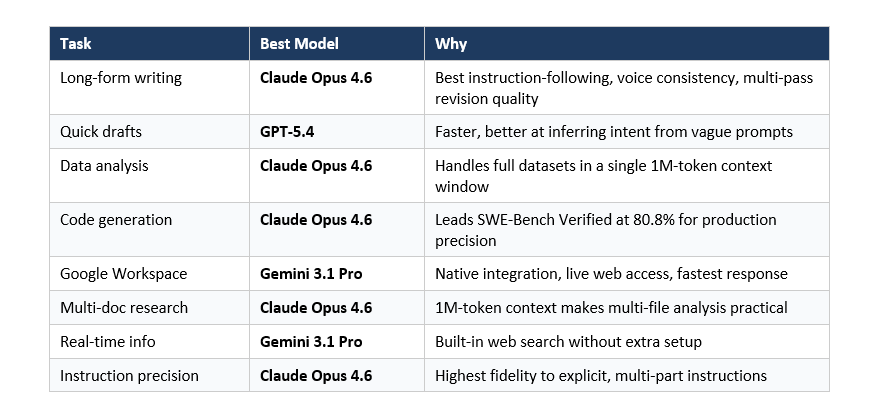
The highest-leverage approach for serious AI workflows is not choosing one model. It is routing tasks to the right model. Claude for deep writing and analysis. GPT for quick-turnaround work. Gemini for anything inside Google's ecosystem. See the free Prompt Library for categorized prompts across all three models.
7 Claude Prompt Categories with Real Examples
All 150 prompts across these categories are available in the Build Fast with AI Prompt Library. Below are 2–3 tested examples from each category.
Writing and Editing
Claude Opus 4.6 leads on writing quality for precision tasks - instruction-following, voice consistency, and long-form coherence across multi-pass revisions. The key is being explicit about your audience, format, length, and tone before Claude writes a single word.
Prompt 1 - Long-Form Article with Voice Matching:
You are a senior tech journalist who writes for founders and developers.
Tone: direct, opinionated, no corporate hedging.
Task: Write a 1,200-word article arguing that [TOPIC].
Audience: Technical founders at Series A stage.
Format: One strong hook sentence, then 4 H2 sections, then a punchy 2-sentence close.
Do NOT include: passive voice, "in today's landscape," generic CTAs, or unsupported claims.
Prompt 2 - Developmental Edit:
I am giving you a draft. Your job:
1. Identify the 3 biggest structural weaknesses (not grammar).
2. Ask me 2 clarifying questions before revising.
3. After I answer, produce a revised version.
Do not revise until I answer the questions. [PASTE DRAFT]
Browse all 20 Writing prompts: buildfastwithai.com/tools/prompt-library
Coding and Debugging
Claude Opus 4.6 scores 80.8% on SWE-Bench Verified - the highest among frontier models for production coding precision. Its 1M-token context window makes full codebase review practical in a way that is not possible on models with 128K-capped contexts.
Prompt 1 - Security Audit:
You are a senior security engineer with 10 years of experience in web app vulnerabilities.
Review the following code for: SQL injection, XSS, insecure auth, exposed secrets.
For each issue: severity (Critical/High/Medium/Low), exact location, why dangerous, corrected snippet.
Output format: numbered list, severity label first. [PASTE CODE]
Prompt 2 - Bug Fix with Explanation:
The following code produces this error: [ERROR MESSAGE].
Diagnose the root cause step by step before writing any fix.
Then give the corrected code and explain in 2 sentences what was wrong.
[PASTE CODE]
Browse all 20 Coding prompts: buildfastwithai.com/tools/prompt-library
Data Analysis and Research
Claude's 1M-token context window makes it the strongest model for multi-document research and full-dataset analysis. Paste entire research papers, full spreadsheets, and year-long document histories into single Claude sessions - something that requires chunking and multiple API calls on every other model.
Prompt 1 - Dataset Interpretation:
You are a senior data analyst.
Task: Identify the top 3 trends, flag anomalies, suggest 2 follow-up analyses.
Format: Trend summary (2 sentences each), anomaly table (value | why unusual | what to investigate).
Context: This data is from [DESCRIBE CONTEXT]. [PASTE DATA]
Browse all 20 Data Analysis prompts: buildfastwithai.com/tools/prompt-library
Product Management and Strategy
Claude handles complex, multi-stakeholder reasoning better than any other model when you give it named perspectives and specific constraints. Vague strategy questions produce generic frameworks. Specific context produces actionable output.
Prompt 1 - PRD Writing:
You are a senior PM at a B2B SaaS company.
Write a PRD for: [FEATURE NAME].
Include: problem statement (2 sentences), 3 user stories, 3 success metrics with targets,
2 non-goals, 2 technical constraints. Audience: Engineering team. No marketing language.
Browse all 15 Product Management prompts: buildfastwithai.com/tools/prompt-library
Email and Communication
Claude respects 'do not include' constraints more reliably than GPT or Gemini. For emails and outreach, this makes a measurable difference - outputs stay on-tone without filler phrases, generic CTAs, or hedging language.
Prompt 1 - Cold Outreach:
Write a cold email to [ROLE] at [COMPANY TYPE].
Goal: [SPECIFIC OUTCOME]. Tone: Direct, peer-to-peer, no sales language. Length: Under 100 words.
Do NOT include: flattery, 'I hope this finds you well,' product feature lists, generic CTA.
Include: One specific observation about their company that shows I did research.
Browse all 15 Email prompts: buildfastwithai.com/tools/prompt-library
Learning and Explanation
Claude's strength here is depth of reasoning. When you ask it to explain a concept, it doesn't just define it - it gives you analogies, edge cases, and misconceptions. Ask it to teach via Socratic dialogue and the output quality is genuinely better than most other models.
Prompt 1 - ELI5 with Precision:
Explain [CONCEPT] to someone who knows [PREREQUISITE] but has never encountered [CONCEPT].
Use one concrete real-world analogy. Then give one example of where the analogy breaks down.
Keep the explanation under 200 words.
Browse all 10 Learning prompts: buildfastwithai.com/tools/prompt-library
Creative and Brainstorming
Claude's reasoning depth makes it stronger than other models at structured creativity techniques. SCAMPER, Six Thinking Hats, and reverse brainstorming produce more differentiated outputs on Claude when you name stakeholders and constraints explicitly.
Prompt 1 - Reverse Brainstorm:
We want to [GOAL].
First, brainstorm 10 ways we could guarantee failure at this goal.
Then, for each failure mode, invert it into a success strategy.
Flag the 3 inverted strategies that are most counterintuitive but have genuine upside.
Browse all 15 Creative prompts: buildfastwithai.com/tools/prompt-library
8 Advanced Prompt Patterns That Only Work Well on Claude
These patterns work on other models to varying degrees, but Claude's training responds to them in a more predictable, higher-quality way. I use all eight in production workflows.
1. XML Tag Structuring
Wrap multi-part instructions in <task>, <context>, and <output_requirements> tags. Anthropic uses this format in their own internal system prompts - Claude recognizes it natively and produces more structured outputs.
2. Chain-of-Thought Activation
Ask Claude to reason step-by-step before answering. The key is requesting the reasoning explicitly - not just the conclusion. Add: 'Show your reasoning process. If you are uncertain at any step, say so and explain what information would change your answer.'
3. Role and Constraint Pairing
Always pair a specific role with a constraint. A role without a constraint lets Claude default to generic advice. The constraint forces it to earn each recommendation with evidence.
4. Explicit Output Format Specification
Claude responds to format instructions better than any other model - but you must be explicit. Vague format requests produce vague formats. Specify section titles, length limits, and structure type for every output.
5. Negative Space Prompting
Telling Claude what NOT to include is often as powerful as telling it what you want. Claude respects do-not constraints more reliably than GPT or Gemini. Use it for every professional output.
6. Iterative Refinement in the Context Window
Build on prior output within the same session rather than re-prompting from scratch. Ask Claude to identify weaknesses, ask clarifying questions, and only revise after you answer. This is where the 1M-token window becomes a real workflow advantage.
7. Named Stakeholder Perspective Analysis
Claude handles perspective-taking better when you name specific stakeholders rather than asking for 'different views.' Named perspectives produce more differentiated, less generic outputs than abstract role descriptions.
8. Context-First Prompting for Recommendations
Give context before asking. Most users skip this and get generic frameworks. Provide company type, stage, budget, what you sell, who you sell to, what you have already tried, and your biggest constraint - then ask for the recommendation.
Don't just use ChatGPT. Learn to build custom LLM agents, RAG pipelines, and full-stack Agentic AI apps in our intensive 6-week program.
5 Prompt Mistakes That Kill Claude Output Quality
These patterns consistently underperform on Claude Opus 4.6 - even when they work on GPT or Gemini.
Mistake 1: Vague creative requests. 'Write something creative about the future of work' gives Claude zero signal about audience, length, format, tone, or your angle. Be specific about all four before asking.
Mistake 2: Implicit technical expectations. 'Build me a dashboard' produces exactly a dashboard container - nothing inside - because you did not specify what belongs there. List every component explicitly.
Mistake 3: Suppressing reasoning on a reasoning model. 'Quick answer, don't overthink it' asks Claude to suppress the capability you are paying for. If you want speed, use Claude Haiku 4.5.
Mistake 4: Opinion requests without context. 'What is the best marketing strategy?' has zero information about your company, market, or what you have already tried. Always give context first.
Mistake 5: Context dumps without priority. Pasting 50 facts without flagging which 5 matter most causes Claude to process everything equally. Structure your context before pasting.
How to Build Your Own Claude Prompt Library
A prompt library is not a folder of text files. It is a system - and the habit that separates occasional AI users from people who consistently get 10x better output from the same tools.
Three things every working prompt library needs: categorization by task type (not by tool), a tested output example for each prompt, and version history for your best prompts. The first version of any prompt is almost never the best one.
The fastest way to start: use the free Prompt Library at Build Fast with AI. Filter by model (Claude, ChatGPT, Gemini), tag by use case, copy with one click, and save your custom versions without juggling seven different apps.
One workflow tip: after any AI session where you got an output you were genuinely happy with, spend two minutes saving the exact prompt that produced it. Two minutes of saving eliminates an hour of rediscovery later.
Frequently Asked Questions
What is Claude Opus 4.6 and how does it differ from Claude Sonnet 4.6?
Claude Opus 4.6 is Anthropic's most capable model, built for complex reasoning, long-form analysis, and high-precision instruction-following. Claude Sonnet 4.6 balances performance and cost - faster and cheaper but less capable on nuanced multi-step tasks. Both support 1M-token context windows. Use Opus for analysis, coding review, and strategy; Sonnet works well for writing drafts and summarization.
Do Claude prompts work on the free tier?
Most prompts in this guide work with Claude's free tier, which uses the Sonnet model. For complex reasoning, multi-document analysis, and production-level coding, Claude Pro with Opus 4.6 produces significantly better outputs. The Prompt Library at buildfastwithai.com/tools/prompt-library works with any Claude tier.
How is prompting Claude different from prompting ChatGPT?
Claude takes instructions literally - it will not infer what you probably meant. This means Claude rewards explicit, detailed prompts more than GPT does. The biggest structural differences: XML tags work natively in Claude; the 1M-token context allows full-document prompting; and Claude respects 'do not include' constraints more reliably.
What are Claude XML tags and when should I use them?
XML tags like <task>, <context>, and <output_requirements> are structural markers that help Claude parse multi-part instructions. Anthropic uses this format in their internal system prompts, so Claude recognizes it natively. Use XML tags whenever your prompt has 3 or more distinct sections with different purposes.
What is the Build Fast with AI Prompt Library and is it free?
The Build Fast with AI Prompt Library is a free, searchable tool at buildfastwithai.com/tools/prompt-library. It contains 150+ tested prompts for Claude, ChatGPT, and Gemini, organized by use case. Filter by category, copy with one click, and save your customized versions. No sign-up required to browse.
Can I use these Claude prompts via the Anthropic API?
Yes. Every prompt in this guide works via the Anthropic API. The model string for Claude Opus 4.6 is claude-opus-4-6. For high-frequency production workflows, convert prompts into system prompts - they benefit from prompt caching, which reduces cost and latency on the API.
Which Claude model should I use for writing prompts?
Use Claude Opus 4.6 for precision writing tasks where instruction-following, voice consistency, and multi-pass revision quality matter. Use Claude Sonnet 4.6 for quick first drafts. Use Claude Haiku 4.5 for high-volume, simple tasks like classification, short summaries, or rapid-fire rewrites.
How does Claude compare to Gemini 3.1 Pro for prompting in 2026?
Claude leads on writing quality, instruction precision, and complex multi-step reasoning. Gemini 3.1 Pro leads on speed (Flash-Lite under 200ms), native Google Workspace integration, and real-time web access without additional setup. For professional prompt workflows outside Google's ecosystem, Claude Opus 4.6 is the stronger choice.
Recommended Reads
If you found this useful, these posts from Build Fast with AI go deeper on related topics:
Claude AI 2026: Models, Features, Desktop App and What's Coming Next
Best ChatGPT Prompts in 2026: 200+ Prompts for Work, Writing and Coding
GPT-5.3-Codex vs Claude Opus 4.6 vs Kimi K2.5: Who Actually Wins?
GPT-5.4 vs Gemini 3.1 Pro (2026): Which AI Wins?
Prompt Engineering Salary 2026: US, India, Freshers Pay Guide
The only comprehensive program designed to take you from basic prompting to building interactive Artifacts, custom integrations, and deploying production-ready code with Claude Code.

