


I type prompts into AI tools about 50 times a day. Not as a test. As actual work. And after thousands of iterations across ChatGPT, Gemini, and Claude, I've learned one uncomfortable truth: most people are using maybe 20% of what these tools can actually do — purely because their prompts are too vague.
This isn't a list of "fun" prompts. It's a working library of the best ChatGPT prompts I use to get real outputs — organized by use case, optimized for 2026's models, and tested until they stopped disappointing me.
And if you want to save, organize, and search your own prompt collection, I'd also point you toward the free Prompt Library tool at BuildFastWithAI — it's built exactly for this workflow.
What Makes a ChatGPT Prompt Actually Good?
A good ChatGPT prompt does four things: it gives the model a role, gives it context, defines the output format, and sets constraints. That's it. Most prompts people write do one of those things — that's why the output is mediocre.
Here's the frame I use for every prompt I write:
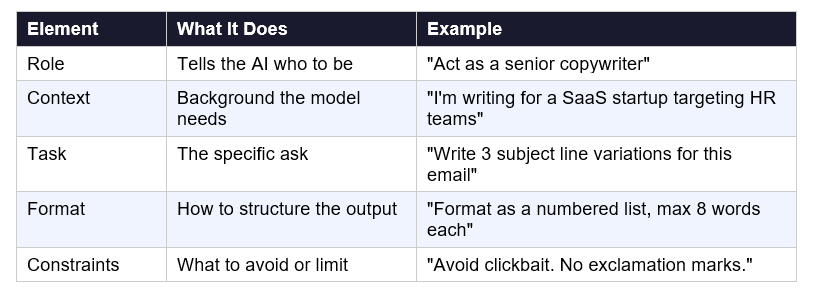
My honest take: you don't need all five elements in every prompt. But you need at least three. A prompt with only the task — "write me an email" — leaves the model guessing on role, format, and constraints, and you end up editing more than you saved.
Best ChatGPT Prompts for Productivity and Work
How Do I Use ChatGPT to Manage My Day?
This is one of the most common questions I see. Here's the prompt I actually use every morning:
"Act as my personal productivity coach. I have [X hours] available today. Here are my tasks: [list]. Prioritize them using the Eisenhower Matrix (Urgent/Important quadrants). Flag anything I should delegate or drop entirely. Then build me a time-blocked schedule with 15-minute buffer periods between deep work sessions."
Why this works: it forces prioritization before scheduling, which is the order humans should do it but usually don't. The Eisenhower Matrix instruction removes ambiguity about what 'prioritize' means.
Best ChatGPT Prompt for Writing Professional Emails
"Write a professional email to [job title] at [company type] requesting [specific outcome]. Tone: direct but warm. Length: under 120 words. End with a single, clear ask — not multiple options. Do not use the phrase 'I hope this email finds you well.'"
The last instruction matters more than it sounds. That phrase is a GPT fingerprint and signals template-generated email. Remove it.
What Is a Good ChatGPT Prompt for Meeting Prep?
"I have a meeting about [topic] with [audience — e.g., investors, direct reports, a client]. My goal: [outcome you want from the meeting]. Give me: 5 questions I'm likely to be asked and ideal answers, 3 key points I should lead with, and one thing I should NOT say in this context."
ChatGPT Prompt for Weekly Reports
"Summarize the following work log into a weekly status update for my manager. Tone: professional and concise. Format: 3 sections — Completed, In Progress, Blockers. Keep each bullet to one line. Here is the log: [paste log]"
Best ChatGPT Prompts for Writing
How Do I Write Better Blog Posts Using ChatGPT?
"I'm writing a blog post targeting the keyword [keyword] for an audience of [audience description]. Give me: an H1 title (under 60 characters), 6 H2 section headings that match search intent, and a 150-word intro that opens with a surprising stat or counterintuitive claim. Do not start the intro with 'In this article.'"
This prompt does the structural work before you write a word. That structure — specifically the H2 headings — is what determines whether the post ranks. Get that right first.
ChatGPT Prompt for Social Media Captions
"Here is a blog post excerpt: [paste text]. Write 3 LinkedIn captions and 3 Instagram captions repurposing this content. Each should: stand alone (no 'read more at...' teasers), lead with a hook in the first sentence, end with a question or call to action. LinkedIn tone: thought leadership. Instagram tone: personal and conversational."
Best Prompt for Editing and Proofreading
"Edit the following text for: 1) grammar and punctuation, 2) passive voice (convert to active where possible), 3) sentences over 25 words (flag and suggest shorter versions), 4) any jargon a general reader wouldn't understand. Track your changes and explain the most important edits. Here is the text: [paste]"
Best ChatGPT Prompts for Coding
What Is the Best ChatGPT Prompt for Debugging Code?
"I have a bug in my [language] code. Expected behavior: [describe]. Actual behavior: [describe]. Error message: [paste]. Here is the relevant code: [paste]. Diagnose the root cause, explain why it is happening in plain English, and provide a corrected version with comments on what you changed and why."
The 'explain in plain English' instruction is important if you're mid-level or junior. You want to understand the fix, not just copy-paste it.
ChatGPT Prompt for Code Review
"Review this [language] function for: security vulnerabilities, performance bottlenecks, and readability. For each issue, rate its severity (Critical/Major/Minor), explain the problem, and provide a corrected code snippet. Here is the code: [paste]"
How to Write a Function Using ChatGPT
"Write a [language] function that [does X]. Requirements: handles the edge case of [Y], returns [data type], includes error handling for [Z], and has inline comments explaining the logic. Optimize for readability, not performance. Include a unit test for the main case."
Gemini AI Prompts That Work Differently
What Are Gemini AI Prompts Good For?
Gemini has two capabilities that ChatGPT's base tier doesn't: real-time web access and native Google Workspace integration. These gemini ai prompts are built around those strengths.
Best Gemini Prompt for Research
"Search the web for the 5 most credible recent sources on [topic] from 2024 to 2026. For each source, give me: the main argument or finding, the source credibility (publication type, author background), and one direct implication for [your context]. Cite all sources with URLs."
Gemini Prompt Examples for Google Docs
"I'm working in Google Docs on [document type]. Draft a [length]-word [section name] for this document. Audience: [audience]. Tone: [formal/conversational]. The key message to convey is: [message]. Do not use buzzwords. Write as if a senior professional wrote it from scratch, not a template."
Gemini Prompt for Competitive Research
"Search the web and compare [Company A] and [Company B] on: pricing, core features, target customer, user review sentiment (from G2 or Capterra), and one recent product update for each. Present as a comparison table with a 3-sentence summary of which company wins in each category and why."
I use this every time I'm researching tools for a client. Gemini with web access pulls current pricing and reviews that ChatGPT simply can't access without plugins.
ChatGPT Prompt Templates (Copy-Paste Ready for 2026)
What Are ChatGPT Prompt Templates and How Do I Use Them?
A ChatGPT prompt template is a reusable prompt structure with [bracketed placeholders] for variable information. You save the template, fill in the brackets each time, and get consistent outputs without starting from scratch.
Here are 6 templates I use weekly — ready to copy:
Sales Outreach Template
"Write a cold outreach message to [job title] at a [company type] company. We offer [product/service] that helps [target audience] achieve [specific outcome]. Requirements: under 100 words, reference one pain point specific to their industry, end with a soft CTA (15-minute call or a single question). No corporate jargon."
Content Brief Template
"Create a content brief for a blog post on [topic]. Include: primary keyword, target audience, search intent, suggested H1 title, 6 H2 headings, tone and style notes, 3 competitor URLs to beat, and estimated word count range. Format as a structured brief a freelance writer can use without additional instructions."
Job Description Template
"Write a job description for a [role] at a [company type] company. The team is [size], and this role reports to [manager title]. Required skills: [list]. Nice to have: [list]. Tone: direct, not corporate. Lead with what makes this role interesting, not a list of responsibilities. Keep under 400 words."
Performance Review Template
"Write a self-performance review paragraph for someone in the [role] role. Strengths this quarter: [list]. Key achievement: [describe achievement with metric if possible]. Area for growth: [one honest area]. Tone: confident and growth-oriented. Length: 150 words."
Product Description Template
"Write a product description for [product name]. Target customer: [describe]. Key benefit: [main benefit]. Secondary benefits: [list 2-3]. Tone: [professional/casual/playful]. Format: one punchy headline, a 2-sentence value statement, and 4 bullet points. No superlatives like 'best-in-class' or 'industry-leading.'"
Customer Support Response Template
"Write a customer support response to this complaint: [paste complaint]. Tone: empathetic but not sycophantic. Structure: acknowledge the issue, give the reason in one sentence, provide a clear resolution or next step, end with a genuine offer to help further. Under 100 words. Do not start with 'I apologize for the inconvenience.'"
Try it free: Save all these templates to your personal prompt library — search, organize, and copy them in one click. → buildfastwithai.com/tools/prompt-library
Where to Build Your Own Prompt Library (And Why You Need One)
What Is a Prompt Library?
A prompt library is an organized, searchable collection of your best-performing AI prompts. Instead of rewriting the same prompts from memory, you pull from a tested bank. Power users consistently outperform casual users not because they're smarter, but because they systematize.
How Do I Organize My ChatGPT Prompts?
Most people store prompts in a Notes app or a random doc — which means they never find them again. The better approach: categorize by use case (writing, coding, research, outreach), tag by model (ChatGPT, Gemini, Claude), and include a short note on what each prompt does well.
If you'd rather skip the manual setup, the BuildFastWithAI Prompt Library tool at buildfastwithai.com/tools/prompt-library does exactly this — it's free, built for AI power users, and lets you save, tag, and search your prompts without juggling seven different apps.
What's the Difference Between a Prompt Template and a Prompt Library?
A prompt template is a single reusable structure with placeholders. A prompt library is a collection of templates plus tested prompts organized for quick access. The library is the system; the template is the unit inside it.
Most serious AI users maintain both: a personal library of their tested prompts, and a set of structured templates they adapt per project.
FAQ: ChatGPT Prompts, Gemini Prompts & Prompt Libraries
What are the best ChatGPT prompts for beginners?
The best ChatGPT prompts for beginners are single-task prompts with clear context. Start with: summarization ("Summarize this in 5 bullet points for a non-expert"), explanation ("Explain [concept] like I'm 14"), and rewriting ("Rewrite this to sound more professional"). Add role and format instructions as you get comfortable.
How do I write a good ChatGPT prompt?
Write a good ChatGPT prompt by including four elements: a role ("Act as a financial analyst"), context ("I'm analyzing a startup's Series A pitch deck"), a specific task ("Identify 3 financial red flags"), and a format instruction ("Present as a table with Risk, Severity, and Recommendation columns"). More specificity always beats vagueness.
What is the difference between ChatGPT prompts and Gemini AI prompts?
ChatGPT and Gemini respond to the same prompt structure, but Gemini has native Google Workspace integration and real-time web search that ChatGPT's base tier lacks. For research, competitive analysis, and Google Docs work, Gemini prompts should leverage web search explicitly. For creative writing and long-form content, ChatGPT-4o and Claude tend to produce more natural outputs.
Where can I find a free ChatGPT prompt library?
Free ChatGPT prompt libraries exist at BuildFastWithAI (buildfastwithai.com/tools/prompt-library), PromptHero, FlowGPT, and PromptBase's free tier. The BuildFastWithAI library is specifically designed for productivity and professional use cases, with categorized templates you can copy and adapt immediately.
What are the best AI prompts for writing content?
The best AI prompts for writing content specify the keyword, target audience, format, and tone before asking for output. For example: "Write a 150-word intro for a blog post targeting [keyword]. Audience: [describe]. Open with a surprising stat. Do not start with 'In this article.' Tone: direct and conversational." This level of instruction consistently outperforms vague requests.
Does downloading a 1000 ChatGPT prompts PDF actually help?
Honestly? Not much. Bulk prompt PDFs give you quantity but zero context on when, why, or how to use each prompt. A smaller, well-organized prompt library you actually understand and customize is worth 100x more than 1,000 generic prompts you downloaded once and never revisited. Build your own library from prompts you've tested.
What are Gemini prompt examples for business use?
Effective Gemini prompt examples for business include: competitive analysis prompts that use web search ("Search and compare [Company A] and [Company B] pricing and features"), Google Workspace prompts ("Draft a project brief in Google Docs style for [project]"), and research synthesis prompts ("Find and summarize the 3 most recent industry reports on [topic] with source links").

