


Pick a side. That's what Tyler posted on X last week, dropping logos of Anthropic's Claude Code and OpenAI's Codex side by side. The replies blew up. Developers picked teams, shared workflows, debated benchmarks, and posted advanced tips that most people had never seen. I spent the week going through every thread, running both tools, and digging into the actual numbers. Here's what I found.
This isn't another surface-level comparison. Both tools have matured significantly in 2026. Claude Code hit a $2.5 billion annualized run rate with 135,000 GitHub commits per day flowing through it. OpenAI's Codex launched its macOS desktop app in February 2026 and now runs on GPT-5.3-Codex. The gap that existed six months ago has closed considerably, and the debate has gotten genuinely interesting.
I'll cover benchmarks, pricing, power-user workflows, and the honest truth about when each tool actually wins. No marketing. No hype. Just what developers are actually saying.
What Are Claude Code and Codex, Really?
Both tools are agentic coding agents, not autocomplete tools. You describe a task in plain language, the agent plans an approach, writes code across multiple files, runs your tests, and iterates until the task passes. That's where the similarity ends.
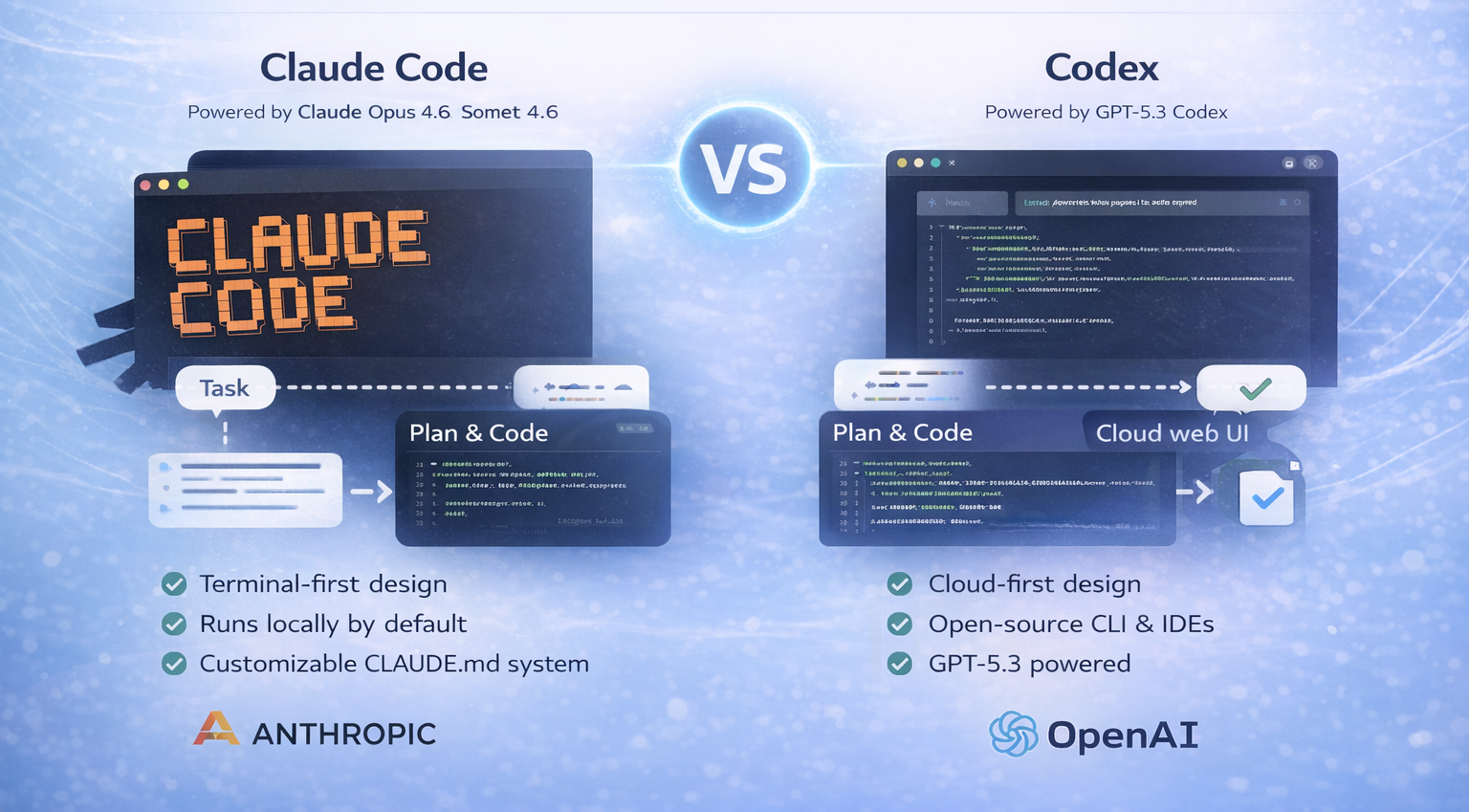
Claude Code is Anthropic's terminal-first coding agent, launched in May 2025 and powered by Claude Opus 4.6 and Sonnet 4.6. It runs locally by default, integrates deeply with your terminal and IDE, and ships with a rich configuration system built around CLAUDE.md files, custom slash commands, sub-agents, and hooks. Anthropic has since expanded it to VS Code, JetBrains, the Claude desktop app, Slack, and a web interface. As of early 2026, it runs across more surfaces than most developers realize.
OpenAI's Codex in 2026 is completely different from the original 2021 version that was deprecated in March 2023. The new Codex is a full autonomous software engineering agent powered by GPT-5.3-Codex. It runs across a cloud web agent at chatgpt.com/codex, an open-source CLI built in Rust and TypeScript, IDE extensions for VS Code and Cursor, and a macOS desktop app. The CLI has over 59,000 GitHub stars and hundreds of releases as of early 2026. Codex is cloud-first by default and leans into async, delegated workflows.
The framing most developers inherited is wrong: Claude Code is the local tool, Codex is the cloud tool. That was already incomplete before 2026. Both now operate across multiple surfaces. The real difference is the workflow philosophy. Claude Code keeps you in the loop while the task runs. Codex is designed for you to define a task, hand it off, and review the branch later.
Benchmark Reality Check: The Numbers That Actually Matter
OpenAI warned developers in early 2026 that SWE-bench Verified is becoming unreliable due to contamination concerns and recommended SWE-bench Pro instead. With that caveat in mind, here's where things actually stand:
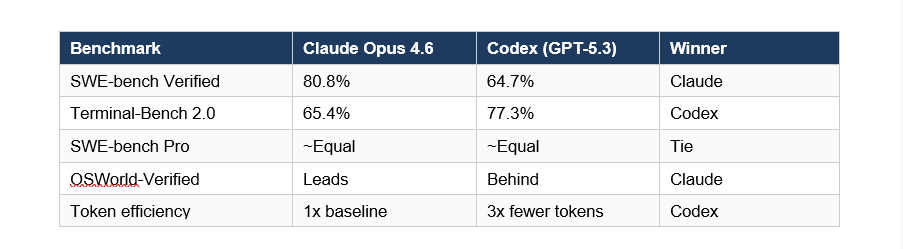
The 23-point gap on SWE-bench Verified is significant. It reflects Claude's superior ability to understand complex codebases and make changes that solve problems without introducing new bugs. On real-world bug-fixing tasks across large repositories, that gap matters.
But Codex leads on Terminal-Bench 2.0 at 77.3% versus Claude's 65.4%. Terminal-Bench measures terminal-based debugging specifically, and GPT-5.3-Codex was optimized for exactly that kind of structured, multi-step reasoning. Developers on Reddit and Hacker News describe Codex as catching logical errors, race conditions, and edge cases that Claude misses on those specific task types.
My take: Claude wins on codebase understanding and complex refactoring. Codex wins on terminal debugging tasks and token cost. If your work is mostly fixing bugs in well-scoped issues, Codex is legitimately competitive. If you're doing architectural work across a large repo, Claude is the better choice right now.
Pricing Breakdown: What You Actually Pay
Pricing in this space changes fast, but here's the state of things as of March 2026:
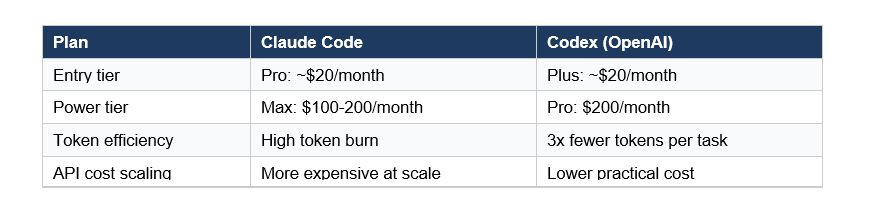
The listed prices look similar, but the practical cost difference is wider than they suggest. Because Claude Code's reasoning is token-intensive, heavy daily users frequently hit limits on the $20 Pro plan and find the Max tier at $100-200/month is what they actually need for sustained work. Codex tends to use roughly 3x fewer tokens for equivalent tasks, which means the Plus tier stretches further.
For API users building products on top of these tools, the token efficiency gap translates directly to infrastructure costs. Codex is meaningfully cheaper at scale. That math changes what's buildable for startups watching LLM API spend.
That said, Claude Code's Max plan at $200/month includes access to Opus 4.6 with high effort settings, which is where you get that 80.8% SWE-bench performance. You're paying for quality. The question is whether your workflow justifies it.
Claude Code's Secret Weapons: CLAUDE.md and Parallel Agents
This is where Claude Code genuinely pulls ahead for developers who invest in the setup. The configuration system is unlike anything Codex offers.
CLAUDE.md: Persistent Project Intelligence
CLAUDE.md is a Markdown file in your project root that Claude reads at the start of every session. It acts as a persistent project brief: your coding conventions, architecture decisions, key commands, patterns to follow, and anti-patterns to avoid. Claude reads it before acting, which means it writes new code that matches your style rather than imposing its own.
The files can be hierarchical. You can have one project-level CLAUDE.md and individual ones in subdirectories, and Claude prioritizes the most specific one when working in that context. You can also save personal preferences to global memory that applies across all projects, or local memory that's project-specific and git-ignored.
Best practice: keep CLAUDE.md under 200 lines. Move detailed instructions into skills, which only load when invoked. Use @file imports for large reference docs instead of pasting content. The goal is a tight, fast-loading context that gives Claude what it needs without bloating every message.
Slash Commands and Sub-Agents
Custom slash commands let you define reusable workflows as Markdown files. Create a .claude/commands/deploy.md and /deploy becomes a command that runs your entire deployment procedure. Use $ARGUMENTS to pass parameters. Teams share these via the .claude/ directory committed to git.
Sub-agents are specialized AI instances Claude can delegate to. You define them at .claude/agents/ with their own system prompts, tool restrictions, and model choices. A code-reviewer agent that runs automatically after changes. A security-audit agent with read-only permissions. A test-writer that specializes in your testing framework. These run in parallel and their verbose output stays in their own context, keeping the main session clean.
The /batch command runs changes across many files in parallel. The --worktree flag creates an isolated git worktree for each task, so parallel sessions don't interfere. This is where Claude Code starts feeling like AI-native development rather than AI-assisted development.
Codex's Strengths: Speed, Cost, and Open Source
Codex wins on three things developers care about: raw speed, token cost, and transparency. If Claude Code is the meticulous senior developer who understands your whole codebase, Codex is the fast contractor who ships working code quickly and lets you review the diff.
The open-source CLI is a genuine differentiator. Codex CLI is fully published on GitHub under an open license. Developers can inspect exactly what it does, modify it, and build on top of it. Claude Code is closed source. For teams with security or compliance requirements who want full transparency into their tooling, this matters.
Codex's GitHub integration is considered best-in-class. Several developers on X described the pull request workflow as their favorite feature: define a task, Codex runs in an isolated cloud container with your repository preloaded, produces a branch with a clean diff, and you review it as a PR. For teams running parallel workstreams across a backlog of discrete tasks, this async model is genuinely faster than Claude's interactive approach.
Ben Holmes, whose workflow breakdown got significant traction on X, described Codex as doing rigorous self-checking code while praising Claude for clearer plans and better conversations. That framing stuck because it's accurate: Codex is stronger at structured, well-scoped tasks. Claude is stronger at the exploratory, architectural work where you don't fully know what you want until you're doing it.
Advanced Developer Workflows Shared on X
The X thread that kicked off this debate surfaced power-user tips that aren't in any documentation. Here are the ones that showed up repeatedly from verified developers:
Parallel sessions via --worktree: Run claude --worktree feature-auth to create an isolated git worktree and start a session in it. Run multiple Claude Code instances in parallel on different features without branch-switching conflicts. Some developers run 4-6 parallel sessions simultaneously on a single codebase. Each worktree is automatically cleaned up if no changes are made.
/init for new projects: Running /init in a new repository generates a CLAUDE.md file that describes your project structure and confirms your current configuration. This is the fastest way to onboard Claude to an existing codebase. Several developers noted that /init on a repo with poor documentation produced better project descriptions than the team's actual README.
Custom sub-agents as a code review layer: The emerging workflow that got the most discussion: use Claude Code to generate features, then define a Codex-style reviewer sub-agent that runs before any PR merge. Some developers are literally calling the Codex API from within a Claude Code sub-agent. There's even a community-built 'Codex Skill' for Claude Code that lets you prompt Codex directly from a Claude session.
/compact and /clear discipline: Heavy users are obsessive about context hygiene. /compact replaces conversation history with a compressed summary when context usage exceeds 80%. /clear wipes it entirely when switching to a completely different task. The practical difference: /compact when you want Claude to remember the thread, /clear when you want a fresh start. Running out of context mid-task without compacting is the most common reason for degraded output quality.
HANDOFF.md for complex multi-session tasks: For tasks that take longer than a single context window, power users create a HANDOFF.md file that captures current state: what's been tried, what worked, what didn't, and what the next agent needs to pick up. A fresh Claude session with nothing but the HANDOFF.md path produces better results than trying to compress an entire long session.
Hooks for automated workflows: Hooks fire before and after specific Claude Code events. Developers use them to automatically run Prettier after file modifications, validate inputs before allowing edits, send Slack notifications when Claude needs input, and trigger CI checks after commits. One developer described a hook setup that runs a full type-check after every file edit, meaning Claude only accepts changes that pass TypeScript compilation.
The Hybrid Workflow: Why Power Users Use Both
The binary framing of the X debate is somewhat misleading. The developers with the most sophisticated setups are using both tools. The split that emerged from the thread discussions:
Claude Code for architecture, planning, and complex multi-file changes. Codex for debugging, code review, and long autonomous runs on well-scoped tickets. The two tools complement each other rather than substitute. Claude's deep codebase understanding and interactive collaboration is best for work where you need to steer the task mid-flight. Codex's async cloud execution and lower token burn is best for defined tasks you can hand off and review later.
An increasingly common pattern: write features with Claude Code, submit to Codex for review before merging. One developer described Codex as catching race conditions and edge cases that Claude missed on 3 out of 5 complex TypeScript tasks. That's not a condemnation of Claude; it's a recognition that having a second specialized pass catches different classes of errors.
The AI code tools market is projected to reach $91 billion by 2035, growing at 27.6% annually from $7.9 billion in 2025. That's large enough for multiple winners. The ecosystem is already treating these as complementary rather than competing, and the tooling is following: community-built Claude Code skills that call Codex directly, shared agent configurations that use both APIs, and team workflows that formalize which tool handles which task type.
Which Tool Should You Choose?
Based on actual benchmark data, pricing, and developer feedback from the X thread, here's the honest answer:
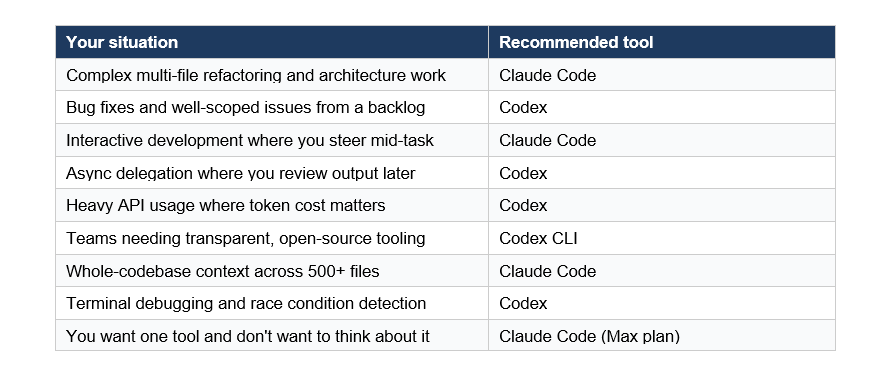
For most web development and complex engineering work, Claude Code is the stronger default in 2026. The 80.8% SWE-bench Verified score isn't just a marketing number; it reflects real capability on the kinds of tasks that slow teams down. But Codex has earned its place for specific workflows, and the token cost advantage is real money at scale.
My recommendation: start with Claude Code on the Max plan for a month. Build your CLAUDE.md files and custom commands. If you find yourself running lots of parallel isolated tasks where you just want to review diffs, add Codex to your workflow for those cases. The two-tool setup adds overhead, but for active teams shipping multiple features in parallel, it pays for itself quickly
Want to build AI-powered apps and autonomous coding agents like these?
Join Build Fast with AI's Gen AI Launchpad, an 8-week structured program to go from 0 to 1 in Generative AI.
Register here: buildfastwithai.com/genai-course
Frequently Asked Questions
What is the difference between Claude Code and OpenAI Codex?
Claude Code is Anthropic's terminal-first coding agent powered by Claude Opus 4.6, focused on interactive deep-reasoning development with persistent project context via CLAUDE.md files. OpenAI Codex is a cloud-first autonomous agent powered by GPT-5.3-Codex, designed for async task delegation with a multi-surface interface including a CLI, web agent, and macOS desktop app. Claude Code scores 80.8% on SWE-bench Verified; Codex scores 64.7%.
Which is better for complex coding tasks, Claude Code or Codex?
Claude Code outperforms Codex on complex multi-file refactoring and codebase understanding tasks. It scores 80.8% on SWE-bench Verified compared to Codex's 64.7%. Codex leads on Terminal-Bench 2.0 at 77.3% versus Claude's 65.4%, making it the stronger choice for structured terminal debugging and well-scoped ticket-based work.
Is Claude Code or Codex cheaper to use?
Both start at approximately $20/month. In practice, Codex uses roughly 3x fewer tokens per task, making it meaningfully cheaper at scale. Claude Code's reasoning is token-intensive, and heavy users often find the $100-200/month Max plan is needed for sustained daily work. For API users building products on these tools, Codex's token efficiency translates to significantly lower infrastructure costs.
What is CLAUDE.md and why do developers use it?
CLAUDE.md is a Markdown file placed in your project root that Claude Code reads at the start of every session. It functions as a persistent project brief: coding conventions, architectural patterns, key commands, and rules Claude should follow. This prevents Claude from scanning the codebase to figure out your stack and style on every session. Developers keep it under 200 lines and use it alongside custom slash commands and sub-agents to create repeatable, consistent coding workflows.
Can you use Claude Code and Codex together?
Yes, and many power users do. The emerging hybrid workflow uses Claude Code for feature generation and complex architectural work, then runs Codex as a reviewer before PR merges. There is even a community-built Claude Code skill (Codex Skill by klaudworks) that lets you call Codex directly from a Claude Code session. Several developers on X described Codex catching race conditions and edge cases that Claude missed on complex TypeScript tasks.
Does Claude Code or Codex have better GitHub integration?
Both tools integrate with GitHub. Claude Code's /install-github-app command sets up the Claude GitHub App for pull request workflows. Codex is widely praised for its GitHub integration, with cloud-based tasks running in isolated containers with your repository preloaded, producing clean branches and reviewable diffs. Developers frequently cite Codex's PR workflow as its strongest feature for team-based async development.
What are the best slash commands to learn in Claude Code?
The most impactful Claude Code slash commands are /init (generates CLAUDE.md for a new project), /compact (compresses conversation history when context usage exceeds 80%), /clear (resets context entirely between unrelated tasks), /plan (enables plan mode before executing changes), /cost (shows token spend for the current session), and /batch (runs parallel changes across many files). Custom slash commands created in .claude/commands/ let teams build repeatable workflows like /deploy and /security-review.
Is Codex CLI open source?
Yes. The Codex CLI is fully open source, published on GitHub, and has over 59,000 stars as of early 2026. It is built in Rust and TypeScript. This transparency lets developers inspect exactly how it works, modify it for their needs, and build tooling on top of it. Claude Code is closed source, though Anthropic maintains detailed documentation and has been responsive to feature requests from the developer community.
Recommended Reads
If you found this useful, these posts from Build Fast with AI go deeper on related topics:
References
Claude Code vs Codex CLI 2026 Comparison - NxCode (March 2026) - nxcode.io
Codex vs Claude Code: AI Coding Assistants Compared - DataCamp (Feb 2026) - datacamp.com
Claude Code vs OpenAI Codex - PinkLime (Feb 2026) - pinklime.io
Claude vs Codex: Comparison of AI Coding Agents - WaveSpeedAI (Jan 2026) - wavespeed.ai
OpenAI Codex Plugins Target Enterprises, Not Developers - Implicator AI (Mar 2026) - implicator.ai
Claude Code vs Codex in 2026: Steer Live or Delegate Async - LaoZhang AI (Mar 2026) - blog.laozhang.ai
Codex vs Claude Code: 2026 Comparison for Developers - Leanware (Feb 2026) - leanware.co
How to Use Claude Code: Skills, Agents, Slash Commands - ProductTalk (Feb 2026) - producttalk.org
Extend Claude with Skills - Claude Code Official Documentation - code.claude.com

