


What Is Claude Cowork? The 2026 Guide That Actually Makes Sense
Software stocks lost billions the day Anthropic launched this thing. ServiceNow dropped 23%. Salesforce fell 22%. Thomson Reuters cratered 31%. That should tell you everything about how seriously the market is taking Claude Cowork.
So what actually is it, and should you care?
I've spent time going through everything Anthropic has published, every hands-on review, and every enterprise announcement since the January 12, 2026 launch. Here is the straightforward breakdown that most articles are getting wrong.
What Is Claude Cowork, Really?
Claude Cowork is Anthropic's agentic AI desktop tool that does actual work on your files instead of just answering questions about them. Launched on January 12, 2026, it lives inside the Claude desktop app as its own tab, sitting right next to Chat and Code.
The simplest way I can put it: you give Claude access to a folder on your computer, describe what you want done, and it goes and does it. Reorganize your downloads folder. Pull expense data from a pile of screenshots into a spreadsheet. Draft a report from scattered notes. All without you manually copying and pasting anything.
Anthropic describes it as "Claude Code for the rest of your work." That framing matters. Claude Code turned out to be a general-purpose agent that developers were using for almost everything. Cowork strips out the terminal interface that scared non-developers away and wraps the same underlying technology in something anyone can use.
One important detail that most coverage missed: Cowork is not running Claude on your raw files. According to a technical analysis by developer Simon Willison, it uses Apple's VZVirtualMachine virtualization framework to boot a custom Linux environment. Your files get mounted into that sandbox. This means Claude literally cannot reach anything you have not explicitly handed it.
Quotable stat: Claude Cowork launched on January 12, 2026, initially limited to Claude Max subscribers paying $100 or $200 per month, then expanded to Pro users on January 16 and Team and Enterprise plans on January 23.
What Can Claude Cowork Actually Do?
Claude Cowork handles multi-step file tasks, document creation, research synthesis, and now connects to over a dozen enterprise software tools. Here is what that looks like in practice.
File and document tasks it handles out of the box:
- Sort and rename files in a folder based on custom rules
- Pull data from screenshots or PDFs into a formatted spreadsheet
- Write first drafts of reports from your raw notes
- Create and edit presentations and Word documents
- Pass context between Cowork, Excel, and PowerPoint without restarting
Enterprise connectors available as of February 25, 2026:
- Google Drive, Gmail, Google Calendar
- DocuSign, LegalZoom
- FactSet, MSCI, S&P, LSEG
- Apollo, Clay, Outreach, SimilarWeb
- WordPress, Harvey
Plugins cover these departments:
- HR, Design, Engineering, Operations
- Financial analysis, Investment banking, Equity research, Private equity, Wealth management
- Marketing, Sales, Enterprise search, Productivity
Anthropic released 11 open-source plugins at the January 30, 2026 plugin launch. Organizations can also build their own private plugins using Plugin Create, one of the launch tools, and distribute them internally through private marketplaces connected to GitHub.
I find the plugin architecture genuinely interesting here. Scott White, Anthropic's head of enterprise product, put it well: the goal is for Cowork to feel like "a specialist for your company specifically, not just Claude for legal, but Cowork for legal at your company." That is a meaningfully different product vision than a generic chatbot.
How to Set Up Claude Cowork Step by Step
Setting up Claude Cowork takes under 10 minutes if you are on a paid Claude plan. Here is the exact process.
Step 1: Check your plan. Cowork requires a paid Claude subscription. As of March 2026, it is available in research preview on Pro, Max, Team, and Enterprise plans. Free accounts do not have access.
Step 2: Download the Claude desktop app. Go to claude.com/download. Cowork is available on both macOS and Windows (Windows support with full feature parity launched alongside the February 2026 enterprise update).
Step 3: Open the Cowork tab. Inside the desktop app, you will see three tabs: Chat, Code, and Cowork. Click Cowork.
Step 4: Grant folder access. Cowork asks you to select a folder on your computer. This is the only folder it can see. Claude cannot read or edit anything outside what you explicitly grant.
Step 5: Set your global instructions. This is a feature I think people sleep on. You can tell Claude your preferred tone, your role, your formatting preferences, and it applies that across every session. You can also set folder-specific instructions that activate when you are working in a particular directory.
Step 6: Connect any external tools. If you use Google Drive, Gmail, or any of the supported MCP connectors, you can link them from the connectors panel. Each connector only gets access when you enable it.
Step 7: Queue up your first task. Write a plain-English description of what you want done. You do not need to wait for one task to finish before starting another. You can queue tasks in parallel.
One thing worth knowing before you hand Claude a folder: it can take destructive actions if instructed to, including deleting files. Give it clear guidance upfront about anything you do not want touched.
Claude Cowork vs Claude Code: The Real Difference
Claude Cowork is Claude Code with a non-developer interface and a pre-configured file sandbox. The underlying AI is identical. But the practical differences matter depending on who you are.
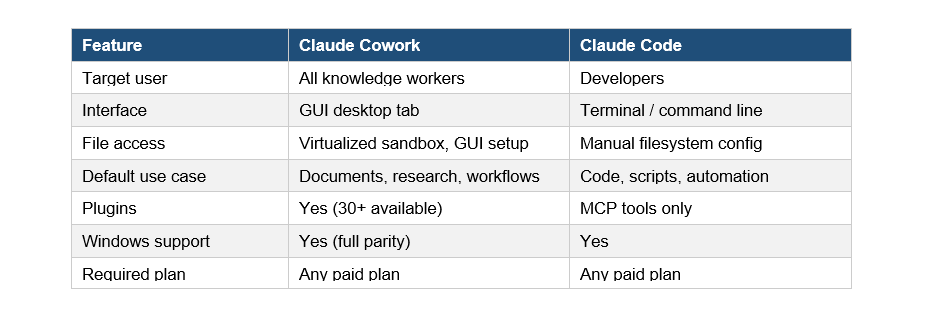
The honest contrarian take: I think for power users, Claude Code is still more capable right now. It has been around longer, the community has built more tooling around it, and there are fewer guardrails between you and what you want to accomplish. Cowork is genuinely better for non-developers and for teams that need something they can deploy and explain to a 50-person department without a training session.
What Claude Code did for engineering teams in 2025, Anthropic is betting Cowork does for every other department in 2026. Kate Jensen, Anthropic's Head of Americas, said it directly: "Engineers think about Claude Code as a tool they just couldn't live without anymore. We expect every knowledge worker will feel that way about Cowork."
Claude Cowork Pricing and Plans
Claude Cowork is included in all paid Anthropic plans as a research preview, with no separate charge as of March 2026. Here is the breakdown.
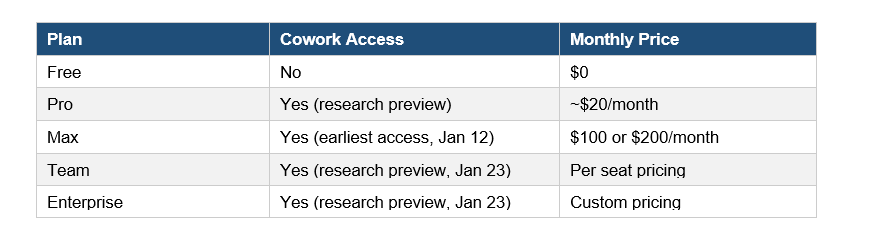
Because Cowork is still in research preview, Anthropic has not announced a separate pricing tier for it. The current access is bundled with your existing plan.
For enterprise deployments, pricing becomes more complex once you factor in private plugin development and organizational admin controls. Direct enterprise contracts are handled through Anthropic's sales team at anthropic.com/contact-sales.
My honest read: the value proposition is currently strongest for Max subscribers who have access to all the enterprise connectors and can actually test the full feature set. Pro access is there, but the plugin ecosystem and connector integrations are more constrained at lower tiers.
Is Claude Cowork Safe for Work Documents?
Yes, Claude Cowork is designed with explicit access controls that prevent it from reading or modifying anything outside the folder you assign. But "designed with controls" and "risk-free" are not the same thing.
Here is what the safety architecture actually looks like:
- File isolation. File isolation
Cowork runs inside a virtualized Linux environment using Apple's VZVirtualMachine. Your files are mounted into that container. Claude cannot reach outside that mount point.
- Explicit permission model. Explicit permission model
You choose which folders it can see. You choose which connectors it can access. None of this is on by default.
- Action confirmation. Action confirmation
Before taking significant actions, Cowork asks for your approval. You can steer or correct it mid-task.
- Enterprise admin controls. Enterprise admin controls
Team and Enterprise accounts get organizational-level settings that control which connectors and plugins employees can access. Admins can run private plugin marketplaces connected to internal GitHub repositories.
What should still give you pause: Cowork can delete files if instructed to, and there is always a chance it misinterprets an instruction. Back up anything irreplaceable before pointing it at a folder.
For regulated industries, Anthropic's enterprise contracts include data handling terms that address compliance requirements. For sensitive financial or legal work, the FactSet, MSCI, LegalZoom, and Harvey integrations were specifically built with enterprise data governance in mind.
My Honest Take: What It Gets Right and Wrong
I have been watching Anthropic's product releases closely for a while. Cowork is genuinely impressive in one specific way: it solves the "last mile" problem that made Claude Code inaccessible to most people.
What it gets right:
- The virtualization approach is smart. Sandboxing files into a Linux container is a real security architecture, not just a policy statement.
- Global and folder instructions are underrated. Being able to encode how you work once and have it persist across sessions removes a major friction point.
- The plugin marketplace model scales. Enterprises building their own mini-apps for specific workflows is a much more sustainable adoption path than hoping a general tool fits everyone.
What it gets wrong, or at least what is still missing:
- The research preview label is doing a lot of work here. Multiple testers noted display bugs and rough edges. This is not a finished product yet.
- Windows support only arrived in the latest update. Mac-first releases in 2026 still feel like a choice that cuts off a huge portion of enterprise users on day one.
- The pricing transparency for Team and Enterprise is basically nonexistent right now. If you are evaluating this for a 500-person company, you are going to a sales call before you know what anything costs.
Anthropic's Head of Economics Peter McCrory acknowledged during the February 25, 2026 enterprise launch that the company has not yet seen widespread labor market displacement from Cowork. That is an honest thing to say. Whether that changes depends entirely on adoption speed.
Frequently Asked Questions
What is Claude Cowork?
Claude Cowork is Anthropic's agentic AI productivity tool that reads, creates, and edits files on your computer, connects to enterprise software like Google Drive and Gmail, and runs multi-step work tasks autonomously. It launched on January 12, 2026 as a research preview.
How is Claude Cowork different from regular Claude chat?
Regular Claude chat answers questions and generates text in a conversation window. Cowork actually accesses files you grant it, executes multi-step tasks in parallel, connects to external tools via MCP connectors, and completes work without you needing to manually copy outputs. It is closer to a virtual assistant than a chatbot.
Is Claude Cowork free?
No. As of March 2026, Cowork requires a paid Anthropic subscription. It is available in research preview on Pro (approximately $20/month), Max ($100 or $200/month), Team, and Enterprise plans. Free accounts do not have access.
What is the difference between Claude Cowork and Claude Code?
Both run on the same underlying AI. Claude Code is built for developers and runs in a terminal interface where you configure your own file access. Cowork is a graphical desktop tool pre-configured for non-developers, with plugin support and a simpler setup process. For technical power users, Claude Code is still more flexible.
What apps does Claude Cowork connect to?
As of February 25, 2026, Cowork connects to Google Drive, Gmail, Google Calendar, DocuSign, LegalZoom, FactSet, MSCI, S&P, LSEG, Apollo, Clay, Outreach, SimilarWeb, WordPress, and Harvey. Organizations on Team and Enterprise plans can also build private custom plugins.
Is Claude Cowork safe for sensitive business documents?
Cowork uses Apple's VZVirtualMachine virtualization to run a sandboxed Linux environment. It can only access folders you explicitly grant. It confirms significant actions before proceeding. That said, it can delete files if instructed to, so backing up important data before use is still smart. Enterprise plans include organizational admin controls for compliance use cases.
How do I set up Claude Cowork?
Download the Claude desktop app from claude.com/download, open the Cowork tab, select a folder you want Claude to access, set your global instructions, and optionally connect external tools like Google Drive or Gmail. The full setup takes under 10 minutes for most users.
Does Claude Cowork work on Windows?
Yes. Windows support with full feature parity (including file access, multi-step tasks, plugins, and MCP connectors) launched alongside the February 2026 enterprise update. Earlier versions were macOS-only.

