



24GB VRAM Local AI: Which Models Actually Fit on a Single GPU?
A 24GB GPU is one of the best local-AI hardware tiers because it can run genuinely capable models on one accelerator. An RTX 3090, RTX 4090 or other 24GB card can handle many current 20B to 35B-class models with sensible quantization, without requiring a multi-GPU server. Current local-model guides repeatedly place Qwen3.6-27B, DeepSeek R1 32B, gpt-oss-20b, Mistral Small and similar models in this range.
But there is an important catch: 24GB does not mean 24GB is available for model weights. Runtime overhead and the KV cache also consume VRAM, and the cache grows with context length. Google makes this explicit in its Gemma quantization guidance, which notes that weight memory alone does not describe the VRAM needed to run a model.
That changes how you should choose a model. The best 24GB model is not the biggest one that can technically load. It is the model that fits while leaving enough room for context, tool calls and normal runtime overhead. In practice, that usually means targeting roughly 14GB to 20GB of weight memory rather than trying to fill the whole card.
QUICK ANSWER
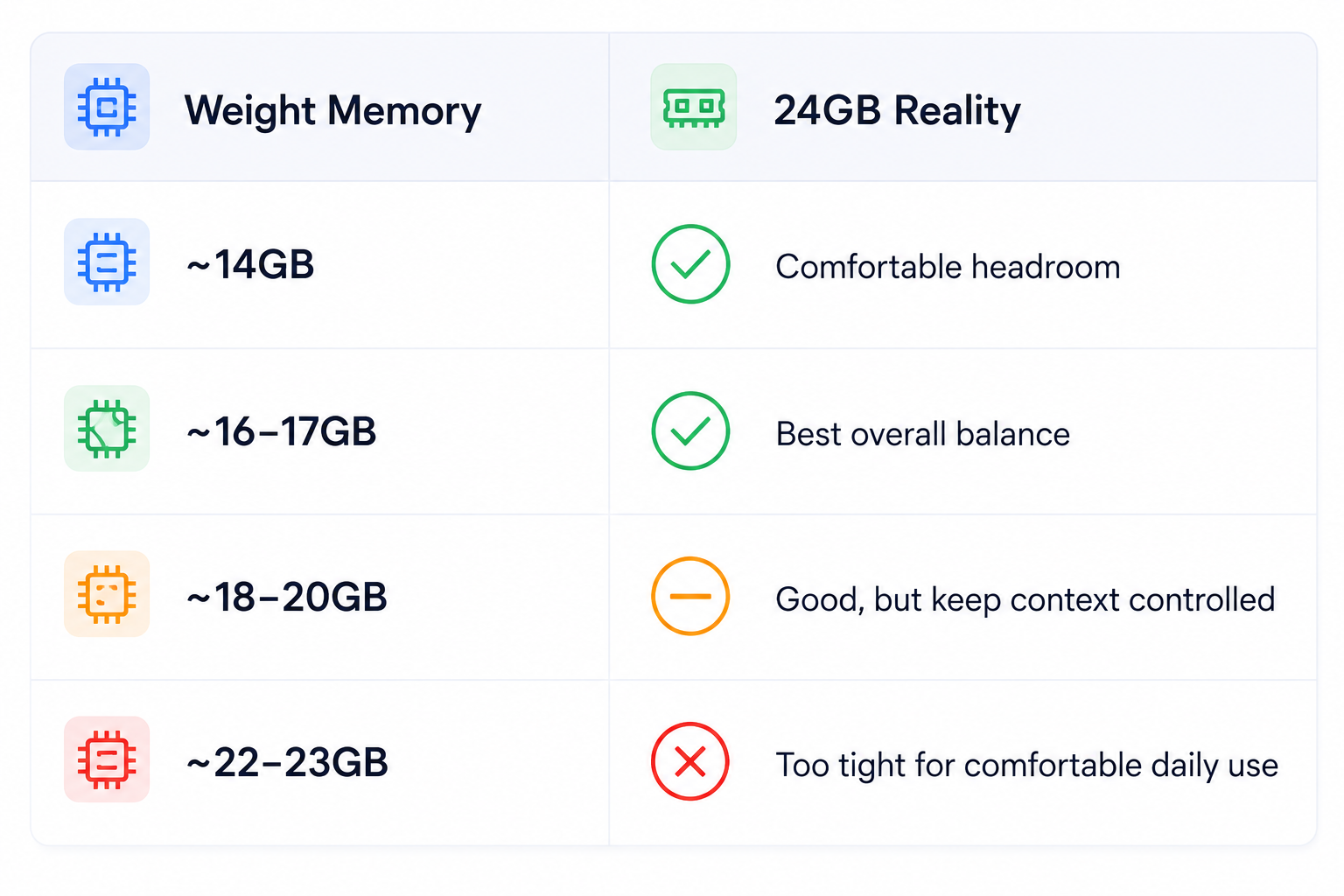
The practical 24GB sweet spot in 2026 is modern 20B to 35B-class models with efficient quantization. Strong choices include Qwen3.6-27B, Qwen3.6-35B-A3B, suitable Gemma 4 variants, Mistral Small 3.2 24B, gpt-oss-20b and DeepSeek R1 32B. Current local-model guides place Qwen3.6-27B around 16 to 17GB at Q4_K_M, DeepSeek R1 32B around 18 to 20GB, and gpt-oss-20b around 14GB in their cited configurations.
For most users, Qwen3.6-27B is the best default because it leaves enough memory for useful context. DeepSeek R1 32B is a stronger choice when reasoning matters more than headroom. gpt-oss-20b is attractive when you want a capable reasoning model with more room for context and other processes.
The blunt rule: a 20GB model that leaves several gigabytes free is usually more practical than a 23GB model that barely fits.
1. What 24GB of VRAM Actually Has to Hold
Inference memory is split between model weights, KV cache and runtime buffers. The exact balance depends on precision, context length, batch size and the framework. This is why a model can fit at short context and fail when you increase the prompt or run several requests.
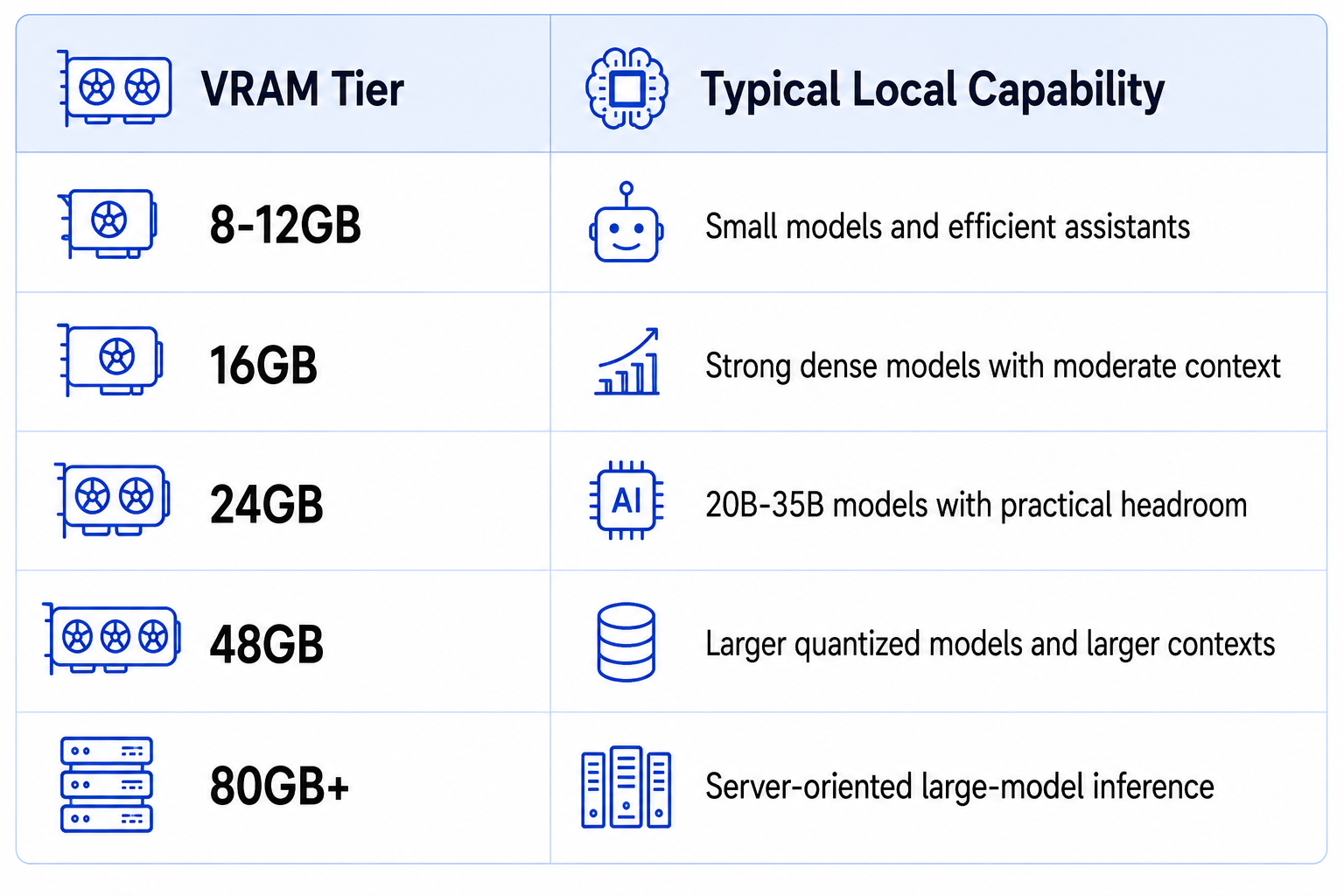
Twenty-four gigabytes is a sweet spot, not a hard parameter-count limit.
2. Why Quantization Changes Everything
A 27B model in BF16 needs roughly 54GB just for weights. At 4-bit, the theoretical weight storage drops to about 13.5GB before metadata and runtime overhead. That is why 4-bit quantization is central to consumer local AI.
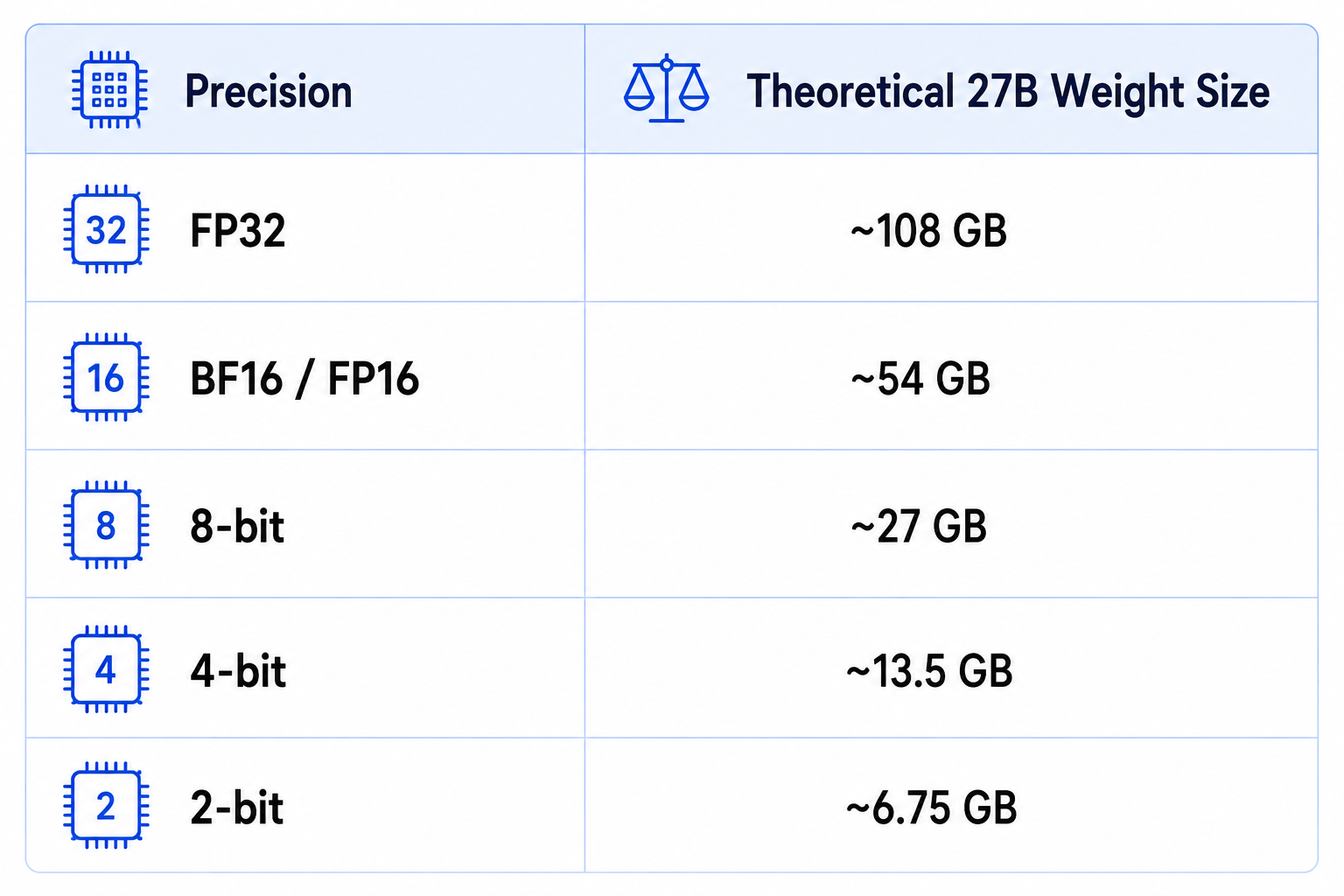
Real files are larger than the theoretical minimum because quantized formats contain scales, metadata and implementation-specific overhead. The practical Q4 footprints reported for current 27B to 32B models land closer to the 16GB to 20GB range.
3. Best Overall: Qwen3.6-27B
Qwen3.6-27B is currently the cleanest 24GB recommendation. Current local guides report a Q4_K_M footprint around 16.8GB, which leaves useful room for the KV cache and runtime. It is positioned as a strong general model for coding, chat and agent tasks.
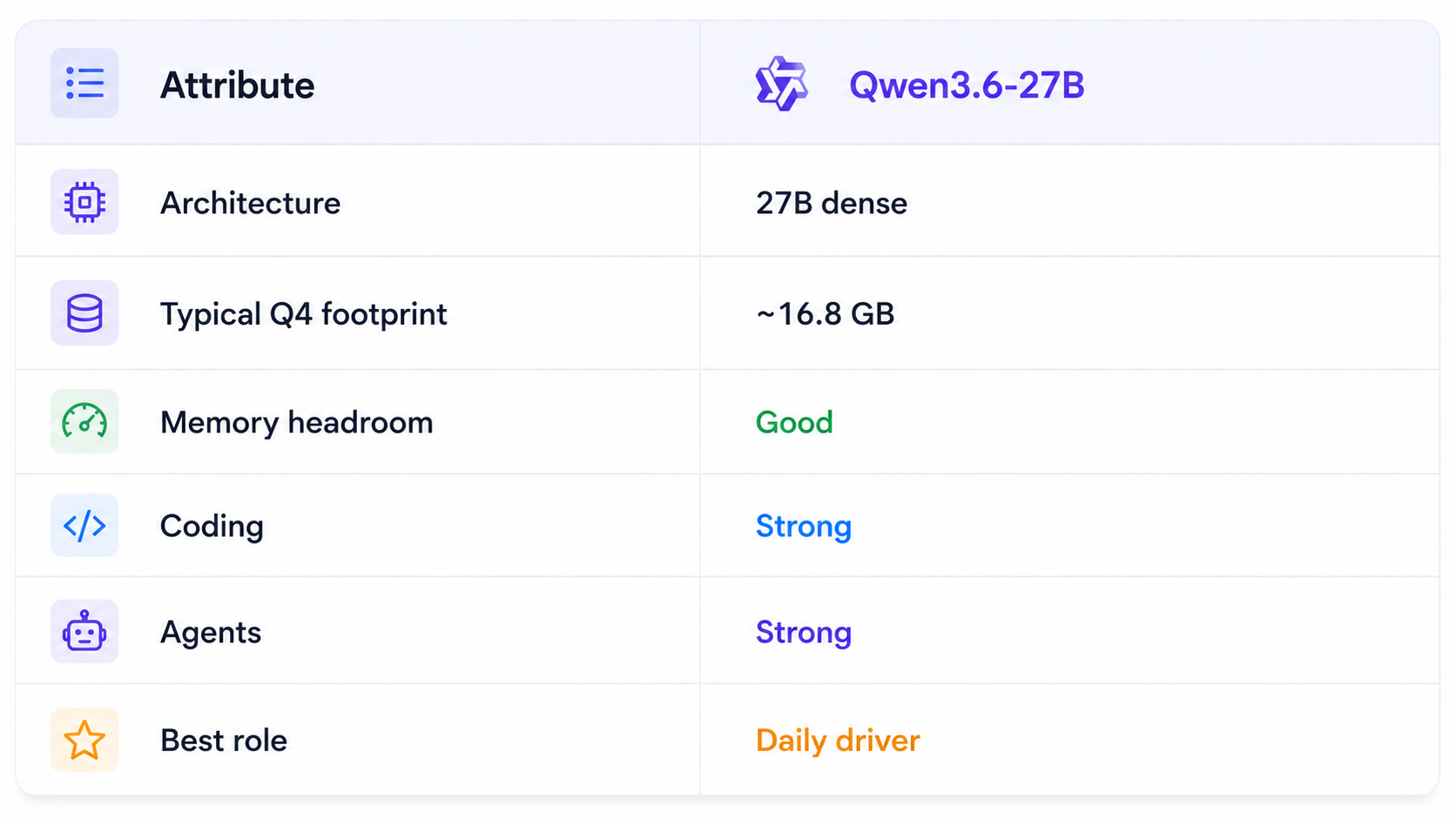
This is the key 24GB lesson: model quality and hardware fit are a joint optimization problem. A slightly smaller model with more context headroom can outperform a larger one in real agent workflows.
4. Qwen3.6-35B-A3B: The MoE Sweet Spot
Qwen3.6-35B-A3B is a 35B-total MoE model with about 3B active parameters. Current 24GB-focused guides estimate around 20GB at Q4_K_M.
The active 3B parameter path helps decoding efficiency, but the full quantized weight set still determines memory use. This is the classic MoE trap: active parameters influence compute, not the total storage requirement.
If your runtime supports the model well, it is one of the most interesting configurations for pushing capability toward the upper edge of a 24GB card.
5. Gemma 4 and Google's Consumer-GPU Strategy
Google's Gemma work is a useful demonstration of what quantization-aware training can do for consumer hardware. Google showed that Gemma 3 27B at int4 could fit comfortably on a single RTX 3090 with 24GB, while smaller variants fit on much lower-memory systems.
Current local-model tracking also places Gemma 4 among the practical models for consumer hardware, but exact memory use depends on the specific checkpoint and quantization. Do not assume that every Gemma variant has the same footprint.
Gemma is a particularly useful option when you want a compact Google ecosystem and a model that can handle general assistant or multimodal workloads without moving to server-class hardware.
6. Mistral Small: Strong Local Coding Option
Mistral's own offline-model guidance recommends Devstral Small 2 for local coding and states that a 24GB GPU can handle supported models at 4-bit precision with a 32K context. Mistral also notes that CPU offload works with enough RAM but is significantly slower.
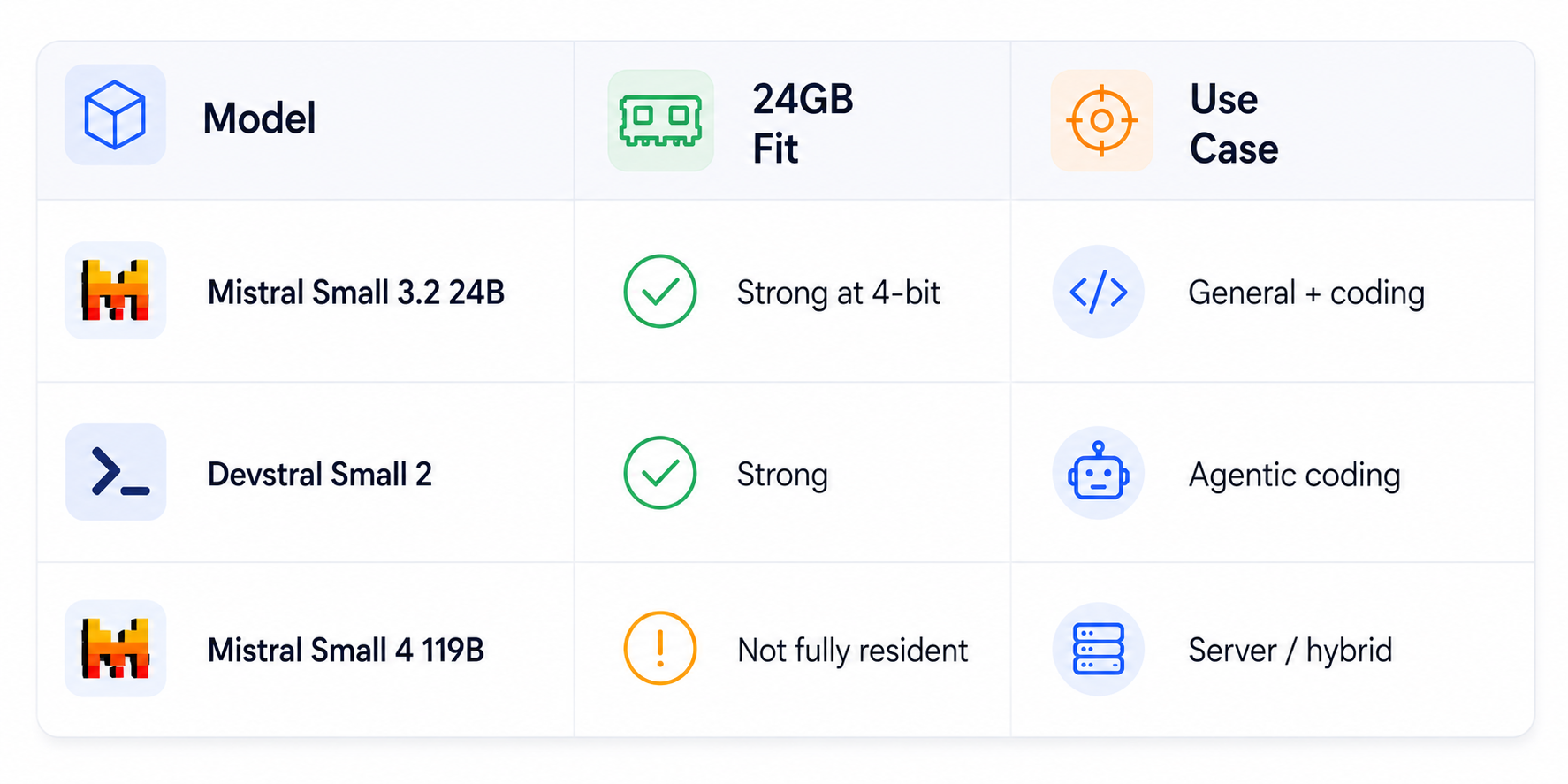
The 119B example shows why product names can be misleading. A model called 'Small' can still require far more memory than a 24GB card provides.
7. gpt-oss-20b: Maximum Headroom
gpt-oss-20b is a 21B-class MoE model with roughly 3.6B active parameters. Current local guides estimate about 14GB for the cited native MXFP4-style configuration, leaving substantially more room than a 27B or 32B model.
That extra memory can be more valuable than another few billion parameters. It lets you increase context, keep more tool state around or run additional local processes without pushing the card into an out-of-memory failure.
This is one of the best choices for users who want a reasoning-capable local model but do not need maximum model size.
8. DeepSeek R1 32B: Strong Reasoning, Less Headroom
DeepSeek R1 32B is still a serious 24GB option. Current guides estimate roughly 18 to 20GB at Q4_K_M, making it practical for single-user inference while leaving less room for context than Qwen3.6-27B.
If your priority is step-by-step reasoning and difficult code analysis, this is a strong candidate. But if you are building a tool-heavy agent with large prompts, the 27B model may actually be easier to operate because it leaves more VRAM for everything around the model.
9. Can You Run 70B Models on 24GB?
Technically, some 70B-class models can be squeezed into 24GB with extreme low-bit quantization. Practically, this is usually a poor trade. One current guide estimates Llama 3.3 70B at about 23GB in Q2_K, which leaves almost no space for useful runtime overhead or context.
The result is a model that may load while being frustrating to use. If you genuinely want 70B-class models, 48GB or multi-GPU hardware is the better direction.
The point of 24GB is not to prove that any model can be squeezed into the card. It is to run a capable model comfortably.
10. Best 24GB Models for Coding
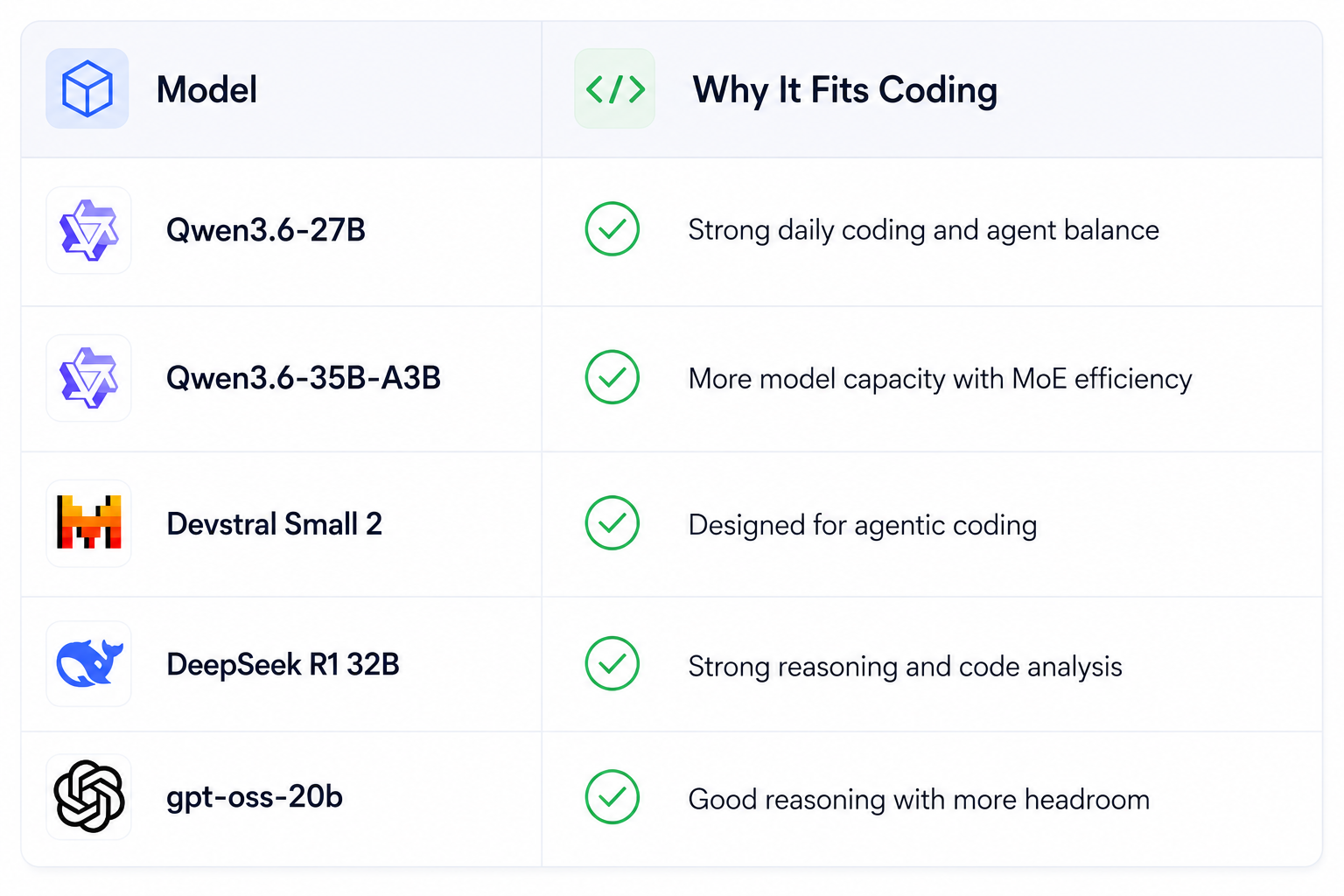
For coding, do not optimize only for tokens per second. Repository context, tool outputs and agent state can easily consume the memory your model leaves behind.
11. Best 24GB Models for Agents
Agents are more memory-sensitive than chat because every loop can add new context. The model has to share VRAM with longer prompts, retrieved files and tool outputs.
- Favor models that leave several GB of VRAM unused at your normal quantization.
- Limit tool-output size and summarize stale agent state.
- Use retrieval instead of loading an entire repository.
- Measure performance at your real context length.
- Keep batch size conservative for single-GPU interactive use.
For context strategy, read What Is Context Engineering? Complete Guide (2026).
12. Vision Models Need Extra Care
Vision-language models add image encoders and visual tokens on top of the language model. A model that fits comfortably for text can become much tighter once you add high-resolution images or multiple images.
For 24GB, prefer models with documented consumer quantizations and test the exact image sizes you plan to use. Do not apply text-only VRAM figures directly to multimodal workloads.
Google's consumer-GPU Gemma results illustrate why quantized model variants matter for multimodal local workloads.
13. Context Length Is the Hidden VRAM Cost
The KV cache grows with context. This means a model that fits at 4K context may become unstable at 32K or 128K, especially when its weights already consume 20GB or more. Google's Gemma documentation explicitly warns that weight memory is only part of the total VRAM requirement because the KV cache uses additional memory.
14. Best Quantization for 24GB
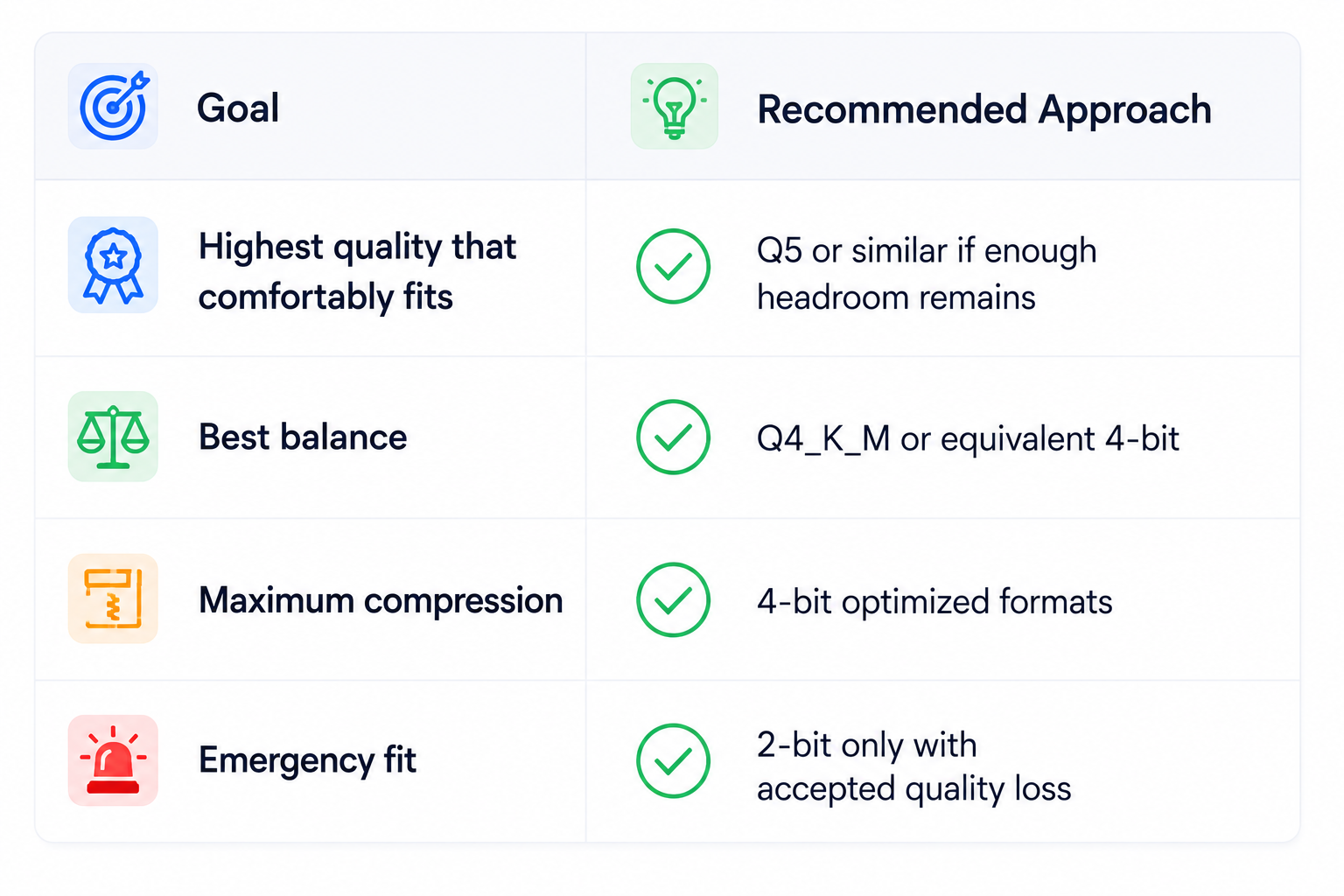
Do not automatically choose the lowest-bit file. If Q5 barely fits and forces tiny context, Q4 may deliver a better overall experience because the extra memory can support longer context and fewer failures.
15. RTX 3090 vs RTX 4090 vs RTX 5090
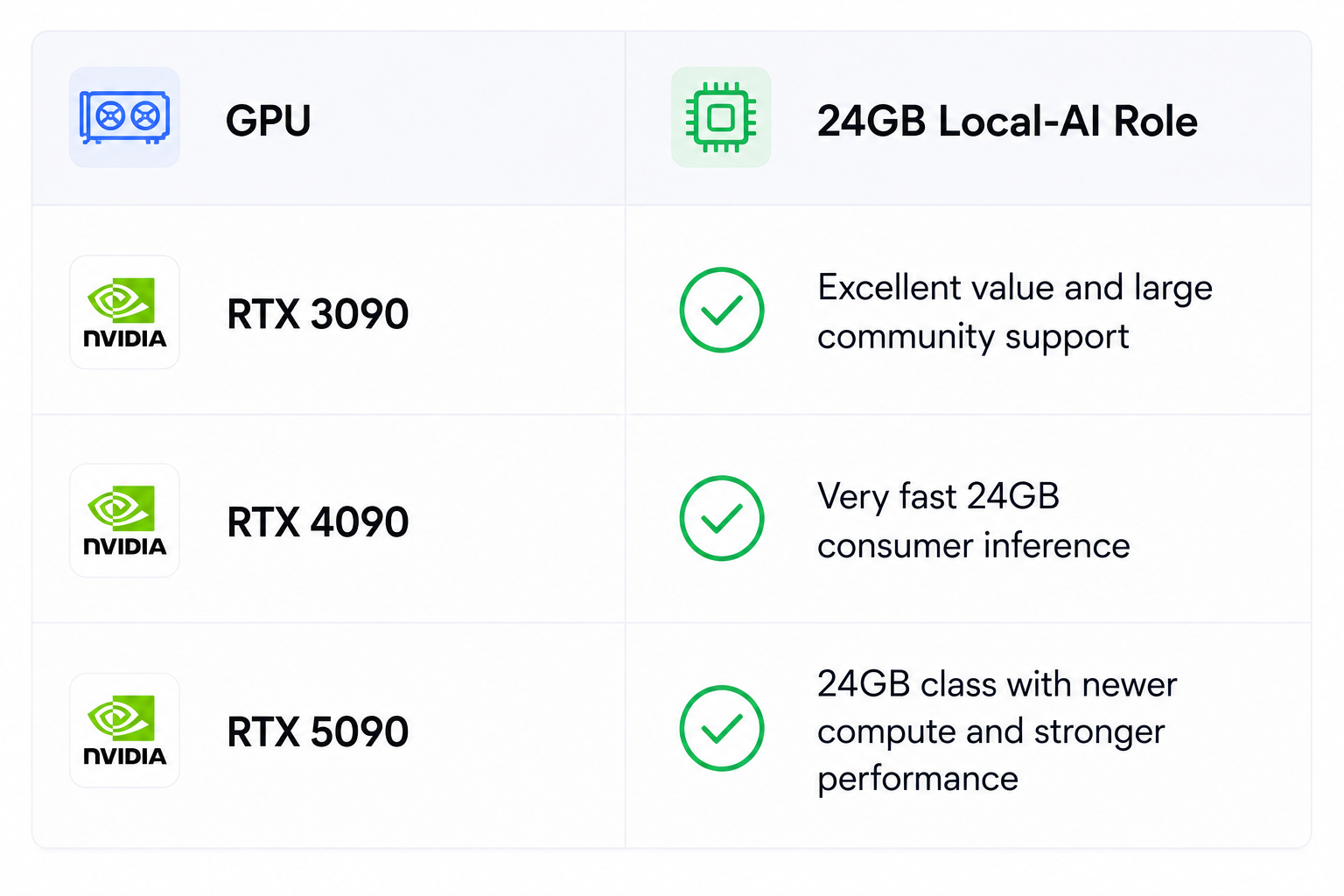
All three sit in the same VRAM capacity tier, so model size is driven primarily by the 24GB memory ceiling. The newer GPUs can be significantly faster, but 24GB remains 24GB. You do not get to load a model twice as large just because the GPU is newer.
16. Ollama, llama.cpp or vLLM?
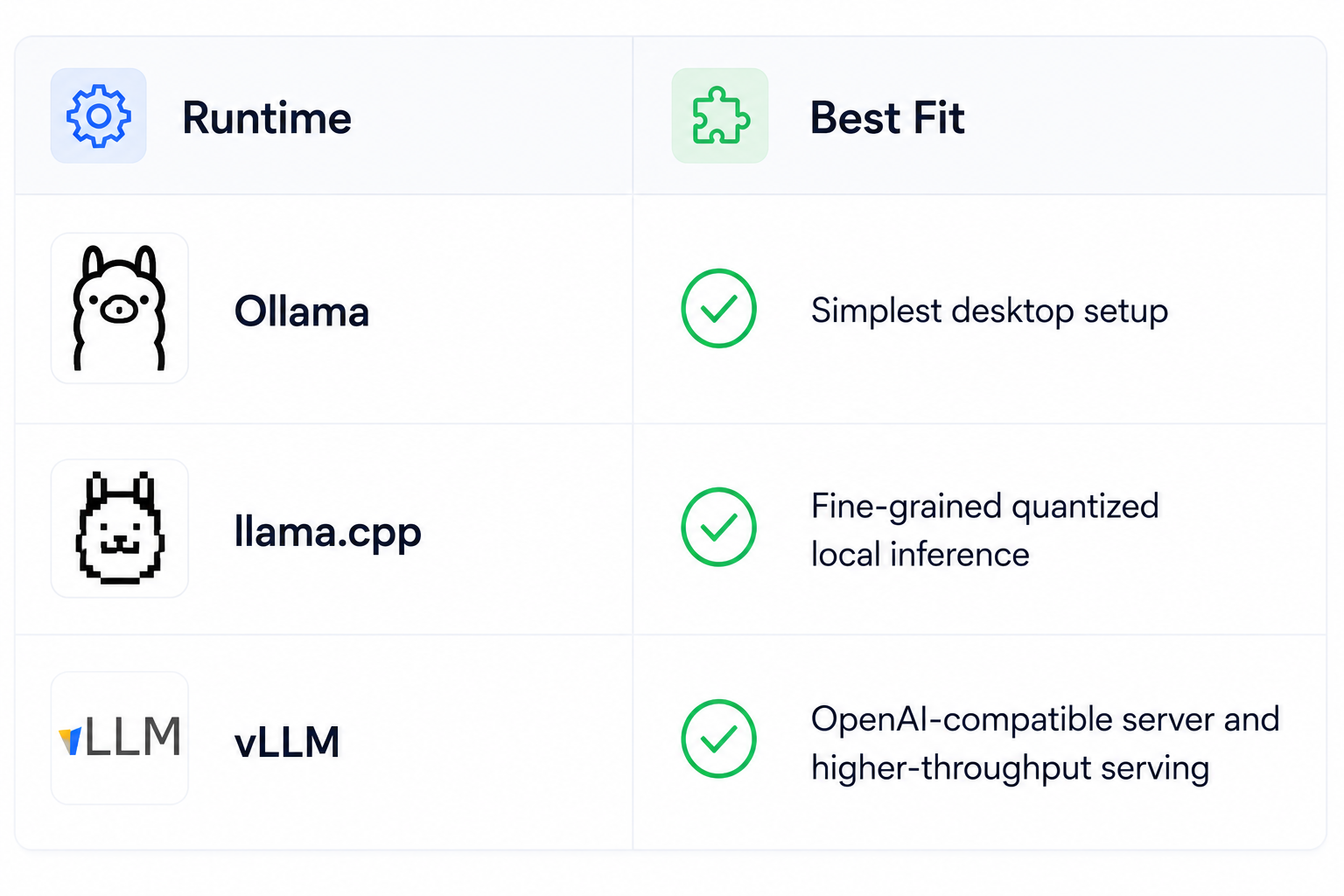
For a personal workstation, Ollama or llama.cpp is usually easier. For a server exposed to coding tools or agents, vLLM becomes more attractive. The runtime does not change the fundamental memory requirement, but it can change which quantizations and context configurations are practical.
17. CPU Offloading: Useful but Slow
CPU offload can make an oversized model load by moving some weights into system memory. But it is a compromise, not a free upgrade. Mistral explicitly notes that CPU offload works with enough RAM but is significantly slower.
Use it when the model you need genuinely exceeds the card. If a smaller model already meets your quality target, clean GPU-resident inference is usually the better experience.
18. Models You Should Not Try to Force Onto 24GB
- Full GLM-5.3.
- DeepSeek V4-Pro-class giant models.
- Kimi K3-class giant models.
- 70B models that require extreme 2-bit quantization just to load.
- Any model whose quantized weights consume nearly all 24GB before context.
Your existing GLM-5.3 local guide makes the boundary clear: the full checkpoint is a server-class multi-GPU workload, not a single 24GB deployment.
19. The Real 24GB Sweet Spot
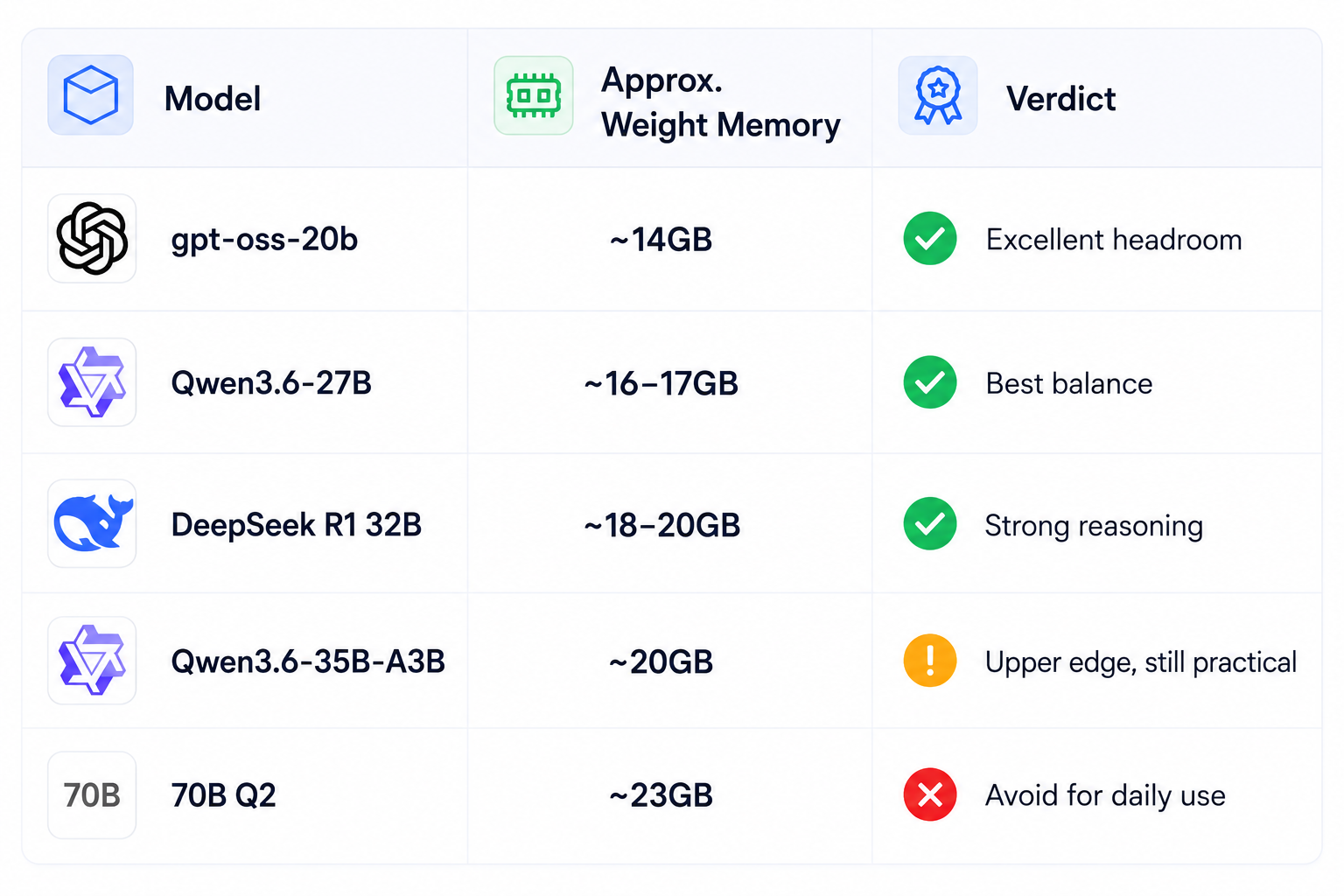
This is the central recommendation of the guide. A 24GB card is most useful when the model leaves enough memory for the workload around it.
20. How to Choose Your 24GB Model
- Pick the smallest model that clears your quality threshold.
- Prefer quantizations that leave several GB of VRAM free.
- Benchmark at your actual context length.
- For coding, test repository-level tasks rather than chat prompts.
- For agents, include tool calls and long-running loops.
- For vision, test real image sizes and multi-image inputs.
- Use CPU offload only when it solves a real capacity problem.
21. When 24GB Is No Longer Enough
Upgrade to 48GB or more when you need a model that is too large for comfortable quantization, very long context with substantial headroom, or multiple concurrent users. Otherwise, there is little reason to leave the 24GB tier simply because larger models exist.
The jump from 24GB to 48GB is most valuable when it changes the class of model you can run. If the only difference is a slightly larger quantized model with similar quality, spending heavily on more hardware may not be justified.
22. Final Recommendations
For most users, start with Qwen3.6-27B. It offers the best combination of model capability and room for context. If you care primarily about reasoning, compare DeepSeek R1 32B. If you want more VRAM headroom for a reasoning model, gpt-oss-20b is a strong alternative. If you want an MoE model near the upper edge of the tier, test Qwen3.6-35B-A3B.
For coding, Devstral Small 2 deserves a dedicated test, particularly if you want an agentic coding workflow on a single card. Mistral's own local documentation supports this direction for 24GB hardware with 4-bit inference.
23. Final Verdict
24GB VRAM remains one of the strongest single-GPU local-AI tiers.
The practical sweet spot is roughly 20B to 35B models with efficient quantization.
Qwen3.6-27B is the best general recommendation because current guides place it around 16.8GB at Q4_K_M, leaving useful headroom.
DeepSeek R1 32B is a strong reasoning option around 18 to 20GB, while gpt-oss-20b is attractive at roughly 14GB.
Qwen3.6-35B-A3B shows how an MoE model can push capability toward the edge of the tier without becoming impossible to run.
Trying to squeeze a 70B model into 24GB with extreme quantization is usually a worse experience than running a well-quantized 20B to 35B model with real context headroom.
VRAM is not only about model weights. KV cache, context length, runtime overhead and concurrency determine whether the setup is actually usable.
Bottom line: 24GB is enough for serious local AI in 2026. Pick the model that leaves breathing room instead of chasing the largest model that can barely load.
Frequently Asked Questions
What AI models can I run on 24GB VRAM?
You can run many 20B to 35B-class models with suitable quantization, including Qwen3.6-27B, Qwen3.6-35B-A3B, suitable Gemma 4 variants, Mistral Small models, gpt-oss-20b and DeepSeek R1 32B.
What is the best 24GB VRAM AI model in 2026?
Qwen3.6-27B is a strong general-purpose choice because current guides report around 16.8GB at Q4_K_M, leaving useful memory for context.
Can I run Qwen3.6-27B on 24GB VRAM?
Yes. A current Q4_K_M estimate is around 16.8GB, which leaves practical headroom on a 24GB GPU.
Can I run a 32B model on 24GB VRAM?
Yes, with suitable 4-bit quantization. DeepSeek R1 32B is commonly estimated at roughly 18 to 20GB in Q4_K_M.
Can I run Gemma on a 24GB GPU?
Yes. Google demonstrated a 27B Gemma 3 int4 variant fitting on a single 24GB RTX 3090. Exact Gemma 4 memory use depends on the specific model and quantization.
What can an RTX 3090 run locally?
A 24GB RTX 3090 can run many capable 20B to 35B-class quantized models for chat, coding, reasoning and agent workflows.
Can an RTX 4090 run 35B models?
Yes when the chosen quantization and runtime fit inside 24GB. Qwen3.6-35B-A3B is an example of a 35B-total MoE model around the 20GB Q4 range.
Can an RTX 5090 run local LLMs?
Yes. The same 24GB capacity limit applies, although newer compute can improve inference speed.
Can I run GLM-5.3 on 24GB?
No, not the full official model. The full GLM-5.3 checkpoint is a server-class multi-GPU workload.
How much VRAM does a 27B model need?
Around 54GB for BF16 weights alone. A 4-bit representation has a theoretical weight size around 13.5GB, with real files and runtime needs higher.
Should I use CPU offloading?
Only when the model is worth the performance penalty. A smaller model that stays entirely on the GPU is usually preferable.
Is 24GB enough for local AI in 2026?
Yes. It is a strong tier for serious local chat, coding, reasoning, vision and agent workloads when the model and quantization are chosen carefully.
Recommended Blogs
- How to Run GLM-5.3 Locally: Hardware, VRAM & Setup (2026)
- Best Open Source AI Models August 2026: Full Collection
- GLM-5.3-Flash Review: Accuracy, Price & Is It Worth It? (2026)
- Qwen3.8-Flash-Next Review: Benchmarks, Cost & Is It Worth It? (2026)
- What Is Context Engineering? Complete Guide (2026)
- Model Routing for AI Coding Agents: How to Cut Costs Without Losing Quality
Resources & Community
Join our community of 70,000+ AI enthusiasts and learn to build powerful AI applications. Whether you're a beginner or an experienced developer, Build Fast with AI helps you understand and implement AI in your projects.
- Website - buildfastwithai.com
- LinkedIn - Build Fast with AI
- Instagram - @buildfastwithai
- Founder Twitter - @satvikps
- Twitter - @BuildFastWithAI
Agentic AI Launchpad 2026
A structured 6-week cohort program that takes you from AI basics to building and deploying real-world agentic AI systems. Includes live sessions, expert mentorship, project reviews and a builder community network.
Ready to go from learning to building? Join the next cohort: Agentic AI Launchpad 2026
Free AI Resources
Access free tools, workshops and micro-learning to keep building.
- AI Workshops - Free resources, upcoming events and past recordings
- Unrot - Learn AI in 5 minutes a day

