



GLM-5.3 Local Setup: Hardware, VRAM, Software and the Fastest Way to Get It Running
GLM-5.3 is now publicly downloadable, so the question is no longer whether you can get the model. The real question is whether your hardware can run it at a speed that makes local inference useful. Z.ai publishes the official zai-org/GLM-5.3 checkpoint on Hugging Face, along with deployment paths for Transformers, vLLM, SGLang, TokenSpeed, KTransformers and Unsloth.
The model is huge. The official repository is a multi-hundred-gigabyte checkpoint, and the full model belongs in server-class hardware. Its mixture-of-experts architecture reduces the number of experts used for each token, but it does not make the stored weight set small enough for a normal single consumer GPU.
There are several ways to make GLM-5.3 useful locally. The official vLLM and SGLang paths are the cleanest choices for multi-GPU serving. Transformers is useful for direct experimentation. KTransformers is relevant when you need CPU-GPU hybrid inference. Quantized and specialized deployments can reduce accelerator-memory pressure, but they need to be evaluated as separate configurations rather than treated as drop-in equivalents to the full checkpoint.
QUICK ANSWER
Yes, you can run GLM-5.3 locally right now. The official zai-org/GLM-5.3 checkpoint is public on Hugging Face, and Z.ai documents direct Transformers loading plus official vLLM and SGLang serving. For the full checkpoint, plan on a high-memory multi-GPU server. A single 24 GB, 48 GB or 80 GB GPU is not enough for the complete model.
The simplest deployment path is vLLM or SGLang. If you need a direct model API, use the OpenAI-compatible endpoints those runtimes expose. If you have limited VRAM but substantial system memory, investigate supported hybrid or quantized configurations instead of trying to force the full checkpoint into one consumer GPU.
My practical recommendation is blunt: use full GLM-5.3 on serious multi-GPU hardware when you need its full capability. If your machine has a single consumer GPU, use a smaller GLM variant rather than spending hours trying to make an oversized checkpoint barely usable.
1. What Is GLM-5.3?
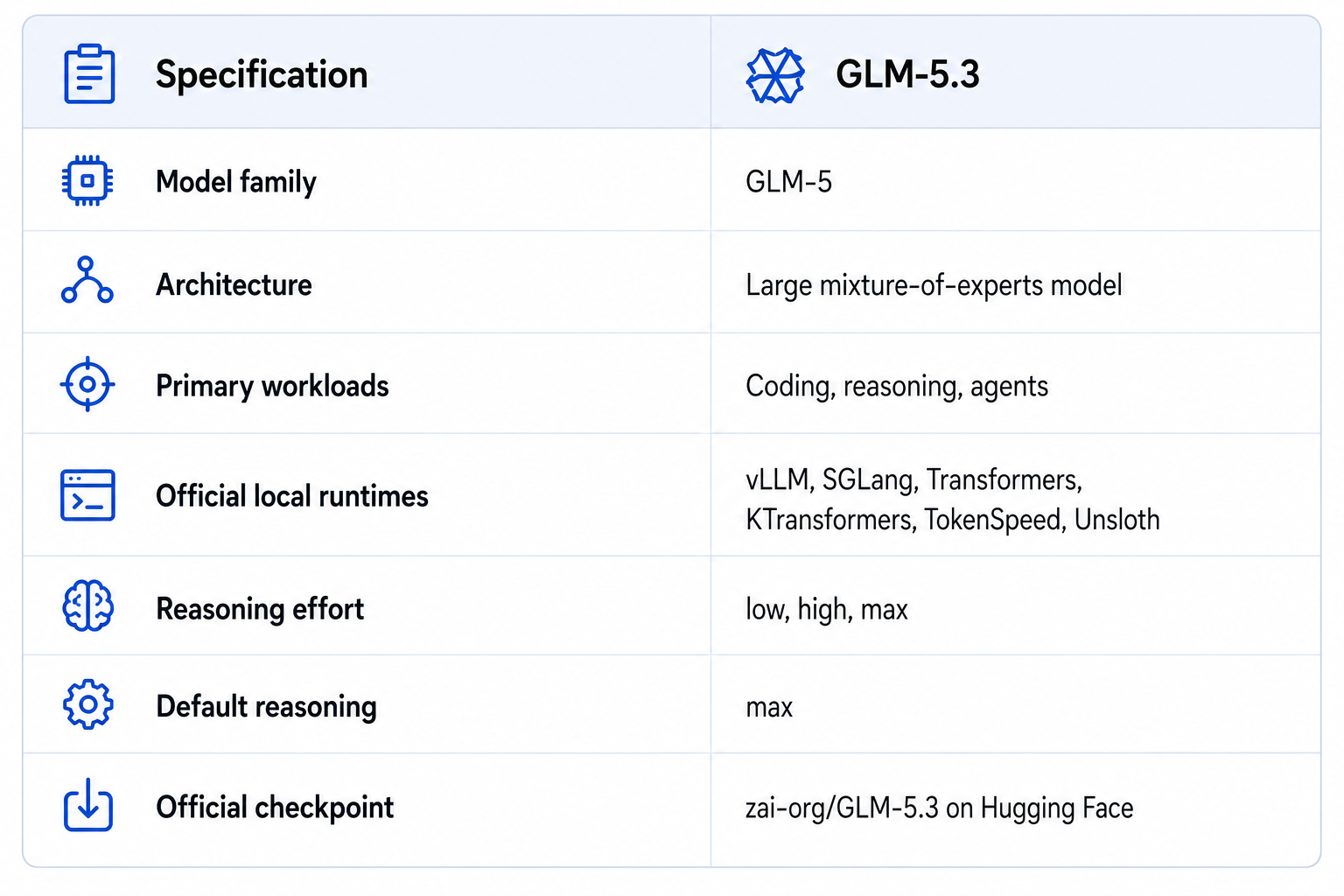
GLM-5.3 is Z.ai's large open-weight reasoning model aimed at coding, software engineering and long-horizon agent work. The official model card documents controllable reasoning through low, high and max settings, with max as the default.
For local deployment, the important specification is not only the parameter count. The model is a large mixture-of-experts system, so total stored weight memory, active computation, KV cache and serving overhead all matter.
2. The First Reality Check: Model Size
GLM-5.3 is not in the same hardware category as a 7B, 14B or 32B local model. The official checkpoint is hundreds of gigabytes, which immediately rules out a normal single-GPU setup.
This is where local-AI guides often get the hardware calculation wrong. Active parameters describe the amount of network computation per token. Total stored parameters and numerical precision determine how much memory the checkpoint consumes. If the weights do not fit in accelerator memory, they need to live in other GPUs, system RAM or another storage tier, with a corresponding performance cost.
3. How Much VRAM Do You Need?
There is no single universal VRAM requirement because precision, quantization, runtime, context length and batch size change the answer. The useful starting point is weight storage, followed by extra memory for KV cache, runtime buffers and serving overhead.
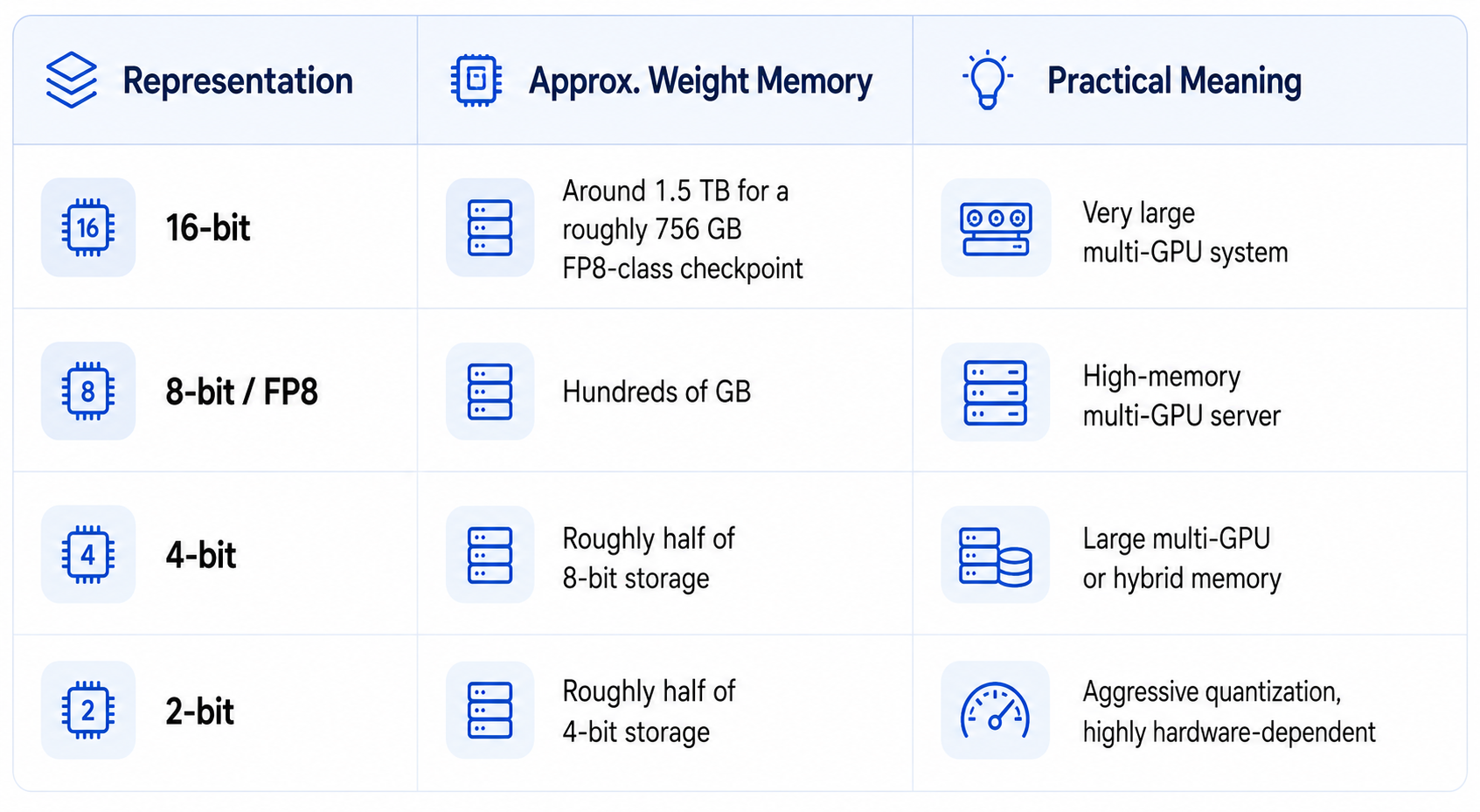
These are planning estimates rather than official minimum requirements. Quantized files include metadata and scaling information, while serving needs memory beyond the weights.
4. Can GLM-5.3 Run on One GPU?
Not the full official checkpoint on a conventional consumer or workstation GPU. A single 24 GB, 48 GB or even 80 GB card cannot hold a multi-hundred-gigabyte model.
A reduced or quantized build can change the situation, but it can also make bandwidth the bottleneck. A model that technically loads while constantly moving weights between CPU RAM and GPU memory may be too slow for interactive use.
5. Can You Run GLM-5.3 on an RTX 5090?
Not the full official checkpoint in its standard published form. An RTX 5090 does not have enough VRAM to store a multi-hundred-gigabyte checkpoint. A verified quantized or hybrid build may be possible, but it is a different deployment target.
Do not benchmark a community conversion and assume the result represents official GLM-5.3. Verify the exact model revision, quantization format, runtime, context length and reasoning settings.
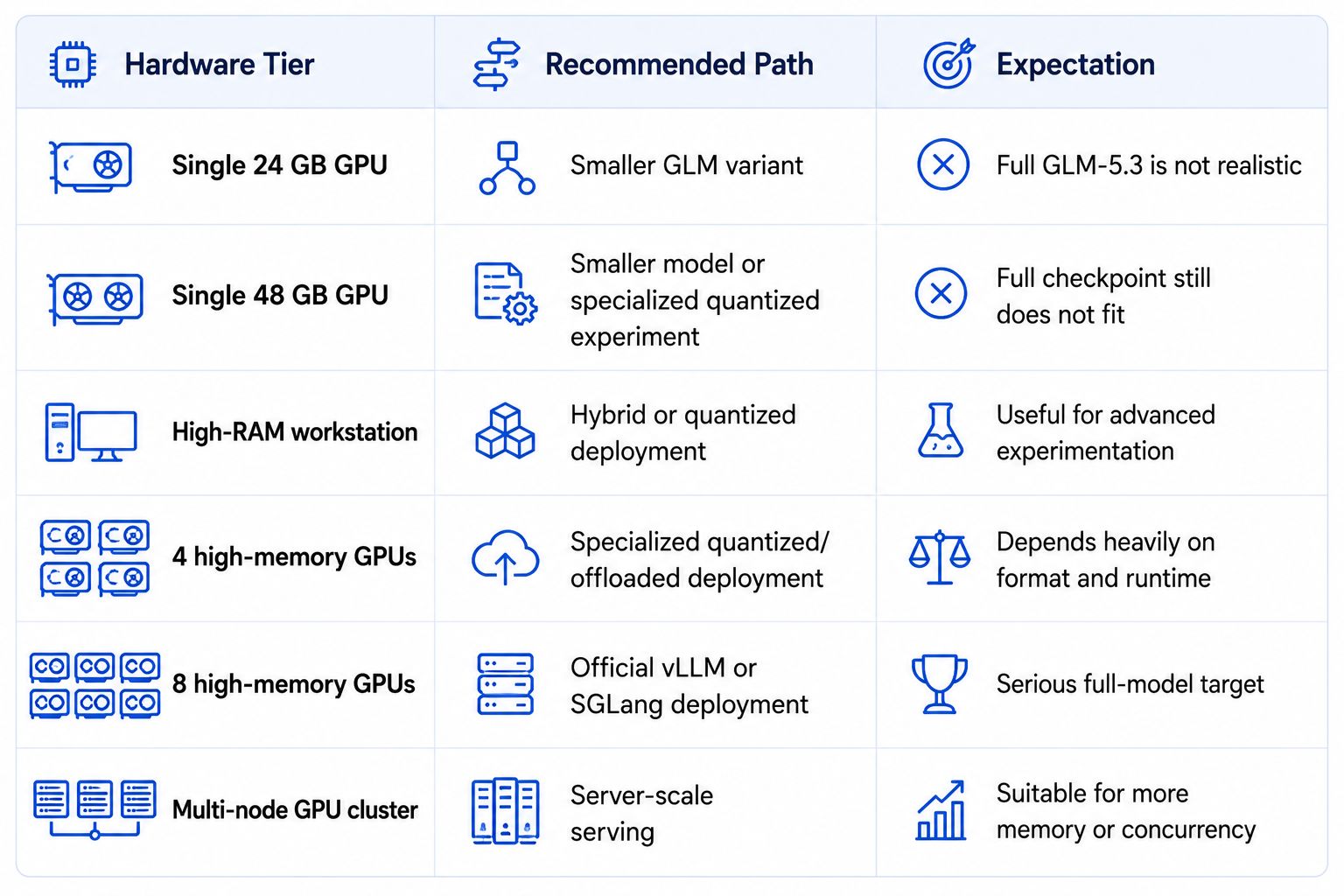
6. Hardware Tiers That Make Sense
7. System RAM, Storage and Networking
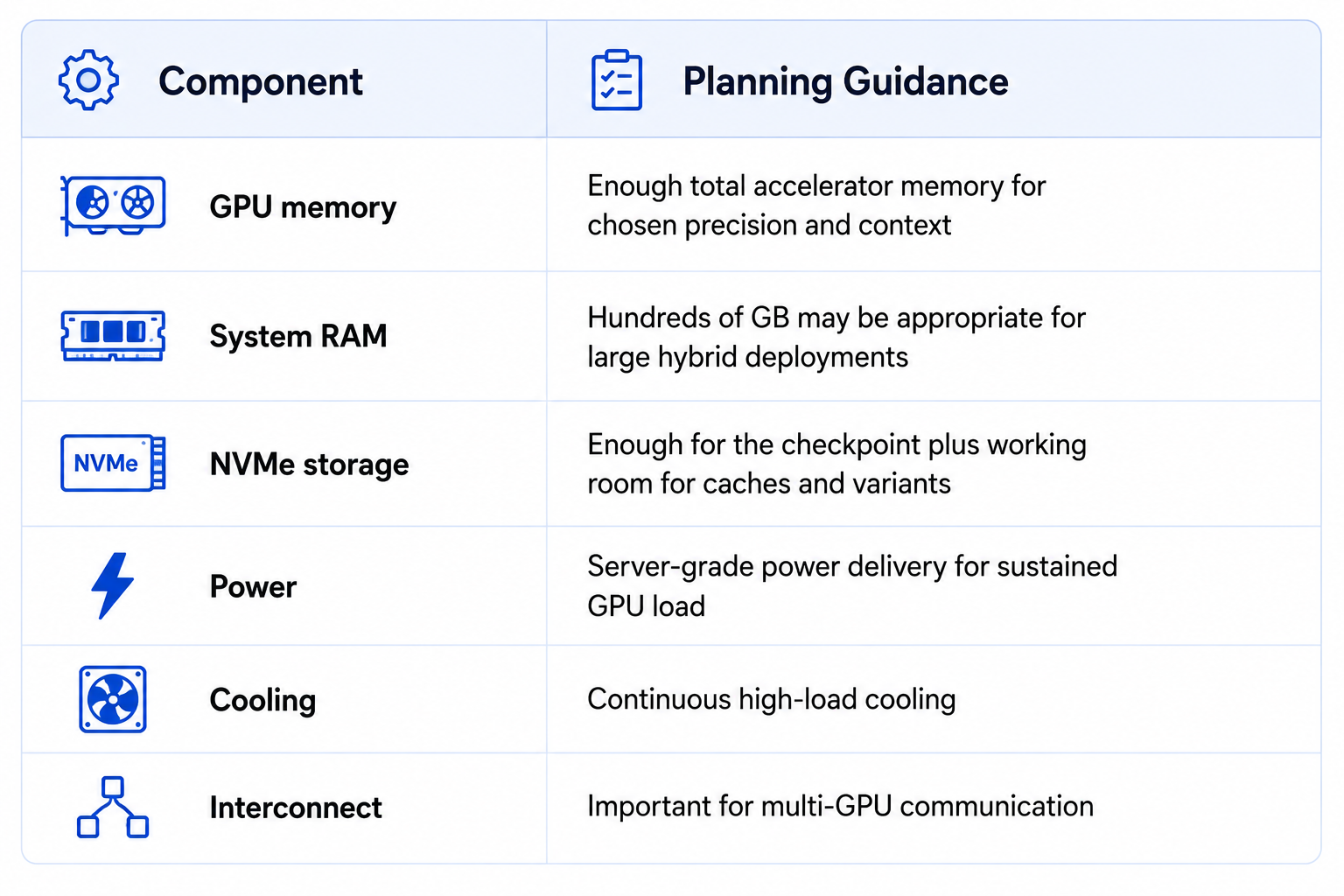
VRAM is only one part of the deployment. A local system also needs enough RAM and fast storage to hold model shards and support CPU offloading. In hybrid inference, system RAM becomes a major part of the model's effective memory pool.
8. Download GLM-5.3 From the Official Repository
The official checkpoint is hosted under zai-org/GLM-5.3 on Hugging Face. The model page currently includes instructions for Transformers, vLLM, SGLang, Docker Model Runner and other deployment routes.
Install the Hugging Face client:
pip install -U huggingface_hubDownload the official checkpoint:
hf download zai-org/GLM-5.3 --local-dir ./GLM-5.3Check the repository owner, license and model revision before deployment. Avoid unofficial mirrors unless provenance and integrity are verified.
9. The Easiest Server Route: vLLM
Z.ai documents vLLM as an official serving path, exposing an OpenAI-compatible API.
pip install vllmvllm serve "zai-org/GLM-5.3"That is the official starting command, not a universal production configuration. On large clusters, configure parallelism, memory utilization and context length for your actual GPU topology.
10. Test the vLLM Server
Start with a model-list check:
curl http://localhost:8000/v1/modelsThen test a completion through the OpenAI-compatible endpoint:
curl -X POST "http://localhost:8000/v1/chat/completions" \
  -H "Content-Type: application/json" \
  --data '{
    "model": "zai-org/GLM-5.3",
    "messages": [{"role":"user","content":"Explain this function in one paragraph."}]
  }'
A successful response proves the server works. It does not prove the deployment is fast or stable. Measure latency, throughput and memory next.
11. Run GLM-5.3 With SGLang
SGLang is also officially documented by Z.ai. It provides another OpenAI-compatible server route.
pip install sglangpython3 -m sglang.launch_server \
--model-path "zai-org/GLM-5.3" \
--host 0.0.0.0 \
--port 30000Choose SGLang when its serving stack fits your environment. It does not change the underlying hardware requirement.
12. Run GLM-5.3 With Transformers
Transformers is convenient for direct experiments, model inspection and research.
from transformers import pipeline

pipe = pipeline("text-generation", model="zai-org/GLM-5.3")
messages = [{"role": "user", "content": "Who are you?"}]
print(pipe(messages))
For concurrent production serving, a dedicated inference runtime is usually more appropriate than direct Transformers loading.
13. KTransformers and Hybrid CPU-GPU Inference
KTransformers is relevant when accelerator memory is not enough and you can use system memory for part of the workload. Its current GLM-5.3-Flash documentation supports heterogeneous CPU-GPU expert inference and native FP8 weight loading.
This can lower the accelerator requirement, but CPU memory and PCIe bandwidth become part of the performance equation. Also, the current tutorial retrieved for this technique is specifically for GLM-5.3-Flash, not the full GLM-5.3 model, so its hardware numbers must not be copied to the full model.
14. Quantization: When It Helps
Quantization reduces weight precision so a model consumes less memory. The main options are FP8, 4-bit and lower-bit representations. Lower precision can make large models accessible on fewer GPUs, but runtime support and quality can vary.
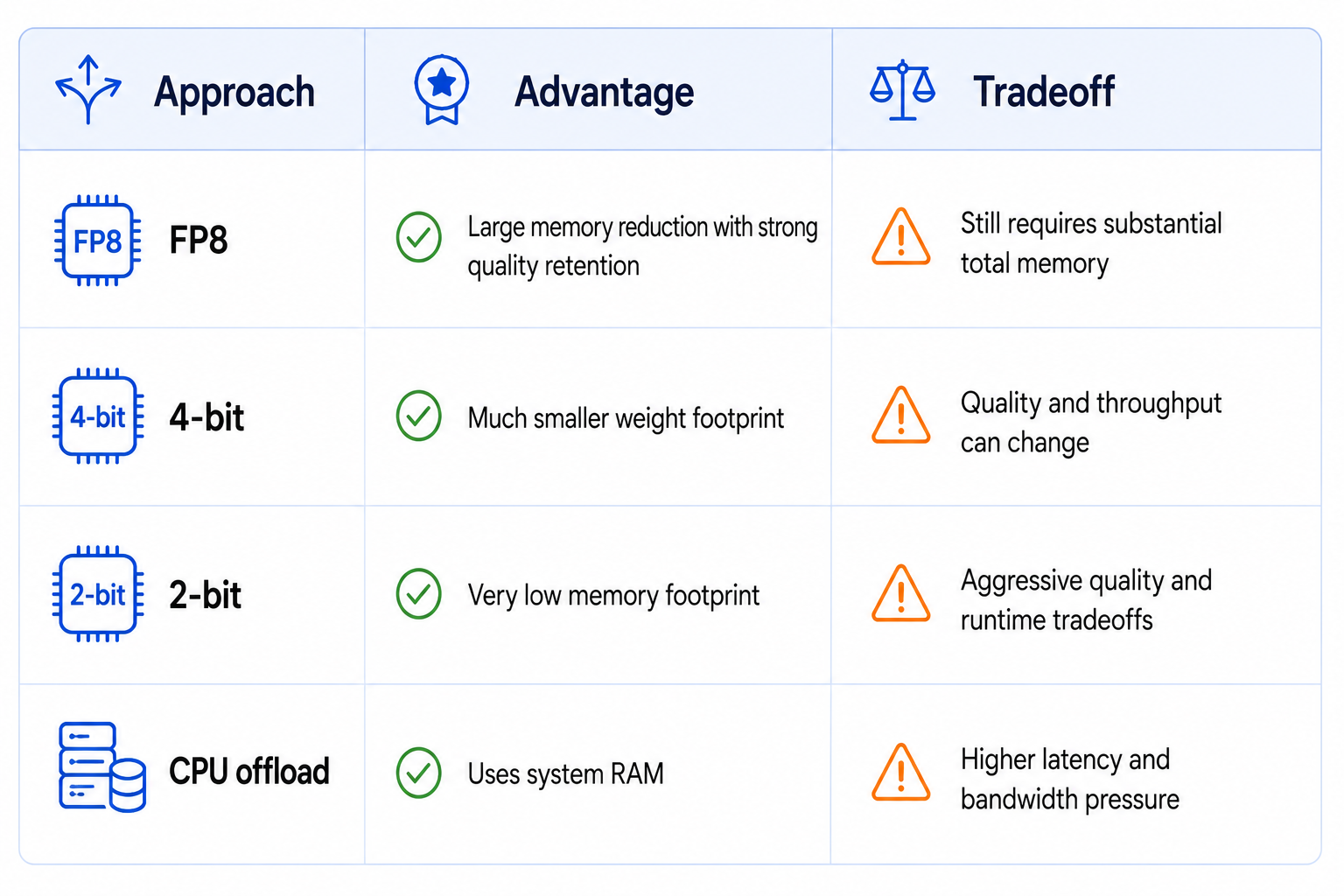
Use verified, documented quantization paths where possible. A random conversion can change performance and tool-calling behavior.
15. Reasoning Settings Affect Speed
GLM-5.3 supports reasoning_effort values of low, high and max, with max as the default. Z.ai recommends max for benchmark reproduction. The chat template also supports clear_thinking=true when you want to control reasoning display.
Keep reasoning effort fixed when comparing hardware or runtimes. Otherwise you can accidentally compare different workloads and misattribute the speed difference to hardware.
16. Context Length: Do Not Max It Out
A long context window is useful for large repositories and long-running agent tasks, but maximum context should not be your default setting. Larger context increases KV-cache memory use and can reduce efficiency. For coding agents, retrieve relevant files, summarize stale history and isolate subtask context.
For a deeper explanation, read What Is Context Engineering? Complete Guide (2026).
17. Docker Deployment
Z.ai's model card also documents Docker-based deployment paths for vLLM and SGLang. A containerized setup can make dependency management easier, but GPU runtime compatibility and image versions still need to be checked.
Example pattern:
docker run --gpus all --ipc=host --shm-size 32g \
  -p 8000:8000 \
  -v ~/.cache/huggingface:/root/.cache/huggingface \
  vllm/vllm-openai:latest \
--model zai-org/GLM-5.318. Benchmark Your Local Deployment Properly
Do not judge the setup because the server starts. Measure the actual workload.
- Time to first token.
- Sustained tokens per second.
- Peak VRAM and system RAM.
- Latency with short and long context.
- Performance at your actual reasoning_effort setting.
- Tool-calling correctness if you use agents.
- One-user and target-concurrency behavior.
- Success rate on real coding or reasoning tasks.
For coding agents, task completion is more meaningful than raw token throughput. A slower model that completes a repository task in one pass may be more useful than a faster model that needs repeated retries.
19. Common GLM-5.3 Local Problems
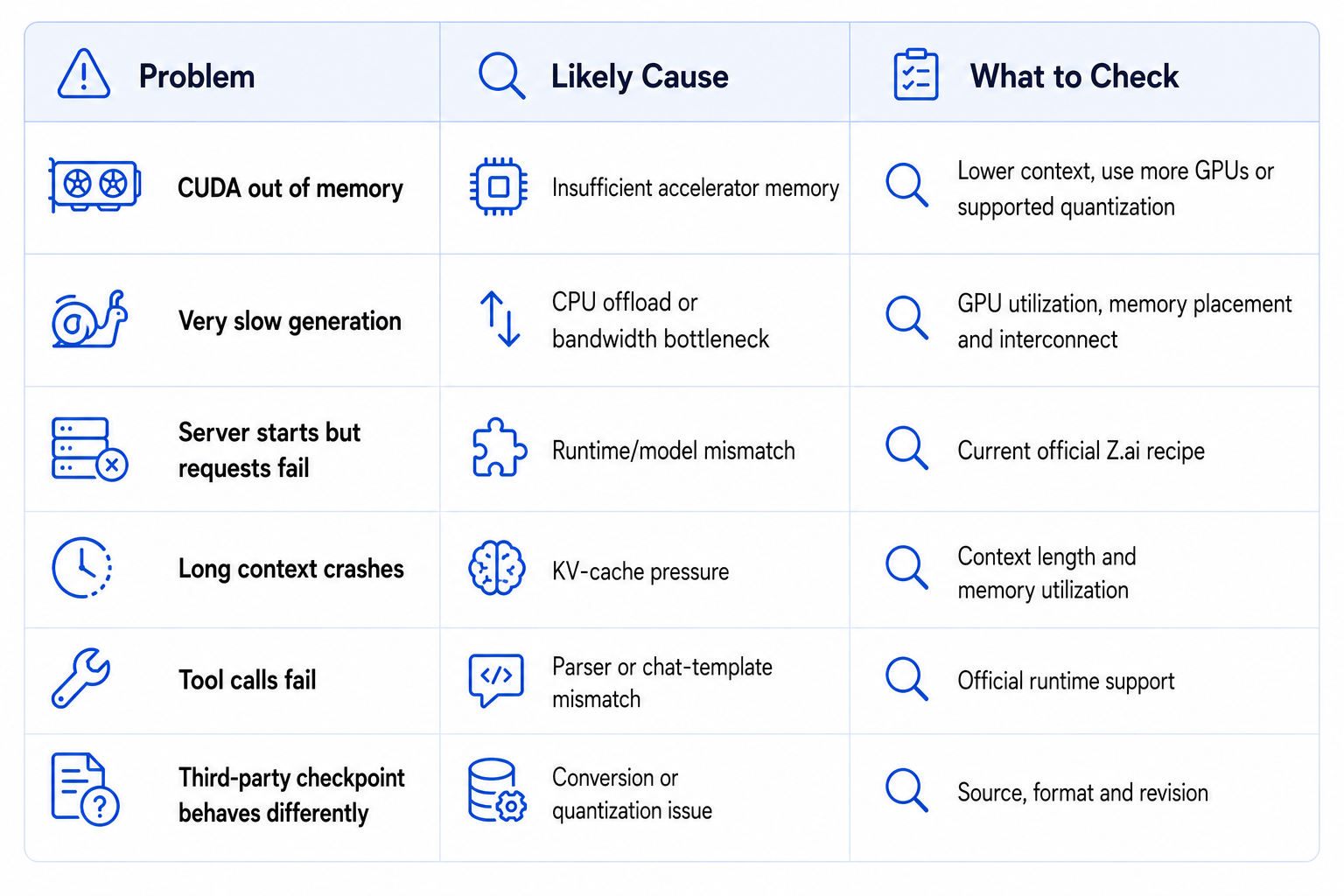
Change one deployment variable at a time. If you change quantization, context, reasoning effort and parallelism simultaneously, you cannot tell which change fixed the problem.
20. When GLM-5.3 Is Worth Running Locally
Local GLM-5.3 makes sense when you have a real reason to self-host: private code or documents, recurring high-volume workloads, infrastructure control, or research value.
- You already own compatible multi-GPU hardware.
- You need private inference for code or business data.
- You expect enough volume to justify self-hosting.
- You need control over model and serving versions.
- You are building agents with your own tools.
It is not worth buying an expensive server for a handful of experiments. A smaller GLM variant or hosted model is usually the rational choice.
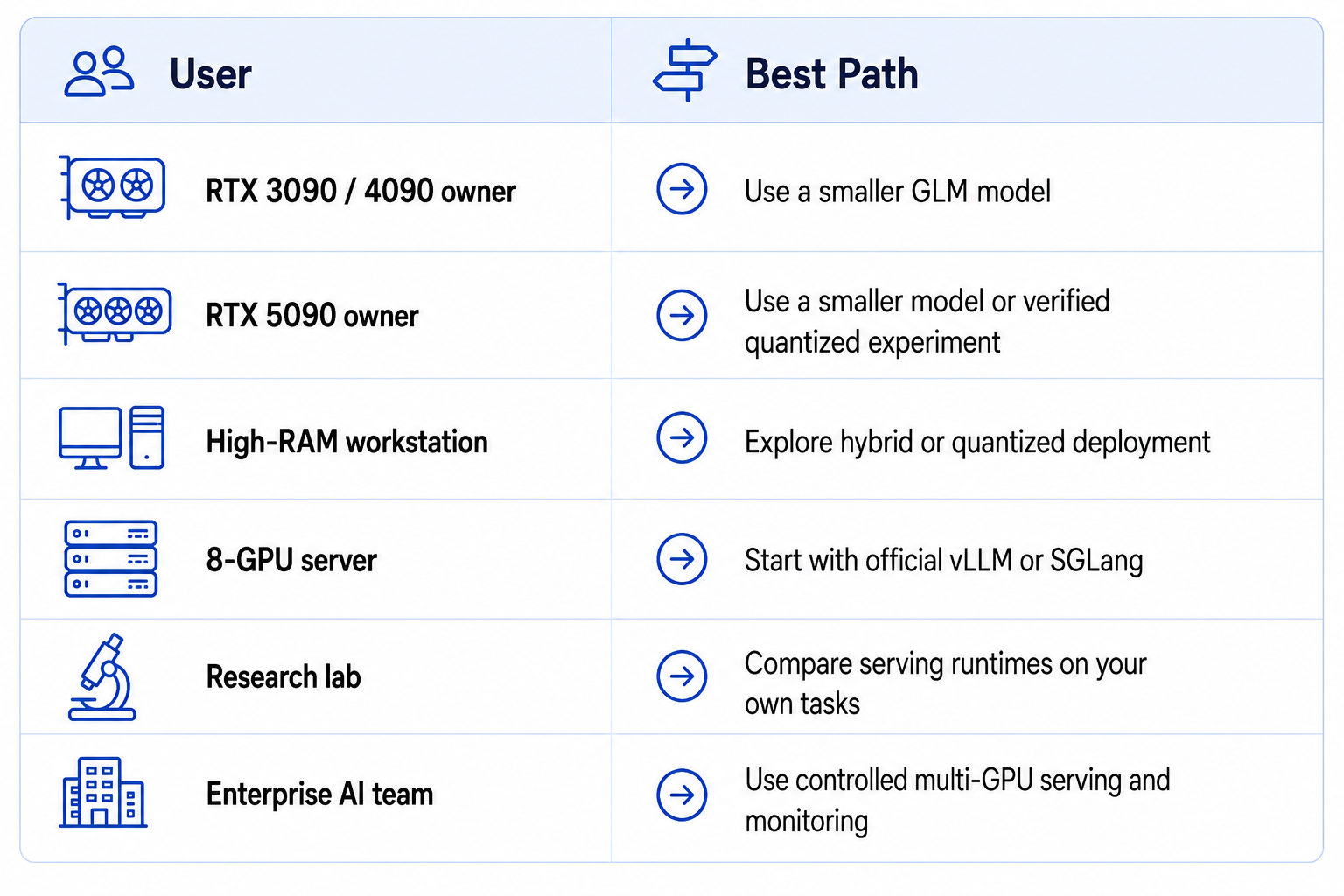
21. Best Setup by User Type
22. Final Checklist
- Download from the official zai-org/GLM-5.3 repository.
- Verify the license and model revision.
- Estimate weight memory before choosing hardware.
- Reserve memory for KV cache and runtime overhead.
- Use vLLM or SGLang for server-style inference.
- Use Transformers for direct experiments.
- Use KTransformers only where current model-specific support matches your hardware.
- Keep reasoning_effort fixed during performance comparisons.
- Test realistic context lengths.
- Benchmark real coding or agent tasks before declaring success.
23. Final Verdict
GLM-5.3 is now a genuine local-deployment option because the official checkpoint is publicly available through Z.ai's Hugging Face repository.
The full model is still a server-class workload. A single 24 GB, 48 GB or 80 GB GPU is not enough to hold the complete published checkpoint.
vLLM and SGLang are the cleanest official serving routes, while Transformers is better suited to direct experimentation. Z.ai also lists KTransformers, TokenSpeed and Unsloth among supported deployment options.
Hybrid CPU-GPU inference and quantization can lower accelerator requirements, but they introduce tradeoffs in bandwidth, latency and sometimes quality.
Do not confuse MoE active parameters with total memory needs. The compute path is smaller than the stored model.
Do not use a random community conversion as if it were the official checkpoint. Verify the model source, quantization and runtime.
For a serious local GLM-5.3 deployment, hardware planning is more important than the first launch command. The command is easy. Making the model fast, stable and economical is the real engineering problem.
Bottom line: GLM-5.3 is worth self-hosting when you already have serious GPU infrastructure or a strong reason to keep inference local. For most individual developers on one consumer GPU, a smaller GLM variant is the smarter choice.
Do the hardware calculation backwards from the workload. First decide how many simultaneous users or agent runs you need, then choose precision and context length, then calculate total accelerator memory with headroom. Only after that should you choose the GPU count, RAM, storage and chassis. Buying eight GPUs because a model is large is not a plan. Buying the smallest configuration that meets a measured throughput target is.
What Hardware Should You Buy for GLM-5.3?
Use vLLM when you want the simplest official OpenAI-compatible server. Use SGLang when its serving stack and current GLM support fit your deployment. Use KTransformers when the main constraint is accelerator memory and you can accept CPU-GPU hybrid inference. Do not choose by benchmark screenshots alone. Run the same prompt, context length, reasoning effort and concurrency against each runtime, then compare latency, throughput and stability on your own hardware.
Frequently Asked Questions
What GPU do I need to run GLM-5.3 locally?
The full official checkpoint needs a high-memory multi-GPU deployment. A single consumer or workstation GPU does not have enough memory for the complete model.
How much VRAM does GLM-5.3 need?
There is no single number because precision, quantization, context and runtime matter. The full checkpoint is hundreds of gigabytes, so full deployment is firmly multi-GPU.
Can GLM-5.3 run on one GPU?
Not the full published model on conventional hardware. A smaller or aggressively quantized configuration may be possible, sometimes with system-memory offload.
Can I run GLM-5.3 on an RTX 5090?
Not the full official checkpoint in standard form. You would need a verified quantized or hybrid build.
How do I run GLM-5.3 with vLLM?
Install vLLM and start the official zai-org/GLM-5.3 checkpoint with vllm serve, then tune parallelism and memory for your cluster.
How do I run GLM-5.3 with SGLang?
Install SGLang and start zai-org/GLM-5.3 with the documented launch_server command.
Can I run GLM-5.3 with Transformers?
Yes. Z.ai documents direct loading through Transformers for experimentation.
Can GLM-5.3 run with KTransformers?
KTransformers supports GLM-family hybrid CPU-GPU workflows, but verify the current model-specific tutorial and hardware support before deploying.
How do I download GLM-5.3 from Hugging Face?
Use the official zai-org/GLM-5.3 repository and a current Hugging Face download method such as the hf CLI.
Is GLM-5.3 practical on consumer hardware?
The full model is not practical on a normal single GPU. Smaller GLM variants or verified quantized configurations are much more realistic.
What reasoning settings does GLM-5.3 support?
GLM-5.3 supports low, high and max reasoning effort, with max as the default.
Is GLM-5.3 worth running locally?
Yes when privacy, recurring workload, infrastructure control or research value justifies the hardware. Otherwise a smaller model or hosted service is usually easier.
Recommended Blogs
- Best Open Source AI Models August 2026: Full Collection
- GLM-5.3-Flash Review: Accuracy, Price & Is It Worth It? (2026)
- Qwen3.8-Flash-Next Review: Benchmarks, Cost & Is It Worth It? (2026)
- What Is Context Engineering? Complete Guide (2026)
- How to Secure AI Coding Agents in 2026: Permissions, Sandboxing, MCP & Secrets
- Model Routing for AI Coding Agents: How to Cut Costs Without Losing Quality
Resources & Community
Join our community of 70,000+ AI enthusiasts and learn to build powerful AI applications. Whether you're a beginner or an experienced developer, Build Fast with AI helps you understand and implement AI in your projects.
- Website - buildfastwithai.com
- LinkedIn - Build Fast with AI
- Instagram - @buildfastwithai
- Founder Twitter - @satvikps
- Twitter - @BuildFastWithAI
Agentic AI Launchpad 2026
A structured 6-week cohort program that takes you from AI basics to building and deploying real-world agentic AI systems. Includes live sessions, expert mentorship, project reviews and a builder community network.
Ready to go from learning to building? Join the next cohort: Agentic AI Launchpad 2026
Free AI Resources
Access free tools, workshops and micro-learning to keep building.
- AI Workshops - Free resources, upcoming events and past recordings
- Unrot - Learn AI in 5 minutes a day

