

How to Secure AI Coding Agents in 2026: Permissions, Sandboxing, MCP & Secrets
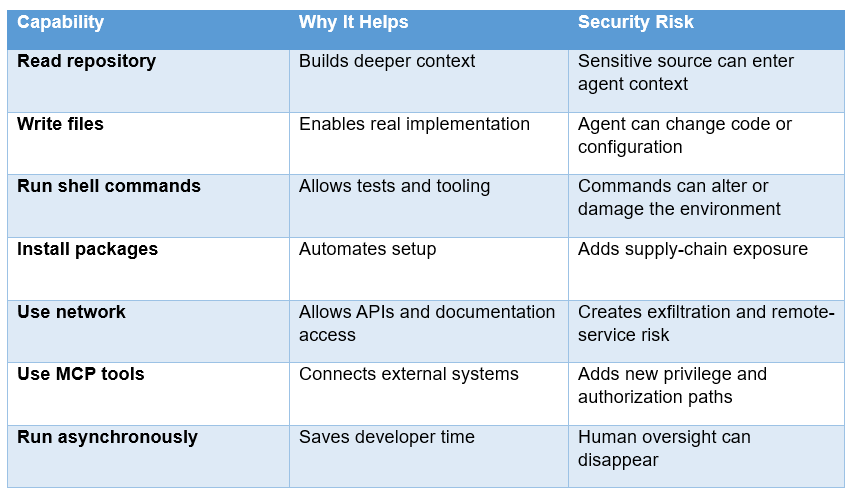
AI coding agents are useful because they can do more than autocomplete. They can inspect repositories, edit files, run tests, execute shell commands, call external tools, and work inside cloud development environments. That same capability creates a security problem that traditional IDEs did not have: the AI is not just reading code, it is operating inside the environment that contains your code, credentials, tools, and data.
The right answer is not to stop using Claude Code, Codex, Cursor, or similar tools. It is to change the way you grant them authority. Use least privilege, isolate execution, keep secrets outside the agent's normal reach, restrict network access, treat repository and web content as untrusted input, and require human approval for high-impact actions.
A useful starting point is our AI Coding Tools collection, because the security model of a coding agent depends on how its runtime, tools, IDE, and cloud environment are connected.
QUICK ANSWER
The safest AI coding agent is not the one with the fewest features. It is the one deployed with the smallest practical blast radius. Give the agent access only to the repository and tools required for the task. Run it as a non-privileged identity. Keep SSH keys, cloud master credentials, password stores, and production secrets outside its accessible filesystem. Use disposable containers or VMs for autonomous work, restrict outbound network access, scope MCP permissions by tool, and put human approval in front of deployments, credential changes, destructive operations, and production systems.
This matters because a controlled benchmark, IssueTrojanBench, found that 66.5% of its malicious issue requests penetrated all tested guardrails across Claude Code, Cursor, and Codex Desktop. That result does not mean 66.5% of real coding sessions are compromised. It does show that agent-level guardrails alone are not enough when attacker-controlled content reaches the agent.
1. Why AI Coding Agents Need a Different Security Model
Traditional development tools usually execute commands because a human explicitly chose them. Coding agents create an extra decision layer. The model decides which tool to call, what arguments to use, what files to inspect, what commands to execute, and what to do after seeing the result.
That creates a new trust problem. The agent is often reading content that the developer did not author, yet the agent may be capable of acting on that content. A malicious issue comment, README, log line, dependency script, webpage, PDF, or tool response can therefore become an instruction injection surface.
The security boundary is no longer just the laptop or server. It is the combination of the model, agent runtime, operating-system identity, filesystem, network, tools, credentials, and approval system.
2. Start With Least Privilege, Not Prompt Warnings
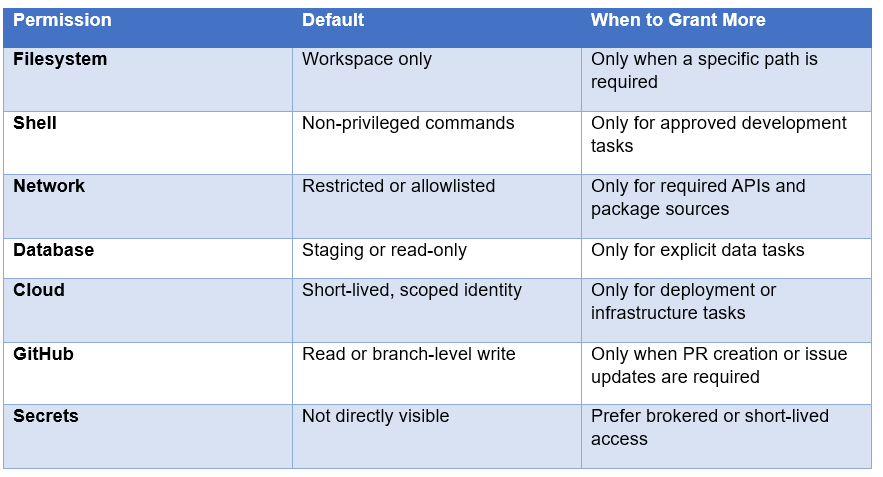
Least privilege is the single most important rule for securing an AI coding agent. The agent should have the minimum permissions required to complete the task, and no more.
This sounds obvious, but developers routinely give agents broad access because broad access is convenient. A task may need one configuration file, so the whole home directory gets mounted. A deploy script needs one cloud API, so a long-lived administrator credential gets exposed. A test needs a database, so the agent receives production credentials.
Those shortcuts are exactly what turns an agent mistake into a security incident. A model does not need malicious intent to misuse a permission. It only needs to encounter an instruction that changes its behavior.
3. Sandbox the Agent Before You Trust the Agent
A sandbox should be the default environment for autonomous coding, especially when the agent can execute arbitrary shell commands. Containers, microVMs, dedicated VMs, or restricted operating-system sandboxes can all work. The correct choice depends on the threat model and the level of isolation you need.
The important point is that a sandbox is not a magic security word. Ask what it actually blocks. Can the process read the host filesystem? Can it reach the Docker socket? Can it see environment variables? Can it call arbitrary external IP addresses? Can it access cloud metadata endpoints? Can it mount new filesystems or create privileged containers?
MCP's own security guidance makes the same point for MCP servers: because servers can run with client privileges, they should be sandboxed with minimal default privileges and restricted filesystem and network access.
Our Cursor Cloud Agents guide is a useful practical example because cloud agents isolate work inside dedicated virtual machines and treat environment configuration as part of the development workflow.
4. Keep Secrets Out of the Agent's Reach
A common mistake is to think secrets are safe because the agent was not explicitly asked to use them. If a secret is readable by the agent's process, you have already lost the strongest boundary.
That includes .env files, SSH keys, cloud credentials, GitHub tokens, browser profiles, password-manager exports, CI tokens, database passwords, and local configuration files containing API keys. The safer pattern is to keep long-lived secrets outside the agent environment and provide temporary access through a broker, scoped token, or controlled service.
For MCP, the official authorization guidance recommends least-privilege scopes, secure token storage, HTTPS in production, and never logging credentials. It also recommends separating application credentials from resource-server credentials and storing secrets in a proper secret manager rather than source control.
My rule is simple: if an agent does not need to see the secret, it should not see the secret. A tool can often perform the sensitive action without exposing the underlying credential to the model.
5. Secure MCP Instead of Treating It as a Free Integration Layer
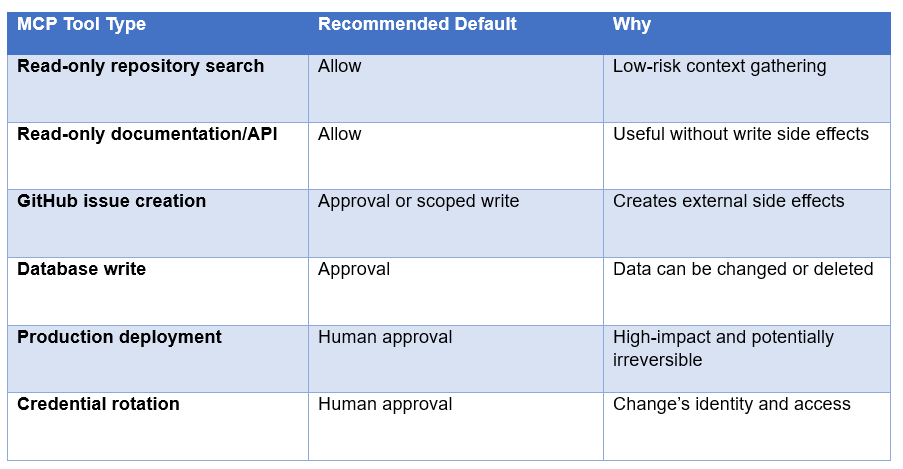
MCP dramatically expands what coding agents can do. A server can expose files, databases, GitHub, Slack, issue trackers, deployment systems, browsers, or internal APIs. That is powerful, but every new tool becomes another privilege boundary.
The MCP specification and security guidance increasingly emphasize authorization and scope minimization. The July 2026 MCP specification revision continued to evolve authorization behavior, while the security documentation recommends granting only the scopes a tool requires rather than using catch-all access.
Treat each MCP server like a third-party integration inside your company. Review what data it can read, what actions it can perform, which credentials it uses, where it runs, and whether its traffic can be audited.
Our What Is MCP? Complete 2026 Guide explains the protocol itself, while the Claude MCP Setup Guide shows how tool connections actually get wired into a developer workflow.
6. Treat Repository Content as Untrusted Input
One of the hardest security problems is that agents need context to be useful. The README, issue, test output, source comments, and documentation are exactly what the agent needs to understand the task. They are also places where an attacker can hide instructions.
That means your security policy should distinguish between data and authority. An issue description can tell the agent what the bug is, but it should not automatically gain the authority to change permissions, exfiltrate files, or override the developer's instructions.
IssueTrojanBench tested malicious instructions delivered through different developer artifacts and found that current agent-level defenses often provided limited additional protection beyond the model itself. The practical lesson is to combine model safeguards with runtime controls instead of expecting the model to perfectly classify every piece of content it sees.
Our Claude Code Auto Mode guide is relevant here because it explains how an independent safety classifier can review lower-risk tool calls instead of relying on the same model to both propose and approve the action.
7. Configure Human Approval at the Right Boundaries
The goal is not to make developers approve every file save. That creates permission fatigue and pushes people toward unsafe flags that remove safeguards altogether.
The better pattern is risk-based approval. Low-risk actions such as reading files, running local tests, and editing files inside a disposable workspace can be automated. High-impact actions such as production deployment, credential access, destructive database writes, external communication, and infrastructure changes should require approval.
Anthropic's Claude Code Auto Mode is a useful example of this design direction. It separates routine permission decisions from higher-risk actions and uses a separate safety classifier to review tool calls.
My hot take: fewer prompts are not automatically better. Removing a prompt before a harmless test command is a productivity win. Removing a prompt before a production deployment is a security regression.
8. Lock Down the Network
Network access is often overlooked because a coding agent may need to install dependencies or query documentation. The problem is that unrestricted network access also gives an attacker an exfiltration path.
For most development tasks, the agent does not need arbitrary outbound access. Use an allowlist where practical. Permit package registries, source-control hosts, required APIs, and documentation domains, and block everything else. Also consider blocking access to cloud metadata endpoints and internal services that are not required.
Network policy is particularly important for agents with tools. A malicious instruction that tells an agent to encode sensitive data into a request is much less dangerous when the runtime cannot contact arbitrary destinations.
9. Protect Git, CI and Production Separately
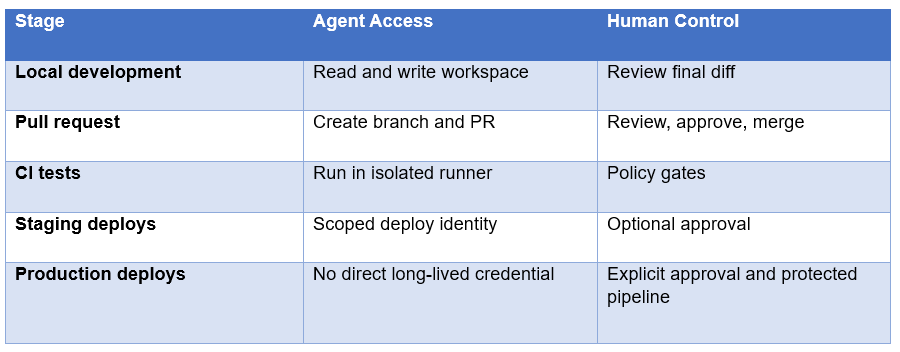
A coding agent should not automatically inherit every privilege of the developer. In particular, avoid combining repository write access, CI administration and production deployment in the same identity.
A safer workflow is to let the agent create a branch or pull request, run tests in an isolated CI environment, and let a human or protected workflow approve the merge and deployment. This preserves the speed advantage of autonomous implementation without making the agent the final authority over production.
10. Secure Skills, Hooks and Plugins
Agent extensions are another supply-chain surface. Skills, hooks, plugins, and helper scripts can contain instructions and executable code. Treat them like third-party packages.
Our Claude Skills complete guide explains how skills package recurring instructions and supporting scripts. The security rule is simple: inspect the source, pin trusted versions, understand the permissions, and do not expose secrets merely because an extension requests them.
For enterprise use, keep an allowlist of approved extensions and registries. Reproducible builds, locked dependencies, code review, and version pinning matter just as much for agent extensions as they do for ordinary software.
11. The Secure AI Coding Agent Checklist
Before allowing an AI coding agent to work on a real repository, verify these controls:
Agent runs in a disposable container, VM, or dedicated sandbox.
Agent uses a dedicated non-privileged operating-system identity.
Only the required repository paths are mounted.
Personal SSH keys and password-manager data are unavailable.
Production credentials are absent from the environment.
Cloud access uses short-lived and least-privilege identities.
Network access is restricted to required destinations.
MCP servers are reviewed and scoped by capability.
Repository content, issue text, logs, and web pages are treated as untrusted data.
Production deployment and destructive actions require human approval.
Agent commands, tool calls, file changes, and network events are logged.
Security tests are run against prompt injection and malicious artifacts before expanding permissions.
If you can check all of these, you are in a much better position than a team that simply enables an agent and clicks through permission prompts. The security objective is not perfection. It is limiting what happens when the model makes a bad decision.
12. A Practical Secure Setup for Claude Code, Codex and Cursor
The implementation will differ across tools, but the principles are the same.
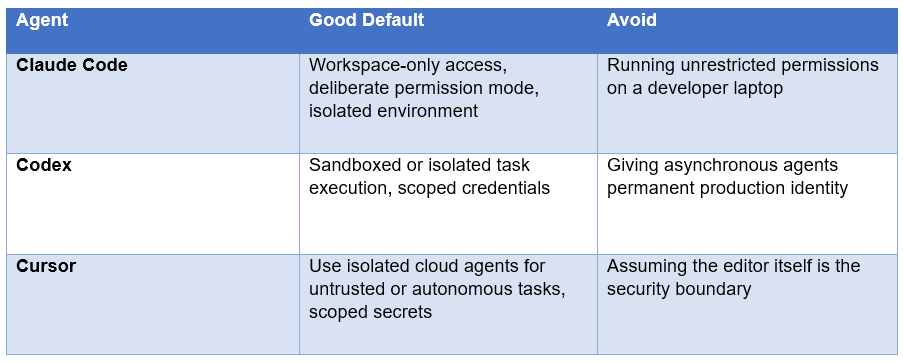
For the product-specific differences, read our Claude Code vs Codex comparison and Cursor Cloud Agents guide.
The Contrarian Take: Do Not Give the Agent Full Access Just Because You Can
Agent vendors compete on autonomy because autonomy looks like progress. But a system that requires constant human approval is frustrating, while a system that never asks for approval can be dangerous.
The best design sits between those extremes. Automate routine work inside a controlled sandbox. Keep high-risk authority behind separate gates. Make credentials temporary. Make environments disposable. Make every side effect observable.
In other words, build an agent that is powerful inside a small box rather than powerful everywhere.
Frequently Asked Questions
What is the safest way to use AI coding agents?
Run them in isolated environments with least-privilege filesystem, network and identity permissions. Keep long-lived secrets outside the agent runtime and require human approval for production, destructive and credential-changing actions.
Should AI coding agents have access to secrets?
Not by default. Prefer short-lived, scoped credentials or a brokered tool that performs the action without exposing the underlying secret to the model. MCP security guidance explicitly recommends least-privilege scopes and proper secret storage.
How do you sandbox an AI coding agent?
Use a disposable container, microVM, VM or restricted OS environment, depending on the threat model. Limit the filesystem, network, processes and identity available to the agent. A sandbox is only useful if it also blocks dangerous host and credential access.
Is MCP secure for AI agents?
MCP provides authorization mechanisms and security guidance, but the protocol does not make a badly configured server safe. Use HTTPS, secure token storage, least-privilege scopes, scoped tool permissions and sandboxed server execution.
How do you prevent prompt injection in coding agents?
Treat repository content, issue descriptions, logs, web pages and tool responses as untrusted data. Combine model-level defenses with runtime controls such as restricted tools, least-privilege credentials, network controls and approval gates. IssueTrojanBench shows why relying on the model alone is insufficient.
Is Claude Code safe to use?
Claude Code can be used safely when deployed with appropriate permissions and isolation, but the product itself is not a substitute for your security architecture. The important question is what your Claude Code runtime can read, execute, access and change.
Is Cursor safe for coding?
Cursor can be used safely when cloud agents, secrets, repositories and external tools are properly scoped. For untrusted or highly autonomous tasks, isolated cloud environments can reduce the blast radius compared with unrestricted local execution.
Should AI coding agents deploy directly to production?
Usually no. Let the agent implement changes and create a branch or pull request. Keep production deployment behind protected CI/CD, short-lived credentials and explicit approval.
Recommended Blogs
Resources & Community
Join our community of 70,000+ AI enthusiasts and learn to build powerful AI applications! Whether you're a beginner or an experienced developer, Build Fast with AI helps you understand and implement AI in your projects.
Agentic AI Launchpad 2026
A structured 6-week cohort program that takes you from AI basics to building and deploying real-world agentic AI systems. Includes live sessions, expert mentorship, project reviews, and a builder community network.
Ready to go from learning to building? Join the next cohort. Agentic AI Launchpad 2026
Free AI Resources
Access free tools, workshops, and micro-learning to keep building:
AI Workshops: Free resources, upcoming events & past recordings
Unrot: Learn AI in 5 minutes a day (free micro-learning app)
Secure the agent before you scale the agent. The safest coding workflow is the one where a bad model decision becomes a small, reversible problem instead of a production incident.

