



Most people are running Claude at 20% of its real capability. The other 80% is locked behind MCP — and most guides make the setup look harder than it is.
MCP (Model Context Protocol) is an open standard that lets Claude read your files, query your databases, search GitHub, and take real actions in connected systems. Anthropic launched it in November 2024, donated it to the Linux Foundation in December 2025, and by May 2026 there are over 2,300 public MCP servers available, with adoption across Claude, Cursor, Windsurf, VS Code, and 200+ other tools. If you haven't set it up yet, you are working harder than you need to. This guide gets you connected in under 10 minutes — and covers every surface: Claude Desktop, Claude Code, and the new one-click Desktop Extensions.
1. What Is MCP and Why Does It Matter?
MCP (Model Context Protocol) is the universal connector layer that lets any AI model talk to any external tool through a single standardised interface — without custom integration code for every combination.
Before MCP, connecting Claude to GitHub required one custom integration. Connecting it to Slack required a different one. Connecting it to your database required a third. Anthropic called this the "N×M problem": N AI models times M external tools meant N×M bespoke connectors. MCP solves it by turning that into N+M. Build one MCP server for GitHub, and every MCP-compatible AI client — Claude, Cursor, Windsurf, and dozens more — can use it immediately.
The protocol reuses the message-flow design of the Language Server Protocol (LSP) and runs over JSON-RPC 2.0. For a deeper technical breakdown, our complete guide to what MCP is and how it works covers the architecture in full. The short version: MCP is USB-C for AI. One plug, any device.
In May 2026, this matters more than ever. Claude Code reached a $2.5 billion ARR run-rate by early 2026 — driven almost entirely by developers using MCP to wire Claude into their actual workflows. The window where MCP was "experimental" has closed. It is infrastructure now.
2. How MCP Works in 3 Simple Parts
Understanding the 3-part architecture takes 2 minutes and prevents 90% of setup confusion.
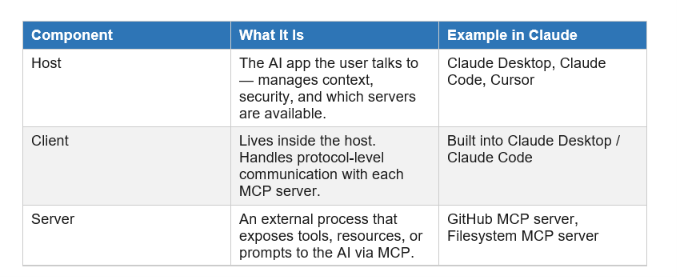
When you ask Claude to "check my open GitHub PRs", here is what happens behind the scenes:
- Claude identifies it needs an external tool to fulfil the request.
- The MCP client in Claude sends a JSON-RPC request to the GitHub MCP server.
- The server queries GitHub's API and returns structured data.
- Claude incorporates that data into its context and generates your answer.
The whole flow takes under a second. You never see the plumbing.
Two transport types matter for setup: stdio (local servers, run as child processes) and Streamable HTTP (remote servers, connect via URL). Claude Desktop uses stdio for most servers. Claude Code supports both. As of April 2026, Streamable HTTP is Anthropic's official recommended transport — the older SSE transport is being deprecated.
3. Claude Desktop: Step-by-Step MCP Setup
Claude Desktop reads its MCP configuration from a single JSON file. There are two ways to install servers: the new one-click Desktop Extensions (.dxt files) and the traditional JSON config method. Use Extensions for supported servers; use JSON config for anything custom.
Method 1: Desktop Extensions (One-Click, No JSON)
As of early 2026, Claude Desktop supports Desktop Extensions — pre-packaged MCP servers distributed as .dxt files. These install with a double-click. No JSON editing, no Node.js PATH issues.
- Open Claude Desktop.
- Click the "+" button in the bottom-left of the chat input.
- Select "Extensions" to open the marketplace.
- Find your server (e.g., GitHub, Google Drive) and click Install.
- Restart Claude Desktop. The server activates automatically.
Desktop Extensions are the right choice for non-technical users or servers you want to "set and forget." The JSON config method below is right for custom servers, private servers, or full control over arguments and environment variables.
Method 2: JSON Config (Full Control)
Claude Desktop reads its MCP configuration from claude_desktop_config.json. The file location depends on your OS:
macOS:   ~/Library/Application Support/Claude/claude_desktop_config.json
Windows: %APPDATA%\Claude\claude_desktop_config.json
Shortcut on macOS: Open Claude Desktop → top menu bar → Settings → Developer → Edit Config. This opens the file in your default editor and creates it if it does not exist.
The file has one top-level key: mcpServers. Each child key is the server name you choose. Here is a practical starter config for a developer workflow — filesystem access, GitHub integration, and web search:
{
  "mcpServers": {
    "filesystem": {
      "command": "/usr/local/bin/npx",
      "args": ["-y", "@modelcontextprotocol/server-filesystem",
               "/Users/yourname/Documents", "/Users/yourname/projects"]
    },
    "github": {
      "command": "/ur/local/bin/npx",
      "args": ["-y", "@modelcontextprotocol/server-github"],
      "env": {
        "GITHUB_PERSONAL_ACCESS_TOKEN": "ghp_your_token_here"
      }
    },
    "brave-search": {
      "command": "/usr/local/bin/npx",
      "args": ["-y", "@modelcontextprotocol/server-brave-search"],
      "env": { "BRAVE_API_KEY": "your_brave_api_key" }
    }
  }
}
Critical: Use absolute paths for command. Claude Desktop launches servers with a minimal PATH, so short names like npx or docker often fail even when they work in your terminal. Run which npx in your terminal to get the full path.
After saving, completely quit Claude Desktop (not just close the window) and restart. Look for the tools icon (hammer) in the input bar — that confirms at least one MCP server is active.
4. Claude Code: Adding MCP Servers via CLI
Claude Code has its own MCP configuration surface separate from Claude Desktop, and it comes with a dedicated CLI command that makes setup faster than editing JSON manually.
If you haven't installed Claude Code yet, check our Claude Code Auto Mode guide for the full installation walkthrough. Once installed, adding an MCP server is a single command.
Adding a Server with claude mcp add
The basic syntax is:
claude mcp add <server-name> -- <command> [args...]For a Postgres database server:
claude mcp add --transport stdio project-db \
  -- npx -y @modelcontextprotocol/server-postgres \  postgresql://localhost:5432/mydb
Claude Code supports three scopes for server configuration:
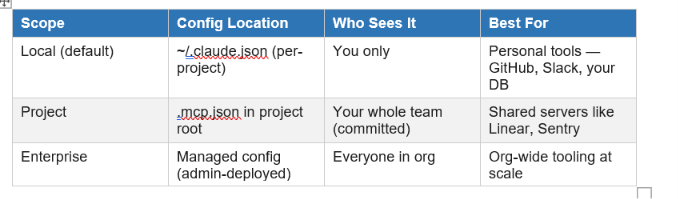
To verify setup, run:
claude mcp listYou should see your server listed with a "connected" status. If it shows "disconnected", run the raw command manually in a terminal to see the error output directly — that surfaces the real error far faster than reading logs.
For a deeper look at how Claude Code's MCP layer fits into its broader agent architecture, the Claude Managed Agents review covers how MCP servers compose into multi-step agent workflows.
5. The Best MCP Servers to Install First
The MCP ecosystem has over 2,300 public servers in May 2026. Most are abandoned demos. The ones below are actively maintained, production-tested, and cover 80% of real workflows. My honest take: install 3–5 servers maximum to start. Every server adds its tool definitions to Claude's context window, and a bloated tool list visibly degrades Claude's tool-selection quality.
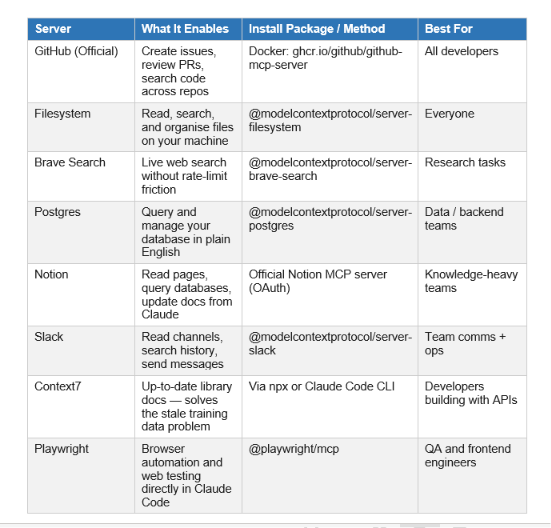
For developers, the practical starter pack is GitHub + Filesystem + Context7. That combination covers 80% of coding workflows without burning context tokens on unused tools. If you want to build your own MCP server from scratch, the MCP Workshop cookbook from our Build Fast with AI lab walks you through a full implementation — including connecting Google Calendar and Notion — in a hands-on Jupyter notebook.
6. Common Errors and Fixes
73% of first-time MCP users hit at least one connection error. Here are the five patterns that account for the vast majority of failures, and the fix for each.
Error 1: Server shows "disconnected" in claude mcp list
The server process crashed on startup. Run the exact install command manually in your terminal and read the stderr output. The three most common causes: npx not found in PATH (use absolute path), wrong npm package name, or missing environment variable. Fix the underlying error before touching the Claude config.
Error 2: Tools don't appear after connecting
Use the /mcp slash command inside a Claude Code session to force a reconnect. If tools still don't appear, run claude mcp get <name> — an empty tool list means the server started but declared no tools, usually a server-side config error. Restart with the updated server config.
Error 3: JSON syntax error silently breaks all servers
A single missing comma or mismatched bracket in claude_desktop_config.json silently disables every server. Run your JSON through jsonlint.com or use jq to validate before restarting Claude. This is the single most common first-install failure mode.
Error 4: Relative paths fail
Claude Desktop starts MCP servers with an undefined working directory, so relative paths like ./mydir never resolve. Always use absolute paths: /Users/yourname/projects instead of ~/projects or ./projects. On macOS, the ~ shorthand does not expand in this context.
Error 5: Context window gets eaten by tool definitions
One developer measured 30–40% of their Claude context window going to MCP tool schemas that were never used in that session. If Claude seems unusually slow or expensive, the culprit is almost always too many connected servers. Prune to the 3–5 servers you actually use in your current workflow. You can always add more later.
Hot take: most people who think they need a higher-tier Claude plan actually just need fewer MCP servers loaded. The context cost is invisible but significant. For a comparison of Claude plan features and what they actually unlock, see our Claude AI 2026 complete guide
7. Advanced: Build Your Own MCP Server
Building a custom MCP server is the fastest way to give Claude access to internal tools, proprietary APIs, or data that no public server covers. The Python SDK makes this surprisingly accessible — you define tools with decorators instead of writing JSON schemas by hand.
Anthropic offers a free Introduction to Model Context Protocol course that covers building both MCP servers and clients using the Python SDK. It covers MCP's three core primitives — tools, resources, and prompts — which are all you need to build a server that Claude can discover and call.
The minimum viable MCP server in Python:
pip install modelcontext

from modelcontext import Server, StdioServerTranspor

server = Server("my-server")
@server.tool(
def get_data(query: str) -> str
    """Fetch data from my internal API.""
    return my_api.fetch(query)
server.run(StdioServerTransport())
Register it in your Claude Desktop config the same way as any other server — point command at your Python interpreter and args at the server file path.
One security note that most tutorials skip: always use scoped permissions when connecting MCP servers. Grant read-only access first, expand to write access only when you have confirmed the server behaves as expected. An MCP server with write access to production systems and a misinterpreted prompt can do real damage.
For teams building multi-agent workflows where MCP servers form the tool layer between agents, our Claude Managed Agents memory guide shows how to wire tool-calling agents together with persistent memory across sessions.
Frequently Asked Questions
What is MCP in Claude AI?
MCP stands for Model Context Protocol. It is an open standard created by Anthropic in November 2024 that lets Claude connect to external tools, databases, files, and APIs through a universal interface. With MCP enabled, Claude moves from answering questions based on training data to taking real actions in connected systems — reading files, querying databases, pushing GitHub commits, or sending Slack messages.
How do I set up MCP in Claude Desktop?
Claude Desktop reads MCP configuration from claude_desktop_config.json. On macOS, the file is at ~/Library/Application Support/Claude/claude_desktop_config.json. On Windows, it's at %APPDATA%\Claude\claude_desktop_config.json. Add your server definitions under the mcpServers key using absolute paths, save the file, then fully restart Claude Desktop. Alternatively, use Claude Desktop Extensions (.dxt files) for one-click install of supported servers — no JSON editing required.
How do I add MCP servers to Claude Code?
Use the CLI command: claude mcp add <name> -- <command> [args]. For example, to add a Postgres server: claude mcp add project-db -- npx -y @modelcontextprotocol/server-postgres postgresql://localhost:5432/mydb. Run claude mcp list to verify the server connected. Claude Code supports local scope (personal), project scope (team-shared via .mcp.json), and enterprise scope (admin-managed).
What MCP servers should I install first?
For developers: start with GitHub, Filesystem, and Context7 — those three cover 80% of coding workflows. For product and marketing teams: Slack, Google Drive, and Notion handle most non-coding tasks. For AI agent builders: add Brave Search and Playwright on top. Install only what you'll actively use this week. Every server consumes context tokens even when idle.
Why isn't my MCP server showing up in Claude?
The five most common causes are: JSON syntax error in the config file (validate with jsonlint.com), relative path instead of absolute path, missing Node.js or npx in PATH, authentication token missing or expired, or a server startup crash. Run the server command manually in your terminal first — stderr output reveals the actual error faster than reading Claude's logs.
What is the difference between MCP and an API?
An API is a specific interface designed by one service. MCP is a universal protocol layer that sits on top of APIs. MCP wraps function-calling mechanics in a standard discovery layer (servers advertise their tools), a transport layer (JSON-RPC 2.0), and a session layer (stateful connections). A GitHub API integration is custom code. A GitHub MCP server works with Claude, Cursor, Windsurf, and any other MCP-compatible host — built once, used everywhere.
How many MCP servers can I connect to Claude at once?
There is no hard limit, but there is a practical one: context tokens. Each connected server loads its full tool definitions into Claude's context window at session start. One benchmark measured 84 tools across several servers consuming 15,540 tokens before a single user message was processed. Best practice is 3–5 servers for most workflows. If you regularly use more than 10, consider an MCP gateway that consolidates servers behind one endpoint with selective tool loading.
Is MCP secure to use?
MCP itself is secure — all connections require explicit authorisation, and you grant access per-server. The risk is in how you configure servers. Always use scoped credentials (read-only first), avoid committing API tokens to project .mcp.json files (use environment variables instead), and treat MCP servers the same way you'd treat any third-party Slack app — review what access they request before authorising.
Recommended Blogs
- What Is MCP? Model Context Protocol Complete 2026 Guide — Build Fast with AI
- Claude AI 2026: Models, Features, Desktop & More — Build Fast with AI
- Claude Managed Agents Review 2026: Is It Worth It? — Build Fast with AI
- Claude Code Auto Mode: Unlock Safer, Faster AI Coding (2026 Guide) — Build Fast with AI
- Claude Managed Agents Memory: Build Agents That Learn — Build Fast with AI
- 150 Best Claude Prompts That Work in 2026 — Build Fast with AI
References
- Anthropic — Introducing the Model Context Protocol (Nov 2024)
- Wikipedia — Model Context Protocol (May 2026)
- Anthropic Claude Code Docs — Connect to tools via MCP
- Model Context Protocol — Official Introduction & Spec
- Toolradar — How to Set Up MCP Servers in Claude Desktop (2026)
- Nimbalyst — Claude Code MCP Setup: A Practical 2026 Guide
- MCP Playground — How to Set Up MCP in Claude Desktop (Complete 2026 Guide)
- Apigene — Claude MCP Servers: Complete List and Setup Guide (2026)

