



Claude Managed Agents Memory: Build AI Agents That Actually Learn
Rakuten's Claude agents are now making 97% fewer first-pass errors — at 27% lower cost and 34% lower latency — because those agents remember every mistake they've ever made. On April 23, 2026, Anthropic made the technology behind that possible for every developer: Memory on Claude Managed Agents is now in public beta. Your agents can finally learn.
1. Why Agent Memory Changes Everything
Every Claude agent session has started from zero — until now. You spin up a session, Claude works, the session ends, and every lesson the agent learned vanishes. For simple one-off tasks, that's fine. For anything that runs repeatedly — document verification, customer support, code review, data pipelines — statelessness is the fundamental blocker.
If you've been wrestling with this problem using LangGraph, CrewAI, or custom memory layers, the best AI agent frameworks guide for 2026 covers what each framework does well. But all of those approaches require you to build and maintain your own memory infrastructure. Claude Managed Agents Memory eliminates that entirely.
The shift from stateless to stateful is the difference between a tool that resets and a system that compounds. An agent that forgets is a disposable resource. An agent that remembers is an appreciating asset. That's the value proposition here — and it's not incremental.
Hot take: this is quietly the most important infrastructure release Anthropic has shipped in 2026. Not the flashiest. But the one that most directly changes what production AI agents can actually do over time.
2. What Claude Agent Memory Actually Is
Claude Managed Agents Memory is a filesystem-based persistent memory layer for agents running on the Claude Platform. It launched in public beta on April 23, 2026, accessible under the standard managed-agents-2026-04-01 beta header — no separate access request required.
At its core, a memory store is a workspace-scoped collection of text documents optimized for Claude. Think of it as a structured folder of Markdown files that your agent can read, write, and update across sessions. The design philosophy is deliberate: memories are stored as files so developers can export them, manage them via the API, and maintain full control over what agents retain.
Three things make this architecture different from embedding-based memory systems:
Files, not vectors. Claude reads and writes memory with the same bash and file tools it uses for everything else — no new paradigm, no embedding model, no retrieval infrastructure to maintain.
Immutable versioning. Every write creates a named version (memver_...). Full audit trail, point-in-time recovery, and the ability to redact content from history without destroying the version chain.
Console observability. Every memory change surfaces as a session event in the Claude Console, so you can trace exactly what an agent learned and which session it came from.
3. How Memory Stores Work: The Technical Architecture
When you attach a memory store to a session, it is mounted as a directory inside the session's container at /mnt/memory/. The agent reads and writes it with standard file tools — bash, read, write — exactly like any other directory in the container. A short description of each mount (path, access mode, store description, and any instructions) is automatically injected into the system prompt so the agent always knows where to look.
Key architectural constraints to know before you build:
Individual memories within a store are capped at 100KB (~25K tokens). Structure memory as many small, focused files rather than a few large documents. A preferences.md, a learnings.md, and a task-history.md will outperform a single monolithic memory.md.
Memory stores can only be attached at session creation time. Adding or removing a store from a running session is not supported.
The agent toolset (agent_toolset_20260401) is required for memory interactions — ensure it is enabled when creating the agent.
The memory versioning model is worth understanding deeply. Every mutation creates an immutable memory version. You can list versions to audit the full history, inspect or restore any prior snapshot, and redact sensitive content from history without breaking the version chain. For enterprise deployments handling user data, this is table-stakes governance that most DIY memory solutions don't provide.
For hands-on implementation patterns including context editing strategies and cross-session learning loops, the Anthropic memory cookbook on GitHub is the clearest technical reference available — it covers the full implementation from scratch.
4. Step-by-Step: Implementing Memory in Your Claude Agent
Here is the complete flow from zero to a memory-enabled Claude agent using the Python SDK.
Step 1: Create a Memory Store
A memory store is workspace-scoped and exists independently of any session. Create it once; attach it to many sessions.
import anthropic
client = anthropic.Anthropic()
 store = client.beta.memory_stores.create(
                  name="customer-support-memory",
                  description="User preferences,
                  past issues,
                  and learned resolution patterns"
)
Step 2: Seed It with Reference Material (Optional but Recommended)
Pre-loading the store before any agent runs avoids a cold-start problem where the agent has no context for early sessions.
client.beta.memory_stores.memories.create(
                store.id,
                path="/formatting_standards.md",
                content="All reports use ISO-8601 dates. Escalation threshold: > 3 unresolved issues." )
Step 3: Attach the Store to a Session
Memory stores are attached in the session's resources array at creation time.
session = client.beta.agents.sessions.create(
              agent_id=agent.id,
              environment_id=env.id,
              resources=[
                          {
                        "type": "memory_store",
                         "memory_store_id": store.id,
                         "access": "read_write",
                         "instructions": "Read learnings.md at task start. Write new learnings at task end."
    }
   ]
 )
Step 4: Safe Concurrent Writes
To prevent one agent from overwriting another's concurrent write, use the content_sha256 precondition. The update only applies if the stored content hash still matches what you read — on mismatch, re-read and retry.
client.beta.memory_stores.memories.update(
         memory_id=mem.id,
         memory_store_id=store.id,
         content="UPDATED: Use 2-space indentation for all Python files.",
         precondition={
                       "type": "content_sha256",
                    "content_sha256": mem.content_sha256
   } )
If you're newer to agentic Claude workflows and want to understand the broader infrastructure picture before diving into memory, the Claude Managed Agents complete review covers sandboxing, session architecture, pricing, and how all the components fit together.
5. Access Modes, Scoping, and Concurrent Architecture
Memory stores support two access modes, and choosing correctly is one of the most important architectural decisions you'll make:
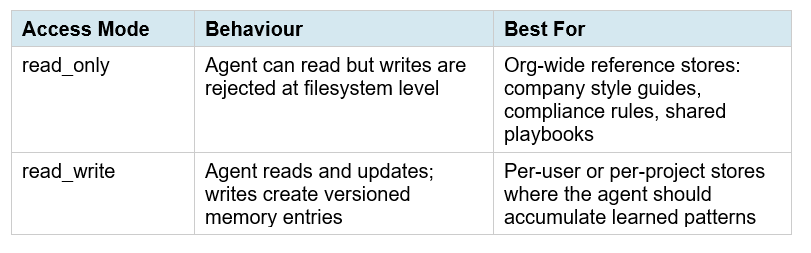
Stores are workspace-scoped, not session-scoped. This means multiple agents can share the same store simultaneously. An org-wide knowledge store can be read_only for all agents while individual user stores are read_write. This is the architecture behind Rakuten's multi-department deployment — five specialist agents, each reading shared company context and writing to their own domain-specific stores.
One critical design note: concurrent writes to the same memory file are last-write-wins without a precondition. If you run parallel agents writing to overlapping files, always implement the content_sha256 precondition check. This is not optional for production multi-agent systems.
6. Real Enterprise Results: Netflix, Rakuten, Wisedocs, Ando
Anthropic published four enterprise case studies at launch. These are the most concrete proof points available, and they're worth reading carefully because each one reveals a different use case pattern.
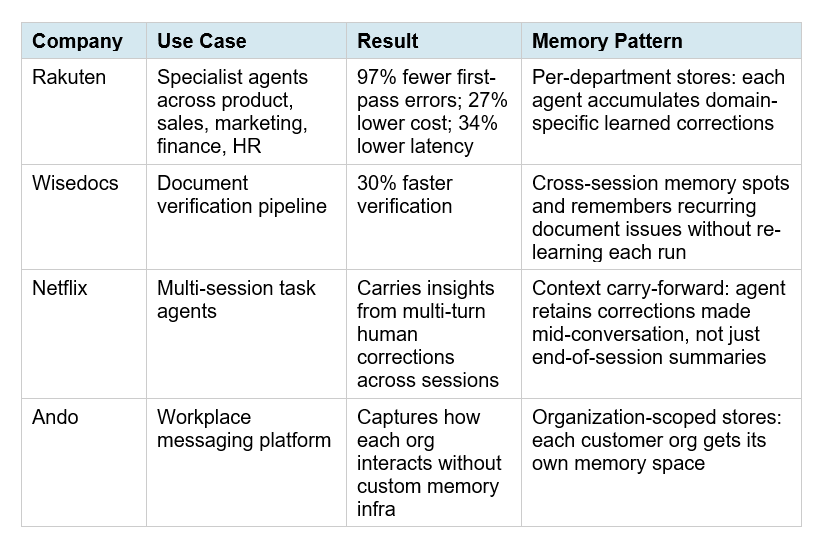
The pattern that stands out most is Wisedocs. Their 30% faster verification didn't come from a smarter model — it came from the agent remembering which document issues recur in specific templates and skipping redundant re-analysis. That's pure compounding memory value that would be impossible to replicate with prompt engineering alone.
If you're building multi-agent workflows where memory coordination across agents matters, the LangGraph multi-agent swarm guide shows the underlying orchestration patterns — useful context before deciding whether to port to Managed Agents Memory or extend your existing LangGraph setup.
7. Memory + Claude Opus 4.7: The Compounding Advantage
Claude Opus 4.7, released April 16, 2026, ships with a specific improvement that pairs directly with memory stores: better filesystem-based memory. If an agent maintains a scratchpad, notes file, or structured memory store across turns, Opus 4.7 writes more comprehensive, well-organized memories and is more discerning about what to remember for a given task.
What this means in practice: with Opus 4.6, agents often wrote vague or over-broad memories that diluted the signal in a learnings.md file over time. With Opus 4.7, early testing from DataCamp shows that at max effort, the model writes highly actionable memory entries — specific edge cases, concrete checklists, explicit failure modes — that measurably improve performance on subsequent tasks.
One calibration note worth flagging: the DataCamp benchmark found that memory-induced instructions consume response budget. At xhigh effort, a memory instruction about response structure caused a 37-point performance drop on one task because the model took the instruction too literally. Design your memory files around patterns and learnings, not formatting micro-rules. Keep memory entries as decision guidance, not rigid scripts.
For the full breakdown of how Opus 4.7's effort levels and adaptive thinking affect agent performance, the Claude AI complete guide for 2026 covers all the model-level changes and how they interact with agentic infrastructure.
8. Best Practices and Honest Limitations
After reviewing the official docs, enterprise case studies, and early developer feedback, here are the practices that will determine whether your memory implementation compounds or collapses:
Structure memory as a library, not a journal
The 100KB per-file cap is a signal, not just a constraint. Small, focused files outperform large monolithic ones. Consider: preferences.md (user or domain preferences), learnings.md (what worked and what failed), task-history.md (recent context), and constants.md (seeded reference material that rarely changes). One file per concern. Each under 10KB.
Write at task end, read at task start
Instruct your agent to read the most relevant memory files at the beginning of each session and write a structured summary of what it learned at the end. This mirrors how skilled humans hand off work between sessions. The instructions field when attaching the store is the right place to encode this behaviour.
Redact proactively, not reactively
Every write creates an immutable version, but you can redact content from history using the version endpoints. For any application handling user PII or sensitive corrections, build a scheduled redaction review into your operations workflow from day one. Don't wait for an incident.
Honest limitation: this is not semantic retrieval
Memory stores are text files, not vector databases. Claude reads the full file content — there's no embedding-based similarity search to surface the most relevant memories from a large store. For use cases requiring retrieval across thousands of memory entries, you still need a proper vector store. Claude Managed Agents Memory is optimized for structured, human-readable patterns and preferences — not corpus-scale retrieval. Know the boundary.
If you want to compare the no-code approach to agent memory with what's possible via the Managed Agents API, the no-code AI agent automation guide covers Make.com, Claude Cowork, and similar tools — useful for teams that don't want to write API code.
Contrarian take worth making: memory stores are powerful, but they're also a new attack surface. An agent with read_write access to a shared store can corrupt that store with a bad write — whether from a prompt injection, a model error, or a runaway session. The version history and rollback capability exist precisely because this will happen. Design your memory architecture assuming writes will sometimes be wrong, and make rollback a first-class part of your operations playbook.
For cookbook-style implementations of agent patterns including multi-step tool orchestration and agentic builds you can run and modify, the BuildFastWithAI gen-ai-experiments repository has production-ready notebooks across LangChain, Claude, and multi-agent workflows.
Frequently Asked Questions
What is Claude Managed Agents Memory?
Claude Managed Agents Memory is a filesystem-based persistent memory layer for agents running on the Claude Platform, launched in public beta on April 23, 2026. Memory is stored as text files in workspace-scoped stores that persist across sessions. Agents read and write to these stores using standard file tools, and every write creates an immutable versioned record with full audit trails and rollback capability.
How do I add persistent memory to a Claude agent?
Create a memory store via the API (client.beta.memory_stores.create), optionally seed it with reference material, then attach it to a session in the resources array with read_only or read_write access. The store is mounted at /mnt/memory/ inside the container. All Managed Agents requests require the managed-agents-2026-04-01 beta header, which the Python and TypeScript SDKs set automatically.
Does Claude agent memory cost extra?
Memory stores are part of the core Managed Agents platform and do not carry an additional line-item fee beyond the $0.08 per session-hour infrastructure cost and standard Claude model token rates. However, memory reads and writes consume tokens as ordinary file tool calls, which do add to session token counts for heavily memory-dependent agents.
What is the difference between Claude memory stores and a vector database?
Claude memory stores are optimized text files with versioning, audit logs, and API management. Claude reads the full file content — there is no embedding-based semantic retrieval. For structured preferences, patterns, and learned corrections (the primary use case), file-based memory outperforms vector retrieval because the full content is always in context. For applications needing similarity search across thousands of entries, a vector database remains the right tool.
Can multiple Claude agents share the same memory store?
Yes. Memory stores are workspace-scoped, not session-scoped. Multiple agents can attach to the same store with different access modes — for example, an org-wide reference store as read_only for all agents, and per-user stores as read_write. For concurrent writes to the same file, always use the content_sha256 precondition to prevent last-write-wins overwrites.
How do I roll back or redact a Claude agent memory?
Every write creates an immutable memory version (memver_...). Use the version endpoints to list history, inspect any prior snapshot, restore a previous state, or redact sensitive content from a version without destroying the version chain. All changes also surface as session events in the Claude Console, giving you a trace of what was learned and when.
Which Claude models work best with memory stores?
Claude Opus 4.7, released April 16, 2026, has specific improvements for filesystem-based memory: it writes more comprehensive, well-organized notes and is more discerning about what to retain. At max effort, Opus 4.7 produces the most actionable memory entries. Claude Sonnet 4.6 also works well with memory stores and is the more cost-effective choice for agents that don't require the deepest reasoning. Memory is available across all models supported by Managed Agents.
Is there a memory store size limit?
Individual memories within a store are capped at 100KB per file (~25K tokens). There is no documented limit on the number of files in a store or total store size in the current public beta documentation. Best practice is to structure memory as many small, focused files rather than a few large ones — this improves agent comprehension and stays well within per-file limits.
Recommended Blogs
References
Anthropic — Built-in memory for Claude Managed Agents (April 23, 2026):
Anthropic — Claude Managed Agents overview:
Anthropic — What's new in Claude Opus 4.7:SD Times — Anthropic adds memory to Claude Managed Agents (April 24, 2026):
TestingCatalog — Anthropic launches Memory in Claude Agents for enterprise:
DataCamp — Claude Opus 4.7 Benchmark: Memory & Effort Levels Tested:

