



I woke up on April 14, 2026 to my Twitter feed lit up with one screenshot. A Claude Code window. With two sessions running side by side from one window. That was it. That was the moment I realised Anthropic had quietly crossed a threshold that most AI coding tools are still months away from reaching.
The Claude Code desktop app got a full redesign this week, and a brand-new cloud automation feature called Routines shipped alongside it. These are not incremental polish updates. Together, they shift Claude Code from "AI pair programmer" to something closer to "AI operations platform."
Here is what actually changed, why it matters, and what you should do about it
1. What Changed: The Redesigned Desktop App
The redesigned Claude Code desktop app, available now to all Pro, Max, Team, and Enterprise plan users, brings four major additions: a multi-session sidebar, drag-and-drop pane layout, integrated terminal, and an in-app file editor. If you want the full picture of what Claude Code can do inside Anthropic's broader model family, the Claude AI 2026 complete guide covers the architecture in detail.
Before this update, the Claude Code desktop experience was functional but fragmented. You had the chat interface in one place, your editor open separately, your terminal in another window. Context-switching between them was the friction nobody talked about but everybody felt.
Anthropic's framing for the redesign is direct: "The new app is built for how agentic coding actually feels now: many things in flight, and you in the orchestrator seat." That is a real shift in mental model. Not the AI doing one thing for you. Multiple things, simultaneously, with you reviewing and steering.
The app has also been rebuilt for reliability under the hood, with streaming responses that start appearing as Claude generates them rather than waiting for the full output to complete.
2. The Multi-Session Sidebar: Parallel Agents in One Window
The multi-session sidebar is the headline feature, and it works exactly as well as it sounds. You can now kick off a refactor in one repo, a bug fix in another, and a test-writing pass in a third, then move between them using the sidebar as each session produces results.
Every active and recent session shows up in the sidebar. You can filter by status (active, idle, completed), by project, or by environment. Sessions can be grouped by project so that related tasks stay visually together. When a session's pull request merges or closes, it archives itself automatically, so the sidebar stays clean.
Each session in a Git repository gets its own isolated copy of your project using Git worktrees, stored by default in <project-root>/.claude/worktrees/. Changes in one session do not affect other sessions until you commit. This is the detail that makes parallel work actually safe, not just technically possible. If you want to take this further and automate the review side of those PRs, the Claude Code Review guide explains how the multi-agent PR review system works and whether the cost is worth it.
One genuinely useful addition: side chats. Press Cmd+; (macOS) or Ctrl+; (Windows) during any session to open a branch conversation that uses the session's context without feeding anything back into the main thread. You can ask "should this function be async?" without derailing the task Claude is already running.
My take: side chats solve a real problem I hit constantly with agentic tools. You want to ask a clarifying question without restarting the agent's working memory. This is the right design.
3. Drag-and-Drop Workspace: Build Your Own Layout
Every pane in the new app is drag-and-drop. Terminal, preview, diff viewer, file editor, chat. You can arrange them in whatever grid matches how you work.
The specific additions inside the app now:
• Integrated terminal: Run tests or builds alongside your Claude session without switching windows
• In-app file editor: Open and edit files directly, with changes saved back to the project
• Faster diff viewer: Rebuilt for large changesets, which was noticeably slow in the previous version
• Expanded preview: Open HTML files and PDFs in-app alongside local app server previews
Three view modes let you dial how much detail you see: Verbose shows every tool call Claude makes, Normal is the default balanced view, and Summary shows only results. If you are reviewing Claude's work rather than supervising it in real time, Summary keeps the interface clean.
SSH support now extends to macOS alongside Linux, so you can point sessions at remote machines from either platform. For developers who want Claude to run autonomously without babysitting each tool call, Claude Code Auto Mode pairs naturally with this new workspace setup and shipped just three weeks ago.
4. Claude Code Routines: Your AI Agent Works While You Sleep
Routines are the bigger deal here, and I think most of the coverage this week has undersold them.
A routine is a saved Claude Code configuration: a prompt, one or more GitHub repositories, and whatever MCP connectors you need (Slack, Linear, Asana, Google Drive). You configure it once, then tell it when and how to run. It executes on Anthropic's cloud infrastructure. Your laptop can be off. The routine keeps going. Before you wire any of this up, I'd recommend getting comfortable with how Claude handles tool calls and multi-step tasks at the API level. The Claude Opus 4.6 Fast hands-on cookbook takes you from zero to running agentic Claude patterns in under 20 minutes, which is exactly the foundation you need before designing a routine prompt.
This removes the single biggest limitation of agentic coding workflows: the dependency on a running local process. Anthropic launched the /schedule command earlier this year for local scheduled tasks. Routines are the cloud version of that, and any tasks you already set up with /schedule migrate automatically with no manual steps. If you want to understand how Anthropic's agent infrastructure works at a deeper level, the Claude Managed Agents review covers the platform layer that Routines run on top of.
Real workflows teams are already running in the research preview:
• Nightly backlog triage: Claude reads your issue tracker at 2am, applies labels, assigns owners, posts a summary to Slack before standup
• Automated PR review: A GitHub webhook triggers Claude on every new pull request against your team's custom checklist, leaving inline comments before any human opens the PR
• Docs drift detection: Weekly scan of merged PRs flags documentation referencing changed APIs and opens update PRs automatically
• Deploy verification: Your CD pipeline calls the routine after each production deploy; Claude runs smoke checks and posts go/no-go to the release channel
The feedback-to-fix pipeline use case is the one I find most interesting. A docs feedback widget sends reports to a routine endpoint, Claude opens a session with the relevant repo context, and drafts a fix. No human intervention needed on the initial pass.
5. Three Trigger Types Explained
Routines support three trigger types, and you can combine multiple triggers on a single routine.
Scheduled Triggers
Set a cadence and walk away. Options are hourly, daily, nightly, on weekdays, or weekly. Times are entered in your local timezone and converted automatically. For custom intervals not covered by presets, run /schedule update in the CLI to set a specific cron expression.
API Triggers
Each routine gets a unique HTTP endpoint and a bearer token. POST to the endpoint with an optional text payload and the routine fires. Anthropic ships the endpoint under the experimental-cc-routine-2026-04-01 beta header, with breaking changes under new dated headers and a two-version grace period. The use case: your monitoring tool crosses an error threshold, calls the routine endpoint with the alert body, and Claude correlates the stack trace with recent commits and opens a draft fix PR. On-call reviews the PR instead of starting from a blank terminal.
GitHub Event Triggers
This is the trigger type that changes the most for active engineering teams. Subscribe a routine to any GitHub repository event (pull_request.opened, push, issues, releases, check runs, discussions, and many more). Claude spins up a new session for each matching event in real time using webhooks, not polling.
A practical example: a routine subscribed to pull_request.opened against your auth module applies your team's security checklist, leaves inline comments with severity labels, and adds a summary comment before any human reviewer opens the PR. For hands-on implementation with Claude via the API, the Claude Opus 4.6 Fast cookbook is a useful starting point for building prompts that work well in autonomous, no-human-in-the-loop contexts like this.
One honest caveat: routines are in research preview with daily run caps that scale by plan. In a busy repo with events on every PR, you will hit caps if you trigger on every event without batching. Design for signal, not volume.
6. Claude Code Desktop vs GitHub Copilot vs Codex: Where Things Stand
The multi-session parallel work is the strongest differentiator here. Neither GitHub Copilot nor OpenAI's Codex ships a native desktop interface with Git worktree isolation per session. Copilot Workspace operates at the issue level, not the session level. Codex is cloud-first but doesn't have the sidebar session management.
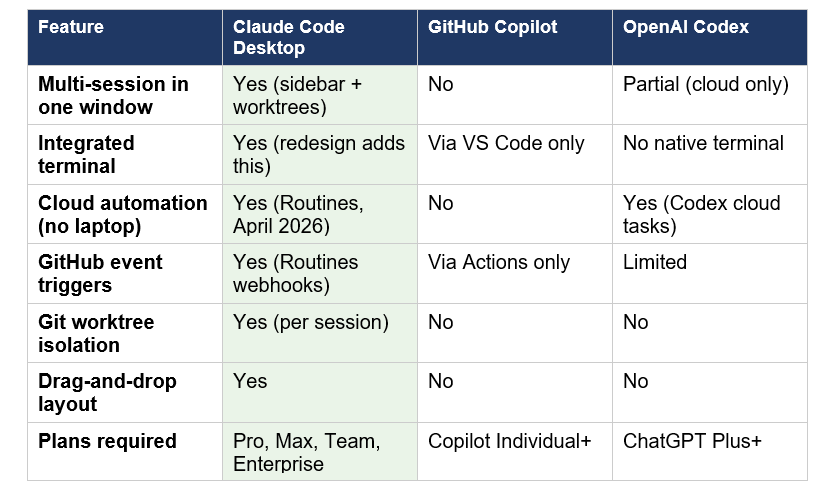
Routines vs GitHub Actions is the comparison I keep seeing framed wrong. GitHub Actions is better for deterministic CI/CD: builds, tests, linting, deployments. Routines complement Actions by doing interpretive work: review summaries, risk analysis, docs suggestions, backlog triage. They run alongside your Actions pipeline, not instead of it.
The competitive picture for Claude Code more broadly (benchmarks, pricing, model comparisons against GPT-5.3-Codex and Kimi K2.5) is covered in the 7 AI tools that changed developer workflow in March 2026 roundup.
7. How to Get Started Today
For the redesigned desktop app: download the Claude desktop app or update and restart if you already have it. The Code tab inside the app is where all of this lives. You need Claude Desktop v1.2581.0 or later. Pro, Max, Team, and Enterprise plans all have access.
For Routines specifically:
- Go to claude.ai/code/routines and click New routine
- Write the prompt first, and make it explicit. "Review open PRs against the /auth module, check for SQL injection vulnerabilities and missing input validation, leave inline comments with severity labels, and add a summary comment with pass/fail status" outperforms "review PRs" by a significant margin
- Define what the routine should not do. "Create draft PRs only. Never merge. Never push to main."
- Handle edge cases in the prompt itself. "If no new issues were opened since the last run, post a nothing-to-triage message to the Slack channel and exit."
- Test the prompt in a normal Claude Code session before converting it to a routine
Because each Routines execution is stateless, the prompt carries the entire job specification. Every detail you leave out is a decision Claude will make autonomously. Write prompts for routines the way you write runbooks for a new team member on their first week: explicit, specific about success criteria, clear about what not to do.
The biggest mistake I see developers make with agentic prompts is leaving success criteria vague. A routine that runs autonomously with no permission prompts needs a self-contained spec. If you want a working reference for how to structure Claude API calls with tool use and streaming for exactly this kind of autonomous workflow, the Claude Opus 4.6 Fast cookbook covers the patterns you will actually need when building prompts for routines.
If you want to understand how to write prompts that work well for autonomous agent contexts, the 150 best Claude prompts guide has a tested section on agentic prompt patterns.
Frequently Asked Questions
What is the Claude Code desktop redesign released in April 2026?
Anthropic released a redesigned Claude Code desktop app on April 14, 2026, adding a multi-session sidebar, drag-and-drop pane layout, integrated terminal, in-app file editor, expanded HTML and PDF preview, and a rebuilt diff viewer. The update is available to all Claude Code users on Pro, Max, Team, and Enterprise plans.
How do I run multiple Claude Code sessions at the same time?
In the redesigned Claude Code desktop app, click + New session in the sidebar or press Cmd+N (macOS) / Ctrl+N (Windows). Each session in a Git repository gets its own isolated copy of the project via Git worktrees, so changes in one session do not affect others until committed. Filter and group sessions by project using the sidebar controls.
What are Claude Code Routines?
Claude Code Routines, launched in research preview on April 14, 2026, are saved Claude Code automations that run on Anthropic's cloud infrastructure without requiring your laptop to be on. You configure a routine once with a prompt, repository context, and connectors, then choose a trigger: a schedule (hourly/daily/weekly), an API call, or a GitHub event.
What trigger types does Claude Code Routines support?
Routines support three trigger types: Scheduled (hourly, daily, nightly, weekdays, or weekly), API (an HTTP POST to a per-routine endpoint with a bearer token), and GitHub events (pull_request.opened, push, issues, releases, check runs, and more). A single routine can combine all three trigger types simultaneously.
Is Claude Code Routines available on the free plan?
No. Claude Code Routines require a paid plan: Pro, Max, Team, or Enterprise. Routines also require Claude Code on the web to be enabled. Access is currently in research preview as of April 14, 2026, with daily run caps that scale by plan tier.
How is Claude Code Routines different from GitHub Actions?
GitHub Actions is best for deterministic CI/CD workflows: builds, tests, linting, and deployments. Claude Code Routines handle interpretive tasks that require reasoning: PR risk analysis, backlog triage, docs drift detection, and cross-language library ports. Routines complement Actions rather than replacing them.
How is Claude Code Routines different from a cron job?
A cron job runs a deterministic shell command you write. A Claude Code Routine runs a saved Claude Code configuration that reads context, reasons about it, and produces output with judgment. Routines can open PRs, leave comments, triage issues, and post to Slack based on what they find, not just execute fixed commands.
Do I need Git installed for the multi-session sidebar?
Yes. Session isolation using Git worktrees requires Git. Most Macs include Git by default. On Windows, Git is required for the Code tab to work. Download Git for Windows, install it, and restart the app. Run git --version in the terminal to verify installation before starting a session.
Recommended Blogs
Related posts from Build Fast with AI that go deeper on the tools mentioned here:
References
• Anthropic - Redesigning Claude Code on desktop for parallel agents (Official blog)
• Anthropic - Claude Code Routines documentation (Official docs)
• Anthropic - Claude Code Desktop documentation (Official docs)
• SiliconANGLE - Anthropic's Claude Code gets automated routines and a desktop makeover
• MacRumors - Anthropic Rebuilds Claude Code Desktop App Around Parallel Sessions

