




Claude Code Review: Setup, What It Catches, and Is It Worth It? (2026)
Your engineering team is shipping faster than ever. Pull requests are piling up. And your senior developers are spending 2-3 hours a day doing code review instead of building.
That was Anthropic's exact problem. Code output per engineer grew by 200% after they started using Claude internally. But review became the new bottleneck. So they built a solution and in March 2025, they shipped it to everyone.
Claude Code Review is a multi-agent AI system that deploys five parallel specialized agents on every pull request, catches bugs before your team even sees the PR, and posts findings as inline comments. I've gone deep on how it works, how to set it up, what it actually costs, and whether it's genuinely worth $15-25 per review.
The short answer: for teams shipping more than 3-4 PRs a day, the math is almost always yes.
What Is Claude Code Review?
Claude Code Review is Anthropic's automated pull request review feature, available for Claude Teams and Enterprise customers, that uses multiple AI agents to analyze code changes and post inline bug-detection comments on GitHub pull requests.
It launched on March 9, 2025, built on a straightforward observation: as AI coding assistants like Claude Code, Cursor, and GitHub Copilot let engineers ship code much faster, the human review queue grows faster than you can hire reviewers. The PRs are cleaner in some ways (the AI doesn't write syntax errors) but riskier in others (the logic errors are subtler).
Before Claude Code Review, only 16% of PRs at Anthropic received substantive review comments. After deploying it internally, that number jumped to 54%. And less than 1% of its findings were marked incorrect by engineers.
One real example: Claude caught a race condition in a TrueNAS ZFS storage module that a full human review team had missed. That kind of catch, on a large PR, is exactly where this earns its keep.
How Claude Code Review Actually Works: The 5-Agent System
Most AI code review tools just scan your diff. Claude Code Review dispatches five parallel specialized agents that each look at a different dimension of your change, then a verification pass filters anything below a confidence threshold of 80 out of 100.
Here's what the five agents actually do:
- Agent 1 - CLAUDE.md Compliance: Reads your repo's CLAUDE.md or REVIEW.md file (if you have one) and checks whether the PR follows your team's documented standards, patterns, and style rules.
- Agent 2 - Bug Detection: Scans the diff for logic errors, null pointer risks, off-by-one errors, incorrect conditional branches, and other correctness issues. This is the core agent.
- Agent 3 - Git History Analysis: Pulls your repo's commit history and identifies whether this change touches code that has a history of regressions or has been reverted before.
- Agent 4 - Previous PR Comments: Reviews comments from your past pull requests to understand patterns, recurring issues, and what your team has flagged as important in similar changes.
- Agent 5 - Code Comment Verification: Checks whether the inline comments in the code (docstrings, TODOs, API documentation) are accurate and consistent with what the code actually does.
Each agent scores its findings from 0-100. Only findings that hit 80 or above get passed to the verification stage. A separate verification agent then re-examines those shortlisted findings and filters false positives before anything gets posted to the PR.
I think this architecture is underrated. The verification pass is what keeps the false positive rate below 1%. Most AI reviewers just dump every possible concern as a comment and flood the PR with noise. Claude's multi-stage filter is why engineers actually read its output.
Step-by-Step Setup Guide (Admin + Developer View)
Setup takes about 10 minutes and has two phases: admin configuration and developer workflow. You need a Claude Teams or Enterprise plan to access this feature.
Admin Setup (5 minutes)
- Go to claude.ai/admin-settings/claude-code in your organization's Claude admin panel.
- Click 'Connect GitHub' and install the Claude GitHub App. During installation, select which repositories you want to enable reviews on. You can choose all repos or specific ones.
- Set your monthly spend cap. This is under Settings > Usage Controls. Given that reviews average $15-25, a team doing 10 PRs/day could spend $4,500-7,500/month. Set a cap before your first PR.
- Optionally configure auto-review: Claude can trigger automatically on every new PR, or only when manually requested via the @claude command.
Developer Workflow (What Your Team Actually Does)
Once the admin setup is done, developers have two ways to trigger a review:
- Automatic mode: Claude reviews every PR automatically when it's opened. No action needed.
- Manual trigger: In any PR comment, type @claude review and Claude will run a full analysis on the current state of the PR.
Claude posts its findings as inline PR comments with severity tags. Red tags are high-confidence correctness bugs. Yellow tags are medium-confidence warnings. Purple tags flag documentation or comment inaccuracies. Reviews typically complete in about 20 minutes.
A useful tip: Claude does NOT approve or block PRs. It only comments. The merge decision stays with your human reviewers. This is intentional and the right call, because shipping decisions carry context that an AI can't fully weigh.
What Bugs Does It Catch? Real Data from Anthropic
Claude Code Review finds substantive issues in 84% of large pull requests (1,000 lines of code or more), averaging 7.5 findings per PR. For small PRs under 50 lines, it flags 31% of them with an average of 0.5 findings.
The types of bugs it catches most often:
- Logic errors: Incorrect conditional branches, wrong operator precedence, inverted boolean checks
- Edge cases: Null/undefined inputs, empty array handling, integer overflow scenarios
- Race conditions: Concurrent access issues, missing locks, timing dependencies in async code
- Security issues: Input validation gaps, path traversal risks, SQL injection patterns
- Regression risks: Changes to code that has broken before, flagged via git history analysis
- Documentation drift: Docstrings and API docs that no longer match the actual function behavior
Here's the number I keep coming back to: less than 1% of all findings are marked incorrect. For context, studies on human code review false positive rates often run 10-15%. Claude is not just fast, it's more precise than most reviewers on the specific dimension of "is this actually a bug."
Where it's weaker: architectural judgment. It won't tell you the PR is solving the wrong problem, or that a cleaner abstraction exists. It reviews correctness, not design. I'd still want a senior engineer reviewing PRs for design quality. But catching correctness bugs? Claude's doing a better job than most.
Don't just use ChatGPT. Learn to build custom LLM agents, RAG pipelines, and full-stack Agentic AI apps in our intensive 6-week program.
How to Customize Reviews with CLAUDE.md
You can tune exactly what Claude flags by adding a CLAUDE.md or REVIEW.md file to your repository's root directory. Without one, Claude uses its default review profile focused purely on correctness.
Add a CLAUDE.md to change what Claude focuses on. Here's what you can configure:
- Expand beyond correctness: Tell Claude to also check for test coverage, naming conventions, or specific patterns your team uses
- Focus on file types: 'Prioritize review of changes to /api/ and /auth/ directories'
- Suppress known non-issues: 'Ignore TODO comments in legacy modules under /v1/'
- Enforce team standards: 'Flag any database query that doesn't use our query builder pattern'
A minimal CLAUDE.md example for a Python backend:
# Claude Review Config
## Focus Areas
- Flag SQL queries that don't use SQLAlchemy ORM
- Check all async functions for missing await statements
- Verify all API endpoints have input validation
## Ignore
- Style comments in /legacy/ directory
This is the most underused feature of the whole system. Teams that take 20 minutes to write a good CLAUDE.md get significantly more relevant findings and far fewer comments on things they don't care about.
Pricing: What Does Claude Code Review Actually Cost?
Claude Code Review costs $15-25 per review on average, billed by token usage rather than a flat per-review fee. A short PR (under 200 lines) might cost $8-12. A large PR with 2,000+ lines and significant git history might cost $30-40.
The feature is only available on Claude Teams ($30/user/month) and Claude Enterprise (custom pricing). There is no free tier for Code Review.
Here's the ROI math that makes teams comfortable with the cost:
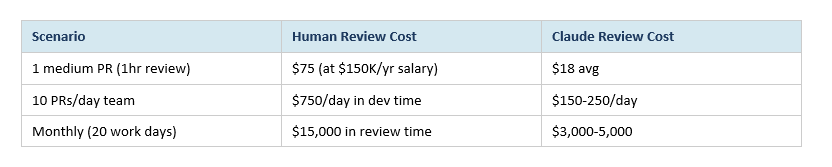
These numbers assume Claude catches issues that would otherwise require human review time. The real payoff is two-layer: direct cost savings on review time, plus the reduced cost of bugs that make it to production.
To control costs: set spend caps in admin settings, consider auto-review only on PRs above a certain size threshold, and use manual @claude review for smaller day-to-day changes.
Claude Code Review vs CodeRabbit vs GitHub Copilot
Claude Code Review is not the only automated PR review tool. CodeRabbit is the established player with a larger user base. GitHub Copilot launched its own code review feature in April 2025. Here's how they actually compare:
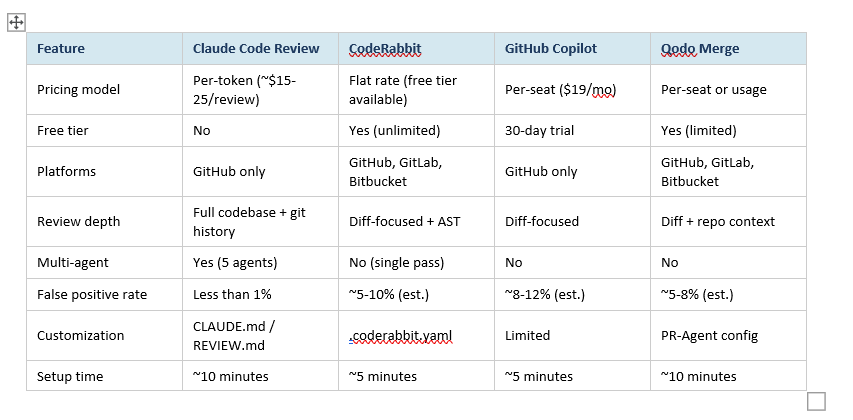
My honest take: if you're already paying for Claude Teams or Enterprise, Code Review is an obvious add. The multi-agent architecture and sub-1% false positive rate are genuinely differentiated. CodeRabbit wins on price flexibility and platform support (GitLab + Bitbucket teams, this is important). GitHub Copilot's review is convenient but shallow compared to both.
If budget is tight: start with CodeRabbit's free tier, prove the ROI, then upgrade to Claude Code Review once the savings are clear.
GitHub Actions vs Managed Claude Code Review: Which to Use?
There are actually two different ways to get Claude reviewing your code: the managed Claude Code Review feature (the one this whole guide is about) and a self-hosted approach using Claude's open-source GitHub Actions workflow. They're designed for different teams.
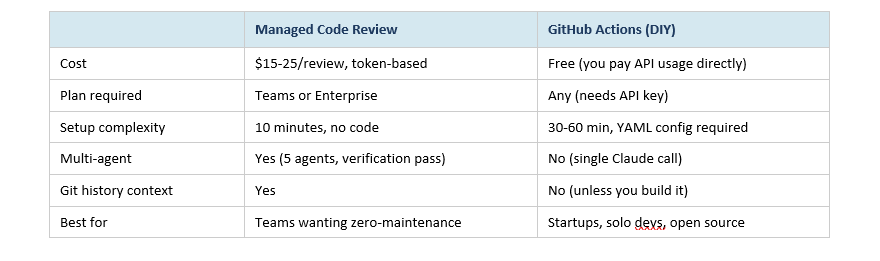
The GitHub Actions version is genuinely useful for individuals and small teams. You wire it up with your Anthropic API key, and Claude comments on PRs just like the managed version. What you lose is the multi-agent architecture, the git history analysis, and the verification pass. The false positive rate is noticeably higher.
For any team beyond 3-4 engineers shipping regularly, the managed version pays for itself. For solo projects and open source, the Actions version is a practical and free starting point.
The only comprehensive program designed to take you from basic prompting to building interactive Artifacts, custom integrations, and deploying production-ready code with Claude Code.
Frequently Asked Questions
What is Claude Code Review and how is it different from regular AI review?
Claude Code Review is Anthropic's pull request analysis feature that dispatches five specialized AI agents in parallel on every PR. Unlike single-pass AI reviewers, each agent examines a separate dimension of the code change: CLAUDE.md compliance, bug detection, git history patterns, past PR comments, and code comment accuracy. A verification pass then filters any finding below 80% confidence before it's posted.
Does Claude Code Review approve or block pull requests?
No. Claude Code Review only posts inline comments on the PR. It does not approve, request changes in a blocking sense, or merge code. The final merge decision always stays with your human reviewers. This is by design: shipping decisions involve business context and architectural judgment that a code analysis tool shouldn't unilaterally override.
How much does Claude Code Review cost?
Reviews average $15-25 per PR, billed by token usage rather than a flat fee. A small PR under 200 lines might cost $8-12. A large 2,000-line PR with significant history context can cost $30-40. The feature requires a Claude Teams ($30/user/month) or Enterprise plan. There is no free tier for Code Review specifically.
Is Claude Code Review available on the Claude free plan?
No. Code Review is only available on Claude Teams and Claude Enterprise plans. Free-plan users can still trigger basic Claude responses in GitHub via the open-source GitHub Actions integration, but that doesn't include the five-agent architecture, the verification pass, or the git history analysis.
How long does a Claude Code Review take?
Most reviews complete in approximately 20 minutes. Large PRs (over 1,000 lines) may take 25-30 minutes, depending on repository history size. The review runs asynchronously, so your developer can work on something else while it runs. You'll get a notification when the inline comments appear on the PR.
What is CLAUDE.md and why should I create one?
CLAUDE.md is a configuration file you add to your repository root that tells Claude what to prioritize during reviews. Without it, Claude uses its default correctness-focused profile. With it, you can expand the scope (test coverage, naming conventions), focus on specific directories, suppress known non-issues, or enforce team-specific patterns. Teams that maintain a good CLAUDE.md report significantly more relevant findings and less noise.
How does Claude Code Review compare to CodeRabbit?
Claude Code Review's key advantages are its multi-agent architecture (5 specialized agents vs CodeRabbit's single pass), sub-1% false positive rate, and deep git history context. CodeRabbit's key advantages are platform support (GitHub, GitLab, and Bitbucket vs Claude's GitHub-only), a free unlimited tier, and lower per-review cost. For Teams and Enterprise Claude customers, Code Review is the stronger technical choice. For GitLab or Bitbucket users, or teams watching costs closely, CodeRabbit wins.
Can I use Claude Code Review without Claude Teams, using GitHub Actions instead?
Yes. Anthropic maintains an open-source Claude GitHub Actions workflow that any developer with an Anthropic API key can use. It gives you Claude commenting on PRs for free (you pay only API token costs). The trade-off: you get a single-pass review without multi-agent depth, no git history analysis, and a higher false positive rate. It's a great starting point for individuals and small teams before upgrading to the managed version.
Recommended Reads
If you found this useful, these posts from Build Fast with AI go deeper on related topics:
- 7 AI Tools That Changed Developer Workflow (March 2026)
- 150 Best Claude Prompts That Work in 2026
- Every AI Model Compared: Best One Per Task (2026)
- Claude AI 2026: Models, Features, Desktop & More
References
- Anthropic - Introducing Code Review for Claude Code (March 9, 2025):
- Anthropic Claude Code Documentation - Code Review Feature:
- VentureBeat - Anthropic launches Code Review for Claude Code (March 2025):
- The New Stack - Claude Code Review: Multi-Agent PR Analysis Explained:
- Anthropic Claude Code GitHub Actions (open source):
- CodeRabbit documentation and pricing:
- GitHub Copilot code review feature announcement (April 2025):

