



Claude Skills: The Complete 2026 Guide — Build, Install & Use
If you have spent any serious time with Claude and found yourself retyping the same context, instructions, or preferences every single session, skills are the fix. They are the most underused power feature in the Claude ecosystem — and in 2026, the ecosystem around them has exploded from a handful of official examples to over a million community contributions indexed across skills marketplaces.
This guide covers the complete picture: what skills are and how they work architecturally, the critical distinction between two completely different skill systems (Claude.ai skills vs Claude Code skills), how to install skills from GitHub in three different ways, how to write a skill from scratch, how to use the Skill Creator, the 10 best skills to install today, and a clear comparison of when to use skills vs MCP servers vs subagents.
By the end, you'll know exactly which type of skill you need, how to find or build it, and how to get it working — whether you use Claude in the browser, in the terminal, or via the API.
What Are Claude Skills? The Architecture Explained
A Claude skill is a folder containing a SKILL.md file — a markdown document with YAML frontmatter at the top and instructions in the body — that teaches Claude how to handle a specific type of task in a repeatable, consistent way.
Think of it like an onboarding guide for a new hire. Instead of explaining the same process every time you need something done — your brand colors, your code review checklist, your commit message format — you package that expertise once. Claude reads it automatically when the task is relevant and applies it without being prompted.
The key to understanding why skills work so efficiently is the progressive disclosure architecture. When Claude starts a session, it reads only the name and description from each skill — about 100 tokens per skill. When you give Claude a task, it checks whether any skill descriptions match. If one matches, it loads the full skill content (under 5,000 tokens). Supporting scripts and files only load when explicitly needed. This means you can have 50+ skills installed without any performance impact on unrelated tasks.
Skills are not always-on. They are auto-discovered. This is the part that confuses most people: a vague description means your skill rarely triggers; a specific, well-written description means it triggers reliably. More on this in the build section below.
For the broader context of how skills fit into Claude's full feature ecosystem — alongside Claude Code, Managed Agents, and Cowork — our Claude AI complete guide for 2026 covers the full picture.
Claude.ai Skills vs Claude Code Skills: Two Different Systems
This is the most important distinction in the guide. "Claude skills" refers to two completely different feature systems that share a name and a file format (SKILL.md) but are accessed in different ways and used for different purposes.
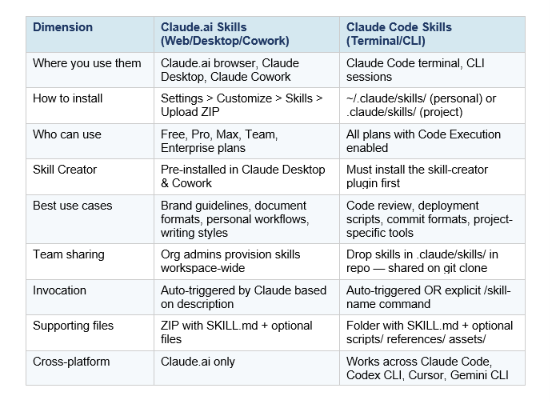
Skills work identically across Claude.ai, Claude Code, and the API at the core SKILL.md format level. A skill you create works on all three surfaces. But the access mechanism (upload vs folder) and some advanced features (subagent context forking, hooks) are Claude Code-specific.
For Team and Enterprise users on claude.ai: organization owners can provision skills workspace-wide from Organization settings > Skills. These appear for all users with a team indicator and can be toggled on or off individually.
Capability Uplift vs Encoded Preference: The Two Types of Skills
Before installing or building anything, it helps to understand the conceptual distinction that determines which type of skill you actually need.
Capability Uplift Skills
Capability Uplift skills give Claude abilities it doesn't have on its own. Before the skill, Claude cannot reliably do the task. After installing the skill, it can. Examples: web scraping via the Firecrawl skill, creating real PDF files with proper formatting, running browser automation tests through Playwright, generating production-quality .docx or .pptx files.
These skills typically include executable scripts in the skills/ folder alongside the SKILL.md — actual Python or Bash code that Claude can run to perform the capability.
Encoded Preference Skills
Encoded Preference skills are different. Claude already knows how to do the underlying task. The skill encodes your team's specific way of doing it. Claude can write commit messages — but your skill encodes your team's required format. Claude can review code — but your skill encodes your team's checklist. Claude can write NDA clauses — but your skill encodes your firm's approved language.
These skills are often just a SKILL.md file with instructions and no supporting code. They are the easiest to build, the most immediately valuable for teams, and the most overlooked category. The difference between Claude giving you a generic output and Claude giving you exactly what your workflow requires is almost always an Encoded Preference skill.
Build Fast with AI's own workflow is built on Encoded Preference skills — the skills that power our blog-writer, Unrot news cards, and topic research workflows are exactly this pattern: Claude already knows how to write, but the skills encode the exact format, voice, and structure we need. See the gen-ai-experiments cookbook repository for examples.
How to Install Claude Code Skills: 3 Methods
Claude Code skills live in either ~/.claude/skills/ (personal — available across all your projects) or .claude/skills/ in a specific repository (project-scoped — shared via git clone). Here are the three installation methods, from fastest to most manual.
Method 1: Plugin marketplace (fastest)
Claude Code has a built-in plugin system accessible directly from your terminal session. Open any Claude Code session and type /plugin. Navigate to the Discover tab, find the plugin you want, and press Enter to install. Claude asks whether to install as User (all projects) or Project (current repo only).
# One-liner to install from the official Anthropic marketplace:
/plugin install frontend-design@anthropic-agent-skills
# Add a third-party marketplace first:
/plugin marketplace add agensi
Method 2: curl one-liner (for Agensi-hosted skills)
For skills hosted on Agensi (the largest security-scanned skills marketplace), you can install with a single curl command:
mkdir -p ~/.claude/skills && curl -sL https://www.agensi.io/api/install/SKILL_SLUG | tar xz -C ~/.claude/skills/Replace SKILL_SLUG with the skill name from the Agensi page. This creates the directory, fetches the skill, and unpacks it in one step. Run /skills in Claude Code to confirm it loaded.
Method 3: Manual installation (for GitHub or custom skills)
For skills from GitHub repos or skills you created yourself:
# Clone or download the skill folder
# For personal install (all projects):
cp -r my-skill-folder/ ~/.claude/skills/

# For project install (current repo only):
cp -r my-skill-folder/ .claude/skills/

# Verify it loaded:
claude --version  # then start a session and type /skills
The folder must contain at least a SKILL.md file. Restart your Claude Code session after copying. To remove a skill, delete the folder. To temporarily disable, rename the folder with a leading underscore: _my-skill/
For Claude.ai (browser/desktop):
Go to Settings > Customize > Skills > Upload. Zip the skill folder first (the ZIP must contain the folder itself at the root, not just the SKILL.md file). After upload, Claude automatically reads the SKILL.md and displays the skill name, description, and license.
Once you have skills installed, the Claude Code Agent View guide shows how to coordinate multiple agent sessions that each run different skills simultaneously — the combination that makes parallel agentic workflows genuinely powerful.
How to Build a Claude Skill from Scratch (SKILL.md Deep Dive)
Building a skill is straightforward: one folder, one required file, optional supporting files. Here is the exact structure Claude expects:
my-skill/
├── SKILL.md          # Required — core instructions and frontmatter
├── scripts/          # Optional — Python/Bash scripts Claude can execute
│   └── helper.py
├── references/       # Optional — reference docs loaded into context
│   └── REFERENCE.md
└── assets/           # Optional — templates, binary files, examples
    └── template.json
Critical rules that catch most beginners: the folder name must be kebab-case (my-skill, not MySkill or my_skill). The file must be named exactly SKILL.md — case-sensitive. skill.md, Skill.md, and Skills.md will all be silently ignored. No README.md in the skill folder roo
Step 1: Define your use case first
Before writing a single line of SKILL.md, define 2–3 concrete trigger scenarios. Not "a helpful skill" in the abstract — actual prompts that should trigger it. This discipline produces a better description and better instructions. Example: instead of "helps with sales data," define: (1) "analyze this month's revenue CSV," (2) "find patterns in the deals sheet," (3) "chart our Q3 performance."
Step 2: Write the YAML frontmatter
The frontmatter is the most important part of any skill. Claude reads this first to decide whether to load the skill at all. A bad description means the skill never triggers, no matter how good the instructions are.
---
name: sales-data-analyzer
description: >
  Analyze sales, revenue, and pipeline CSV/Excel files to identify
  patterns, calculate metrics, and create visualizations.
  Use when the user shares sales data and asks to analyze, chart, or find trends.
allowed-tools: Read, Glob, Bash
---
Description formula that works: What it does + When to use it + What it produces. Make it "pushy" — specific enough that Claude recognizes "this is a job for the skill, not for me." The description must be under 200 characters for Claude.ai skills; for Claude Code there is no hard limit but shorter is better.
Step 3: Write the markdown body
The body is the playbook Claude follows when the skill activates. Be specific and actionable — state what to do, not why or how. Use numbered steps for procedures (Claude follows sequences more reliably than unstructured prose). Set explicit boundaries: "Do not modify code — only report issues" prevents the skill from making unwanted changes.
## Overview
Analyze sales data to surface patterns, trends, and actionable metrics.

## Steps
1. Load the file using the Read tool
2. Identify key columns: date, revenue, deal count, rep name
3. Calculate: total revenue, month-over-month growth, top performers
4. Highlight anomalies (>20% deviation from trend)
5. Output a structured markdown report with a summary table

## Output Format
- Summary paragraph (2-3 sentences)
- Metrics table with current vs prior period
- Top 3 findings, each with one action recommendation

## Constraints
- Never modify source data
- Ask if the date column is ambiguous
Keep SKILL.md focused on core instructions and under 5,000 words. Move detailed reference documentation to references/ and link to it from SKILL.md. Every line in the body is a recurring token cost once the skill loads.
The YAML Frontmatter: Every Field Explained
Most people only set name and description, which uses about 20% of what frontmatter can do. Here is every field:
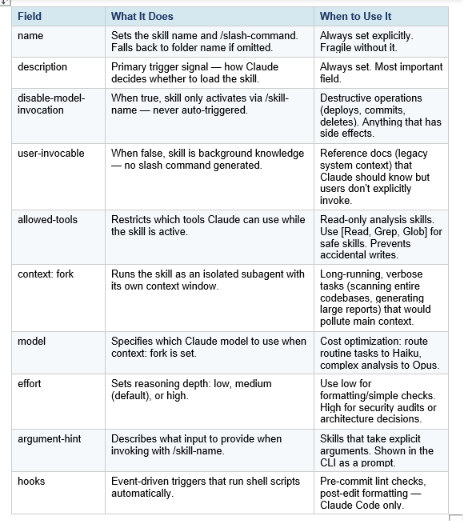
Three decision rules that cover 90% of skill configurations:
- If you should decide when it runs → disable-model-invocation: true
- If Claude should decide → leave disable-model-invocation out (default)
- If it's background knowledge, not a command → user-invocable: false
Using the Skill Creator: Build Skills Without Writing Markdown
The fastest way to build a skill if you have never done it before is not to write a SKILL.md from scratch — it is to use the Skill Creator, a meta-skill whose job is to build other skills.
Anthropic ships the Skill Creator pre-installed in Claude Desktop and Claude Cowork — it's already there when you open the app. For Claude Code users, you need to install it first:
/plugin install skill-creator@anthropic-agent-skillsOnce installed, invoke it by describing the workflow you want to automate. The Skill Creator runs an interactive Q&A that walks you through:
- What the skill should do (define the use case)
- When it should trigger (define the description)
- What scripts or reference files it needs
- How it should handle edge cases
It then generates a complete skill directory with proper SKILL.md structure, frontmatter, and instructions — plus an optimization loop. The Skill Creator splits your example prompts 60/40 into train/test sets, measures trigger rate, generates improved descriptions, and picks the best one by test score. This eval-driven approach solves the biggest problem most hand-written skills have: descriptions that are too vague to reliably trigger.
After the Skill Creator generates the skill, test it by opening a Claude session and sending a prompt that should trigger it. If it does not fire, tighten the description — add more specific trigger phrases. A well-written description reads out loud as a clear answer to "when should Claude use this?" A vague description reads like a category, not a trigger.
The same principle behind the Skill Creator — building systems that compound over time — applies to Claude Cowork's file-based agent workflows. The Claude Cowork complete guide covers how to combine skills with persistent file-based agent sessions for knowledge worker automation.
The 10 Best Claude Skills to Install in 2026
With 1.2M+ skills indexed across marketplaces, the signal-to-noise ratio is a real problem. Here are ten skills that have demonstrated real install volume and real workflow impact — curated by category.
For Developers
[1] frontend-design (Official Anthropic) — 277,000+ installs. Gives Claude a design system before it touches code, producing distinctive UI rather than the default "Inter font, purple gradient" output most LLMs converge on.
/plugin install frontend-design@anthropic-agent-skills[2] code-reviewer — Systematic pull request review with configurable focus areas: security, performance, style. Best combined with Claude Code's git worktree workflow for parallel PR review.
[3] skill-creator (Official Anthropic) — Meta-skill for building skills. Runs an interactive Q&A and eval loop that generates better skills faster than manual writing.
[4] deploy — A deploy skill with disable-model-invocation: true so it only runs when you explicitly type /deploy. Encodes your specific deploy target, commands, and verification steps.
--- name: deploy disable-model-invocation: true allowed-tools: Bash ---For Writers, Marketers, and Creators
[5] brand-guidelines — Encodes your organization's brand colors, typography, tone of voice, and logo usage. Apply it to any document or presentation and Claude follows your exact brand specs without being prompted.
[6] content-calendar — Takes a content strategy and generates structured weekly content calendars in your team's format, with platform-specific character counts, hashtags, and posting times.
[7] newsletter-writer — Encodes the exact format, section structure, word count, and voice for your newsletter. Eliminates the setup prompt every issue.
For Finance and Operations
[8] sales-data-analyzer — Capability Uplift skill that runs analysis on revenue CSVs, calculates MoM growth, identifies top performers, and flags anomalies. Much more reliable than prompting without it.
[9] weekly-status-update — Encodes your team's status update format (what's done, what's in progress, blockers, next week). Claude produces the right format from raw notes without formatting instructions.
[10] Superpowers (obra/superpowers) — Community-maintained library of 20+ battle-tested skills including TDD workflow, debugging playbooks, and multi-agent orchestration. One of the most starred community skill packs.
/plugin marketplace add obra/superpowers-marketplaceFor the full context on how Claude Code skills integrate with multi-agent workflows, the Claude Managed Agents review covers the API-level orchestration that sits above individual skills — useful when your skills need to coordinate across multiple agent sessions.
Where to Find Skills: Marketplaces and Repositories
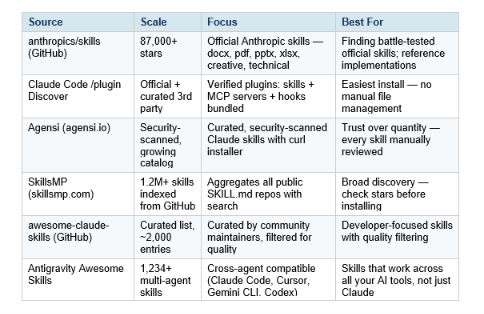
Security note: skills can execute arbitrary code in Claude's environment. Only install skills from trusted sources. For any skill from a less-trusted source, review the SKILL.md and any scripts in the scripts/ folder before enabling. Pay particular attention to Bash commands and network requests. Agensi security-scans every submission before listing — dangerous commands, hardcoded secrets, prompt injection, and obfuscated code are all checked.
Claude Skills vs MCP Servers vs Subagents vs Slash Commands
The Claude ecosystem has four related but distinct extensibility mechanisms, and people regularly confuse them. Here's when to use each one.
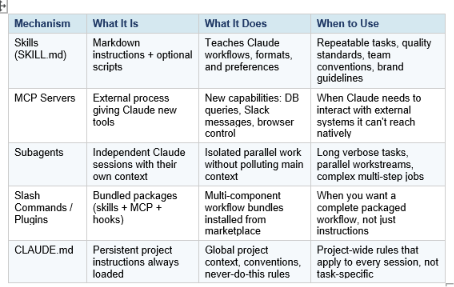
The analogy that clarifies the relationship: MCP is the kitchen — the knives, pots, and ingredients (the tools). A skill is the recipe that tells you how to use them. You can combine them: Sentry's code review skill defines the PR analysis workflow in a SKILL.md and fetches error data via MCP. But in most cases, a skill alone is enough to start.
Skills vs slash commands: skills are model-invoked — Claude automatically decides when to use them based on context. Slash commands are user-invoked — you explicitly type the command. Skills enable more intelligent, context-aware automation. Slash commands give you explicit control. The right choice depends on whether you want Claude to decide or want to decide yourself.
For advanced multi-agent patterns that combine skills, subagents, and the Advisor Strategy for cost optimization, the Anthropic Advisor Strategy guide covers how to pair Sonnet 4.6 as the executor with Opus 4.6 as the advisor — skills run on the executor, hard decisions escalate to Opus.
Frequently Asked Questions
What are Claude skills?
Claude skills are folders containing a SKILL.md file with YAML frontmatter and markdown instructions that teach Claude how to handle specific tasks in a consistent, repeatable way. They load automatically when Claude detects your task matches the skill's description, using a progressive disclosure architecture that keeps unused skills out of context.
Are Claude.ai skills and Claude Code skills the same thing?
They use the same SKILL.md format but are two separate systems. Claude.ai skills are uploaded via Settings > Customize > Skills in the browser or desktop app. Claude Code skills are SKILL.md folders placed in ~/.claude/skills/ (personal) or .claude/skills/ (project). Both use the same format, so a skill built once works on both surfaces.
How do I find my installed Claude Code skills?
Run claude --list-skills or type /skills inside a Claude Code session. Skills are stored in ~/.claude/skills/ for personal installs or .claude/skills/ inside your project directory for project-scoped installs.
What is the most important part of a SKILL.md file?
The description field in the YAML frontmatter. Claude reads this first to decide whether to load the skill at all. A vague description means the skill never triggers. A specific, trigger-ready description — one that describes what the skill does, when to use it, and what it produces — means it triggers reliably. Most skill failures are description failures, not instruction failures.
Can I have multiple skills active at the same time?
Yes. Claude can load multiple skills simultaneously. Skills are modular and designed to compose. You can combine a code-reviewer skill with a git-automation skill and they work alongside each other. The only constraint is context window size — each active skill adds tokens, though the progressive disclosure architecture keeps this minimal.
What is the difference between Capability Uplift and Encoded Preference skills?
Capability Uplift skills give Claude abilities it doesn't have natively — web scraping, PDF creation, browser automation. They typically include executable scripts. Encoded Preference skills capture how your team does something Claude already knows how to do — commit formats, brand guidelines, review checklists. They are usually just a SKILL.md file with instructions, no code required.
Are Claude skills free?
Yes. The SKILL.md format is open-source and free to create and share. Official Anthropic skills on GitHub are mostly Apache 2.0 licensed. Community skills are free to use. Some premium skills on third-party marketplaces have a price, but the core ecosystem is free.
Do Claude skills work on Claude Code, Cursor, Codex CLI, and Gemini CLI?
The core SKILL.md format (name + description + markdown instructions) works across all major AI coding agents that have adopted the Agent Skills open standard, including Claude Code, OpenAI Codex CLI, Cursor, Gemini CLI, and GitHub Copilot. Claude Code-specific features (context: fork, hooks, allowed-tools) are safely ignored by agents that don't support them.
Recommended Blogs
- Claude Code Agent View: Manage Multiple AI Agents in One Dashboard
- Claude AI Complete Guide 2026: Models, Features, and Pricing Explained
- Claude Code Desktop Redesign 2026: Multi-Sessions, Worktrees & Routines
- Claude Managed Agents Review: Is It Worth It? (2026)
- Anthropic Advisor Strategy: Smarter, Cheaper AI Agents (2026)
- Claude Code vs Codex: Which Terminal AI Tool Wins in 2026?
- What Is Claude Cowork? The 2026 Guide You Need
References
- Anthropic — Extend Claude with Skills (Official Docs)
- Anthropic — Use Skills in Claude (Support Article)
- Anthropic — How to Create Custom Skills
- Anthropic — The Complete Guide to Building Skills for Claude (PDF)
- GitHub — anthropics/skills (Official Skills Repository)
- GitHub — travisvn/awesome-claude-skills (Curated Community List)
- Firecrawl — Best Claude Code Skills to Try in 2026
- Dev.to — Claude Code Skills: A Practical Guide for 2026
- Agensi — How to Install Skills in Claude Code (3 Ways)
- Agensi — SKILL.md Format Specification
- Towards Data Science — How to Build a Production-Ready Claude Code Skill
- sjramblings — Build a Claude Skill: YAML Frontmatter, SKILL.md, Testing Guide
- SkillsMP — Agent Skills Marketplace

