



Claude Code Agent View: How to Manage Multiple AI Coding Agents in One Dashboard
Most developers running Claude Code in 2026 are juggling between 3 and 8 parallel sessions at once — different bug fixes, PR reviews, refactors, and feature builds all running simultaneously in separate terminal tabs or a tmux grid they can barely keep track of. That chaos just got solved.
On May 11, 2026, Anthropic launched Agent View in Claude Code: a single CLI dashboard that shows every background session at a glance, tells you which agents are waiting on your input, and lets you reply or attach without losing any context. It launches with one command:
claude agentsThis is not a minor quality-of-life update. Agent View is the control plane that makes parallel multi-agent development actually manageable — and it ships the same week Anthropic launched dreaming, multiagent orchestration for up to 20 specialists, and outcomes on the Managed Agents platform. The agentic era of software development just got a proper command center.
Here's exactly what Agent View is, how every feature works, how to use the key keyboard shortcuts, what the session states mean, and how it positions Claude Code against OpenAI Codex's parallel task approach.
What Is Claude Code Agent View?
Claude Code Agent View is a research preview feature, launched May 11, 2026, that gives developers a unified CLI dashboard for managing multiple concurrent Claude Code sessions from a single screen. It is available on Pro, Max, Team, Enterprise, and Claude API plans, and requires Claude Code v2.1.139 or later.
Before Agent View, running parallel Claude Code sessions meant opening multiple terminal windows or splitting a tmux grid, keeping a mental ledger of which session was doing what, and either losing track of agents waiting for your input or constantly switching contexts to check on them. The workflow worked, but barely — and it didn't scale past 3 or 4 sessions without becoming genuinely chaotic.
Agent View solves this in the most direct possible way: one table, one input at the bottom, every active session in a row. You see the session state, its most recent output, and when you last interacted with it. That's the whole interface. It is deliberately minimal, and deliberately correct.
The release is part of a broader Anthropic push to make Claude Code operate less like a single AI coding assistant and more like a multi-agent development platform. Agent View is the user-facing command center for workflows that were already possible — running agents via worktrees, subagents, background sessions — but previously required you to manage the coordination yourself.
For context on how the Claude Code desktop app has evolved in parallel to support these workflows, our Claude Code desktop redesign 2026 guide covers the multi-session sidebar, worktrees, routines, and side chats that form the full multi-agent experience in the GUI.
How to Open Agent View and Launch Your First Session
Getting into Agent View requires Claude Code v2.1.139 or later. Check your version first:
claude --versionIf you need to update:
npm update -g @anthropic-ai/claude-codeOpening Agent View from the terminal:
claude agentsOpening Agent View from inside an active Claude Code session (press the left arrow key):
← (left arrow from any session)Once Agent View is open, you'll see an input field at the bottom and a table that fills in as sessions start. Here's how to dispatch your first agent:
Method 1: Dispatch from the Agent View input
Type a task prompt in the Agent View input field and press Enter. A new background session starts and appears immediately as a row in the table.
# In the Agent View input:
 Fix all failing tests in the auth module and open a PR
Method 2: Send an existing session to the background
From inside any active Claude Code session, use the /bg slash command:
/bgThe session continues running without a terminal attached. You return to Agent View.
Method 3: Launch a background session from the shell
You can start a Claude Code session already in the background:
claude --bg "Refactor the payments module to use the new API endpoints"Sessions keep running in the background without a terminal attached — no need to keep a terminal window open.
If you are new to agentic Claude Code workflows and want to understand the full subagent architecture before running parallel sessions, the Claude Managed Agents complete review covers sandboxing, session persistence, and how all the infrastructure components fit together.
Understanding Session States: Running, Waiting, Done
Each row in Agent View shows a session and its current state. Understanding what each state means — and what it needs from you — is the core skill for working with Agent View effectively.
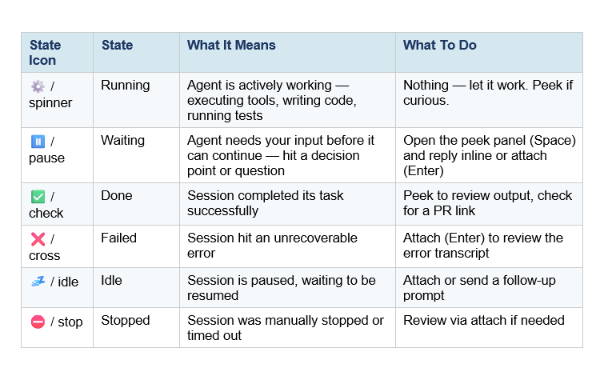
The most important state is Waiting. In parallel workflows, Waiting sessions are the ones that are actively blocking — they can't make progress until you provide input. Agent View makes them immediately visible instead of requiring you to check each terminal tab manually. This is the actual productivity win.
One underrated feature: long-running agents like PR babysitters and dashboard updaters show their next run time directly in the list, so you always know when a looping job will fire again.
The Peek Panel: Replying Without Attaching
The peek panel is Agent View's most elegant feature. Select any session row and press Space to open a peek panel that shows the session's most recent output — without attaching to the full session transcript.
From the peek panel you can:
- Read the last response to understand what the session needs
- Type a reply and press Enter to send it inline — the session picks back up without you attaching
- Press a number key to answer a multiple-choice question the agent asked
- Press Tab to auto-fill a suggested reply (editable before sending)
- Prefix a reply with ! to send a Bash command directly to that session
- Press ↑ or ↓ to peek at adjacent sessions without closing the panel
- Press → or Enter to attach to the full session
My honest take: the peek-and-reply workflow is what transforms Agent View from a nice feature into a genuine force multiplier. The old workflow was: notice a session waiting → switch terminal → read the transcript → type a reply → switch back. The new workflow is: press Space → read → type → press Enter → done. For 5+ parallel sessions, that difference compounds into hours per week.
Complete Keyboard Shortcuts Reference
Agent View is keyboard-first. Here are every shortcut you need to know:
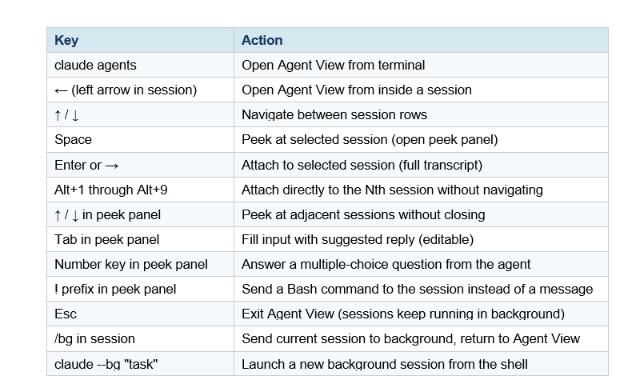
One shortcut worth calling out: Esc exits Agent View but does not stop any sessions. They keep running in the background. You can always return with claude agents. This is how you work: open Agent View to check status, handle anything waiting, close it, do other work, open it again.
For the complete Claude Code keyboard shortcut reference covering all slash commands, CLI flags, and hook events — not just Agent View — the Claude Code vs Codex comparison and workflow guide has a thorough breakdown of power-user patterns including /compact, /clear, and HANDOFF.md for multi-session context management.
Agent View vs OpenAI Codex Multi-Agent: Key Differences
The timing is not coincidental: OpenAI's Codex Desktop app launched in February 2026 with a visual command center for parallel cloud tasks, and Agent View is Anthropic's answer from the terminal side. They solve the same problem with fundamentally different architectures.
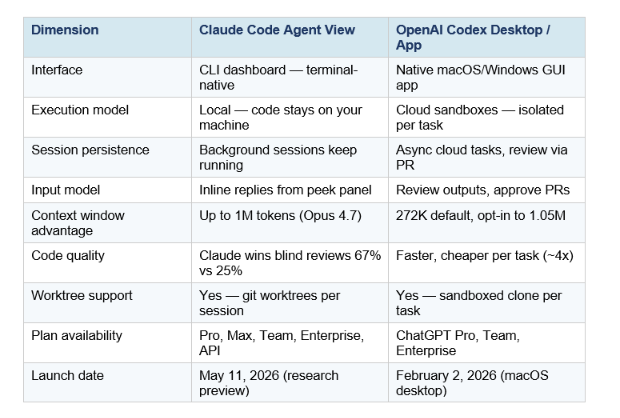
The honest framing: Codex is better if you want to hand off tasks and review output later — the fire-and-forget cloud model. Claude Code Agent View is better if you want to stay in the loop and steer multiple sessions interactively as they work. Both have their use case, and many serious developers are running both in the same workflow.
The deeper architectural difference: Claude Code sessions run locally with your actual filesystem, which means they have real access to your dev environment, your config files, your local services. Codex works on a clone in OpenAI's cloud, which adds isolation but also adds a layer of friction when the task needs to touch your actual running system.
For a deeper benchmark-by-benchmark breakdown of Claude Code vs Codex on SWE-Bench, Terminal-Bench, and real-world cost analysis, our GPT-5.3-Codex vs Claude Opus 4.6 comparison covers the full picture including token efficiency, context windows, and the routing strategies power users actually run.
Real-World Use Cases for Multi-Agent Workflows with Agent View
Here are the specific workflows where Agent View earns its keep immediately — not theoretical scenarios, but the actual use cases Anthropic's own documentation and the developer community describe as primary:
1. Parallel Bug Fixes Across Modules
Dispatch one agent per independent bug, each working in its own worktree. Monitor all five from Agent View. When one finishes and asks if it should open a PR, reply from the peek panel without leaving the dashboard.
claude --bg "Fix the null pointer exception in payments/checkout.ts, line 247"
 claude --bg "Fix the race condition in auth/session.ts reported in issue #891"
 claude --bg "Fix the memory leak in workers/queue.ts, add test coverage"
 # Open Agent View to monitor all three:
 claude agents
2. PR Review and Feature Build in Parallel
While one agent reviews an incoming pull request and posts inline comments, another is building a feature you spec'd out. You supervise both from Agent View, answering questions from either without full context switching.
3. Long-Running Background Jobs
Agent View shows next run time for recurring looping jobs — PR babysitters that check for new review comments, dashboard updaters that regenerate reports on a schedule, or integration tests that run after every commit. The list shows you when each one will fire next, so you're not constantly wondering if a background job is still alive.
4. Quick Codebase Questions Without Derailing a Session
Thariq Shihipar's Claude Code team also shipped /btw — a side question command that gets a quick answer from Claude without consuming main session context. Combined with Agent View's navigate-between-sessions workflow, you can ask a codebase question while three other agents are mid-task, get the answer in the peek panel, and get back to work.
For a full breakdown of how Claude Managed Agents multiagent orchestration works at the API level — including the coordinator-subagent model that Agent View surfaces in the CLI — the Claude Managed Agents Dreaming and multiagent orchestration guide covers the full architecture including how up to 20 parallel specialists share a filesystem and a coordinator.
Rate Limits and Token Cost Considerations
This is the section nobody wants to read but everyone needs to. The headline: each session in Agent View uses your subscription quota independently. Five parallel sessions burn through rate limits roughly five times as fast as a single session.
Three rules to operate by:
- Check your Claude plan limits before dispatching large agent teams — especially on Pro ($20/month) which has rolling 5-hour usage limits
- Prefer Sonnet 4.6 for straightforward parallel tasks (feature builds, bug fixes) and reserve Opus 4.7 for sessions that need deep reasoning or large codebase understanding
- Use /compact aggressively in long-running sessions — context accumulates fast in background agents that run for hours, and compacted sessions are dramatically cheaper
The cost math works out well for teams on Max, Team, or Enterprise plans where per-session limits are higher. For Pro users running 5+ parallel sessions, you will hit limits faster than you expect — budget accordingly and treat the limits as a workflow constraint, not a bug.
One genuinely useful signal: the Advisor Strategy pattern Anthropic launched in April 2026 lets you run Sonnet 4.6 as the executor and only call Opus 4.7 when the session hits a hard problem. For multi-agent workflows where most tasks are well-defined, this cuts cost by 11.9% per agentic task while maintaining near-Opus quality on hard problems.
The Anthropic Advisor Strategy guide covers exactly how to implement this cost-routing pattern — it is especially useful once you are running 5+ parallel sessions and cost starts compounding.
Frequently Asked Questions
What is Claude Code Agent View?
Claude Code Agent View is a CLI dashboard that shows all your Claude Code sessions — running, waiting, or done — in a single table. It lets you dispatch new sessions, monitor their state, reply to agents without attaching to the full transcript, and navigate between sessions using keyboard shortcuts. It launched May 11, 2026 as a research preview.
How do I open Claude Code Agent View?
Run claude agents from your terminal. Or press the left arrow key from inside any active Claude Code session. Agent View opens showing all current sessions. Press Esc at any time to exit — sessions keep running.
What plans support Claude Code Agent View?
Agent View is available on Pro, Max, Team, Enterprise, and Claude API plans. It requires Claude Code v2.1.139 or later. Administrators on Team and Enterprise plans can disable it via the disableAgentView managed setting.
How do I send a Claude Code session to the background?
From inside an active session, run /bg. The session continues working without a terminal attached. You return to Agent View. You can also launch sessions already in background mode from the shell: claude --bg "your task here".
What is the peek panel in Claude Code Agent View?
The peek panel opens when you select a session row and press Space. It shows the session's most recent output. From the peek panel you can reply inline (Enter), answer multiple-choice questions (number keys), fill a suggested reply (Tab), send a Bash command (! prefix), or attach to the full session (→ or Enter).
How does Agent View differ from Claude Managed Agents?
Agent View is a CLI feature for Claude Code — it manages terminal-based local coding sessions. Claude Managed Agents is a platform API for building and deploying agents in cloud infrastructure. They serve different use cases: Agent View is for developers working with code locally; Managed Agents is for teams building agent applications in production.
Does running multiple sessions in Agent View cost more?
Yes. Each session uses your subscription quota independently. Three parallel sessions consume roughly three times the tokens and rate limit capacity of a single session. Use Sonnet 4.6 for routine tasks to keep costs manageable, and use the Advisor Strategy to route hard problems to Opus 4.7 only when needed.
How many agents can I run in parallel in Agent View?
There is no hard session limit documented for Agent View. Practical limits are your plan's rate limits and system resources. Most developers find 4–8 parallel sessions to be the practical sweet spot before coordination overhead and rate limits reduce the benefit of adding more agents.
Recommended Blogs
- Claude Code Desktop Redesign 2026: Multi-Sessions, Worktrees, and Routines
- Claude Managed Agents Review: Is It Worth It? (2026)
- Claude Managed Agents Dreaming, Outcomes, and Multiagent Orchestration Explained
- Claude Code vs Codex: Which Terminal AI Tool Wins in 2026?
- Is Claude Code Review Worth $15–25 Per PR? (2026 Verdict)
- Anthropic Advisor Strategy: Smarter, Cheaper Multi-Agent Patterns
- Claude Managed Agents Memory: Build Agents That Learn
References
- Anthropic — Agent View in Claude Code (Official Announcement)
- Claude Code Docs — Manage Multiple Agents with Agent View
- Claude Code Docs — Create Custom Subagents
- Anthropic — New in Claude Managed Agents: Dreaming, Outcomes, and Multiagent Orchestration
- Testing Catalog — Anthropic Adds Agent View to Claude Code CLI Interface
- MindStudio — Claude Code Agent Teams: How to Run Multiple AI Agents in Parallel
- Developers Digest — Claude Code vs Codex App in 2026: Local Agent Pairing vs Cloud Agent Orchestration
- Towards Data Science — How to Run Claude Code Agents in Parallel

