



Cursor Cloud Agents & Dev Environments: The Complete 2026 Guide
Cursor just made its cloud agents dramatically more useful. On May 13, 2026, the company shipped a changelog update that adds multi-repo support, upgraded Dockerfile configuration with 70% faster layer caching, version history with rollback for every environment, scoped secrets management, and a new Microsoft Teams integration — all building on the cloud agents infrastructure Cursor launched in February 2026.
The headline stat that explains why this matters: more than 35% of the PRs merged at Cursor's own engineering team are now written by autonomous cloud agents. That number was zero eighteen months ago. It is the clearest signal in the industry that AI agents are moving from demo to production reality, and Cursor is the company shipping the most complete implementation of what that actually looks like day to day.
This guide covers everything: what cloud agents are and how they work, exactly what changed in today's update, how to configure a development environment from scratch, how to set up multi-repo support, the full pricing breakdown across all plans, and an honest comparison against Claude Code, OpenAI Codex, and GitHub Copilot Workspace.
What Are Cursor Cloud Agents?
Cursor cloud agents are autonomous AI coding agents that run inside isolated virtual machines in the cloud — not on your laptop. Each agent gets its own dedicated Linux VM with a full terminal, browser, and desktop environment, along with your cloned repositories, installed dependencies, and configured credentials. You describe a task, the agent works independently in its own sandboxed environment, and when it is done it delivers a merge-ready pull request with artifacts (videos, screenshots, logs) demonstrating the changes actually work.
The key distinction from local agents — the AI assistance that runs inside your Cursor IDE on your machine — is complete environmental isolation. Local agents share your machine's resources, require you to be at your laptop, and compete with your own workflow for compute. Cloud agents run on Cursor's infrastructure (or your own, with self-hosted mode), keep working after your laptop is closed, and can run in parallel without any interaction on your part. You can have 10 cloud agents working on 10 different features simultaneously while you focus on the hardest architectural problem yourself.
The video artifact capability is what separates Cursor's implementation from every other "AI coding" announcement. The agent does not just write code and submit a diff. It actually runs the software it built inside its sandbox, records itself interacting with web pages, navigating desktop applications, and validating behavior — then sends you that video as part of the PR. You can see the feature working before you review a single line of code.
Cloud agents are one component of Cursor 3's broader agent-first architecture. For the full product picture — including the Agents Window, Design Mode, and how local agents, remote agents, and cloud agents work together — the Cursor 3 vs Google Antigravity comparison covers the complete Cursor 3 feature set and how it stacks up against the main competitor.
How Cloud Agent Development Environments Work
The concept behind cloud agent development environments is exactly what the name says: give the agent the same environment a human engineer would have. The problem with earlier AI coding tools was that agents were running in a void — they could write code, but they had no way to test it, query internal services, hit APIs, or validate that their changes actually worked. That made them useful for small, isolated tasks and frustrating for anything that required understanding a real system.
A cloud agent development environment solves this by configuring a dedicated VM with:
- Cloned repositories — all the code the agent needs, checked out to the right branches
- Installed dependencies — npm packages, pip requirements, system libraries, language runtimes
- Credentials and secrets — API keys, database connection strings, internal service tokens
- Build toolchains — compilers, linters, test runners, deployment scripts
- Network access — internal endpoints, staging environments, third-party APIs
With this environment in place, an agent can do what a human engineer does: write code, run the tests, check that the API responses look right, fix the things that break, and iterate until the work is actually done — not just until the diff looks reasonable. This is the shift from "AI writes code" to "AI ships features."
The technical implementation uses Dockerfile-based configuration. You define your environment in a Dockerfile, commit it to your repository, and Cursor uses it as the base image for every cloud agent that runs against that codebase. The environment is versioned, auditable, and reproducible. If an environment configuration fails, Cursor defaults to a base image rather than failing the entire agent run, with clear warnings so you know what happened.
What Changed on May 13, 2026 — The Full Upgrade
Today's changelog (cursor.com/changelog/05-13-26) shipped a set of significant upgrades to the cloud agent development environment infrastructure. Here is exactly what changed:
Multi-Repo Support
Cloud agents and automations now support multi-repo environments. Previously, each agent was scoped to a single repository — which meant any task requiring changes across multiple services required multiple separate agent sessions, with no shared context between them. Now, you can configure a single development environment with all the repositories an agent needs, with re-use across sessions.
The practical impact is significant for enterprise-scale development. Most real engineering work spans multiple codebases: a bug fix that requires coordinated changes to the frontend, backend API, and infrastructure configuration across three separate repos can now be handled by a single agent with full visibility across all three. Amplitude, named as a customer in Cursor's announcement, specifically cited multi-repo support for their Cursor Automations across public Slack channels.
Upgraded Dockerfile Configuration
The Dockerfile-based environment setup received two major improvements. First: support for build secrets, making it straightforward to securely access private package registries directly from Dockerfiles. Build secrets are scoped to the build step and are not passed to the running agent's environment — the credential used to pull a private package does not persist inside the running VM.
Second: upgraded layer caching. Only the updated layers of an image now rebuild when you change the Dockerfile. Builds that hit the cache run 70% faster. For teams running many agents daily, this is a meaningful throughput improvement that compounds across every agent launch.
Cursor is also rolling out AI-assisted Dockerfile generation in private beta for Enterprise teams. Instead of writing the Dockerfile manually, Cursor inspects your repositories, identifies the tools and dependencies required, and produces a configuration you can review and edit. It asks questions during setup, flags missing credentials, and validates that the environment is properly configured before your first agent run.
Version History and Rollback
Every development environment now has its own version history. Team members can review the history of environment changes and roll back to any previous version if an update breaks something. Admins can restrict rollback permissions to admin-only if the team wants change control on environment configurations.
Security Controls: Scoped Egress and Secrets
Egress and secrets can now be scoped at the development environment level. Secrets configured for one environment are not accessible from any other. This means you can give different agent environments access to different internal services without risking cross-environment credential leakage. An agent working on your payments service has access to the payments API credentials; the same team's agent working on the documentation site does not.
An audit log captures every action team members take on environments, giving security teams full visibility into who changed what and when.
Microsoft Teams Integration
Cursor is now available in Microsoft Teams. Mention @Cursor in any Teams channel to delegate a task to a cloud agent. Cursor automatically picks the right repository and model based on your prompt and recent agent activity, reads the entire Teams thread for context before implementing a solution, and creates a PR for team review when it finishes.
For developers who want programmatic access to this same cloud agent infrastructure — triggering agents from CI/CD pipelines, Linear tickets, or custom workflows — the Cursor SDK TypeScript guide covers the @cursor/sdk package that exposes the full agent runtime as a TypeScript API.
Setting Up a Cloud Agent Environment: Step-by-Step
Getting started with cloud agent development environments requires a Cursor Pro plan or higher. Here is the complete setup flow:
Step 1: Access the cloud agents dashboard
Open cursor.com/agents in your browser, or access it from the Cursor desktop app via the Agents Window (Cmd+Shift+P → Agents Window). This is the unified interface for all your cloud agent sessions across every device and integration.
Step 2: Create a development environment
In the dashboard, navigate to Development Environments and create a new environment. You can either:
- Write a Dockerfile manually — define your base image, install dependencies, configure credentials
- Use Cursor's AI-assisted setup (Enterprise beta) — Cursor inspects your repos and generates the Dockerfile, asking questions as needed
Example Dockerfile for a Node.js/TypeScript project with private package registry access:
FROM node:20-alpine
# Install system dependencies
RUN apk add --no-cache git openssh-client

# Configure private registry access (build secret, not persisted)
RUN --mount=type=secret,id=npm_token \
    npm config set //registry.npmjs.org/:_authToken=$(cat /run/secrets/npm_token)
# Set up working directory
WORKDIR /workspace
# Install global tools
RUN npm install -g typescript ts-node jest
Step 3: Configure repositories
For single-repo environments, add your repository URL and the branch to clone. For multi-repo environments, add each repository separately. You can configure which branch to clone per repo and which repos should be cloned into which directories inside the VM.
Step 4: Add credentials
Add secrets for any credentials the agent needs: API keys, database connection strings, deployment tokens. Secrets are encrypted, scoped to this environment only, and are not accessible from other environments.
Step 5: Validate and version
Cursor validates your environment configuration and flags any issues — missing credentials, build errors, or failed dependency installations. Once validated, the environment is saved as version 1 and appears in the Agents Window. Any future changes create a new version you can review or roll back to.
Step 6: Launch your first cloud agent
From the Agents Window, desktop app, web, Slack, Teams, GitHub, or mobile, describe a task: "Add rate limiting to the /api/users endpoint with Redis-backed storage. Write integration tests. The Redis configuration is in the infrastructure repo." The agent picks up your environment, spins up its VM, and gets to work.
Multi-Repo Support: The Enterprise Use Case
Multi-repo support is the feature that moves cloud agents from useful for solo developers to essential for enterprise engineering teams. Here is why.
Most production software at any meaningful scale is not a single repository. A typical e-commerce platform might have a storefront repo, an API services repo, a payment processing microservice, an inventory management service, a shared component library, and an infrastructure-as-code repo. A "simple" bug fix — say, a type mismatch between what the frontend expects and what the API returns — might require coordinated changes in three of those repos simultaneously.
With single-repo agents, you handle this by running three separate agents, manually coordinating their context, and hoping they do not make conflicting changes. With multi-repo environments, you configure one environment that includes all three repos, describe the end-to-end fix, and the agent reasons across all the required context to deliver a set of coordinated PRs.
The configuration is straightforward. In your environment definition, list each repository:
repositories:
  - url: github.com/yourorg/storefront
    branch: main
    path: /workspace/storefront
  - url: github.com/yourorg/api-services
    branch: main
    path: /workspace/api-services
  - url: github.com/yourorg/shared-components
    branch: main
    path: /workspace/shared-components
The agent has all three repos in scope and can read, write, test, and verify changes across all of them within a single session. Changes to the shared-component library that affect both the storefront and the API services are handled atomically. This is what makes Amplitude's Cursor Automations across Slack channels actually useful — their agents can fix issues that span frontend, backend, and infrastructure without human coordination between sessions.
For controlling and monitoring these multi-repo agent sessions from anywhere — including from your phone while you are away from your desk — the Cursor remote agents guide covers the agent worker CLI and mobile access patterns.
Running Cloud Agents from Anywhere
Cloud agents are available from every surface Cursor supports. Once an agent is running in a cloud environment, it keeps working regardless of your connection status:
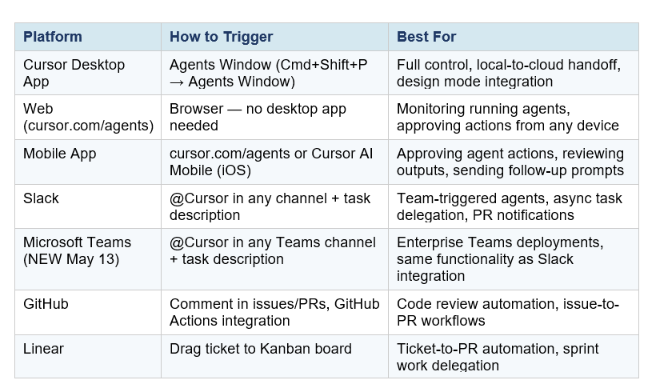
The key architectural detail: all sessions from all surfaces appear in the unified Agents Window. An agent triggered from a Slack message, one from GitHub, and one from the desktop app are all visible in one place. You see their status (running, waiting, done), their most recent output, and can intervene on any of them from the same interface.
Cursor Cloud Agents Pricing: Every Plan Compared
Cloud agents are available on Cursor Pro plans and above. Here is the complete pricing breakdown for May 2026:
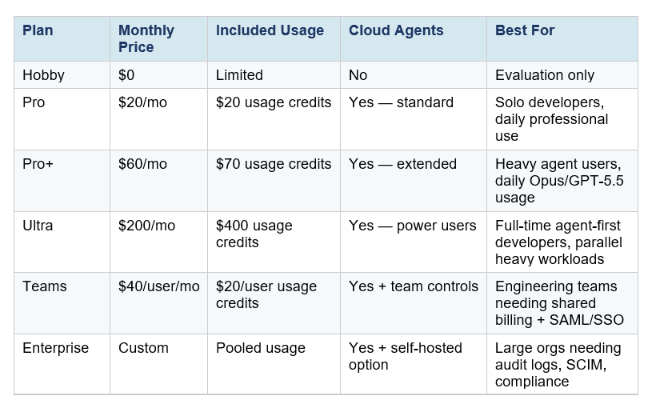
Three important pricing details developers miss:
- Agent runs cost credits from your monthly pool. A single agent run on a large codebase can consume roughly 22.5% of a $20 Pro credit pool. If you plan to run multiple agents daily, Pro+ ($60) or Ultra ($200) is more practical than paying overages.
- Auto mode is unlimited. Using Cursor's Auto setting (which routes tasks to the most appropriate model automatically) does not draw from your credit pool in the same way as manually selecting a frontier model. Most routine work should run in Auto mode.
- Self-hosted cloud agents require Enterprise. If your codebase, tool execution, and build artifacts need to stay in your own infrastructure for compliance or security reasons, self-hosted agents are an Enterprise feature.
For teams: at $40/user/month, Cursor Teams is meaningfully more expensive than GitHub Copilot Business ($19/user/month). The premium buys cloud agents, full MCP ecosystem, and SAML/SSO that Copilot does not offer at the team tier. For teams where cloud agents are central to the workflow, the productivity ROI is documented — Cursor's own data shows developers save 1–3 hours per day, which pays for Ultra at a $100/hour billing rate within 2–3 hours of the first billing cycle.
For the complete model-level cost breakdown — including what Claude Opus 4.7, GPT-5.5, and Gemini 3.1 Pro cost per million tokens inside Cursor cloud agents — the Cursor Composer 2 review covers the full token economics and how Cursor's in-house Composer 2 model at $0.50/MTok changes the cost math for high-volume agent workflows.
Cursor Cloud Agents vs Claude Code, Codex, and GitHub Copilot
Cloud agents are Cursor's biggest competitive differentiator in 2026. Here is the honest side-by-side:
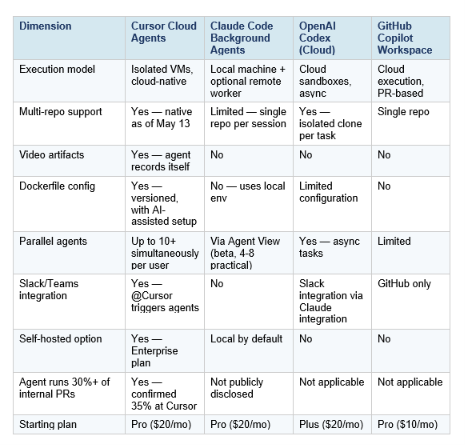
The honest competitive framing: Cursor leads on feature completeness for cloud-native agent workflows. Claude Code wins on raw model quality (87.6% SWE-bench Verified) and terminal-first workflows where you want to stay in the loop. Codex wins on token efficiency — roughly 3x fewer tokens per equivalent task — and async delegation where you want to fire-and-forget. GitHub Copilot wins on GitHub ecosystem integration and lowest starting price.
Many serious developers run two or three of these tools simultaneously, using Cursor for daily IDE work and cloud agents, Claude Code for complex multi-file reasoning sessions, and Codex for DevOps automation. They are not competitors in the same way different tools in a developer's toolkit are not competitors.
For the deep benchmark-level comparison of Claude Code vs Codex — including SWE-bench scores, Terminal-Bench results, and token efficiency numbers — the Claude Code vs Codex 2026 guide covers the full data.
When to Use Cloud Agents vs Local Agents
The right choice between cloud agents and local Cursor agents depends on task type, duration, and whether you need to remain online. Here is the decision framework:
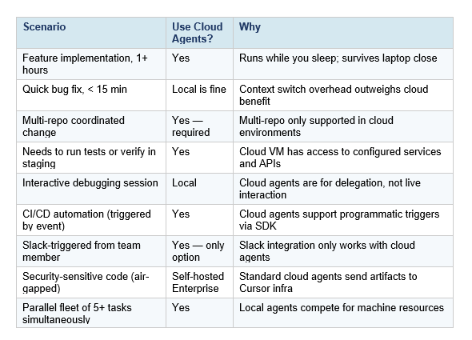
The rule of thumb: if the task is defined enough to delegate to a junior engineer without real-time supervision, it is a good candidate for a cloud agent. If the task requires ongoing architectural discussion or close collaboration during implementation, work locally with Cursor's IDE. Cloud agents are best for the execution layer, not the design layer.
For cost-optimization strategies that apply whether you are running agents locally or in the cloud — including how to use the Advisor Strategy to route expensive tasks to Opus only when needed — the Anthropic Advisor Strategy guide covers the model-routing patterns that keep agent costs predictable at scale.
Frequently Asked Questions
What are cloud agents in Cursor?
Cloud agents are autonomous AI coding agents that run in isolated virtual machines on Cursor's cloud infrastructure. Each agent gets its own VM with a terminal, browser, full desktop, and your configured development environment (cloned repos, dependencies, credentials). You describe a task, the agent implements it, tests it, and delivers a merge-ready PR with video/screenshot/log artifacts. Available on Cursor Pro plans and above.
Are Cursor cloud agents free?
No. Cloud agents require a paid Cursor plan. The entry point is Cursor Pro at $20/month, which includes $20 in monthly usage credits. Standard cloud agent runs draw from your credit pool; heavier workloads will exhaust a $20 Pro allocation quickly. Cursor recommends Pro+ ($60/mo) for daily agent users and Ultra ($200/mo) for power users who run multiple agents in parallel throughout the day.
Can Cursor work with multiple repositories in one session?
Yes, as of May 13, 2026. The new multi-repo environment support lets you configure a single cloud agent environment with multiple repositories, which the agent can clone, read, write, and test across in a single session. This is especially useful for enterprise microservices architectures where fixes require coordinated changes across frontend, backend, and infrastructure repos.
How do I configure a Dockerfile for Cursor cloud agents?
Create a Dockerfile in your project that installs your language runtimes, dependencies, and tools. Reference it in your development environment configuration in the Cursor dashboard. Use build secrets (RUN --mount=type=secret,id=token) for private package registry access — secrets are scoped to the build step and not passed to the running agent. Layer caching is automatic and has been upgraded to run 70% faster for cached builds.
How is a cloud agent different from a local Cursor agent?
Local agents run on your machine inside the Cursor IDE and require you to be present. Cloud agents run on Cursor's servers (or your own, with self-hosted Enterprise) inside isolated VMs, keep running when your laptop is closed, support multi-repo environments, generate video artifacts to prove their changes work, and can be triggered from Slack, Teams, GitHub, or Linear in addition to the Cursor IDE.
What is the 35% PR stat about?
More than 35% of pull requests merged at Cursor's own engineering team as of April 2026 are created by autonomous cloud agents — not by human engineers writing code directly. This is Cursor's most cited internal metric because it demonstrates the technology's maturity in a production context where the stakes are real. The figure has grown from 30% at the February 2026 cloud agents launch.
Can I use Cursor cloud agents without the desktop app?
Yes. Cloud agents are accessible from cursor.com/agents in any browser, the Cursor mobile app (iOS), Slack (@Cursor mention in any channel), Microsoft Teams (@Cursor mention — new as of May 13), GitHub comments and pull requests, and Linear via the Kanban board integration. The Cursor desktop app is not required to run, monitor, or interact with cloud agents once they are set up.
What is self-hosted cloud agents and who needs it?
Self-hosted cloud agents (generally available as of March 25, 2026) let Enterprise teams run Cursor's agent infrastructure on their own servers. Your code, tool execution, and build artifacts never leave your environment. Each agent gets its own dedicated worker process that connects outbound via HTTPS to Cursor's cloud for inference and planning — no inbound ports, firewall changes, or VPN tunnels required. Suitable for financial services, healthcare, government, or any organization with strict data residency requirements.
Recommended Blogs
- Cursor 3 vs Google Antigravity: Best AI IDE 2026
- Cursor SDK: Build AI Coding Agents in TypeScript (2026)
- Cursor Remote Agents: Control Dev From Any Device (2026)
- Cursor Composer 2: Benchmarks, Pricing & Review (2026)
- Claude Code vs Codex: Which Terminal AI Tool Wins in 2026?
- Claude Code Agent View: Manage Multiple AI Agents in One Dashboard
- Anthropic Advisor Strategy: Smarter, Cheaper AI Agents (2026)
Want to go from understanding these tools to building production AI systems on top of them? The Gen AI Launchpad 8-week program covers cloud agent workflows, SDK development, and agentic system design with 12,000+ developers.
References
- Cursor Blog — Development Environments for Your Agents (May 13, 2026)
- Cursor Changelog — May 13, 2026
- Cursor Blog — Agents Can Now Control Their Own Computers (Feb 24, 2026)
- Cursor Blog — Run Cloud Agents in Your Own Infrastructure (Mar 25, 2026)
- Cursor Pricing — Official Plans
- InfoQ — Cursor 3 Introduces Agent-First Interface (Apr 2026)
- NxCode — Cursor Cloud Agents: Autonomous Coding on Virtual Machines
- StartupHub — Cursor Boosts Cloud Agent Environments
- Vantage — Cursor Pricing Explained 2026

