





Cursor SDK: Build Programmatic AI Coding Agents in TypeScript (2026 Tutorial)
I have been building with Cursor for over a year. In that time, I have watched it go from a VS Code fork with better autocomplete to something that sends chills down the spine of every traditional IDE maker. On April 29, 2026, Cursor shipped the thing I did not know I needed: an SDK.
With one npm install, you now get programmatic access to the exact same agent runtime that powers Cursor's desktop app, CLI, and web interface. The same codebase indexing, MCP server support, subagents, hooks, and cloud infrastructure — exposed as a TypeScript API you can wire into any pipeline, product, or workflow you already have.
This is not a new LLM wrapper. Cursor grew from $1M ARR in December 2023 to over $2B ARR by Q1 2026, with a valuation approaching $50B. The SDK is the programmatic layer of that product. Rippling, Notion, Faire, and C3 AI are already running it in production. Here is everything you need to know to start building with it today.
What Is the Cursor SDK (And Why It's Different From an LLM API)
The Cursor SDK (@cursor/sdk) gives developers programmatic access to the full agent runtime that powers Cursor — not just a model endpoint, but the complete harness that makes Cursor's agents actually effective in real codebases.
Most developers have tried calling an LLM API directly for coding tasks. The experience is usually underwhelming. The model generates plausible code without knowing what files exist in your repo, which dependencies you use, or what your test results look like. You end up spending more time wrangling context than getting useful work done.
The Cursor SDK solves this by bundling the same infrastructure that Cursor uses internally:
- Codebase indexing — semantic search and instant grep across your entire repository, so the agent retrieves relevant files before it starts generating
- MCP server support — agents can connect to external tools (Sentry, Datadog, Slack, Linear, databases) via the Model Context Protocol standard
- Skills — reusable behavior definitions stored as markdown in .cursor/skills/, loaded automatically when relevant
- Hooks — scripts that run before or after agent actions, allowing you to add guardrails, logging, or custom orchestration logic
- Subagents — the main agent can delegate subtasks to named sub-agents with their own prompts and models, enabling parallel multi-agent workflows without custom orchestration code
The company behind it — Anysphere — has been building toward this moment. Cursor 3 launched on April 2, 2026, with a complete interface redesign built around autonomous agent fleets. The SDK is its programmatic counterpart. If you want to understand how the Agents Window, worktrees, and cloud handoff fit into this picture, the Cursor 3 vs Google Antigravity breakdown covers the full product context in detail.
My take: calling the Cursor SDK 'a coding tool' is like calling AWS Lambda 'a way to run code.' Technically accurate, practically insufficient. This is infrastructure for autonomous software engineering — and the early adoption numbers from Rippling and Notion suggest enterprise teams understand that already.
Setup: Install @cursor/sdk and Run Your First Agent
The Cursor SDK is a TypeScript package. It installs in seconds and the minimal working agent is under 15 lines of code.
Step 1: Install and configure
npm install @cursor/sdkYou will need a Cursor API key. Get it from your Cursor account settings under the API section. Store it as an environment variable:
export CURSOR_API_KEY=your_api_key_hereStep 2: Your first local agent
This creates an agent that runs against your current working directory:
import { Agent } from "@cursor/sdk";

const agent = await Agent.create({

  apiKey: process.env.CURSOR_API_KEY!,

  model: { id: "composer-2" },

  local: { cwd: process.cwd() },

});
const run = await agent.send("Summarize what this repository does and list the main entry points");

for await (const event of run.stream()) {

  console.log(event);

}
That is it. The agent gets full codebase indexing, semantic search, and the entire Cursor harness automatically. You did not build any of that — you just called Agent.create().
Step 3: Run a cloud agent that opens a PR
For longer-running tasks that need to survive if your machine goes offline, use cloud mode:
 const agent = await Agent.create({
  apiKey: process.env.CURSOR_API_KEY!,
  model: { id: "composer-2" },
  cloud: {
    repo: "your-org/your-repo",
    branch: "main",
  },
});
const run = await agent.send(
  "Find the root cause of CI failure #1234 and open a PR with the fix"
);
Cloud agents get a dedicated virtual machine with the repository already cloned. They keep running even if your local machine disconnects. When the task completes, the agent can push a branch, open a PR, or attach screenshots. This is the same infrastructure behind Cursor's remote agents feature, now accessible programmatically from any TypeScript codebase.
The Full Harness: MCP, Skills, Hooks, and Subagents Explained
The SDK's real power is not the Agent.create() call — it's what gets bundled automatically into every agent you create. Let's walk through each component.
MCP Servers: Connect Agents to External Tools
MCP (Model Context Protocol) is the open standard for wiring external tools and data sources into agent runtimes. With the Cursor SDK, your agents can query Sentry errors, pull Datadog metrics, read Linear tickets, message Slack, and more — all from inside the agent loop.
Configure MCP servers in your repository's .cursor/mcp.json file:
 {
  "mcpServers": {
    "sentry": {
      "type": "http",
      "url": "https://mcp.sentry.io/sse"
    },
    "linear": {
      "type": "stdio",
      "command": "npx @linear/mcp"
    }
  }
}
Once configured, your SDK agents pick up these integrations automatically. An agent triggered by a failing CI job can query Sentry for the stack trace, check the Linear ticket for context, and open a PR with a fix — without you writing any tool-calling logic.
Skills: Teach Agents Your Codebase Conventions
Skills are markdown files stored in .cursor/skills/ that teach agents domain-specific workflows, coding patterns, and project conventions. Unlike rules that are always included in context, skills are loaded dynamically when the agent decides they're relevant — which keeps the context window lean.
# .cursor/skills/api-pattern.md
## API Endpoint Pattern

When creating a new REST endpoint, always:
1. Add input validation using Zod schemas
2. Follow the existing error handling pattern in src/lib/errors.ts
3. Write integration tests in tests/api/
4. Update the OpenAPI spec in docs/openapi.yaml
An agent triggered to 'add a new /users/export endpoint' will automatically pick up this skill and follow your conventions without being explicitly told to check them.
Hooks: Extend and Control the Agent Loop
Hooks are scripts that run at defined points in the agent's execution loop. They let you add logging, guardrails, notifications, or loop control without modifying the SDK.
The most powerful pattern is using a stop hook to keep the agent working until a condition is met:
// .cursor/hooks/grind.ts — keep running until all tests pass

const input = await Bun.stdin.json()
const MAX_ITERATIONS = 5;
if (input.status !== 'completed' || input.loop_count >= MAX_ITERATIONS) {
  process.stdout.write(JSON.stringify({}));
  process.exit(0);
}

 process.stdout.write(JSON.stringify({
  followup_message: Iteration ${input.loop_count + 1}/${MAX_ITERATIONS}: Continue until all tests pass.
}));
This hook loops the agent automatically — sending a follow-up prompt — until either the tests pass or the iteration limit is hit. No polling, no external orchestration. Just a hook file.
Subagents: Parallelize Complex Tasks
The main agent can delegate subtasks to named subagents with their own prompts and models. Subagents run in parallel, each with their own isolated context, then merge results back into the parent workflow.
A practical example: an agent doing a code review could spawn four parallel subagents — one each for security, performance, correctness, and readability — then synthesize a single report. Without subagents, this is a sequential process that takes 4x as long.
For agent architecture patterns and multi-agent orchestration implementations, the gen-ai-experiments agent-building notebooks cover both single-agent and multi-agent orchestration patterns you can adapt for Cursor SDK workflows.
Three Deployment Modes: Local, Cloud, and Self-Hosted
The Cursor SDK supports three deployment targets, each with a different trade-off between speed, durability, and data control.
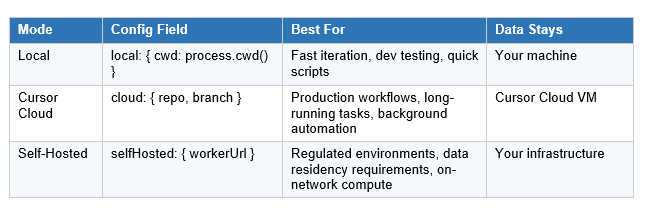
Local mode is the right starting point for development. It runs the agent in your working directory, uses your machine's compute, and completes in seconds for simple tasks. The limitation: if your machine goes offline or the process terminates, the run stops.
Cloud mode gives each agent run a dedicated virtual machine with a fresh clone of your repo, full sandboxing, and durability that survives connection drops. You can start a cloud agent run, close your laptop, and the agent keeps working. When it finishes, it opens a PR or pushes a branch. Cloud agents also appear in Cursor's Agents Window and web app, so you can inspect or take over any run manually.
Self-hosted mode lets teams keep all code execution and tool access inside their own network. This is the option for companies with strict data residency or compliance requirements — you run the agent worker on your own infrastructure, and nothing leaves your network.
Don't just use ChatGPT. Learn to build custom LLM agents, RAG pipelines, and full-stack Agentic AI apps in our intensive 6-week program.
Real-World Use Cases: What Teams Are Already Building
The SDK launched in public beta on April 29, 2026, and companies were already running it in production before the announcement went live. Here is what the early adopters are actually building.
CI/CD Automation
The most common pattern so far: agents triggered by CI failures. When a build breaks, an agent gets the failing job logs, identifies the root cause, generates a fix, runs the test suite locally to verify it, and opens a PR — all without a human stepping in. Cursor estimates teams using this pattern see 30-50% reductions in time spent on routine CI maintenance.
Ticket-to-PR Pipelines
Teams at Rippling and Notion are running agents that pick up Linear or Jira tickets, understand the requirement, generate the implementation, write tests, and open a draft PR for engineer review. The kanban board demo that went viral on X before the launch showed this exact workflow: drag a ticket into a 'Ready for Agent' column, and a cloud agent picks it up automatically and ships the PR.
Repository Health Automation
Faire's engineering team highlighted the SDK as a way to keep codebases healthy without constant developer intervention. Agents run in the background auditing for type errors, outdated dependencies, missing test coverage, and documentation gaps — opening PRs for each issue they find. Cursor runs hundreds of such automations per hour internally.
Customer-Facing Agent Products
Several companies are embedding the SDK directly into their own products. Instead of building their own agent runtime, sandboxing system, and codebase search infrastructure, they call the Cursor SDK and get all of that out of the box. End users get an agent experience without ever seeing 'Cursor' in the interface.
For a broader view of how the agentic coding ecosystem looks right now — including where Cursor's SDK sits relative to Claude Code and Codex on performance benchmarks — see our full April 2026 AI models leaderboard for the complete picture.
Cursor SDK Pricing: What It Costs to Run Agents at Scale
The Cursor SDK uses token-based consumption pricing. You pay for the tokens your agents consume — not per seat, per run, or per month. This aligns costs with actual usage, which matters a lot when programmatic workloads can range from 5 runs per day to 5,000.
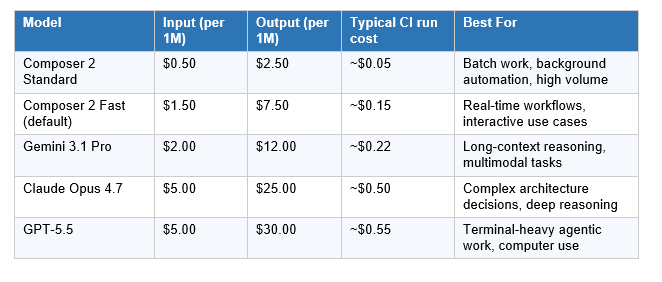
The default model is Composer 2 — Cursor's own frontier-level coding model, released March 18, 2026. It costs $0.50/M input and $2.50/M output at Standard tier, which is roughly 10x cheaper than Claude Opus 4.7 per token. On Terminal-Bench 2.0, Composer 2 scores 61.7 — ahead of Claude Opus 4.6's 58.0, though GPT-5.4 still leads the full benchmark at 75.1.
For a deep-dive on Composer 2's benchmarks, how it's trained (compaction-in-the-loop reinforcement learning), and where it still trails frontier reasoning models, the Cursor Composer 2 full review covers everything you need before committing to it as your default model.
The routing math: For a 20-person engineering team generating 10M output tokens per month — a reasonable estimate for daily agentic workflows — the cost difference between running everything on Claude Opus 4.7 ($250/month) versus Composer 2 Standard ($25/month) is $2,700 per year on output tokens alone. At scale, that math compounds into real infrastructure budget.
My approach: default Composer 2 Standard for background and batch work; route to Opus 4.7 or GPT-5.5 for complex architectural decisions or security-sensitive reviews where the reasoning depth matters more than cost. Model switching is a single field change in Agent.create().
Cursor SDK vs Claude Code SDK vs OpenAI Codex
Three programmatic coding agent frameworks are competing for the same category. They are not identical, and the right choice depends on your architecture, existing toolchain, and what tasks you are automating.
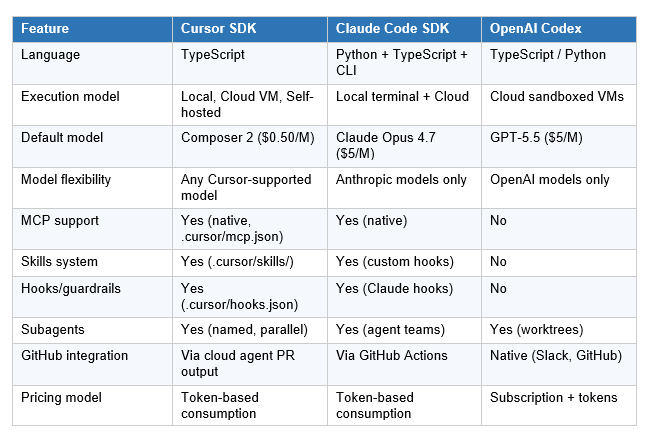
The Cursor SDK wins when you want the full IDE-grade harness — indexing, MCP, skills, hooks, and subagents — without being locked into a single model provider. That model flexibility is the most meaningful differentiator: switching from Composer 2 to Claude Opus 4.7 or GPT-5.5 is literally a one-line configuration change. No migration, no API changes.
The Claude Code SDK wins when you are already deep in the Anthropic ecosystem and want the deepest possible integration with Claude's reasoning depth. Opus 4.7 at 64.3% on SWE-bench Pro is the best coding model on that benchmark. The SDK inherits that quality directly.
OpenAI Codex wins when you want the tightest GitHub and Slack integration out of the box, async fire-and-forget task delegation, and you do not need MCP or custom skills. The limitation is model lock-in — you are on OpenAI's infrastructure and pricing, period.
For a comprehensive breakdown of how Claude Code, Codex, and Cursor stack up on benchmarks, developer adoption, and real-world performance, the best AI for coding 2026 comparison covers the full landscape.
Frequently Asked Questions
What is the Cursor SDK?
The Cursor SDK (@cursor/sdk) is a TypeScript package released in public beta on April 29, 2026 that gives developers programmatic access to the same agent runtime, harness, and models that power the Cursor desktop app, CLI, and web app. It includes codebase indexing, MCP server support, skills, hooks, subagents, and three deployment modes (local, cloud, self-hosted). Install it with npm install @cursor/sdk.
What is the difference between the Cursor SDK and calling an LLM API?
Calling an LLM API gives you a model. The Cursor SDK gives you a model plus the full agent harness: automatic codebase indexing, semantic code search, MCP server integrations, skills, hooks, subagents, and sandboxed cloud execution. A raw LLM call has no idea your repository even exists. A Cursor SDK agent can search it, index it, run terminal commands inside it, and open a PR when it finishes.
How much does the Cursor SDK cost?
The Cursor SDK uses token-based pricing. The default model is Composer 2 Standard at $0.50/M input tokens and $2.50/M output tokens. A typical CI/CD agent run (50K input + 10K output) costs roughly $0.05. You can route to Claude Opus 4.7 ($5/$25) or GPT-5.5 ($5/$30) for complex tasks. Composer 2 Fast (the default inside the SDK) costs $1.50/$7.50 per million tokens.
What models does the Cursor SDK support?
The Cursor SDK supports every model available inside Cursor: Composer 2 (Cursor's in-house coding model, the default), Claude Opus 4.7, GPT-5.5, Gemini 3.1 Pro, and others. Switching models is a single field change in the model parameter of Agent.create(). You are not locked into one provider.
Can I use the Cursor SDK for CI/CD automation?
Yes. CI/CD automation is the most common use case in early production deployments. Teams are triggering agents from CI pipelines to summarize code changes, identify root causes for test failures, apply fixes, and update pull requests — all without developer intervention. The cloud deployment mode is designed for this: agents run in dedicated VMs and survive connection drops, so long-running CI workflows complete reliably.
What companies are using the Cursor SDK?
Rippling, Notion, Faire, and C3 AI are confirmed early adopters as of the April 29, 2026 public beta launch. Use cases include ticket-to-PR automation (drag a Linear ticket into a Kanban board and the agent generates the implementation and opens a PR), autonomous bug fixing, CI/CD summarization, and embedding agent experiences into customer-facing products without exposing the Cursor interface directly.
How does the Cursor SDK compare to Claude Code SDK?
The Cursor SDK offers multi-model flexibility (Composer 2, Claude Opus 4.7, GPT-5.5, Gemini 3.1 Pro via a single config field), plus MCP server support and a skills system. The Claude Code SDK is optimized for deep reasoning with Claude models — Opus 4.7 leads SWE-bench Pro at 64.3% — but is Anthropic-model-only. If your tasks require maximum coding reasoning depth, Claude Code SDK has the edge. If you want model flexibility and the full IDE harness at a fraction of the cost (Composer 2 at $0.50/M vs Opus 4.7 at $5/M), Cursor SDK wins.
Is the Cursor SDK available for self-hosting?
Yes. Self-hosted deployment keeps all code and tool execution inside your network. You register your own infrastructure as a worker via the SDK, and agents run on-premises without any data leaving your environment. This is the mode for regulated industries, government use, or teams with strict data residency requirements.
The only comprehensive program designed to take you from basic prompting to building interactive Artifacts, custom integrations, and deploying production-ready code with Claude Code.
Recommended Blogs
Related reading from Build Fast with AI:
- Cursor Composer 2: Benchmarks, Pricing & Full Review (2026)
- Cursor Remote Agents: Control Dev From Any Device (2026)
- Cursor 3 vs Google Antigravity: Best AI IDE 2026
- Best AI for Coding 2026: Nemotron vs GPT-5.3 vs Claude Opus 4.6
- Best AI Models April 2026: GPT-5.5, Claude & Gemini Compared
- Best AI Models Leaderboard: April 2026 Update
References
- Cursor — Build Programmatic Agents with the Cursor SDK (Official Announcement, April 29, 2026)
- Cursor — Changelog: Cursor SDK Public Beta (April 29, 2026)
- Cursor — Best Practices for Coding with Agents (Skills, Hooks, MCP)
- Cursor — Introducing Composer 2 (March 18, 2026)
- MarkTechPost — Cursor Introduces a TypeScript SDK for Building Programmatic Coding Agents
- TechCrunch — Cursor Is Rolling Out a New System for Agentic Coding (March 5, 2026)
- Vantage — Cursor Composer 2: What the New Agentic Coding Model Changes (Pricing Analysis)
- Lushbinary — Cursor SDK Guide: Programmatic AI Agents in TypeScript (April 2026)
- GitHub — awesome-cursor-skills: Curated Skills for Cursor Agents
- Build Fast with AI — gen-ai-experiments: Agent-Building and Multi-Agent Notebooks

