



Cursor Remote Agents: Run Your AI Dev Box From Any Device (2026)
I was in the middle of a sprint review when I realized my Cursor agent was sitting idle on my devbox, waiting for approval on a PR. I was 12 minutes away. No laptop. Just my phone.
That used to mean losing the entire run. Wasted compute. Lost context. The agent just sitting there, blinking at a checkpoint, while I sat in a conference room.
On April 8, 2026, Cursor (@cursor_ai) announced something that fixes exactly that problem: you can now run Cursor on any machine and control it from anywhere. Kick off agents from your phone to run on your devbox. The tweet had 598.3K views in under 24 hours. That number tells you everything about how many developers have hit this exact wall.
I have been using Cursor since before Composer 2 shipped. I wrote the breakdown on Cursor 3's Agents Window. I know this tool. And I think this remote agent launch is a bigger deal than most coverage is giving it credit for.
What Are Cursor Remote Agents?
Cursor remote agents let you run Cursor's AI coding engine on any machine and control it from any device, including your phone, tablet, or a secondary computer.
The core idea is simple: your devbox (or any machine with Cursor installed) becomes the compute layer. Your phone becomes the control layer. The two communicate through Cursor's agent infrastructure, letting you monitor tasks, approve tool calls, send new prompts, and review outputs from anywhere with internet.
The key command is agent worker start. Run it on your devbox, and the terminal output tells you everything: worker name, directory, and a unique URL at cursor.com/agents to manage that session from any browser or the Cursor mobile app.
This was technically possible through workarounds before. SSH tunnels, tmux sessions, ngrok proxies. Developers were duct-taping solutions together. Cursor just made it a first-class feature.
My take: the fact that 598.3K people viewed that announcement tweet within 24 hours is not hype. That's a reaction from developers who have all felt the exact same friction. This solves a real, daily problem.
How to Set Up Cursor on Any Machine
Getting Cursor running on a remote machine takes about five minutes. Here is the exact process.
Step 1:
Install Cursor on your devbox. Download from cursor.com/download. Cursor runs on macOS, Windows, and Linux. The agent CLI works on all three.Step 2:
Authenticate. Sign in with your Cursor account on the machine. Your subscription syncs automatically.Step 3:
Start the agent worker. Open a terminal on your devbox and run agent worker start. You will see output like:Starting worker... Worker is now running. Name: [MachineName]. Directory: /Users/you/homeStep 4:
Copy the agent URL. The terminal gives you two URLs: one for cursor.com/agents (to run agents from that worker) and one for cursor.com/automations (to set up automated workflows on that machine).Step 5:
Open that URL on any device. Your phone, another laptop, a tablet. You now have full agent control from that interface.The setup is genuinely straightforward. If you have used any remote dev environment before, this will feel familiar. If you haven't, Cursor's onboarding at cursor.com/onboard walks you through it in real time.
Controlling Cursor From Your Phone (iOS and Android)
Cursor's mobile experience for remote agents works through two channels: the Cursor mobile app and the cursor.com web interface.
On iOS, the third-party Cursor AI Mobile app (available on the App Store) lets you send prompts directly to your devbox. Messages you type on your iPhone become prompts processed by Cursor's AI on your computer, with results syncing back in real time. It supports GPT-5.4, Claude Opus 4.6, Claude Sonnet 4.6, and Gemini 3.1 Pro.
On Android, the web interface at cursor.com/agents is the primary control layer. Open your agent worker URL in Chrome on Android, and you get a full dashboard: task status, agent outputs, approval requests, and the ability to send new prompts.
The community also built open-source solutions before Cursor's official launch. CursorRemote (available on the VS Code Marketplace as cursor-remote.cursor-remote) lets you monitor, approve, and send tasks from your phone or Telegram, self-hosted for $7.99 one-time. It's a useful fallback if you want Telegram integration specifically.
My honest opinion on the mobile experience: it is better described as remote monitoring than remote coding. You are not going to rewrite a module from your iPhone. But approving an agent checkpoint, reviewing a generated PR, and sending a follow-up prompt? That works well. That's what this is actually for.
Cursor Agent CLI: How the Worker Command Works
The agent CLI is the backbone of Cursor's remote capability. Here is what's happening under the hood.
When you run agent worker start, Cursor registers your machine as a named worker in your account. It assigns a Worker ID (a UUID like 71e1e6b3-ddc2-49c1-9d3b-a3e41d82a283) and connects your machine to Cursor's agent routing infrastructure.
From that point, any agent task you kick off through cursor.com/agents with that worker selected runs on your machine's resources. Your CPU, your GPU, your local files, your environment variables, your existing tool configurations.
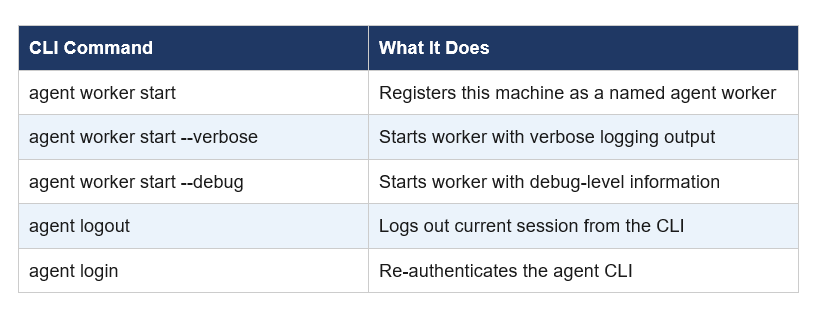
The verbose and debug flags are useful during setup. If the worker fails to connect, running with --verbose shows exactly where the handshake is breaking. In practice, most connection issues come down to firewall rules blocking outbound WebSocket connections on port 443.
One thing I'd like to see: a background daemon mode. Right now you need to keep the terminal session alive. Using screen, tmux, or nohup works as a workaround, but it should be built in.
Cursor Cloud Agents vs Remote Agents: What's the Difference?
Cursor has two distinct agent execution models, and the distinction matters for how you use them.
Cursor cloud agents, announced February 24, 2026, give each agent its own isolated VM with a full development environment. The agent runs in Cursor's cloud infrastructure, not on your machine. It can build and test software in its sandbox, produce artifacts (videos, screenshots, logs), and generate merge-ready PRs. More than 30% of the PRs Cursor merges internally are now created by these cloud agents. You access them from the web, mobile, Slack, or GitHub.
Cursor remote agents are different. The compute stays on YOUR machine. You're not renting a VM. The agent runs on your devbox's resources, in your environment, with access to your local files and tools. Remote control just means you can manage that agent from anywhere, not that the agent lives in the cloud.
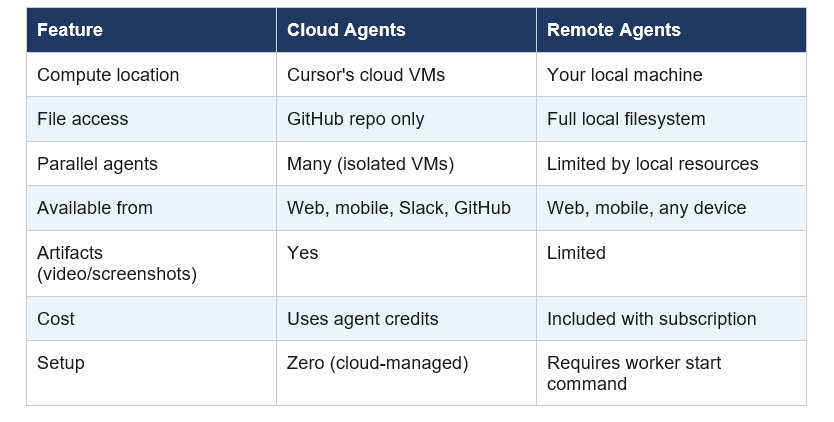
For most individual developers, remote agents are the right starting point. You keep full control of your environment, there are no additional credit costs, and the setup takes five minutes. Cloud agents make more sense for teams that need parallel workstreams or want fully autonomous PR generation without any local machine dependency.
Real Use Cases: What You Can Actually Do Remotely
Let's get concrete. Here are the situations where remote agents actually change your workflow.
Overnight runs. Kick off a long refactor or a test suite before leaving the office. The agent keeps running on your devbox. Check status from your phone during dinner. Approve the checkpoint. Push to main before you go to sleep.
Meeting interruptions. You're in a sprint review. Your agent hits a decision point. Instead of losing the session or running back to your desk, pull out your phone, review the output, approve the next step. Back to the meeting in 90 seconds.
Multi-machine workflows. Your devbox is a beefy Linux machine. Your travel laptop is a thin MacBook Air. Start a heavy compilation or a fine-tuning run on the devbox from your MacBook. Monitor from the road.
Background automation. Set up Cursor automations on a specific machine using the automations URL from the worker start output. The machine can handle scheduled tasks without you needing to be at the keyboard.
The community had a developer on the Cursor forum describe the exact problem perfectly: they kept starting refactors, stepping away for coffee, and coming back 20 minutes later to find the agent stuck waiting for approval. CursorRemote (the third-party tool) was built specifically for that problem. The official remote agent feature solves it at the infrastructure level.
Limitations and Honest Criticism
I think this feature is good. I also think some coverage is overselling it, so here's the actual list of things that don't work yet.
No background daemon mode. You need a persistent terminal session. tmux or screen works, but requiring a workaround for a core capability is an oversight. This should be a flag on the worker start command.
Mobile UI is monitoring, not development. The phone interface is useful for approvals and prompts. It is not a replacement for a keyboard. Anyone expecting to write features from their iPhone will be disappointed.
TTY limitations on remote interactive commands. If your agent needs to run an interactive CLI command that expects terminal input beyond simple y/n, you can hit friction. This is an inherent limitation of the remote tunnel model.
Firewall sensitivity. Corporate networks with strict outbound rules may block the WebSocket connections the worker relies on. IT policy compliance is a real concern for enterprise use cases.
Windows stability is still catching up. The agent CLI works on Windows, but the Linux and macOS experiences are currently smoother. Windows users should expect occasional edge cases.
None of these are dealbreakers. But you should know about them before you reorganize your workflow around remote agents
Cursor Remote Agents vs Claude Code Remote Control
The two most-discussed remote agent launches in early 2026 are Cursor's remote agents and Anthropic's Claude Code Remote Control, which shipped February 25, 2026.
The philosophies are meaningfully different. Claude Code Remote Control is a synchronization layer: your code never leaves your machine. It creates a secure tunnel so you can monitor and control a Claude terminal session from your phone, but compute and files stay local. Cursor's remote agents work the same way, with the addition of cloud agents as an option when you want to hand off to Cursor's infrastructure entirely.
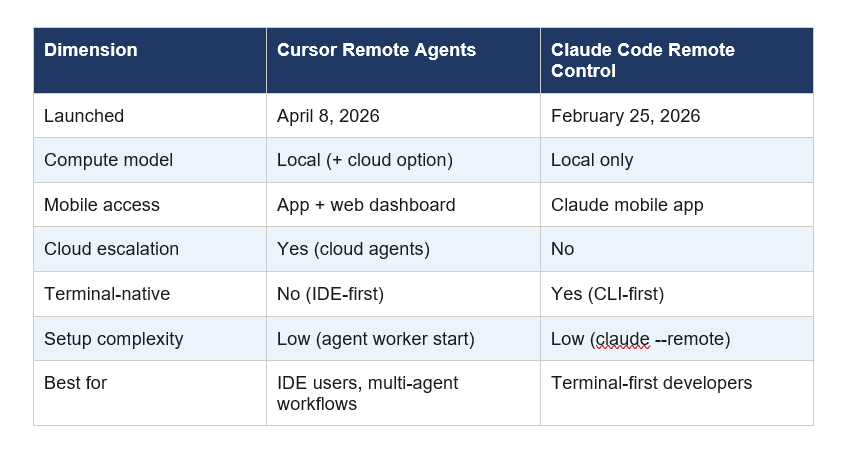
My read: if you live in Cursor's IDE, remote agents are the obvious choice. If you live in the terminal and think in Claude Code, Remote Control fits your workflow better. These aren't competing for the same user. Both are solving the same category of problem from different starting points.
Frequently Asked Questions
What are Cursor remote agents used for?
Cursor remote agents let developers run AI coding tasks on a devbox or any machine and control them from another device, including a phone. Common uses include overnight runs, approving agent checkpoints during meetings, and multi-machine workflows where a powerful local machine does the compute while a lighter device handles monitoring.
Can I use Cursor from my phone?
Yes. You can control Cursor agents from your phone through the cursor.com/agents web interface or third-party apps like Cursor AI Mobile (iOS). The mobile experience is best for approving agent actions, reviewing outputs, and sending follow-up prompts. It is not designed for writing code from scratch on mobile.
Which device is used to control the cursor movement in remote agent mode?
Any device with a browser works: iPhone, Android phone, tablet, or a secondary laptop. The Cursor agent worker registers your devbox as the compute node, and the cursor.com/agents dashboard gives you control from any browser. iOS users also have the Cursor AI Mobile app available on the App Store.
Does Cursor allow remote work?
Yes. The agent worker start command registers any machine as a remote worker, accessible from anywhere. Combined with Cursor's cloud agents (launched February 24, 2026), developers can work across local machines and cloud VMs from any location or device.
What is the Cursor agent CLI command to start a remote worker?
The command is 'agent worker start'. Running it on your machine registers it as a named worker and outputs two URLs: one for cursor.com/agents to run tasks, and one for cursor.com/automations to configure scheduled tasks. Add --verbose or --debug flags for detailed logging during setup.
What is the difference between Cursor cloud agents and Cursor remote agents?
Cloud agents run on Cursor's own virtual machines in the cloud with isolated environments, producing merge-ready PRs and video artifacts. Remote agents run on your local machine, using your own CPU and files, with remote control from any device. Cloud agents cost credits; remote agents are included with a Cursor subscription.
Can I run Cursor on Android?
Android support for Cursor remote agents works through the cursor.com/agents web interface in Chrome. There is no native Android app from Cursor as of April 2026, but the web interface is fully functional on Android browsers for monitoring and controlling agent sessions.
How many PRs does Cursor create with cloud agents internally?
According to Cursor's February 24, 2026 announcement, more than 30% of the PRs merged at Cursor internally are now created by agents operating autonomously in cloud sandboxes. This figure reflects roughly one month of internal usage before the feature went public.
Recommended Reading
- Cursor 3 vs Google Antigravity: Best AI IDE 2026
- Cursor Composer 2 Review 2026
- Claude Managed Agents Review: Is It Worth It? (2026)
- GLM-5.1: #1 Open Source AI Model? Full Review (2026)
- Claude Opus 4.6 Fast Mode: 2.5x Faster, Same Brain (2026)
References
Cursor (@cursor_ai) — Remote Agents Announcement Tweet, April 8, 2026:
Cursor Official Blog — 'Cursor agents can now control their own computers', February 24, 2026:
Cursor Docs — Cloud Agent Documentation:
Cursor AI Mobile — App Store (iOS):
CursorRemote — VS Code Marketplace Extension:
Cursor Community Forum — 'Cursor on your phone: open-source remote control for agent mode':

