



Cursor 3 vs Google Antigravity: Which AI IDE Wins in 2026?
I woke up on April 2, 2026, refreshed my Twitter feed, and the first thing I saw was the @cursor_ai announcement: Cursor 3 is live. After months of watching the AI coding tool race intensify, Anysphere just shipped the biggest update in the company's history.
This isn't an incremental update. Cursor 3 introduces the Agents Window — a completely new interface, built from scratch, designed around one idea: you manage agents, agents write the code. Run them locally, in worktrees, over SSH, or hand them off to the cloud so they keep working while your laptop is shut.
Meanwhile, Google's Antigravity has been sitting at 76.2% on SWE-bench Verified since November 2025, offering a free agent-first IDE powered by Gemini 3 Pro. And Claude Code is quietly eating market share from the terminal with Anthropic's Opus 4.6 underneath.
Three very different tools. Three different philosophies. One question: which one should you actually be using right now? I've gone deep on all three, and I have a real opinion.
What Is Cursor 3? The Agents Window Explained
Cursor 3 is the most significant release Anysphere has shipped since the company forked VS Code in 2023. Announced on April 2, 2026, it adds the Agents Window — a standalone interface that lets developers run multiple AI agents in parallel across local machines, worktrees, SSH environments, and cloud setups, all without interrupting the main coding session.
The core product philosophy has shifted. Previously, Cursor was an AI-enhanced editor. Now, the goal is explicit: you are the architect, agents are the builders. The IDE is still there. You can switch back to it anytime. But the default experience in Cursor 3 is managing a fleet.
To access the Agents Window right now: upgrade Cursor, then type Cmd+Shift+P -> Agents Window. You can run it side-by-side with the IDE or as a standalone view.
What I find genuinely interesting about Cursor 3 is the cloud handoff feature. Start a task locally, then push it to a cloud agent so it keeps running after you close your laptop. Longer-running overnight jobs, no interruptions. That's not a gimmick. That solves a real daily annoyance.
Cursor crossed $2 billion in annual revenue as of early 2026, doubling in three months, with roughly 25% market share among generative AI software buyers. By mid-2025, over 50% of Fortune 500 companies had adopted Cursor. Nvidia, Uber, and Adobe are on that list. Those numbers give Anysphere the budget to build things like the cloud agent infrastructure that powers Cursor 3.
What Is Google Antigravity? Gemini 3 in an IDE
Google Antigravity is a free agent-first IDE released in November 2025 alongside Gemini 3, powered by Gemini 3.1 Pro and Claude Opus 4.6. It scored 76.2% on SWE-bench Verified and 54.2% on Terminal-Bench 2.0, two benchmarks that measure real coding agent performance.
The origin story is worth knowing: Google acquired the Windsurf team, including CEO Varun Mohan, for $2.4 billion in July 2024. That team delivered Antigravity in under six months. It is not a VS Code fork — Antigravity is built from the ground up as a native agent-first environment.
Antigravity has two primary views. Editor View is essentially VS Code-familiar — syntax highlighting, an agent sidebar, inline completions powered by Gemini 3 Flash. Manager View is where Antigravity gets interesting: a mission control dashboard for dispatching up to five parallel agents simultaneously, monitoring their progress in real-time, and reviewing their work as Artifacts — task plans, screenshots, browser recordings — before accepting any changes.
The Artifacts system is Antigravity's standout idea. Every agent action generates a verifiable record. Developers don't need to review every line of code; they review whether the agent's plan and test results match what they asked for. That's a different kind of trust model than Cursor's, and honestly, it's the smarter one for enterprise compliance.
The honest downside: Antigravity is still early-stage. Early 2026 saw real stability problems — context memory errors, version compatibility bugs, agents terminating mid-task. MCP support doesn't exist yet. The ambition is there; the reliability isn't fully there yet.
Cursor 3 vs Antigravity vs Claude Code: Full Comparison Table
Here's the side-by-side across every dimension that actually matters for developer decisions:
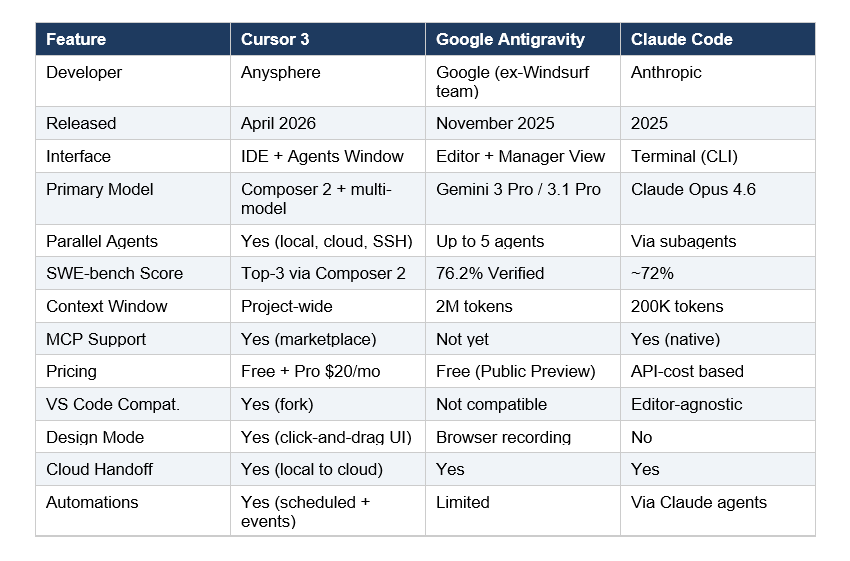
My take on this table: the MCP support gap is Antigravity's biggest weakness right now. Cursor's marketplace has hundreds of plugins. Antigravity has none. For teams already running MCP workflows — Figma, Amplitude, tldraw in chat — switching to Antigravity means giving all of that up.
Cursor 3 Key Features Breakdown
Agents Window
The Agents Window is a new interface built from scratch — not a panel bolted onto the IDE. It supports multi-workspace layouts, letting you and your agents work across different repos from one place. Agent Tabs allow side-by-side or grid views of multiple chats. Native worktree support has moved here from the Editor, with better UX for managing multiple workspaces.
Design Mode
Design Mode lets users click and drag to annotate UI elements directly in an embedded browser, then point the agent at exactly the component they want changed. This is faster than describing UI elements in text — a 5-minute explanation becomes a 10-second click. For frontend developers iterating on designs, this alone is worth the upgrade.
Composer 2 and Real-Time RL
Composer 2 is Cursor's proprietary coding model, trained with real-time reinforcement learning on actual user interactions. The results from Cursor's internal A/B testing: agent edit persistence in codebases improved by +2.28%, dissatisfied follow-up messages dropped by -3.13%, and latency dropped -10.3%. Typical tasks complete in under 30 seconds. On Terminal-Bench 2.0, Cursor uses the official Harbor evaluation framework and reports results across five iterations per model-agent pair.
Cloud Agents and Automations
Cursor Automations, which launched before Cursor 3, lets developers trigger agents based on events like code commits, Slack messages, or scheduled timers. Security agents are currently reviewing more than 3,000 internal PRs per week, catching over 200 vulnerabilities weekly. Cursor 3 extends this further with cloud handoff — push a local session to the cloud mid-task and it keeps running.
New Commands
Two new commands worth knowing: /worktree for isolated task execution in separate git worktrees, and /best-of-n for running the same task across multiple models and comparing results. The second one is underrated — it effectively lets you A/B test model output without leaving the IDE.
Google Antigravity Key Features Breakdown
Manager View and Artifact System
Manager View is Antigravity's most genuinely novel contribution to the AI IDE space. Dispatch five agents on five independent tasks simultaneously, monitor real-time status, and receive diffs, test results, and screenshots as Artifacts before accepting any changes. For debugging and compliance use cases, this transparency is invaluable.
Planning Mode vs Fast Mode
Antigravity gives agents two operating modes. Planning Mode externalizes the agent's reasoning — it generates a task list and walkthrough as an Artifact before writing a single line. Fast Mode skips the planning phase and executes directly. For production code, Planning Mode is the right default. Fast Mode is for throwaway prototypes and boilerplate.
Gemini 3.1 Pro and Multi-Model Support
Antigravity centers on Gemini 3.1 Pro but also supports Claude Sonnet 4.6, Claude Opus 4.6, and GPT-OSS-120B. More interestingly, you can assign different models to different agents — Gemini 3.1 Pro for architecture planning, Claude Sonnet 4.6 for implementation, Gemini 3 Flash for unit test generation. Cursor lets you switch models, but per-agent model assignment at this level is more flexible in Antigravity.
2 Million Token Context Window
Antigravity's Gemini 3 Pro context window processes up to 2 million tokens — your entire codebase, in context, at once. Ask questions like 'Where is the authentication middleware defined?' and get accurate answers from the full codebase. Cursor works with project-wide embeddings and is strong here, but raw context window size is Antigravity's structural advantage.
Chrome Extension and Browser Automation
A Chrome extension allows agents to interact directly with the browser — recording actions, validating UI flows, running tests against local websites. Cursor 3 also has built-in browser interaction, but Antigravity's implementation supports browser recording as an Artifact, giving you a replayable record of what the agent did.
Pricing: Cursor Pro vs Antigravity Free vs Claude Code API
This is where the conversation gets real. Antigravity being completely free with Gemini 3.1 Pro and Claude Opus 4.6 included is a meaningful market pressure on Cursor and Anthropic.
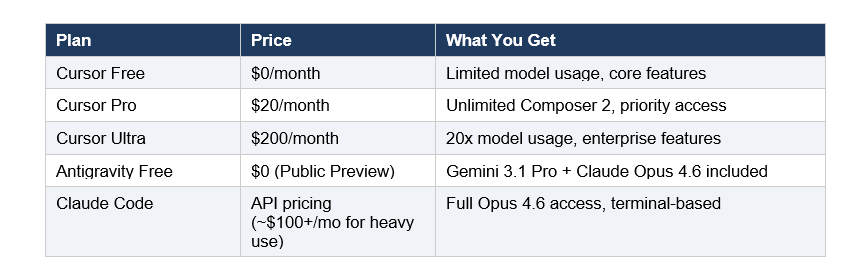
My honest opinion: $20/month for Cursor Pro is fair value if you're using it daily on production code. The Composer 2 quality and MCP ecosystem justify it. But if you're a solo developer or student who just wants to build things, Antigravity's free tier with Opus 4.6 access is a remarkable deal that I don't think the market has fully priced in yet.
The Cursor Ultra plan at $200/month is aimed at power users who need guaranteed compute. 20x model usage and priority access make sense for teams with predictable high-volume workflows. Most individual developers don't need this tier.
Benchmarks: SWE-bench, Terminal-Bench 2.0, and Real-World Tests
Google Antigravity scores 76.2% on SWE-bench Verified, one of the highest published scores for a coding agent as of April 2026. For context: Devin, which launched in 2024 as the first 'autonomous software engineer,' scored 13.86% at launch. The gap between what was considered impressive then and what's standard now is staggering.
Antigravity also scored 54.2% on Terminal-Bench 2.0, an agent evaluation benchmark for terminal use maintained by the Laude Institute. Cursor's score on Terminal-Bench 2.0, computed using the official Harbor evaluation framework with five iterations per model-agent pair, is reported in the March 2026 release notes as top-3 alongside Antigravity and Kiro IDE.
Claude Code, using Claude Opus 4.6, scores approximately 72% on SWE-bench Verified — slightly below Antigravity's 76.2%, but within the margin of variation across evaluation runs. The practical difference in day-to-day coding tasks between 72% and 76.2% is likely small for most use cases.
Antigravity scored 1487 Elo on the WebDev Arena leaderboard, demonstrating strong performance specifically for web development tasks.
One number I'd push back on: SWE-bench Verified measures specific, reproducible GitHub issues. It is a useful proxy but not a perfect measure of how productive a tool makes you in your actual codebase. Cursor's Composer 2 improvements in A/B testing on real user interactions — the +2.28% edit persistence, -3.13% dissatisfied follow-ups — are arguably more predictive of real developer experience than benchmark scores.
Which AI Coding IDE Should You Use in 2026?
The honest answer is that the right choice depends on what you're actually building and how you work. But I'll give you my real opinion instead of the safe 'it depends' non-answer.
Use Cursor 3 if: you work on production codebases, your team has existing .cursorrules and workflows, you need MCP integrations, or you want the most mature day-to-day coding experience. The Composer 2 quality, Design Mode, and cloud agent infrastructure make this the professional developer's default in 2026. The $20/month Pro price is justified for anyone using it seriously.
Use Google Antigravity if: you're experimenting with agent-first workflows, building in the Google ecosystem (Firebase, Google Cloud, Gemini API), want a free Opus 4.6 coding environment, or need the Artifacts transparency system for compliance or debugging. The Manager View is genuinely novel. The 2M token context window is a structural advantage. Just be patient with the stability issues.
Use Claude Code if: you're terminal-native, want the deepest MCP integration, need editor-agnostic agents that work across your whole setup, or are already on Anthropic's API for other purposes. Claude Code is also the best option for complex multi-step refactoring tasks where you want to track every change.
My personal setup: I'm running Cursor 3 for daily coding and switching to Antigravity's Manager View for larger refactoring sessions or new feature builds that I can define cleanly as independent tasks. At $20/month plus free Antigravity, it's the highest-ROI combination I've found.
The contrarian take worth saying out loud: most developers are still running a single-agent workflow when multi-agent parallel execution is already available. The productivity ceiling hasn't been hit yet. Cursor 3 and Antigravity both push that ceiling significantly higher — but only if you actually restructure how you work, not just how you open your IDE.
Want to build AI agents and apps using tools like Cursor 3, Antigravity, and Claude Code?
Join Build Fast with AI's Gen AI Launchpad — an 8-week program to go from 0 to 1 in Generative AI.
Register here:
Frequently Asked Questions
What is Cursor 3?
Cursor 3 is the latest major release from Anysphere, launched on April 2, 2026. It introduces the Agents Window — a new standalone interface for running multiple AI agents in parallel across local, SSH, worktree, and cloud environments. Features include Design Mode for UI editing, Composer 2 for fast code iteration, cloud handoff for overnight tasks, and new /worktree and /best-of-n commands.
How do I access the Agents Window in Cursor 3?
Upgrade to the latest version of Cursor, then press Cmd+Shift+P (Mac) or Ctrl+Shift+P (Windows/Linux) and type 'Agents Window.' You can run the Agents Window alongside the IDE simultaneously or as a standalone view. To revert to the classic IDE interface at any time, switch back through the same shortcut.
Is Google Antigravity better than Cursor for coding?
Google Antigravity scores 76.2% on SWE-bench Verified compared to Cursor's top-3 placement on Terminal-Bench 2.0. Antigravity has advantages in raw context window size (2M tokens), pricing (free), and parallel agent transparency (Artifacts system). Cursor has advantages in MCP ecosystem maturity, day-to-day polish, VS Code extension compatibility, and the Composer 2 model's production reliability. Neither is universally better — the right choice depends on your workflow.
What is Design Mode in Cursor 3?
Design Mode is a Cursor 3 feature in the Agents Window that lets developers click and drag directly on browser-rendered UI elements to annotate and target them for the AI agent. Instead of describing a UI component in text, you point to it visually. This enables more precise feedback and faster iteration cycles, particularly for frontend developers working on component-level changes.
How much does Cursor 3 cost?
Cursor 3 has three pricing tiers: Free (limited model usage), Pro at $20/month (unlimited Composer 2, priority access), and Ultra at $200/month (20x model usage, enterprise features and guaranteed compute). Google Antigravity is currently free in public preview with Gemini 3.1 Pro and Claude Opus 4.6 included at no cost. Claude Code pricing is based on Anthropic API usage, which runs approximately $100/month or more for heavy professional use.
Does Google Antigravity support MCP servers?
As of April 2026, Google Antigravity does not support MCP (Model Context Protocol) servers. This is a significant limitation for teams that rely on MCP integrations for tools like Figma, Amplitude, or custom enterprise plugins. Cursor has a mature MCP marketplace with hundreds of plugins. If MCP support is a requirement, Cursor or Claude Code are the better choices for now.
What is the SWE-bench score for Cursor vs Antigravity?
Google Antigravity scores 76.2% on SWE-bench Verified as of its public preview release. Claude Code with Opus 4.6 scores approximately 72% on the same benchmark. Cursor does not publish a single SWE-bench number for the full product but scores in the top-3 on Terminal-Bench 2.0 using the Harbor framework with five-iteration averages. Devin, for context, scored 13.86% at its 2024 launch.
Can I use both Cursor 3 and Google Antigravity together?
Yes, and many developers in 2026 are doing exactly this. A common setup: Cursor 3 for daily coding assistance, tab completion, and MCP-connected tools; Antigravity Manager View for larger autonomous refactoring sessions or new features with well-defined independent tasks. Since both have free or low-cost tiers, there's no cost barrier to running both.
Recommended Reads
If you found this useful, these posts from Build Fast with AI go deeper on related topics:
Related Cookbooks
References
Meet the New Cursor (Cursor 3 Official Announcement) — Cursor Blog
Google Antigravity vs Cursor: AI-Powered Coding IDEs Differences — Metana
Google Antigravity: Agentic IDE Powered by Gemini 3 vs. Cursor & Claude Code — Vertu
Antigravity vs Cursor 2026: Which AI Coding IDE Should You Choose? — Antigravity Lab
Google Antigravity Review: Free Agent-First IDE With Claude Opus Built In — OpenAIToolsHub
Cursor Releases Automations Platform for AI Coding Agent Management — MLQ.ai

