



OpenClaw 2.0: How Good Is the Biggest Update Yet?
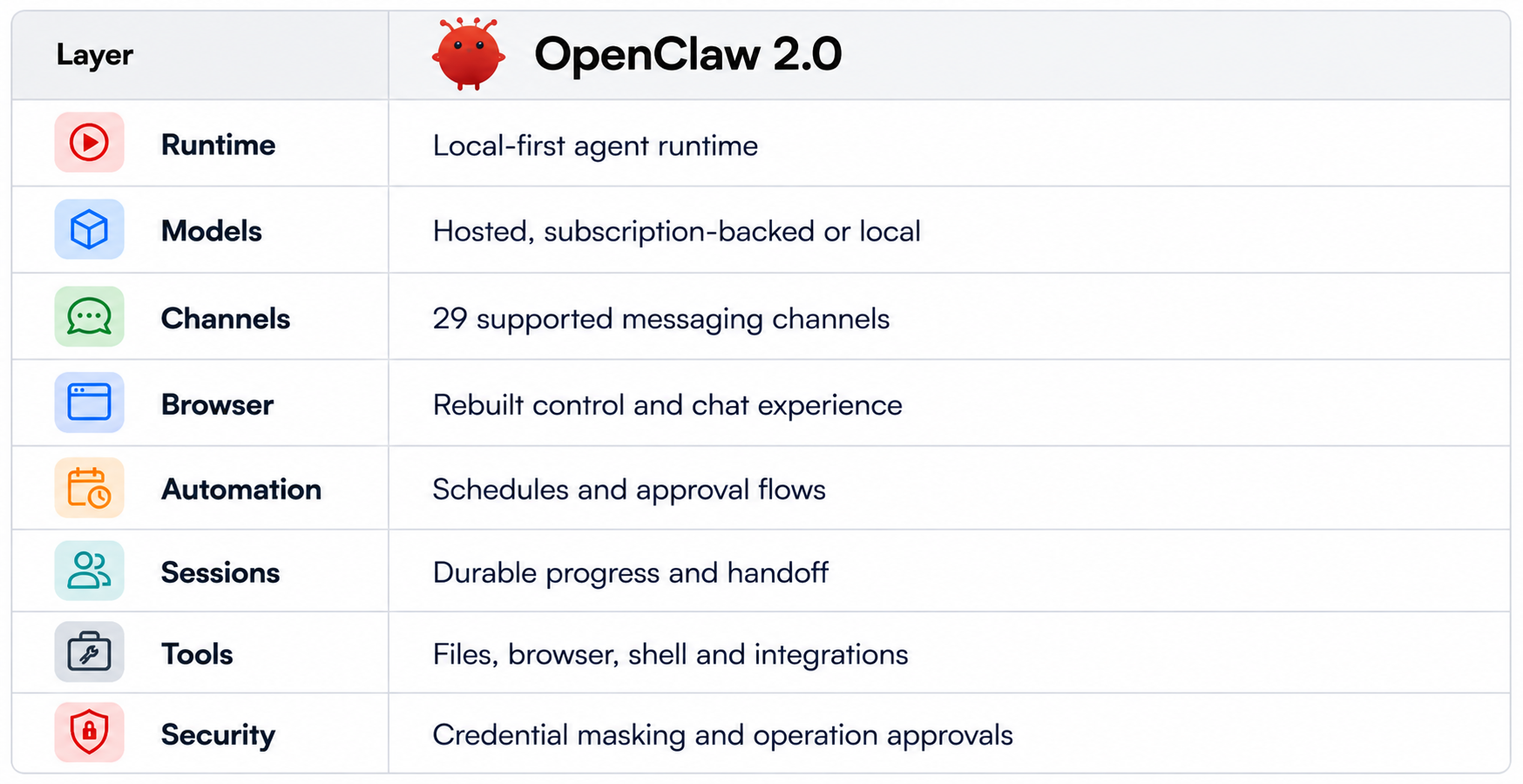
OpenClaw 2.0 is the name attached to OpenClaw v2026.8.1, released on August 30, 2026. It is not a new AI model. It is a major update to the open-source agent runtime that connects language models to tools, files, browsers, messaging channels, schedules and local or remote execution. The official release notes cover changes across apps, sessions, tools, credentials, automation, plugins and security.
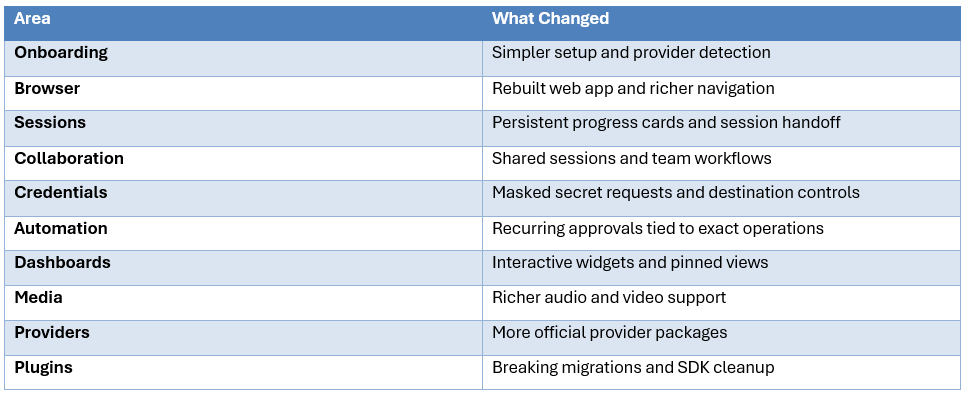
The biggest change is that OpenClaw is moving from a developer-heavy personal agent toward a more complete workspace for persistent agent work. The release adds a rebuilt browser interface, conversation search, durable session progress, shared sessions, interactive dashboards, masked credential requests and operation-specific approval for recurring work.
The catch is migration risk. The 2.0 release includes breaking changes for OpenProse, OpenAI route configuration and parts of the plugin SDK. So the correct review question is not simply whether 2.0 has more features. It is whether those features are worth the operational complexity for your particular setup.
QUICK ANSWER
OpenClaw 2.0 is a major usability and agent-workflow upgrade. The strongest changes are simpler onboarding, a substantially better browser experience, shared sessions, cross-device or cloud-worker execution, masked credentials and more granular automation approvals.
It is still a powerful agent runtime, not a harmless chatbot. OpenClaw can access tools, files, browsers, messaging and other services, so security remains an operator responsibility. Early reviews consistently describe 2.0 as easier to use while warning that the core trust problem does not disappear.
My verdict: 9/10 usability, 9/10 workflow features, 7.5/10 upgrade safety, 8/10 team readiness and 8.5/10 overall.
1. What Is OpenClaw 2.0?
OpenClaw is an open-source personal AI agent runtime. It can run on your own machine, connect to hosted or local models and communicate through channels including WhatsApp, Telegram, Discord, Slack, Signal and iMessage. Its state lives on the user's infrastructure rather than being tied to a single vendor chat service.
OpenClaw 2.0 refers to v2026.8.1. Current reporting says the release involved more than 16,000 merged pull requests from 933 contributors, which illustrates why this is much more than a cosmetic version bump.
2. The Biggest Changes in 2.0
3. Onboarding Is Finally Less Painful
OpenClaw 2.0 reduces the amount of setup required before a user can reach the agent. The current product site also presents stable macOS and Windows desktop apps, alongside Linux support and the CLI.
That is a meaningful improvement because OpenClaw's biggest historical barrier was not model intelligence. It was the number of infrastructure decisions a new user had to understand before the system became useful.
But simplified onboarding creates a new obligation: the interface can hide complexity that still exists underneath. Users still need to decide which model, files, credentials, tools and devices the agent can access.
4. The Rebuilt Browser App
The browser interface is now a proper workspace for agent activity. OpenClaw 2.0 adds durable session progress cards, visible subagent activity, structured questions, interactive widgets, dashboards and conversation search.
This matters because long-running agents are difficult to supervise when state is hidden. A progress view makes it easier to see whether the agent is researching, waiting for input, working through a subtask or accumulating changes.
The conversation search feature is also more important than it sounds. Once an agent has hundreds of interactions, being able to search visible conversation text and reopen the matching context becomes a basic productivity requirement.
5. Shared Sessions Turn OpenClaw Into a Team Tool
OpenClaw 2.0 adds shared sessions and the ability to move work between paired devices or cloud workers while carrying the session workspace with the task.
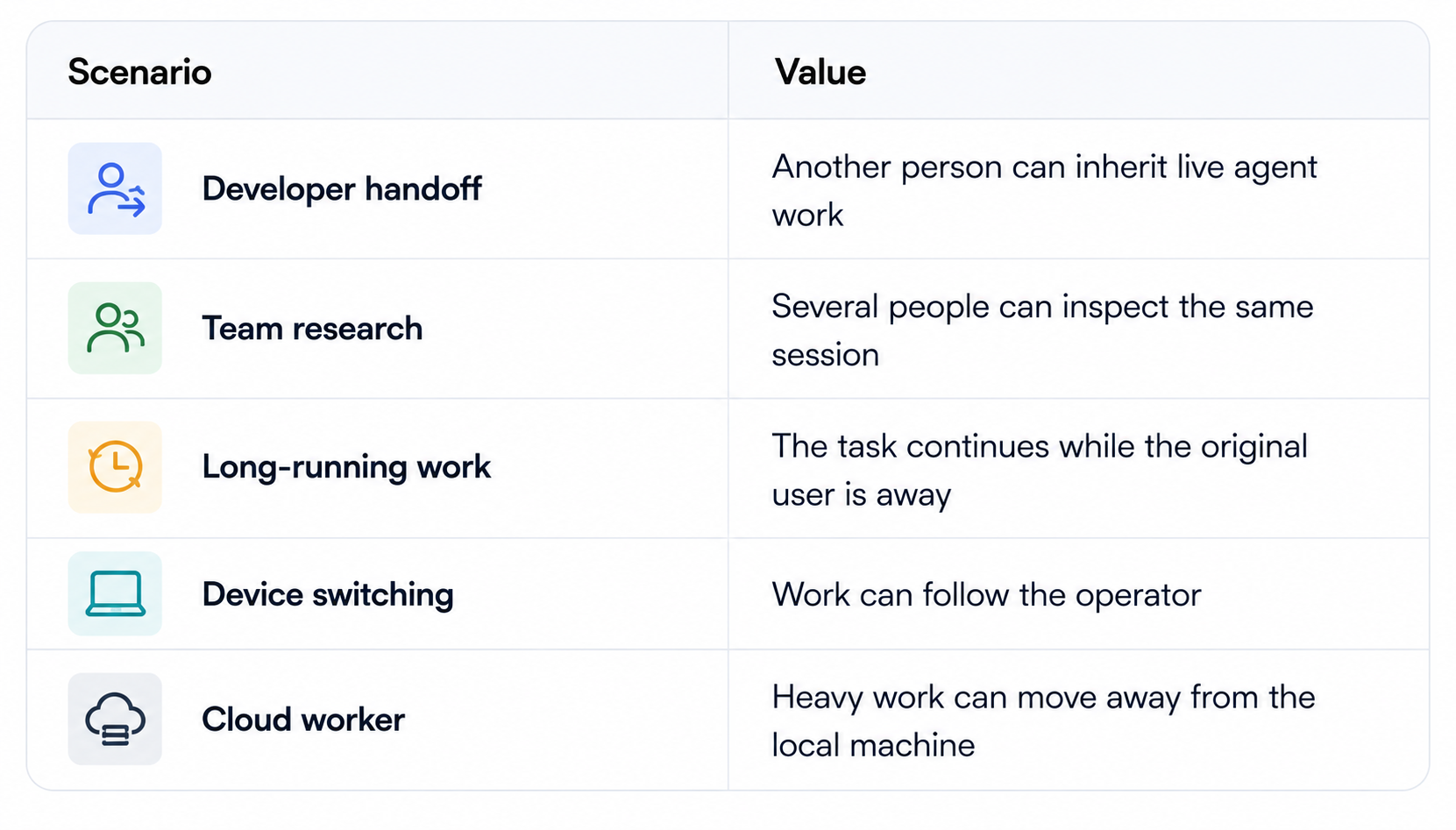
This is strategically important. OpenClaw started as a personal assistant concept. Shared sessions push it toward collaborative agent infrastructure. The downside is that team access creates a much more complicated permission problem.
6. Cloud Workers and Local-First Execution
OpenClaw remains local-first, but 2.0 can move sessions to paired devices and cloud workers. The workspace can move with the session and warm machines or project seeds can be reused for future work.
This is useful when a local laptop is not the right execution environment. It also means users should stop thinking in binary terms such as 'local' or 'cloud'. The important question is where each task, file, model and tool executes.
7. Credential Handling Is Better
OpenClaw 2.0 introduces masked credential requests so a secret can be entered without putting its value into chat or model context. It also provides an opt-in proxy that can constrain protected-secret substitution to approved destinations.
This is a real security improvement because the model does not need to see the raw secret to use a protected capability.
But this is not a complete authorization system. A credential can still be abused if the underlying tool has broad permissions. The safe unit is credential plus scope plus destination plus approval.
8. Recurring Approvals Are a Big Deal
OpenClaw 2.0 lets users approve an automation for a specific operation, inspect or revoke that approval later and demand a fresh approval when the job or operation changes.
That is far better than giving an agent a permanent blanket permission. An automation that can send one specific report to one specific channel is much safer than one that can send arbitrary messages anywhere.
This approach also makes auditing easier because the permission describes what the agent was actually authorized to do.
9. Local Models and Model Flexibility
OpenClaw can use local models as well as hosted and subscription-backed providers, which separates the agent runtime from the model provider.
That is a practical advantage for developers because the same agent workflow can survive changes in model availability, pricing or local hardware.
For a current local model deployment example, see How to Run GLM-5.3 Locally.
10. Automation Is the Real Product
OpenClaw becomes much more useful when it does work without being continuously prompted. Schedules, skills, messaging, browser actions and persistent sessions turn it into an automation layer. The 2.0 release adds better progress visibility and more granular permissioning around recurring work.
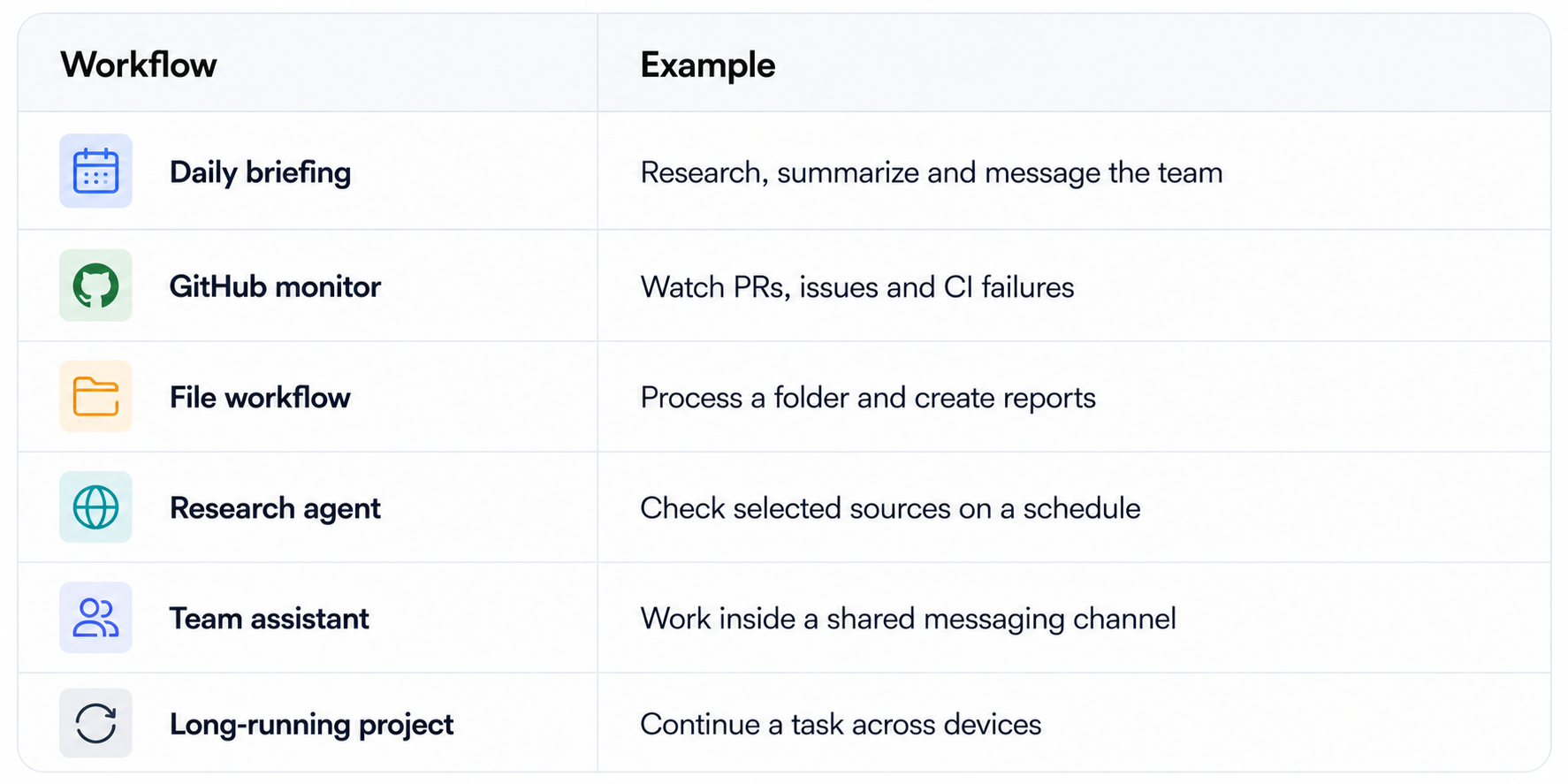
For a comparable automation guide, read How to Automate Tasks With Hermes Agent.
11. Tool Access Is Also the Risk
An agent that can browse, execute shell commands, access files and message people is powerful because it can act. That is also exactly why an OpenClaw deployment can become dangerous. Malicious webpages, prompt injection, unsafe commands, stolen credentials and overly broad tool scopes can all turn a useful workflow into a security incident.
The 2.0 approval and credential changes reduce some attack paths, but they do not eliminate them. Users still need isolation, least privilege and human confirmation for destructive operations.
See How to Secure AI Coding Agents in 2026 for a deeper framework.
12. Provider Ecosystem
The 2.0 release adds or formalizes many provider packages, including BytePlus, ComfyUI, Mistral, NovitaAI, OpenCode, Synthetic, Volcengine, Vydra and Xiaomi, plus separate packages for Cohere, Meta, DuckDuckGo search, Voyage embeddings and iMessage.
That flexibility is valuable, but the cost is operational complexity. Every provider introduces credentials, versions, configuration and another integration that can be affected by upgrades.
13. Upgrade Risk
This is the part that deserves serious attention. v2026.8.1 includes breaking changes. The bundled OpenProse plugin and /prose command were removed, OpenAI route references were migrated to openai/* and several plugin SDK paths are changing. The release notes also call out migration work and removal gates around September.
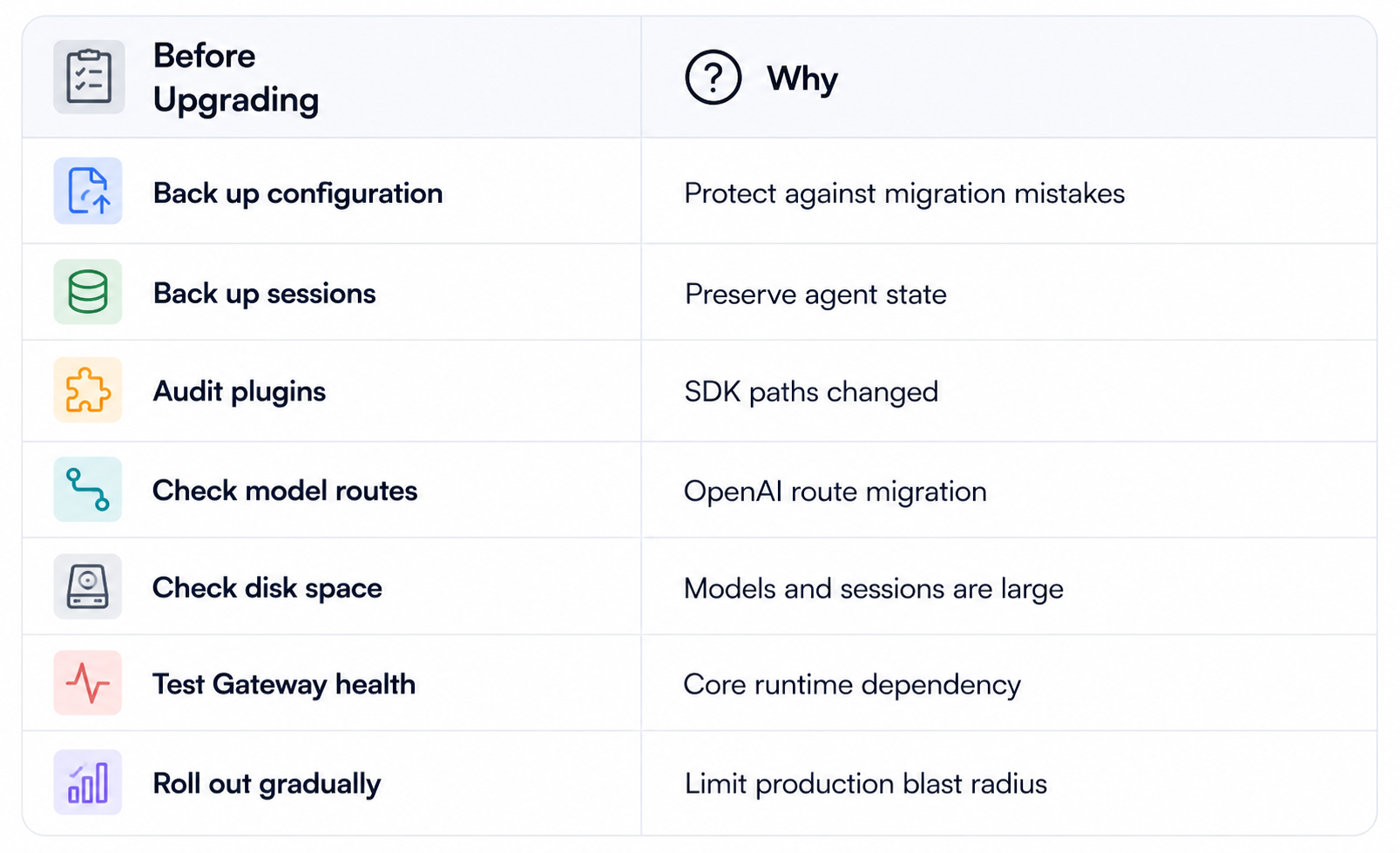
Community reports describe upgrade problems involving configuration migration, process management and app-versus-CLI state. These are anecdotal rather than formal benchmark evidence, but they support a cautious rollout.
14. OpenClaw 2.0 vs Hermes Agent
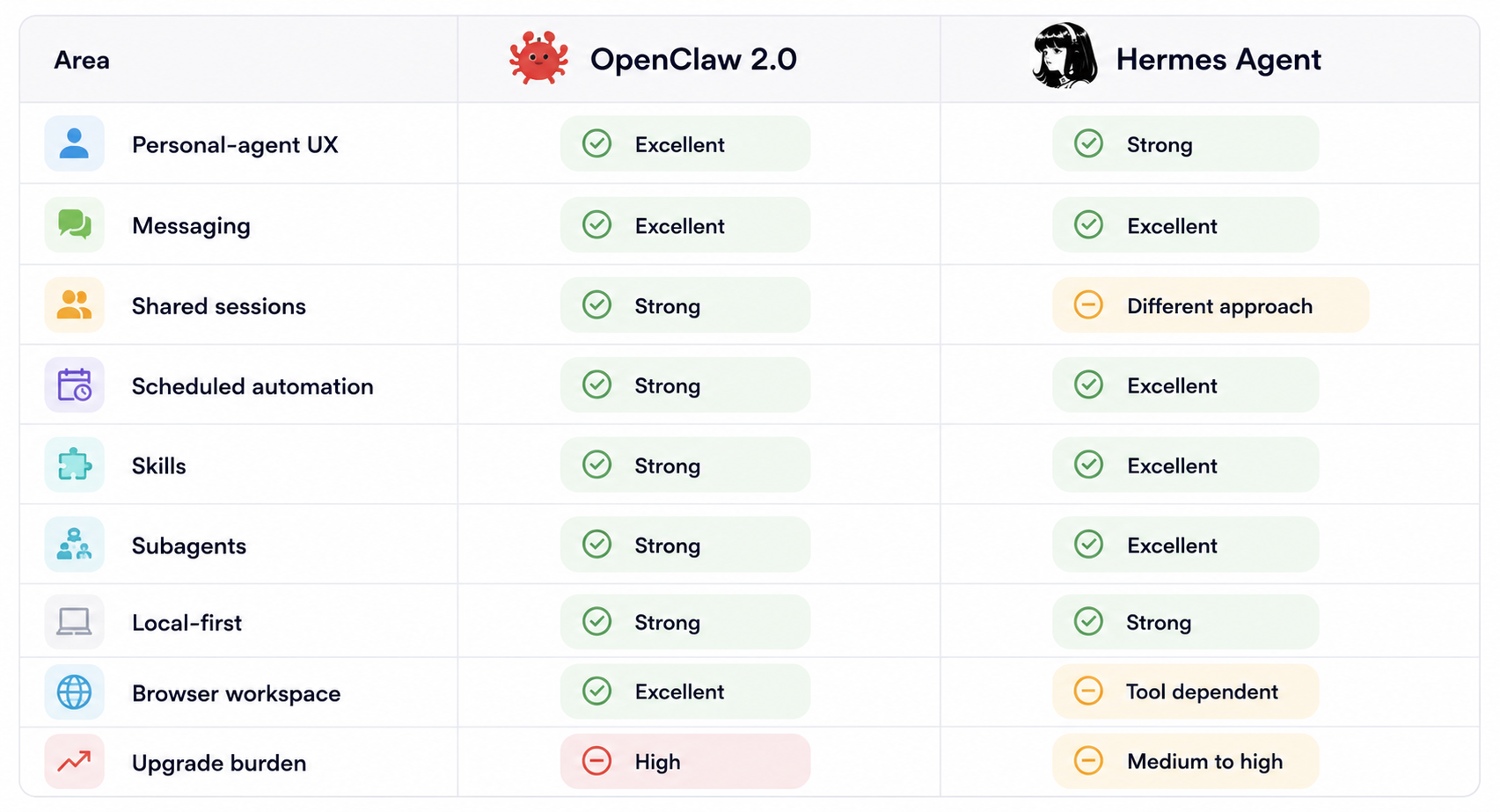
They overlap heavily, but their emphasis differs. OpenClaw is increasingly a polished personal and collaborative agent workspace. Hermes is particularly attractive when automation, skills and technical agent workflows are the priority.
15. Is OpenClaw 2.0 Safe?
No deep-access agent should be considered automatically safe. OpenClaw 2.0 is safer than earlier versions in several concrete ways, particularly credential masking and exact-operation approvals, but it still depends on how you configure the host, tools, credentials and network.
A sensible deployment uses a dedicated machine or container, minimal credentials, restricted network exposure, read-only access wherever possible, explicit approval for destructive actions and logs that explain what the agent did.
16. Performance: Better Workflow, Not a Model Benchmark
OpenClaw 2.0 is not primarily a token-per-second release. Its performance improvements are workflow improvements: less setup friction, persistent progress, better state continuity, session handoff and reuse of warm execution environments.
For long-running agents, these improvements can matter more than raw model speed. An agent that preserves state and continues from the correct point can save substantial human time even if the underlying model's generation speed is unchanged.
17. Cost: Is OpenClaw 2.0 Free?
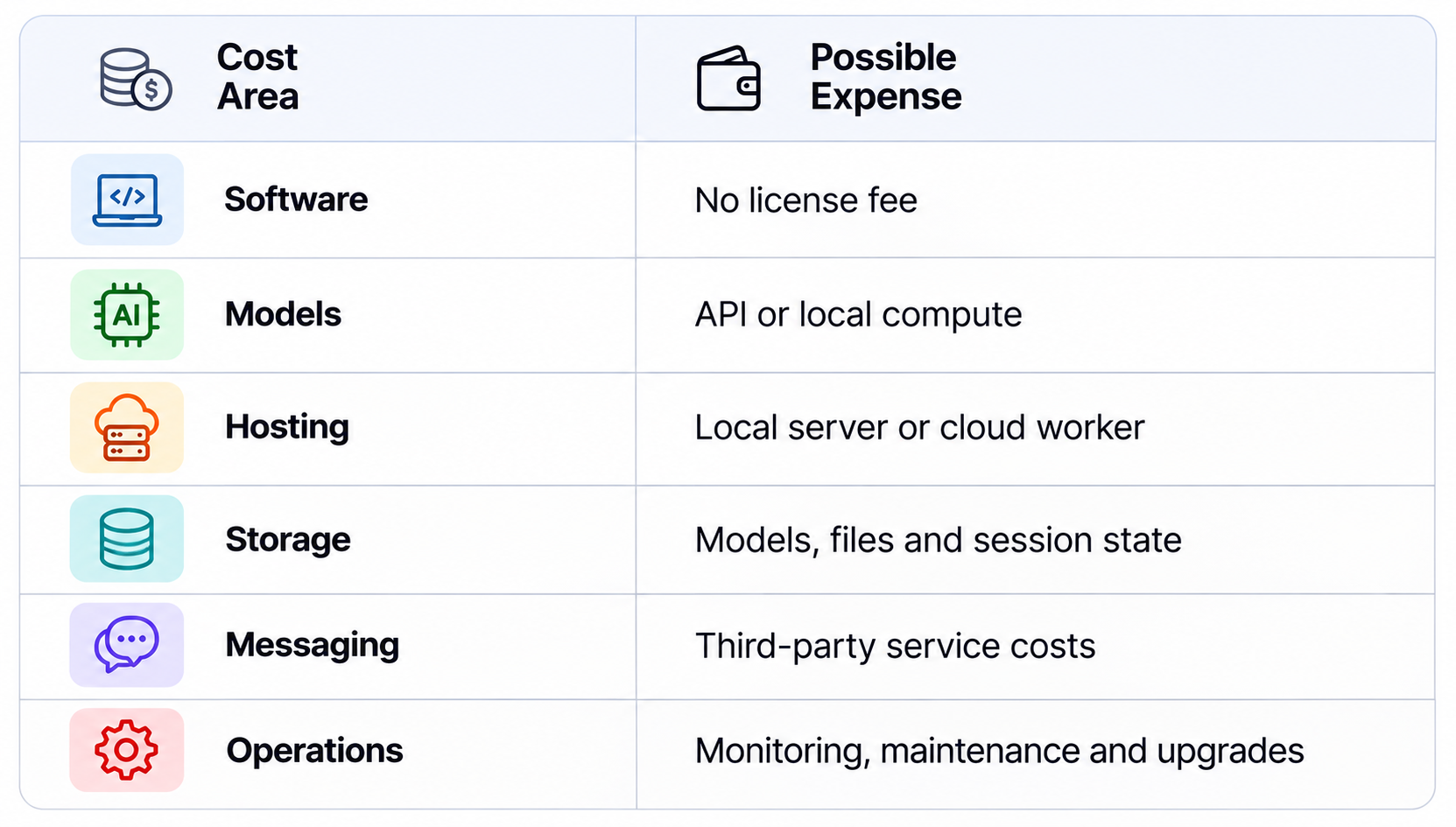
The software is open source under the MIT license. Operating the full system is not necessarily free because you can still pay for model APIs, local hardware, cloud workers, storage, bandwidth and third-party services.
18. Who Should Use OpenClaw 2.0?
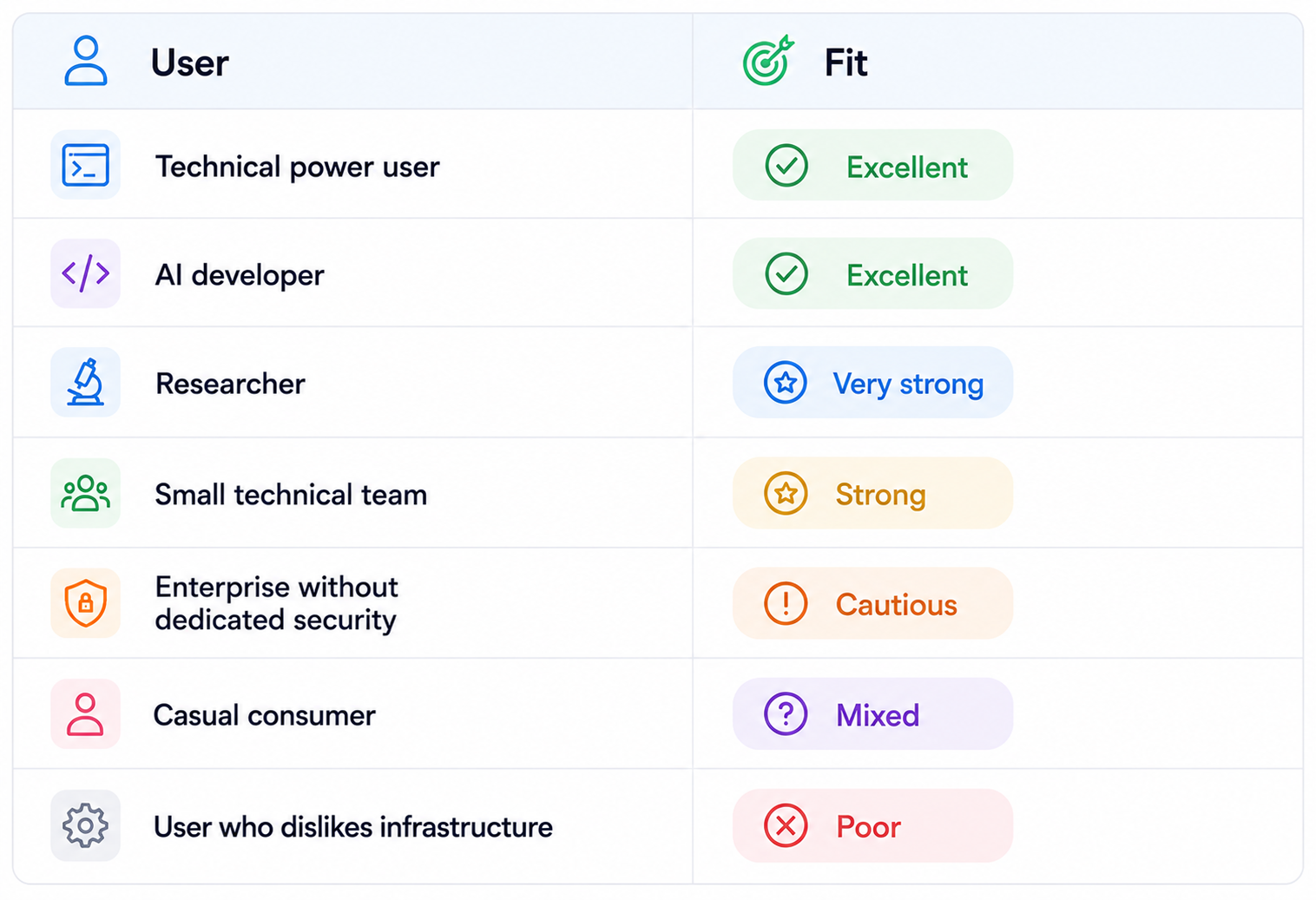
The better your understanding of permissions, local infrastructure and model configuration, the more value you can extract from OpenClaw.
19. What I Like About OpenClaw 2.0
- Much easier onboarding.
- Browser UI that is finally a serious agent workspace.
- Shared sessions for collaborative work.
- Masked credentials that keep raw secrets out of model context.
- More granular recurring approvals.
- Durable progress visibility.
- Strong local and hosted model flexibility.
- Broad channel and provider support.
20. What I Don't Like
- The upgrade surface is now large enough to require migration planning.
- More integrations mean more maintenance.
- Shared sessions create a new permission problem for teams.
- Local-first does not remove agent security risk.
- The system remains complex for non-technical users.
- Long-term stability evidence for the 2.0 release is still limited.
21. Is OpenClaw 2.0 Worth It?
For a new user, yes. The onboarding, browser workspace and persistent-work features make OpenClaw much easier to use as a serious agent platform.
For an existing user, it depends on how customized the installation is. A simple setup with few plugins can probably migrate cleanly after a verified backup. A heavily customized production environment should be upgraded in stages and tested against every critical automation.
Do not upgrade because the version number says 2.0. Upgrade because the new capabilities solve a real problem.
22. Final Verdict
OpenClaw 2.0 is a major evolution of the agent runtime, not a new AI model.
Its strongest improvements are onboarding, browser UX, durable sessions, shared work, credential protection and recurring approval controls.
The product is moving from a personal-agent tool toward collaborative, persistent agent infrastructure.
The biggest weakness is operational complexity. More capability creates more security, plugin and upgrade responsibility.
New users can reasonably start with 2.0. Existing production users should back up, audit plugins and migrate carefully.
My rating: 9/10 usability, 9/10 workflow capability, 7.5/10 upgrade safety, 8/10 team readiness and 8.5/10 overall.
Bottom line: OpenClaw 2.0 is one of the more capable local-first agent runtimes available right now, but it rewards technical users who are willing to manage the authority they give the agent.
If you already run OpenClaw, treat 2.0 as a migration project rather than a routine package update. Create a verified backup of configuration and important session data. Inventory installed plugins and custom providers. Test model routes and automations separately. Run the upgrade first on a disposable environment if the installation is business-critical. Then compare the behavior of the most important workflows before and after the migration. This process is slower than clicking update, but it is far cheaper than discovering a breaking change after an important automation stops working.
Frequently Asked Questions
What is OpenClaw 2.0?
OpenClaw 2.0 is the name for OpenClaw v2026.8.1, a major update to the open-source agent runtime. It is not a new AI model.
What changed in OpenClaw 2.0?
Major changes include simpler onboarding, a rebuilt browser app, durable session progress, shared sessions, paired-device and cloud-worker execution, masked credential requests, recurring approval controls and richer dashboards.
Is OpenClaw 2.0 free?
The software is open source under the MIT license, but model access, hosting, hardware, storage and third-party services can cost money.
Is OpenClaw 2.0 safe?
It has stronger controls than earlier versions, but no agent with deep access is automatically safe. Isolation, least privilege, approvals and monitoring remain necessary.
Can OpenClaw 2.0 run locally?
Yes. OpenClaw is local-first and can use local models, although it can also use hosted providers.
Does OpenClaw 2.0 support shared sessions?
Yes. Shared sessions are one of the major additions in 2.0.
Can OpenClaw move work to another machine?
Yes. Work can be moved to paired devices or cloud workers while carrying the session workspace.
Can OpenClaw use local AI models?
Yes. The runtime supports local models as well as hosted providers.
How difficult is OpenClaw 2.0 to install?
It is easier than earlier versions because onboarding is more guided and desktop apps are available, but it remains more complex than a standard chat application.
Should existing users upgrade?
Upgrade only after backups and checks for plugins, model routes, session state and automations because the release includes breaking migrations.
What is the biggest weakness of OpenClaw 2.0?
Operational and security complexity. The more authority the agent has, the more carefully the environment must be configured.
Is OpenClaw 2.0 worth it?
For technical users who want a powerful personal or team agent, yes. For casual chat, it is overkill.
Recommended Blogs
- How to Automate Tasks With Hermes Agent: Complete 2026 Guide
- What Is an AI Agent? Beginner Guide With Examples (2026)
- How to Run GLM-5.3 Locally: Hardware, VRAM & Setup (2026)
- How to Secure AI Coding Agents in 2026: Permissions, Sandboxing, MCP & Secrets
- Pydantic AI: Build Type-Safe AI Agents Guide (2026)
- How to Use LangGraph for Multi-Agent Systems (2026)
Resources & Community
Join our community of 70,000+ AI enthusiasts and learn to build powerful AI applications. Whether you're a beginner or an experienced developer, Build Fast with AI helps you understand and implement AI in your projects.
- Website - buildfastwithai.com
- LinkedIn - Build Fast with AI
- Instagram - @buildfastwithai
- Founder Twitter - @satvikps
- Twitter - @BuildFastWithAI
Agentic AI Launchpad 2026
A structured 6-week cohort program that takes you from AI basics to building and deploying real-world agentic AI systems. Includes live sessions, expert mentorship, project reviews and a builder community network.
Ready to go from learning to building? Join the next cohort: Agentic AI Launchpad 2026
Free AI Resources
Access free tools, workshops and micro-learning to keep building.
- AI Workshops - Free resources, upcoming events and past recordings
- Unrot - Learn AI in 5 minutes a day

