



Multi-agent AI stops being a demo the moment you need more than one thing to happen reliably. You need a planner to delegate work, specialists to operate in focused contexts, state to survive between steps, retries when something fails, and a clear path back to a human when the system reaches a risky action.
That is the problem LangGraph is designed to solve. LangGraph models agent workflows as graphs with state, nodes and edges, so you can build sequential flows, conditional branches, loops, parallel execution and multi-agent systems without hiding the execution logic inside one opaque agent loop. LangGraph 1.0 also emphasizes durable execution, persistence and human-in-the-loop workflows for production systems.
If you are still deciding whether you need a framework at all, our What Is Agentic AI? Complete Beginner's Guide (2026) explains where agent frameworks fit in the 2026 AI stack. For LangGraph specifically, this guide focuses on how to turn the graph model into a practical multi-agent architecture.
1. What LangGraph Is and Why Multi-Agent Systems Need It
LangGraph is a low-level orchestration runtime for stateful AI workflows. Its core abstraction is intentionally small: state stores the current application snapshot, nodes perform work, and edges determine what runs next. That graph model is the foundation for conditional branches, loops, parallel execution and multi-agent coordination.
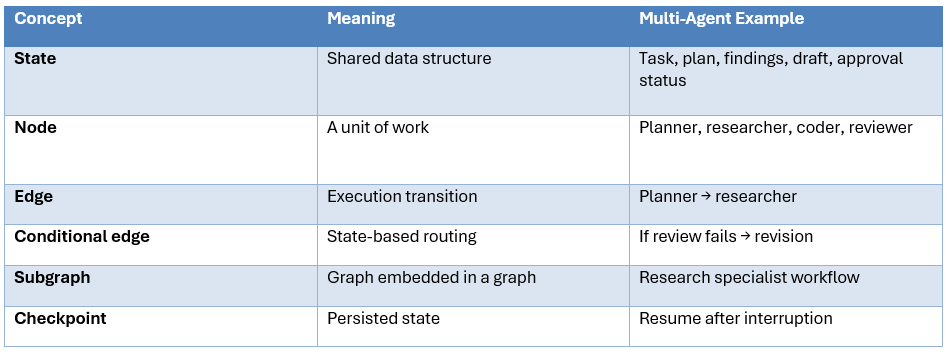
This graph model matters because multi-agent systems are control-flow systems. A supervisor may call specialists in one order for one task and a different order for another. A router may fan out to three agents at once. A reviewer may send work back to an implementer. Those are graph operations, not just chat messages.
Build Fast with AI's AI Agent Frameworks collection covers LangGraph alongside CrewAI, AutoGen and other frameworks. Use LangGraph when you need especially explicit control over state and workflow execution.
Hot take: if you cannot draw your agent workflow as a simple diagram, adding more agents is probably premature. Graph-based orchestration is useful because it forces you to make the workflow explicit.
2. The Four LangGraph Multi-Agent Patterns
LangChain's current multi-agent guidance centers on four major patterns: subagents, handoffs, routers and custom workflows. Each solves a different coordination problem.
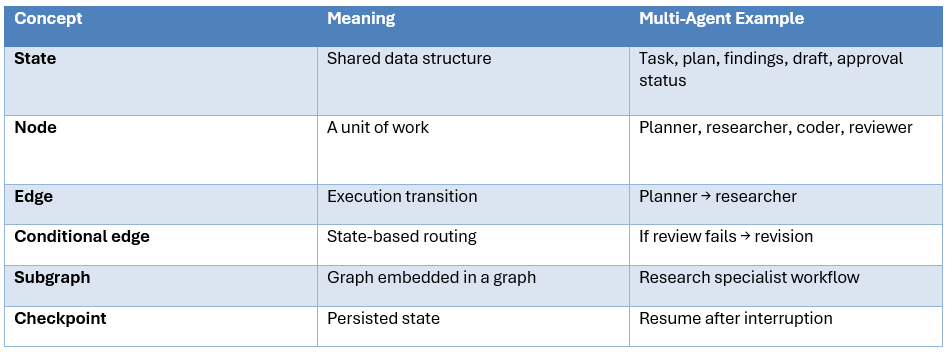
Subagents are the cleanest starting point when you want a central supervisor. The main agent chooses a specialist, passes a focused task, gets a result and continues. The current LangChain guidance describes these specialists as stateless by default, which helps prevent specialist history from bloating the supervisor's context.
Handoffs are different because the active state changes. A support agent can move a conversation from intake to billing or technical support, with the next agent directly owning the next turn. Handoff tools update state such as active_agent or current_step.
Routers make a classification decision and dispatch to one or more specialists, often in parallel. They work especially well when knowledge lives in clearly separated domains.
Custom workflows are the most flexible option. Any node can be a normal function, an LLM call or an entire agent, so deterministic business rules can sit beside agentic reasoning.
The honest criticism: developers often jump directly to a supervisor because it looks sophisticated. A router is frequently cheaper and easier to debug when the task categories are obvious.
3. Build a Basic Multi-Agent Graph
The easiest way to learn LangGraph is to build a tiny research system with a planner, two specialists and a reviewer. Start with the state schema, then turn each role into a node.
from typing import TypedDict
from langgraph.graph import StateGraph, START, END

class AgentState(TypedDict, total=False):
    task: str
    plan: list[str]
    research: dict[str, str]
    draft: str
    review: str
    approved: bool
The state should contain information that genuinely needs to move through the workflow. Do not put every intermediate transcript into shared state. Keep the schema small and purposeful.
def planner(state: AgentState):
    return {
        "plan": [
            "Research market facts",
            "Research technical details",
            "Draft the answer",
            "Review the draft",
        ]
    }

def market_research(state: AgentState):
    return {"research": {"market": "Verified findings"}}

def technical_research(state: AgentState):
    return {"research": {"technical": "Verified findings"}}
The parent graph then wires those functions together. In a real application, the specialist nodes would call models and tools, but the graph structure remains the same.
builder = StateGraph(AgentState)
builder.add_node("planner", planner)
builder.add_node("market", market_research)
builder.add_node("technical", technical_research)

builder.add_edge(START, "planner")
# Connect specialist nodes and join their outputs.
graph = builder.compile()
The point of the example is architectural rather than vendor-specific. LangGraph lets you decide where state changes, where control branches and where work rejoins. The model is only one component inside that graph.
4. Subgraphs, State and Context Engineering
Subgraphs are one of LangGraph's most useful features for multi-agent systems because they let you package a specialist's internal workflow behind a clean interface. A subgraph is simply a graph used as a node in another graph.
Imagine your research specialist has its own search, source validation and summarization steps. The parent graph should not need to know those implementation details. It passes a query into the research subgraph and receives a structured result.
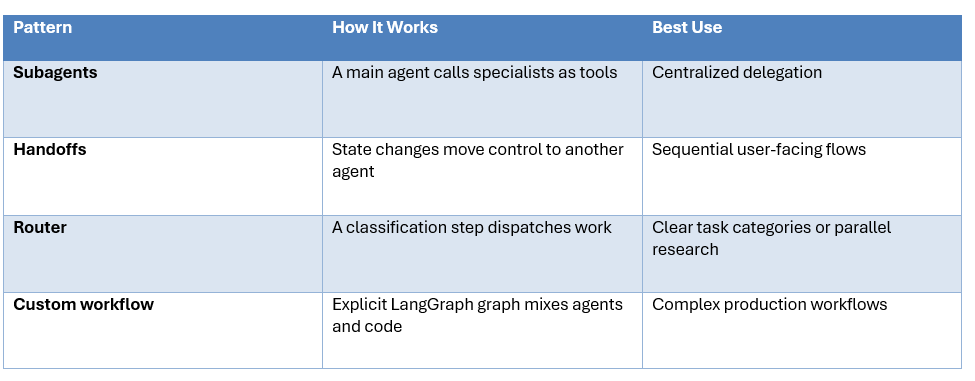
LangGraph's current documentation recommends per-invocation persistence for many subagent calls where each request should start fresh while still supporting interrupts and durable execution within that invocation. Per-thread persistence makes sense when the specialist needs to accumulate context across calls.
This is also where context engineering becomes critical. The receiving agent should get the context it needs, not the entire parent conversation.
A research agent needs the research question and evidence. A writer needs the research findings and output requirements. A reviewer needs the draft, rubric and evidence needed to verify it. Passing everything to everyone creates context bloat and makes failures harder to diagnose.
LangChain's handoff guidance also warns that agent-to-agent context needs careful construction because incomplete or bloated histories can create malformed conversations and unnecessary context growth.
This is the key design principle: specialized agents should usually have specialized context.
5. Parallel Agents, Persistence and Human Approval
Use parallel execution when agents are genuinely independent. A research workflow might ask a market analyst, technical analyst and competitor analyst to work simultaneously, then join their structured outputs before synthesis.
Parallelism reduces wall-clock latency when branches are independent, but it does not magically reduce total model usage. You are trading time for concurrent work. Use it when the user or application actually benefits from faster completion.
Persistence matters when workflows outlive a single request. A customer-support escalation can pause while waiting for approval. A research job can resume after a worker restart. LangGraph's persistence and durable-execution model is designed for these long-running states.
Human approval should sit before irreversible actions. If an agent is only drafting a response, full autonomy may be fine. If it is about to deploy code, send money, delete records or change production infrastructure, put a human gate in the graph.
A useful rule is blunt: let agents prepare actions automatically, but require approval for high-impact side effects.
6. Error Handling, Routing and Model Cost
Production multi-agent systems need explicit failure paths. Otherwise one timeout or malformed response can stop the entire workflow.
Keep retry counts and budgets explicit. An unrestricted graph loop can burn tokens quickly. That is where model routing and multi-agent orchestration meet.
Our Model Routing for AI Coding Agents: How to Cut Costs Without Losing Quality covers the broader idea of escalating tasks only when a cheaper model is no longer good enough.
A simple strategy is to start routine work with a low-cost model, use a stronger model for complex planning and escalate only when tests fail, evidence conflicts or the risk score rises. This can reduce the average cost of a multi-agent workflow without sacrificing the ability to use stronger intelligence where it matters.
For long-running autonomous loops, the same principle appears in loop engineering: gather context, act, verify and repeat. Verification and stop rules matter as much as model choice.
7. A Practical Research Team Architecture
A research team is one of the best first multi-agent projects because the work naturally decomposes into specialists and the outputs are easy to validate.
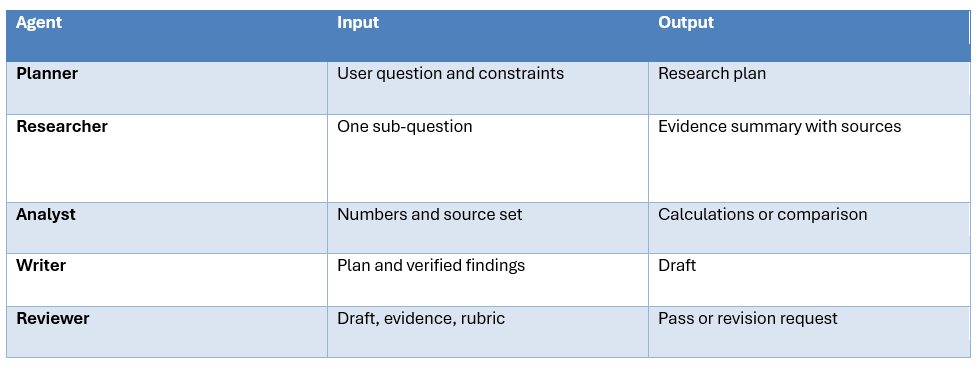
The planner creates several independent questions. Researchers run in parallel. The analyst checks quantitative claims. The writer receives only verified findings. The reviewer checks the draft and loops back to the writer if important claims are unsupported.
The critical design decision is the handoff contract. Each agent should know exactly what it receives and what it must return. That is more important than giving the system more agents.
Build Fast with AI already has an older LangGraph multi-agent swarm tutorial and a dedicated LangGraph supervisor walkthrough. These are useful for understanding the earlier supervisor and swarm ideas, while current LangGraph documentation is the better reference for today's APIs.
For hands-on experiments, the Gen-AI-Experiments repository contains production-oriented AI applications, agents and framework examples.
8. When LangGraph Is the Wrong Choice
Do not use LangGraph simply because the workflow contains the word 'agent.' A single well-designed agent with tools is often easier to build, cheaper to run and easier to debug.
The best multi-agent system is usually the smallest one that creates a measurable advantage. If three specialists do not improve quality, latency, coverage or safety, they are just three extra failure surfaces.
Contrarian take: a lot of multi-agent demos are architecture cosplay. They split a simple task across agents because the diagram looks impressive. Production systems should do the opposite. Add an agent only when specialization gives it a different context, toolset, policy or responsibility that is worth the coordination cost.
LangGraph is valuable precisely because it gives you enough control to resist that complexity. You can keep deterministic business logic in normal Python, expose a small set of tools to each agent, persist only the state you need, and add parallelism only where the workload justifies it.
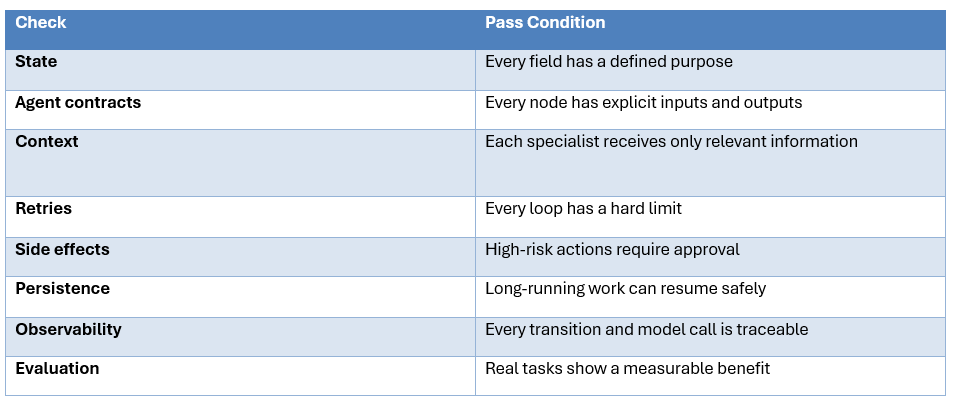
Before deploying a LangGraph multi-agent workflow, test the workflow as a system rather than testing only the individual agents. The graph can be logically correct while the overall application still fails because state grows unexpectedly, a specialist receives the wrong context, retries duplicate side effects, or an approval step is skipped.
Start by defining an explicit state contract. Every field should have an owner, a reason to exist and a clear rule for when it changes. Then define the inputs and outputs of every specialist. This makes handoffs testable and gives you a way to replace one model or agent without rewriting the rest of the workflow.
Next, test failure paths before optimizing the happy path. Kill a tool call. Return malformed structured output. Make a specialist time out. Send conflicting research results. Pause the workflow for human approval. Your graph should have a deliberate response to each failure instead of relying on a global exception handler.
Finally, measure the system with real tasks. Track success rate, latency, token usage, number of model calls, number of tool calls, retries, escalations and human interventions. Multi-agent architecture should earn its extra complexity with measurable improvements in quality, speed, reliability or safety.
How to Choose the Right Multi-Agent Pattern
Start with the simplest architecture that matches the information flow. If one agent can call the required tools and finish the task in a single loop, keep that design. Introduce a router when the first job is simply to identify which specialist should handle the request. This works well for clearly separated domains such as sales, support, finance or internal knowledge sources.
Use the subagents pattern when one agent needs to remain the conversation owner while delegating focused jobs to specialists. This is a good fit for a research assistant that may call a web researcher, a data analyst and a source checker without exposing all of their intermediate context to the user. Each specialist can stay focused on its own tools and return a compact result.
Use handoffs when the active responsibility genuinely changes during a conversation. Customer support is the obvious example. An intake stage can collect an account identifier, a billing stage can handle invoices, and a technical stage can investigate the product. The important thing is that the state transition is meaningful and the receiving agent has the context required to continue.
Use a custom LangGraph workflow when the process includes deterministic business rules, loops, parallel branches, persistence or approval gates that you need to control explicitly. That is where the graph stops being an academic abstraction and becomes useful production infrastructure.
Finally, evaluate the architecture on real tasks. Compare the single-agent baseline against the multi-agent version using success rate, latency, token usage, failure recovery, human review time and operational complexity. If a multi-agent design is not measurably better, remove agents rather than defending the architecture.
Frequently Asked Questions
What is LangGraph used for?
LangGraph is used to build stateful AI agents and workflows where you need explicit control over state, routing, loops, parallel work, persistence and human approval.
How do you build a multi-agent system with LangGraph?
Define shared state, create nodes for agents or deterministic functions, connect them with fixed or conditional edges, and compile the graph. Use subgraphs to encapsulate specialist workflows.
What is the difference between LangGraph and LangChain?
LangChain provides higher-level agent abstractions, while LangGraph gives lower-level graph and runtime control. LangChain's current create_agent runs on LangGraph, so the two are complementary rather than direct substitutes.
What is a LangGraph supervisor?
A supervisor is a central agent that decides which specialist to call and how to combine the results. The current LangChain guidance describes this as the subagents pattern, where specialists are invoked as tools.
How do handoffs work in LangGraph?
A handoff changes state, such as the active agent or current step, and the graph routes execution accordingly. This works well for customer support and other staged user-facing workflows.
How do LangGraph subgraphs work?
A subgraph is a graph used as a node inside another graph. It lets you keep a specialist's internal workflow separate while defining a clear input and output interface.
Should I use a supervisor or a router?
Use a router when task categories are clear and dispatch can happen in one lightweight step. Use a supervisor when delegation is dynamic and depends on evolving conversation context.
Recommended Blogs
- What Is Agentic AI? Complete Beginner's Guide (2026)
- Mastering LangGraph’s Multi-Agent Swarm
- LangGraph-Supervisor: Building Multi-Agent Workflows
- Loop Engineering: Complete Guide for AI Agents (2026)
- What Is Context Engineering? Complete Guide (2026)
- Model Routing for AI Coding Agents: How to Cut Costs Without Losing Quality
Resources & Community
Join our community of 70,000+ AI enthusiasts and learn to build powerful AI applications! Whether you're a beginner or an experienced developer, Build Fast with AI helps you understand and implement AI in your projects.
- Website - buildfastwithai.com
- LinkedIn - Build Fast with AI
- Instagram - @buildfastwithai
- Founder Twitter - @satvikps
- Twitter - @BuildFastWithAI
Agentic AI Launchpad 2026
A structured 6-week cohort program that takes you from AI basics to building and deploying real-world agentic AI systems. Includes live sessions, expert mentorship, project reviews, and a builder community network.
Ready to go from learning to building? Join the next cohort → Agentic AI Launchpad 2026
Free AI Resources
Access free tools, workshops, and micro-learning to keep building.
- AI Workshops - Free resources, upcoming events & past recordings
- Unrot - Learn AI in 5 minutes a day (free micro-learning app)
The practical goal is simple: build the smallest graph that gives you better reliability, specialization or throughput, then add complexity only when your evaluation data proves it is worth it.

