



Loop Engineering: The Complete Guide for AI Agents (2026)
Boris Cherny, one of the engineers behind Claude Code, said the quiet part out loud in June 2026: "I don't prompt Claude anymore. I have loops running that prompt Claude." That single sentence is the whole shift. The hardest problem in applied AI has moved from writing one perfect prompt to designing the system that writes the prompts, runs the agent, checks the work, and runs it again until the job is actually done.
That practice now has a name: loop engineering. It was coined in June 2026 after essays by Addy Osmani and a viral one-liner from Peter Steinberger, and it has quickly become the defining skill for anyone building with autonomous AI agents. This guide covers exactly what loop engineering is, how it differs from prompt engineering and context engineering, the four components every loop needs, the Anthropic playbook that formalized it, and a full worked example you can copy.
If you are coming from the prompt side of the world, start with our library of best Claude prompts that actually work, then come back here, because loop engineering is the layer that sits directly on top of everything you already know about prompting.
What Is Loop Engineering?
Loop engineering is the practice of designing the control system that prompts, verifies, retries, and stops an AI agent, instead of prompting that agent yourself turn by turn. In plainer terms: you stop being the person who types the next instruction, and you build a system that decides the next instruction for you. Addy Osmani put it as "replacing yourself as the person who prompts the agent."
A loop is a task plus a check. A task without a check is just hope. That is the mental model to hold onto. When you ask Claude to fix a bug once and eyeball the result, that is prompting. When you wrap that request in a system that runs the fix, runs the tests, feeds failures back to the model, and repeats until the tests pass or a limit is hit, that is a loop. The intelligence lives in the model, but the reliability lives in the loop.
The term went mainstream in June 2026, but the idea is older than the name. Every serious agent framework, from the Claude Agent SDK to open orchestration tools, already runs some version of the same cycle. What loop engineering did was give builders a shared vocabulary for the part that was previously invisible: the trigger, the verifier, the state, and the stop rules that turn a clever demo into something you can trust to run unattended overnight.
Quotable version: prompt engineering makes the model smart for one turn. Loop engineering makes the system reliable for a thousand turns.
Loop Engineering vs Prompt Engineering vs Context Engineering
The difference is the unit of design. Prompt engineering designs a single input. Context engineering designs the whole information environment the model sees. Loop engineering designs the repeating cycle that runs the whole thing until a goal is met. They are layers, not rivals, and a strong agent uses all three.

Here is the practical distinction. In prompt engineering, human judgment is applied before and after every model call: you write the prompt, read the answer, decide if it is good, and try again. That does not scale to a task that needs 40 steps over three hours. In loop engineering, judgment is encoded once into the verifier and the stop rules, and then the loop applies that judgment automatically on every iteration. You move from being the operator to being the designer.
This is also why prompt engineering is not dead, despite the headlines. You still need clear goals, tight constraints, and explicit output formats inside every loop iteration.
The skills you built writing structured prompts still matter inside every loop iteration. Our breakdown of Claude AI prompt codes that work covers the exact instruction patterns that make each turn of the loop reliable enough to automate.
The 4 Components of a Loop
Every agent loop decomposes into four components: the trigger, the goal (topology), the verifier, and the stop rules. If any one of these is missing or vague, the loop either never starts, never stops, or stops without knowing whether it succeeded. Get all four right and you have a system you can trust to run on its own.
1. Trigger: what starts the loop
The trigger is the event that kicks off the cycle. It can be a schedule (every weekday at 8am), an event (a pull request opens, a test fails, a support email arrives), or a plain human instruction. The trigger is what lets a loop run without you sitting there to press go. A scheduled trigger plus a good verifier is the difference between a tool you operate and a teammate that works while you sleep.
2. Goal or topology: a verifiable end state
The goal must be something a machine can check, not a vague aspiration. "Make the code better" is not a goal. "All tests pass," "zero open high-priority issues," or "the bundle is under 200KB" are goals. If you cannot write a check for it, the loop cannot know when it is done, and it will either quit too early or spin forever. This is the single most common place loops go wrong.
3. Verifier: how the loop knows it is done
The verifier is the check that decides whether the goal is met after each iteration. The golden rule: prefer a deterministic check over asking the model to grade its own work. Running a test suite and reading the exit code is a deterministic verifier. Asking the same model that wrote the code whether the code is good is not, because a model grading itself is the fox guarding the henhouse. When you must use a model as verifier, use a separate agent with different instructions, so the writer is not also the judge.
4. Stop rules: multiple independent exits
The stop rules end the loop, and a good loop has more than one. At minimum: a success exit when the verifier confirms the goal, a hard cap on iterations (MAX_ITERATIONS) so a stuck loop cannot run forever, and a budget cap so a runaway loop cannot burn your entire token spend overnight. If any one of these trips, the loop stops. Skipping the iteration and budget caps is how people wake up to a $400 API bill and an agent that looped 900 times on an impossible task.
The Hindi-searching readers asking लूप के 4 घटक क्या हैं will find the same answer here: trigger, goal, verifier, stop rules. Those four are the anatomy of every reliable agent loop, in any language.
The 5 Building Blocks of a Production Loop
Once you move from a toy loop to a production system, five building blocks show up in almost every serious setup, drawn from Addy Osmani's field notes on running agents at scale. These are the concrete pieces that turn the four abstract components into something that survives real work.
● Automations: scheduled discovery and triage that run on a cadence, so the loop finds its own work instead of waiting for you to assign it.
● Worktrees: isolated parallel workspaces so multiple agents can work at once without colliding on the same files. This is what makes fan-out safe.
● Skills: documented project knowledge in SKILL.md files, so the agent does not re-derive the same context every single cycle and waste tokens doing it.
● Plugins and connectors: MCP-based integrations that link the agent to real tools like issue trackers, APIs, and Slack, so the loop can act on the outside world.
● Sub-agents: separate agents for verification, so the agent writing the code is never the one grading it. This is the four-component verifier rule made concrete.
There is a sixth piece that quietly holds the whole thing together: persistent state. Models forget everything between runs, so the loop's memory has to live outside the conversation, in markdown files, a Linear board, or a database. Without external state, every iteration starts amnesiac, and a long-running loop cannot make real progress. State is the spine that lets a loop pick up exactly where it left off.
If you want to wire these blocks together in code, the agent and orchestration cookbooks in gen-ai-experiments include runnable examples of worktrees, sub-agent verification, and MCP connectors you can adapt directly.
The Anthropic Playbook: Gather, Act, Verify, Repeat
Anthropic never published a document titled "loop engineering," but its engineering essays add up to the most battle-tested playbook for it that exists. The through-line across Building Effective Agents, the Claude Agent SDK guide, and the writing on context and long-running harnesses is a single loop that runs on every task: gather context, take action, verify the work, repeat. That four-beat cycle is the heartbeat of every Claude-based agent.
The playbook's core advice is refreshingly boring, which is exactly why it works. Start with the simplest thing that could possibly work, usually a single model call, and only add loop machinery when a real failure forces you to. Do not build a multi-agent orchestration cathedral for a task a well-verified single loop can handle. Complexity in a loop is not sophistication, it is surface area for things to break.
The Claude Agent SDK bakes in the gather-act-verify-repeat cycle precisely because the verify step is what makes long-running autonomy safe. A model that acts without verifying is a liability at scale, and a loop that verifies deterministically is the difference between an agent you supervise and one you delegate to.
Anthropic's second lesson is that verification is the product, not an afterthought. That same reliability mindset drives rigorous model testing, which is why we lean on tools like PromptBench for LLM evaluation to score whether an agent's output actually meets the goal before it ships.
A Loop Engineering Example, Start to Finish
Here is a concrete loop that closes GitHub issues automatically, mapping each of the four components to a real piece. This is deliberately simple, because the best first loop is one you can read end to end in a minute.
Component
In this example
Trigger
A new issue labeled 'agent-fix' opens on GitHub
Goal
The failing test named in the issue passes, and no other test breaks
Verifier
The CI test suite runs; exit code 0 means done, non-zero means keep going
Stop rules
Success on green CI, hard stop at 6 iterations, hard stop at $2 of tokens
The cycle runs like this. The trigger fires when the labeled issue opens. Iteration one: the agent reads the issue and the failing test, writes a fix in an isolated worktree, and commits. The verifier runs CI. If CI is red, the failure output is fed back into the next iteration as fresh context, and the agent tries again with knowledge of exactly what broke. If CI goes green, the success stop rule fires, the agent opens a pull request, and the loop ends. If the agent hits six iterations or two dollars of spend first, the loop stops and pings a human instead of grinding forever.
Notice what makes this trustworthy. The verifier is deterministic (CI passes or it does not), the agent never grades its own work, the worktree keeps the experiment isolated, and three independent stop rules guarantee the loop cannot run away. That is loop engineering in one screen. Everything else is a variation on this skeleton: swap CI for a linter, a data-quality check, or a second reviewing agent, and you have a loop for a different job.
Quotable version: a good loop fails safe. It stops on success, stops on a limit, and never keeps your credit card guessing.
How to Build Your First Loop
Start smaller than feels satisfying. The fastest path to a working loop is to pick one repetitive task you already babysit, write a deterministic check for it, and wrap the smallest possible cycle around that check. Here is the order that works.
● Pick a task with an obvious pass or fail check. Test suites, linters, schema validation, and build steps are ideal first goals because the verifier writes itself.
● Write the goal as a check, not a sentence. Turn 'the site should be fast' into 'Lighthouse performance score is above 90' before you write any agent code.
● Wrap one act-verify cycle. Have the agent take one action, run the check, and read the result. Do not add retries yet. Confirm a single pass works.
● Add the feedback path. On failure, feed the exact error back into the next iteration as context. This is where most of the reliability comes from.
● Add all three stop rules before you automate. Success exit, iteration cap, and budget cap. Never run an unattended loop without a budget cap.
● Only then add a trigger. Once the manual loop is trustworthy, attach a schedule or an event so it runs without you.
The Claude Agent SDK is the most direct on-ramp because it already implements the gather-act-verify-repeat cycle, so you supply the goal, the tools, and the verifier rather than the plumbing. Whatever stack you choose, resist the urge to add a second agent, a planner, and a memory store on day one. A single well-verified loop beats a complex one you cannot debug.
Common Mistakes and When Loops Fail
Most broken loops fail for one of five reasons, and all five are avoidable. The pattern is almost always a missing or weak component from the core four, so the fixes map directly back to them.
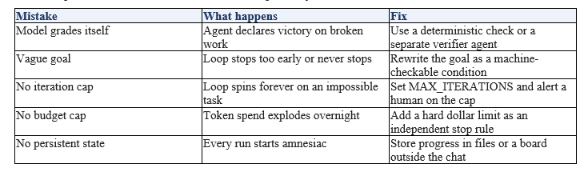
The deepest failure is subtler than any single row above: over-engineering the loop before you have a working simple one. Builders get excited and wire up five agents, a planner, and a vector memory before they have proven that one act-verify cycle even works for their task. The result is a system with so many moving parts that when it fails, nobody can tell which part failed. Anthropic's advice bears repeating here: start with the simplest thing that works, and earn every ounce of added complexity with a real failure it solves.
One honest caveat about the whole trend. Loop engineering is not a magic upgrade that makes weak models reliable. A loop amplifies the model inside it, so a strong model in a good loop is excellent, but a weak model in a good loop just fails faster and more expensively. The loop is the multiplier, not the intelligence. Pick a capable model first, then engineer the loop around it.
A loop amplifies the model inside it, so model choice still matters enormously. That is why the frontier options we review, including the GPT-5.6 Sol, Terra, and Luna family, are worth getting right before you invest in the loop that wraps them.
Frequently Asked Questions
What is loop engineering?
Loop engineering is the practice of designing the system that prompts, verifies, retries, and stops an AI agent, instead of prompting the agent yourself turn by turn. In short, you build the loop that runs the agent to completion rather than steering every step by hand. It was named in June 2026 and is now the core skill for building autonomous agents.
What is loop engineering in AI?
In AI, loop engineering means building the control cycle around a model: something triggers the agent, the agent acts, a verifier checks the result, and the loop repeats until a goal is met or a stop rule fires. It is the layer that turns a single smart response into a reliable, long-running task the agent can finish on its own.
What are the 4 components of a loop?
The four components of a loop are the trigger (what starts it), the goal or topology (a verifiable end state), the verifier (how the loop knows it is done), and the stop rules (success, an iteration cap, and a budget cap). If any of the four is missing, the loop either never starts, never stops, or stops without knowing if it succeeded.
What is the difference between loop engineering and prompt engineering?
Prompt engineering designs a single input and relies on a human to judge each output. Loop engineering designs the repeating cycle that runs the agent, checks its work, and retries automatically until the task is done. Prompt engineering makes one turn good; loop engineering makes the whole task complete without a human in every step.
What is looping AI?
Looping AI is another way of describing an agent that runs in iterative cycles: act, observe, reason, and repeat until it reaches a goal. It is the runtime behavior that loop engineering designs. The loop keeps feeding results back into the agent so it can self-correct instead of stopping after one response.
Is loop engineering the same as agentic AI?
They are closely related but not identical. Agentic AI describes systems that take actions toward goals, while loop engineering is the specific discipline of designing the run, verify, and stop cycle that makes those agentic systems reliable. Loop engineering is how you build good agentic AI, not a synonym for it.
What is the Anthropic loop engineering playbook?
Anthropic has not published a document by that name, but its engineering essays and the Claude Agent SDK describe one consistent loop: gather context, take action, verify the work, repeat. Its core advice is to start with the simplest thing that works, treat verification as the product, and add complexity only when a real failure demands it.
Recommended Blogs
● LLM evaluation with PromptBench
● GPT-5.6 Sol Terra Luna review
Resources and Community
Join our community of 70,000+ AI enthusiasts and learn to build powerful AI applications. Whether you are a beginner or an experienced developer, Build Fast with AI helps you understand and implement AI in your projects.
● Website (buildfastwithai.com)
● LinkedIn (Build Fast with AI)
● Instagram (@buildfastwithai)
Agentic AI Launchpad 2026
A structured 6-week cohort program that takes you from AI basics to building and deploying real-world agentic AI systems. Includes live sessions, expert mentorship, project reviews, and a builder community network.
Ready to go from learning to building? Join the next cohort: Agentic AI Launchpad 2026
Free AI Resources
Access free tools, workshops, and micro-learning to keep building:
● AI Workshops (free resources and recordings)
● Unrot (learn AI in 5 minutes a day)
Found this guide useful? Follow Build Fast with AI for hands-on breakdowns of agent design, prompting, and every major model launch, and subscribe so the next deep dive lands in your inbox.
References
● Loop engineering essay (Addy Osmani)
● Anthropic playbook (AI Builder Club)
● Loop vs prompt engineering (MindStudio)

