



Hermes Agent Automation: Build AI Workflows That Run on Their Own
Hermes Agent is built to do more than answer prompts. Its current feature set includes scheduled tasks, persistent memory, skills, subagent delegation, MCP integration, messaging gateways and multiple execution backends. That makes it particularly useful for automation because an agent can be left running instead of requiring a user to start every task manually.
The most important automation feature is the built-in scheduler. Hermes can create recurring or one-shot tasks using natural language or cron expressions, attach skills to those jobs and deliver results to a chat, a local file or supported messaging platforms. It can also run script-only jobs that skip the LLM completely when the task does not require reasoning.
That distinction matters. A good automation system should not invoke an LLM when a simple script can produce the exact answer. Hermes has a no-agent cron mode for watchdogs, alerts and other deterministic checks, while LLM-powered jobs handle research, summarization and tasks that need judgment. That makes Hermes closer to an automation platform with an agent inside it than a chatbot with a timer.

QUICK ANSWER
To automate a task with Hermes Agent, describe the schedule and desired work in natural language, or create the job with Hermes's cron interface. Hermes runs scheduled jobs through its gateway scheduler, starts each job in a fresh agent session, can attach skills and can deliver output to Telegram, Discord, Slack, SMS, email, GitHub comments or local files depending on configuration.
For example, you can ask Hermes to check a GitHub repository every weekday morning, summarize new pull requests and CI failures, and send the result to Telegram. The important detail is that scheduled sessions do not inherit your current chat context. The job prompt therefore needs its own URLs, file paths, rules and output requirements.
My verdict: Hermes is a strong fit for technical automation that needs reasoning, scheduling and access to real tools. The main tradeoff is that unattended agents create operational responsibility. Permissions, sandboxing, logs, retries and approval rules are part of the automation design.
1. What Is Hermes Agent?
Hermes Agent is an open-source agent platform from Nous Research. It connects language models to tools, files, terminals, messaging platforms and external services, and it can run through local or isolated execution backends. The project combines scheduled automation, persistent memory, skills, subagent delegation and MCP support.
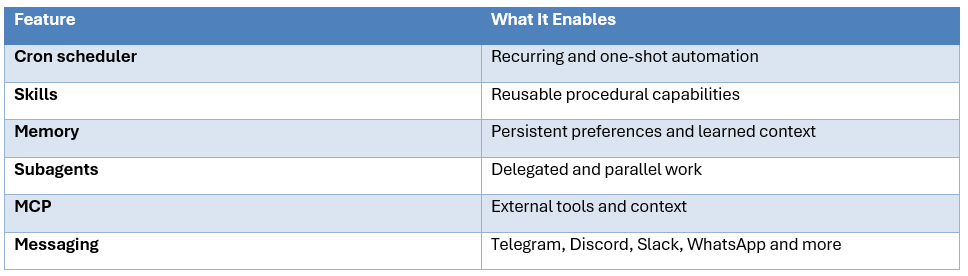
2. Why Hermes Is Good for Automation
Most automation tools are excellent when the steps are fixed. Most LLM agents are useful when the steps need judgment. Hermes combines the two by allowing a schedule or event to start an agent workflow. Its documentation also separates deterministic jobs from reasoning-heavy jobs through no-agent cron.
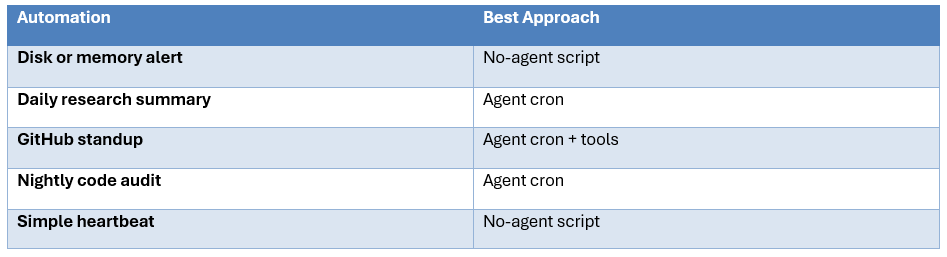
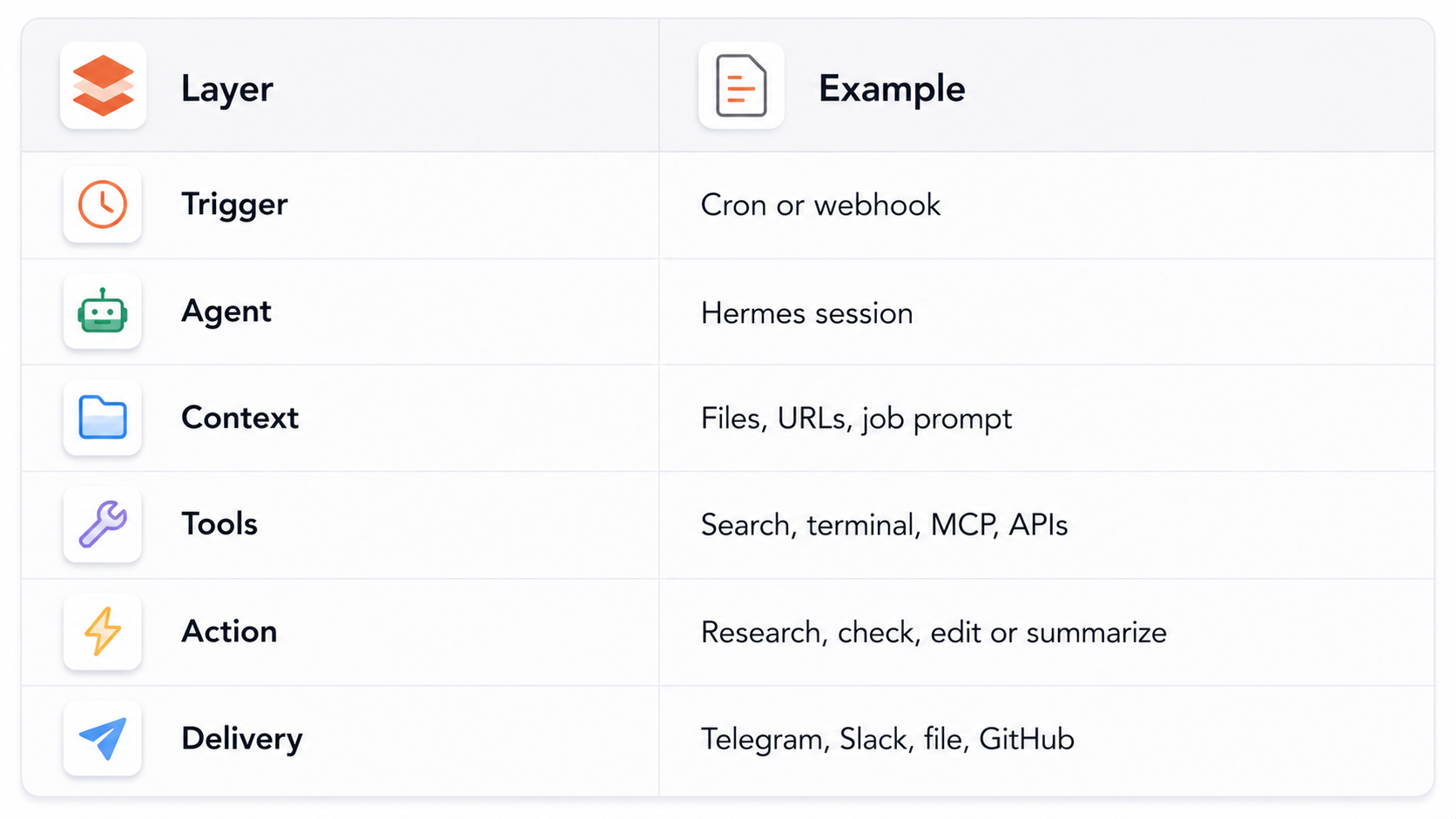
3. Hermes Automation Architecture
A Hermes automation can be understood as a trigger, agent, context, tools, action and delivery pipeline. The trigger can be a schedule or webhook. The agent receives a self-contained prompt, uses its configured tools, performs the task and sends or stores the result. Because scheduled jobs run in fresh sessions, the job should not depend on an invisible previous conversation.
4. Creating Your First Scheduled Task
The easiest method is natural language. Hermes's cron documentation shows requests such as 'Every morning at 9am, check Hacker News for AI news and send me a summary on Telegram.' Hermes can convert the request into a recurring job through its cronjob tool. You can also use the CLI for explicit configuration.
Example CLI: hermes cron create "every 2h" "Check server status"
5. Daily Research Automation
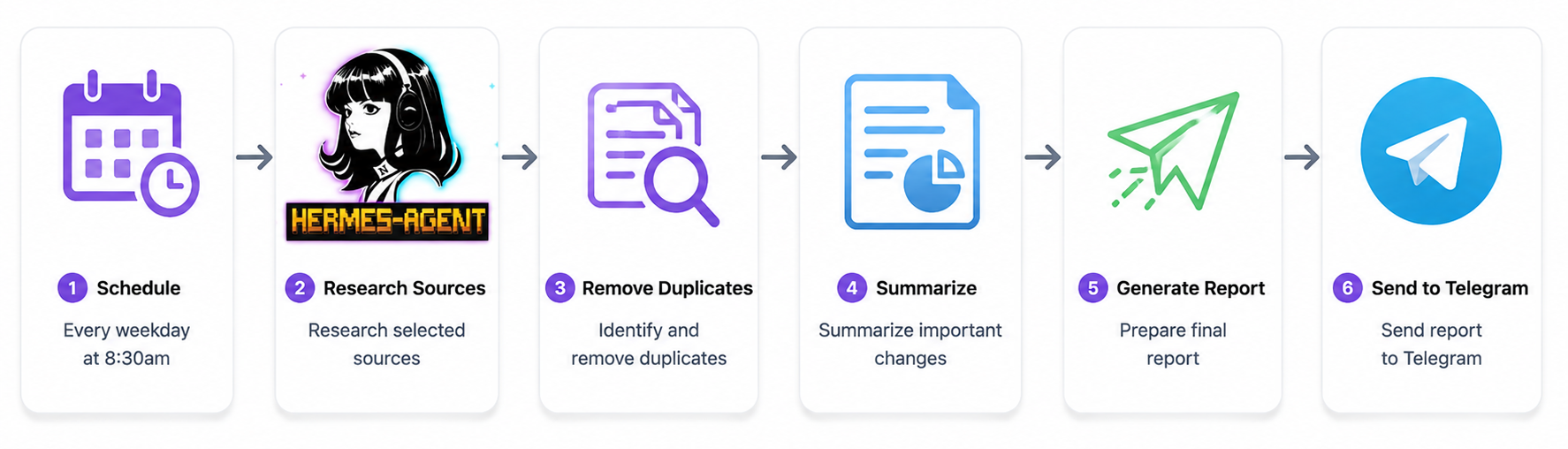
A research automation is useful when the goal is not merely to fetch data but to interpret it. A scheduled Hermes job can inspect selected sources, identify meaningful changes, compare evidence, produce a summary and deliver the result. Define the date range, trusted sources, relevance rules and output structure so the report stays consistent.
Example: Every weekday at 8:30am -> research selected sources -> remove duplicates -> summarize important changes -> send report to Telegram.
6. GitHub Standup Automation
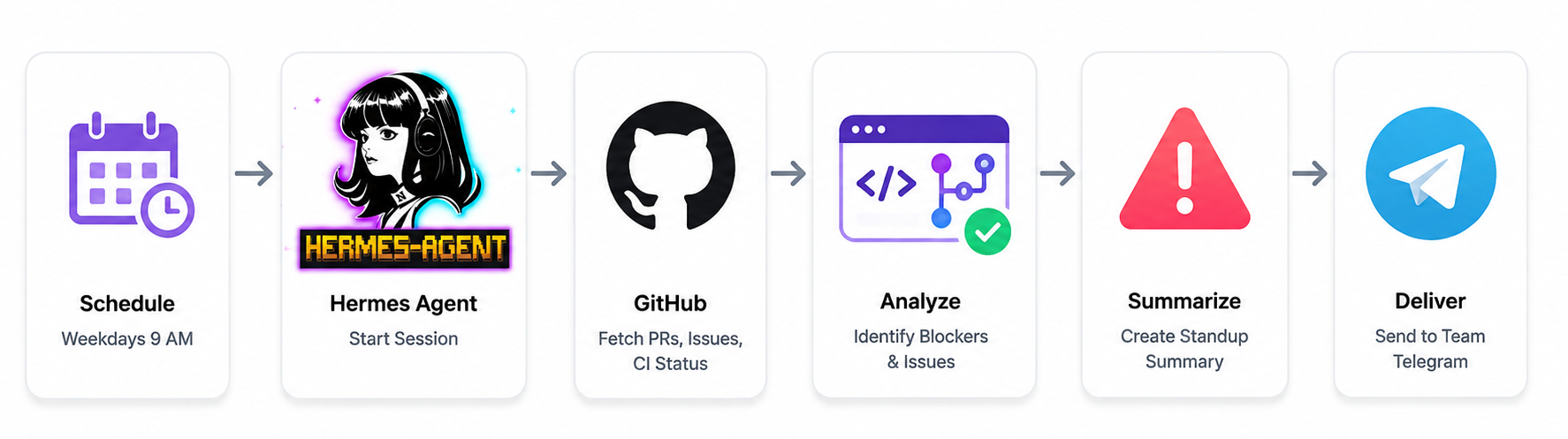
Hermes's team Telegram guide provides a concrete pattern where a weekday job checks a repository for pull requests, issues and CI failures, then sends a standup-style summary. This is a good example because the agent adds interpretation instead of merely copying API responses.
Example: Every weekday at 9am -> inspect PRs, issues and CI -> identify blockers -> send a brief team summary.
7. Server Monitoring Without LLM Costs
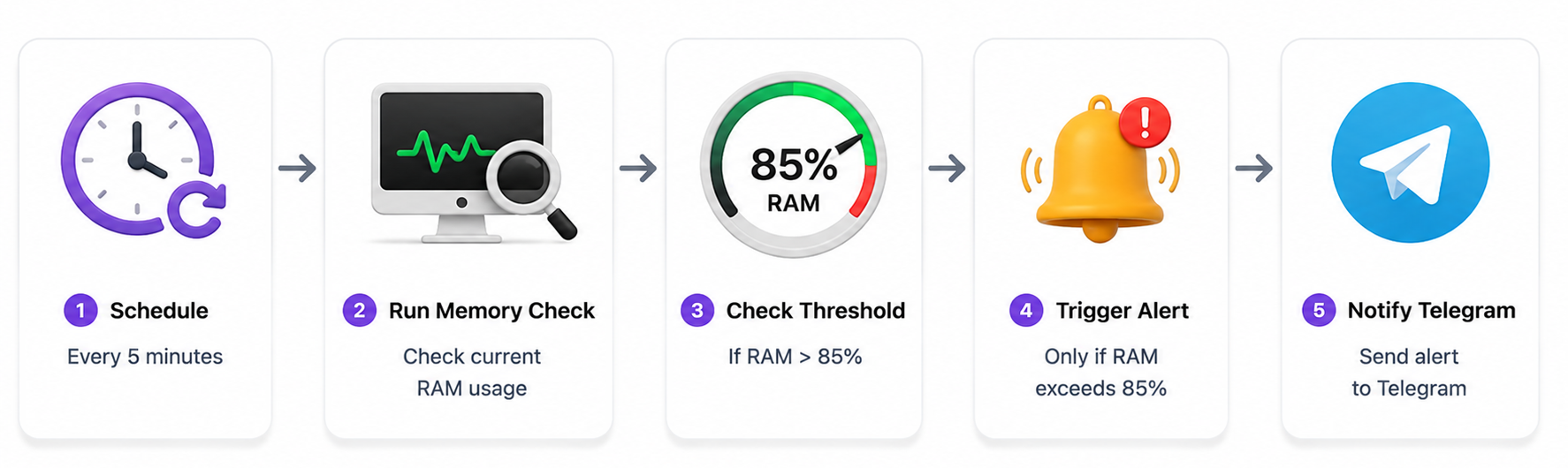
Use no-agent cron when the answer is deterministic. Hermes can schedule a shell or Python script, deliver non-empty stdout and avoid the model completely. The documentation describes watchdogs for memory, disk and similar threshold-based alerts.
Example: Every 5 minutes -> run a memory check -> notify Telegram only when RAM exceeds 85%.
8. Content Research Automation
You can use Hermes to build a recurring editorial pipeline: discover new topics, filter duplicates, rank ideas, collect evidence and create short briefs. The prompt should define what counts as new, the date window, target audience and output fields.
Example: Every Monday -> find new developments -> rank ten topics -> create briefs -> save them to a content folder.
9. Automated Coding Workflows
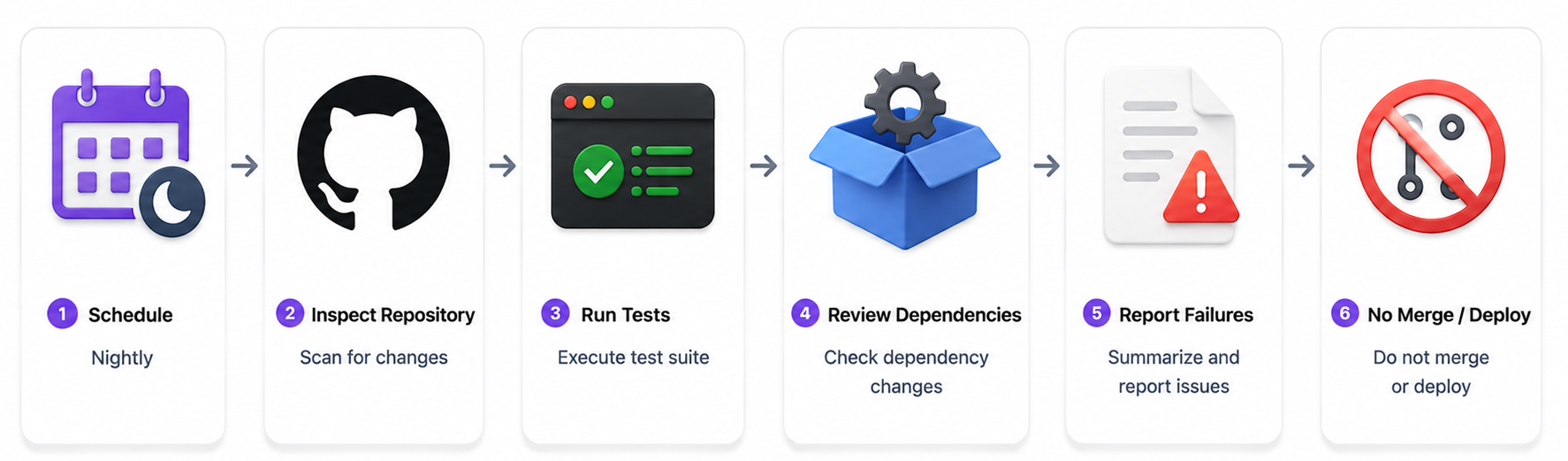
Hermes can run technical workflows such as nightly test reports, dependency checks, issue triage and code audits. Give the job read access and test execution before giving it write or deployment permissions. A useful first automation is analysis without side effects.
Example: Nightly -> inspect repository -> run tests -> review dependency changes -> report failures -> do not merge or deploy.
10. Skills for Repeatable Automations
Hermes can attach one or more skills to a scheduled job. Skills package reusable procedures so the automation does not need to reinvent tool usage every time. The cron examples demonstrate attaching skills to jobs and combining several skills.
Example: Every hour -> run the blogwatcher skill -> run maps skill -> combine findings into one report.
11. Using Subagents
Complex automations can delegate work to isolated subagents with their own context and restricted tools. That is useful when independent research tasks can run in parallel. It also makes specialization possible, such as one subagent researching, another verifying and the main agent synthesizing.
Example: Main agent -> delegate source research A and B -> verify disagreements -> produce final report.
12. Telegram, Slack and Team Delivery
Hermes can act as a persistent bot through Telegram, Discord, Slack, WhatsApp and Signal. Scheduled jobs can deliver information directly to the platform where the team already works.
The useful principle is push, not pull: the automation should notify the people who need the result instead of making them open a dashboard to discover whether anything happened.
13. Memory vs Scheduled Job Context
Hermes has persistent curated memory in MEMORY.md and USER.md for normal sessions. Scheduled cron jobs still run in fresh sessions, so the recurring job prompt should contain the exact files, URLs, paths, rules and output format it needs.
Think of each scheduled prompt as a small software contract. Do not make critical automation depend on a previous chat.
14. Event-Driven Automation With Webhooks
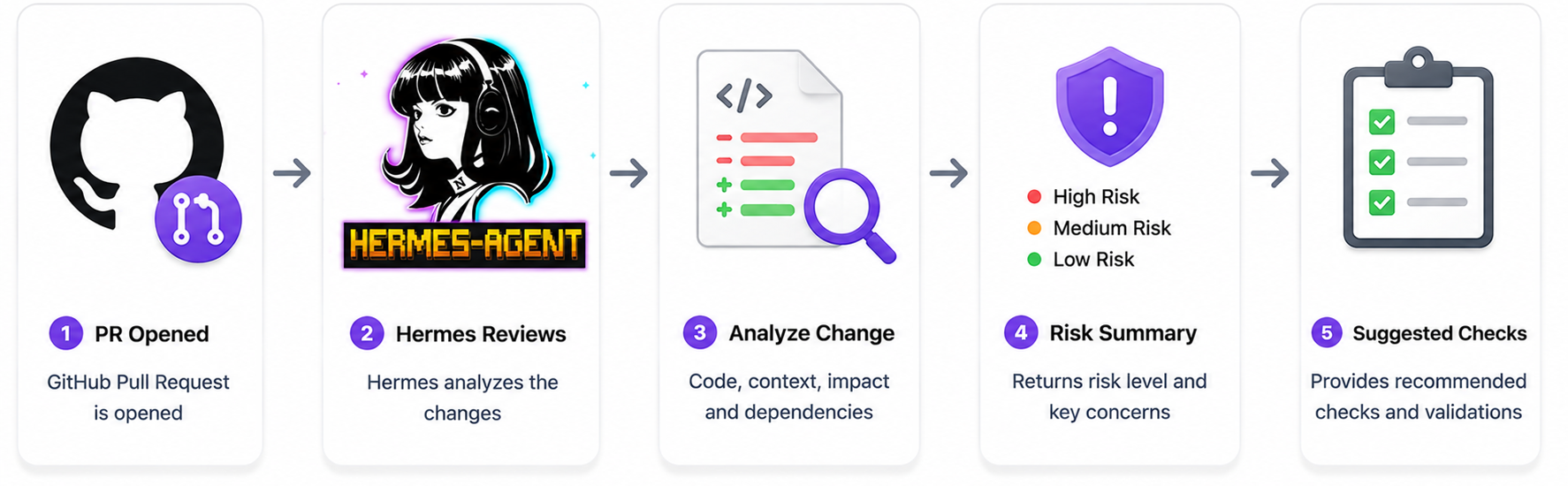
Time is not always the right trigger. Hermes automation blueprints also cover webhooks for GitHub events and external API requests. That lets an automation start when a pull request opens, a push occurs, a CI result arrives or another service sends data.
Example: GitHub PR opened -> Hermes reviews the change -> returns a risk summary and suggested checks.
15. No-Agent Cron vs AI Cron
No-agent cron is best when a script already knows the exact answer. AI cron is best when the task requires research, interpretation, planning or adaptation. Mixing the two intelligently can reduce cost and failure surface.
Rule: if the expected output is fully determined by a script, skip the model.
16. Security for Unattended Automation
An unattended agent is more powerful than a normal chat because it can act without a person watching every turn. Use least-privilege credentials, isolate terminal access, limit tool permissions, set timeouts and require approval before irreversible actions. Hermes's team guide specifically recommends Docker for shared bots so commands run in a container rather than directly on the host.
For deeper coverage, see our AI coding-agent security guide.
17. Five Automations Worth Building
The best first automations are low-risk and repetitive. Start with workflows where the result is easy to verify and failure has limited impact.
Daily research briefing; GitHub standup; server watchdog; nightly code audit; weekly content research.
18. How to Make Hermes Automations Reliable
Reliability comes from explicit inputs and bounded behavior. Define one outcome, list sources, specify time range, set output format, define the no-result case, handle tool failures and cap the amount of work. Test the job manually before scheduling it.
A scheduled agent is software. Treat prompts, permissions, outputs and failure handling like production configuration.
19. Is Hermes Good for AI Automation?
Yes, especially when an automation needs both scheduling and reasoning. Hermes combines cron, skills, memory, subagents, MCP and messaging in one open agent platform. Its no-agent mode also prevents deterministic tasks from consuming LLM tokens.
It is less attractive for workflows that are entirely deterministic, where ordinary cron, scripts or a conventional automation platform will usually be simpler.
20. Final Verdict
Hermes is most useful when it removes repeated human work without requiring an unnecessarily complex system. Start with one scheduled report or watchdog, validate the output, then add skills, subagents and webhooks only when they solve a real bottleneck.
The goal is not maximum autonomy. The goal is reliable automation with the minimum autonomy required.
For the broader concept, see our What Is an AI Agent? Beginner Guide With Examples (2026).
For safe agent execution, see How to Secure AI Coding Agents in 2026: Permissions, Sandboxing, MCP & Secrets.
For typed agent applications, see Pydantic AI: Build Type-Safe AI Agents Guide (2026).
Use a self-contained prompt for every scheduled agent job. A reliable template is:
Goal: [what must be completed]
Sources: [URLs, repositories, folders or APIs]
Time window: [date or frequency]
Rules: [what to include, exclude or never change]
Tools: [specific tools or skills]
Output: [exact format and maximum length]
Failure behavior: [what to report if a source or tool is unavailable]
Delivery: [Telegram, Slack, file, GitHub or local output]
The point is to make the automation repeatable. A scheduled session may not have the conversational context you used when creating the job, so the prompt should contain everything the agent needs to execute that run correctly.
Hermes Automation Prompt Template
A reliable automation should progress from low-risk observation to higher-impact action. Start by asking Hermes to collect and summarize information. Once the output is consistently correct, add structured decisions. Only after that should you allow write operations such as creating tickets, modifying files or posting messages. This staged approach gives you a simple way to discover failures without giving an early prototype unnecessary permissions.
For each automation, define a success condition. For example, a research job succeeds when it produces five non-duplicate findings with source links. A GitHub audit succeeds when the report includes all failed checks and identifies the affected commit. A server watchdog succeeds when it remains silent during normal operation and alerts only when a threshold is crossed. These definitions are far more useful than simply saying that the agent should 'do a good job.'
How to Build a Reliable Hermes Workflow
Hermes can also be useful for batch work where a large set of similar items needs processing. A batch workflow can read a folder of documents, classify each item, summarize the important ones and write the results to a structured output directory. The practical advantage is that the same agent procedure can be repeated across many inputs rather than manually starting separate conversations.
Keep the batch contract strict: define the input location, allowed file types, output naming convention, error handling and maximum work per run. For large batches, delegate independent groups to subagents or process the work in smaller scheduled chunks. This limits the damage from one bad input and makes failures easier to retry.
Batch Processing With Hermes
MCP becomes useful when Hermes needs capabilities that are not already exposed as native tools. Instead of embedding application-specific logic into every prompt, an MCP server can provide a reusable interface to an external database, business system or specialized service. Hermes documentation lists MCP as a supported extension mechanism for external tools and context.
Do not add MCP simply because it is available. First identify the exact action the automation needs. Then expose the smallest useful tool surface, validate inputs and keep credentials outside prompts. Treat every new MCP connection as a new permission boundary that needs to be reviewed.
When to Add MCP
Start with tasks that are repetitive, easy to verify and low risk. A daily research brief is safer than an agent that edits production infrastructure. A GitHub summary is easier to validate than an agent that merges code. A threshold watchdog is safer than one that automatically restarts critical services. Once the first workflow works consistently, expand its capabilities gradually.
This approach also makes the value easier to measure. Record how much time the old manual process required, how frequently it ran and what mistakes occurred. Then compare the automated workflow using the same measures. The purpose of Hermes is not to make a workflow look autonomous. The purpose is to reduce real work while keeping the result dependable.
How to Choose the Right Hermes Automation
Do not assume a scheduled agent is reliable just because the first few runs succeed. Review the scheduler status, recent job results and delivery errors regularly. Hermes exposes cron commands for listing jobs and checking scheduler status, and its documentation notes that delivery timeouts are recorded as errors even when the underlying agent turn may continue. This makes operational monitoring part of the workflow rather than an optional extra.
A useful review routine is to inspect successful runs, failed runs and silent runs separately. A successful run should produce the expected output. A failed run should explain what blocked execution. A silent run should be intentional, such as a watchdog that had nothing to report. This distinction prevents teams from treating a lack of a message as proof that an automation is healthy.
How to Monitor Hermes Automations
Frequently Asked Questions
What is Hermes Agent?
Hermes Agent is an open-source agent platform from Nous Research that connects language models to tools, files, terminals, messaging, memory, skills, subagents, scheduling and MCP.
How do I automate tasks with Hermes Agent?
Create a one-shot or recurring cron job using natural language, the cron CLI or the cronjob tool. Give the job a self-contained prompt and define how and where the result should be delivered.
How do Hermes Agent cron jobs work?
The gateway scheduler checks for due jobs and runs them in fresh agent sessions. Jobs can be one-shot or recurring, can attach skills and can deliver results to configured destinations.
Can Hermes Agent run tasks on a schedule?
Yes. Hermes supports natural-language schedules and cron expressions for recurring or one-time jobs.
Can Hermes send automation results to Telegram?
Yes. Hermes supports Telegram and other messaging gateways and scheduled tasks can deliver results to configured platforms.
Can Hermes use subagents?
Yes. It can delegate work to isolated subagents with separate context and tool restrictions.
Can Hermes use MCP?
Yes. Hermes supports MCP servers for external tools and context.
Does Hermes remember previous conversations in scheduled jobs?
Normal sessions can use persistent memory, but scheduled cron jobs run in fresh sessions. Put required context directly in the scheduled prompt.
Can Hermes automate tasks without an LLM?
Yes. No-agent cron can run a script and deliver its output without model inference or token use.
Is Hermes Agent good for production automation?
It can be, but unattended agents need least-privilege permissions, sandboxing, monitoring, failure handling and approval rules for high-impact actions.
What is the best first Hermes automation?
Start with a daily report, low-risk watchdog or research summary. These are easy to verify and do not require dangerous side effects.
Recommended Blogs
- What Is an AI Agent? Beginner Guide With Examples (2026)
- How to Secure AI Coding Agents in 2026: Permissions, Sandboxing, MCP & Secrets
- Pydantic AI: Build Type-Safe AI Agents Guide (2026)
- How to Use LangGraph for Multi-Agent Systems (2026)
- Replit's AI Model Routing Is Here: How Intelligent Routing Cuts Costs (2026)
Resources & Community
Join our community of 70,000+ AI enthusiasts and learn to build powerful AI applications. Whether you're a beginner or an experienced developer, Build Fast with AI helps you understand and implement AI in your projects.
- Website - buildfastwithai.com
- LinkedIn - Build Fast with AI
- Instagram - @buildfastwithai
- Founder Twitter - @satvikps
- Twitter - @BuildFastWithAI
Agentic AI Launchpad 2026
A structured 6-week cohort program that takes you from AI basics to building and deploying real-world agentic AI systems. Includes live sessions, expert mentorship, project reviews and a builder community network.
Ready to go from learning to building? Join the next cohort: Agentic AI Launchpad 2026
Free AI Resources
Access free tools, workshops and micro-learning to keep building.
- AI Workshops - Free resources, upcoming events and past recordings
- Unrot - Learn AI in 5 minutes a day

