



Gemini Omni 1.1 Flash Review: Accuracy, Price & Is It Worth It? (2026)
Gemini Omni 1.1 Flash is Google's latest production video generation and editing model, released on August 27, 2026. The update is not a new standalone text-to-video system so much as a more controlled version of the Omni workflow. Google added scene extension, first and last frame interpolation, video references, a 360p draft mode, 1080p and 4K output options, and the ability to refine generated videos through conversational editing.
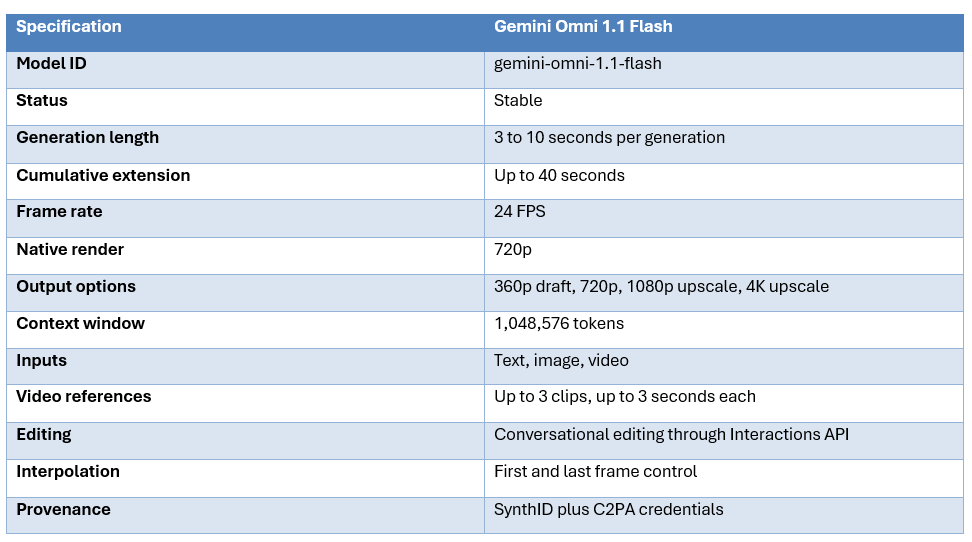
That distinction matters because the headline numbers are easy to misunderstand. Each generation still produces 3 to 10 seconds of video, while longer sequences are built by extending previous generations to a cumulative 40 seconds. The 4K output is an upscale path rather than a native 4K generation mode, and the 1.1 model uses the same basic 720p price point of about $0.10 per second while adding cheaper 360p drafts.
The accuracy story is equally nuanced. Google does not publish a single universal video accuracy score for Omni 1.1. Its model card says the model can follow complex instructions and simulate real-world physics, but also explicitly acknowledges that complete consistency through edits, complex motion and perfectly accurate text remain challenges. Independent testing reports strong competitive performance in text-to-video rankings, but also finds weaknesses in lip sync, multi-speaker dialogue and motion realism.
QUICK ANSWER
Gemini Omni 1.1 Flash is worth testing if your priority is interactive video creation rather than one-shot generation alone. Its strongest feature is the edit loop: generate, change something with a natural-language instruction, extend the shot, set start and end frames, and continue refining. The model also adds 360p drafts and 4K output options while keeping 720p at about $0.10 per second.
It is not the clear winner on raw video quality. Independent reports place Omni near the top of current text-to-video arenas, but hands-on tests still find lip-sync drift, floaty motion and problems with multi-speaker dialogue. Google's own model card confirms that complex motion, consistent editing and exact text rendering remain limitations.
My verdict: 8.5/10 overall. Omni 1.1 is one of the most useful developer-focused video systems because it reduces the distance between generation and editing. It is strongest for creators who value control, iteration and low-cost drafts. It is less compelling when the only requirement is the most cinematic one-shot output possible.
1. What Is Gemini Omni 1.1 Flash?
Gemini Omni 1.1 Flash is Google's multimodal video generation and editing model. The Gemini API identifies the stable model as gemini-omni-1.1-flash, with text, image and video inputs and video output. Google positions it as a fast conversational model for creating, extending and editing video.
The practical way to understand the model is as a video workbench. It is designed so the first generation is not necessarily the final generation. You can start with an image, generate motion, edit the result, extend it and continue the conversation.
2. What Actually Changed From Gemini Omni Flash?
The 1.1 release adds several controls that make the original Omni model more useful. Scene extension can now look at the preceding generated scene for continuity, first and last frames can be specified to control the transition between two visual states, short videos can serve as references, and 360p is available for cheaper drafting. Google also added 1080p and 4K output options through upscaling.
The biggest conceptual change is the edit loop. Instead of treating a generated clip as a fixed artifact, the model is designed to accept a conversational correction. This is more important for real production than simply increasing a benchmark score because most creators do not need a perfect first generation. They need a system that makes the second, third and fourth version easy.
There are still boundaries. Google describes uploaded video references and editing as supported, but regional availability and feature limits can vary. Developers should check the current API documentation before designing a production pipeline around a capability that may have geography or duration restrictions.
3. Accuracy: How Good Is Gemini Omni 1.1 Flash?
Video accuracy is a broader concept than sharpness. For Omni 1.1, the useful measures are prompt adherence, subject consistency, temporal stability, motion realism, camera control, audio synchronization and text fidelity.
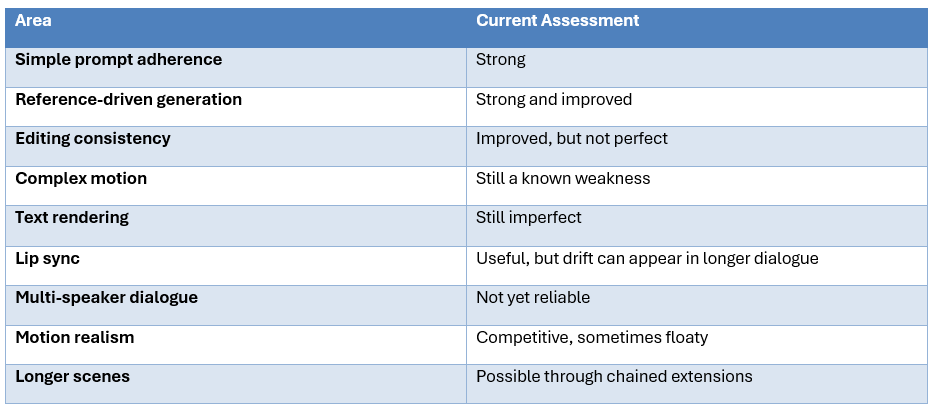
Google's own model card is unusually important here. It explicitly says that maintaining complete consistency throughout edits, generating complex motion and rendering perfectly accurate text remain challenges. That means a review should not claim that Omni 1.1 has 'solved consistency' simply because the release adds better controls. The controls improve the workflow, but the underlying generative weaknesses remain.
Independent evaluation is encouraging but mixed. Morphix reports that Omni ranks near the top of its current text-to-video arena and above Veo 3.1 in that particular leaderboard, while also finding lip-sync drift and floaty motion. Those results are useful as a snapshot, not as a universal benchmark. The right decision still comes from testing the exact scene types your product needs.
4. The 40-Second Claim Needs a Footnote
Gemini Omni 1.1 Flash is often described as a 40-second video model. That is technically true only if you interpret 40 seconds as the cumulative extension ceiling. A single generation still tops out at 10 seconds. Longer sequences are built by chaining extensions, so a 40-second scene is effectively a sequence of multiple generations.
This matters for continuity and cost. Every extension is another generation step, which means the model has to preserve the scene state from one generation into the next. Google improved this workflow in 1.1 by giving the extension process more preceding context, but users should still expect some drift over repeated extensions.
It also means the economics are additive. Four 10-second 720p generations at approximately $0.10 per second produce roughly $4 of video-output cost before input processing and any additional text output. The 40-second result is not a $4 single render. It is a chain of paid generation steps.
5. Gemini Omni 1.1 Flash Pricing
Google's pricing is token based, but the published conversion makes the model easy to budget in seconds. Video output is priced at $17.50 per million tokens, and Google states that 720p video uses 5,792 output tokens per second, which works out to about $0.10 per second. Text, image, video and audio input is priced at $1.50 per million tokens, while text output is $9 per million tokens.
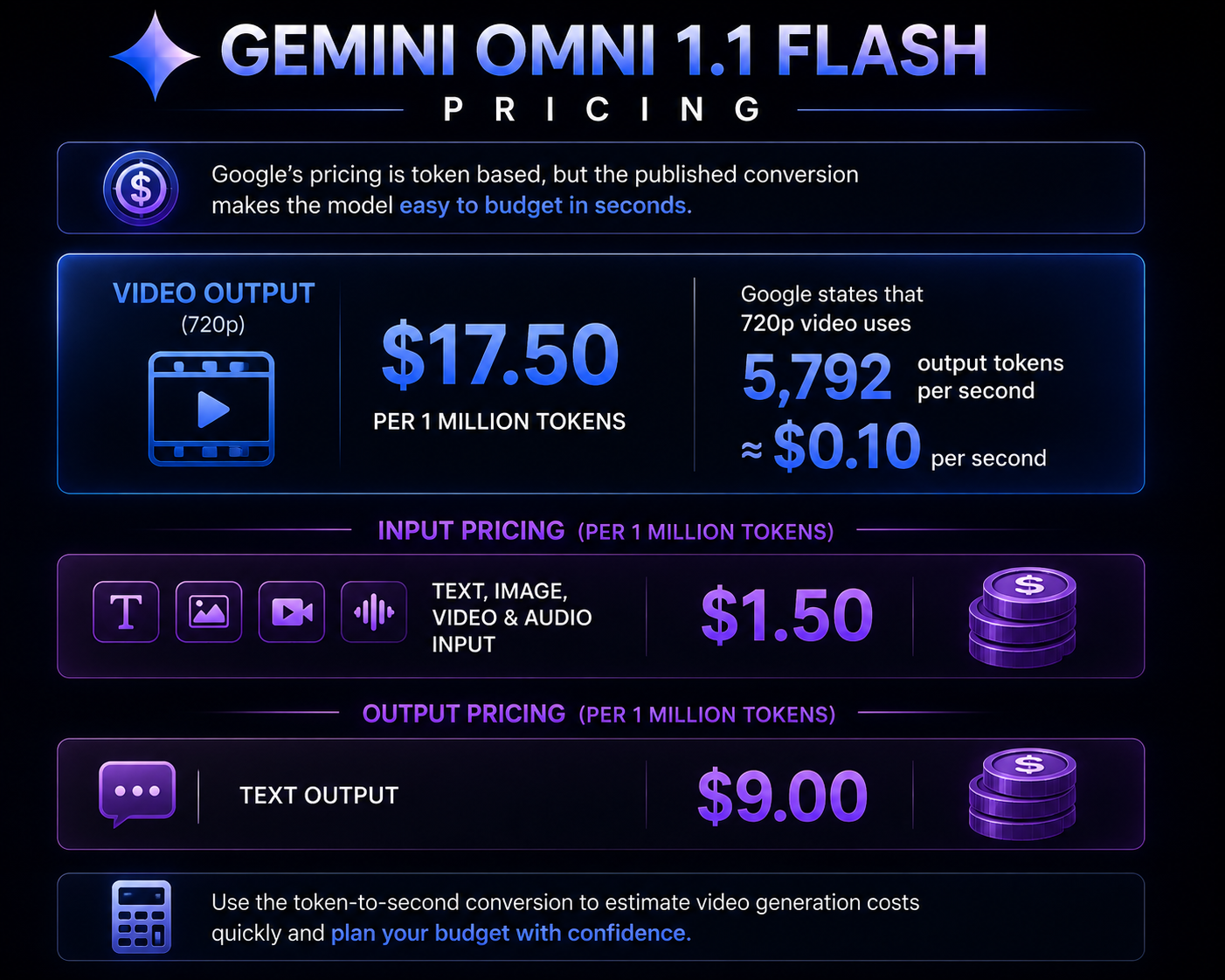
The 720p figure is the directly documented benchmark for the token-to-second conversion. The other resolution figures are derived from current published pricing references and platform documentation, so treat them as planning numbers rather than guaranteed invoices. The biggest new cost lever is 360p drafting at roughly one third of 720p.
That changes the sensible workflow. Explore at 360p, approve the composition and motion, then move the chosen shot to 720p or an upscaled 1080p or 4K deliverable. Spending 4K budget on every failed idea is a fast way to make a cheap model expensive.
6. Is Gemini Omni 1.1 Flash Actually Cheaper?
Not at 720p. The standard 720p rate remains about $0.10 per second, which is effectively unchanged from the original Omni model. The meaningful new savings come from the 360p draft mode. The model therefore did not suddenly make final video ten times cheaper. It made experimentation cheaper.
That is still valuable. In generative video, iteration is often the main cost. A creator may need five or ten generations before the camera, character and timing are right. Cutting the exploratory render rate lets you spend the expensive resolution budget only after the composition works.
7. 360p Draft Mode Is the Feature You Will Actually Use
A 360p draft may sound like a compromise, but for creative exploration it makes sense. You can evaluate composition, camera motion, story beats and basic character behavior without paying the full 720p output price. Google says the draft mode can be generated significantly faster than 720p as well.
This is a better optimization than shaving a few words from the prompt. Video output tokens dominate the economics. The expensive variable is how much video you render and at what resolution, not whether your prompt is 70 or 90 words.
8. First and Last Frame Control
Omni 1.1 adds first and last frame interpolation. Instead of asking the model to infer an entire transition from text, you can define the visual state at the start and the desired state at the end and let the model generate the motion between them.
This is useful for camera moves, transformations and controlled transitions. It is especially valuable when a creator already has two key frames and needs the motion between them. It shifts some creative control from natural-language description to explicit visual constraints.
It is not the same as deterministic animation. The model still invents the intermediate frames, so physics, anatomy and object identity can drift. Use the feature as a stronger constraint, not as a guarantee that every pixel will travel exactly where you expect.
9. Video References and Multi-Turn Editing
Omni 1.1 supports short video references and conversational editing. The current API documentation says the model accepts video inputs up to 10 seconds for editing and extension, and external reference clips can be used to influence character or motion patterns.
This is one of the model's biggest workflow advantages. Instead of regenerating a scene because the background color is wrong, you can ask for the change in natural language. Instead of describing a movement pattern from scratch, you can give the model a short reference clip.
There is an important limitation: audio inside a video reference is ignored for the reference workflow, according to current third-party testing and documentation analysis. If the sound itself matters, describe the desired audio in text or use another audio workflow.
10. 4K Output: Native or Upscaled?
This is where marketing language can create the wrong expectation. Gemini Omni 1.1 Flash offers 1080p and 4K output options, but current technical coverage describes these as upscales from the 720p generation rather than native 1080p or 4K generation.
Upscaling can still be useful. If the 720p generation is already good, increasing output resolution is an efficient finishing step. But do not compare a native 4K generation pipeline against Omni's upscaled 4K and assume they are equivalent. Detail quality, fine motion and text can behave differently.
For creators, the practical question is whether the 4K file is good enough for the final delivery channel. If social media or a web landing page is the target, it may be more than sufficient. For cinema-grade footage or highly detailed product macro shots, test it directly before promising native 4K quality.
11. Gemini Omni 1.1 Flash vs Veo 3.1
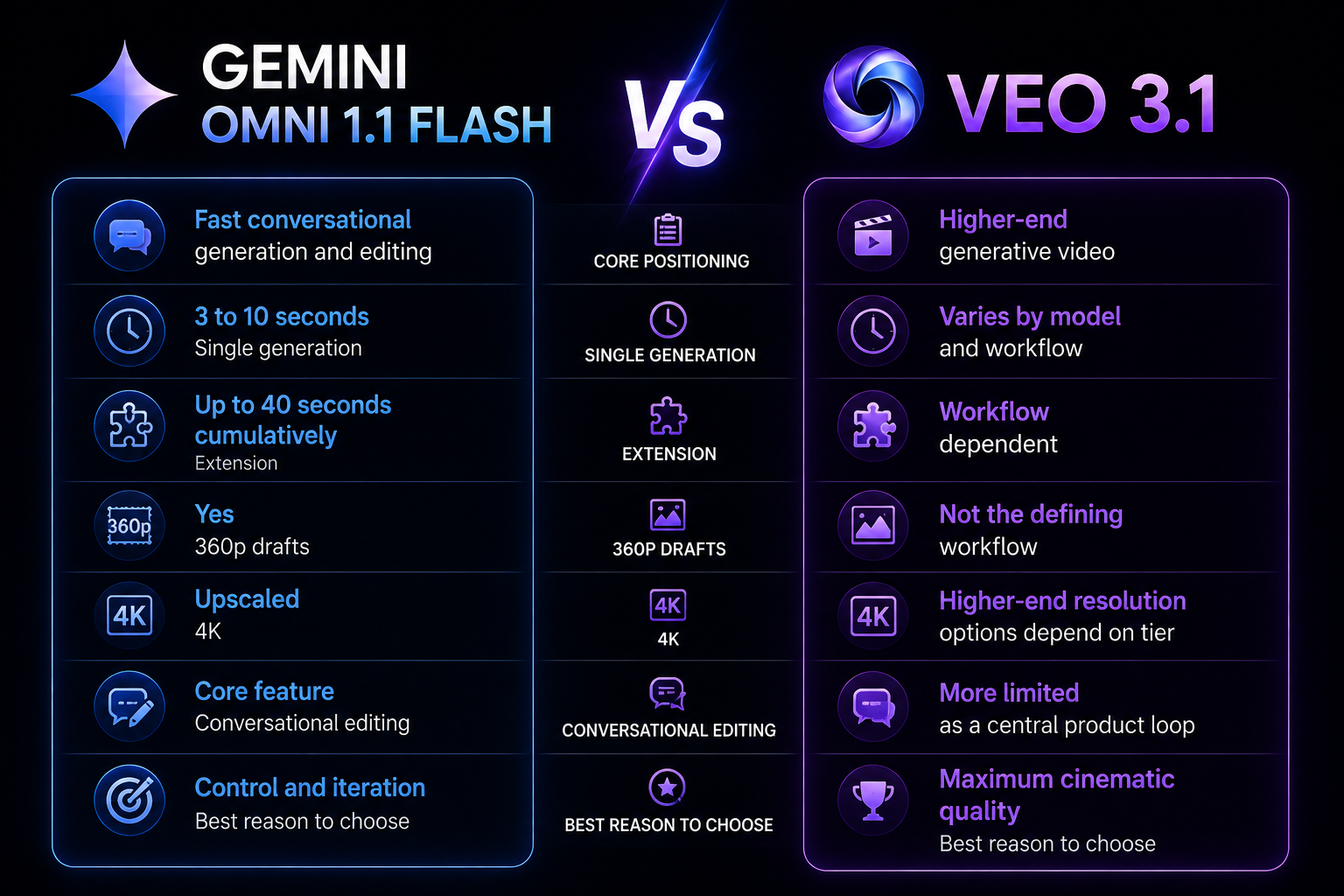
The mistake is treating Omni 1.1 Flash as a cheaper Veo 3.1. Google itself positions Omni as a different model family. Omni's advantage is the conversational edit loop and fast production workflow. Veo remains the better target when the priority is maximizing one-shot cinematic quality.
Current third-party arena measurements show Omni 1.1 competing strongly with top video models, but those scores are dynamic and benchmark conditions differ. Treat them as one signal, not a final ranking.
12. Gemini Omni 1.1 Flash vs Wan 3.0
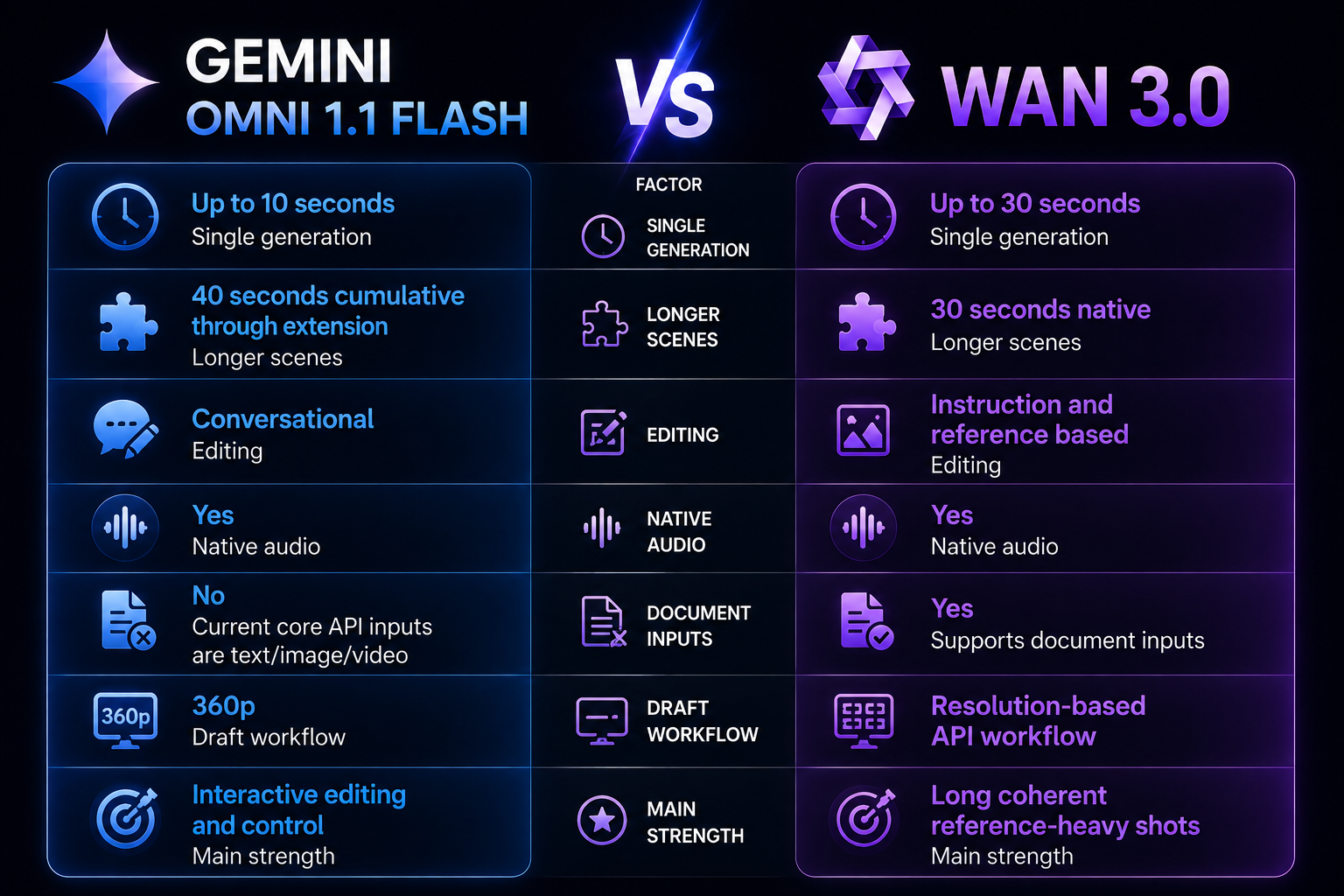
Wan 3.0 is the better choice when you want a long native shot and strong document or multimodal reference workflows. Omni 1.1 Flash is the better choice when you want to generate a clip and then keep talking to it until the scene is closer to what you want.
Read our Wan 3.0 Review: Accuracy, Price & Is It Worth It? (2026) for the full comparison context.
13. Known Weaknesses
- Character and scene consistency can still break during repeated edits.
- Complex motion remains a known limitation in Google's own model card.
- Text rendering is not reliably pixel-perfect.
- Lip sync can drift in longer dialogue scenes in independent tests.
- Multi-speaker dialogue synchronization is still a weak area.
- Motion can look floaty compared with stronger cinematic competitors on some prompts.
- The 40-second limit is cumulative rather than a single 40-second generation.
- 4K output is an upscale path, not proof of native 4K generation.
- Uploaded-video editing and extension have regional availability restrictions.
14. Who Should Use Gemini Omni 1.1 Flash?
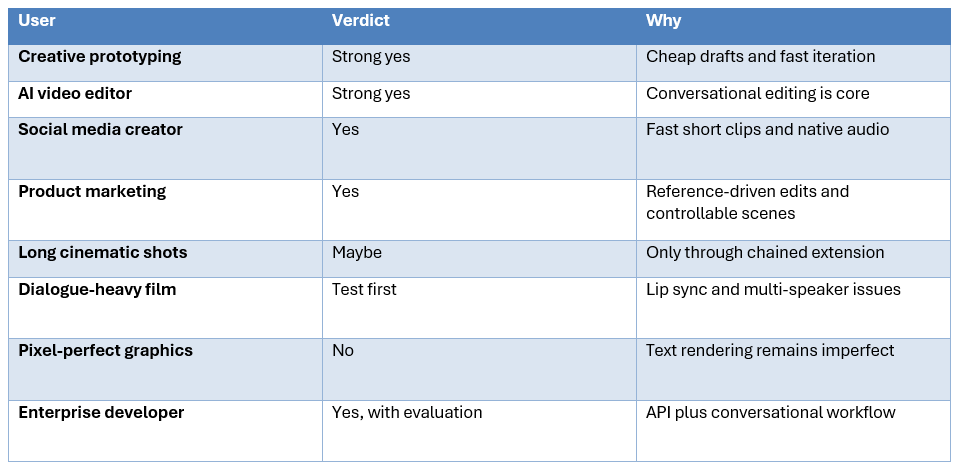
15. The Production Workflow I Recommend
The smartest way to use Omni 1.1 is to treat resolution as a production stage rather than a quality setting that you always keep maxed out.
- Start with a concise three to four sentence prompt that defines the subject, action, camera and environment.
- Generate several concepts at 360p while deciding on composition and motion.
- Choose the strongest take and use conversational editing instead of regenerating from scratch.
- Use first and last frame controls when a transition needs more precise structure.
- Extend the selected scene only after its first ten seconds are stable.
- Move the approved sequence to 720p and then upscale to 1080p or 4K when the delivery target justifies it.
- Use dedicated audio or manual editing when dialogue sync or sound design is critical.
That workflow minimizes the most expensive failure mode in generative video: paying high-resolution prices for concepts that were never going to work. The 360p mode exists for exactly this kind of exploration.
16. How We Would Evaluate Accuracy
Because there is no single universally accepted Omni accuracy benchmark, a serious buyer should test the dimensions that matter to the product.
- Reference preservation: does the character, object or product remain recognizable?
- Prompt adherence: does the model execute the requested action and camera?
- Temporal continuity: does the scene remain stable from first frame to last?
- Physics: do impacts, fluids, cloth and body movement behave plausibly?
- Audio sync: does spoken dialogue align with the correct speaker?
- Text: are product names, signs and interface labels correct?
- Edit stability: does changing one detail preserve the rest of the scene?
This is more useful than copying a leaderboard score because your application may care about one failure mode much more than another. A marketing pipeline might care about product consistency and text. A cinematic creator may care about motion and lighting. A voice-driven application will care about dialogue synchronization.
17. Is Gemini Omni 1.1 Flash Worth It?
Yes, particularly for creators and developers who value iteration. The model makes it cheap enough to explore concepts at 360p and then refine the winner conversationally. The ability to extend scenes, control start and end frames and use video references also gives it more practical control than a simple one-prompt video generator.
The cost is reasonable at 720p, but it is not trivial. At roughly $0.10 per second, a 10-second clip costs about $1 in video-output cost and a four-step 40-second sequence costs about $4 before input and other output tokens. The 360p draft tier is therefore a key part of the value proposition, not a side feature.
The model is less attractive when absolute first-pass visual quality is the only criterion. In that case, compare it directly against Veo 3.1, Seedance and Wan 3.0 on the same prompts. Omni's advantage is the complete workflow, not a claim of universal visual supremacy.
18. Final Verdict
Gemini Omni 1.1 Flash is a strong August 2026 release because Google is moving AI video toward an iterative editing model rather than treating generation as a one-shot event.
The best new features are scene extension, first and last frame control, video references, 360p drafts, 1080p and 4K output options and conversational editing.
The accuracy picture is competitive but not perfect. Google itself says complete consistency, complex motion and exact text remain challenges. Independent testing adds lip-sync, multi-speaker and motion weaknesses.
The price is attractive for experimentation. The published 720p equivalent is about $0.10 per second, while 360p is roughly $0.03 and can be used as the low-cost draft stage.
My rating: 8.5/10 overall, 9/10 for workflow and editing, 8.5/10 for price, and 7.5/10 for raw visual consistency.
Bottom line: Gemini Omni 1.1 Flash is worth using when you want to create, edit and extend video through one conversational workflow. It is not a magic replacement for every video model, but its combination of control, speed, low-cost drafts and multimodal editing makes it one of the most practical developer-facing video systems available in late August 2026.
Frequently Asked Questions
What is Gemini Omni 1.1 Flash?
It is Google's stable multimodal video generation and editing model, with text, image and video input and 3 to 10 second video generations that can be extended cumulatively to 40 seconds.
How accurate is Gemini Omni 1.1 Flash?
There is no single universal accuracy score. Google says it can follow complex instructions and model real-world physics, but also says complex motion, complete edit consistency and perfectly accurate text remain challenges.
How much does Gemini Omni 1.1 Flash cost?
Google's published 720p conversion works out to about $0.10 per second. Current reporting puts 360p around $0.03 per second, 1080p around $0.15 and 4K around $0.30.
Can Gemini Omni 1.1 Flash generate 4K video?
Yes as an output option, but current technical coverage describes 4K as an upscale from the 720p generation rather than native 4K generation.
Can Gemini Omni 1.1 Flash generate 40-second videos?
Yes cumulatively through scene extension. A single generation is still limited to 10 seconds.
Does Gemini Omni 1.1 Flash generate audio?
Yes. The model outputs video with audio and supports dialogue, ambience and effects.
Can it edit existing videos?
Yes, through its conversational editing workflow, subject to current API capabilities and regional restrictions.
Does it support video references?
Yes. The current model documentation supports short video inputs for editing and extension and reference clips for generation.
Is Gemini Omni 1.1 Flash better than Veo 3.1?
Not universally. Omni's main advantage is conversational generation and editing, while Veo targets higher-end generative video quality. Use matched tests for a fair comparison.
Is Gemini Omni 1.1 Flash better than Wan 3.0?
It depends on the job. Omni is stronger as an interactive editing workflow, while Wan 3.0 has longer native single generations and broader document and reference workflows.
Is Gemini Omni 1.1 Flash worth using?
Yes for creators and developers who value fast iteration, conversational editing, reference control and cheap drafts. Test it first for dialogue-heavy, text-heavy or complex-motion projects.
Recommended Blogs
- Wan 3.0 Review: Accuracy, Price & Is It Worth It? (2026)
- 100 Best Veo 3 Prompts 2026 (Copy-Paste)
- MiniMax Design Review: Software, M3, Pricing & Free Tier
- Gemini 3.5 Transcribe Review: Accuracy, Price & Is It Worth It? (2026)
- Qwen3.8-Flash-Next Review: Benchmarks, Cost & Is It Worth It? (2026)
- GLM-5.3-Flash Review: Benchmarks, Price & Is It Worth It? (2026)
- Best Open Source AI Models August 2026: Full Collection
Resources & Community
Join our community of 70,000+ AI enthusiasts and learn to build powerful AI applications. Whether you're a beginner or an experienced developer, Build Fast with AI helps you understand and implement AI in your projects.
- Website - buildfastwithai.com
- LinkedIn - Build Fast with AI
- Instagram - @buildfastwithai
- Founder Twitter - @satvikps
- Twitter - @BuildFastWithAI
Agentic AI Launchpad 2026
A structured 6-week cohort program that takes you from AI basics to building and deploying real-world agentic AI systems. Includes live sessions, expert mentorship, project reviews and a builder community network.
Ready to go from learning to building? Join the next cohort: Agentic AI Launchpad 2026
Free AI Resources
Access free tools, workshops and micro-learning to keep building.
- AI Workshops - Free resources, upcoming events and past recordings
- Unrot - Learn AI in 5 minutes a day
References
- Google Blog - Build with Gemini Omni 1.1 Flash
- Google AI for Developers - Gemini Omni Flash
- Google DeepMind - Gemini Omni Flash Model Card
- Google Gemini - Omni product page
- The Decoder - Gemini Omni 1.1 Flash coverage
- PacketNebula - Gemini Omni 1.1 Flash technical analysis
- Morphix - Gemini Omni 1.1 Flash review
- Promptslove - Gemini Omni 1.1 Flash review and prompt guide

