



MiniMax Design Review: Software, M3, Pricing & Free Tier (2026)
MiniMax quietly turned into one of the most interesting AI companies of 2026, and MiniMax Design is the clearest proof. It is not another chat box. It is a desktop studio that hands a full crew of AI agents a single brief and returns a finished short video, with the script, visuals, edit, and voiceover already assembled. I spent real time with it across the H3 model, the M3 language model, the coding plan, MiniMax Chat, and MiniMax Audio, and this review covers the whole picture, including the parts the marketing pages skip.
I will keep it honest. MiniMax Design gets a lot right, and it is priced aggressively enough to embarrass tools that cost several times more. It also has the rough edges you would expect from a fast moving product. By the end of this you will know exactly what it is, how to download and log in, what the free tier really gives you, how M3 and the coding plan fit in, and whether it deserves a place in your workflow.
What Is MiniMax Design?
MiniMax Design is an AI-native creation platform from MiniMax that orchestrates end to end agent workflows across text, image, video, and audio models inside a single desktop app. Instead of prompting one model at a time and stitching the outputs together by hand, you describe what you want, and a main agent reads your intent, breaks the job into steps, and assigns each step to a specialist agent. One canvas holds the script, storyboard, video, music, and edit.
The product sits on top of the MiniMax model family, and its headline engine is the H3 model, marked live at launch. Around H3, four dedicated agents run in parallel: a copy agent for text and script, an image agent for visuals, a video agent for the timeline, and an audio agent for voiceover and music. That parallel, multi agent design is the core idea, and it is closer to running a small studio than to using a single generator. If the term agent is new to you, our beginner guide to agentic AI is a good primer before you read on.
MiniMax positions Design for short form video, brand marketing, e-commerce content, short dramas, education, and multi platform social media. In plain terms, it is built for people who need a steady stream of polished short videos and do not want to run five separate tools to make each one. The pitch is speed and cohesion, and for the most part the app delivers on it.
MiniMax Design Software: Key Features
The MiniMax Design software is built around a five step production workflow that takes you from an idea to a delivered video without leaving the canvas. Each step maps to a real stage of production, which is what makes the tool feel like a studio rather than a toy.
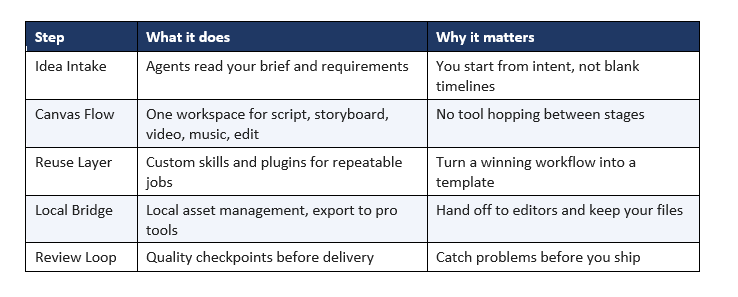
Two features stand out to me. The Reuse Layer is the one power users will love, because it lets you save a proven multi agent run as a repeatable skill, so your tenth video takes a fraction of the effort of your first. The Local Bridge matters more than it sounds, since it keeps your assets on your machine and exports cleanly to professional editors, which means MiniMax Design can be the fast first draft while a human finishes in a traditional tool. That is a mature way to design an AI studio.
The multi agent execution is the headline, and it works. You drop in a brief, the main agent plans, and the copy, image, video, and audio agents move at once rather than in a slow line. The result is a rough but coherent short in minutes. It is not always broadcast ready, but it is a genuine head start, and for social content it is often close enough to publish after light edits.
The H3 Model Behind MiniMax Design
H3 is the creative model that powers MiniMax Design, and it went live as the app launched. MiniMax has not published deep technical specs for H3 the way it did for its language models, so I will not invent numbers. What is clear from hands on use is that H3 handles the visual and video generation at the heart of Design, and it is tuned for short form output with reference driven control over style and consistency.
In practice, H3 is strongest at short, stylized clips where character and scene consistency across shots matters, which is exactly what social and marketing video needs. It is less suited to long, cinematic sequences, and it can wobble on fine detail and text rendering inside frames, which is a common limit across AI video in 2026. If your work is short and punchy, H3 is a real asset. If you need minutes long, film grade shots, temper expectations.
For a sense of where H3 sits against dedicated video generators, our comparison of Seedance vs Veo vs Kling is worth reading. The honest summary is that H3 trades a little raw clip quality for the huge convenience of living inside a full agent workflow, and for most creators that trade is worth it.
MiniMax M3: The Model Powering the Ecosystem
MiniMax M3 is the language model at the center of the MiniMax stack, released on June 1, 2026, and it is a genuinely strong open weight model. M3 uses a mixture of experts design with roughly 428 billion total parameters and about 23 billion active per token, paired with a sparse attention architecture that MiniMax says cuts compute and cost to a fraction of the previous generation. It ships with a 1 million token context window and native multimodality.
The benchmarks are the headline. M3 scores about 59 percent on SWE-Bench Pro, which puts it ahead of GPT-5.5 and Gemini 3.1 Pro on that coding test, alongside strong marks on reasoning and knowledge tasks. The catch that makes it notable is price. M3 delivers frontier level coding at roughly 5 to 10 percent of the cost of those rivals, which is why it made so much noise on launch.
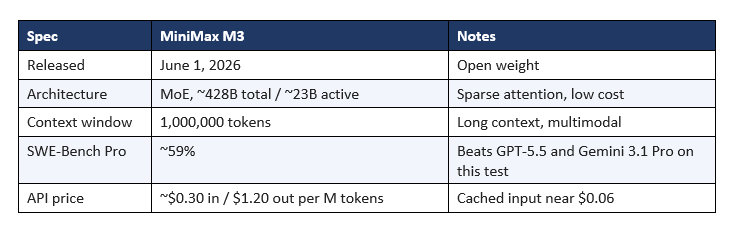
M3 matters to a MiniMax Design review because the same account and the same subscription tie the whole ecosystem together. The language brain that plans your video agents is the language brain you can also use for coding and chat. If you want the deeper model breakdown, see our MiniMax M2.7 review for the prior generation, and our best open source AI models roundup for where M3 lands among its peers.
MiniMax Design Download and System Requirements
You download MiniMax Design as a desktop app from the official MiniMax Design site, and it is free to install and start. There is no browser only version of the full studio, because the agent workflow and local asset management are built for a native app. The download is straightforward: pick your platform, install, sign in, and you are creating within a few minutes.
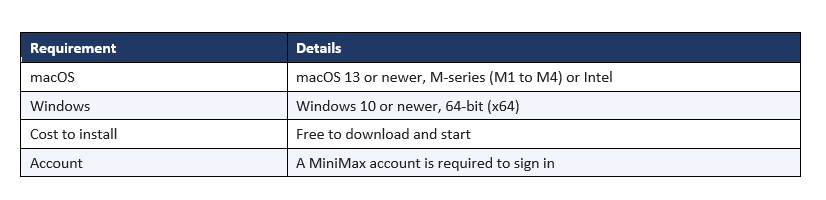
A practical note on the minimax design download: install from the official domain only. Because the app is popular and new, look-alike sites and reuploaded installers show up quickly, and an AI tool with account access is not something you want from an unofficial source. Stick to the official MiniMax Design page, and if a link looks off, do not run it. Once installed, updates come through the app itself.
MiniMax Login: How to Access Your Account
MiniMax login uses a single MiniMax account across the whole ecosystem, so one sign in covers MiniMax Design, MiniMax Chat, the developer platform, and MiniMax Audio. You create the account with an email, and depending on region, phone or social sign in options may be available. The same credentials that log you into the Design desktop app also log you into the web console at the MiniMax platform site.
If you run into a minimax login problem, the usual fixes apply. Confirm you are using the same email across the app and the web, check that your plan or credits are active, and make sure the desktop app is updated, since an outdated build can fail to authenticate against a changed backend. For API and billing, sign in at the MiniMax platform console rather than the Design app, because that is where keys, usage, and subscriptions live. Keeping one account for everything is convenient, but it also means account security matters, so use a strong, unique password.
MiniMax Design Free Tier and Pricing
Yes, MiniMax Design is free to start, and the free tier is real rather than a locked demo. You can download the app, sign in, and produce videos without paying, which is unusual for a tool this capable and is the easiest reason to try it. The free plan is where most people should begin, because it lets you test the full agent workflow on your own content before spending anything.
Paid plans move you up in generation volume, output quality tiers, and export options, billed through the MiniMax media plan. Rather than quote a number that shifts with promotions, the practical guidance is this: use the free tier to confirm the tool fits your workflow, then match a paid tier to your monthly output. Light creators can often live on the free or entry tier, while agencies pushing daily video will want a higher plan for the volume.
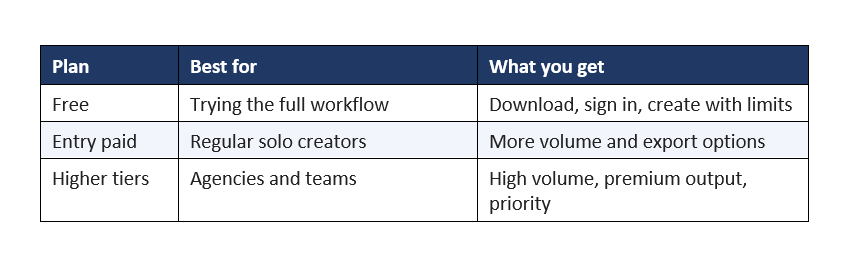
One honest caveat on the minimax design free plan: free usage comes with generation limits and, on some outputs, quality or watermark constraints typical of AI video tools. That is fair for a free product, but plan around it. Test on the free tier, then upgrade only once you know the tool earns its keep in your process.
MiniMax Coding Plan and Token Plan
The MiniMax coding plan, also called the Token Plan, is a flat monthly subscription that gives developers a shared token allowance across MiniMax M3, MiniMax Code, and multimodal features, instead of metering every API call. It starts around 20 dollars a month, with the allowance shared across text, image, speech, and music, which makes it a genuinely cheap way to build on a frontier class model.
Beyond the token plan, MiniMax offers agent focused plans. MiniMax Agent has a free Lightning tier, a Basic plan around 19 dollars a month with roughly 10,000 credits for about 30 tasks, and a Pro plan near 69 dollars a month with about 40,000 credits for around 120 tasks. For pure API users, pay as you go M3 pricing sits near 30 cents per million input tokens and 1.2 dollars per million output tokens, which is a fraction of comparable frontier models.
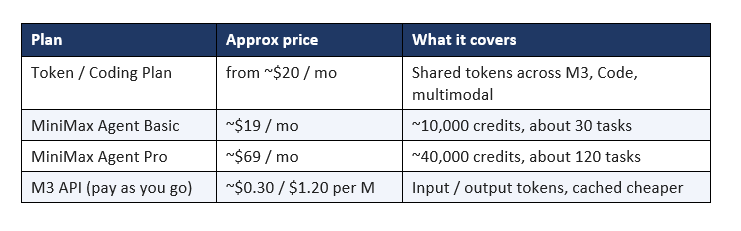
For developers, this is the quiet headline of the whole MiniMax story. A coding capable model at this price changes the math on what you can afford to build. If you are weighing coding tools, our roundup of the best AI coding agents of 2026 puts MiniMax in context against the field. Prices move with promotions, so confirm current rates on the official platform before you commit.
MiniMax Chat Explained
MiniMax Chat is the conversational front end to the MiniMax models, the simplest way to use M3 without touching an API or the Design app. It is the equivalent of a standard AI assistant: you type, it answers, and it can handle reasoning, writing, coding help, and multimodal input thanks to the underlying model. For most people, MiniMax Chat is the first place to meet the M3 brain that also powers everything else.
What makes MiniMax Chat worth a look is the model underneath. You are talking to a frontier class model with a very long context window and strong coding ability, at a price point that undercuts the big Western assistants. If your main need is a capable everyday chat assistant, MiniMax Chat covers it, and the same account carries over to Design, Audio, and the developer platform when you are ready to go further. It is the low commitment doorway into the ecosystem.
MiniMax Audio: TTS and Voice Cloning
MiniMax Audio is the speech side of the platform, offering text to speech and voice cloning through the Speech model family, and it is one of the strongest audio stacks of 2026. It supports more than 40 languages, offers a library of over 300 voices across styles and ages, and lets you fine tune delivery with adjustable audio parameters. Inside MiniMax Design, this is what powers the audio agent that generates voiceover for your videos.
Voice cloning is the standout. With as little as 10 seconds of clean audio, MiniMax Audio can build a custom voice that captures texture, breathiness, and speaking pace, and the latest Speech models reduced background noise and fixed cross lingual accent bleed. Pricing is aggressive: text to speech from around 60 dollars per million characters, rapid voice cloning near 1.5 dollars per voice, and a starter plan around 5 dollars a month for roughly two hours of audio.
Important: as of August 2026, MiniMax Audio does not enforce a voice-verification or consent check for cloning. Only clone your own voice, or get written consent first, because the platform will not check for you.
That consent gap is a real responsibility, not a footnote. Cloning a voice you do not have the right to use can cause legal and ethical harm, and the tool leaves that judgment entirely to you. Used well, on your own voice or with clear permission, MiniMax Audio is a superb, low cost narration and dubbing engine. Used carelessly, it is a liability. Treat the power with the seriousness it deserves.
MiniMax Design Pros and Cons
After real use, here is my balanced read on MiniMax Design. It is a strong product with a clear identity, and its weaknesses are the normal cost of being early and ambitious.
Pros
End to end agent workflow in one app
Free tier that actually creates
Very aggressive pricing across the stack
Reuse Layer turns workflows into templates
Local Bridge keeps and exports your assets
One account spans Design, M3, Chat, Audio
Cons
Occasional stability and rendering hiccups
H3 wobbles on long or fine-detail shots
Less manual control than pro editors
Deep specs for H3 are thin
Free outputs carry limits or watermarks
Newer product, features still shifting
The pattern is clear. MiniMax Design wins on integration, price, and speed, and it gives up some polish, control, and maturity in return. For the target audience of creators and marketers who need volume, that trade lands well. For a perfectionist finishing a single flagship film, it is a fast first draft rather than the final tool.
Who Should Use MiniMax Design?
MiniMax Design is the right tool for anyone who needs a steady flow of short, polished video and values speed over frame by frame control. Social media creators, marketing teams, e-commerce sellers, and educators are the clearest fit, because their work rewards volume, consistency, and quick turnaround, which is exactly what the agent workflow delivers.
It is a weaker fit if your work is long form, highly cinematic, or demands precise manual control over every shot, since H3 and the automated workflow favor short and stylized over long and exacting. Developers are a special case: even if you never touch the video studio, the M3 coding plan alone can justify a MiniMax account. And complete beginners are well served too, because the free tier and guided projects make it easy to learn by doing. If you are new to building with AI generally, a structured start like a hands on AI workshop pairs well with a tool like this.
MiniMax Design vs Alternatives
Against alternatives, MiniMax Design competes less on raw clip quality and more on being a complete studio at a low price. Dedicated video generators may edge it on any single clip, but they leave you to assemble script, visuals, audio, and edit across separate tools. MiniMax Design folds all of that into one agent driven canvas, which is a different and often more practical value.
If your priority is the single best looking clip, a specialist generator like those in our best AI video comparison may win that narrow test. If your priority is producing finished short videos fast and cheaply, at scale, MiniMax Design is hard to beat in 2026. And when you factor in the M3 model, the coding plan, MiniMax Chat, and MiniMax Audio all under one account, the total package is broader than almost any single purpose rival. For the full landscape, see our best AI models of 2026.
FAQ
What is MiniMax Design software?
MiniMax Design is a desktop AI creation app that runs the H3 model and orchestrates copy, image, video, and audio agents on one canvas, taking you from a brief to a finished short video in a single workflow. It runs on macOS 13+ and Windows 10+ and is free to start.
Is MiniMax Design free?
Yes, MiniMax Design is free to download and start, and the free tier lets you create real videos, not just preview the app. Free usage comes with generation limits and possible quality or watermark constraints, and paid plans add volume, higher quality, and more export options.
How do I download and log in to MiniMax Design?
Download the desktop app from the official MiniMax Design site, install it on macOS 13+ or Windows 10+, then sign in with a MiniMax account. The same login works across MiniMax Design, MiniMax Chat, MiniMax Audio, and the developer platform. Install only from the official domain to avoid fake installers.
What is MiniMax M3?
MiniMax M3 is MiniMax's open weight language model, released June 1, 2026, with a mixture of experts design, about 428 billion total parameters, a 1 million token context window, and native multimodality. It scores around 59 percent on SWE-Bench Pro, beating GPT-5.5 and Gemini 3.1 Pro on that test, at roughly 5 to 10 percent of their cost.
How much is the MiniMax coding plan?
The MiniMax coding plan, or Token Plan, starts around 20 dollars a month for a token allowance shared across M3, MiniMax Code, and multimodal features. MiniMax Agent plans sit near 19 dollars and 69 dollars a month, and pay as you go M3 API pricing is about 30 cents per million input tokens and 1.2 dollars per million output tokens. Confirm current rates on the official platform.
What is MiniMax Chat?
MiniMax Chat is the conversational assistant front end to the MiniMax models, the simplest way to use M3 without an API or the Design app. It handles reasoning, writing, coding help, and multimodal input, and uses the same account as the rest of the MiniMax ecosystem.
What is MiniMax Audio used for?
MiniMax Audio provides text to speech and voice cloning in 40+ languages with 300+ voices, and it powers the voiceover agent inside MiniMax Design. It can clone a voice from about 10 seconds of audio, but it does not enforce consent checks, so only clone your own voice or one you have written permission to use.
Is MiniMax Design good for beginners?
Yes. The free tier, guided projects, and brief driven agent workflow make MiniMax Design approachable for beginners, since you describe what you want and the agents handle the production steps. Start on the free plan, learn by making a few short videos, and upgrade only once the tool proves useful to you.
Is MiniMax Design safe to download?
MiniMax Design is safe when you download it from the official MiniMax Design website, not a mirror or a reuploaded installer. Because the app is new and popular, look-alike sites appear fast, and an AI tool with account access is not something to install from an unknown source. Use the official domain, keep the app updated, and protect your MiniMax account with a strong, unique password.
Does MiniMax Design work offline?
No, MiniMax Design needs an internet connection because the generation runs on MiniMax's cloud models, including H3, while the app manages your project and assets locally. The Local Bridge keeps your files on your machine and exports to professional editors, but the actual agent runs and video generation happen online.
Recommended Blogs
- MiniMax M2.7 Review: Self-Evolving AI at $0.30/M Tokens
- Best Open Source AI Models July 2026: Full Collection
- Best AI Coding Agents 2026: Claude Code vs Codex vs Muse Code vs Cursor
- Seedance 2.5 vs Veo 3.1 vs Kling 3.0: Best AI Video (2026)
- Best AI Models 2026: Full Ranked Analysis and Benchmarks
References
- Source: MiniMax Design, official site (design.minimax.io)
- Source: VentureBeat, MiniMax-M3 debuts (venturebeat.com)
- Source: Artificial Analysis, MiniMax-M3 (artificialanalysis.ai)
Source: MiniMax API Docs, pricing (platform.minimax.io

