



Gemini 3.5 Transcribe Review: Accuracy, Price & Is It Worth It? (2026)
Google launched Gemini 3.5 Transcribe on August 26, 2026, adding a new speech-to-text model to its Gemini Audio lineup. The release is more significant than a routine transcription upgrade because Google is positioning the model as intelligent transcription rather than simple audio-to-text conversion. It can produce readable formatted text, remove filler words, handle spoken corrections, recognize specialized vocabulary and work in both live and pre-recorded workflows.
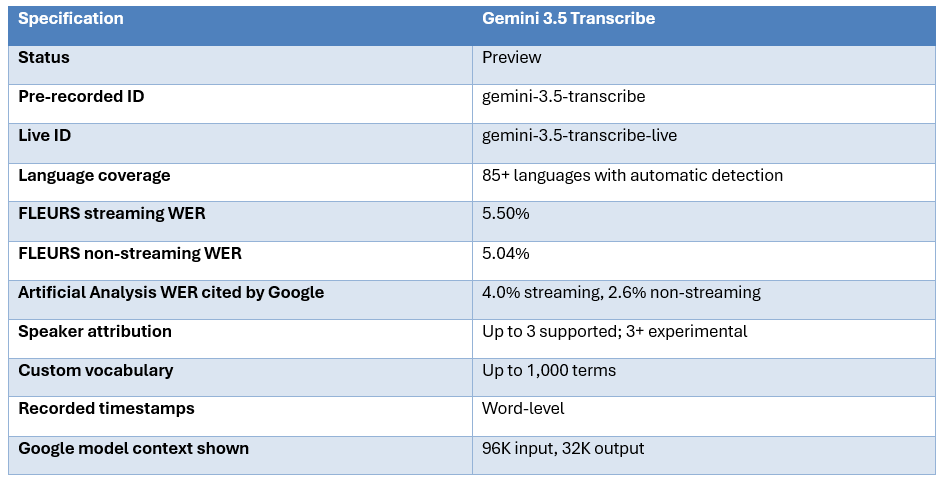
The early accuracy numbers are good, but the headline needs context. Google reports 5.50% word error rate on the FLEURS multilingual streaming benchmark and 5.04% in non-streaming mode. It also cites Artificial Analysis measurements of 4.0% streaming WER and 2.6% non-streaming WER. Those datasets are different and should not be blended into one supposed universal score.
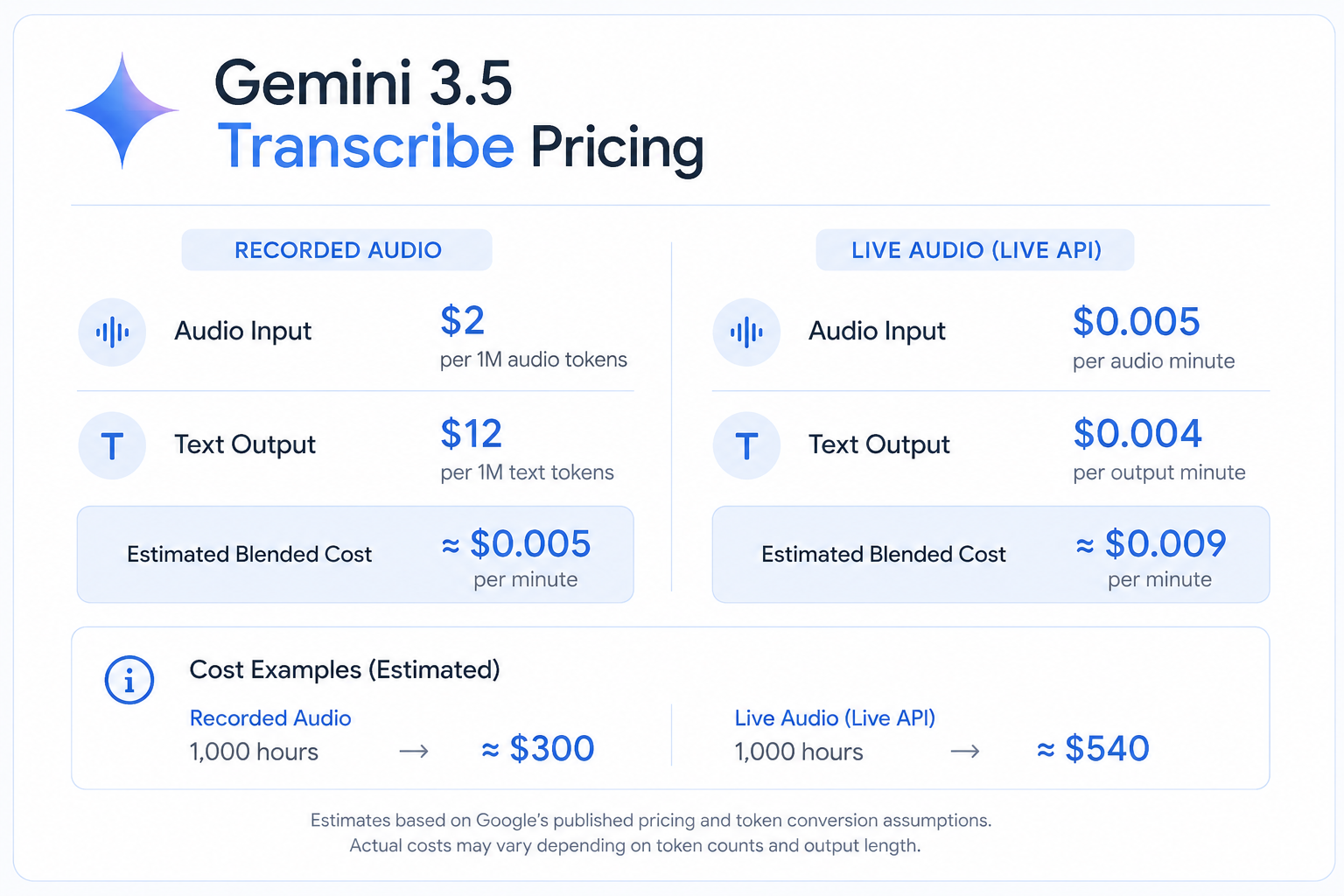
Price is arguably the bigger story. Google currently lists the recorded-audio model at $2 per million audio tokens or about $0.003 per audio minute for input, plus $12 per million text-output tokens. Its estimated blended rate is around $0.005 per minute. The Live model is estimated around $0.009 per minute. That is cheap enough to put Gemini 3.5 Transcribe directly into consideration for production workloads, not just demos.
Gemini 3.5 Transcribe is one of the strongest new speech-to-text options to test in August 2026. Its main advantage is not a single benchmark number. It is the combination of competitive recognition, intelligent cleanup, 85+ language auto-detection, custom vocabulary, timestamps, speaker attribution and low estimated cost.
Use gemini-3.5-transcribe for recorded audio, meetings, interviews and call analysis. Use gemini-3.5-transcribe-live for real-time voice applications. Google Cloud documents different feature sets: file transcription supports word-level timestamps and speaker diarization, while live streaming prioritizes low latency and does not support diarization.
My verdict is 8.5/10 overall. It is worth serious testing for most new transcription products, especially when readable output and low cost matter. It is less compelling when you need many-speaker diarization or are optimizing solely for absolute WER on a narrowly defined benchmark.
1. What Is Gemini 3.5 Transcribe?
Gemini 3.5 Transcribe is Google's latest speech-to-text model inside Gemini Audio. Google describes it as a model designed for precise and intelligent real-time transcription, with separate paths for live streaming and pre-recorded audio. It is currently a preview model exposed through Google AI Studio, the Gemini API and the Gemini Enterprise Agent Platform.
2. The Biggest Difference: Smart Transcription
Traditional speech recognition aims to reproduce what was spoken. Gemini 3.5 Transcribe can also transform the transcript into something that is easier to read and act on. Google's API documentation defines verbatim mode, which preserves filler words, repetitions, pauses and false starts, and smart mode, which removes disfluencies, resolves spoken self-corrections and automatically structures text.
That matters in ordinary dictation. A speaker may say, 'Send the report Tuesday, actually Wednesday at two.' A literal transcription can preserve the correction sequence, while smart transcription can resolve it into the intended final instruction. The feature is useful because a second model does not necessarily have to clean every transcript after the speech-to-text step.
There is an important downside. Smart transcription is an interpretation layer. For meeting notes and productivity software that is a benefit. For legal evidence, archival records or forensic transcripts, it can be the wrong behavior. Use verbatim mode when fidelity is more important than readability.
3. Accuracy: Strong, But Do Not Misread the Numbers
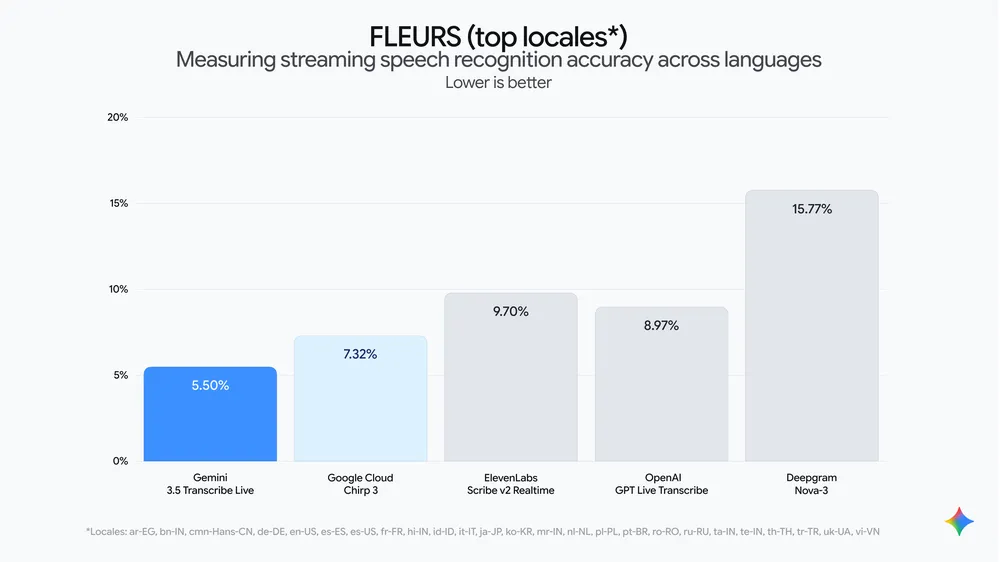
Google publishes two distinct groups of WER results. On FLEURS across selected top languages and locales, Gemini 3.5 Transcribe reaches 5.50% WER in streaming mode and 5.04% non-streaming. Google also cites Artificial Analysis at 4.0% streaming and 2.6% non-streaming.
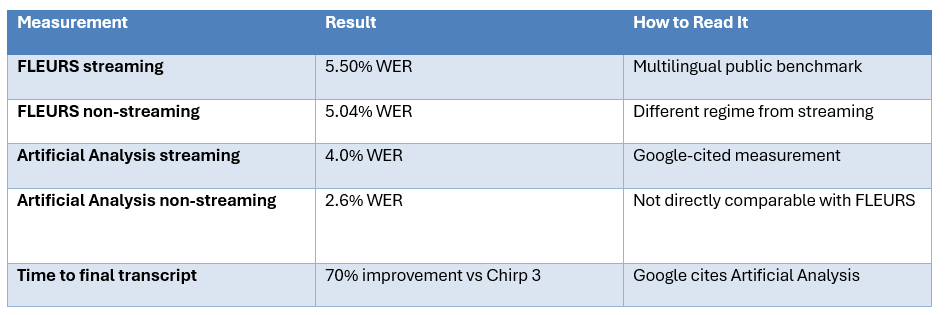
The independent picture is more nuanced. A current review of the Artificial Analysis board places Gemini 3.5 Transcribe fifth on the non-streaming WER ranking at launch, behind models including ElevenLabs Scribe v2 and Microsoft MAI-Transcribe-1.5. That does not make Gemini bad. It simply means the correct conclusion is that Gemini is highly competitive, not that it has already become the uncontested accuracy leader.
For buyers, this is a better way to think about speech models. A model with the lowest average WER may still lose on your workload if it mishandles product codes, names, accents, noisy audio or speaker changes. Measure the errors that actually hurt your application.
4. Gemini 3.5 Transcribe vs Transcribe Live
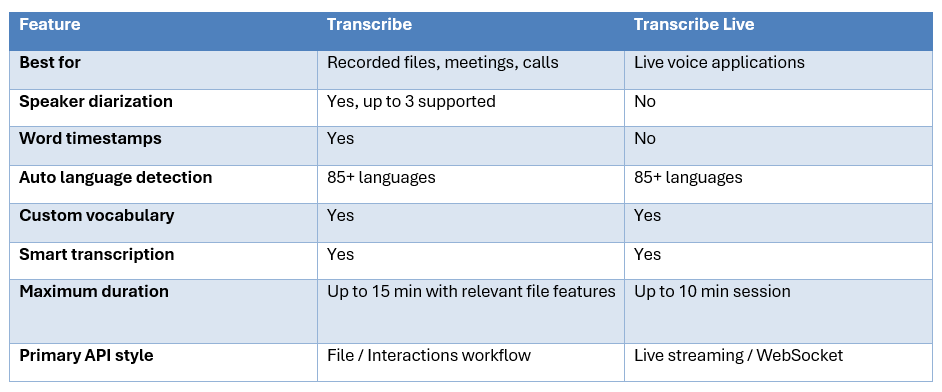
This is not a cosmetic product split. The wrong endpoint can make a technically good model unusable for a specific application. A call-center analytics pipeline usually needs the file endpoint because speaker labels and word timestamps matter. A voice assistant needs the Live endpoint because latency and continuous streaming matter. Google's documentation explicitly describes separate limits and capabilities.
5. Price: Around Half a Cent Per Minute
Google's Gemini API pricing currently lists Gemini 3.5 Transcribe at $2 per million audio tokens for input and $12 per million text output tokens. Google's estimated conversion produces roughly $0.003 per audio minute plus $0.002 per output minute, or about $0.005 per minute blended. The Live endpoint is listed at $0.005 per audio minute for audio input and $0.004 per output minute, or roughly $0.009 blended.
At the estimated blended recorded rate, 1,000 hours of audio would be approximately $300. The equivalent Live estimate would be about $540. These are simple extrapolations from Google's published estimates, not guaranteed bills, because actual token counts and output length vary.
The economics become particularly attractive when transcription is only one step in an AI pipeline. A product can transcribe audio and then feed the resulting text into another model for summarization, extraction or action planning without paying for an expensive speech specialist at every step.
6. 85+ Languages and Custom Vocabulary
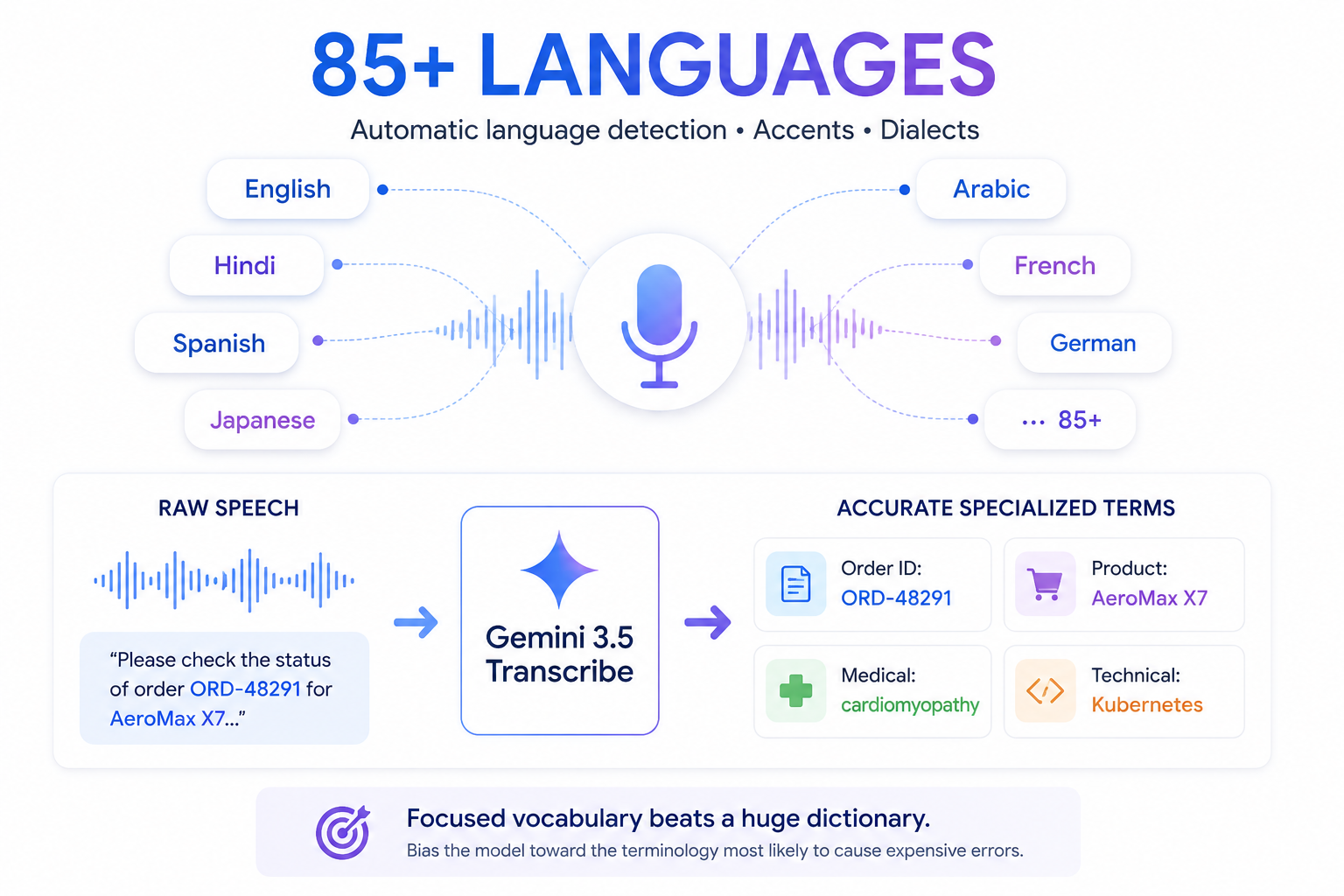
Google says Gemini 3.5 Transcribe can automatically detect more than 85 languages and handle regional accents and dialects. It also supports custom vocabulary biasing for specialized words, names and spellings. Google Cloud lists up to 1,000 vocabulary terms and says customers often get the best results with smaller focused lists.
This is more important than a raw language count for many commercial applications. Support software might need order IDs, product names and internal terms. Medical or technical workflows need specialized vocabulary. If a transcription model gets ordinary sentences right but corrupts the key identifier in a transaction, its average WER is not the metric that matters.
The right strategy is to maintain targeted vocabularies by workflow or customer. Do not throw a huge dictionary into every request. Bias the model toward the terminology most likely to cause expensive errors.
7. Speaker Diarization Is Useful, Not Unlimited
The recorded-audio endpoint supports speaker attribution for up to three speakers, while support for three or more speakers remains experimental. It also returns word-level timestamps.
That covers interviews, two-person calls and many support workflows. It is not a complete meeting-room diarization solution. If your product needs reliable identity tracking across six or ten speakers, build a separate evaluation and do not treat experimental support as equivalent to a mature multi-speaker system.
Google also notes that word-level timestamping can degrade transcription accuracy. That is a useful reminder that every extra output requirement can impose a quality or latency tradeoff.
8. Where Gemini 3.5 Transcribe Wins
- Smart cleanup reduces the need for separate post-processing of filler words, stutters and spoken corrections.
- Low estimated blended pricing makes it practical for high-volume transcription.
- 85+ language automatic detection simplifies multilingual products.
- Custom vocabulary is directly useful for technical and business terminology.
- Recorded audio gets speaker attribution and word-level timestamps.
- Google can connect transcription to its wider Gemini ecosystem, including agents, dictation and developer platforms.
9. Where It Falls Short
- It is a preview model, so limits, quotas and behavior can change.
- The current independent WER picture does not make it the universal accuracy leader.
- Speaker attribution beyond three speakers is experimental.
- The streaming and file endpoints do not offer identical features.
- Smart mode can intentionally change the transcript, which is undesirable when strict verbatim fidelity is required.
- Duration and processing limits mean large audio libraries still need chunking and workflow design.
10. Gemini 3.5 Transcribe vs GPT Transcribe
GPT Transcribe is the most obvious alternative for teams already using the OpenAI stack. A fair launch comparison should focus on your workload rather than on one provider's headline WER. Current independent analysis notes that the public numbers are measured under different benchmark regimes, making a universal winner difficult to claim from launch data alone.
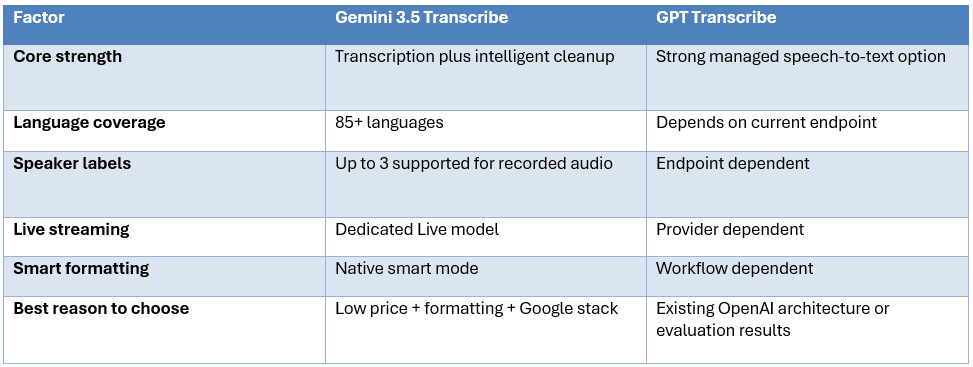
The practical choice should come from a small test set. Run the same noisy calls, names, numbers, accents and speaker transitions through both models and compare not only WER but the percentage of transcripts that need human correction.
11. Gemini 3.5 Transcribe vs Specialist Speech APIs
Dedicated speech vendors have an advantage when speech is the entire product. They can tune infrastructure, decoding and product features around transcription. Gemini's counterargument is that transcription can be part of a broader reasoning workflow, where the same AI platform can turn speech into summaries, extracted fields, decisions or tool actions.
That makes Gemini particularly interesting for AI-native applications. A voice support agent, for example, may need transcription, intent classification, customer-data extraction and an action request. The fewer separate APIs required, the simpler the system can become. But if speech recognition itself is the product, specialist APIs deserve a direct benchmark.
For the broader model-selection problem, see our Best Open Source AI Models August 2026 and our Model Routing for AI Coding Agents guide.
12. Best Use Cases
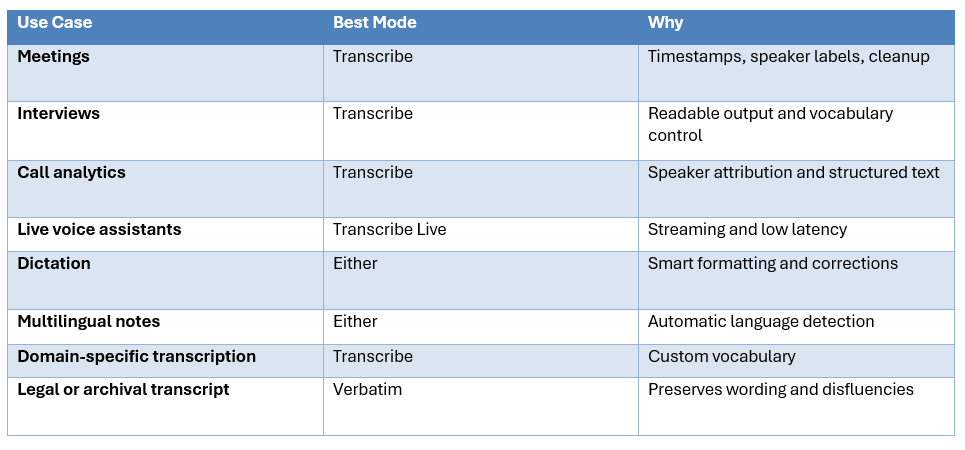
13. How to Evaluate It Properly
The wrong way to test a transcription model is to record a clean 30-second microphone demo. Build an evaluation set from the audio that breaks your product.
- Include accents, noise, reverberation, interruptions and code-switching.
- Include customer names, numbers, dates, SKUs, order IDs and technical terms.
- Measure WER, but also measure entity accuracy and diarization accuracy.
- Measure time to first usable text and time to final transcript for live systems.
- Compare smart mode against verbatim mode to see whether corrections are actually helpful.
- Calculate human correction time because that can matter more than raw WER.
- Calculate total cost after any downstream summarization or extraction calls.
This connects directly with our Context Engineering guide because the quality of an AI workflow depends on how information is structured and passed between steps.
14. Is Gemini 3.5 Transcribe Worth It?
Yes, for evaluation. The feature set is broad and the price is low enough that there is little reason not to benchmark it if you are building a new transcription pipeline. The strongest case is not that Gemini has the absolute lowest WER. The strongest case is that it combines good recognition with useful post-processing, language detection, vocabulary control and timestamps in a single model.
The preview status is the main caution. Production teams should verify quotas, maximum audio duration, endpoint availability and regional support before making it a hard dependency. They should also keep a fallback speech provider for high-value workloads until the model has a longer production history.
For large group meetings, diarization requirements can be the deciding weakness. For legal or archival work, use verbatim output and validate every assumption about formatting. For live voice agents, the Live endpoint is the natural choice, but its limits should be tested under actual session lengths and concurrency.
15. Final Verdict
Gemini 3.5 Transcribe is a serious release, and its biggest advantage is that Google is treating transcription as a language understanding problem rather than only a recognition problem. Smart transcription, automatic formatting, custom vocabulary and spoken correction handling make the output more useful without requiring a second cleanup model.
Its accuracy story is strong but nuanced. Google's FLEURS results are competitive, and the company cites even stronger Artificial Analysis WER measurements, but current independent leaderboard data does not justify calling it the undisputed number-one speech model. Benchmark conditions differ, and your own audio matters more than a single public score.
The price is difficult to ignore. At Google's estimated blended rate of about half a cent per minute for recorded transcription, Gemini 3.5 Transcribe is cheap enough for applications that previously had to ration speech processing. That makes it especially attractive for AI agents, meeting products, dictation and content pipelines where transcription is one component of a larger workflow.
Bottom line: Gemini 3.5 Transcribe is worth testing now. It is not automatically the best speech model for every workload, but it is one of the best new combinations of price, intelligence and developer features. If your product needs smart transcription rather than raw speech recognition alone, Google's new model deserves a place near the top of the shortlist.
Frequently Asked Questions
What is Gemini 3.5 Transcribe?
It is Google's latest speech-to-text model for recorded and live audio workflows, with automatic language detection, custom vocabulary, timestamps, speaker attribution and smart transcription features.
How accurate is Gemini 3.5 Transcribe?
Google reports 5.50% WER streaming and 5.04% non-streaming on FLEURS. It also cites Artificial Analysis at 4.0% streaming and 2.6% non-streaming. These are different measurements and should not be treated as one number.
How much does Gemini 3.5 Transcribe cost?
Google estimates about $0.005 per minute blended for the recorded model and about $0.009 per minute for the Live endpoint.
Does it support speaker diarization?
Yes for recorded audio, with up to three speakers supported. Attribution beyond three speakers is experimental.
How many languages does it support?
Google says more than 85 languages with automatic language detection.
What is the difference between Transcribe and Transcribe Live?
Transcribe is aimed at recorded audio and supports speaker attribution and word timestamps. Transcribe Live is for real-time streaming and has a different feature set.
Can it remove filler words?
Yes. Smart transcription can remove filler words, stutters and false starts and can format the result into more readable text.
Does it have a verbatim mode?
Yes. Verbatim mode preserves filler words, repetitions, pauses and false starts.
Is it better than GPT Transcribe?
There is no defensible universal winner from the current launch data. Test both on the exact audio, languages and speaker patterns in your product.
Is it ready for production?
It is in preview, so serious production deployments should evaluate quotas, limits, regional availability and fallback requirements before depending on it as the only provider.
Recommended Blogs
- Best Open Source AI Models August 2026: Full Collection
- Qwen3.8-Flash-Next Preview: Release Date, Specs & Qwen4
- 100 Best DeepSeek Prompts 2026 (Copy-Paste)
- MiniMax Design Review: Software, M3, Pricing & Free Tier
- What Is Context Engineering? Complete Guide (2026)
- How to Use LangGraph for Multi-Agent Systems (2026)
Resources & Community
Join our community of 70,000+ AI enthusiasts and learn to build powerful AI applications. Whether you're a beginner or an experienced developer, Build Fast with AI helps you understand and implement AI in your projects.
- Website - buildfastwithai.com
- LinkedIn - Build Fast with AI
- Instagram - @buildfastwithai
- Founder Twitter - @satvikps
- Twitter - @BuildFastWithAI
Agentic AI Launchpad 2026
A structured 6-week cohort program that takes you from AI basics to building and deploying real-world agentic AI systems. Includes live sessions, expert mentorship, project reviews and a builder community network.
Ready to go from learning to building? Join the next cohort: Agentic AI Launchpad 2026
Free AI Resources
Access free tools, workshops and micro-learning to keep building.
References
- Google Blog - Introducing Gemini 3.5 Transcribe
- Google AI Developers - Audio transcription
- Google AI Developers - Gemini API pricing
- Google Cloud - Gemini 3.5 Transcribe model documentation
- Google DeepMind - Gemini Audio transcription
- The Verge - Google Gemini 3.5 Transcribe launch
- PacketNebula - Gemini 3.5 Transcribe analysis

