



MiniMax H3 Turbo Review: Is This the Best Way to Make H3 Dramatically Faster?
MiniMax H3 Turbo is not a separate first-party MiniMax model like MiniMax H3. It is a community acceleration ecosystem built on top of the open-weight H3 checkpoint. The main idea is simple: use LoRA distillation to compress H3's sampling process into a much smaller number of inference steps, making local and hosted generation substantially faster. The most visible Turbo branches now include 4-step and 8-step checkpoints from LightX2V and related community projects.
The reason this matters is that MiniMax H3 is a large multimodal video model that generates video with synchronized audio. H3 supports text, image, video and audio understanding, 24 fps output, and clips in the roughly 4-15 second range. Its native resolution path uses a 768-pixel short edge, while MiniMax's official workflow also provides a route to 2K output. Turbo keeps the core H3 generation idea while reducing the sampling burden.
The result is a very different workflow. Instead of waiting through a long native sampling schedule for every experiment, creators can generate multiple candidates much more quickly. But the speed increase is not free. The most aggressive 4-step settings can introduce motion smear, oversharpening and audio regressions, while 6-8 steps usually provide a better quality-speed balance.
QUICK ANSWER
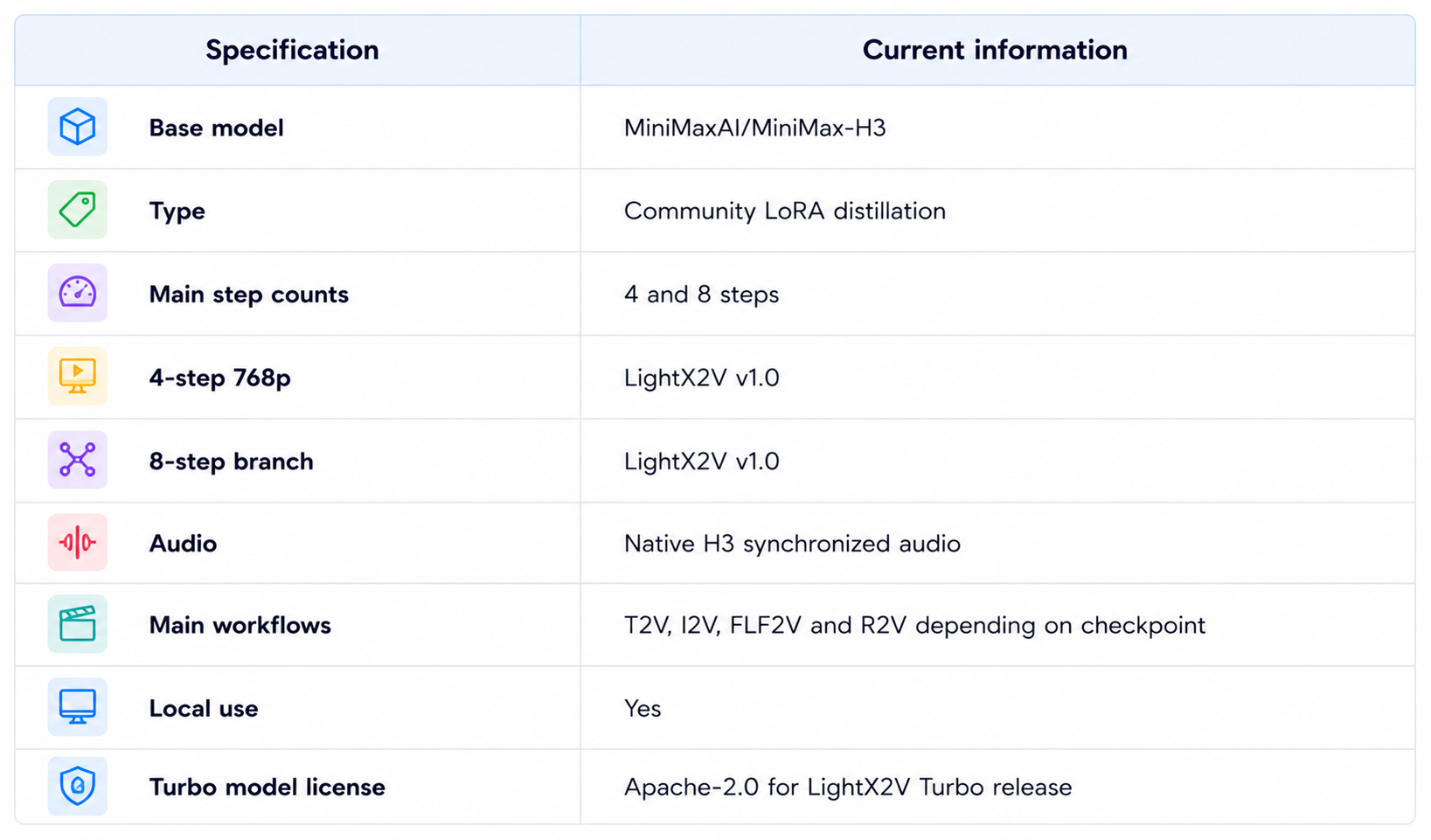
MiniMax H3 Turbo is best understood as a community-made acceleration layer for MiniMax H3, not a new official MiniMax model. LightX2V currently publishes Turbo LoRAs for H3, including a 4-step 768p checkpoint, an 8-step 768p checkpoint and a separate reference-to-video Turbo branch. The base H3 model remains the actual generation model underneath these adapters.
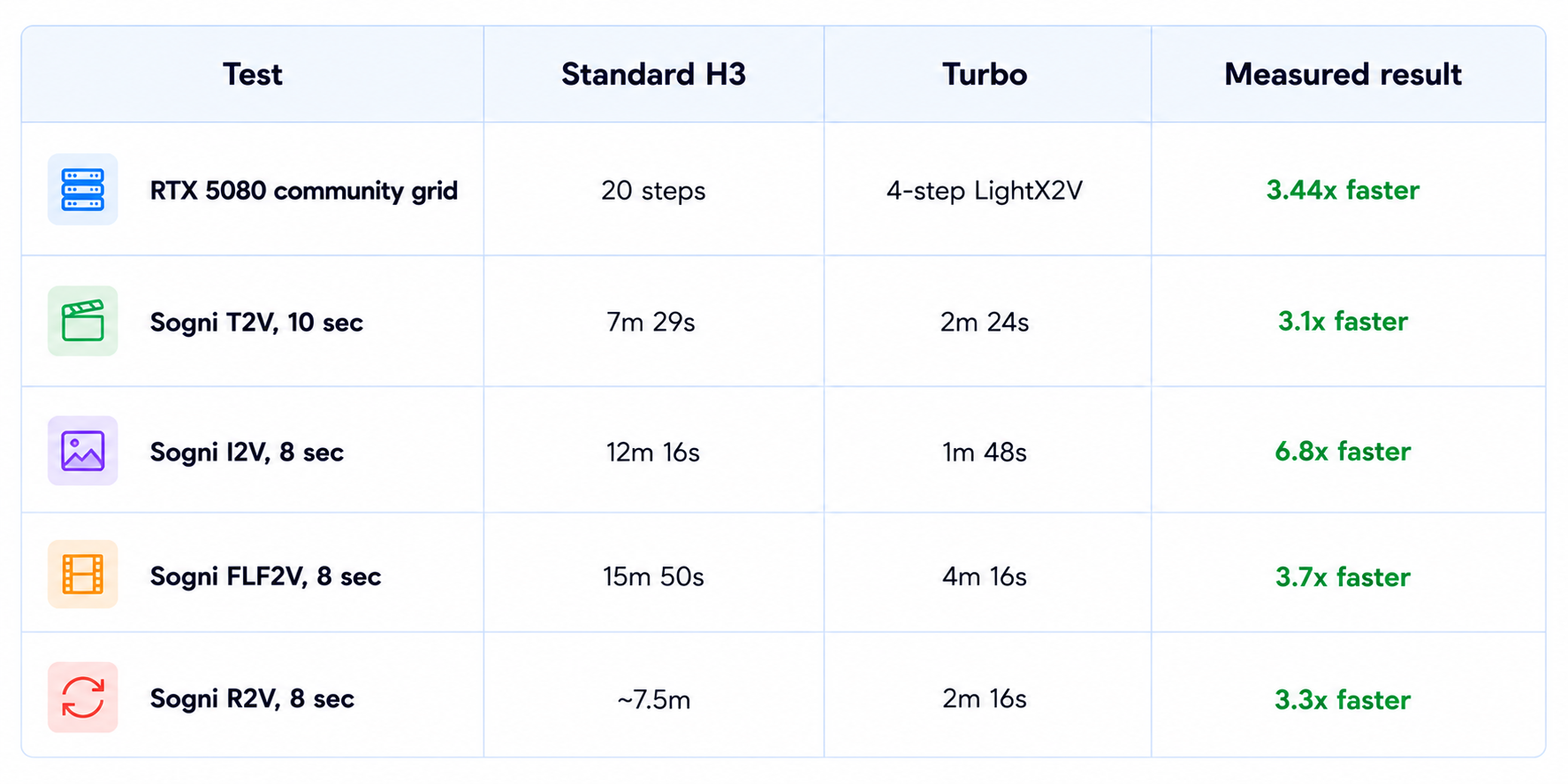
The speed gains are substantial. A structured community evaluation on an RTX 5080 measured the LightX2V 4-step configuration at about 3.44x the speed of the 20-step baseline under its fixed test setup. Sogni's hosted measurements showed Turbo text-to-video rendering 3.1x faster than standard H3 for a 10-second job and image-to-video 6.8x faster for an 8-second job. These are controlled measurements, not universal guarantees for every GPU or provider.
Quality is the tradeoff. Community tests generally find 6-8 steps more reliable for detail, motion and audio, while 4 steps is useful when speed is the priority. The current Turbo ecosystem also includes different checkpoints for different tasks, so using the right adapter and sampling configuration matters.
My verdict: 9/10 for speed, 8.2/10 for quality, 9.1/10 for local experimentation and 8.8/10 overall. H3 Turbo is worth using when H3 generation time is your main bottleneck.
1. What Is MiniMax H3 Turbo?
MiniMax H3 Turbo is a family of LoRA distillations built on MiniMax H3. The adapters teach the model to reach a useful result in far fewer sampling steps than the base workflow. LightX2V publishes the Turbo weights on Hugging Face under Apache-2.0 and provides local Diffusers usage, a hosted Studio and an API.
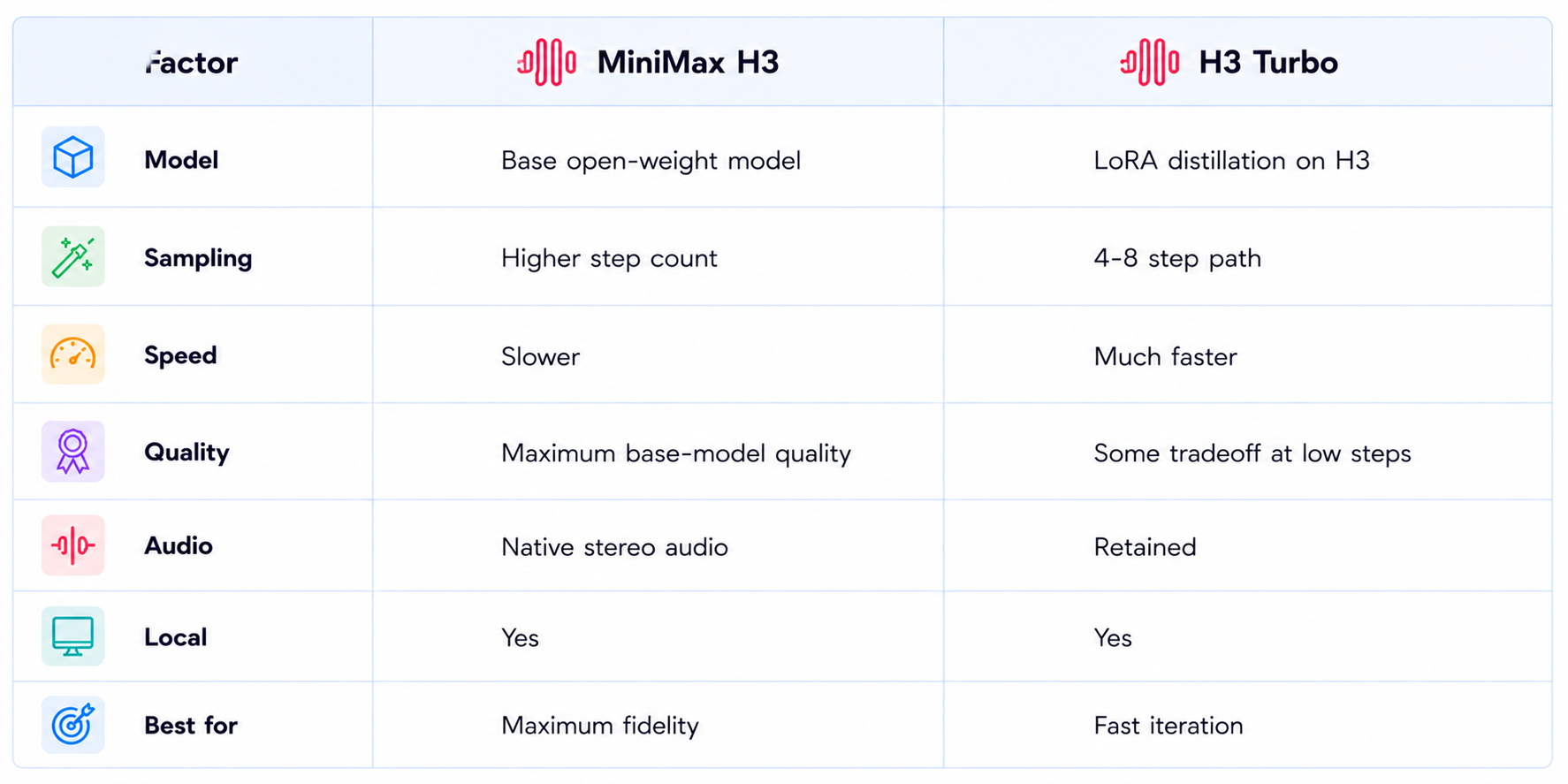
The distinction between H3 and H3 Turbo is important. MiniMax H3 is the underlying open-weight multimodal video model. H3 Turbo is the optimization layer applied to that model. Calling Turbo a separate official MiniMax release would therefore be misleading.
Because the acceleration is based on distillation, different Turbo checkpoints can behave differently. Current repositories contain separate paths for standard text/image-to-video acceleration and reference-to-video acceleration. The checkpoint is part of the configuration, not merely an interchangeable file.
2. MiniMax H3 Turbo Specifications
3. Why Turbo Changes the H3 Workflow
The main benefit of Turbo is not simply a faster benchmark number. Video generation is iterative. A creator generates a shot, watches it, changes the camera move, adjusts the character action and tries again. When one render takes a long time, the creator is pushed toward keeping mediocre results. When the same model can produce several alternatives quickly, the creative workflow changes.
The same idea applies to developers. Local model experimentation is much more practical when each evaluation takes seconds or minutes rather than a long native H3 run. Turbo therefore lowers the time cost of testing prompts, samplers, seeds and workflows.
4. How Much Faster Is MiniMax H3 Turbo?
5. 4 Steps vs 8 Steps
Four-step Turbo is the speed-oriented option. Eight-step Turbo is usually the safer quality-oriented option. Community evaluations repeatedly point to 6-8 steps as a practical middle ground when the output needs to remain clean.
The important point is that 4 steps is not automatically the 'best' Turbo setting. It is the fastest setting in the current LightX2V branch, but quality depends on the scene. Fast motion, difficult audio and fine detail are more likely to expose the limits of aggressive distillation.
6. Video Quality and Prompt Adherence
Turbo works best when the scene does not demand more precision than the few-step path can provide. Simple camera movement, short actions and well-defined subjects can look very strong. More complicated motion can reveal the tradeoff quickly.
Community benchmark notes report that 4-step distillation can hurt quiet or sustained vocal registers, regress accents toward more generic output and turn some hard cuts into softer transitions. Other tests show that 4-step settings can introduce oversharpening, ghosting or motion trails on demanding scenes. These observations come from particular community configurations, so they should be treated as practical failure modes rather than universal behavior.
7. Native Audio Still Works
One of H3's main strengths is that video and audio are generated together. The official H3 project describes native stereo audio at 32 kHz, with dialogue, sound effects and ambience generated as part of the video workflow. Turbo accelerates the sampling path without removing that audio capability.
The caveat is that audio can be more sensitive to very low step counts. If the scene depends on precise dialogue, subtle sound design or sustained voices, an 8-step configuration is the safer starting point. Community evaluations specifically flag quiet vocal passages and some accents as areas where aggressive distillation can regress.
8. Image-to-Video
Turbo supports image-to-video through the current LightX2V ecosystem. This is one of the most useful workflows because the source image already establishes the composition, subject and much of the visual identity.
Sogni's current measurements show especially large relative gains for image-to-video, with an 8-second Turbo I2V run measured at 1 minute 48 seconds versus 12 minutes 16 seconds for standard H3 on its Supernet setup.
9. Reference-to-Video Turbo
Reference-to-video is handled by a separate Turbo branch. LightX2V provides a dedicated Ref2V Turbo checkpoint because reference-heavy generation has different conditioning requirements from ordinary text-to-video or image-to-video.
This is useful for identity preservation, style references and controlled casting. It is also the workflow where correct checkpoint selection becomes especially important. Do not assume that a FL2VA or T2VA Turbo LoRA can simply be attached to an R2V graph.
10. MiniMax H3 Turbo Pricing
Because H3 Turbo is a community ecosystem rather than one official MiniMax endpoint, there is no single universal Turbo price. Hosted services set their own rates.
Sogni currently lists Turbo at 4 Spark per second for 480p and 6 Spark per second for its 544/768p-class tier. With Sogni's 1 Spark equal to $0.005, that works out to $0.02 per second at 480p and $0.03 per second at the higher tier.
For users running Turbo locally, there is no per-video API fee for the local generation itself. The effective cost instead comes from GPU hardware, electricity, storage and setup time.
11. Can You Run MiniMax H3 Turbo Locally?
Yes. LightX2V distributes the Turbo weights through Hugging Face and provides Diffusers examples, while community projects provide ComfyUI workflows and other local integrations.
Hardware requirements vary with precision and offloading. Community hardware documentation places a Q5_K_M H3 UNet at about 23.9 GB, with roughly 44 GB total memory for the complete setup. That puts some quantized configurations within reach of 24GB-class GPUs, although a 24GB card does not make every full-precision workflow practical.
12. ComfyUI and Diffusers
ComfyUI is one of the strongest reasons to use H3 Turbo locally. The current community repositories include dedicated T2VA, I2VA and Ref2VA examples, and the Turbo LoRAs can be integrated into the H3 workflow rather than replacing the entire model.
Diffusers users can also load the LightX2V model directly with the pipeline API. The important rule is to follow the checkpoint's intended step count, flow-shift settings and sampler. A distilled adapter can produce poor output when it is paired with the wrong schedule.
13. MiniMax H3 vs H3 Turbo
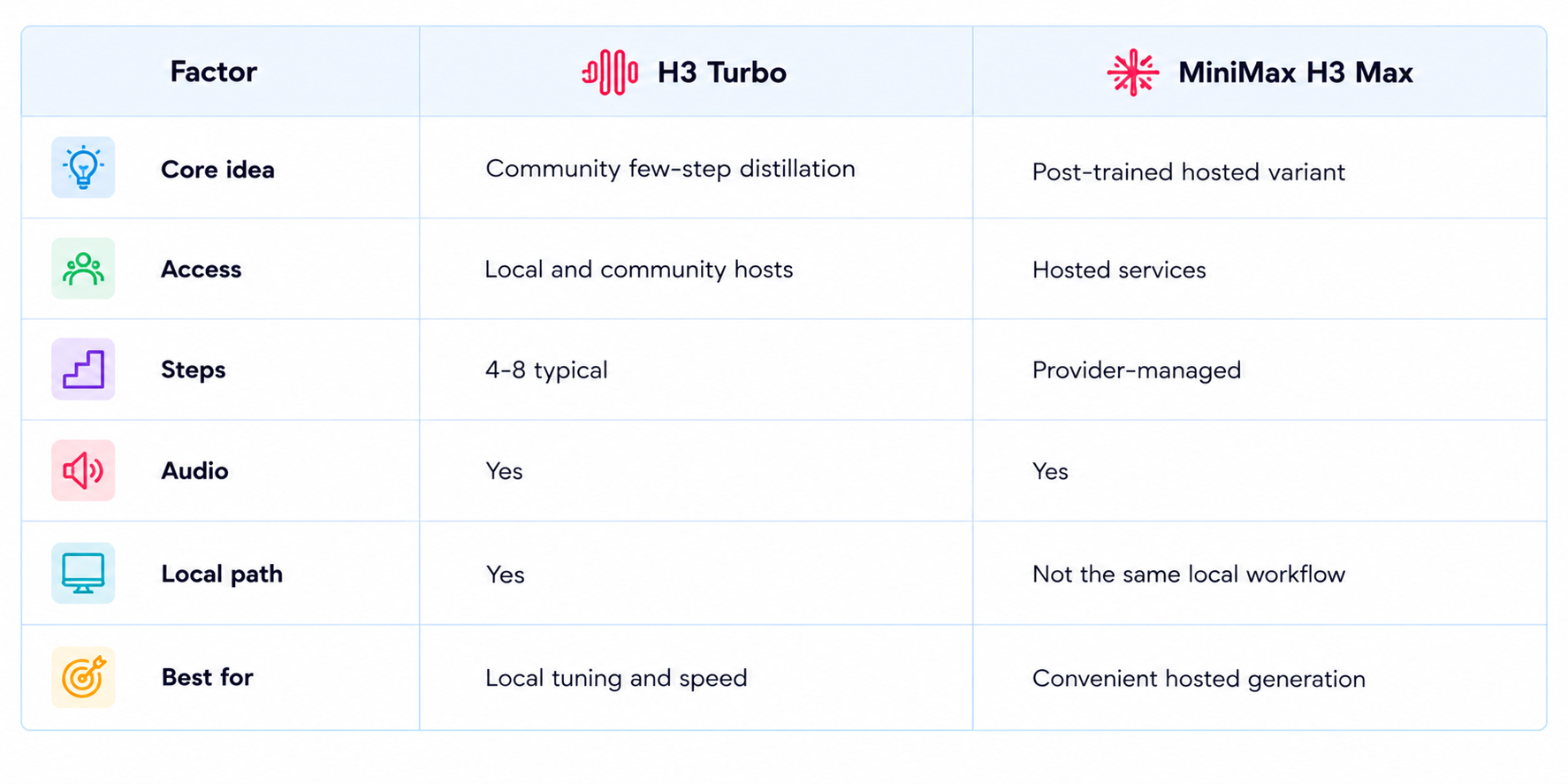
14. MiniMax H3 Turbo vs H3 Max
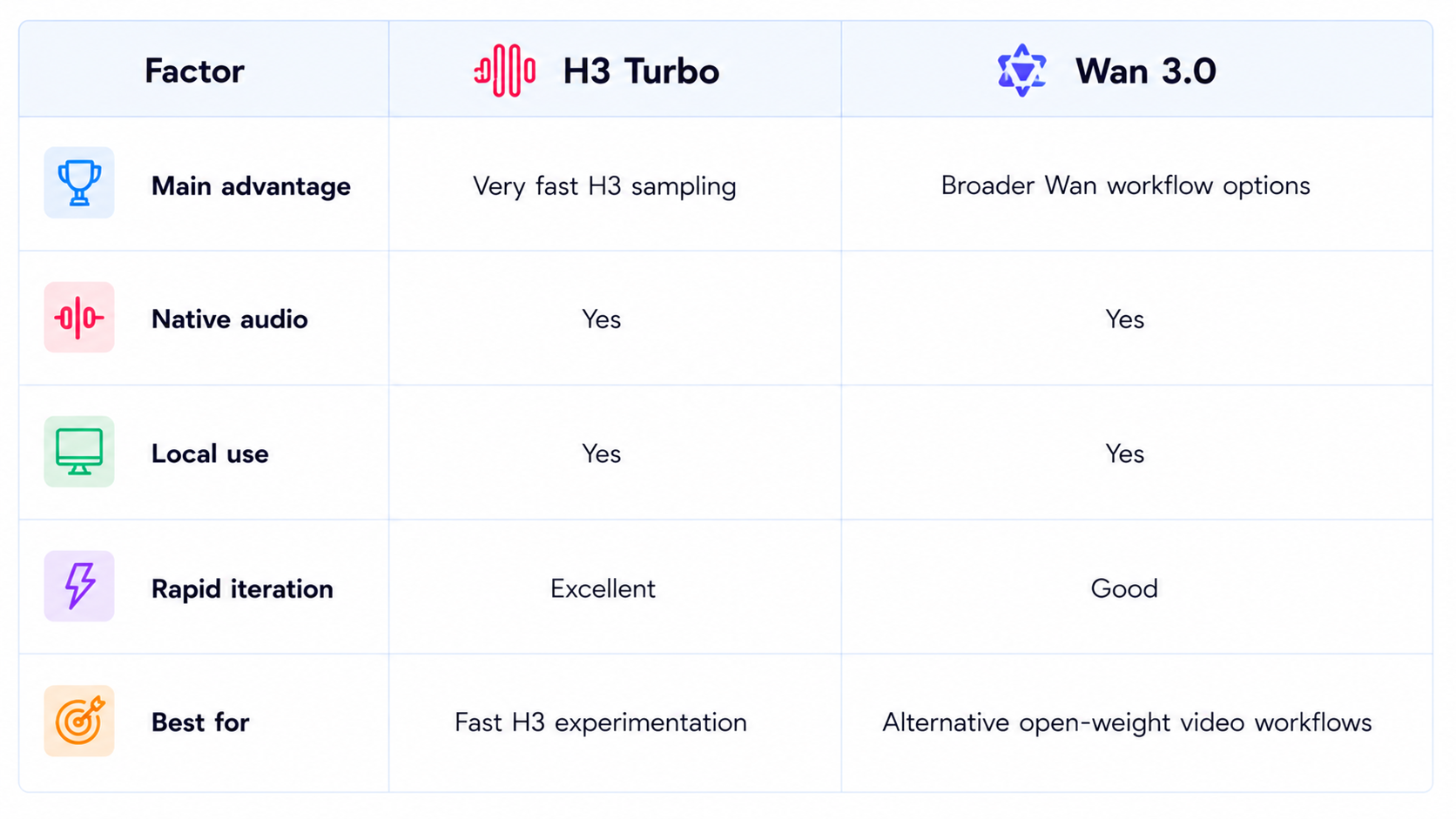
15. MiniMax H3 Turbo vs Wan 3.0
16. Limitations You Should Know
Turbo is a community acceleration ecosystem, not an official separate MiniMax product.
Four-step generation can reduce detail and stability compared with the base H3 sampling path.
Quality varies between LoRA versions and the workflow they were trained for.
Fast motion can expose ghosting or motion smear at very low step counts.
Audio quality can be more sensitive to aggressive distillation, especially for subtle speech.
Hosted pricing depends on the provider.
Local inference can require substantial VRAM, especially without quantization or offloading.
Turbo should be evaluated as a speed-quality tradeoff, not as a guaranteed quality upgrade over standard H3.
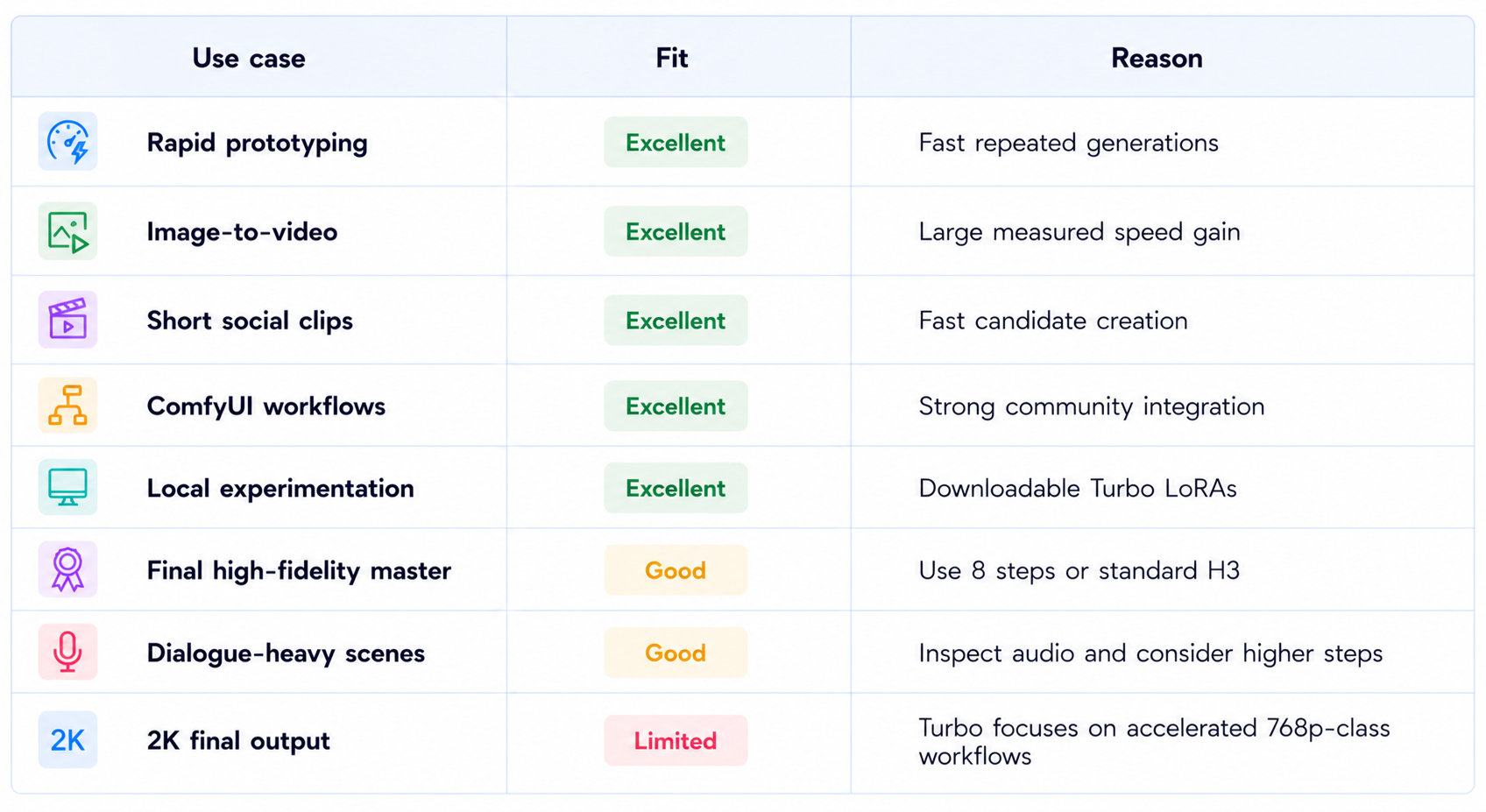
17. Best Use Cases
18. Recommended Production Workflow
The most effective workflow is to use Turbo as a fast search stage and standard H3 as a quality stage.
Start with 4 steps when you are exploring ideas and need rapid feedback.
Move to 6-8 steps when a promising shot needs cleaner motion, detail or audio.
Use the checkpoint designed for the exact workflow you are running.
Prefer image-to-video when an important composition or character is already defined.
Review the complete clip, including audio, before accepting it.
Use standard H3 when the Turbo result is close but does not have enough fidelity for the final deliverable.
19. How to Evaluate H3 Turbo Yourself
Run the same prompt, seed, resolution and duration through standard H3, 4-step Turbo and 8-step Turbo.
Measure wall-clock generation time, prompt adherence, temporal stability, video detail, audio quality and artifact rate.
Track cost per accepted shot instead of cost per generation. A faster result that needs several retries can be less efficient than a slightly slower result that succeeds on the first attempt.
20. Is MiniMax H3 Turbo Worth It?
Yes, especially when generation time is the main bottleneck. The current community ecosystem has moved beyond a single experimental LoRA into multiple 4-step and 8-step branches, local Diffusers support, ComfyUI workflows and hosted access.
The key benefit is throughput. A creator can explore more shots in the same amount of time, while a developer can run more local evaluations before deciding which prompt or workflow is worth refining.
The best results come from treating the step count as a quality control. Four steps is ideal for exploration. Six to eight steps is usually the better target when the output itself matters. Standard H3 remains the fallback when the final render needs the maximum fidelity available from the base model.
21. Final Verdict
MiniMax H3 Turbo is one of the most useful community optimizations around MiniMax H3 because it attacks the model's biggest practical weakness for local users: sampling time. It does not create a new video model from scratch. It makes an existing multimodal video-and-audio model much cheaper and faster to sample.
The measured speedups are substantial. A community RTX 5080 evaluation put the LightX2V 4-step setup at roughly 3.44x the 20-step baseline, while Sogni measured 3.1x faster text-to-video and 6.8x faster image-to-video in specific workloads.
Quality is the tradeoff. At four steps, difficult motion and audio can show artifacts or loss of detail. Eight steps usually provides a better balance, and the correct checkpoint matters just as much as the step count.
Hosted pricing is also attractive on providers such as Sogni, where Turbo is currently 4 Spark per second at 480p and 6 Spark per second at 544/768p-class output. Local users can instead use the downloadable LoRAs and pay primarily in GPU time.
My rating: 9/10 for speed, 8.2/10 for quality, 9.1/10 for local experimentation and 8.8/10 overall.
Bottom line: MiniMax H3 Turbo is worth using when fast H3 iteration matters more than squeezing out the last bit of visual quality. Start with four steps for exploration, move to six or eight steps for stronger final candidates, and switch back to standard H3 whenever maximum fidelity matters.
Frequently Asked Questions
What is MiniMax H3 Turbo?
A set of community LoRA distillations built on MiniMax H3 to reduce the number of sampling steps and accelerate video-and-audio generation.
Is MiniMax H3 Turbo official?
No. MiniMax H3 is the official MiniMax model. H3 Turbo refers to community acceleration checkpoints and workflows.
How much faster is H3 Turbo?
Controlled community measurements range from about 3.1x to 6.8x faster in specific Sogni workloads, while an RTX 5080 grid measured about 3.44x for a 4-step setup.
Should I use four or eight steps?
Use four for maximum speed and exploration. Use six to eight when you want a better quality-speed balance.
Does H3 Turbo generate audio?
Yes. It retains H3's joint video-and-audio generation.
Can I run H3 Turbo locally?
Yes. LightX2V publishes Turbo weights on Hugging Face and community tools support Diffusers and ComfyUI.
How much does H3 Turbo cost?
There is no universal official price. Sogni currently lists 4 Spark/sec at 480p and 6 Spark/sec at its 544/768p-class tier.
Is H3 Turbo better than standard H3?
It is faster, not inherently higher quality. Standard H3 remains the choice for maximum fidelity.
Is H3 Turbo worth it?
Yes for rapid generation and local experimentation, especially when the base H3 sampling time is the bottleneck.
Recommended Blogs
MiniMax H3 Max Review: Accuracy, Price & Is It Worth It? (2026)
Gemini Omni 1.1 Flash Review: Accuracy, Price & Is It Worth It? (2026)
Best AI Video Models 2026: Ranked by Quality, Speed, Price & Use Case
Google Pics Review: Features, Price & Is It Worth It? (2026)
Resources & Community
Join our community of 70,000+ AI enthusiasts and learn to build powerful AI applications. Whether you're a beginner or an experienced developer, Build Fast with AI helps you understand and implement AI in your projects.
Agentic AI Launchpad 2026
A structured 6-week cohort program that takes you from AI basics to building and deploying real-world agentic AI systems. Includes live sessions, expert mentorship, project reviews and a builder community network.
Ready to go from learning to building? Join the next cohort:
Ready to go from learning to building? Join the next cohort: Agentic AI Launchpad 2026
Free AI Resources
Access free tools, workshops and micro-learning to keep building.

