



20 Things Kimi K3 Can Build From One Prompt (That Most Users Never Try)
Moonshot AI let a model design a chip. Not assist with a chip — design one, alone, in a single 48-hour autonomous run, using open-source EDA tools on a 45nm library, closing timing at 100 MHz inside 4 mm² with 1.46M standard cells and an INT4 MAC array. The model was Kimi K3. The instruction was a prompt.
That is the gap this article is about. Kimi K3 shipped on July 16, 2026, and its open weights landed on July 27 — 2.8 trillion parameters, native vision, a 1-million-token context window, and the first open model in the 3T class. Most people are still typing questions at it. A question gets you an answer. A specification gets you a compiler, a research site, a video edit, or a spreadsheet with a working checks sheet.
Below are twenty things Kimi K3 will build from a single prompt, each with a copy-paste template, the reason it works on this specific model, and the failure mode to watch. If you want the benchmark and pricing context first, our Kimi K3 review with full benchmarks and K2 comparison covers the launch; this piece is about what to actually type.
1. Why Kimi K3 Prompts Are Different: Five Behaviours That Change What You Type
Kimi K3 rewards long, complete, up-front specifications and punishes vague ones harder than any model Moonshot has shipped — because it was trained for long-horizon autonomy and will improvise when your intent is ambiguous. Moonshot says this in its own launch notes, filed under Limitations, which is the most honest place any lab has put it.
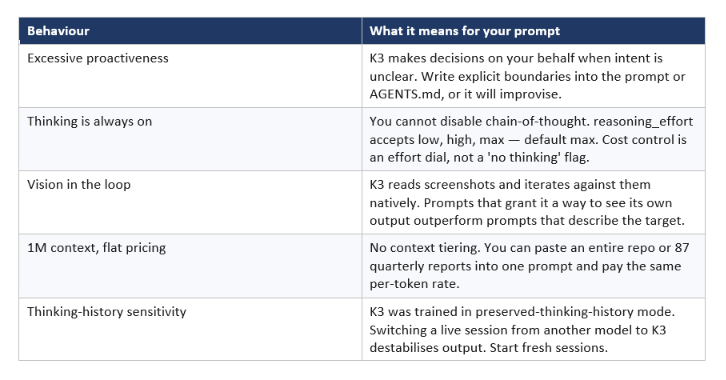
The proactiveness point is the one that catches people. On a tightly-scoped task, K3's willingness to make judgment calls is why it finishes; on a loosely-scoped one, it is why you get something you did not ask for. Every template below either exploits that autonomy or fences it in, and knowing which is which is most of the skill.
The vision loop deserves its own note because it is genuinely underused. Moonshot's own examples have K3 writing frontend code, screenshotting the render, and correcting itself — no human in the cycle. If your harness can hand it a screenshot, say so in the prompt. That single sentence changes the output class.
2. The Kimi K3 Prompt Template (The Skeleton Under All Twenty)
Every high-yield Kimi K3 prompt has the same six blocks, and you can build any of the twenty below by filling them in. This is the skeleton; the templates in section 3 are variations on it.
GOAL: [the finished artifact, described as a noun, not a verb]
CONTEXT: [repo path / files / data / audience / constraints you already know]
DEFINITION OF DONE: [the concrete test that says it is finished]
OUT OF SCOPE: [what you must not touch, change, or add]
VERIFICATION LOOP: [how you can check your own work — tests, screenshots,
a harness, a second source. Build the checker if one does not exist.]
DELIVERABLES: [file paths and formats you expect to exist at the end]
Make routine judgment calls yourself and note them in one line at the end.
Ask me only if two readings of this brief lead to materially different work.
Two blocks do the heavy lifting. OUT OF SCOPE is the direct counter to K3's documented over-improvisation, and VERIFICATION LOOP is what turns a long autonomous run from a gamble into something auditable. Moonshot's kernel-optimization evaluation gave K3 24 hours to profile, rewrite, and benchmark — the benchmark was the loop, and the loop is why the result was trustworthy. Prompt-engineering fundamentals that carry across models are collected in the AI prompts and prompt engineering hub if you want the wider frame.
Quotable: On Kimi K3, the most valuable line in your prompt is not the instruction — it is the test that tells the model whether it is done.
3. The 20 Things Kimi K3 Can Build From One Prompt
These twenty are grouped by the five jobs K3 is measurably good at: systems code, research at scale, documents and data, visual and web output, and standing agents. Square brackets are your fill-ins. Nothing here needs a custom harness — they run in Kimi.com, Kimi Work, Kimi Code, and the API.
Group A — Systems Code and Compilers (1-5)
This is the group where K3's numbers are hardest to argue with: 88.3 on Terminal-Bench 2.1 against Claude Fable 5's 84.6, and 42.0 versus 35.0 on SWE Marathon. It is also where nobody points it, because most people ask coding models for functions.
1. The From-Scratch Toolchain
Use it for: compilers, interpreters, DSLs, parsers — anything with a frontend, an IR, and a backend.
Build a working [COMPILER / INTERPRETER / DSL] for [TARGET].
Deliver the full pipeline, not fragments:
- Frontend: [syntax / source language]
- IR: design your own tile-level or [X]-level IR; document the invariants
- Passes: at minimum [list the optimizations you care about]
- Backend: emit [PTX / LLVM IR / bytecode / target]
- Runtime: whatever the emitted code needs to actually execute
Definition of done: [BENCHMARK SUITE] runs end to end and matches or
beats [REFERENCE IMPLEMENTATION] on at least [N] of the workloads.
Build the benchmark harness yourself before you start optimizing.
Report a roofline chart and the workloads where you lose. Do not hide
the losses.
Why it works on Kimi K3: Moonshot ran exactly this and got MiniTriton — a Triton-like compiler with its own IR over MLIR, optimization passes, and a PTX codegen pipeline that matched or beat Triton and torch.compile on supported roofline benchmarks and sustained end-to-end nanoGPT training. A model that can build a coherent compiler will not be troubled by your DSL.
Watch for: ask for the losses explicitly. Without that line you get a report of the wins and no sense of the envelope.
2. The Profile-Rewrite-Benchmark Kernel Loop
Use it for: GPU kernels, hot loops, anything where the win is measured in microseconds.
Optimize [KERNEL / FUNCTION] in [FILE].
Work in a loop, not a single pass:
- Profile the current implementation and report the actual bottleneck
- Form one hypothesis about what to change and why
- Rewrite
- Benchmark against the original on [HARDWARE / INPUT SHAPES]
- Keep the change only if it wins; revert and try again if not
Numerical tolerance: [SPEC]. Any precision shortcut must be stated
explicitly and stay inside that tolerance.
Run at least [N] iterations of the loop before you report. Give me the
log of hypotheses tried and rejected, not just the final version.
Why it works on Kimi K3: in Moonshot's own testing, models got up to 24 hours in an identical sandbox to profile, rewrite, and benchmark four kernel tasks across NVIDIA Hopper and a non-NVIDIA GPGPU. K3 performed competitively with Fable 5 and substantially outperformed Opus 4.8, GPT 5.6 Sol, and GPT 5.5. In the late stages of K3's own development, an early K3 handled most of the team's kernel optimization work.
Watch for: the rejected-hypotheses log. If it is empty, the model did one pass and called it a loop.
3. The Vision-in-the-Loop Frontend
Use it for: UI work where 'looks right' is the spec and you are tired of describing pixels.
Build [COMPONENT / PAGE] to match the attached [screenshot / mockup].
Work visually, not from my description:
- Implement a first pass
- Render it, screenshot it, and compare against the reference yourself
- List the specific visual deltas you can see
- Fix them and repeat until the deltas are cosmetic
Show me the screenshot from your final iteration alongside the code.
Constraints: [framework, design tokens, no new dependencies, etc.]
Do not change anything outside [DIRECTORY].
Why it works on Kimi K3: native multimodality means text, image, and code live in one model, so K3 achieves what Moonshot calls true vision in the loop — iterating between code and live screenshots and refining without a round trip through you. This is the same capability that makes it strong on game dev, frontend, and CAD.
Watch for: it needs an actual screenshot tool. Without one, this template degrades into ordinary frontend generation and the promised loop never runs.
4. The Whole-Repo Migration in One Context
Use it for: framework upgrades and API migrations that span hundreds of files.
We are migrating from [OLD] to [NEW] across this repository.
You have the full repo in context. Use it. Do not sample.
Produce and then execute:
- A complete inventory of affected files, grouped by transformation pattern
- The distinct patterns involved (expect 3-5, name them)
- Mechanical edits vs. judgment calls, marked per file
- A sequence that keeps the build green at every commit
- The rollback story if we stop halfway
Execute in that order. After each group, run [BUILD/TEST COMMAND] and
report the result before continuing. Stop and ask if the build breaks
twice in a row on the same group
Out of scope: dependency upgrades, formatting-only changes, test
rewrites in files you are not otherwise touching.
Why it works on Kimi K3: the 1M-token window is priced flat with no tiering, so 'paste the repo' is an economic decision as well as a technical one, and the KDA architecture is designed specifically to hold information flow across long sequences. Cache-hit input drops to $0.30 per million tokens, and Moonshot reports over 90% cache hit rates on coding workloads through its Mooncake inference stack — the second and third turns on a large repo cost a tenth of the first.
Watch for: verify the inventory against a real grep before approving. A plan built on a partially-hallucinated file list is worse than no plan, on any model.
5. The Playable Game From a Reference
Use it for: prototypes, interactive demos, and 3D scenes generated from an image or a video clip.
Turn this [image / video / concept description] into a playable
[GENRE] game in a single [HTML file / Unity scene / p5 sketch].
Required: player control, win and lose states, a scoring or progress
system, and a start screen. No placeholder art — generate what you need.
After each build, run it, screenshot it, and evaluate against the
reference. Name the three things that look or feel wrong and fix them.
Repeat [N] times before showing me anything.
Target: playable for 90 seconds without a bug that stops progress.
Why it works on Kimi K3: Moonshot pitches 3D reasoning, coding, and vision as one combined capability that turns concepts, images, and videos into fully playable interactive experiences. The 'run it, screenshot it, critique it' triplet is what converts that claim into a finished artifact instead of a first draft.
Watch for: specify the iteration count. Left open, K3 either stops at one pass or keeps polishing well past the point of usefulness.
Group B — Research and Knowledge Work at Scale (6-10)
K3's knowledge-work gains are less publicised than its coding scores and, for most non-engineers, matter more. It scores 90.4 on BrowseComp when run with the full 1M window and no context management. The templates here are the ones that use that.
6. The Interactive Research Website
Use it for: industry analyses, market maps, and anything you would otherwise deliver as a 40-slide deck nobody reads.
Research [TOPIC / INDUSTRY] over [TIME PERIOD] and deliver it as a
single interactive HTML site, not a document.
Sourcing: primary sources first — filings, official docs, raw data.
Label every Tier 3 claim (commentary, forums, vendor marketing) as
opinion. Where sources conflict, show both and say so.
The site must include:
- A drill-down structure: overview -> segment -> individual data point
- Charts built from the data you gathered, not stock imagery
- An animated timeline of the [N] inflection points you identify
- A methodology page listing every source and what you could not verify
Iterate on your own output: render, review, improve. Minimum [N] passes.
Why it works on Kimi K3: Moonshot's flagship example is a 42-year interactive history of the AI ASIC industry built through 120+ rounds of recursive self-improvement, pulling data via 2,800+ web searches and fetches and 1,100+ terminal data pulls across 11,000+ pages, 87 quarterly reports, and 99 original PDFs. The recursion is the product.
Watch for: the methodology page is not decoration. It is the only cheap way to audit a run that touched thousands of sources.
7. The Paper-to-Pipeline Reproduction
Use it for: turning published research into code you can actually run and check.
Reproduce [RESULT / RELATION] from the literature on [TOPIC].
Steps, in order:
- Find and cross-validate the relevant papers. Note where published
formulas disagree with each other — do not silently pick one.
- Implement the full numerical pipeline in Python.
- Evaluate across [PARAMETER SPACE / DATASET], not a single case.
- Validate your implementation against any published reference values
you can find, and report the deviation.
- Produce an interactive HTML dashboard for exploring the results.
Flag every inconsistency you found in the published formulas, with the
citation. That list is part of the deliverable.
Why it works on Kimi K3: reproducing the I-Love-Q universal relations in computational astrophysics, K3 reviewed and cross-validated 20+ papers, evaluated 300+ equations of state, wrote 3,000+ lines of Python, built an interactive dashboard, and found inconsistencies in published formulas — in about two hours against an estimated one to two weeks for an experienced researcher.
Watch for: the inconsistency list is the highest-value output and the easiest one to leave out of the prompt. Ask for it explicitly.
8. The Swarm Discovery Sweep
Use it for: finding a mountain of things that are individually hard to find.
Find [TARGET] across [N] distinct [DOMAINS / CATEGORIES / REGIONS].
This is a parallel problem — decompose it and work it in parallel.
Per domain, return: [the specific fields you need, e.g. name, URL,
audience size, last active date, one-line description].
Rules:
- Define each domain before you search it, so the results are comparable
- Deduplicate across domains and say which entries collided
- Mark any entry you could not verify from a primary source
Deliver one consolidated [CSV / table] plus a short note on which
domains were thin and why.
Why it works on Kimi K3: Agent Swarm spawns sub-agents autonomously — up to 100 in the K2.5 generation, with over 1,500 tool calls and roughly 4.5x faster delivery than sequential execution, and K3 now powers it. Moonshot's own demo is finding the top three creators across 100 niche YouTube domains by spawning 100 parallel sub-agents. Say 'this is a parallel problem' and the orchestrator does the rest.
Watch for: swarm runs multiply token cost as fast as they divide wall-clock time. Cap the domain count before you cap your budget.
9. The Adversarial Panel Review
Use it for: plans, launches, and decisions where you need real disagreement rather than a polite summary.
Here is my [PLAN / SPEC / STRATEGY]: [PASTE].
Convene a panel of independent reviewers who do not coordinate:
- A skeptical VC focused on unit economics
- A veteran engineering lead focused on technical debt and delivery risk
- An ethicist focused on dark patterns and downstream harm
- A customer success lead focused on edge cases and support load
- [ADD YOUR OWN]
Each writes independently. Then surface the points where they disagree
with each other and force a reconciliation — do not average them.
End with: the three objections that would actually change my decision,
and what evidence would resolve each one.
Why it works on Kimi K3: Moonshot's stated design goal for swarm work is creating the conditions for productive disagreement — independent agents reaching different conclusions and then being forced to reconcile, which avoids groupthink structurally rather than by instruction. 'Do not average them' is the line that preserves it.
Watch for: if the panel reads like five paraphrases of one view, your plan description was too vague to attack. That is diagnostic information about the plan.
10. The Book-Length Synthesis From a PDF Pile
Use it for: literature reviews, due diligence packs, and regulatory summaries built from dozens of source documents.
Read all [N] documents in [FOLDER] and produce a [LENGTH]-page
[literature review / diligence memo] in [FORMAT].
Structure: [your section plan, or 'derive it from the corpus and show
me the outline first'].
Requirements:
- Every claim carries an inline citation to a specific document and page
- A contradictions section listing where the sources disagree
- A gaps section listing what the corpus does not cover
- Formatted references, [citation style]
Decompose across the document set and assign sections in parallel, then
reconcile terminology and numbering across sections before delivery.
Why it works on Kimi K3: the documented pattern is a 100-page, two-column academic literature review generated from forty social psychology PDFs, with multiple writing sub-agents each owning sections and their outputs synthesised into one document with formatted citations. On OfficeQA Pro, K3 is evaluated against entire PDF corpora rendered as images with no machine-readable text — scanned documents are in scope.
Watch for: the reconcile step. Parallel writers produce inconsistent terminology unless you demand a unification pass.
Group C — Documents, Decks and Data (11-14)
Office output is where K3 quietly beats expectations, and where the gap between a one-line request and a specified one is largest.
11. The Editable Infographic Deck
Use it for: board updates, annual reviews, and conference talks that must not look like default templates.
Build a [N]-slide deck on [TOPIC] for [AUDIENCE]
Rules:
- Every slide title states a claim, not a topic
- Maximum three bullets per slide, twelve words each
- Data slides use generated charts built from [SOURCE], with the
underlying numbers left editable — no flattened images
- One infographic-style slide per section: a heatmap, funnel, Gantt, or
range bar that carries the argument visually
- A 'so what' slide closing each section
- Speaker notes are what I say out loud, not a restatement of the slide
Flag any slide where the source material was too thin, rather than
padding it.
Why it works on Kimi K3: Moonshot specifically calls out infographic-style presentations — fully editable heatmaps and annual reports — as a K3 strength, and the case studies include consulting-style reports with timelines, funnel charts, range bar charts, Gantt charts, and publication-quality slides. 'Fully editable' is the word to reuse in your own prompt.
Watch for: the padding flag. Without it, thin sections get filled with filler that reads plausible and says nothing.
12. The Audited Multi-Sheet Model
Use it for: financial models, capacity plans, and any spreadsheet where a wrong number is expensive.
Build a [MODEL TYPE] workbook.
Sheet 1 'Inputs': every assumption, one per row, labelled and
unit-tagged. Nothing hardcoded anywhere else in the workbook.
Sheet 2 'Calculations': formulas referencing Inputs only.
Sheet 3 'Outputs': the summary view, formatted for reading.
Sheet 4 'Checks': at least [N] validation formulas that evaluate TRUE
when the model is internally consistent
Every formula references cells. No literal repeated anywhere.
Then: tell me the three assumptions the output is most sensitive to,
and show the output range when each moves +/- [X]%.
Why it works on Kimi K3: SpreadsheetBench 2 is one of the productivity benchmarks in K3's evaluation suite, and the Checks sheet is what makes a generated model auditable instead of merely plausible. The sensitivity request costs one extra sentence and is the fastest sanity test available.
Watch for: open the file and change one input. If downstream numbers do not move, something was hardcoded despite the instruction.
13. The Scanned-Corpus Answer Engine
Use it for: contract stacks, invoice archives, and scanned reports with no extractable text layer.
Here is a corpus of [N] PDFs, most of them scans with no text layer.
Answer these questions from the corpus: [LIST].
For every answer:
- Cite the document and page you read it from
- Distinguish values you read from a printed label versus values you
estimated from a chart position — mark estimates as estimated
- Do not interpolate anything the documents do not state
- List the questions the corpus cannot answer, and why
Output as a table: question, answer, source, confidence, note.
Why it works on Kimi K3: OfficeQA Pro hands the agent an entire PDF corpus rendered as images with no machine-readable text available, and K3 is evaluated on exactly that. Native vision means you skip the OCR preprocessing step most pipelines still carry. The printed-versus-estimated distinction is the single most valuable constraint in any vision extraction prompt.
Watch for: spot-check three values against the source pages before trusting the table. Always, on any model.
14. The Living Dashboard Widget
Use it for: metrics you check daily and currently rebuild by hand every time.
Build me a widget that shows [METRIC / VIEW].
- Data source: [local file / API / plugin], refreshed [CADENCE]
- Show [the specific fields and the specific comparison, e.g. today vs
the trailing 7-day average]
- Highlight rule: [what should turn red, and at what threshold]
- Interaction: [what happens when I click a row]
- Fail visibly: if the data source is unreachable, say so on the widget
rather than showing a stale number
Then pin it to my dashboard.
Why it works on Kimi K3: Kimi Work ships Widgets and Dashboard alongside K3 — interactive components generated inside a chat, connected to local data or external plugins for continuous updates, then organised into a persistent view. The 'fail visibly' rule is the one people forget and then regret.
Watch for: widgets that silently cache. Specify the refresh cadence in the prompt or you will make decisions on yesterday's number.
Group D — Visual, Web and Media (15-17)
The native multimodal architecture is doing the work in this group, and it is the group most users do not know exists.
15. The Motion-Graphics Explainer
Use it for: explaining a technical concept to people who will not read the doc.
Produce a [DURATION] motion-graphics explainer of [CONCEPT], in the
style of a 3Blue1Brown video: animated diagrams, transitions that carry
the logic, minimal text on screen.
Structure: [the 3-5 beats you want, or 'derive them and show me the
storyboard first'].
Constraints:
- Every animation must illustrate a specific claim, not decorate one
- Narration script alongside the visuals, timed to the beats
- Render it, watch your own output, and list what does not read clearly
at [PLAYBACK SPEED] before you finalise
Why it works on Kimi K3: K3 built a 3Blue1Brown-style motion-graphics explainer of its own architecture, translating technical ideas into animated diagrams and transitions. Moonshot attributes this to text, image, and video living inside one native multimodal model rather than a pipeline of handoffs.
Watch for: ask for the storyboard before the render. Fixing a beat structure is cheap; re-rendering is not.
16. The Rough-Cut Video Edit
Use it for: turning a folder of raw clips into something watchable without opening an NLE.
Here are [N] raw clips in [FOLDER] and an audio track at [PATH].
Cut a [DURATION] [teaser / recap / explainer]:
- Select the usable clips and tell me which ones you rejected and why
- Match cuts on motion where the footage allows it
- Sync cuts to the beat of the audio track, frame-accurate
- Colour and level the audio so nothing spikes
Deliver [FORMAT] plus an EDL or cut list I can take into [NLE].
Then watch your own cut and list the three weakest transitions.
Why it works on Kimi K3: K3 edited its own launch teaser from 56 source clips — clip selection, motion-matched cuts, frame-accurate beat synchronisation, audio processing, and multiple revision rounds. Moonshot's estimate is one to two working days for an experienced editor, three to five for a beginner.
Watch for: ask for the cut list, not just the render. It is what makes the output editable instead of take-it-or-leave-it.
17. The Full Site From a Brief
Use it for: landing pages, docs sites, and microsites where the round trip through a designer is the bottleneck.
Build a [N]-page [SITE TYPE] for [BUSINESS / PROJECT].
Brief: [audience, offer, tone, one competitor you like and why]
- Write the copy as well as the code; do not use lorem ipsum
- Responsive at 375px, 768px, and 1440px — check all three by rendering
and screenshotting, not by adding media queries and hoping
- Accessible: semantic HTML, alt text, keyboard navigation, contrast
ratios that pass AA
- Deploy-ready as [static files / framework], no build step I have to
reverse-engineer
Show me the three screenshots before you tell me it is done.
Why it works on Kimi K3: the screenshot-verification loop turns responsive design from an assertion into a check, and Kimi ships a website builder around this exact capability. If you are comparing K3 against the other open coding models before committing, the GLM-5.2 vs Claude Opus vs GPT-5.6 vs Kimi coding comparison is the head-to-head.
Watch for: 'do not use lorem ipsum' matters more than it should. Placeholder copy hides layout problems that real text exposes.
Group E — Standing Agents and Automation (18-20)
These three are system-prompt fragments more than one-shot prompts. They are the difference between an agent that runs for eight hours and an agent that runs for eight hours and produces something you can use.
18. The Tool-Search Agent Scaffold
Use it for: agents with dozens or hundreds of tools, where stuffing every definition into context is the actual bug.
SYSTEM PROMPT FRAGMENT
You have access to a search_tools function and a small set of core
tools. The full inventory covers these domains: [LIST DOMAIN TAGS].
Before acting on any request that needs a capability you do not
currently hold, call search_tools with a keyword from the domain list.
The application will inject the matching tool definitions into the
conversation; they become available from that point onward.
Do not answer from memory when a tool exists for the task.
Do not request more than [N] tools per turn.
Why it works on Kimi K3: this is Moonshot's own documented pattern. Declaring only search_tools plus a few core tools, forcing first-turn retrieval with tool_choice: "required", then injecting definitions via a system message carrying a tools field — dynamic tool loading uses the same schema as the top-level tools field, and changing tool_choice does not invalidate the prefix cache. If you want runnable agent loops rather than fragments to paste, the gen-ai-experiments agent cookbooks are a working scaffold to drop these into.
Watch for: dynamic tool declarations are not retained server-side. Keep them in your message history on subsequent requests or the tool silently disappears — and modifying an earlier declaration can cost you the cache hit.
19. The Scheduled Intelligence Radar
Use it for: the recurring research you keep meaning to automate and never do.
Every [DAY / TIME], do the following and deliver it to [DESTINATION]:
- Search for [TOPIC] across [SOURCE TYPES]
- Keep only items that meet [RELEVANCE BAR] — be strict, an empty
brief is better than a padded one
- Summarise each in [FORMAT: e.g. two bullets, one line on why it
matters to me specifically]
- Save to [FOLDER] with filename [PATTERN]
At the end of each [WEEK / MONTH], compile the briefs into a one-page
executive summary and flag the trend you think I am underweighting.
If a source is unreachable, say so in the brief rather than skipping
it silently.
Why it works on Kimi K3: Kimi Claw runs scheduled tasks on cloud infrastructure with persistent memory, 40GB of storage, and access to 5,000+ ClawHub skills — and the documented template for reliable scheduling is exactly three elements: when to run, what to do, and how to deliver the result. The 'strict relevance bar' line is what stops a daily brief becoming daily noise.
Watch for: the underweighting prompt is the part that earns its keep. A digest that only summarises is a newsletter; one that argues with you is intelligence.
20. The Long-Horizon Scope Contract
Use it for: any multi-hour autonomous run, and the single most important item on this list.
OPERATING CONTRACT — put this in AGENTS.md or the system prompt
Deliver what was asked, at the scope intended. Make routine judgment
calls yourself; escalate only when two readings of the request lead to
materially different work, when an action is irreversible, or when you
have been blocked [N] times on the same obstacle.
Never do these without asking: [DESTRUCTIVE ACTIONS, DEPENDENCY
CHANGES, SCHEMA CHANGES, ANYTHING TOUCHING PRODUCTION].
Maintain a state file at [PATH] with: current status, decisions made
unilaterally, open questions, next actions. Update it after every
meaningful step. If you correct an earlier assumption, write the
correction into the file and continue.
If you believe the request is mistaken, say so in one sentence and
continue with the task as asked. Do not quietly narrow, widen, or
transform it.
Why it works on Kimi K3: Moonshot's own Limitations section names excessive proactiveness as a known K3 behaviour and recommends imposing explicit behavioural constraints in the system prompt or AGENTS.md when you need the agent inside defined boundaries. This is that constraint, written out. The state file is what separates agents that survive long horizons from agents that drift; the mechanics are covered in our loop engineering guide for AI agents.
Watch for: set N explicitly. 'Escalate when blocked' with no threshold gives you either an agent that never asks or one that asks constantly.
4. Five Patterns That Separate Great Kimi K3 Runs From Expensive Ones
Across all twenty templates, five patterns predict whether a Kimi K3 prompt produces an artifact or a expensive apology. If you remember nothing else, remember these.
Pattern 1: Ask for the artifact, not the answer
K3 is trained for long-horizon tasks and underperforms when handed short ones. 'Explain how a Triton-style compiler works' gets you prose. 'Build one, benchmark it against Triton, show me the roofline' gets you MiniTriton. The noun in your GOAL line sets the ceiling for the entire run.
Pattern 2: Give it a way to see its own work
A screenshot tool, a test suite, a benchmark harness, a reference value — any of these turns an open-ended generation into a closed loop. Where none exists, ask K3 to build the checker first. Moonshot's kernel and compiler results both depended on this, and it is the cheapest quality upgrade available on this model.
Pattern 3: Fence the scope in writing
This is not optional on K3 the way it is on more conservative models. Moonshot documents the model making unexpected decisions on your behalf when it hits minor issues or ambiguous intent. An OUT OF SCOPE block is a two-line insurance policy against a run that technically succeeded and still cost you an afternoon.
Pattern 4: Say when the work is parallel
Agent Swarm's orchestrator decides how to decompose, but naming the parallel structure in your prompt — '[N] domains, treat each independently, then reconcile' — reliably produces cleaner decomposition than leaving it implicit. The corollary matters too: on a two-file task, a swarm is three times the cost for the same result.
Pattern 5: Control cost with effort, not with brevity
You cannot turn K3's thinking off, so shortening your prompt does not save money — it just removes the specification the model needed. Lower reasoning_effort instead, and let the prompt stay long. This is the mistake most migrations make in week one.
Quotable: A short prompt on Kimi K3 does not save tokens. It just moves the guessing from you to the model, and the model guesses at max effort.
Don't just use ChatGPT. Learn to build custom LLM agents, RAG pipelines, and full-stack Agentic AI apps in our intensive 6-week program.
5. Kimi K3 Prompt Anti-Patterns That Actively Break Runs
Five habits that are harmless on other models and cost you real output on K3. This is the contrarian section, and the first row is the one nobody warns you about.
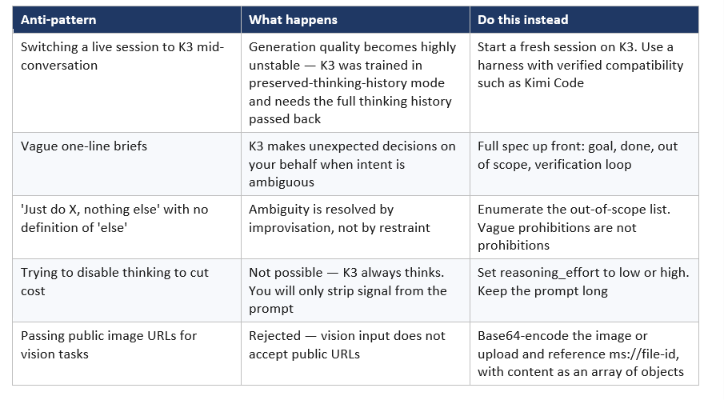
My honest criticism: the thinking-history sensitivity is a real ergonomic cost, and Moonshot says so itself — alongside an admission that K3 shows a noticeable user-experience gap against Claude Fable 5 and GPT-5.6 Sol. You are buying frontier capability at a third of Fable-class pricing and paying for it in harness fragility. That is a reasonable trade, but it is a trade, and any article that tells you an open 2.8T model is a drop-in replacement for a polished proprietary one is selling you something.
The benchmark caveat belongs here too. Moonshot's own footnotes show K3's headline coding numbers were collected under at least three different agent harnesses — Kimi Code, Claude Code, and mini-SWE-agent — and that Claude Fable 5 hit fallbacks on 35% of the SWE Marathon tasks in their evaluation. On DeepSWE, K3 scores 67.3 under mini-SWE-agent versus a higher figure under Kimi Code. Same model, same benchmark, different harness, different number. Read the footnotes before you quote the chart.
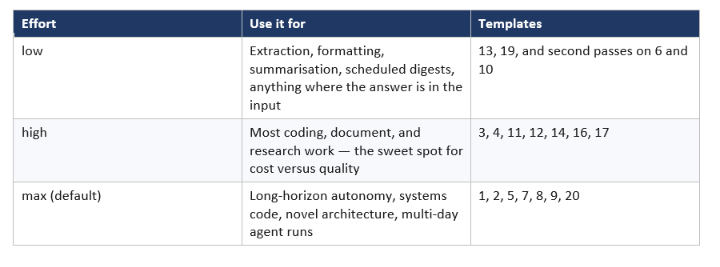
6. Reasoning Effort: Which Prompts Actually Need max
Kimi K3 defaults to max reasoning effort and supports low and high — and because thinking cannot be disabled, reasoning_effort is your only real latency and cost control. Decide it before the conversation starts, since the setting interacts with prefix caching.
Two mechanics worth knowing. max_completion_tokens defaults to 131,072 and can be raised to 1,048,576 — if your one-prompt build is getting truncated, that is usually why, not the model giving up. And temperature, top_p, n, presence_penalty, and frequency_penalty are all fixed on K3; omit them from requests rather than tuning them out of habit.
On price: $3.00 per million input tokens on a cache miss, $0.30 on a cache hit, and $15.00 per million output tokens, flat across the full 1M window. That cache discount is not a rounding error — at a reported 90%+ hit rate on coding workloads, keeping your long prefix stable across turns is worth more than most prompt optimisations. For where this lands against the rest of the field, the best open-source AI models July 2026 collection has the full comparison.
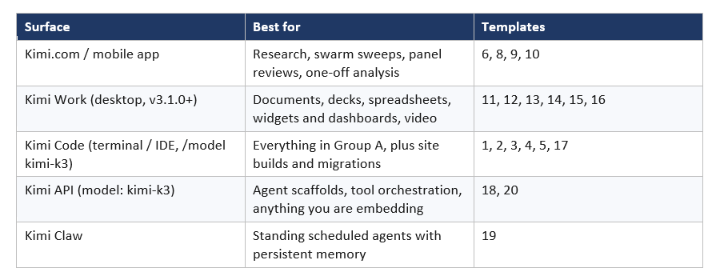
7. Where To Run These Prompts: Kimi.com, Work, Code, or the API
All twenty templates run on every surface, but three of them have a natural home and the rest have a best one. Pick by artifact type, not by habit.
One deployment note for anyone planning to self-host the open weights: Moonshot recommends supernode configurations with 64 or more accelerators, because inference efficiency depends on large high-bandwidth communication domains at this sparsity. K3 activates 16 of 896 experts under a Stable LatentMoE framework, which is what makes a 2.8T model servable at all — and also what makes 'just run it locally' unrealistic for most teams. If you are weighing hosted versus self-hosted across the open field, the open-source LLM collection tracks every major release with hardware requirements.
Worth noting for anyone porting a prompt library: if you are coming from Anthropic's stack, the migration is not symmetric. Our 20 Claude Opus 5 prompts tested piece documents a model whose official guidance is to delete verification instructions. On K3 the advice inverts — you add the verification loop, because the model will happily run for hours without one.
Frequently Asked Questions
What can Kimi K3 build from a single prompt?
Kimi K3 has built a working GPU compiler with its own IR and PTX codegen, a chip that closes timing at 100 MHz, a 42-year interactive industry research site, a 100-page literature review from forty PDFs, a 3Blue1Brown-style animated explainer, and a full video edit from 56 raw clips — each from a specification rather than a conversation. The pattern that unlocks it is asking for a finished artifact with a definition of done and a way for the model to check its own work.
How do I write good prompts for Kimi K3?
Use six blocks: goal stated as a noun, context, definition of done, out of scope, verification loop, and expected deliverable paths. The out-of-scope block matters more on K3 than on most models because Moonshot documents the model making unexpected decisions when intent is ambiguous. The verification loop matters because K3 runs long — without a checker, a six-hour run produces six hours of unaudited work.
What is Kimi K3's context window and how much does it cost?
Kimi K3 has a 1,048,576-token context window with flat pricing and no tiering by context length: $3.00 per million input tokens on a cache miss, $0.30 on a cache hit, and $15.00 per million output tokens. Moonshot reports a cache hit rate above 90% on coding workloads via its Mooncake disaggregated inference stack, which makes repeated turns over a large fixed prefix substantially cheaper than the headline rate suggests.
Is Kimi K3 better than Claude for coding?
On Moonshot's own numbers K3 beats Claude Fable 5 on Terminal-Bench 2.1 (88.3 vs 84.6) and SWE Marathon (42.0 vs 35.0), but those results mix agent harnesses — Kimi Code for K3, Claude Code or Terminus 2 for the Claude models — and Moonshot notes Fable 5 hit fallbacks on 35% of its SWE Marathon tasks. Moonshot itself says K3's overall performance still trails Claude Fable 5 and GPT-5.6 Sol and that there is a noticeable user-experience gap. Treat the coding numbers as strong evidence and the general claim as contested.
Can I turn off Kimi K3's thinking to save money?
No. K3 always has thinking mode enabled — this is documented behaviour, not a setting you have missed. The available control is the top-level reasoning_effort field, which accepts low, high, and max, with max as the default. Set it before the conversation begins, since it interacts with prefix caching, and use low for extraction and formatting work where the answer is already in the input.
What is Kimi Agent Swarm and how do I prompt it?
Agent Swarm is a self-organising multi-agent system that spawns sub-agents in parallel — up to 100 in the K2.5 generation, with over 1,500 tool calls and roughly 4.5x faster delivery than sequential execution, now powered by K3. You prompt it by naming the parallel structure explicitly: how many independent units the work divides into, what each should return, and how results should be deduplicated and reconciled at the end. It excels at broad discovery, batch document processing, and multi-perspective review where you want genuine disagreement between agents.
Why did my Kimi K3 output suddenly get unstable?
The most common cause is switching an in-progress session from another model to K3, or using a harness that does not pass the full thinking history back on each turn. K3 was trained in preserved-thinking-history mode and Moonshot explicitly warns that generation quality may become highly unstable otherwise. Start a fresh session on K3 and use a harness with verified compatibility, such as Kimi Code.
Do I need the open weights, or is the API enough?
For almost everyone, the API is enough. The weights released on July 27, 2026 and are genuinely downloadable, but Moonshot recommends supernode configurations of 64 or more accelerators for efficient inference, because the Stable LatentMoE sparsity — 16 active experts out of 896 — depends on large high-bandwidth communication domains. Self-hosting makes sense for data-residency requirements or fine-tuning; it rarely makes sense on cost alone.
Which Kimi surface should I use for these prompts?
Use Kimi Code in the terminal for systems work and migrations, Kimi Work on desktop for documents, decks, spreadsheets, widgets and video, Kimi.com or the mobile app for research and swarm sweeps, and the API when you are embedding K3 in your own agent. Select the model with the /model command in Kimi Code, or model: kimi-k3 via the API, which is OpenAI-SDK compatible against api.moonshot.ai/v1.
The only comprehensive program designed to take you from basic prompting to building interactive Artifacts, custom integrations, and deploying production-ready code with Claude Code.
Recommended Blogs
● Kimi K3 Review: Benchmarks, Pricing, and K2 Comparison
● Kimi K2.6: Open-Source Just Beat GPT-5.5 at Coding
● Kimi K2.7 Code Review 2026: 1T Coding Model Tested
● 20 Claude Opus 5 Prompts Tested (Copy-Paste Templates)
● GLM-5.2 vs Claude Opus vs GPT-5.6 vs Kimi: Coding Compared
● Best Open Source AI Models July 2026: Full Collection
● Loop Engineering: Complete Guide for AI Agents (2026)
Resources & Community
Join our community of 70,000+ AI enthusiasts and learn to build powerful AI applications! Whether you're a beginner or an experienced developer, Build Fast with AI helps you understand and implement AI in your projects.
● Website — buildfastwithai.com
● LinkedIn — Build Fast with AI
● Instagram — @buildfastwithai
Agentic AI Launchpad 2026
A structured 6-week cohort program that takes you from AI basics to building and deploying real-world agentic AI systems. Includes live sessions, expert mentorship, project reviews, and a builder community network.
Ready to go from learning to building? Join the next cohort → Agentic AI Launchpad 2026
Free AI Resources
Access free tools, workshops, and micro-learning to keep building:
● AI Workshops — Free resources, upcoming events & past recordings
● Unrot — Learn AI in 5 minutes a day (free micro-learning app)
Pick three templates from this list, run them at the effort level in section 6, and write the OUT OF SCOPE block before you write anything else — that one habit is worth more than the other nineteen prompts combined. Follow Build Fast with AI for honest, tested coverage of every major model release.
References
● Moonshot AI — Kimi K3: Open Frontier Intelligence (Tech Blog)
● Kimi API Platform — Kimi K3 Quickstart, Limits and Pricing
● Kimi API Platform — Kimi K3 Tool Calling Best Practices
● Moonshot AI — Kimi Agent Swarm: Let 100 AI Agents Work for You
● Kimi — Kimi Claw: Deploy Your 24/7 Personal OpenClaw in Seconds
● MoonshotAI — Kimi-K3 open weights and repository (GitHub)
● Hugging Face — moonshotai/Kimi-K3 model card
● Build Fast with AI — Kimi K3 Review: Benchmarks, Pricing, and K2 Comparison