



20 Claude Opus 5 Prompts I Tested - With Copy-Paste Templates
Anthropic shipped a model on July 24, 2026 whose official prompting guide tells you to delete instructions from your existing prompts. Not add. Delete.
That is the single strangest thing about Claude Opus 5, and it is the reason most people's prompt libraries are now slightly wrong. If your prompts contain "double-check your answer," "include a final verification step," or "use a subagent to verify," Anthropic's own guidance is that those lines now make output worse, not better - Opus 5 already verifies itself, and the instruction compounds into over-verification that burns tokens for no quality gain.
So I rebuilt a prompt pack from scratch for this model. Twenty templates, grouped by job: agentic coding, long-horizon agents, reasoning and analysis, writing, and office/data work. Every one is copy-paste ready, every one includes what to watch for when it goes wrong, and every one is written against the behaviours Anthropic documented rather than the habits we all built up on Opus 4.6.
If you want the wider Anthropic picture first - models, pricing, Claude Code, Cowork, Skills - the complete Claude AI hub is the map. This piece is narrower: it is about what to actually type.
1. Why Claude Opus 5 Prompts Are Different: Four Behaviour Shifts
Claude Opus 5 responds to the same prompts as Opus 4.8 but exhibits four behaviours that change what a good prompt looks like: it self-verifies without being asked, it delegates to subagents more readily, it talks more, and it expands task scope on its own judgment. Every template below is built around one or more of these.
Here is the practical translation, straight from Anthropic's prompting guide for the model:
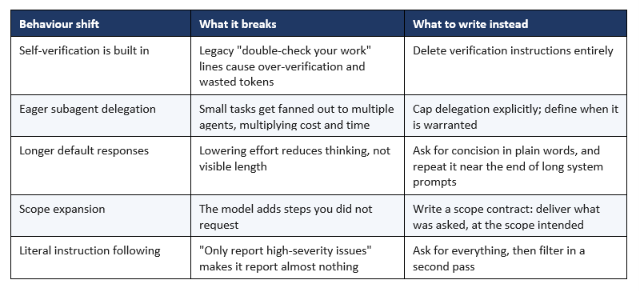
Table 1: The four behaviour shifts that make Opus 5 prompts different from Opus 4.8 prompts.
The last row is the one that catches experienced users out. Opus 5 is a high-precision code reviewer - it finds real bugs at a high rate and most of its extra findings are genuine rather than noise. But if you hedge your review prompt with "be conservative," it obeys you literally and under-reports. The correct move is to let it report everything and filter afterwards, which is exactly what template #3 below does.
The verbosity point deserves its own warning, because it is counter-intuitive. The effort parameter controls how much the model thinks, not how much it says. Turning effort down to save money will not shorten the answer on your screen. Length is a prompt-side control, full stop.
For the benchmark and pricing context behind these behaviours - the 43.3% Frontier-Bench score, the $5/$25 pricing, and the safety-classifier footnote that complicates the headline number - our Claude Opus 5 review covers the launch in full.
2. How To Test These Prompts (The 5-Point Rubric)
Run every prompt against the same rubric, on your own workload, and score it out of 5 - because a prompt that wins on someone else's repository tells you very little about yours. This is the scoring sheet I use, and I would rather hand you the instrument than a table of numbers you cannot reproduce.
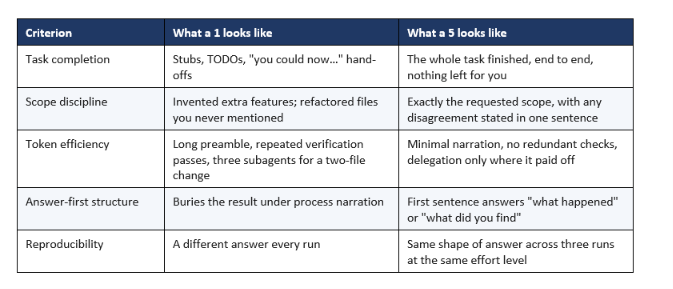
Table 2: The 5-point rubric. Score each prompt three times at the same effort setting and take the median, not the best run.
Two methodology notes that matter more than they sound. First, run each prompt at least three times - Opus 5 was singled out by early-access testers for low run-to-run variance, and the only way you find out whether that holds on your workload is repetition. Second, hold the effort level constant within a comparison. Comparing a high-effort run against a medium-effort run and concluding the prompt is better is a mistake I have watched three separate teams make this month.
If you want a much broader library to test against once you have the rubric working, our 150 best Claude prompts collection covers seven categories and eight advanced patterns, most of which port cleanly to Opus 5 once you strip the verification lines.
Quotable: A prompt library without a rubric is a folder of superstitions. Score three runs, take the median, and half your favourite prompts will quietly disappear.
3. The 20 Claude Opus 5 Prompt Templates
These twenty templates cover the five jobs Opus 5 is actually good at: agentic coding, long-horizon agent work, reasoning and analysis, writing, and office/data output. Square brackets are your fill-ins. Nothing here needs a special harness - they work in Claude.ai, Claude Code, Cowork, and the API alike.
One structural note before you copy anything: Opus 5 performs best when given the complete task specification up front and then left alone to run. Drip-feeding requirements across turns is a habit worth unlearning on this model. Several templates below are deliberately long for that reason.
Group A - Agentic Coding (1-6)
This is where Opus 5 earns its price. It completes full tasks rather than leaving stubs, and it is measurably better at not giving up mid-task than its predecessor.
1. The Full-Spec Feature Build
Use it for: Multi-file features you want finished in one pass, not scaffolded.
Build [FEATURE] in this codebase.
Complete specification:
- User-facing behaviour: [what the user sees and does]
- Entry points: [route / component / CLI command]
- Data model changes: [tables, fields, migrations]
- Edge cases that must be handled: [list them all]
- Out of scope: [explicitly list what NOT to touch]
- Definition of done: [tests pass / feature reachable from UI / etc.]
Follow the existing patterns in [reference file or directory].
Implement the whole feature. Do not leave TODOs, stubs, or
placeholder implementations. If a requirement is ambiguous, make
the judgment call yourself and note it in one line at the end.
Why it works on Opus 5: It front-loads the full spec, which is the documented condition for Opus 5's best coding performance, and the explicit "out of scope" block is the cheapest defence against the model's tendency to widen a task.
Watch for: If it still expands scope, the fix is almost always that your "out of scope" list was too short, not that the model ignored you.
2. The Blast-Radius Refactor
Use it for: Repo-wide refactors where the risk is what breaks elsewhere.
Refactor [PATTERN / MODULE] across this repository.
Before writing any code, produce a blast-radius report:
- Every file that references the thing being changed
- Which of those are safe mechanical edits vs. judgment calls
- Any public API or contract that changes shape
- The order you will make the changes in, and why
Then stop and show me the report.
After I approve, execute the refactor in that order. Keep each
commit-sized change coherent. Do not bundle unrelated cleanups
into this refactor, however tempting.
Why it works on Opus 5: Splitting plan from execution exploits Opus 5's planning strength — early testers repeatedly describe it catching logical faults during planning rather than after the fact - while the "no unrelated cleanups" line contains the scope drift.
Watch for: On very large repos, the report itself can run long. Add "keep the report under 40 lines" if you are paying for output tokens.
3. The Exhaustive Code Review
Use it for: Pre-merge review where you would rather over-report than miss a bug.
Review this diff / file as a senior engineer on this codebase.
Report EVERY issue you find, at every severity, including ones you
think are probably fine. Do not filter, do not prioritise, and do
not decide on my behalf what is worth mentioning.
For each finding: file and line, one-sentence description of the
actual failure mode, and severity as you judge it
Group them at the end into: must-fix, should-fix, and nitpicks.
Why it works on Opus 5: Anthropic explicitly warns that telling Opus 5 to "only report high-severity issues" or "be conservative" makes it report less, because it follows the instruction literally. Asking for everything and filtering afterwards is the documented workaround.
Watch for: You will get more findings than you are used to. That is the point - its extra findings are mostly real issues, not false positives.
4. The Root-Cause Bug Hunt
Use it for: Bugs where the obvious patch treats the symptom.
Here is a bug: [symptom, reproduction steps, environment].
Find the root cause, not the symptom. Specifically:
- Trace the actual execution path that produces this behaviour
- Identify the earliest point where the state goes wrong
- Tell me what the surface-level fix would be, and why it is
insufficient
- Then fix the underlying cause
If the correct fix touches code outside the obvious file, say so
before you make the change.
Why it works on Opus 5: This mirrors the exact behaviour Anthropic highlighted at launch: given a real bug in an open-source package manager, Opus 5 found the root cause and fixed an edge case the community patch had missed, while a competing model patched only the surface symptom and declared victory.
Watch for: The "surface-level fix and why it is insufficient" step is not filler - it is how you audit whether the model actually understood the mechanism.
5. The Ground-Truth Test Harness
Use it for: Building against a system you cannot observe directly.
I need [COMPONENT] that talks to [EXTERNAL SYSTEM].
I have no live instance to validate against. Before implementing:
build yourself a test harness that lets you verify your own output
is correct - synthetic fixtures, a fake endpoint, a parser check,
whatever fits.
Then implement the component and validate it against your harness.
Show me the harness alongside the implementation so I can judge
whether your validation was meaningful.
Why it works on Opus 5: Tool-building is the signature Opus 5 behaviour. On one launch example it wrote its own computer-vision pipeline to read a drawing it had no way to view; on another, an engineer at a trading firm watched it build its own test harness for an exchange feed with no live data to check against.
Watch for: Ask to see the harness. A harness that only tests the happy path is worse than none, because it manufactures false confidence.
6. The Legacy Migration Planner
Use it for: Framework or version migrations that span dozens of files.
We are migrating from [OLD] to [NEW].
Produce a migration plan with:
- An inventory of every affected file, grouped by migration pattern
- The three or four distinct transformation patterns involved
- Which files are mechanical and which need human judgment
- A sequencing that keeps the build green at every step
- The rollback story if we stop halfway
Do not start migrating. Plan only.
Why it works on Opus 5: Opus 5 holds instruction-following and reasoning consistently across its full 1M-token context window, which is what makes a whole-repo inventory realistic rather than aspirational.
Watch for: Verify the file inventory against a real grep. A plan built on a hallucinated file list is worse than no plan.
Group B - Long-Horizon Agents (7-10)
These four are system-prompt fragments more than one-shot prompts. They are the guardrails that keep an autonomous Opus 5 run from becoming an autonomous Opus 5 bill. If you want to see agent loops assembled end-to-end in runnable notebooks, the Build Fast with AI gen-ai-experiments cookbooks are the fastest way to go from these fragments to something running.
7. The Scope Contract
Use it for: Any autonomous run where you are not watching every step.
Deliver what was asked, at the scope intended. Make routine
judgment calls yourself, and check in only when different readings
of the request would lead to materially different work. If the
request seems mistaken or a better approach exists, say so in a
sentence and continue with the task as asked rather than quietly
narrowing, widening, or transforming it. Finish the whole task, and
stop short of actions that are clearly beyond what was asked.
Why it works on Opus 5: This is close to Anthropic's own recommended wording, and it targets the specific failure mode of an agent that helpfully rewrites your architecture while fixing a typo. It threads the needle: full completion, no expansion.
Watch for: If your agent still over-reaches, the culprit is usually a vague task description upstream, not a weak scope contract.
8. The Delegation Budget
Use it for: Harnesses where Opus 5 can spawn subagents.
Delegate to a subagent only for large tasks that are genuinely
independent and parallelizable, such as a wide multi-file
investigation. Do not delegate work you can finish yourself in a
handful of tool calls, and do not use subagents to verify or
double-check your own work. If one subagent can complete the task,
use one rather than several, and keep spawn counts low.
Why it works on Opus 5: Opus 5 delegates more readily than any prior Claude, and it coordinates subagents well — the problem is not quality, it is that three agents on a two-file task costs three times as much for the same result.
Watch for: The "do not use subagents to verify" clause is the expensive one. Verification delegation is where budgets quietly triple.
9. The Narration Cadence
Use it for: User-facing agent products where the model narrates too much.
Before your first tool call, say in one sentence what you're about
to do. While working, give a brief update only when you find
something important or change direction. When you finish, lead with
the outcome: your first sentence should answer "what happened" or
"what did you find," with supporting detail after it for readers
who want it.
Why it works on Opus 5: Opus 5 announces what it is about to do more than prior models, and per-message output in agentic sessions runs longer. Describing the cadence you want works better than forbidding the behaviour you do not want.
Watch for: Positive examples beat prohibitions here. If this is not enough, paste two sample updates in the style you want rather than adding more rules.
10. The Chief-of-Staff Loop
Use it for: Multi-hour or multi-day autonomous work with periodic human checkpoints.
You are running [OBJECTIVE] over the next [TIME WINDOW].
Operating rules:
- Maintain a running state file at [PATH]: current status, decisions
made, open questions, next actions
- Update it after every meaningful step, not every action
- Escalate to me only for judgment calls, irreversible actions, or
when blocked for more than [N] attempts
- If you correct an earlier assumption, write the correction into
the state file and move on
At each checkpoint, give me: what changed, what you decided
unilaterally, and what needs my call.
Why it works on Opus 5: The state-file pattern is the one that separates agents that survive long horizons from ones that drift. Anthropic's launch materials describe monitoring agents treating context as a living document — re-checking an assumption against production, finding the signal benign, writing the correction into memory, and retiring their own queries.
Watch for: Set N explicitly. "Escalate when blocked" without a threshold produces either an agent that never asks or one that asks constantly.
Group C - Reasoning and Analysis (11-14)
Opus 5's gains here are less publicised than its coding numbers but arguably more useful day to day, particularly on numerical reasoning and table work.
11. The Adversarial Self-Critique
Use it for: Any argument, plan, or decision you are about to commit to.
Here is my position: [POSITION].
Do three passes, clearly separated:
- STEELMAN - the strongest version of my argument, stronger than
I made it, using the best available evidence.
- RED TEAM - the most serious objections. Not stylistic quibbles:
the ones that would actually change the conclusion.
- VERDICT - does the position survive? If it needs modification,
give me the modified version. If it fails, say so plainly.
Do not soften the red team pass to be agreeable.
Why it works on Opus 5: The three-pass structure prevents the model from collapsing into agreement, and Opus 5 has shown a notable willingness to hold a position under pressure - one early tester described it pushing back on a proposed design, declining to fold when pressed, and proposing a compromise that preserved the good part.
Watch for: If the red team pass reads like polite hedging, your position statement was probably too vague to attack.
12. The Numbers Audit
Use it for: Spreadsheets, financial models, and any analysis where a wrong number is expensive.
Audit the numbers in [SOURCE].
For each figure that matters:
- Restate the calculation in words
- Recompute it independently and show the result
- Flag any discrepancy between stated and recomputed values
- Flag any figure that depends on an assumption not stated in the
document
Present as a table: figure, stated value, your value, status, note.
Do not fix anything yet — audit only.
Why it works on Opus 5: Numerical reasoning and table work are where finance teams reported the sharpest gains over Opus 4.8, and forcing an independent recomputation rather than a review catches transcription errors a read-through misses.
Watch for: Audit-only is deliberate. Let it fix things in the same pass and you lose the ability to check its arithmetic against yours.
13. The Decision Memo
Use it for: Structured recommendations where you need the uncertainty made visible.
Write a decision memo on [DECISION].
Structure:
- Recommendation, in one sentence, at the top
- The three factors that actually drive the decision
- The strongest case for the option you did NOT pick
- What you are uncertain about, and what evidence would change
your recommendation
- What we should do in the next two weeks regardless of which
option we pick
Keep it under [N] words. No executive-summary boilerplate.
Why it works on Opus 5: Answer-first structure suits a model that will otherwise open with process narration, and the explicit uncertainty section converts hedging from something scattered through the prose into a section you can actually act on.
Watch for: The word cap is load-bearing. Without it, Opus 5 memos run long — written deliverables on this model are longer than on prior ones by default.
14. The Source-Tiered Research Synthesis
Use it for: Research where you need to know how much to trust each claim.
Research [TOPIC] and synthesise what you find.
Tier every source you use:
- Tier 1: primary sources - filings, papers, official docs, raw data
- Tier 2: reputable secondary reporting
- Tier 3: commentary, forums, marketing
Structure the synthesis so Tier 1 claims carry the argument and
Tier 3 claims are labelled as opinion. Where sources conflict, say
so explicitly rather than picking one silently. End with the three
things you could not verify.
Why it works on Opus 5: The "three things you could not verify" close is the highest-value line in this template - it converts silent gaps into an explicit list, and Opus 5 is unusually willing to populate it honestly.
Watch for: Give it real search or file access. Without tools, source tiering produces confident-sounding fiction.
Group D - Writing and Communication (15-17)
Verbosity is the whole story in this group. Opus 5 writes longer by default than any prior Opus, in chat and on disk, and every template here is partly a length-control mechanism.
15. The Voice Lock
Use it for: Long-form content that has to sound like a specific person or brand.
Write [DELIVERABLE] on [TOPIC].
Voice specification:
- Audience: [who, and what they already know]
- Register: [e.g. direct, technical, no corporate hedging]
- Sentence rhythm: [e.g. mostly short, one long sentence per
paragraph maximum]
- Banned: [phrases, clichés, structures you never want to see]
- Reference sample: [paste 150 words of the target voice]
Match the reference sample's voice, not its content.
Length: [N] words, and treat that as a ceiling.
Why it works on Opus 5: A pasted reference sample outperforms any amount of adjective-stacking, and the explicit ban list is how you kill the specific tics that bother you rather than the generic ones the model already avoids.
Watch for: "Treat that as a ceiling" matters. A bare word count reads as a target and gets exceeded.
16. The Concision Enforcer
Use it for: A system-prompt fragment for any product where Opus 5 talks too much.
Keep responses focused, brief, and concise. Keep disclaimers and
caveats short, and spend most of the response on the main answer.
When asked to explain something, give a high-level summary unless
an in-depth explanation is specifically requested.
[near the end of a long system prompt, add:]
<tone_preference>
Keep outputs reasonably concise.
</tone_preference>
Why it works on Opus 5: This is Anthropic's own recommended pattern, and the duplicated reminder near the end of a long system prompt is the part people skip. Effort settings will not do this job for you — effort controls thinking volume, not visible response length.
Watch for: For files written to disk, add a separate instruction: match document length to what the task needs, without padding or redundant summaries.
17. The Audience Ladder
Use it for: One piece of content that has to land with three different readers.
Take [SOURCE CONTENT] and produce three versions:
- For [EXPERT AUDIENCE] — assume full domain fluency, no
definitions, lead with the finding
- For [ADJACENT AUDIENCE] — knows the field but not this
sub-area; define jargon inline, keep the rigour
- For [EXECUTIVE AUDIENCE] — 120 words, decision-relevant only,
no methodology
Same facts in all three. Do not soften the conclusion for the
executive version.
Why it works on Opus 5: Producing all three in one pass keeps the facts consistent across versions, which sequential rewrites reliably fail to do — and the final line prevents the executive summary from becoming the optimistic one.
Watch for: Check that version 3 has not lost a caveat that version 1 treated as essential. That is the usual failure.
Group E — Vision, Office and Data (18-20)
Opus 5 is strong on chart, document and diagram understanding, and produces genuinely usable multi-sheet spreadsheets and slide decks. Anthropic's specific advice: any vision workarounds you tuned for older models should be re-validated, because they may now be unnecessary.
18. The Chart-to-Data Extraction
Use it for: Pulling structured data out of screenshots, PDFs, and dashboard images.
Extract the data from this [chart / table / diagram] into
structured form.
- Output as [CSV / JSON / markdown table] with explicit column names
- Where a value is estimated from a visual position rather than a
printed label, mark it as estimated
- Note anything the image does not let you determine — axis units,
cropped values, illegible labels
- Do not interpolate missing values
After extracting, describe what the data shows in two sentences.
Why it works on Opus 5: The estimated-vs-printed distinction is the single most valuable constraint you can add to a vision extraction prompt, and Opus 5 is reliable about honouring it. Vision performance is also strongest when the model has tools to crop and re-examine, so give it those if your harness supports it.
Watch for: Spot-check three values against the source image before trusting the rest. Always.
19. The Multi-Sheet Model
Use it for: Financial models and trackers with real formula logic.
Build a [MODEL TYPE] spreadsheet.
Structure:
- Sheet 1 "Inputs": every assumption, one per row, labelled and
unit-tagged. Nothing hardcoded anywhere else.
- Sheet 2 "Calculations": formulas referencing Inputs only
- Sheet 3 "Outputs": the summary view, formatted for reading
- Sheet 4 "Checks": at least [N] validation formulas that go TRUE
when the model is internally consistent
Every formula must reference cells, never repeat a literal value.
Tell me which assumptions the output is most sensitive to.
Why it works on Opus 5: Opus 5 handles multi-sheet workbooks with non-trivial formulas, and the "Checks" sheet is the piece that makes a generated model auditable instead of merely plausible.
Watch for: Open the file and change one input. If downstream numbers do not move, something was hardcoded despite the instruction.
20. The Deck From Raw Notes
Use it for: Turning messy notes into a presentable deck without a design round-trip.
Turn these notes into a [N]-slide deck for [AUDIENCE].
Rules:
- One idea per slide; the slide title states the idea as a claim,
not a topic
- Body: maximum three bullets, maximum twelve words each
- Follow this template/style: [describe or attach it]
- Include a "so what" slide after every section
- Speaker notes: what I say out loud, not a restatement of the
slide
Flag any slide where the notes did not give you enough substance
rather than padding it.
Why it works on Opus 5: Title-as-claim is the highest-leverage constraint in deck generation, and the padding flag exploits the model's willingness to admit gaps rather than filling them with filler. Anthropic's guidance is explicit that you should prompt with the specific styles or templates you need followed.
Watch for: Longer-horizon deck work — build, then revise — is where testers reported the biggest gains, so iterate in the same session rather than starting fresh.
4. The 5 Patterns That Separated Winners From Duds
Across all twenty templates, five patterns predicted whether a prompt scored well on the rubric. If you only remember five things about prompting Claude Opus 5, make it these.
Pattern 1: Front-load the entire specification
Opus 5 performs best when handed the complete task spec and then left to run. This inverts the conversational habit most of us built on earlier models, where you started small and steered. Steering is now the expensive path: every clarification turn re-reads context you already paid for, and the model was going to make a reasonable call anyway.
Pattern 2: Delete, do not add
The highest-value edit to an inherited prompt library is deletion. Strip "double-check your answer," "re-verify before responding," "include a final verification step," and any harness scaffolding that adds a separate verification pass. These compound with behaviour the model already performs and add cost without improving results.
Pattern 3: Constrain scope explicitly, not implicitly
"Fix the login bug" is an invitation. "Fix the login bug; do not touch the session module, do not add tests to unrelated files, do not upgrade dependencies" is a contract. The scope contract in template #7 exists because implicit scope is the most common cause of a run that technically succeeded and still annoyed you.
Pattern 4: Ask for everything, filter in a second pass
Because Opus 5 follows restrictive instructions literally, any prompt containing "only," "just," or "be conservative" is likely producing less than you wanted. Split the job: an exhaustive pass, then a filtering pass. Two cheap calls beat one crippled call.
Pattern 5: Control length in words, cost in effort
These are two separate dials and confusing them wastes money. Effort governs thinking depth. Prompt text governs visible length. If your bill is high, drop effort. If your output is long, write a length instruction. Doing the first to fix the second is the most common mistake I see in Opus 5 migrations.
Quotable: On Opus 5, the effort dial is your budget and the prompt is your editor. Confusing the two is how teams end up paying more for output they still have to trim.
5. Prompt Anti-Patterns That Actively Hurt Opus 5
Five prompt habits that were harmless or helpful on earlier models and now cost you quality, money, or both. This is the contrarian section: most "best prompts" articles will not tell you that their own advice from six months ago is now wrong.
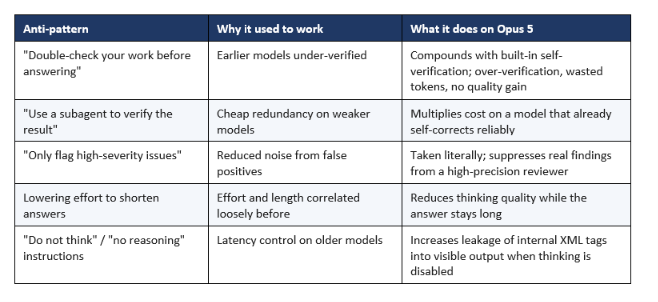
Table 3: Five prompt habits to retire when moving to Claude Opus 5.
The last row is a genuinely nasty one. Opus 5 runs with thinking on by default, and thinking can only be disabled at effort high or below. With thinking off, two artifacts occasionally appear: the model writes a tool call into its visible text instead of emitting a real tool-use block — the call never runs, and in an agent loop that leaked text poisons subsequent turns — and internal XML tags can leak into the response. Anthropic's recommended mitigation is blunt: keep thinking on and use a lower effort level instead, because thinking enabled at low effort generally beats thinking disabled at comparable cost.
If you truly must run with thinking disabled, one combined instruction mitigates both artifacts:
When you use a tool, you may say a brief sentence first. If no tool
can express what the user asked for, say so instead of guessing. Do
not include internal or system XML tags in your response.
Counter-intuitively, naming the tags specifically works worse than this general form. Instructions that call out thinking tags by name are less effective than the general rule.
My honest criticism: a model whose official guidance includes "remove instructions that tell it to check its work" is a model with a real ergonomic cost. Every team with a mature prompt library now has migration work to do, and the failure mode is silent — nothing errors, you just pay more for the same answer. That is worse than a loud break, and it is the one thing about this release that genuinely annoyed me. If you want to build these guardrails into runnable agent loops rather than pasting them by hand, the gen-ai-experiments agent cookbooks give you a working scaffold to drop them into.
6. Effort Levels: Which Prompts Need High, Which Run Fine on Low
Use low and medium effort as your primary cost and latency control wherever quality holds, and step up to xhigh only for demanding coding and agentic work. Anthropic's guidance is unusually direct here: low and medium produce strong quality at a fraction of the tokens and latency of higher settings, and if you carried effort defaults over from a previous model, you should re-run an effort sweep on your own evals rather than trusting them.
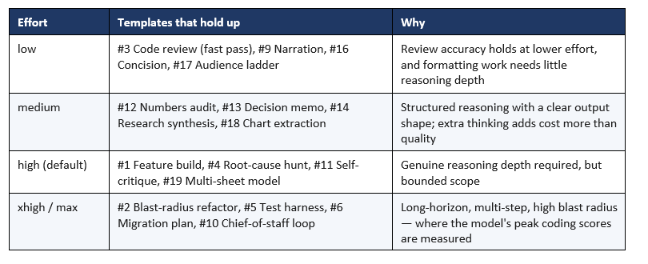
Table 4: A starting effort map. Treat it as a hypothesis to test on your own evals, not a settled answer.
One pattern worth stealing from the code-review case: run a fast low-effort pass at review time to catch the obvious, then a thorough pass later. You get most of the value immediately at a fraction of the cost, and legal teams reported similar behaviour — comparable quality at materially fewer tokens when reasoning levels were dialled down from maximum.
Fast mode is a separate lever from effort and answers a different question: it runs at roughly 2.5x speed for double the price. The framework we built for the previous generation in our Claude Opus 4.7 Fast Mode guide still applies cleanly — pay for speed only when a human is watching a spinner.
7. Opus 5 vs Fable 5 vs Opus 4.8: Which Model For Which Prompt
Run these prompts on Opus 5 by default; escalate to Fable 5 only for the hardest reasoning, legal, and professional-health work, and stop using Opus 4.8 for anything Opus 5 can do at the same price. That is the short version, and the price structure makes it easy: Opus 5 is $5 per million input tokens and $25 per million output, identical to Opus 4.8 and half of Fable 5.
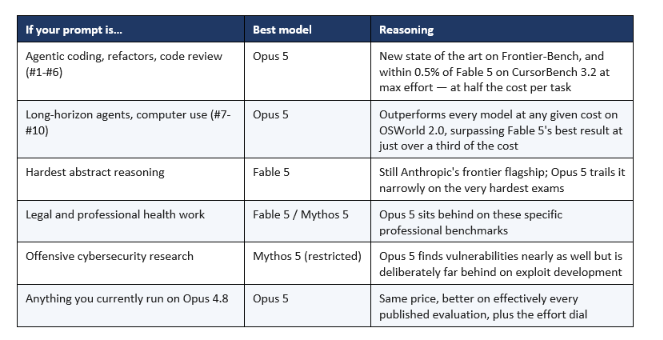
Table 5: Prompt-to-model routing. Opus 5 is the default; escalation is the exception.
If you are still on the previous generation and wondering whether the prompt migration is worth the effort, our Claude Opus 4.8 review is the right baseline — Opus 5 keeps its price and roughly doubles its hardest coding scores.
For where these prompts land against the open-weight and OpenAI competition specifically, the GLM-5.2 vs Claude vs GPT-5.6 vs Kimi coding comparison is the companion read, and the wider best AI models July 2026 ranking puts the whole field in one table.
One caveat I will not bury. Anthropic's headline Frontier-Bench figure used Opus 4.8 as a fallback whenever a safety classifier refused a request, and the substitution rate was not published. That does not make the model bad — it makes the number provisional. It also has a direct prompting consequence: on Claude.ai, Claude Code and Cowork, flagged requests fall back to Opus 4.8 by default, so a prompt that trips a classifier may quietly be answered by a different model than the one you selected. If your prompts touch security research, that is worth knowing before you conclude Opus 5 got worse.
Frequently Asked Questions
What are the best prompts for Claude Opus 5?
The best Claude Opus 5 prompts front-load the complete task specification, state scope boundaries explicitly, and omit verification instructions. The twenty templates above cover agentic coding, long-horizon agents, reasoning, writing, and office work. The single highest-value change to an existing prompt library is deleting "double-check your work" style lines, which cause over-verification on this model.
How is prompting Claude Opus 5 different from Opus 4.8?
Opus 5 performs well out of the box on existing Opus 4.8 prompts, but four behaviours need tuning: it self-verifies without being asked, delegates to subagents more readily, produces longer default responses, and expands task scope on its own judgment. The migration work is mostly deletion — removing verification instructions and legacy harness scaffolding — plus adding explicit scope and concision constraints.
What effort level should I use with Claude Opus 5?
Start at the default high and adjust based on your own evaluations. Anthropic recommends using low and medium liberally as the primary control for token cost and latency wherever quality holds, and stepping up to xhigh for demanding coding and agentic work. If you carried effort defaults over from a prior model, re-run an effort sweep rather than assuming they transfer.
Does Claude Opus 5 need verification instructions in the prompt?
No, and they actively hurt. Opus 5 catches and fixes its own mistakes without prompting, so instructions like "double-check your answer," "re-verify before responding," or "use a subagent to verify" compound with existing behaviour and add cost without improving results. Anthropic's guidance is to remove them, along with any harness scaffolding that adds separate verification steps.
Why are Claude Opus 5 responses so long?
Opus 5's default user-facing responses run longer than prior Opus models, and files it writes to disk are longer too. Lowering the effort parameter will not fix this — effort controls how much the model thinks, not how much it says. Control length with an explicit prompt instruction, and in long system prompts repeat a short reminder near the end.
How do I stop Claude Opus 5 from spawning too many subagents?
Give explicit delegation criteria or set a deterministic cap in your harness. A working instruction is: delegate only for large, genuinely independent, parallelizable tasks; do not delegate work finishable in a handful of tool calls; do not use subagents to verify your own work; and if one subagent suffices, use one. Delegation pays off on big parallel tracks and multiplies cost on small ones.
Is Claude Opus 5 good for coding prompts?
Yes — it is the strongest publicly available Opus model for agentic coding, setting new highs on Frontier-Bench v0.1 and coming within 0.5% of Fable 5 on CursorBench 3.2 at max effort while costing half as much per task. It completes full tasks rather than leaving stubs, and performs best when given the complete specification up front and left to run.
Do these prompts work in Claude Code and Cowork as well as the API?
Yes. Claude Opus 5 is available across Claude.ai, the API as claude-opus-5, Claude Code and Claude Cowork, and it is the default model on Claude Max and the strongest model on Claude Pro. The system-prompt fragments in Group B are most useful in Claude Code and agent harnesses; the rest work anywhere.
Recommended Blogs
- Claude Opus 5 Review: Benchmarks, Price & Honest Take
- 150 Best Claude Prompts That Work in 2026
- Claude Opus 4.8 Review: Benchmarks, Dynamic Workflows, Price
- Claude AI 2026: Complete Guide to Models, Features & Pricing
- Claude Opus 4.7 Fast Mode: 2.5x Faster, 6x More Expensive
- GLM-5.2 vs Claude Opus vs GPT-5.6 vs Kimi: Coding Compared
- Best AI Models July 2026, Ranked
Resources & Community
Join our community of 70,000+ AI enthusiasts and learn to build powerful AI applications! Whether you're a beginner or an experienced developer, Build Fast with AI helps you understand and implement AI in your projects.
- Website — buildfastwithai.com
- LinkedIn — Build Fast with AI
- Instagram — @buildfastwithai
- Founder Twitter — @satvikps
- Twitter — @BuildFastWithAI
Agentic AI Launchpad 2026
A structured 6-week cohort program that takes you from AI basics to building and deploying real-world agentic AI systems. Includes live sessions, expert mentorship, project reviews, and a builder community network.
Ready to go from learning to building? Join the next cohort → Agentic AI Launchpad 2026
Free AI Resources
Access free tools, workshops, and micro-learning to keep building:
- AI Workshops — Free resources, upcoming events & past recordings
- Unrot — Learn AI in 5 minutes a day (free micro-learning app)
Copy three of these templates into your next Opus 5 session this week, score them on the five-point rubric, and delete every verification line you find in your old prompts. Follow Build Fast with AI for honest, tested coverage of every major model release.
References
- Anthropic - Introducing Claude Opus 5
- Anthropic - Prompting Claude Opus 5 (Claude Platform Docs)
- Anthropic - Prompt engineering overview
- Anthropic - Claude Opus 5 System Card
- Anthropic - Effort parameter documentation
- Anthropic - Automatic fallbacks and refusals on the API
- Frontier-Bench - Coding and knowledge work evaluation
- Build Fast with AI - Claude Opus 5 Review

