



On May 13, 2026, Anthropic officially extended Fast Mode to Claude Opus 4.7 — and in doing so, started a conversation that matters to every developer building on frontier AI models in 2026: when is paying for raw speed actually worth it?
The offer is simple and the math is not subtle. Fast Mode delivers up to 2.5x higher output tokens per second from Claude Opus 4.7. You get identical model quality, the same full 1 million-token context window, all the same capabilities. The only difference is how fast those tokens arrive. The cost for that speed jump: $30 per million input tokens, $150 per million output tokens. Standard Opus 4.7 runs at $5 input and $25 output. That is a 6x multiplier across the board.
Developers are divided, and their division is informative. Cursor engineer Eric Zakariasson praised the faster model for UI-heavy, interactive development workflows. Others immediately ran the cost math and noted that DeepSeek V4 Flash can handle many coding tasks at $0.14 per million input tokens — orders of magnitude cheaper. Both groups are right, for completely different use cases.
This guide covers everything: what Fast Mode actually is, how the speed improvement works, the exact steps to enable it across every supported platform, a real cost calculator with scenarios from low-volume to enterprise scale, who should turn it on, and who should stay on standard pricing.
What Is Claude Opus 4.7 Fast Mode?
Claude Opus 4.7 Fast Mode is a high-speed inference configuration for the Claude Opus 4.7 model that prioritizes output token generation speed over cost efficiency. It is currently in research preview (beta) and available across the Anthropic API, Claude Code, Cursor, Windsurf, v0, and Warp.
The critical thing to understand from the start: Fast Mode is not a different model. It runs Claude Opus 4.7 with a different underlying API configuration — one that allocates more inference compute to generate tokens faster. The intelligence, capabilities, context window, and output quality are identical to standard Opus 4.7. You get the same 87.6% SWE-bench Verified performance, the same 1 million-token context window, the same xhigh effort level support, the same task budget features. Everything is the same except: tokens arrive faster, and you pay more for each one.
Fast Mode became available for Opus 4.6 in February 2026, and on May 14, 2026, Opus 4.7 becomes the default Fast Mode model — meaning /fast in Claude Code will automatically use Opus 4.7 unless you have configured otherwise. Until then, you need to set CLAUDE_CODE_ENABLE_OPUS_4_7_FAST_MODE=1 to opt in.
The research preview label matters: pricing, availability, and the underlying configuration may change based on feedback. Anthropic is actively gathering data on how developers use Fast Mode. This is a beta feature with production stability, but not a locked spec.
If you came here from our earlier Claude Opus 4.6 Fast Mode guide — most of the mechanics are identical. The key changes are the default model (4.7 from May 14) and a new tokenizer in 4.7 that uses up to 35% more tokens on the same input, which affects your effective cost even at unchanged list prices.
How the 2.5x Speed Improvement Works
Standard Claude Opus 4.7 at max effort generates output at roughly 61 tokens per second via the Anthropic API, which is already below average for its price tier (median is 65.8 t/s among comparable reasoning models). Time to first token is around 10.65 seconds — meaningfully higher than most competitors.
Fast Mode changes the inference configuration to prioritize throughput. The result is up to 2.5x higher output tokens per second — pushing Opus 4.7 from roughly 61 t/s to approximately 150 t/s. For context, Groq running open-weight models at its LPU hardware peak achieves 840 t/s for Llama 3.1 8B and 594 t/s for Llama 4 Scout. Those are different model classes, but they illustrate why latency has become a real competitive dimension.
A technical note: "up to 2.5x" is the stated maximum, not a guaranteed floor. The actual speed improvement varies based on prompt complexity, current API load, and inference configuration. Real-world gains reported by developers typically land in the 1.8x–2.4x range in production.
The tradeoff is worth understanding clearly: Fast Mode does not make the model smarter. It does not increase token quality, reduce errors, or change how Claude reasons. It makes the tokens arrive faster. For interactive workflows — live debugging, real-time UI generation, rapid iteration — faster tokens feel qualitatively better because you spend less time watching the cursor blink. For batch processing or async workflows, Fast Mode provides no practical benefit.
For more context on where Opus 4.7 stands overall on benchmarks and capabilities — the foundation that Fast Mode accelerates — the Claude Opus 4.7 full review covers SWE-bench scores (87.6%), xhigh effort level, task budgets, and the tokenizer change in detail.
Pricing: The Full Cost Breakdown
The pricing is straightforward but there are important details below the headline numbers.
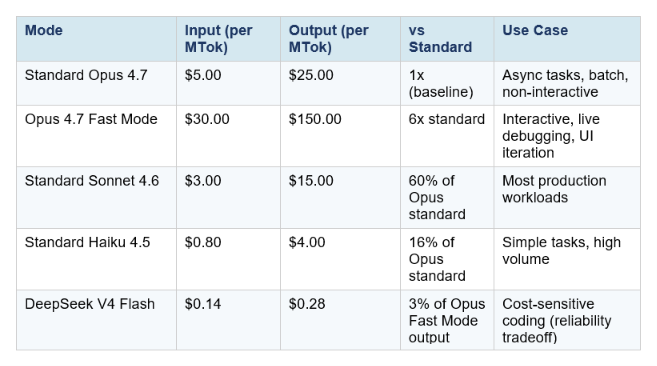
Three pricing details that catch developers off guard:
1. The new tokenizer effectively raises your real cost
Opus 4.7 introduced a new tokenizer that uses up to 35% more tokens on the same input text compared to Opus 4.6. The listed price per million tokens is unchanged, but code-heavy prompts can consume 20–35% more tokens on identical inputs. If you were paying $X/month for Opus 4.6 Fast Mode, your equivalent Opus 4.7 Fast Mode bill could be $X * 1.35 before you factor in any other changes. Run the actual token counts on your traffic sample before assuming costs are flat.
2. Fast Mode invalidates your prompt cache
Switching between Fast Mode and standard mode mid-session invalidates the prompt cache. If you are deep into a long session with significant cached context and toggle fast mode on, you pay the full uncached price for all existing context. The practical rule: decide whether you need fast mode before starting a session, not mid-conversation. Enable it at session start if you know you want speed throughout.
3. Subscription plan users pay via extra usage billing
For Claude Code users on Pro, Max, Team, or Enterprise subscription plans, Fast Mode tokens go to extra usage billing only. They are not included in your plan's rate limits. Fast Mode has a separate rate limit pool, and when you hit it, the API automatically falls back to standard Opus 4.7 speed until the cooldown expires. Plan accordingly if your workflow depends on sustained Fast Mode availability.
Real cost scenarios
One hour of active coding with Fast Mode, consuming roughly 50,000 input tokens and 15,000 output tokens: $1.50 input + $2.25 output = $3.75. The same session on standard Opus 4.7: $0.25 input + $0.375 output = $0.625.
A team running 8-hour coding days, five days per week, at Fast Mode rates and moderate intensity: approximately $75–$150 per developer per week, or $300–$600 per developer per month in API costs. On the Max plan ($200/month) with extra usage, that math shifts significantly — the subscription covers the base, and extra usage covers the fast mode overage.
How to Enable Fast Mode: Every Platform
Claude Code (CLI)
Fast Mode requires Claude Code v2.1.36 or later. Check your version:
claude --versionTo toggle Fast Mode on or off in an active session:
/fastTo enable Opus 4.7 specifically (instead of defaulting to Opus 4.6 until May 14):
export CLAUDE_CODE_ENABLE_OPUS_4_7_FAST_MODE=1Or set it in your Claude Code settings file for persistence:
{ "env": { "CLAUDE_CODE_ENABLE_OPUS_4_7_FAST_MODE": "1" } }Fast mode persists across sessions by default. Administrators can configure it to reset each session via managed setting
Claude Code VS Code Extension
Use /fast in the VS Code extension chat interface. The same toggle behavior applies — fast mode persists across sessions unless configured otherwise.
Anthropic API (direct)
Add the fast-mode-2026-02-01 beta header and speed: "fast" to your request:
import anthropic
client = anthropic.Anthropic()

response = client.beta.messages.create(
    model="claude-opus-4-7",
    max_tokens=4096,
    speed="fast",
    betas=["fast-mode-2026-02-01"],
    messages=[{"role": "user", "content": "Refactor this module"}]
)
To check which speed was used in the response:
print(response.usage.speed) # "fast" or "standard"Important: Fast Mode is not available via the Batch API, on Claude Platform on AWS, Amazon Bedrock, Google Vertex AI, or Microsoft Azure Foundry as of May 2026.
Cursor, Windsurf, v0, Warp
Fast Mode is rolling out natively in these platforms — it appears as a toggle in the model picker or settings alongside the standard Opus 4.7 option. Exact interface location varies per platform; check the model selection panel in each tool.
For the full picture of how Claude Code stacks up against Cursor and Codex in terms of speed, cost, and capability — including Cursor Composer 2's $0.50/MTok pricing that puts significant pressure on the Fast Mode value proposition — the Claude Code vs Codex 2026 comparison runs the complete analysis.
When Fast Mode Is Worth It — and When It Isn't
The honest answer depends entirely on your workflow. Fast Mode is a precision tool, not a blanket upgrade. Here is the decision framewor
Fast Mode is worth it when:
- You are working interactively and latency breaks your flow. Live UI generation, real-time debugging, rapid iteration on component design — tasks where you are watching the output as it generates and the wait time measurably slows you down.
- You are doing time-sensitive work where the cost of waiting is higher than $2.50 additional per session. Enterprise engineers billing at $150–$300/hour lose more to wait time than Fast Mode costs.
- You are building user-facing AI features where end-user perceived latency matters. If your product demos or interactive experiences are bottlenecked on Opus generation speed, the 2.5x boost directly improves the experience.
- You are already paying for Max ($200/month) or Enterprise plans where extra usage is accounted for and cost per session is not your primary constraint.
Fast Mode is not worth it when:
- Your task is async or batch. If you are running overnight CI/CD pipelines, generating documentation in the background, or processing large file sets where you will not see the output for minutes anyway, paying 6x more for token generation speed is waste.
- The task is simple enough for Sonnet 4.6. Standard Sonnet 4.6 at $3/$15 per MTok is fast natively and runs near-Opus quality on SWE-bench (79.6% vs Opus 4.7's 87.6%). For most production workloads, Sonnet is the rational default — not Opus at all, let alone Fast Mode.
- You are cost-sensitive and accuracy is the bottleneck, not speed. If your sessions regularly run into errors that require reruns, spending 6x more on the same model does not help. Fix the prompt, not the price tier.
- You are evaluating cheaper alternatives and speed is the comparison variable. DeepSeek V4 Flash at $0.28/MTok output is roughly 536x cheaper on output tokens than Opus Fast Mode. If your task does not require frontier Opus-level coding intelligence, the cost argument for Fast Mode disappears.
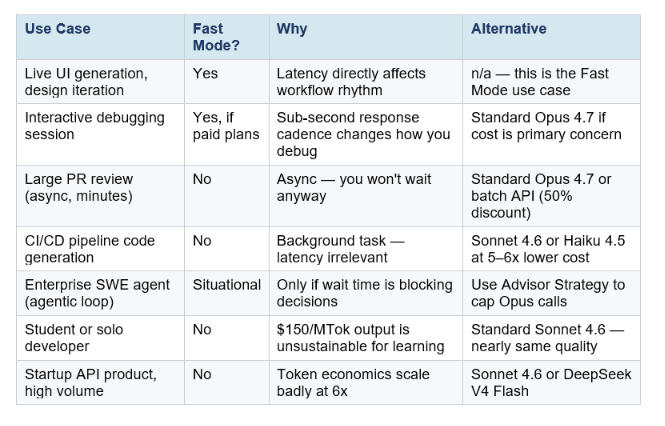
Fast Mode vs Cheaper Alternatives: The Honest Comparison
The Fast Mode announcement landed at an awkward moment in the market. DeepSeek V4 was simultaneously pricing its Flash variant at $0.14 per million input tokens — roughly 97% cheaper than Fast Mode on input, and even more dramatic on output. Cursor Composer 2 launched a few weeks prior at $0.50/$2.50 per MTok, routinely described as 'roughly 86% cheaper than Opus 4.6' on equivalent tasks. These numbers frame what Fast Mode is actually competing against.
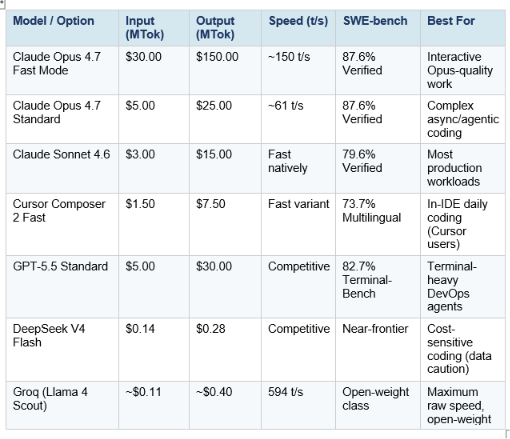
The market reality this table reveals: Fast Mode is competing at the premium end of a market that is simultaneously being commoditized at the lower end. If your requirement is 'fastest possible output,' Groq on open-weight models is faster and cheaper. If your requirement is 'best coding intelligence at any speed,' standard Opus 4.7 already provides it. Fast Mode is specifically for the narrow slice where you need Opus-level intelligence and you need it fast — which is a legitimate use case, but a smaller one than the headline suggests.
The defensible case for Fast Mode is not the speed alone. It is that Opus 4.7 leads on the hardest coding benchmarks by meaningful margins — 87.6% SWE-bench Verified vs GPT-5.5's 82.7% on Terminal-Bench, and a 10.9-point SWE-bench Pro jump from Opus 4.6. If your workflow specifically requires that frontier coding capability and you are doing interactive work, you are paying 6x more for a combination that no other option currently provides. That is the honest framing.
For teams looking to cut Opus costs without sacrificing quality on complex tasks, the Anthropic Advisor Strategy guide covers pairing Sonnet 4.6 as executor with Opus 4.7 as advisor — an 11.9% cost reduction per agentic task at near-Opus quality. Combining this with Fast Mode only for advisor calls is one of the more cost-efficient ways to use the high-speed tier.
The Bigger Picture: AI Is Now Competing on Latency
Fast Mode is a product decision, but it signals something structural about where the AI market is heading. For most of 2024 and 2025, the AI model competition was essentially one-dimensional: which model is smarter? Benchmarks drove adoption. Quality drove pricing. Speed was a constraint, not a product.
In 2026, that is changing. Groq built a business entirely around speed — its LPU hardware was designed specifically to maximize inference throughput, and it has attracted significant developer adoption by being 5–10x faster than standard API providers on open-weight models. DeepSeek is competing on price-per-intelligence, achieving near-frontier coding scores at a fraction of the cost. Cursor Composer 2 launched with an explicit 'fast variant' default. And Anthropic is now charging a premium specifically for speed, signaling that they believe a meaningful customer segment will pay for it.
The competitive dynamics this creates are genuinely interesting. If AI companies can segment their customers by willingness to pay for speed — enterprises paying premium for real-time interaction, developers paying standard for async work, startups using cheap open-weight models for volume — the total addressable market expands rather than being purely zero-sum. Every new dimension of competition (speed, cost, intelligence, specialization) creates new market positions.
For developers and teams, the practical implication is to treat AI model selection the same way you treat cloud infrastructure: match the tier to the requirement. Standard Haiku for simple, high-volume tasks. Standard Sonnet for most production work. Standard Opus for complex async reasoning. Fast Mode Opus only for the interactive sessions where latency is actually your bottleneck.
For the full competitive picture of how Opus 4.7 compares to GPT-5.5 on benchmarks, token economics, and the growing DeepSeek V4 challenge — the GPT-5.5 full review runs the numbers side-by-side, including the surprising finding that one team spent 7x more on GPT-5.5 than Claude and preferred it anyway.
Frequently Asked Questions
What is Claude Opus 4.7 Fast Mode?
Claude Opus 4.7 Fast Mode is a high-speed inference configuration for Claude Opus 4.7 that delivers up to 2.5x faster output token generation at 6x the standard price ($30/$150 per million input/output tokens). It is in research preview (beta) and available across the Anthropic API, Claude Code, Cursor, Windsurf, v0, and Warp. The model quality, capabilities, and context window are identical to standard Opus 4.7 — only speed and price change.
How do I enable Fast Mode in Claude Code?
Type /fast in any Claude Code session to toggle Fast Mode on. It requires Claude Code v2.1.36 or later. To use Opus 4.7 specifically (instead of the Opus 4.6 default until May 14), set CLAUDE_CODE_ENABLE_OPUS_4_7_FAST_MODE=1 in your environment or Claude Code settings file. Starting May 14, 2026, /fast defaults to Opus 4.7 automatically.
How much does Claude Opus 4.7 Fast Mode cost?
Fast Mode is priced at $30 per million input tokens and $150 per million output tokens — 6x standard Opus 4.7 rates ($5/$25). For subscription plan users (Pro, Max, Team, Enterprise), Fast Mode tokens bill as extra usage separate from plan rate limits. Prompt caching and data residency pricing multipliers stack on top of Fast Mode pricing.
Does Fast Mode change Claude's intelligence or output quality?
No. Fast Mode runs the same Claude Opus 4.7 model with a different inference configuration that prioritizes throughput. Intelligence, capabilities, context window (1M tokens), effort levels, and output quality are identical to standard Opus 4.7. You get the same 87.6% SWE-bench Verified performance — just faster.
Can I use Fast Mode with the Batch API or Amazon Bedrock?
No. Fast Mode is not available with the Batch API, on Claude Platform on AWS, Amazon Bedrock, Google Vertex AI, or Microsoft Azure Foundry as of May 2026. It is available only through the direct Anthropic API (with the fast-mode-2026-02-01 beta header) and supported native integrations (Claude Code, Cursor, Windsurf, v0, Warp).
Is Fast Mode worth the 6x price?
It depends entirely on your workflow. Fast Mode is worth it for interactive sessions where wait time measurably slows you down — live debugging, real-time UI generation, rapid design iteration, enterprise engineers where time cost exceeds API cost. It is not worth it for async tasks, batch processing, CI/CD pipelines, or any workflow where you are not watching the output generate in real time. For most developers, standard Sonnet 4.6 at $3/$15 per MTok delivers near-Opus quality at 1/50th the Fast Mode output price.
How does Fast Mode compare to using a different model for speed?
Groq running Llama 4 Scout achieves 594 t/s vs Fast Mode's ~150 t/s, at roughly $0.40/MTok output vs $150. However, Llama 4 Scout scores below Opus 4.7 on frontier coding benchmarks. If your use case does not specifically require Opus-level intelligence, Groq provides more speed at much lower cost. Fast Mode is for the specific requirement of Opus intelligence at interactive speeds — a narrow but legitimate niche.
What is the risk of enabling Fast Mode mid-session?
Switching from standard to Fast Mode mid-session invalidates your prompt cache. If you have been building significant context in a long session and then enable Fast Mode, you pay the full uncached input token price for all existing context. The practical advice: enable Fast Mode at session start if you want it, not mid-conversation. For cost control, use /fast before your first prompt in a session.
Recommended Blogs
- Claude Opus 4.6 Fast Mode: 2.5x Faster, Same Brain (2026)
- Claude Opus 4.7: Full Review, Benchmarks & Features (2026)
- Claude Opus 4.7 Regression Explained (2026)
- Claude Code vs Codex: Which Terminal AI Tool Wins in 2026?
- GPT-5.5 Review 2026: Benchmarks, Pricing & vs Claude
- Cursor Composer 2: Benchmarks, Pricing & Review (2026)
- Anthropic Advisor Strategy: Smarter, Cheaper AI Agents (2026)
Fast Mode is now live across Cursor, Windsurf, Claude Code, and the API. If you use Opus 4.7 for interactive development, it is worth testing for exactly one session. Time your wait across 20 prompts with and without it. If the speed change is noticeable to you, the ROI math will be obvious. If you are watching the output generate and thinking about the next step before it finishes, Fast Mode is working.
Want to learn how to build production AI systems that make optimal model routing decisions automatically — including when to escalate to Opus and when to stay on Sonnet? The Gen AI Launchpad 8-week program covers model routing, cost optimization, and production deployment with 12,000+ developers.
References
- Anthropic — Fast Mode (Beta: Research Preview)
- Claude Code Docs — Speed Up Responses with Fast Mode
- Anthropic — Claude API Pricing
- Anthropic — What's New in Claude Opus 4.7
- OpenRouter — Claude Opus 4.7 Pricing & Benchmarks
- Artificial Analysis — Claude Opus 4.7 Intelligence & Speed Analysis
- llm-stats.com — Claude Opus 4.7: Benchmarks, Pricing, Upgrade Guide
- Finout — Claude Opus 4.7 Pricing: The Real Cost Story
- SCMP — DeepSeek Prices V4 97% Below OpenAI GPT-5.5

