



I clocked Opus 4.6 generating a 400-line refactor in about 18 seconds. Then I toggled /fast in Claude Code. The same refactor came back in under 8 seconds. Same output. Same quality. Just... faster. That's fast mode in a sentence.
Anthropic quietly launched fast mode for Claude Opus 4.6 in February 2026 as a research preview, and it's been rolling out across Claude Code, GitHub Copilot, Cursor, and Vercel AI Gateway ever since. The pitch is simple: you get the full intelligence of Opus 4.6, just routed through a faster inference path that delivers up to 2.5x higher output token speeds. You pay more for it. But depending on how you work, that premium makes complete sense.
Here's everything you need to know, including what the docs gloss over.
1. What Is Claude Opus 4.6 Fast Mode?
Fast mode is not a different model. That's the most important thing to understand and the most common misconception I see in Reddit threads and Discord servers. When you enable fast mode, you're still running Claude Opus 4.6 with the identical model weights, the same reasoning depth, and the same quality ceiling.
What changes is the infrastructure behind your request. Anthropic routes fast mode calls through a high-priority serving path optimized for output token speed. The result is up to 2.5x higher output tokens per second compared to standard Opus 4.6. Importantly, the speed gains are focused specifically on output token generation, not time to first token (TTFT). So you'll still wait roughly the same time for the response to start, but once it starts, the words come out noticeably faster.
Fast mode launched in February 2026 under the beta header fast-mode-2026-02-01, and as of April 2026, it's available across Claude Code, GitHub Copilot, Cursor, and Vercel AI Gateway. It remains a research preview, which means Anthropic has explicitly said pricing, rate limits, and the overall experience will evolve based on feedback.
My hot take: the 'research preview' label undersells it. The feature works exactly as described. The reason it's still in preview is almost certainly because Anthropic is still figuring out the right pricing model, not because the technology is unstable.
2. Fast Mode vs Standard Opus 4.6: A Direct Comparison
Before spending any money on this, understand exactly what you're comparing. Here's the full side-by-side breakdown:
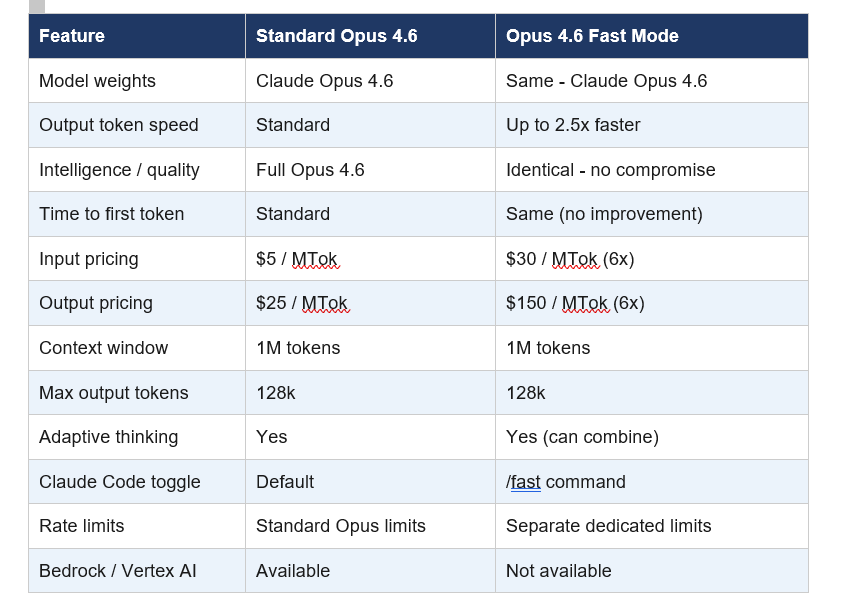
One critical nuance that the docs bury: fast mode and the effort parameter are completely independent. You can run Fast Mode + Low Effort for maximum speed on simple tasks, or Fast Mode + High Effort for rapid high-quality output on complex ones. These two dials control completely different things.
3. Claude Opus 4.6 Fast Mode Pricing: The 6x Math
Fast mode is priced at 6x standard Opus 4.6 rates. That means $30 per million input tokens and $150 per million output tokens, compared to $5 and $25 respectively at standard speed. For context, that makes fast mode Opus 4.6 more expensive per token than nearly any other model on the market right now.
But here's the pricing trap nobody warns you about: if you enable fast mode mid-conversation, you pay the full uncached input token price for your entire existing context. If you're deep into a 50k token session and you flip on fast mode, your wallet will notice. The smart move is always to enable it at the start of a session if you know you'll need it.
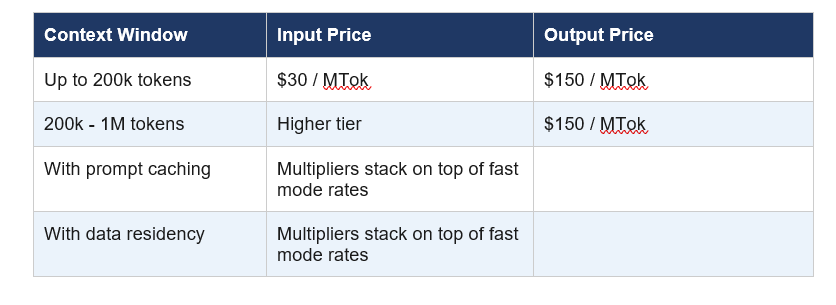
For Claude Code users on subscription plans (Pro, Max, Team, Enterprise), fast mode tokens go to extra usage billing only and are not included in your plan's rate limits. Fast mode has its own separate rate limit pool, and when you hit it, it automatically falls back to standard Opus 4.6 until the cooldown expires.
Between February 7 and 16, 2026, fast mode launched at a 50% promotional discount (3x standard pricing instead of 6x). That window is now closed, but it's worth knowing Anthropic ran that promotion to drive early adoption and gather feedback.
4. How to Enable Fast Mode in Claude Code
Enabling fast mode in Claude Code is the most frictionless experience of any platform. You need Claude Code v2.1.36 or later. Check your version with claude --version before doing anything else.
Once you're on the right version, type /fast in your Claude Code session and press Tab. A lightning bolt icon appears next to your prompt confirming fast mode is active. Type /fast again to check status or toggle it off. Run /fast a third time to disable it.
By default, the setting persists across sessions. If you want fast mode to reset every new session (useful for shared team environments), administrators can set require per-session opt-in in settings. Alternatively, set "fastMode": true in your user settings.json to have it always on from the start.
Practical tip: switching from fast mode back to standard with /fast doesn't revert you to your previous model. You stay on Opus 4.6. If you want to switch models entirely, use /model.
Best use case pairing: Fast mode shines most during rapid iteration cycles where you're making a change, testing it, asking Claude to adjust, and repeating. In a typical debugging session with 25 back-and-forth exchanges, fast mode shaves roughly 15-20 minutes off the total wait time. That's not nothing.
5. Fast Mode on GitHub Copilot, Cursor, and Vercel
Fast mode isn't just a Claude Code feature. As of February 2026, it's rolling out across multiple platforms, each with slightly different access requirements.
GitHub Copilot: Fast mode for Opus 4.6 launched February 7, 2026 as a research preview for Copilot Pro+ and Enterprise users. You select it via the model picker in Visual Studio Code (all modes: chat, ask, edit, agent) and Copilot CLI. Enterprise administrators must explicitly enable the Fast mode for Claude Opus 4.6 policy in Copilot settings. After February 16, a 30x premium request multiplier applies.
Cursor: Opus 4.6 fast mode launched in Cursor on February 7, 2026. The initial 10-day launch period offered 50% off, which has since ended. Cursor is a natural fit given its agentic coding focus. The 2.5x speed boost turns long-running refactors into something you can actually watch in near-realtime.
Vercel AI Gateway: Fast mode support for Opus 4.6 arrived on Vercel's AI Gateway on April 7, 2026. Enable it by passing speed: 'fast' in the anthropic provider options in AI SDK. You can also set "fastMode": true in settings.json for Claude Code via AI Gateway. The playground supports direct testing without writing any code.
Not available on: Amazon Bedrock, Google Vertex AI, and Microsoft Azure Foundry. If your infrastructure is locked into any of these cloud providers, fast mode is simply not an option for you at this point.
6. When Fast Mode Is Worth It (And When to Skip It)
I've tested this across a month of daily use. Here's my honest breakdown of when the premium is justified versus when you're just burning budget.
Use fast mode when:
- You're doing rapid iteration cycles where response latency is breaking your focus
- You're live debugging and each wait breaks your mental thread on the problem
- You're working on a time-sensitive deadline (shipping a fix at 2 AM)
- You're doing interactive pair programming where every pause disrupts the rhythm
- The task involves 20+ back-and-forth exchanges where speed compounds noticeably
Skip fast mode when:
- You're running long batch jobs where latency doesn't matter
- You're doing single-shot generation tasks with no iteration
- Your context window is already large and you'd pay mid-session fast mode rates
- You're on a tight budget and standard Opus 4.6 quality is already overkill
- Your app is on Bedrock, Vertex AI, or Azure Foundry (not available there anyway)
The honest contrarian take: for most batch processing, standard Sonnet 4.6 at $3/$15 per MTok is the smarter choice. Sonnet 4.6 is already genuinely fast and costs a fraction of fast mode Opus. Fast mode Opus makes sense only when you specifically need Opus-level intelligence at interactive speed. That's a narrower use case than the hype suggests.
7. Fast Mode via the Anthropic API
If you're building applications directly on the Anthropic API rather than using Claude Code, here's exactly how to enable fast mode in your code.
You need two things: the beta header fast-mode-2026-02-01 and the speed: "fast" parameter in your request body.
Python SDK example:
response = client.beta.messages.create(

    model="claude-opus-4-6",

    max_tokens=4096,

    speed="fast",

    betas=["fast-mode-2026-02-01"],

    messages=[{"role": "user", "content": "Your prompt here"}]

)
The response object includes a speed field in the usage block confirming the mode that was used. When fast mode rate limits are exceeded, the API returns a 429 error with a retry-after header. Anthropic's SDKs automatically retry up to 2 times by default, waiting for the server-specified delay.
Fast mode is also eligible for Zero Data Retention (ZDR). When your organization has a ZDR arrangement, data sent through fast mode is not stored after the API response is returned. That's a meaningful compliance detail for enterprise use cases.
One JSON behavior note worth flagging: Opus 4.6 may produce slightly different JSON string escaping in tool call arguments compared to older models. Standard JSON parsers handle these differences automatically, but if you're parsing tool call input as a raw string rather than using json.loads() or JSON.parse(), verify your parsing logic.
8. My Honest Take: Who Should Actually Use This?
I've been using fast mode for about a month across three different projects, and my conclusion is more nuanced than the launch posts suggest. Fast mode is genuinely useful, but it solves a specific problem, not a general one.
If your bottleneck is model intelligence, fast mode doesn't help. You're already getting full Opus 4.6 quality at standard speed. If your bottleneck is waiting for responses during active, back-and-forth coding sessions, fast mode is legitimately transformative. The 2.5x speed difference becomes viscerally obvious during extended sessions.
The 6x price premium will filter out most casual users, and that's probably intentional. Anthropic is positioning this for professional developers and enterprises where billable hours and shipping speed have a direct dollar value. If you're charging $150/hour for development work, paying an extra $2-3 per session to shave 20 minutes off your debugging time is a straightforward ROI calculation.
What I wish was different: the lack of availability on Bedrock and Vertex AI is a significant limitation for enterprise teams whose infrastructure is locked into AWS or GCP. That's a real gap that Anthropic will need to address if fast mode is going to see serious enterprise adoption beyond Claude Code users.
Bottom line: fast mode is the right tool for interactive development work where latency breaks flow state. It's not a replacement for choosing the right model for your use case, and it's not worth it for anything that runs unattended.
Frequently Asked Questions
What is fast mode in Claude Opus 4.6?
Fast mode is a high-speed inference configuration for Claude Opus 4.6 that delivers up to 2.5x higher output token speeds. It uses identical model weights and produces the same quality output as standard Opus 4.6, but routes requests through a faster serving path. It launched as a research preview in February 2026 and requires the beta header fast-mode-2026-02-01 via the API.
How much does Claude Opus 4.6 fast mode cost?
Fast mode is priced at 6x standard Opus 4.6 rates: $30 per million input tokens and $150 per million output tokens. Standard Opus 4.6 costs $5 per million input tokens and $25 per million output tokens. Prompt caching and data residency multipliers stack on top of fast mode pricing. Claude Code users on subscription plans are billed to extra usage only, not against plan rate limits.
How do I enable fast mode in Claude Code?
Type /fast in your Claude Code session (v2.1.36 or later) and press Tab to toggle fast mode on. A lightning bolt icon confirms it's active. The setting persists across sessions by default. Alternatively, set "fastMode": true in your user settings.json file to have it enabled automatically. Use /fast again to toggle it off, and /model if you want to switch to a different model entirely.
Is Claude Opus 4.6 fast mode worth it?
Fast mode is worth it for interactive development work where response latency breaks your focus, such as rapid iteration cycles, live debugging sessions, and time-sensitive deadlines. It's not worth it for batch processing, single-shot generation, or workloads where standard Opus quality already exceeds your needs. The 6x price premium is best justified when billable hours or shipping speed have a direct dollar value.
What is the difference between fast mode and effort level in Claude?
Fast mode and effort level are completely independent controls. Fast mode controls output token speed by routing requests through a faster infrastructure path. Effort level controls reasoning depth by telling the model how much to think before responding. You can combine them: Fast Mode + High Effort gives rapid, deeply reasoned output, while Fast Mode + Low Effort maximizes raw speed for simpler tasks.
Is Claude Opus 4.6 fast mode available for free?
Fast mode is not available on free Claude plans. It requires a Claude subscription (Pro, Max, Team, or Enterprise) to access via Claude Code, and is billed to extra usage rather than included in plan limits. GitHub Copilot Pro+ and Enterprise users can access it through Copilot after the model is selected. A promotional 50% discount ran from February 7-16, 2026 and has since ended.
Which Claude model is best for speed?
For raw speed at low cost, Claude Haiku 4.5 is the fastest and cheapest option. For the best balance of speed and quality, Claude Sonnet 4.6 runs fast at $3/$15 per MTok. For maximum intelligence at maximum speed, Claude Opus 4.6 in fast mode delivers 2.5x faster output than standard Opus 4.6 at $30/$150 per MTok. The right answer depends entirely on your quality requirements and budget.
Is fast mode available on Amazon Bedrock, Google Vertex AI, or Azure?
No. As of April 2026, fast mode for Claude Opus 4.6 is not available on Amazon Bedrock, Google Vertex AI, or Microsoft Azure Foundry. It is available natively through the Anthropic API, Claude Code, GitHub Copilot Pro+/Enterprise, Cursor, and Vercel AI Gateway. Teams whose cloud infrastructure is locked into AWS, GCP, or Azure cannot currently access fast mode.
Recommended Reading
- Claude AI Prompt Codes That Actually Work (2026)
- Best AI Models April 2026: Ranked by Benchmarks
- Cursor 3 vs Google Antigravity: Best AI IDE 2026
- What Is MCP (Model Context Protocol)? Complete 2026 Guide
- Attention Mechanism in LLMs Explained (2026)
Related Cookbooks
References
- Anthropic API Docs - Fast Mode (Beta Research Preview):
- Claude Code Docs - Speed Up Responses with Fast Mode:
- Anthropic - What's New in Claude 4.6:
- GitHub Changelog - Fast Mode for Claude Opus 4.6 in Public Preview for GitHub Copilot:
- Vercel Changelog - Opus 4.6 Fast Mode Available on AI Gateway:
- OpenRouter - Claude Opus 4.6 Fast Pricing and Providers:

