



At Google IO 2026, one announcement got buried under Gemini Spark and Omni headlines that every developer should have read first. Google Antigravity went from a single IDE to a five-surface agent platform in one release — and simultaneously killed Gemini CLI with a June 18, 2026 shutdown date. If you use Gemini CLI, you have 28 days to migrate. If you are evaluating agentic coding tools for a team, the platform just changed significantly. This guide covers everything.
Antigravity 2.0 is now a desktop IDE, a CLI (invoked as agy), an SDK, a Managed Agents API tier inside the Gemini API, and an enterprise deployment path — all shipped simultaneously on May 19, 2026. The engine powering all of it is Gemini 3.5 Flash, Google's fastest frontier model. For the full benchmark and pricing breakdown of that model, the Gemini 3.5 Flash complete review at Build Fast with AI covers everything you need before deciding whether the Antigravity ecosystem is the right build environment for your work.
1. What Is Google Antigravity 2.0? The 90-Second Version
Google Antigravity 2.0 is an agent-first development platform launched at Google IO 2026 on May 19, 2026. It is not a Cursor clone with Gemini under the hood. The original Antigravity (November 2025) was that. Version 2.0 is a different product category.
The defining difference: Antigravity 2.0 does not center the code editor. It centers the agent. You describe what you want to build, multiple specialized subagents execute in parallel, and the desktop application is a management surface for those agents — not a text editor with AI assistance bolted on.
At the IO keynote, Google Director of Software Engineering Varun Mohan and Logan Kilpatrick of Google DeepMind demonstrated the architectural ambition directly: Mohan used Antigravity 2.0's parallel agent system to build a working operating system core from scratch live on stage. Total cost: under $1,000 in compute. He then ran a live Doom clone coded directly on top of that brand new OS. The demo was real, the token cost was real, and the speed advantage of Gemini 3.5 Flash — running at 12x the speed of other frontier models inside the Antigravity harness — was the mechanical reason it was possible.
The strategic context: Google built Antigravity 2.0 using Antigravity 2.0. Every consumer product Google launched at IO 2026 — Gemini Spark, AI Mode in Search, Daily Brief — runs on the same Antigravity agent harness internally. For the full IO 2026 context on what this means across Google's product lineup, the Google IO 2026 complete announcements breakdown covers how Antigravity connects to every other major launch from the keynote.
2. The Five Surfaces: What Actually Shipped on May 19
Antigravity 2.0 is not one product. It is five products that share an agent runtime and a Gemini 3.5 Flash backend. Here is what each surface does and who it is for.
Antigravity 2.0 Desktop App
Multi-agent orchestration UI. Runs parallel subagents simultaneously. Schedules background tasks. Native voice commands. Integrates with AI Studio, Android, Firebase. Available on macOS, Windows, Linux.
Antigravity CLI (agy)
Go binary — single self-contained executable. Terminal interface to the same agent runtime. Invoked as "agy" not "antigravity". Bidirectional sync with the desktop app. Replaces Gemini CLI (shutdown June 18, 2026).
Antigravity SDK
Build custom agents using Google's agent runtime and host them on your own infrastructure. MCP support for connecting agents to external data sources. Custom agent templates available in AI Studio.
Managed Agents in the Gemini API
Call a full agent workflow as a single API call. Agents run in an isolated Linux environment. Handles multi-step reasoning, tool calling, code execution, web browsing, and file management automatically.
Gemini Enterprise Agent Platform
Enterprise deployment path. Google Cloud customers can connect to Antigravity for project builds. Custom agent templates. Audit trails and governance controls for agentic actions.
The Managed Agents API is the part of this release that most write-ups have underexplored. A single Gemini API call that spins up an isolated Linux environment, reasons across tools, manages files, browses the web, and returns a completed result — that is the same abstraction LangChain, AutoGen, and CrewAI required hundreds of lines of orchestration code to approximate. Google has packaged that orchestration layer as a managed service. For developers building on top of the Gemini API already, the Gemini Deep Research API Python tutorial covers the underlying SDK patterns that Managed Agents builds on — the call structure is compatible.
3. Antigravity CLI: Install, Commands, and the agy Binary
The Antigravity CLI is a Go binary — no runtime dependencies, no Node.js required. The command is agy, not antigravity. Both Gemini CLI and agy can coexist on your system during the migration window without conflict.
Installation
macOS / Linux:
curl -fsSL https://antigravity.google/cli/install.sh | bashWindows (PowerShell):
irm https://antigravity.google/cli/install.ps1 | iexAfter installation, run agy with no arguments. On first launch it opens your browser for Google OAuth. Sign in with the same account you used for Gemini CLI. For headless or CI environments, agy prints a URL to your terminal that you authenticate in any browser.
Key Commands
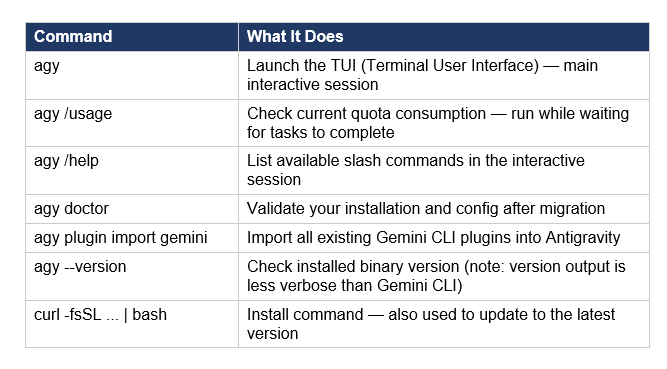
Project Configuration: AGENTS.md
Antigravity CLI uses AGENTS.md for project-level instructions — the equivalent of Claude Code's CLAUDE.md and Gemini CLI's GEMINI.md. Drop a plain-English instruction file at the root of your project:
Always use TypeScript. Never modify files in /dist directly. Run npm test after every code change.
Anything in AGENTS.md gets prepended to every prompt the agent processes inside that directory. Skills files live at .agents/skills/ (migrated from .gemini/skills/ in Gemini CLI setups).
4. Antigravity CLI vs Gemini CLI: What Changed and Why It Matters
Antigravity CLI is not a feature update to Gemini CLI. It is a replacement built on a different technical foundation with a different design philosophy. The most important differences are architectural, not cosmetic.
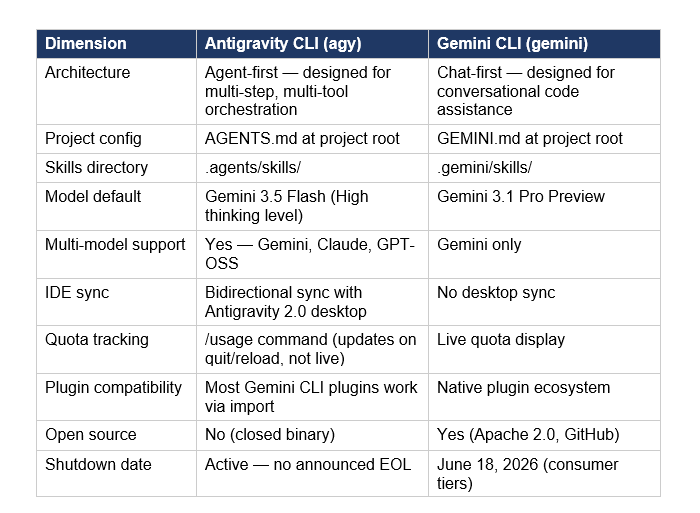
The Go binary is a meaningful technical improvement: no runtime dependency means faster cold start, simpler CI/CD integration, and no Node version conflicts. The trade-off is the loss of open-source access — Gemini CLI was Apache 2.0 licensed on GitHub. Antigravity CLI is a closed binary, which has caused developer community friction.
The most-reported real-world difference from developers who have migrated: quota tracking. Gemini CLI showed live usage in the session. Antigravity CLI's /usage command only updates after you quit and relaunch — meaning you cannot monitor consumption in real time during long agent runs. Multiple users on the Google AI Developers Forum have reported running out of quota unexpectedly because of this. Google has acknowledged it as a known issue.
The multi-model support in Antigravity CLI (Gemini, Claude, GPT-OSS) is a genuine differentiator over Gemini CLI, which was Gemini-only. For developers who want to route different task types to different models — Gemini 3.5 Flash for agentic tool chains, Claude Opus 4.7 for code review — the unified CLI interface is useful. For the benchmark-level comparison of when each model wins, the Gemini 3.5 Flash vs GPT-5.5 vs Claude vs DeepSeek comparison gives you the routing framework.
5. Gemini CLI Migration: Step-by-Step Before June 18, 2026
Gemini CLI shuts down on June 18, 2026 for Google AI Pro, AI Ultra, and free-tier users. Enterprise users on Gemini Code Assist Standard or Enterprise licenses retain access indefinitely. If you are on a consumer tier, here is the complete migration path.
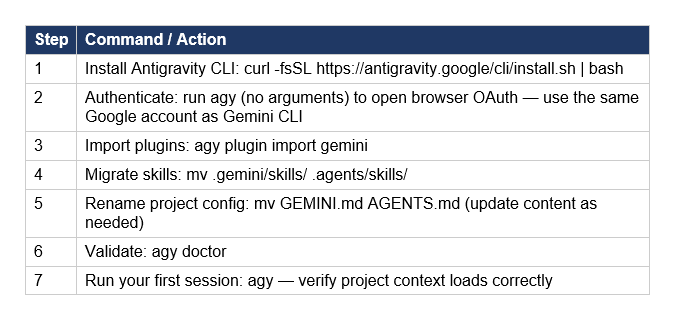
The migration takes under 10 minutes for most setups. Both binaries can coexist on your system during the migration window — there is no conflict between gemini and agy. For headless CI/CD environments, the Antigravity CLI docs at antigravity.google/docs/gcli-migration cover custom auth providers and air-gapped enterprise installs separately.
Important note for CI/CD pipelines: if you have Gemini CLI invocations in shell scripts, GitHub Actions workflows, or Docker containers, those need individual updates. The binary name change from gemini to agy means simple find-and-replace works for most cases, but GEMINI.md to AGENTS.md renames inside Dockerfiles require explicit file mapping.
6. Antigravity vs Claude Code vs Cursor vs Windsurf
The agentic coding tool landscape in May 2026 has seven serious contenders. This comparison covers the four most frequently evaluated against Antigravity 2.0: Claude Code, Cursor, and Windsurf.
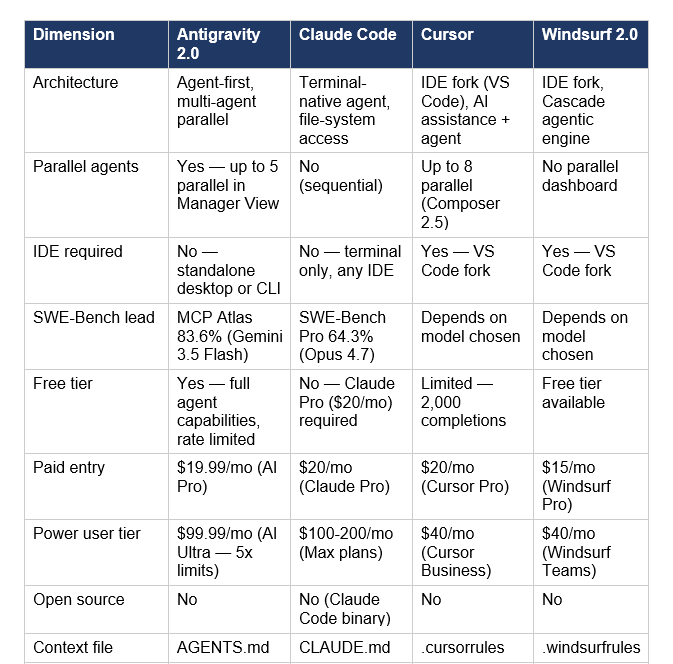
Three takeaways from this comparison. First, Antigravity 2.0 is the only tool in this group that is not built on VS Code — it is a standalone agent management system that can optionally be used alongside an IDE. That is a different design bet: Google is building toward a world where you do not start from a text editor. Whether that is right is not yet settled.
Second, Claude Code wins on raw code quality. SWE-Bench Pro at 64.3% for Claude Opus 4.7 is the highest published score for production-grade repository editing. Antigravity's MCP Atlas score of 83.6% is the highest for tool-orchestration-heavy workflows. These are different benchmarks measuring different things. "Best for coding" depends entirely on whether your coding involves writing new code or coordinating tools to modify existing code.
Third, the free tier comparison matters for solo developers and students. Antigravity's free tier includes full agent capabilities with rotating rate limits. Cursor's free tier is 2,000 completions. This makes Antigravity more accessible for learning and experimentation without a subscription commitment. For building your first Gemini-powered agent workflow as a step toward Antigravity's SDK, the Google AI Studio full developer guide covers the export-to-Antigravity flow that Google added specifically for moving from AI Studio prototypes to local Antigravity builds.
7. Pricing: AI Pro vs AI Ultra vs Enterprise
Antigravity 2.0 has three pricing layers, which Google restructured significantly at IO 2026. The most important change: usage is now compute-based (not daily prompt limits), meaning complex tasks like multi-agent coding runs consume more quota than simple text prompts.
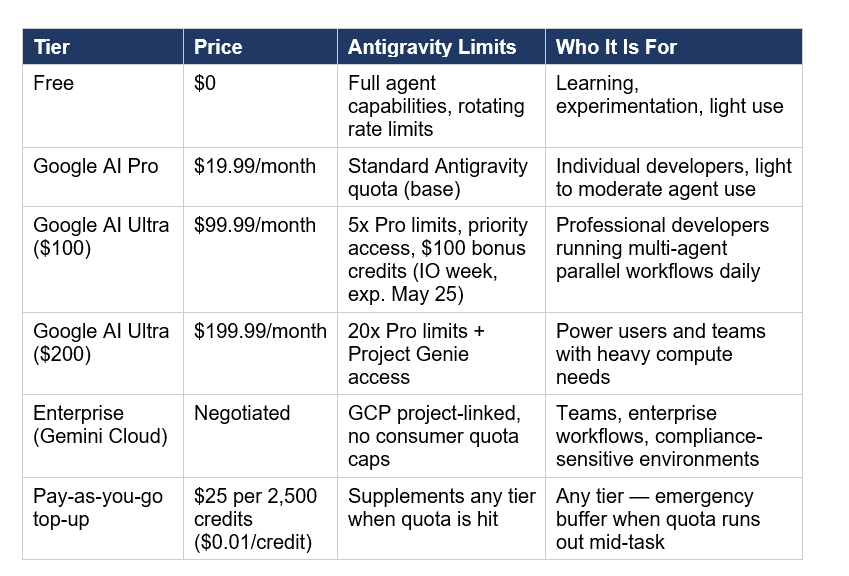
The quota refresh cadence is every 5 hours — not daily. This matters for planning agent runs. If you hit your limit at 2pm, it does not reset at midnight. It resets 5 hours after your period started. For heavy multi-agent parallel workflows, the $100 AI Ultra tier is the realistic minimum to avoid hitting walls mid-task.
The compute-based billing model is the right direction but it creates a visibility problem: developers cannot currently see how much compute a given agent run will consume before it starts. Google has not published a compute unit conversion table. Until they do, the safest approach is to run test workflows on the free tier or Pro tier to calibrate consumption before committing to long-running tasks on a quota you cannot refill mid-session. The Gemini Workspace features and subscription guide covers how AI Ultra interacts with Google Workspace integrations that Antigravity can now access directly.
8. Honest Limitations and Real Criticism
Antigravity 2.0 is the most aggressive developer tool release Google has shipped in years. It is also genuinely early. The criticism coming from the developer community is real and worth naming directly.
Quota Visibility Problem
The /usage command in Antigravity CLI only updates after you quit and reload — not live. Multiple developers on the Google AI Developers Forum reported running out of quota mid-task with no warning. For any agentic workflow that runs for more than 20–30 minutes, this is a real operational problem. Google has acknowledged it as a known issue. No fix date announced.
Forced Gemini CLI Migration
Google is shutting down Gemini CLI for consumer tiers on June 18, 2026. The community reaction on GitHub (Discussion #27274 on the google-gemini/gemini-cli repo) was direct: many developers explicitly preferred Gemini CLI and asked for it to stay alive. The replacement is not feature-equivalent on day one — particularly around plugin ecosystem maturity and live quota tracking. The migration is mandatory, not optional, which has created friction for teams with production pipelines wired into Gemini CLI commands.
Raw Code Quality vs Orchestration Quality
Antigravity's benchmark strength is in tool orchestration — MCP Atlas (83.6%), Finance Agent v2 (57.9%). Its weakness relative to Claude Code is production-grade code correctness on complex real-world repositories. Claude Opus 4.7 still leads SWE-Bench Pro at 64.3%. If your definition of "best coding AI" is "writes the most reliable code for a PR that goes into production," Claude Code has the published benchmark lead. Antigravity wins when the task is coordinating many tools to complete a workflow.
Ecosystem Lock-In
Antigravity's native integrations are Google-first: AI Studio, Firebase, Android, Google Cloud. The MCP support theoretically opens connections to any external service, but the default deployment path strongly favors teams already inside the Google ecosystem. If your stack is AWS-first or Azure-first, the integration friction is real even if the agent runtime is capable.
My personal take: the $100/month AI Ultra requirement to unlock meaningful multi-agent parallel workflows is aggressive for a product that launched 6 months ago. The free tier is genuinely useful for experimentation, but the gap between free and paid is steep. For a solo developer used to the Gemini CLI free tier, moving to Antigravity at production scale is a $100/month commitment, not a free upgrade.
9. Who Should Use Antigravity 2.0 Right Now
Based on the architecture, benchmarks, pricing, and real-world community feedback since May 19, here is the honest routing guide.
Use Antigravity 2.0 now if:
- You are already in the Google ecosystem — Firebase projects, Android development, Google Cloud deployments. The native integrations and AI Studio export paths are genuine workflow improvements, not marketing.
- Your agentic workflows are tool-orchestration heavy — MCP Atlas-style multi-step tool chains, financial agent workflows, parallel subagent execution. This is where Gemini 3.5 Flash and the Antigravity harness have benchmark leads.
- You want the broadest model choice in a single CLI — Gemini 3.5 Flash, Claude models, GPT-OSS, all accessible from agy without switching tools.
- You were already using Antigravity 1.0 — the 2.0 upgrade is meaningful and the migration is low-friction.
- You are migrating from Gemini CLI — you have until June 18, 2026. There is no alternative on consumer tiers.
Wait or evaluate in parallel if:
- Production code correctness is your primary requirement. Claude Code + Opus 4.7 leads SWE-Bench Pro at 64.3%. Antigravity's code quality gap on production-grade repo editing is documented.
- You have sensitive repositories or need clear governance documentation before enabling autonomous agents. The enterprise tier has audit trails; the consumer tier documentation on security posture is less complete.
- Your budget is tight. The $100/month AI Ultra tier is the realistic working threshold for multi-agent parallel workflows. At $19.99/month Pro, quota walls will interrupt serious agent runs.
- Your team is heavily AWS or Azure-first. The ecosystem lock-in is real even with MCP support.
For developers who want to learn Antigravity's agent patterns through hands-on implementation before committing to a subscription, the gen-ai-experiments cookbook repo at Build Fast with AI includes Gemini API notebooks covering MCP agent patterns, tool calling, and the new thinking_level surface — all of which transfer directly to Antigravity SDK development once you move to building custom agents.
Frequently Asked Questions
What is Google Antigravity 2.0?
Google Antigravity 2.0 is an agent-first development platform launched at Google IO 2026 on May 19, 2026. It consists of five surfaces: a standalone desktop app for multi-agent orchestration, an Antigravity CLI (invoked as agy), an Antigravity SDK for building custom agents, Managed Agents in the Gemini API, and the Gemini Enterprise Agent Platform. It replaces the single-IDE model of Antigravity 1.0 (November 2025) and uses Gemini 3.5 Flash as its default model running at 12x the speed of other frontier models inside the Antigravity harness.
Is there a CLI for Antigravity and how do I install it?
Yes. The Antigravity CLI is a Go binary invoked as agy (not antigravity). Install on macOS/Linux with: curl -fsSL https://antigravity.google/cli/install.sh | bash. On Windows: irm https://antigravity.google/cli/install.ps1 | iex. After installation, run agy with no arguments to authenticate via Google OAuth. The CLI supports the same multi-step reasoning, tool calling, and subagent capabilities as the desktop app without requiring the GUI.
What is the difference between Antigravity CLI and Gemini CLI?
Antigravity CLI (agy) is a Go binary — no runtime dependencies. Gemini CLI was Node.js. Antigravity CLI is agent-first: designed for multi-step tool orchestration with multi-model support (Gemini, Claude, GPT-OSS). Gemini CLI was Gemini-only and chat-first. Project configuration moves from GEMINI.md to AGENTS.md, and skills move from .gemini/skills/ to .agents/skills/. Gemini CLI is shutting down for consumer tiers on June 18, 2026. Antigravity CLI is the mandatory replacement.
What AI model does Antigravity use?
Antigravity 2.0 defaults to Gemini 3.5 Flash, which Google has co-optimized for the Antigravity harness at 12x the speed of other frontier models. Antigravity also supports Claude models and GPT-OSS models through multi-model routing within the same CLI and desktop app. The Managed Agents API specifically uses Gemini 3.5 Flash for its isolated Linux environment execution layer.
What are the Antigravity usage limits and how does pricing work?
Usage is compute-based (not daily prompts) and refreshes every 5 hours. Free tier includes full agent capabilities with rotating rate limits. AI Pro ($19.99/month) is the base paid tier. AI Ultra ($99.99/month) provides 5x Pro limits — the realistic minimum for sustained multi-agent parallel workflows. AI Ultra ($199.99/month) provides 20x limits. All tiers can purchase $25 pay-as-you-go credits ($0.01 each) as top-ups when quota is hit before the 5-hour refresh.
How do I migrate from Gemini CLI to Antigravity CLI before June 18, 2026?
Install agy (curl -fsSL https://antigravity.google/cli/install.sh | bash), authenticate with the same Google account, import plugins (agy plugin import gemini), move your skills directory (mv .gemini/skills/ .agents/skills/), rename GEMINI.md to AGENTS.md, and validate with agy doctor. The full migration takes under 10 minutes. Enterprise users on Gemini Code Assist Standard or Enterprise licenses do not need to migrate — they retain Gemini CLI access indefinitely.
How does Antigravity 2.0 compare to Claude Code?
Antigravity 2.0 leads on agentic tool-orchestration benchmarks: MCP Atlas (83.6% vs Claude's 79.1%). Claude Code leads on production code quality: SWE-Bench Pro (64.3% for Claude Opus 4.7). Antigravity supports parallel agent execution (up to 5 simultaneous). Claude Code is sequential but has deeper ecosystem integration with IDEs (VS Code, JetBrains) and is the default for Claude Code CLI workflows. Pick Antigravity for high-volume tool-chain coordination. Pick Claude Code for production-grade repository editing.
What is the Antigravity SDK?
The Antigravity SDK lets developers build custom AI agents using Google's agent runtime and deploy them on their own infrastructure or via Google Cloud. It supports MCP protocol connections to external data sources and services. Custom agent templates are available in AI Studio as starting points. The SDK enables the same multi-step reasoning, tool calling, and subagent patterns as the Antigravity desktop app and CLI, accessible programmatically.
Recommended Blogs
- Gemini 3.5 Flash Review: Benchmarks, Price & API (2026)
- Google I/O 2026: Gemini 3.5 Flash, Spark & Agentic AI
- Gemini Deep Research API: Full Python Tutorial (2026)
- Google AI Studio Vibe Coding: Full Guide (2026)
- Best AI Models May 2026 Leaderboard: GPT-5.5, Claude Opus 4.7, Gemini 3.5 Flash
- Claude Sonnet 4.6 vs GPT-5.5 vs Gemini 3.1 Pro: Best All-Rounder in 2026?
- Gemini in Google Workspace: Every Feature Explained (2026)
Building with Antigravity 2.0 or exploring agentic development on the Gemini stack? Join Build Fast with AI's Gen AI Launchpad — 8 weeks, 100+ tutorials, and 30,000+ builders running production AI in 2026. New cohort open at buildfastwithai.com.
References
- Google Developer Blog — IO 2026 Developer Highlights: Antigravity, Gemini API, AI Studio
- TechCrunch — Google Launches Antigravity 2.0 with Updated Desktop App and CLI Tool at IO 2026
- MarkTechPost — Google Launches Antigravity 2.0 at IO 2026: A Standalone Agent-First Platform
- The Next Web — Google Antigravity 2.0: Desktop, CLI, SDK; Gemini CLI Is Being Retired
- 9to5Google — Google Antigravity 2.0 Becoming Full Agentic Development Suite
- DEV Community — Getting Started with Antigravity CLI
- Agentpedia — Migrate from Gemini CLI to Antigravity CLI: Complete Guide (June 18 Deadline)
- Apidog — Google Antigravity 2.0: Agent-First Dev Platform Has Landed
GitHub — Transitioning Gemini CLI to Antigravity CLI (Discussion #27274)

