Gemini in Google Workspace: Every AI Feature Explained (2026)
Your Google Workspace subscription already includes one of the most capable AI assistants on the planet. And I'd bet most of your team hasn't touched it.
In January 2025, Google made a move that still doesn't get enough credit: they stopped selling Gemini as an expensive add-on and folded it directly into every Business and Enterprise Workspace plan. The same AI that previously added $18 per user per month to your bill? It's now included for roughly $2 more than your old plan without AI. That's a remarkable value shift, and it changes the math entirely for teams sitting on the fence.
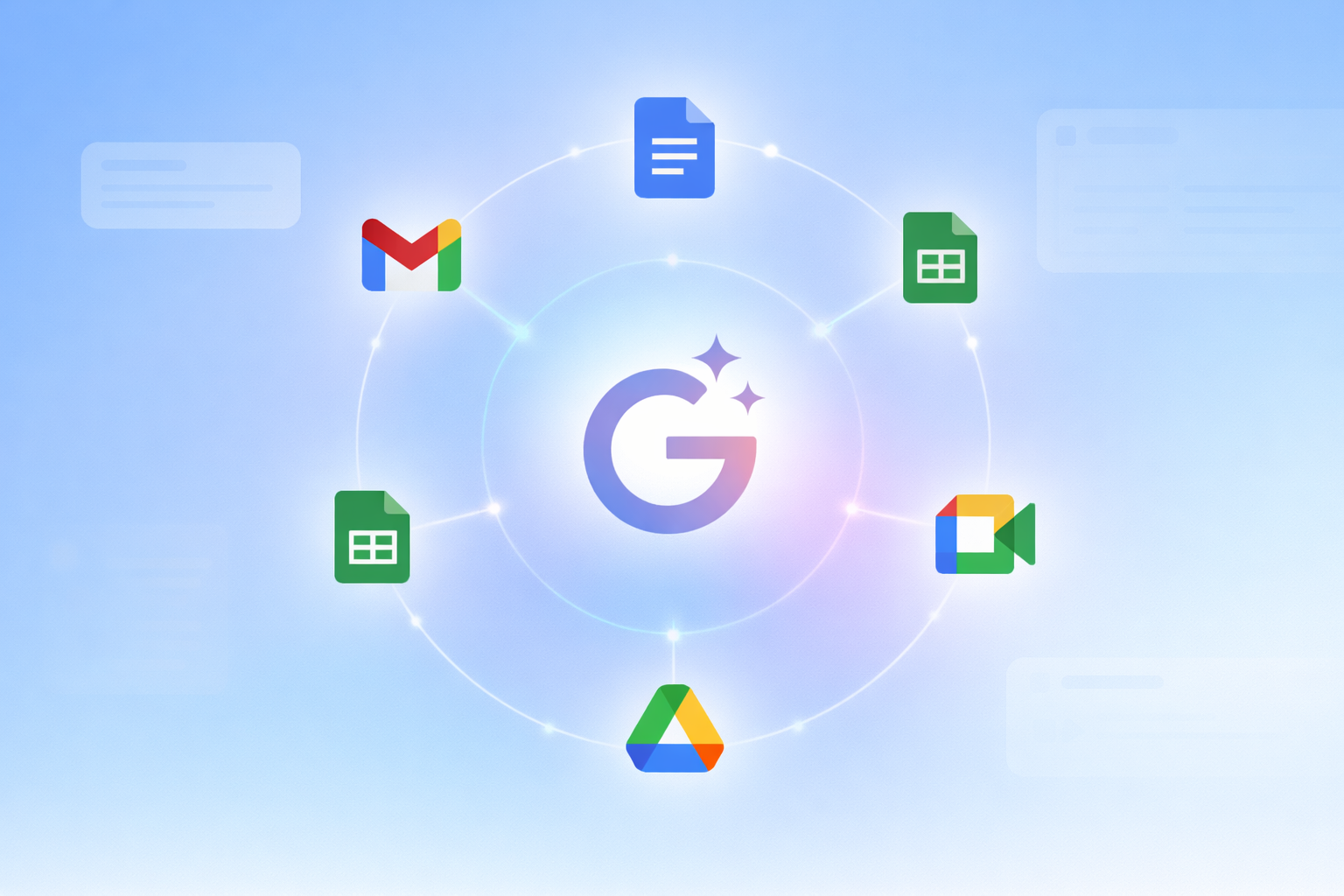
I've been tracking these updates closely, and what Google has shipped into Workspace through early 2026 is genuinely impressive. This isn't surface-level autocomplete. Gemini is now embedded in Gmail, Docs, Sheets, Slides, Drive, Meet, Chat, and even a new video app called Vids. Every app. Every flow. Already there.
This guide covers every Gemini feature currently live in Google Workspace, app by app, with real data, the latest 2026 updates, and honest takes on what's actually worth using.
What Is Gemini in Google Workspace?
Gemini is Google's flagship AI model, now integrated natively across the entire Google Workspace ecosystem. It is not a chatbot in a separate tab. It lives inside your existing apps and has direct context access to your emails, documents, calendars, and meetings.
Think of it as the difference between a consultant you have to brief from scratch every time versus a team member who was in every meeting, read every document, and is already up to speed. The Gemini side panel in Gmail, Docs, Sheets, Slides, Drive, and Chat is the clearest expression of this philosophy: one click, instant AI assistance, full context from wherever you're working.
As of March 2026, Gemini 3 Flash is the default model powering Workspace AI features for most interactions, with Gemini 3 Pro available for complex reasoning tasks through the AI Expanded Access add-on. The combination of model quality and deep product integration is what separates Workspace Gemini from any standalone AI tool.
Gemini in Gmail: Smarter Inbox, Less Time Drafting
Email is where most knowledge workers lose 2 to 3 hours every day. Gemini in Gmail attacks this problem from four angles simultaneously.
Help me write
You give Gemini a subject line, a few bullet points, or a rough sentence, and it produces a fully drafted, tone-appropriate email. It adjusts formality based on context. Write to a vendor? Professional and clear. Reply to a colleague about a lunch plan? Casual and quick. The drafts aren't perfect on the first pass, but they get you to 80% in 10 seconds, which is the entire point.
Thread summarization
Open any 40-reply thread, click Summarize, and Gemini gives you the key decisions, action items, and unresolved questions in three to five sentences. I've watched teams cut email review time by half just from using this feature on client chains.
AI Overviews in Gmail Search
When you search your inbox, Gemini now generates an immediate plain-English answer based on your email content, not just a list of matching threads. Ask "What did the vendor say about the shipping delay?" and you get the answer, not 47 threads to dig through.
Help me schedule (Now Supports Groups)
Introduced in October 2025 and expanded to group meetings in February 2026, this feature detects when you're trying to coordinate a time in an email thread and surfaces a "Help me schedule" button. It then proposes time slots that work across all recipients whose calendars you can see. No more back-and-forth chains just to find a 30-minute window.
Honest take: "Help me write" is the only Gemini feature I've seen near-universal adoption on across different teams. It's the fastest path to productivity gains, and it requires zero learning curve. Start here.
Gemini in Google Docs: Your AI Writing Partner
Docs is where Gemini gets serious for knowledge workers. The March 2026 update was the biggest improvement to Docs AI since launch, so a lot of what you'll read online is already outdated.
Help me create
Provide a prompt in the side panel or the new bottom bar and Gemini generates a first draft instantly, drawing from your files and emails as context sources. The March 2026 update made this much more personalized: you can say "draft a newsletter for our neighborhood association using the meeting minutes from my January HOA meeting and the list of upcoming events," and it pulls both documents automatically.
Match writing style and format
This is an underrated feature. "Match writing style" unifies voice and tone across a document so it sounds like one author wrote the whole thing. "Match doc format" aligns your document to the structure of a reference doc you provide. For teams with multiple contributors writing different sections, this alone is worth the plan upgrade.
Summarize and ask questions
Drop a 50-page report into Docs and ask Gemini to give you the executive summary, the three biggest risks, or what the author recommends for Q3. It reads the document and answers directly. Legal review, investor reports, policy documents: the use cases here are enormous.
The 95-participant study Google ran showed Fill with Gemini dramatically outperforming manual data entry on a 100-cell Sheets task. The same principle applies in Docs: Gemini does the tedious structured work faster and with fewer errors than humans doing it manually.
Gemini in Google Sheets: Spreadsheets Without the Headache
Spreadsheets have always had a brutal learning curve. Gemini flattens it.
Help me organize
Describe your data goal in plain language and Gemini builds the sheet structure for you. "Create a monthly budget tracker with columns for marketing, operations, HR, planned vs. actual, and a variance column" produces exactly that in seconds. No template hunting, no manual column setup.
Fill with Gemini
This is the standout feature in Sheets. Gemini intelligently populates cells based on patterns, existing data, and context. In a controlled study across 95 participants, it significantly outperformed manual entry on a 100-cell task in both speed and accuracy. For data-heavy workflows, the time savings compound fast.
Formula assistance and data analysis
Don't know which formula calculates a 90-day rolling average? Ask in natural language. Gemini writes the formula, explains what it does, and inserts it in the right cell. For analysis, you can ask "Which product category had the highest quarter-over-quarter growth?" and get a plain-English answer without building a pivot table.
I think Sheets AI is underrated compared to the Gmail and Docs features. The ceiling is much higher. Once you start asking analytical questions against real operational data, the productivity gains are substantial.
Don't just use ChatGPT. Learn to build custom LLM agents, RAG pipelines, and full-stack Agentic AI apps in our intensive 6-week program.
Gemini in Google Slides: From Blank Deck to Done
Creating a polished deck has always been time-consuming because it's two jobs: writing the content and making it look good. Gemini attacks both.
Help me visualize
Describe a concept - a customer journey, a system architecture, a product roadmap - and Gemini generates a slide with suggested layout, placeholder content, and design elements. You refine rather than build from zero.
Generate entire decks from a prompt
Give Gemini a topic, an audience, and a target length and it produces a full slide deck outline with content suggestions for each slide. The quality varies, but as a starting point for a 12-slide investor deck or a training presentation, it cuts hours off the initial creation time.
Advanced image generation with Nano Banana Pro
On higher-tier plans, Gemini generates custom images using Nano Banana Pro directly inside Slides. You describe the visual you need and it appears. No stock photo subscription, no designer request, no waiting. This feature is available with standard limits on most Business plans and with higher limits through the AI Expanded Access add-on introduced in early 2026.
Gemini in Google Meet: Meetings That Stop Wasting Hours
This is the highest-ROI Gemini feature for most teams, and it's the one with the most visible before-and-after.
Take notes for me
Gemini listens to your meeting, transcribes it in real time, and delivers a structured Google Doc after the call with a summary, key decisions, and action items, all organized and labeled. The admin can configure whether this runs automatically for all meetings or only when users opt in.
Catch me up
Join a meeting 10 minutes late? Click "Catch me up" and Gemini gives you a concise summary of everything discussed so far. You can re-enter the conversation without interrupting the flow to ask what you missed.
Audio and video enhancement
Gemini improves audio clarity and video quality in real time during Meet calls. For remote team members with inconsistent setups, noisy environments, or older webcams, this makes a real difference in meeting quality.
Speech translation (rolling out in 2026)
Live speech translation in Meet is currently rolling out in 2026, enabling real-time translation across languages during calls. For international teams, this is a significant capability that previously required third-party tools.
Gemini in Google Drive and Chat: Your AI File Brain
Drive: Ask Gemini about your files
The "Ask Gemini" feature in Drive lets you query across your entire file library in natural language. Compare two vendor contracts and highlight the cost differences. Find everything related to a specific client project. Get a summary of a document you've never opened. The March 2026 update made this available in beta for Drive in the US for Google AI Ultra and Pro subscribers, with broader rollout planned.
Chat: Thread summaries and smart replies
In busy team channels, Gemini summarizes long conversation threads so you can catch up without scrolling through hundreds of messages. Smart replies in Chat go beyond generic suggestions - Gemini reads the actual conversation and generates replies that match the content and context of what's being discussed.
Google Vids and Workspace Studio: The New Power Apps
Google Vids
Google Vids is an AI-native video creation app built directly into Workspace. It's designed for business presentation-style videos: product demos, training content, team announcements, marketing explainers. With Gemini integrated, you describe a video concept, and Vids generates a script, visual suggestions, and a structured storyboard. Video generation using Veo 3.1, including AI avatars, is available through the AI Expanded Access add-on announced in early 2026.
Workspace Studio
Workspace Studio is the biggest new Gemini capability for power users. It's an agentic automation hub built into Workspace that lets you create workflows in plain English, no code required. Automate email labeling. Set up a workflow that delivers pre-meeting briefings automatically. Create triggers that generate follow-up task docs after every call. The feature is rolling out through early 2026 with standard access included in most Business and Enterprise plans.
Workspace Studio is where I see the most under-explored potential. Most teams are still using Gemini feature by feature. Studio lets you chain them into persistent, automated workflows. That's the real multiplier.
The only comprehensive program designed to take you from basic prompting to building interactive Artifacts, custom integrations, and deploying production-ready code with Claude Code.
Google Workspace Gemini Pricing: What Do You Actually Get?
In January 2025, Google restructured Workspace pricing to include Gemini AI features without requiring a separate add-on purchase. A Business Standard customer who was previously paying $32 per user per month (Workspace + Gemini Business add-on) now pays $14 per user per month. That's the same AI for less than half the previous cost.
Here's how Gemini features map to Workspace editions:
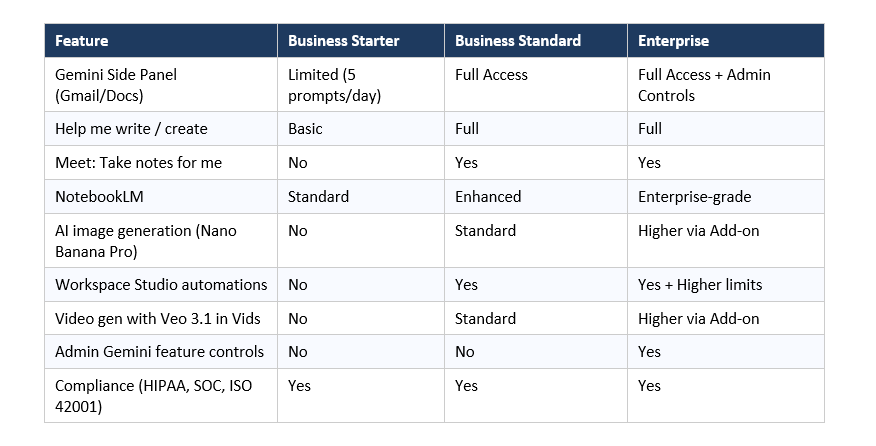
The AI Expanded Access Add-On (New in 2026)
Starting March 1, 2026, teams that need higher usage limits on advanced AI capabilities can purchase the AI Expanded Access add-on. This unlocks higher limits on Nano Banana Pro image generation, Veo 3.1 video generation with AI avatars, deeper Gemini 3 Pro reasoning in the Gemini app, larger NotebookLM source libraries, and more Workspace Studio automation runs.
Standard access to all core features remains included in Business and Enterprise plans at no additional cost. The add-on is for teams pushing the limits of daily AI usage at scale.
Privacy, Security, and Enterprise Compliance
Every enterprise AI conversation eventually comes back to data. Google's position on Workspace data and Gemini is clear: your data, prompts, and AI-generated responses are never used to train Gemini models outside your organization's domain without explicit permission. Your data is not sold and is not used for ad targeting.
Gemini for Workspace holds a comprehensive set of certifications: SOC 1/2/3, ISO 27001, ISO 27017, ISO 27018, ISO 42001 (the international AI management standard), and it supports HIPAA compliance configurations for healthcare organizations. Gemini only retrieves data that the requesting user has permission to access. Your existing Workspace data security controls apply automatically to all AI features.
For Enterprise editions, admins can manage Gemini feature access granularly across the organization - turning specific features on or off, controlling AI note-taking in meetings, and blocking Workspace Studio from specific API controls.
How to Enable Gemini in Your Google Workspace
Getting started is straightforward for most organizations. Here's the practical path:
- Check your plan: Log into the Google Admin Console (admin.google.com). Your Workspace edition determines which Gemini features are available.
- Admin feature access: In the Admin Console, navigate to Apps > Google Workspace > Gemini. Enterprise admins can manage access to individual features. All admins can control whether the Gemini app itself is on or off.
- Enable NotebookLM and Google Vids: These are additional services that must be turned on separately in the Admin Console under Apps > Additional Google Services.
- Workspace Studio: Enable or disable through Apps > Google Workspace > Workspace Studio. API controls allow blocking Studio from specific integrations if needed.
- End user access: Once enabled at the admin level, users see the Gemini icon in Gmail, Docs, Sheets, Slides, Drive, and Chat. Click to open the side panel and start. No additional setup required.
For individual Google AI Pro or Ultra subscribers not on a Workspace plan: Gemini at gemini.google.com gives you access to the Gemini app and personal features, but the deep Workspace integration (side panels, context-aware features, Meet AI) is only available through Workspace Business and Enterprise plans.
Frequently Asked Questions
What can Gemini do in Google Workspace?
Gemini is integrated across Gmail, Docs, Sheets, Slides, Drive, Meet, Chat, Vids, and Workspace Studio. It drafts emails, summarizes documents and threads, generates spreadsheet formulas, creates slide decks, takes meeting notes, automates multi-step workflows, and answers questions about your files. The Gemini side panel provides contextual AI assistance in every major app.
Do you get Gemini free with Google Workspace?
Yes. Since January 2025, Gemini AI features are included in Google Workspace Business Standard, Business Plus, Enterprise Starter, Enterprise Standard, and Enterprise Plus plans at no additional cost. Business Starter includes a limited version with restricted daily prompts. The AI Expanded Access add-on (available from March 2026) unlocks higher usage limits for advanced features.
Is Gemini Business better than Gemini Enterprise?
'Gemini Business' and 'Gemini Enterprise' were the names of the old Workspace add-ons, which were discontinued in January 2025. Today, the distinction is between Workspace Business and Enterprise editions. Enterprise plans add admin controls for managing Gemini feature access across the organization, which is the primary additional capability over Business plans.
How do I enable Gemini in Gmail on Workspace?
If your organization is on a Workspace Business Standard or higher plan, the Gemini side panel in Gmail is enabled by default. If you don't see the Gemini icon in Gmail, ask your Workspace admin to verify that Gemini features are enabled in the Admin Console under Apps > Google Workspace. Individual users cannot enable Workspace AI features independently.
What is Google Workspace Studio?
Workspace Studio is a new agentic automation feature in Google Workspace that lets users create multi-step AI workflows in plain English, without coding. Examples include automatically labeling emails, generating pre-meeting briefing documents, and creating follow-up task docs after calls. It began rolling out in late 2025 and is available to Business and Enterprise customers in 2026.
Do I need Google Workspace to use Gemini?
No. Gemini is also available as a standalone consumer product through gemini.google.com and as Google AI Pro ($19.99/month) or AI Ultra. However, the Workspace-integrated features - side panels in Gmail and Docs, Meet AI note-taking, Drive search, Workspace Studio - are only available through Workspace Business and Enterprise plans.
How does Google protect my data when I use Gemini in Workspace?
Google states that prompts, responses, and Workspace data used with Gemini are not used to train models outside your organization without permission and are not sold or used for ad targeting. Workspace Gemini holds SOC 1/2/3, ISO 27001/17/18, and ISO 42001 certifications, and can be configured for HIPAA compliance. Gemini only accesses data the requesting user already has permission to view.
What is the AI Expanded Access add-on?
Announced in early 2026, the AI Expanded Access add-on is a paid upgrade for Workspace Business and Enterprise customers who need higher usage limits on advanced AI capabilities. It covers more generations with Nano Banana Pro in Slides, more video generation with Veo 3.1 in Vids (including AI avatars), deeper Gemini 3 Pro reasoning access, larger NotebookLM source libraries, and more Workspace Studio automation capacity. Standard access to all core AI features remains included in base plans.
Recommended Reads
If you found this useful, these posts from Build Fast with AI go deeper on related topics:
• Top 11 AI-Powered Developer Tools Transforming Workflows in 2025
• 7 AI Tools That Changed Development — December 2025 Guide
• AI in 2026: Your Survival Guide to the Fourth Year of Generative AI
References
1. The future of AI-powered work for every business -Google Workspace Blog
2. Gemini AI features now included in Google Workspace subscriptions - Google Workspace Help
3. Get higher access to advanced AI in Google Workspace - Google Workspace Updates Blog
4. Google shares Gemini updates to Docs, Sheets, Slides and Drive - Google Blog (March 2026)
5. Expanding Google AI to more of Google Workspace - Google Workspace Updates Blog
6. Help me schedule expanded to group meetings - Google Workspace Updates Blog (February 2026)
7. Gemini for Google Workspace: Your Complete Guide in 2026 - Refractiv
Want to build AI-powered tools on Google Workspace and beyond?
Join Build Fast with AI's Gen AI Launchpad - an 8-week structured program to go from 0 to 1 in Generative AI. Hands-on projects, live sessions, and a community of 30,000+ builders.
Register here: buildfastwithai.com/genai-course