



Google AI Studio Vibe Coding: Full Guide & Comparison (2026)
I opened Google AI Studio on March 19, 2026, typed a prompt, and had a working multiplayer app running in my browser in under 10 minutes. No backend setup. No terminal. No npm install nightmares. Just plain English and a running app.
That was the day Google stopped being 'late to the vibe coding party' and started being a genuine threat to Cursor, Bolt.new, and Lovable. What they shipped is not a demo or a toy. It is a full-stack development environment powered by the Antigravity coding agent and baked-in Firebase backend. And the free tier makes it accessible to anyone.
This guide covers exactly what Google AI Studio vibe coding is, how to use it, what it can actually build, how it stacks up against the competition, and the honest tradeoffs you need to know before you go all in.
What Is Google AI Studio Vibe Coding?
Google AI Studio vibe coding is a browser-based, prompt-to-app development system that lets you describe an application in plain English and have Gemini-powered AI build the entire thing, frontend and backend, without you writing a single line of code manually.
The term 'vibe coding' was coined by Andrej Karpathy (former Tesla AI director) in early 2025, and Collins Dictionary named it Word of the Year for 2025. The concept is simple: describe what you want, let AI write the code, you just steer. Google's version of this, launched inside AI Studio in March 2026, goes further than most because it handles the backend too, not just the UI.
Google AI Studio operates in what they call 'Build mode,' a dedicated workspace within aistudio.google.com where you write a prompt, and the Antigravity agent plans, scaffolds, writes, tests, and deploys your entire application. The fact that this is free to use for prototyping is the part that surprised me most.
What Launched on March 19, 2026: The Full Breakdown
On March 19, 2026, Google pushed its most significant AI Studio update since the platform launched. Here is exactly what changed:
Antigravity Integration: The Antigravity coding agent, originally launched as a standalone VS Code-based IDE in November 2025 (built from the Windsurf team acquisition for $2.4 billion), was folded directly into AI Studio's browser-based Build mode. You no longer need a separate desktop app to use it.
Firebase Backend Baked In: Previous vibe coding tools, Bolt.new, Lovable, even early AI Studio, could build impressive frontends. But the moment a user needed to log in, save data across sessions, or share state in real time, those tools hit a wall. Google solved this by integrating Firebase (Cloud Firestore, Firebase Authentication, and hosting) directly into the vibe coding workflow. The agent detects when your app needs a database or user auth and provisions it automatically after your approval.
Multiplayer and Real-Time Support: The updated AI Studio supports multiplayer apps out of the box. The agent sets up socket connections and syncs data across users without you needing to understand the underlying architecture. They showed a working multiplayer laser tag game with real-time leaderboards built entirely from prompts.
Persistent Sessions: Close the browser tab and your app remembers where it left off. Every other tool in this space makes you start over or manually export state. Google handles this automatically.
Secret Management: Connect apps to third-party services, payment gateways, mapping APIs, external databases, without hard-coding credentials into the app. The agent handles this securely.
Framework Support: Next.js, React, and Angular are all supported, along with automatic npm package installation through prompts.
One stat worth keeping: Google's internal teams built hundreds of thousands of apps on this system during internal testing before the public launch, per the official announcement.
Firebase Studio, Google's previous standalone full-stack environment launched at Cloud Next in April 2025, was sunsetted the same day. Users have until March 22, 2027 to migrate to either AI Studio or the desktop Antigravity IDE. New workspace creation in Firebase Studio cuts off in June 2026.
The Antigravity Agent: How It Actually Works
The Antigravity agent is the core engine powering Google AI Studio's vibe coding experience, and it behaves fundamentally differently from tools like GitHub Copilot or Cursor.
Traditional coding assistants sit beside you as you type. They autocomplete, suggest, and respond to your cursor position. Antigravity takes the wheel entirely. Here is the actual workflow:
- You describe your goal in plain English (or voice, using the speech-to-text button in Build mode)
- The agent plans the entire project structure across multiple files
- It writes the code, sets up dependencies, and configures the backend
- It runs tests in a built-in browser, catches errors, and fixes them autonomously
- You supervise at key checkpoints and approve major decisions like database provisioning
As of March 2026, Antigravity supports multiple AI models including Gemini 3.1 Pro, Gemini 3.1 Flash, and others in the Gemini family. The model flexibility matters for cost and speed tradeoffs depending on the complexity of what you are building.
I think the checkpoint-based approval system is actually smart design. Other tools let AI just run wild and overwrite files you care about. Antigravity pauses at decisions with architectural consequences and asks you to approve. It feels less like autopilot and more like pair programming with a very fast senior developer.
The built-in browser for testing is also a detail most coverage skips. The agent does not just output code and hope it works. It runs the app, tests it, sees what breaks, and iterates before surfacing results to you. That internal QA loop is why the outputs are more reliable than what you get from browser-only tools that just hand you code and wish you luck.
Google AI Studio vs Cursor vs Bolt.new vs Lovable: Honest Comparison
The vibe coding market hit $4.7 billion in 2026 with 138+ tools on the market, per Taskade's State of Vibe Coding 2026 report. 63% of vibe coding users are non-developers. Here is how the main tools stack up:
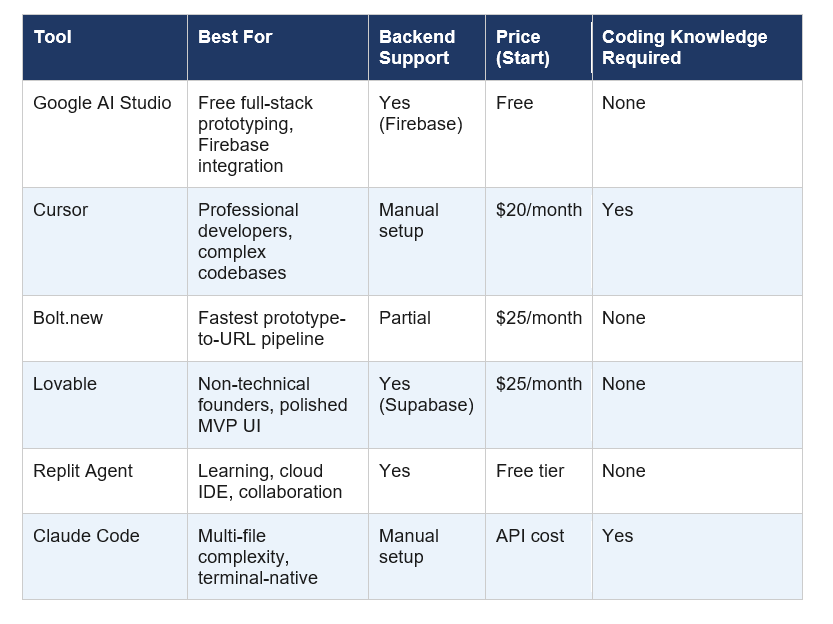
My honest take on each:
Cursor at $20/month is still the best tool if you already code. Its Composer feature that modifies multiple files simultaneously from natural language is genuinely excellent. But it expects you to understand what it generates. If you cannot review AI-generated code, Cursor will eventually cause you pain.
Bolt.new wins on speed. Browser-based, no setup, prompt to shareable URL in minutes. But complex production apps start showing cracks. Large refactors across many components introduce unintended side effects. It is the best 'I need to show this to someone tomorrow' tool in the market.
Lovable is where non-technical founders should probably start. It generates polished UIs and connects to Supabase for the backend. The code quality concern is real though. Multiple experienced developers have noted that Lovable tends toward 3,000-line classes and overcomplicated functions at scale. Great for MVP, risky for production.
Google AI Studio is the surprising entry here. Free, full-stack (including a real Firebase backend), multiplayer support, persistent sessions, and no coding knowledge required. The trade-off is that it is newer and Google's track record with developer tools (see: Firebase Studio's 11-month lifespan before sunset) means you should not build your entire startup infrastructure on it without a migration plan.
Is Google AI Studio Vibe Coding Free? Pricing Explained
Google AI Studio vibe coding is free for prototyping and testing, with costs applying when you move to production. Here is the breakdown:
- Build mode and the Antigravity agent: Free to use at aistudio.google.com
- Prototyping and iteration: Free, with Gemini API rate limits applying
- Production deployment via Gemini API: Token-based costs apply (Gemini 3.1 Pro pricing)
- Firebase backend (Firestore, Auth): Firebase's standard free tier applies (Spark plan), with Blaze pay-as-you-go for heavier usage
- Vertex AI deployment: Enterprise pricing
For context: Bolt.new and Lovable both start at $25/month with restrictive free tiers. Cursor starts at $20/month. Google AI Studio's free tier is genuinely more generous for early-stage building.
Quotable benchmark: Google AI Studio is the only major full-stack vibe coding tool with a truly usable free tier as of April 2026, compared to $20-$25/month entry points for Cursor, Bolt.new, and Lovable.
How to Start Vibe Coding in Google AI Studio (Step by Step)
Starting is faster than you expect. Here is the exact process:
Go to aistudio.google.com and sign in with your Google account
Click on 'Build' in the left sidebar to enter Build mode
In the input box, describe the app you want. Be specific about features, not just categories. 'Build me a headcount planning tool where managers can add team members, set department budgets, and see a real-time dashboard of hiring status' works better than 'build an HR app'
Use the AI Chips to add specific features like image generation, Google Maps integration, or Gemini-powered content generation without describing them from scratch
If you need inspiration, click 'I'm Feeling Lucky' and Gemini will generate a project idea to get you started
Review the agent's project plan at the first checkpoint and approve or modify before it starts writing code
For apps needing user auth or a database, approve Firebase provisioning when prompted
Test in the built-in browser, give feedback in natural language, iterate
For GitHub integration, the upcoming one-click migration from AI Studio to the desktop Antigravity IDE is listed in Google's roadmap. For now, you can export your project files manually. Google Workspace connections for Drive and Sheets are also listed as upcoming integrations in the developer docs as of March 2026.
The speech-to-text button in Build mode is underrated. If you think better out loud than in writing, describe your app verbally. The agent handles it fine.
Real Examples Built with Google AI Studio
Here is what people have actually shipped using the Google AI Studio vibe coding update, based on what was shared publicly after the March 2026 launch:
- Multiplayer laser tag game with real-time leaderboards (built entirely from prompts, using Three.js and Firebase Realtime Database)
- Collaborative 3D particle visualization synced across multiple browser sessions
- Recipe organizer with Gemini-powered recipe generation and search
- Headcount planning tool for HR teams with department budget tracking
- Interior designer agent (VELON) that generates room layout recommendations from photos
- Content automation pipeline integrating with external APIs
- SaaS websites with user authentication and persistent data
The multiplayer apps are the most impressive part to me. Every other vibe coding tool I have tested hits a hard wall when multiple users need to share real-time state. The socket setup alone used to require a backend developer who knew what they were doing. The fact that Antigravity handles this from a natural language description is a meaningful capability jump over what Bolt.new and Lovable currently offer.
Limitations and Honest Criticism
I am not going to pretend this is perfect. A few things you should know before committing:
Google's track record: Firebase Studio launched at Cloud Next in April 2025 and was sunset in March 2026, after barely 11 months. Antigravity itself was launched as a standalone product just 4 months before being absorbed into AI Studio. Google moves fast, including fast to deprecate. If you build something serious on AI Studio's vibe coding today, have a migration plan.
Large project complexity: The Antigravity agent handles well-defined tasks effectively. CRUD apps, real-time features, authentication flows, all solid. But large refactors spanning many interconnected components can introduce unintended side effects. The more complex the architecture, the more you need to review what the agent builds.
Production costs are unclear at scale: The free tier is real for prototyping. But estimating your Gemini API costs at production scale is not straightforward. Firebase costs are well-documented and predictable. The Gemini token costs for the agent's own operations are less clear in current documentation.
Cursor is still better for developers: If you can code, Cursor at $20/month gives you tighter codebase control, model flexibility (Claude, GPT, Gemini, Grok), and an established ecosystem of integrations. Google AI Studio's vibe coding shines for non-technical users. For developers, it is one interesting tool among several.
Contrarian take: The X community's breathless enthusiasm about this launch is slightly overblown. Google AI Studio vibe coding is genuinely impressive for non-technical users building prototypes. But solo developers building micro-SaaS that they plan to monetize should still evaluate Cursor or Lovable carefully before picking AI Studio as their primary environment. The free tier is attractive, but Google's sunset history is a real operational risk.
Frequently Asked Questions
Is Google AI Studio vibe coding free?
Google AI Studio vibe coding is free for prototyping and testing at aistudio.google.com. The Antigravity agent and Build mode have no upfront cost. Production deployment through the Gemini API incurs token-based costs, and Firebase usage beyond the Spark free tier follows Firebase's standard Blaze pay-as-you-go pricing. As of April 2026, it is the only major full-stack vibe coding tool with a genuinely usable free tier.
How do I vibe code with Google AI Studio?
Sign in at aistudio.google.com, click 'Build' in the sidebar to enter Build mode, and type a description of the app you want in the input box. The Antigravity agent plans and builds the project, pausing at key checkpoints for your approval. You can also use the speech-to-text button to describe your app verbally, or click 'I'm Feeling Lucky' for a generated project idea.
What is the Antigravity agent in Google AI Studio?
Antigravity is Google's autonomous coding agent integrated into AI Studio's Build mode. Originally launched as a standalone VS Code-based IDE in November 2025 (built from the Windsurf team acquired for $2.4 billion), it was folded into AI Studio on March 19, 2026. It autonomously plans, writes, tests, and debugs full-stack applications from natural language descriptions, handling frontend, backend (Firebase), multiplayer, and third-party API integrations.
Which AI is best for vibe coding in 2026?
The best vibe coding tool depends on your skill level. For non-technical users who want full-stack apps for free, Google AI Studio is the top choice as of 2026. For non-technical founders who need a polished MVP quickly, Lovable (starting at $25/month) is widely recommended. For speed from prompt to shareable URL, Bolt.new leads. For professional developers who need deep codebase control, Cursor ($20/month) or Claude Code are the strongest options.
Is Google AI Studio good for vibe coding?
Google AI Studio is particularly strong for vibe coding because it supports full-stack development including backend (Firebase), real-time multiplayer, user authentication, and persistent sessions, all for free during prototyping. Google's internal teams built hundreds of thousands of apps on the system before public launch. The main concern is Google's history of sunsetting developer tools quickly, most recently Firebase Studio after only 11 months.
How does Google AI Studio compare to Cursor for vibe coding?
Google AI Studio and Cursor target different users. Google AI Studio is ideal for non-technical users wanting free full-stack app generation without any coding knowledge. Cursor ($20/month) is built for developers who want AI assistance within their existing VS Code workflow and need fine-grained control over the codebase. Cursor supports multiple AI models including Claude, GPT, and Gemini. AI Studio uses Gemini exclusively.
What happened to Firebase Studio after the Google AI Studio update?
Google sunset Firebase Studio on March 19, 2026, the same day it launched the full-stack vibe coding experience in AI Studio. Firebase Studio had launched at Google Cloud Next in April 2025, making its lifespan under 12 months. Existing Firebase Studio users can migrate to either AI Studio or the desktop Antigravity IDE. New workspace creation in Firebase Studio ends in June 2026, with the full sunset completing by March 22, 2027.
Can Google AI Studio build full-stack apps with a real backend?
Yes. Google AI Studio's vibe coding experience as of March 2026 builds genuine full-stack applications including frontend (React, Next.js, Angular), backend logic, Firebase Firestore database, Firebase Authentication for user accounts, secret management for third-party APIs, and real-time multiplayer support. This distinguishes it from earlier vibe coding tools that primarily generated frontends without persistent backend infrastructure.
Recommended Reading
• Google Adds Notebooks to Gemini: What Changed?
• Which is the best open source model in UI, kimi k2.5, GLM 5V Turbo, Qwen 3.6
• GLM-5.1: #1 Open Source AI Model? Full Review (2026)
References
Google Blog -- Introducing the new full-stack vibe coding experience in Google AI Studio:
Google AI for Developers -- Build apps in Google AI Studio (official docs):
Aihola -- Google AI Studio full-stack overhaul analysis (March 2026):
WorthvieW -- Google Just Launched a Full-Stack Vibe Coding Experience:
Taskade -- State of Vibe Coding 2026, 17 tools ranked:
Lovable -- Cursor vs Bolt vs Lovable Comparison (March 2026):

