



Google just opened up the same research infrastructure that powers Gemini App, NotebookLM, and Google Search — and handed it to developers via a single API call. That happened on April 21, 2026, and most people missed what that actually means.
The new Deep Research and Deep Research Max agents, built on Gemini 3.1 Pro, can autonomously plan research tasks, execute up to 160 web searches, analyze your private files, generate native charts, and return a fully cited report in under 20 minutes. You can trigger this with four lines of Python. I've been digging into the API documentation and early tutorials all morning, and this guide covers everything you need to go from zero to running your first research task.
What Is the Gemini Deep Research API?
The Gemini Deep Research API is an autonomous research agent powered by Gemini 3.1 Pro that autonomously plans, searches, reads, and synthesizes multi-step research tasks into cited reports — accessible via the Gemini API's new Interactions API. It is not a chatbot or a summarizer. It is closer to a junior analyst that you can task with an open-ended research question and walk away from.
Google first released a version of this in December 2025. The April 21, 2026 update is a substantial upgrade: Gemini 3.1 Pro replaces the older model, MCP server support is now native, and the agent can generate charts and infographics inline for the first time. Benchmark scores landed at 93.3% on DeepSearchQA and 54.6% on Humanity's Last Exam (HLE) — both state-of-the-art results for web research agents.
I've been tracking Google's Gemini ecosystem closely. If you want context on where Gemini 3.1 Pro sits against GPT-5.4 and Claude Opus 4.7, our GPT-5.4 vs Gemini 3.1 Pro benchmark comparison has the full data — Gemini leads BrowseComp at 85.9%, which directly explains why it's the engine behind Deep Research.
One thing worth understanding: Deep Research is not accessed through the standard generate_content endpoint. It runs exclusively via the Interactions API, which is a newer, stateful interface designed for background execution and multi-step task management. You cannot swap it in for a regular chat call.
Deep Research vs Deep Research Max: Which One Do You Need?
Deep Research is optimized for speed and direct user-facing experiences. Deep Research Max is built for asynchronous, overnight-scale tasks that need maximum thoroughness — think competitive due diligence, financial analysis, and scientific literature reviews.
Here's how the two agents split:
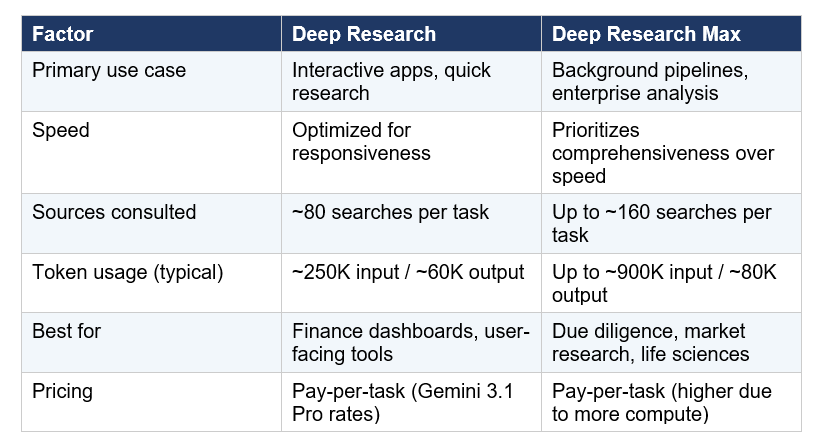
My take: if you're building something with a user waiting on the other end, start with Deep Research. If you're building overnight pipelines that process dozens of complex reports per night, Deep Research Max is worth the extra cost. Google is collaborating with FactSet, S&P Global, and PitchBook for financial data integration, which signals clearly that Max is targeting institutional finance.
How to Set Up the Gemini Interactions API
The setup is simple. You need a Gemini API key from Google AI Studio and the google-genai Python SDK. Deep Research is currently available on paid tiers only — as of April 1, 2026, Google removed all Pro-tier models from the free tier.
Install the SDK:
pip install google-genaiThen initialize the client:
from google import genai
client = genai.Client(api_key='YOUR_GEMINI_API_KEY')
The Interactions API replaces the older generateContent pattern for anything requiring state management, background execution, or multi-step orchestration. If you're already familiar with how Gemini models work, the Gemini 3.1 Flash Lite starter notebook in our gen-ai-experiments repo is the fastest way to get your API key configured and your first call working before you try Deep Research.
Running Your First Deep Research Task in Python
A Deep Research task always runs in the background. You must set background=True — synchronous calls will time out because a single research task can take 5-20 minutes and triggers dozens of iterative search-and-read loops. Here's the complete flow:
Step 1 — Launch the task:
interaction = client.interactions.create(
    input="Research the current state of AI chip competition in 2026.
            Focus on NVIDIA, AMD, and Google TPUs. Include benchmark data.
            Format as a strategic briefing with a comparison table.",
    agent="deep-research-pro-preview-12-2025",
    background=True,
    store=True
)
interaction_id = interaction.id
The call returns immediately with an interaction ID. The agent is now off autonomously planning search queries, crawling pages, and reasoning over findings. Note that store=True is required whenever background=True is used.
Step 2 — Poll for results:
import time
while True:
    result = client.interactions.get(interaction_id)
    if result.state == "COMPLETED":
        report = result.outputs[-1].text
        break
    time.sleep(30)
That's the core pattern. The agent handles everything else — choosing which search queries to run, which pages to read deeply, and how to structure the final report. You control output format entirely through your prompt. Include format instructions like 'use H2 headers', 'include a comparison table', or 'format as a JSON schema' and the agent follows them.
For a full walkthrough including async production patterns, check out the MCP Workshop notebook in the gen-ai-experiments repo — it covers the MCP server connection pattern which maps cleanly to Deep Research's new MCP support.
Adding MCP Servers and Private Data
Deep Research can now blend open web research with your private data — this is the most significant enterprise capability in the April 2026 update. There are two ways to give the agent access to custom data: MCP servers and direct file uploads.
Option A: MCP Server Integration
MCP (Model Context Protocol) is Google's standard for connecting external data sources to Gemini agents. Deep Research now natively supports arbitrary MCP servers, meaning you can connect it to your CRM, internal documentation, proprietary databases, or any third-party data provider.
interaction = client.interactions.create(
    input="Analyze our Q1 2026 sales data vs industry benchmarks.",
    agent="deep-research-pro-preview-12-2025",
    tools=[
        {"type": "mcp_server", "url": "https://your-mcp-server.com/sse"}
    ],
    background=True, store=True
)
Option B: File Upload with File Search
For PDFs, CSVs, images, audio, or video, upload the files first, then pass them directly in the interaction. The File Search tool is currently experimental.
# Upload a PDF first
uploaded_file = client.files.upload("report_q1_2026.pdf")

# Then reference it in the research task
interaction = client.interactions.create(
    input=[
        {"type": "file", "file_uri": uploaded_file.uri},
        {"type": "text", "text": "Summarize and compare this report against public 2026 industry data."}
    ],
    agent="deep-research-pro-preview-12-2025",
    background=True, store=True
)
The blend of web and private data is where this gets genuinely powerful. You're not choosing between your internal data or the open web — the agent synthesizes both simultaneously, cites each source separately, and flags conflicts between your internal numbers and public data. That's not something you can replicate by chaining standard prompts.
Real Cost Breakdown: What Will You Actually Pay?
Deep Research pricing follows a pay-as-you-go model based on Gemini 3.1 Pro token rates. There is no flat per-task fee — you pay for the tokens the agent uses while doing its research, which varies by task complexity.
Here's what Google's official docs say a typical task costs:
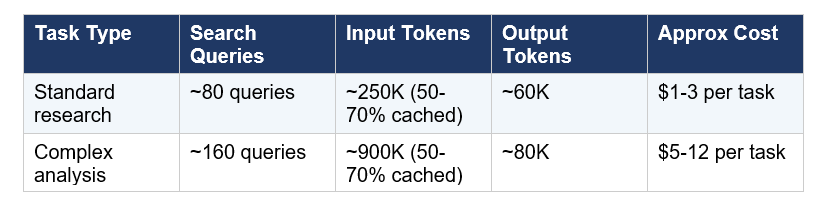
The cache discount is meaningful. Because the agent re-reads context across its iterative loops, 50-70% of input tokens typically hit the cache, which reduces input costs by 90% for cached reads (cached input drops to $0.20 per million tokens vs $2.00 standard). So a 900K-input task is not costing you $1.80 — it's costing much less once caching is accounted for.
For the full Gemini 3.1 Pro token pricing breakdown and how it compares to Claude Opus 4.7 and GPT-5.4, our best AI models April 2026 ranking covers the per-token cost comparison in detail. The short version: Gemini 3.1 Pro at $2/$12 per million is roughly 60% cheaper than Claude Opus 4.7 on equivalent tasks.
Honest take on cost: if you're running this in a consumer product and expect hundreds of research tasks per day, model the cost carefully before going to production. A product that runs 500 complex tasks per day at $8 average is a $4,000/day infrastructure bill. The async nature of the agent makes batch processing viable, but budget modeling matters.
Production Patterns: Beyond the Notebook
The polling loop shown earlier works fine in a Jupyter notebook. In production, you want event-driven architecture, not a while loop burning compute. Google Cloud Run gives you three clean integration patterns for the Interactions API.
• Cloud Run Service: Accept an HTTP request, kick off the agent, store the interaction ID, return immediately. Use Cloud Scheduler or a callback to poll later.
• Pub/Sub Worker: Pull research tasks from a queue, dispatch to the agent, write completed reports to Cloud Storage. Scales naturally for batch research pipelines.
• Cloud Workflow: Define multi-step workflows where Deep Research is one step — for example, research triggers a Gemini 3 Pro synthesis pass that triggers a chart generation pass using Nano Banana Pro.
The Interactions API also supports multi-turn continuation using previous_interaction_id. This means you can have Gemini 3 Flash generate a structured research plan first, pass that plan to the Deep Research agent for execution, then pass the completed research to Gemini 3 Pro for executive synthesis — all in a chained stateful pipeline. Each step inherits full context from the previous step.
If you're building this as part of a broader Google AI Studio project, our Google AI Studio vibe coding guide covers the Antigravity build environment, which now supports Gemini 3.1 Pro and can scaffold applications that incorporate the Interactions API
One contrarian point that I think gets buried: Deep Research is not a replacement for specialized retrieval systems. If your use case is searching a known corpus of documents — your own PDFs, internal knowledge base, product documentation — a standard RAG pipeline with Gemini Embedding 2 and a vector store will be faster and cheaper than Deep Research. Deep Research is for tasks where you don't know exactly what sources you need. That's the use case it wins.
For teams comparing these two approaches, we also have a walkthrough of Claude Opus 4.7 benchmarks and coding performance — worth reading if you're deciding which model to put behind a research or coding agent in 2026.
Frequently Asked Questions
How do I use the Gemini Deep Research API?
The Gemini Deep Research API is accessed via the Interactions API using the google-genai Python SDK. Create a client with your Gemini API key, call client.interactions.create() with background=True and store=True, and poll the returned interaction ID for results. The agent requires a paid-tier API key — all Pro-tier models were removed from the free tier on April 1, 2026.
What is the difference between Deep Research and Deep Research Max?
Deep Research is optimized for speed and interactive user-facing applications, typically completing tasks in under 20 minutes using ~80 search queries. Deep Research Max prioritizes comprehensive analysis for asynchronous, enterprise-scale tasks, consulting up to 160 sources and running for up to 60 minutes. Both are powered by Gemini 3.1 Pro and available via paid tiers of the Gemini API.
Is the Gemini Deep Research API free to use?
No. As of April 1, 2026, Google removed all Pro-tier models including Gemini 3.1 Pro from the free tier. Deep Research is available only on paid API tiers. Flash and Flash-Lite models retain a free tier with reduced daily quotas, but the Deep Research agent specifically requires Gemini 3.1 Pro and therefore a paid account.
How much does a Gemini Deep Research task cost?
Pricing is pay-as-you-go based on Gemini 3.1 Pro token rates ($2.00 per million input tokens, $12.00 per million output tokens). A standard research task uses approximately 250K input tokens and 60K output tokens, costing roughly $1-3 per task. A complex due-diligence task can use up to 900K input tokens, costing approximately $5-12. Caching reduces costs significantly, as 50-70% of input tokens typically hit the cache at a 90% discount.
How do I connect my own data to Gemini Deep Research?
There are two methods. For private databases and third-party services, use MCP (Model Context Protocol) server integration by passing a tools parameter with your MCP server URL. For files like PDFs, CSVs, images, or audio, upload them first using client.files.upload() and reference the file URI in the interaction input. File Search is currently experimental. Both methods allow the agent to blend your private data with open web research in a single task.
How long does a Deep Research task take?
Most Deep Research tasks complete in under 20 minutes. Deep Research Max tasks can run up to 60 minutes for extensive multi-source analysis. The maximum allowed research time is 60 minutes for both agents. Because tasks run asynchronously in the background, your application is free to do other work while polling for completion.
Can I control the output format of Deep Research reports?
Yes. Output format is controlled entirely through your prompt. You can specify headers, comparison tables, JSON schema, executive briefing format, bullet-point summaries, or any other structure. Native chart and infographic generation is also available as of the April 2026 update — the agent generates visual elements inline in HTML or Nano Banana format when the task involves quantitative data
What benchmarks does Gemini Deep Research score on?
As of the April 21, 2026 announcement, Gemini Deep Research scores 93.3% on DeepSearchQA and 54.6% on Humanity's Last Exam (HLE). The December 2025 version scored 66.1% on DeepSearchQA and 46.4% on HLE. For web research specifically, Gemini 3.1 Pro scores 85.9% on BrowseComp, ahead of Claude Opus 4.7 (79.3%) and behind GPT-5.4 Pro (89.3%).
Recommended Blogs
These are real posts from buildfastwithai.com that give you more context on the topics covered in this guide:
References
1. Gemini Deep Research Agent — Official Google AI for Developers Documentation
3. Build with Gemini Deep Research — Google Developers Blog (December 2025)
4. How to Use the Gemini Deep Research API in Production — Google Cloud Community, Medium
5. Getting Started with Gemini Deep Research API — Philipp Schmid
6. Google Debuts Deep Research Agents on AI Studio and APIs — Testing Catalog (April 21, 2026)
8. Build an AI Research Agent with Google Interactions API and Gemini 3 — The Unwind AI

