



Figma's stock dropped 7% within hours of a single tweet. That's not a product launch — that's a market signal. On April 17, 2026, Anthropic released Claude Design, and the design industry hasn't stopped talking since. Whether you're a founder who's never opened Figma, a product manager tired of waiting on design cycles, or a designer looking to 10x your exploration speed, this is the complete guide you need.
1. What Is Claude Design?
Claude Design is Anthropic's AI-powered visual creation tool that turns text prompts into interactive prototypes, pitch decks, slides, one-pagers, and UI mockups — with no design background required. It launched on April 17, 2026, as a research preview under Anthropic Labs, and it is powered by Claude Opus 4.7, the company's most capable publicly available vision model as of April 2026.
The tool is not a standalone app. It lives inside Claude.ai, accessible via the palette icon in the left-hand navigation sidebar. To understand the model powering it, read the full Claude Opus 4.7 review and benchmark breakdown — Opus 4.7 brought significant jumps in vision resolution (from 1,568px to 2,576px) and design-specific capabilities that made this product possible.
"Claude Design gives designers room to explore widely and everyone else a way to produce visual work." — Anthropic, April 2026
The product sits alongside Claude Code and Claude Cowork in Anthropic's growing suite of specialized tools, all part of a deliberate push from AI model provider to full-stack product company.
2. How Claude Design Works (Step by Step)
Claude Design works through a conversational prototyping loop. Here is what the process looks like end to end:
Step 1: Onboarding and Design System Setup
When you first use Claude Design, it reads your codebase, uploaded Figma files, font folders, logo assets, and GitHub repositories to automatically build a design system. Every subsequent project inherits your brand's colors, typography, and component patterns automatically. You never start from a generic blank canvas again.
Step 2: Starting a Project
You can kick off any Claude Design project in four ways: (1) type a text prompt describing what you want, (2) upload reference images or sketches, (3) upload documents — DOCX, PPTX, or XLSX — for Claude to transform into visuals, or (4) use the web capture tool to grab elements directly from a live website so your prototype matches the real product.
Step 3: Refining Through Conversation
After Claude generates a first version, you refine it through chat (ask for changes in plain language), inline comments (annotate specific elements), direct edits (click and change text), or custom sliders that Claude creates on the fly for your specific design controls.
Step 4: Exporting or Handing Off
When the design is ready, export it as a ZIP archive, PDF, or PPTX. You can also send it directly to Canva for collaborative editing, export as standalone HTML, or package it as a handoff bundle for Claude Code to convert into production-ready code with a single command.
The Claude Code handoff is what makes this a genuinely closed loop. If you want to understand how Claude Code handles the build side, the Claude Code desktop redesign and Routines guide explains how multi-session coding and cloud automation work in the same workflow.
3. Claude Design vs Figma vs Lovable: Honest Comparison
Here is an honest side-by-side comparison based on what each tool is actually built for:
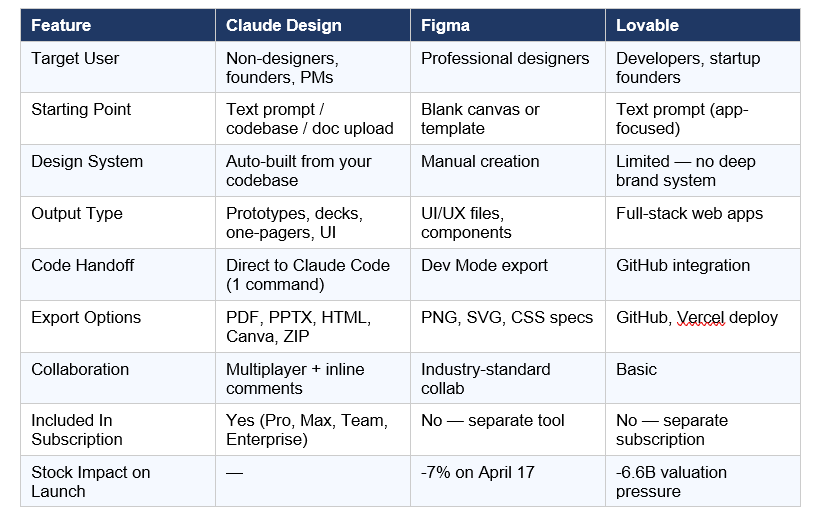
My honest take: Figma is not dead. Professional designers who live in design systems, run design reviews with stakeholders, and need pixel-perfect control are not going to abandon Figma. But Claude Design is not for them — it is for everyone who was never going to use Figma in the first place. The addressable market is enormous.
Lovable faces a more structural problem: it depends on Anthropic's API as its core engine while Anthropic is now a direct competitor. For a broader look at how Anthropic's advisor-model architecture creates similar dynamics, see the Anthropic Advisor Strategy deep-dive.
4. Key Features of Claude Design
Automatic Brand-Consistent Design Systems
Claude reads your codebase and existing design files during onboarding and generates a complete design system — colors, typography, and component patterns — that applies automatically to every future project. Teams can maintain multiple design systems and switch between them per project.
Interactive Prototypes Without Code
Claude Design does not produce static images. It builds interactive, shareable prototypes that your team can click through, user-test, and hand to stakeholders for feedback — all without a code review or a pull request.
Frontier Design: 3D, Voice, and Motion
Beyond slides and mockups, Claude Design supports what Anthropic calls "frontier design" — code-powered experiences with 3D visuals, voice interfaces, video, and interactive effects. In one internal demo, Anthropic used it to create a fully interactive 3D globe with customization controls.
Web Capture Tool
Point Claude at any live website URL and it pulls in the visual elements directly, so your prototype looks like the actual product rather than a generic mockup. This alone cuts hours of recreating existing brand assets.
Multiplayer Collaboration
Multiple team members can access, edit, and chat with Claude simultaneously within the same project — a capability that most AI design tools do not offer at this level today.
5. Who Should Use Claude Design?
The clearest signal of who this is for comes from Anthropic's own framing: people who need to get from an idea to something visual before they open a design tool. If you've ever written a prompt for anything — and if you've mastered the fundamentals in the 150 best Claude prompts guide for 2026 — you can use Claude Design.
Here is who gets the most out of it:
- Founders: Turn rough outlines into on-brand pitch decks in minutes — without hiring a designer or waiting for one.
- Product Managers: Sketch feature flows and shareable wireframes before design reviews. Compress a week-long brief-mockup cycle into one afternoon.
- Marketers: Create landing pages, social media assets, one-pagers, and campaign visuals without design bottlenecks.
- Designers (yes, designers): Use Claude Design for wide-angle exploration — generating 10 directions in the time it takes to Figma one. Then move the winning concept into your design tool for polish.
- Engineers: Prototype ideas visually before committing to full development. Hand directly to Claude Code when ready.
6. Real-World Results: What Early Users Are Seeing
Anthropic has published two concrete early results that are worth taking seriously:
Brilliant (EdTech)
The education company Brilliant reported that pages requiring 20 or more prompts to recreate in competing design tools needed only 2 prompts in Claude Design. The team then converted static mockups into interactive prototypes they could user-test and share — without any code reviews — and passed everything to Claude Code for production implementation.
Datadog
Datadog's product team described compressing what had been a week-long cycle of briefs, mockups, and review rounds into a single Claude Design conversation. The time savings came not just from speed, but from eliminating the handoff friction between brief, design, and review.
"Made this video with Claude in 12 prompts." — Pierre-Eliott Lallemant, X (April 17, 2026)
The Jane Street design blog published a similar finding earlier this year — a designer described reaching for Figma less and less as Claude's design capabilities improved. Claude Design formalizes and accelerates what that designer was doing manually. To see how Anthropic's full product strategy fits together — Code, Cowork, and now Design — check the Claude Code Auto Mode 2026 guide for the agentic layer that powers the handoff.
7. Claude Design Pricing and Availability
Claude Design is available as a research preview for Claude Pro, Max, Team, and Enterprise subscribers as of April 17, 2026. It is NOT available on the free tier.
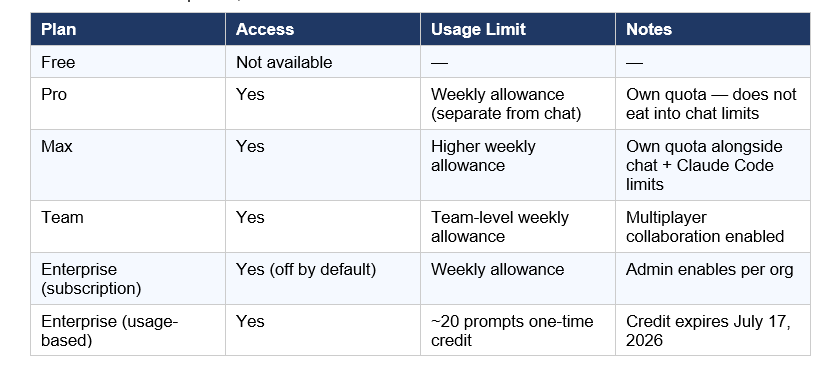
The key detail most coverage missed: Claude Design has its own usage tracking that sits alongside — not inside — your existing Claude chat and Claude Code limits. You are not trading chat messages for design prompts. They are separate quotas.
8. Honest Limitations and Criticism
Claude Design is impressive, and it is also a research preview launched 24 hours ago. Here is what is actually limited right now:
- Not a Figma replacement for professionals. If you run design reviews, manage design tokens at scale, or work in a team where Figma is the source of truth, Claude Design does not replace that workflow — yet.
- Frontier design features are early. The 3D and voice capabilities are real but limited. Expect rough edges.
- No timeline for general availability. Anthropic has not committed to when the research preview becomes production-ready or whether pricing changes.
- Prompting still matters. The "no design skills needed" framing is mostly true, but better prompts produce dramatically better results. Specificity about audience, purpose, and visual style still pays off.
- Lovable and Figma will respond. Both have already announced reactions within hours of launch. The competitive landscape will look different in 90 days.
For a broader view of where Anthropic is heading as a company — including the $800 billion valuation offers, IPO discussions, and the Claude Mythos model tier above Opus — the Claude Mythos 5 review puts this product launch in the larger strategic context.
If you want to try building your own AI-powered design workflow using Claude's API before Claude Design fully ships, the gen-ai-experiments cookbook repository has practical Claude-powered notebooks you can run today — including the Claude-Powered RAG from Scratch cookbook that demonstrates how to pipe design context into Claude for consistent brand outputs.
Frequently Asked Questions
What is Claude Design by Anthropic?
Claude Design is Anthropic's AI-powered visual creation tool, launched April 17, 2026, as a research preview under Anthropic Labs. It generates prototypes, pitch decks, slides, one-pagers, and UI mockups from text prompts, codebase inputs, or uploaded documents. It is powered by Claude Opus 4.7 and available to Pro, Max, Team, and Enterprise subscribers.
Is Claude Design free?
No. Claude Design is only available to paid subscribers — Pro, Max, Team, and Enterprise plans. It has separate weekly usage limits that do not count against your existing chat or Claude Code quotas. Enterprise usage-based customers receive a one-time credit covering approximately 20 prompts, which expires on July 17, 2026.
Is Claude Design a replacement for Figma?
Not for professional designers — yet. Figma holds an estimated 80-90% of the UI/UX design market and remains the tool of choice for teams running design systems at scale. However, Claude Design directly targets the much larger group of people who were never going to use Figma: founders, PMs, and marketers who need visuals without a design background. That audience is where Figma's real revenue risk lies.
How do I set up a design system in Claude Design?
During onboarding, you provide Claude Design with links to your GitHub repository, local code files, uploaded Figma files, font and logo folders, and any style notes. Claude reads these and automatically builds a design system. Every future project in your account inherits these styles. You can update the system at any time and maintain more than one for different brands or products.
Can Claude Design hand off to Claude Code?
Yes — this is one of Claude Design's most powerful features. When your design is ready, Claude packages everything into a "handoff bundle" that you can pass to Claude Code with a single instruction. Claude Code then converts the design into production-ready code. The full loop — exploration, prototype, production code — stays inside Anthropic's ecosystem.
What are Claude Design's export options?
Claude Design exports as ZIP archive, PDF, or PPTX. You can also export to Canva (where designs become fully editable and collaborative), standalone HTML, or directly to Claude Code. The PPTX and Canva exports are specifically useful for pitch decks and marketing materials.
How does Claude Design use the web capture tool?
The web capture tool lets you point Claude Design at any live website URL. Claude pulls in the visual elements — colors, typography, layout patterns — directly from the site, so your prototype matches the actual product rather than a generic blank-canvas design. This is especially valuable for creating prototypes that look like the real app.
What is Claude Opus 4.7 and why does it matter for Claude Design?
Claude Opus 4.7 is the model powering Claude Design. Released April 16, 2026, it improved vision resolution from 1,568px to 2,576px (3.75 megapixels vs 1.15 megapixels in Opus 4.6), which directly enables better image analysis, reference-image interpretation, and design output quality. Anthropic describes it as "more tasteful and creative" for professional design tasks.
Recommended Blogs
• Claude Opus 4.7: Full Review, Benchmarks & Features (2026)
• Claude Code Desktop Redesign: Multi-Sessions + Routines (2026)
• Claude Code Auto Mode: Unlock Safer, Faster AI Coding (2026)
References
TechCrunch — Anthropic launches Claude Design, a new product for creating quick visuals (April 17, 2026):
VentureBeat — Anthropic just launched Claude Design, an AI tool that turns prompts into prototypes and challenges Figma:
The Register — Anthropic debuts Claude Design, because who needs designers? (April 17, 2026):
9to5Mac — Anthropic launches Claude Design following Opus 4.7 model upgrade:
Gizmodo — Anthropic Launches Claude Design, Figma Stock Immediately Nosedives:
SiliconAngle — Anthropic launches Claude Design to speed up graphic design projects:
Anthropic Official Announcement — Introducing Claude Design by Anthropic Labs:
Build Fast with AI — Claude Opus 4.7 Full Review:
Build Fast with AI — Gen AI Experiments Cookbooks:

