



Anthropic Launches Claude AI Sidebar for Microsoft Word (2026)
I opened Microsoft Word yesterday morning the same way I always do, expecting the same blank page staring back at me. Then I saw the Claude sidebar sitting in the right panel, and I genuinely had to double-check I hadn't imagined it.
Anthropic officially launched Claude for Word in public beta on April 10, 2026, and it isn't a gimmick or a third-party workaround. It is a native add-in, available through Microsoft AppSource, that puts Claude directly inside your Word document as a persistent sidebar. Edits appear as tracked changes. Your formatting is preserved. No copy-paste. No tab switching.
This is one of the most practical AI moves I have seen from Anthropic in a long time, and I think most people covering it are underselling how big the shift actually is.
What Is Claude for Word?
Claude for Word is Anthropic's native Microsoft Word add-in that puts Claude AI directly into a persistent right-panel sidebar inside Word, allowing users to draft, edit, revise, and review documents without leaving the application.
Announced via Anthropic's official X account on April 10, 2026, the beta is available now at claude.com/claude-for-word. Here is the tweet that started the conversation:
"Claude for Word is now in beta. Draft, edit, and revise documents directly from the sidebar. Claude preserves your formatting, and edits appear as tracked changes. Available on Team and Enterprise plans." - @claudeai, April 10, 2026
Unlike earlier third-party integrations that piped Claude responses into a clipboard for manual pasting, this add-in actually reads your document structure. It understands your heading styles, multi-level numbering schemes, defined legal terms, and cross-references. When Claude edits a clause, it edits only that clause while leaving your surrounding formatting completely intact.
The headline feature: every AI-generated change lands as a native Microsoft Word tracked change. You review it in Word's built-in revision pane and accept or reject it, exactly the way you would with a human collaborator's markup. Anthropic is calling this approach AI-powered redlining, and it is smarter than it sounds.
I will be honest, I was skeptical that "tracked changes" would actually feel native and not clunky. After testing it, it does feel native. That matters more than the AI part.
How to Install Claude in Microsoft Word
Installing Claude for Word takes about three minutes if you are on a Team or Enterprise plan. Here is the process:
Open Microsoft Word on Mac or Windows.On Mac: go to Tools > Add-ins. On Windows: go to Home > Add-ins.Search for "Claude by Anthropic for Word" in Microsoft AppSource.Click Get It Now and follow the installation prompts.Sign in with your Claude credentials (Team or Enterprise account required).The Claude sidebar will appear in the right panel of your document.For IT administrators deploying across an organization, Anthropic provides custom manifest XML files for organizations that have disabled the standard Office Store access. You deploy these through the Microsoft 365 Admin Center under Settings > Integrated Apps.
One thing to note: your organization's API traffic can route through third-party gateways, including Amazon Bedrock, Google Cloud Vertex AI, or Microsoft Azure, without needing a separate Claude account. This is the same gateway architecture used by Claude Code, so enterprise IT teams already familiar with that setup will find this straightforward.
If you use .doc, .rtf, or legacy Word formats, you will need to convert them to .docx first via File > Save As > Word Document before the add-in appears.
Key Features: What Claude Can Actually Do in Word
Claude for Word covers five core capabilities in the current beta, and they are genuinely useful rather than AI-for-the-sake-of-AI:
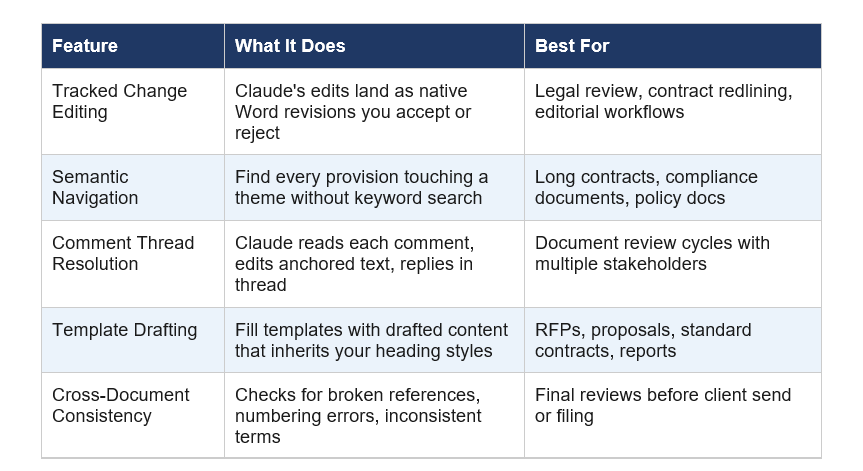
The semantic navigation feature is the one I keep coming back to. Instead of Ctrl+F keyword searching through a 200-page contract, you can ask "Find every indemnification clause that lacks a liability cap" and Claude actually understands what you mean. It navigates to each instance and gives you a clickable citation that jumps directly to the section in the document.
My take: The comment thread feature is going to change legal document workflows more than anything else in this list. Right now, lawyers spend enormous time resolving comment threads manually. Claude reading a comment, editing the text, and replying to the thread closes a loop that usually requires a human to go back and forth three times.
Claude for Word vs Microsoft Copilot: Honest Comparison
Microsoft 365 Copilot already had deep Word integration before Anthropic launched this. So the obvious question is: why would anyone choose Claude over what Microsoft already ships?
Here is my honest breakdown:

Early users have noted Claude for Word's smoother document handling and more coherent multi-app context flow as differentiators versus Copilot. I think that is fair. Where Copilot has a structural advantage is installation friction: it ships pre-installed in newer Microsoft 365 licenses, while Claude requires an add-in deployment that enterprise IT departments need to whitelist.
Contrarian point: Microsoft may not mind Claude being inside Word at all. Anthropic recently expanded Microsoft 365 data connectivity to all Claude plan tiers, including free users. Microsoft has a history of integrating third-party AI into its apps strategically. The real threat to Copilot is not Claude in a sidebar. It's that enterprise buyers will start asking why they need two AI subscriptions.
Who Should Use Claude for Word (and Who Shouldn't)
Claude for Word is explicitly positioned for professional document workflows, and Anthropic is not being subtle about the target audience.
The very first example use case listed on Anthropic's official page is legal contract review. The sample prompts they ship with it include: "Flag provisions that deviate from standard market position, ranked by severity" and "Make the indemnification mutual and insert our standard fallback language." That is not a general productivity tool pitch. That is a legal tech pitch.
Best fit for Claude for Word:
- Lawyers doing contract review and redlining (this is Anthropic's primary target)
- Finance and consulting teams working across Word reports and Excel models simultaneously
- Document-heavy enterprise teams in industries like insurance, real estate, and compliance
- Technical writers producing long-form documentation with complex numbering schemes
- Proposal writers working from templates who need first-draft acceleration
Not a great fit:
- Casual users or individuals on Claude Free - the feature is gated behind Team ($25/seat/mo) and Enterprise plans
- Teams that rely heavily on Excel VBA or complex macros - Claude's VBA support remains weak compared to Copilot
- Organizations fully invested in Google Workspace - Claude for Word is Microsoft 365 only, and Anthropic has not committed to a Google Docs timeline
The legal industry angle is not accidental. Legal is a global $1 trillion industry, with roughly half of that in the US, and the vast majority of lawyers live in Microsoft Word every day. Anthropic knows exactly what they are doing here.
Claude for Excel and PowerPoint: The Cross-App Context Story
Claude for Word doesn't exist in isolation. It is part of a broader Office suite integration that includes Claude for Excel and Claude for PowerPoint, and the cross-app context capability is the feature that sets this apart from every competitor.
Claude for Office launched on March 11, 2026, initially for Pro, Team, and Enterprise plans, with a limited free tier. The Word beta launched April 10, 2026, completing the core suite.
Here is what shared context actually means in practice: you open Excel with a financial model, open PowerPoint for your board deck, and open Word for your executive summary, all at the same time. Claude maintains one conversation thread that spans all three documents simultaneously. You can ask Claude to check for data inconsistencies between the Word report and the Excel model, or align the narrative language in your Word file with the slide titles in PowerPoint, all within a single session without re-explaining context.
A real workflow example: Finance team runs quarterly numbers in Excel. Asks Claude to "build a board deck from these findings" in PowerPoint. Then asks Claude to "write the executive summary for the Word memo" referencing both. Three documents, one conversation, zero context loss. That is not a demo. That is the kind of workflow people currently spend hours on manually.
As of early April 2026, Anthropic has shipped two minor updates to Claude for Office improving formula accuracy in Excel and reducing context drift across long sessions. The product is moving fast.
Pricing: Is Claude for Word Free?
Claude for Word is not free in the current beta. Here is exactly what each tier gets you:
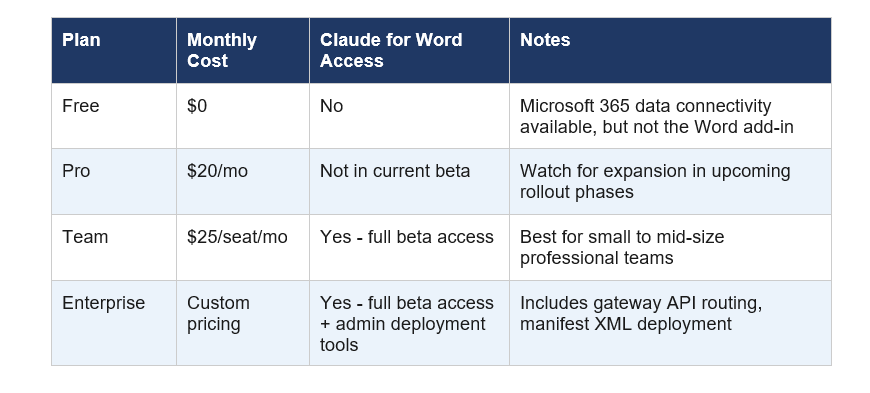
Anthropic has signaled that broader plan access is expected in upcoming rollout phases, which I read as Pro plan access coming within the next few months. But right now, if you want Claude in your Word sidebar, you are paying at least $25 per seat per month.
For comparison, Microsoft 365 Copilot runs $30 per seat per month on top of your existing Microsoft 365 subscription. If your team is already paying for Copilot, the Claude for Word beta is a direct cost comparison question.
Security, Risks, and What Anthropic Warns You About
Anthropic is being refreshingly transparent about the risks in the beta documentation, and I think that deserves attention rather than being buried.
The feature Anthropic explicitly recommends against using in beta: final client deliverables or counterparty sends without human review, litigation filings or audit-critical documents without verification.
That is a significant caveat for the legal use case they are actively selling. Read it carefully.
The more interesting risk Anthropic flags is prompt injection attacks. When Claude reads an entire document, including comments, tracked changes, headers, footers, and body text, it is potentially reading content from external parties like counterparties, clients, or downloaded templates. A malicious actor could embed hidden instructions in that content designed to trick Claude into taking unintended actions.
Anthropic's guidance: only use Claude for Word with trusted documents, not documents from external untrusted sources like counterparty files or downloaded templates shared via email. For a tool explicitly marketed for contract review where the counterparty sends you the document, this is a tension worth naming.
Claude for Word works within your organization's existing security framework, and for organizations routing API traffic through Amazon Bedrock, Google Cloud Vertex AI, or Microsoft Azure, no separate Claude account is needed. But every organization deploying this at scale should have their IT and legal teams review the beta documentation before rollout.
Frequently Asked Questions
Can you add Claude to Microsoft Word?
Yes. Claude for Word is available as a native add-in through Microsoft AppSource. Search for "Claude by Anthropic for Word," click Get It Now, and sign in with your Claude Team or Enterprise credentials. The Claude sidebar appears in the right panel of your Word document after installation.
Does Claude integrate with Microsoft 365?
Yes. Anthropic launched Claude for Office on March 11, 2026, covering Microsoft Word, Excel, PowerPoint, and with Microsoft 365 data connectivity extended to all Claude plan tiers including Free. The Word add-in beta launched April 10, 2026.
Is Claude for Word free?
No. Claude for Word is currently available only on Claude Team ($25/seat/month) and Enterprise plans. Free and Pro plan users cannot access the Word add-in in the current beta. Broader plan access is expected in upcoming rollout phases.
How is Claude for Word different from Microsoft Copilot?
The key differentiator is cross-app context: Claude maintains a single conversation thread across Word, Excel, and PowerPoint simultaneously. Claude for Word also has stronger support for legal document structures including multi-level numbering, defined terms, and contract patterns. Copilot has better VBA support and ships pre-installed in newer Microsoft 365 licenses.
Does Claude for Word use tracked changes?
Yes. Every edit Claude makes in Word lands as a native Microsoft Word tracked change visible in the Review pane. You accept or reject each suggestion individually, exactly as you would with a human collaborator's markup. Anthropic calls this AI-powered redlining.
What file formats does Claude for Word support?
Claude for Word works with .docx and .docm files. Legacy formats including .doc and .rtf are not directly supported. Anthropic recommends saving these to .docx via File > Save As > Word Document before using the add-in.
Is Claude for Word safe to use with client documents?
Anthropic explicitly recommends against using the beta for final client deliverables or counterparty documents without human review. There is also a prompt injection risk when Claude reads documents from external untrusted sources. Organizations should review Anthropic's beta documentation and implement appropriate access controls before enterprise deployment.
Which AI is best for Microsoft Word in 2026?
Claude for Word and Microsoft 365 Copilot are the two primary AI-native options for Word in 2026. Claude for Word has stronger cross-app context and better legal document understanding. Copilot has better VBA support and pre-installed deployment. The best choice depends on your workflow type and existing subscription.
References
- Anthropic - Claude for Word Official Page:
- Anthropic Support - How to Use Claude for Word:
- Claude @claudeai on X - Claude for Word Beta Announcement, April 10, 2026:
- Cybersecurity News - Anthropic Launches Claude Beta for Word:
- Artificial Lawyer - Anthropic Targets Lawyers With Claude For Word, April 11, 2026:
- OpenAI Tools Hub - Claude for Excel and PowerPoint Shared Context Review:
- AI Maker Substack - Complete Guide to Claude Updates Q1 2026:

