



7 AI Tools That Changed Developer Workflow (August 2026)
The tools developers reach for changed again in the past few weeks. Claude Opus 5 landed at half the price of the flagship, OpenAI cut GPT-5.6 prices up to 80%, Claude Code shipped a security scanner into the terminal, and open weights got cheap enough to run coding agents for cents. If your AI stack is more than a month old, some of it is already outdated.
This is the August 2026 edition of our running list of the AI tools genuinely reshaping how developers write, test and ship code. Not a feature dump, but the seven that actually changed a workflow this month, what changed, who each is for, and how to assemble them into a stack. The theme this month: the model got cheaper and the harness got smarter.
The short version: Claude Code on Opus 5 is the terminal agent to beat, Cursor 3 owns the in-editor flow, Codex keeps the benchmark crown, and open models like Kimi K3 make the whole thing affordable. Most real developers now run two or three of these at once.
The 7 Tools at a Glance
Here are the seven tools reshaping developer workflow in August 2026, and the one job each does best. Read this table first, then jump to the tools that fit your work.
Table 1: The August 2026 developer AI stack
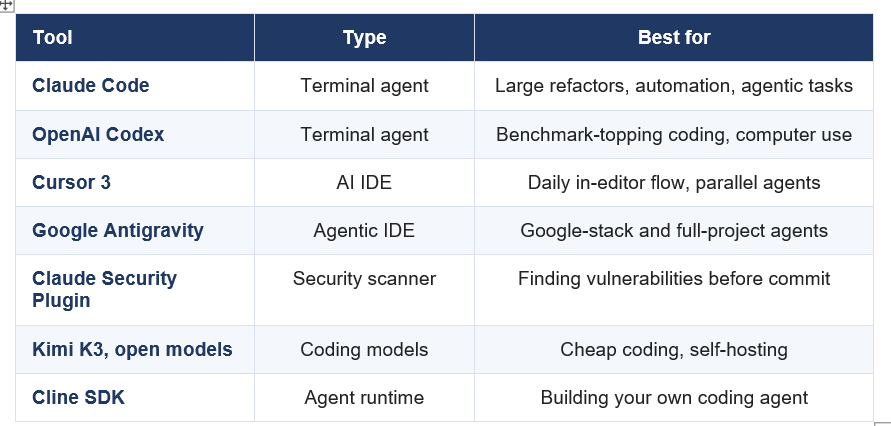
Most developers combine two or three: a terminal agent, an IDE, and a cheap model or a review tool.
1. Claude Code (now on Opus 5)
Claude Code is the top terminal-first AI coding agent in August 2026, and it just got better and cheaper by moving to Claude Opus 5. The July 24 Opus 5 release brought near-flagship quality at half the price plus a per-request effort dial, and Claude Code added per-subagent model control so you can run cheaper models for routine steps and stronger ones for hard problems.
What changed the workflow is autonomy you can trust. Claude Code handles large multi-file refactors, writes and runs tests, and iterates when it hits a blocker, all from the terminal, without you steering every step. For engineers doing serious automation and refactoring rather than line-by-line editing, it is the tool to beat.
My take: the Opus 5 move is the quiet upgrade of the month. Same workflow, better model, lower cost, and the effort dial means you stop overpaying for easy steps. If you run one terminal agent, this is it.
The model behind it is worth understanding. Our Claude Opus 5 review covers why near-Fable quality at half the price reset the coding stack.
2. OpenAI Codex
OpenAI Codex, powered by GPT-5.6, holds the published Terminal-Bench record and got materially cheaper after the July 30 price cuts. It is the terminal agent for developers who want top raw coding performance and OpenAI's computer-use and programmatic tool-calling features.
The July 30 pricing move matters for Codex users: GPT-5.6 Luna dropped 80% and Terra 20%, so routing routine agent steps to the cheaper tiers now costs a fraction of what it did at launch. Codex sits a close second to Claude Code in most August rankings, and the two trade wins depending on the task, which is exactly why many teams keep both.
My take: Codex is the speed-and-benchmark pick, and the price cut removed its main objection. If you already live in the OpenAI ecosystem, the new pricing makes running Codex agents genuinely cheap.
We compared the two terminal agents directly in our Claude Code vs Codex breakdown, and the GPT-5.6 review covers the model and its new pricing.
3. Cursor 3
Cursor 3 is the leading AI IDE and the tool most developers use for daily in-editor flow, having shifted from an AI code editor into a platform for running multiple agents in parallel. Its in-house Composer model keeps costs down by not routing every keystroke to a frontier model, and cloud agents run autonomous work in the background.
The workflow change is parallelism. Instead of one AI helping you edit one file, Cursor 3 lets you dispatch several agents across different parts of a project at once, then review their work. For most developers, Cursor handles the moment-to-moment coding while a terminal agent handles the big jobs, which is the most common stack we see.
My take: Cursor won the editor and is now fighting for the agent layer too. If you want AI inside the editor you already know, it is the default, and Composer keeps the bill sane.
Our Cursor Composer 2.5 review and Cursor 3 vs Antigravity comparison go deeper on the IDE battle.
Don't just use ChatGPT. Learn to build custom LLM agents, RAG pipelines, and full-stack Agentic AI apps in our intensive 6-week program.
4. Google Antigravity
Google Antigravity is the agentic IDE for developers on the Google stack, built to run project-wide AI agents with deep Gemini integration. It is the strongest answer to Cursor from a major lab, and it fits teams already using Google Cloud and Gemini.
What changed the workflow is scope. Antigravity treats the whole project as the unit of work rather than a single file, letting agents plan and execute across a codebase with Gemini's long context. For Google-centric teams, it is a natural home, and it keeps improving as Gemini does.
My take: Antigravity is the pick if your world is already Google. It is not going to pull a committed Cursor or Claude Code user across, but for Gemini-native teams it removes a lot of friction.
Our Google Antigravity developer guide walks through setup and where it fits.
5. Claude Security Plugin
The Claude Security plugin, released in beta in late July 2026, put a multi-agent vulnerability scanner directly in the terminal, and it is the newest tool genuinely changing workflow. It scans your changes or your whole repo for serious flaws like injection and auth bypasses, using an adversarial voting panel to cut false positives.
The workflow change is shifting security left without leaving Claude Code. You can scan before you commit, get a report with suggested patches you review yourself, and trust the findings more because multiple agents vote on each one with the tally computed in code, not asserted by the model. The one caution is token cost on large scans, so scope your runs.
My take: this is the sleeper tool of the month. Security you can run before every commit, in the terminal you already use, is a real shift for solo developers and small teams without a dedicated security function.
Our Claude Security plugin guide covers how the scan and the voting panel work, plus the token-cost math.
6. Kimi K3 and Open Coding Models
Open-weight coding models like Kimi K3, Kimi K2.7 Code, GLM-5.2 and DeepSeek V4 changed the workflow by making capable coding agents cheap, and Kimi K3's open weights landed on Hugging Face on July 26. For teams that want to self-host for data control or cut costs, these models now rival closed tools on real coding.
The workflow change is cost and control. DeepSeek V4 posts top open-weights SWE-bench scores at a fraction of closed prices, Kimi K2.7 Code is a strong budget coding agent, and Kimi K3 is now downloadable for organisations with the hardware to run it. Plugged into a terminal agent or IDE, these models do most everyday coding for far less.
My take: the open tier is the reason the closed labs keep cutting prices. For cost-sensitive teams, routing routine coding to an open model and reserving a closed flagship for hard problems is the smart 2026 stack.
Our Kimi K2.7 Code review and guide to running Kimi K3 locally cover the open coding options and their hardware reality.
7. Cline SDK
The Cline SDK is the open-source agent runtime for developers who want to build their own coding agent rather than use a packaged one. It gives you the loop, the tools, and the permissions layer, so you can wire a coding agent into your own product or workflow with the model of your choice.
The workflow change is control at the framework level. Instead of accepting a vendor's agent behaviour, you define the tools, the guardrails, and the model, which matters for teams building AI features into their own software or running agents on a specific stack. It is the build-your-own option in a market full of buy-it-ready tools.
My take: most developers should use a packaged agent, but if you are building an agentic product, an open runtime like Cline saves you from reinventing the loop. It is the tool for the teams behind the tools.
Our Cline SDK review covers the runtime and when building your own agent makes sense.
The only comprehensive program designed to take you from basic prompting to building interactive Artifacts, custom integrations, and deploying production-ready code with Claude Code.
How to Build Your AI Coding Stack
Do not pick one tool, build a small stack of two or three, because the tools now specialise. Most high-productivity developers pair an IDE for daily editing with a terminal agent for big jobs, and add a cheap model or a review tool as needed.
The common thread: an editor for flow, an agent for scale, and a cheap model to keep the bill down.
The one habit that separates the fast teams: route by task. Use the cheap model or the IDE for the routine 80% of work, and save the expensive terminal agent for the hard 20%. That is how you get frontier productivity without a frontier bill.
For the model side of these decisions, our Claude Code vs Codex comparison is the best next read.
Frequently Asked Questions
Q: What are the best AI tools for developers in 2026?
The top AI developer tools in August 2026 are Claude Code (on Opus 5) and OpenAI Codex for terminal agents, Cursor 3 and Google Antigravity for AI IDEs, the Claude Security plugin for vulnerability scanning, open models like Kimi K3 for cheap coding, and the Cline SDK for building your own agent. Most developers use two or three together.
Q: What is the best AI coding tool right now?
Claude Code, now running on Claude Opus 5, tops most August 2026 rankings for terminal-first coding, with OpenAI Codex a close second holding the Terminal-Bench record. For in-editor work, Cursor 3 is the leading AI IDE. The best choice depends on whether you want a terminal agent or an editor.
Q: Is Claude Code better than Cursor?
They do different jobs. Claude Code is a terminal agent best for large refactors, automation and autonomous multi-step tasks, while Cursor 3 is an AI IDE best for daily in-editor coding. Most developers use both: Cursor for moment-to-moment flow and Claude Code for the big jobs.
Q: What AI coding tools changed in August 2026?
Claude Code moved to Opus 5 for near-flagship quality at half the price, OpenAI cut GPT-5.6 prices up to 80% making Codex cheaper, the Claude Security plugin brought vulnerability scanning to the terminal, and Kimi K3 open weights landed for self-hosting. The theme was cheaper models and smarter agent harnesses.
Q: Do developers use more than one AI tool?
Yes, multi-tool stacks are the norm in 2026. A common high-productivity setup is Cursor for in-editor flow plus Claude Code for larger refactors and automation, often with a cheaper open model for routine work. The tools now specialise, so combining them beats relying on one.
Q: What is the cheapest AI coding tool?
Open-weight models like DeepSeek V4 and Kimi K2.7 Code are the cheapest way to run capable coding, at a fraction of closed-model prices, and self-hosting removes per-token fees entirely. After the July 30 price cut, GPT-5.6 Luna at $0.20 input is also very cheap for an OpenAI-quality model.
Recommended Blogs
- Claude Opus 5 review
- Claude Code vs Codex
- Cursor Composer 2.5 review
- Google Antigravity guide
- Claude Security plugin
Resources and Community
Join our community of 70,000+ AI enthusiasts and learn to build powerful AI applications. Whether you are a beginner or an experienced developer, Build Fast with AI helps you understand and implement AI in your projects.
- Website (buildfastwithai.com)
- LinkedIn (Build Fast with AI)
- Instagram (@buildfastwithai)
- Founder Twitter (@satvikps)
- Twitter (@BuildFastWithAI)
Agentic AI Launchpad 2026
A structured 6-week cohort program that takes you from AI basics to building and deploying real-world agentic AI systems. Includes live sessions, expert mentorship, project reviews, and a builder community network.
Ready to go from learning to building? Join the next cohort: Agentic AI Launchpad 2026
Free AI Resources
Access free tools, workshops, and micro-learning to keep building:
The AI tool stack changes monthly, so revisit yours often. Follow Build Fast with AI for the updated developer tool roundup every month.

