



Kimi K3 Weights Are Live: How to Run It Locally (2026)
The Kimi K3 open weights are here, and they weigh 594 gigabytes. Moonshot released the full 2.8-trillion-parameter model on Hugging Face on July 26, 2026, and the community immediately asked the obvious question: can I run this on my machine? The honest answer, before you download anything, is that running Kimi K3 locally means an enterprise GPU cluster, not a laptop.
That is not a reason to skip this guide, it is the reason to read it. Below is exactly what the weights are, the real hardware Kimi K3 needs, how to download and self-host it with vLLM if you do have the machines, and the practical alternatives if you do not. If you came here hoping to run it on a Mac, there is an honest answer for that too, and it saves you a 594 GB download that would never load.
The one-line reality: Kimi K3 is open weight, not laptop weight. You can absolutely run it yourself, but only if locally for you means at least eight H100 GPUs under your control. For everyone else, the smart move is a hosted endpoint or a smaller model you can actually load.
Kimi K3 Weights: What Was Released
Moonshot released the full Kimi K3 open weights on Hugging Face on July 26, 2026, a 2.8-trillion-parameter Mixture-of-Experts model with a 1 million token context window. The weights ship in MXFP4 quantized format at roughly 594 GB, in the moonshotai/Kimi-K3 repository, and Moonshot lists vLLM, SGLang and TokenSpeed as the recommended inference engines.
This is the same model behind the Kimi K3 API that posted record open-weight reasoning and browsing scores at launch. What changed on July 26 is that you can now download it and run it on infrastructure you control, which matters for data sovereignty, cost at scale, and the freedom to fine-tune. The catch is entirely about size, not access, and the next section is why.
For the full capability picture and benchmarks, our Kimi K3 review covers what the model can actually do, and this guide is the deployment companion.
Can You Run Kimi K3 Locally?
You can run Kimi K3 locally only if your local setup is a multi-GPU cluster with at least eight H100 80GB GPUs, because the model needs roughly 594 GB of memory just to load. No single GPU, no single consumer machine, and no Mac Studio can hold it, even at aggressive quantization.
The reason is simple math. Kimi K3 in its MXFP4 weights is about 594 GB. A single NVIDIA H100 has 80 GB of VRAM, so you need a minimum of eight of them just to fit the weights in memory, before any context or serving overhead. The official vLLM metadata estimates a 1,680 GB minimum VRAM footprint for real serving, and production recommendations run to 64 or more accelerators. This is a data-center model that happens to be open, not a desktop model.
My blunt take: if you searched run Kimi K3 locally expecting to use your gaming PC, the honest kindest answer is no, and that is fine. The open weights are a gift to companies with GPU clusters and to the fine-tuning community, not to solo laptop users. Knowing that now saves you a wasted download.
Kimi K3 Hardware Requirements
Kimi K3 needs at least 8x H100 80GB to load and far more for production serving, with even the smallest quantized builds requiring 540 GB or more of combined memory. Here is the reality across quantization levels.
Table 1: Kimi K3 memory by build
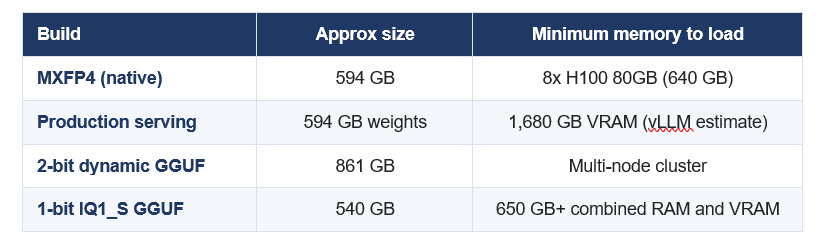
Even a maxed-out 512 GB Mac Studio cannot load the 1-bit build. This is a multi-GPU model at every precision.
The number to remember: 594 GB. That is the download and roughly the memory floor. Everything about running Kimi K3 flows from the fact that the model is larger than the VRAM of any single machine you can buy, so serving it always means a cluster.
How to Download the Kimi K3 Weights
Download the Kimi K3 weights from the official moonshotai/Kimi-K3 repository on Hugging Face using the Hugging Face CLI. Make sure you have 600 GB or more of free disk before you start, because the native weights are about 594 GB.
bash
pip install -U "huggingface_hub[cli]"
# Download the full MXFP4 weights (about 594 GB)
huggingface-cli download moonshotai/Kimi-K3 \
  --local-dir ./kimi-k3 \
  --local-dir-use-symlinks False
The download takes a while even on a fast connection, so run it in a session that will not time out. If you only want to experiment with quantized GGUF builds through llama.cpp, the Unsloth team publishes dedicated Kimi K3 quants and a run guide, though as covered above even the smallest 1-bit build needs 540 GB or more of memory.
Don't just use ChatGPT. Learn to build custom LLM agents, RAG pipelines, and full-stack Agentic AI apps in our intensive 6-week program.
How to Self-Host Kimi K3 with vLLM
Serve Kimi K3 with vLLM on your multi-GPU cluster using tensor parallelism across all your GPUs. Kimi K3 uses custom architecture components, so you need a K3-enabled vLLM build, version 0.26 or newer, rather than the stable release that shipped before launch.
Step 1: Install the K3-enabled vLLM
bash
pip install -U "vllm>=0.26"
# Kimi K3 needs a K3-aware vLLM. Follow Moonshot's
# recommended nightly or recipe if 0.26 stable lacks K3 ops.
Step 2: Serve the model across your GPUs
bash
vllm serve ./kimi-k3 \
  --tensor-parallel-size 8 \
  --max-model-len 131072 \
  --served-model-name kimi-k3
Set tensor-parallel-size to the number of GPUs in the node, and use pipeline parallelism across nodes for a true multi-node cluster. Start with a smaller max-model-len than the full 1M context, because the KV cache for a million tokens adds a large memory cost on top of the weights.
Step 3: Call your endpoint
python
from openai import OpenAI
client = OpenAI(base_url="http://localhost:8000/v1", api_key="local")
resp = client.chat.completions.create(
    model="kimi-k3",
    messages=[{"role": "user", "content": "Summarize this repo."}],
)
print(resp.choices[0].message.content)
Because vLLM exposes an OpenAI-compatible endpoint, any app already written for the OpenAI SDK works against your self-hosted Kimi K3 with only a base-URL change. SGLang and TokenSpeed are the other supported engines if you prefer them.
The Honest Alternative If You Have a Laptop
If you do not have a GPU cluster, do not self-host Kimi K3. Use the hosted Kimi K3 API for the full model, or run a genuinely local model that fits your hardware. Both give you real value without a 594 GB download that will never load.
Table 2: Your three real options
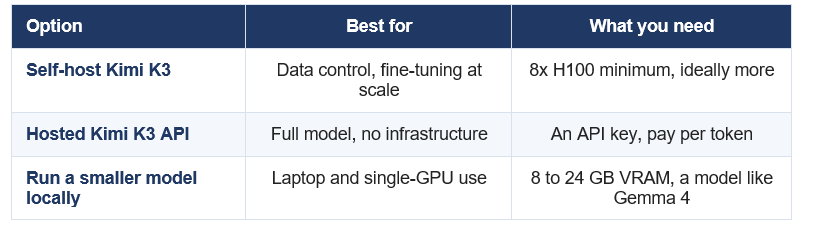
For actual laptop-local AI, a 12B-class model is the right size. Kimi K3 is for clusters.
If your real goal was local AI on your own machine, the right move is a small, capable model rather than a frontier giant. A 12-billion-parameter model runs comfortably in about 8 GB of memory and handles most everyday tasks, and open coders like GLM and DeepSeek offer strong quality per gigabyte. That is the difference between a model you can run tonight and a model you can only admire on Hugging Face.
For a model you can actually run on a laptop, our guide to Gemma 4 12B and how to run it locally is the practical starting point, and DeepSeek V4 is the cheapest hosted option if you want frontier-class coding without the hardware.
Gotchas and Limitations
Three things trip people up when self-hosting Kimi K3, and all three are worth knowing before you commit a cluster to it.
- Custom architecture. Kimi K3 uses Kimi Delta Attention and a Stable LatentMoE design that were not in the stable vLLM or SGLang releases at launch, so you need a K3-enabled build, not the default.
- Context costs extra memory. The 594 GB is just the weights. A large KV cache for long context adds significantly on top, which is why production serving estimates reach 1,680 GB.
- Quantization does not rescue consumer hardware. Even 1-bit builds need 540 GB or more of combined memory, so no amount of quantizing makes this a single-machine model
The takeaway: Kimi K3 self-hosting is a genuine capability for organisations with real GPU infrastructure and a reason to keep data in-house. For everyone else, the hosted API or a smaller local model is not a compromise, it is the correct choice.
Frequently Asked Questions
Q: Can you run Kimi K3 locally?
Only on a multi-GPU cluster. Kimi K3 needs roughly 594 GB of memory to load, which requires at least eight NVIDIA H100 80GB GPUs, and production serving needs far more. It cannot run on a single GPU, a gaming PC, or a Mac, even with aggressive quantization.
Q: What hardware do you need to run Kimi K3?
A minimum of 8x H100 80GB GPUs just to load the 594 GB of weights, with official vLLM estimates putting real serving at around 1,680 GB of VRAM and production recommendations at 64 or more accelerators. This is a data-center model, not a desktop one.
Q: How big is the Kimi K3 download?
The native MXFP4 weights are approximately 594 GB in the moonshotai/Kimi-K3 repository on Hugging Face. Quantized GGUF builds range from about 540 GB for a 1-bit version to roughly 861 GB for a 2-bit dynamic build. Budget 600 GB or more of free disk.
Q: Where can I download the Kimi K3 weights?
From the official moonshotai/Kimi-K3 repository on Hugging Face, released July 26, 2026, using the Hugging Face CLI. Quantized GGUF builds for llama.cpp are published by the Unsloth team with a dedicated run guide.
Q: Can Kimi K3 run on a Mac or a single GPU?
No. Kimi K3 cannot run on a Mac or any single GPU. Even a maxed-out 512 GB Mac Studio cannot load the smallest 1-bit build, which needs 650 GB or more of combined memory. For local AI on a Mac or laptop, use a smaller model such as a 12-billion-parameter one.
Q: How do I self-host Kimi K3 with vLLM?
Download the weights, install a K3-enabled vLLM version 0.26 or newer, then run vllm serve with tensor-parallel-size set to your GPU count. vLLM exposes an OpenAI-compatible endpoint, so existing OpenAI SDK code works with only a base-URL change. Start with a smaller context length to control KV cache memory.
Q: Is Kimi K3 free to use?
The weights are open and free to download and self-host, so if you own the hardware there are no per-token fees. The hosted Kimi K3 API is paid per token. Running the open weights yourself trades API cost for the significant cost of an 8-GPU-or-larger cluster.
The only comprehensive program designed to take you from basic prompting to building interactive Artifacts, custom integrations, and deploying production-ready code with Claude Code.
Recommended Blogs
Resources and Community
Join our community of 70,000+ AI enthusiasts and learn to build powerful AI applications. Whether you are a beginner or an experienced developer, Build Fast with AI helps you understand and implement AI in your projects.
- Website (buildfastwithai.com)
- LinkedIn (Build Fast with AI)
- Instagram (@buildfastwithai)
- Founder Twitter (@satvikps)
- Twitter (@BuildFastWithAI)
Agentic AI Launchpad 2026
A structured 6-week cohort program that takes you from AI basics to building and deploying real-world agentic AI systems. Includes live sessions, expert mentorship, project reviews, and a builder community network.
Ready to go from learning to building? Join the next cohort: Agentic AI Launchpad 2026
Free AI Resources
Access free tools, workshops, and micro-learning to keep building:
Open weights are only as useful as the hardware you can run them on. If Kimi K3 is out of reach, start with a model that fits your machine, and follow Build Fast with AI for honest, practical AI guides.