



Claude Security Plugin for Claude Code: Everything to Know
Anthropic just put a team of security researchers inside your terminal, and they work for tokens. On July 22, 2026, the company released the Claude Security plugin in beta for Claude Code, a multi-agent vulnerability scanner that reviews your code changes or your entire repository without you ever leaving the command line.
The pitch is simple: scan your changes for vulnerabilities before you commit, or run a full repository scan, all on the Claude inference you already pay for. Under that simple pitch is a genuinely sophisticated system: a six-phase pipeline, multiple specialised agents mapping your architecture, and an adversarial verification panel that votes on every finding before it reaches your report. This guide covers how it works, how to install it, what it catches, and the one number that will make you think twice, the token cost.
The headline for busy readers: this is the first AI security tool that reasons about your code the way a human reviewer does, across files and business logic, rather than pattern-matching like a traditional scanner. It is being called a game changer for solo developers, and a single large scan can cost hundreds of dollars in tokens. Both are true.
What Is the Claude Security Plugin?
The Claude Security plugin is a multi-agent vulnerability scanner from Anthropic that runs inside a Claude Code session, reviewing recent changes or a full codebase for serious security flaws directly in your terminal. Released in beta on July 22, 2026, it is available to paid Claude Code users and runs on the same Claude inference you already use.
What makes it different from a normal scanner is that it reasons about how your code actually works. Instead of matching known bad patterns line by line, multiple Claude agents map your architecture, build a threat model, and connect issues across files and business logic, which is exactly where the serious, context-dependent bugs hide. It targets high-severity problems: injection flaws, authentication bypasses, memory corruption, and logic errors that pattern-matching tools routinely miss.
Table 1: Claude Security plugin at a glance
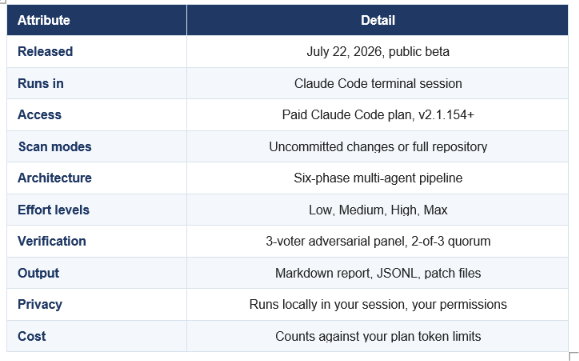
All details from Anthropic's plugin documentation and launch coverage, July 22, 2026.
How to Install the Claude Security Plugin
You install the Claude Security plugin with two commands inside a Claude Code session, and you need a paid plan on version 2.1.154 or newer. The whole setup takes under a minute.
Step 1: Check your requirements
Confirm you have a paid Claude Code plan on v2.1.154 or later with dynamic workflows enabled, plus Python 3.9.6 or newer available as python3, and Git for diff and patch operations. It runs on Linux, macOS and Windows.
Step 2: Install the plugin
Run the install command in your terminal Claude Code session, then reload
/plugin install claude-security@claude-plugins-official
/reload-plugins
Step 3: Run a scan
Point the plugin at your recent changes or the full repository. Before it runs, it reads the target and offers you the scan scope with file counts and relative cost, so you choose the effort level with the price in front of you. That preview step is the most important habit to build, because it is what stops a casual full-repo scan from becoming a surprise bill.
FOR ORGANISATIONS
Organisation admins can enable the plugin for their team through the Claude admin console at claude.ai/admin-settings/claude-code. Decide your policy and effort-level guidance before developers start running full-repo scans on their own, because token cost scales fast at team size.
How the Six-Phase Scan Works
Every scan runs through six phases, moving from mapping your codebase to red-teaming the survivors. This staged pipeline is what lets a language model behave like a methodical security team instead of a single reviewer skimming code.
Table 2: The six-phase scan pipeline
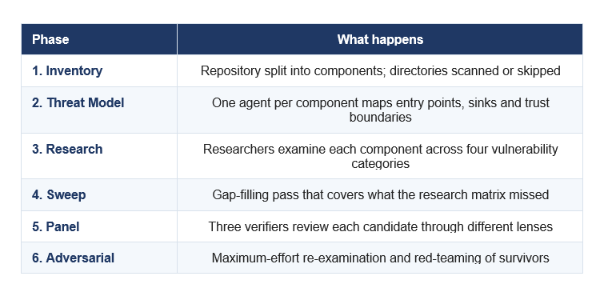
The agents are model-tiered: an Opus orchestrator, Sonnet for mapping and exploration, and session-model researchers and verifiers.
The model-tiering is a smart cost-and-quality decision worth noticing. The orchestrator runs on Opus for judgement, the repository cartographer and code explorer run on the cheaper Sonnet for the high-volume mapping work, and the researchers and verifiers inherit whatever model your session uses. Scan agents get read-only tool access, so the discovery phase physically cannot modify your code. That separation of read and write is good security engineering applied to the security tool itself.
This multi-agent, verify-everything design is the same pattern we broke down in our coverage of the GPT-5.6 launch and its programmatic tool calling, and it is quickly becoming the standard shape for serious agentic systems.
The Four Effort Levels
The plugin offers four effort levels, from Low to Max, that scale how many components it scans, how many researchers work each area, and how many gap-filling sweeps it runs. Higher effort means deeper coverage and higher token cost, and the plugin shows you the trade-off before you commit.
Table 3: Effort levels compared
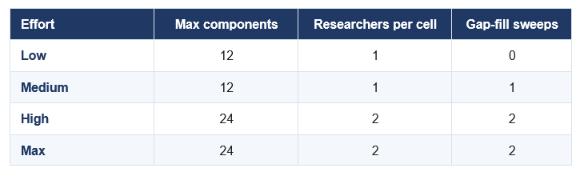
Max adds the full adversarial red-team phase on top of High. Use Low or Medium for pre-commit checks, High or Max for audits.
My practical guidance: match effort to the moment. A quick pre-commit check on a small change wants Low or Medium, runs fast, and costs little. A full security audit before a release wants High or Max, where the extra researchers and the adversarial phase earn their token cost. Running Max on your whole repo every day is how you burn hundreds of dollars for findings you already saw yesterday.
The 3-Voter Panel That Kills False Positives
The best feature in the plugin is how it decides what counts as a real finding: a three-voter adversarial panel where each candidate must survive independent review before it reaches your report. This is the mechanism that separates a useful security tool from a noisy one, because false positives are what make developers ignore scanners entirely.
Each candidate vulnerability faces three voters, and each voter examines a different dimension:
REACHABILITY: Can the vulnerability actually be triggered in real execution, or is it dead code?
IMPACT: If triggered, what are the real security consequences?
DEFENSES: Do existing protections in the code already mitigate the risk?
Each voter returns a verdict of true positive or false positive. The keep quorum is 2 of 3, so a finding needs at least two voters to confirm it. A unanimous panel earns HIGH confidence, a 2-of-3 verdict caps confidence at MEDIUM, and anything with fewer than three voters fails entirely. The detail that makes this trustworthy: the tally is computed in Python by the report renderer, not asserted by the model, so the model cannot simply decide its own finding passed.
WHY THIS DESIGN MATTERS
A model grading its own work is the core weakness of most AI tools. Anthropic answered it with independent voters, a hard quorum, and a Python-computed tally the model cannot fake. That is genuine adversarial verification, and it is the single most important reason to trust this scanner's output over a chatbot you paste code into.
Quotable version: the plugin does not ask Claude whether a bug is real, it makes three Claudes argue about it and counts the votes in Python. That is the difference between a demo and a tool.
What Vulnerabilities It Detects
Claude Security focuses on four fixed categories of serious vulnerabilities, and deliberately skips the low-severity noise that clutters traditional scanners. The research phase examines every component against these categories.
Table 4: The four vulnerability categories
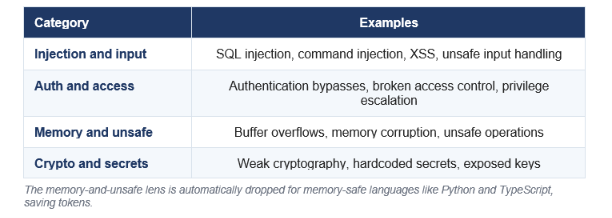
The memory-and-unsafe lens is automatically dropped for memory-safe languages like Python and TypeScript, saving tokens.
That last detail is quietly clever. If a component is written purely in a memory-safe language like Python or TypeScript, the plugin drops the memory-corruption checks for it, shrinking the verification matrix and saving you tokens on findings that cannot exist. It is the kind of context-awareness a rule-based tool cannot manage, and it is exactly why an AI reviewer that understands your stack beats a generic pattern list.
How Patches Work
The plugin suggests patches but never applies them automatically, and a separate reviewing agent verifies each patch before it is offered to you. Every patch is built in an isolated scratch clone, so your working tree is never touched until you decide to apply it yourself.
Before a patch reaches you, a reviewing agent that is independent of the agent that wrote it checks three non-negotiable claims: the change actually addresses the specific finding, it introduces no new vulnerabilities, and it does not alter the code's behaviour. Any patch that weakens security, such as loosening an auth check or disabling a test, is automatically rejected. Verified patches land as files in a patches directory, and none apply on their own.
The honest caveat built into the tool: if no existing test covers the modified code, the plugin says so plainly, noting that its verification rests on code review rather than a passing test. That transparency is the right call, because a security patch you cannot test is a security patch you must read carefully before trusting.
If you want to build this kind of verify-before-apply loop into your own agents, the agent evaluation cookbooks in gen-ai-experiments show the verification harness patterns end to end.
Token Cost: The Catch You Should Plan For
Scans count against your plan's token limits, and a large full-repository scan at high effort can cost hundreds of dollars in tokens. This is the single most important practical fact about the plugin, and the reason scoped, incremental scans are the smart default.
The cost comes from the architecture. Multiple agents, several researchers per component, three verifiers per finding, and an adversarial phase all consume tokens, and large scans can shift to more expensive models as work escalates. For a solo developer scanning a small change before a commit, that is trivial. For a team running Max-effort audits across a large monorepo, it adds up quickly enough that Anthropic itself suggests preferring scoped or incremental runs.
HOW TO KEEP THE BILL SANE
Scan changes, not the whole repo, for routine work. Reserve full-repository Max scans for pre-release audits, not daily use. Always read the cost preview the plugin shows before a run. And set team guidance on effort levels, because the difference between a developer running Medium on a diff and Max on a monorepo is the difference between cents and hundreds of dollars.
My take: the token cost is a feature disguised as a warning. It forces you to scan deliberately rather than spray scans everywhere, and deliberate scanning on real changes is exactly how you should use a security tool anyway. Just do not let a team discover Max mode without a budget conversation first.
Claude Security vs Traditional SAST Tools
Claude Security reasons about code across files and business logic, where traditional static analysis matches known patterns line by line. That difference is the whole value proposition, and it also defines where each approach still wins.
Table 5: Claude Security vs traditional SAST
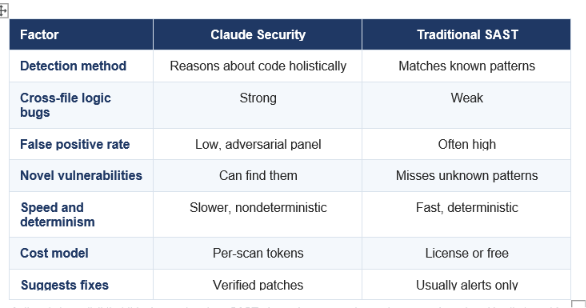
Anthropic is explicit that this does not replace SAST, dependency scanning, or human code review. Use it alongside them.
The right framing is complement, not replacement. Traditional scanners are fast, deterministic, and effectively free to re-run, which makes them ideal for continuous integration gates. Claude Security is slower, costs tokens, and produces different results on different runs, but it catches the context-dependent logic flaws that pattern tools structurally cannot. Anthropic says this directly: it does not replace static analysis, dependency scanning, or code reviews. Run it as another layer, not the only one.
AI is moving fast into security work across the industry, as we covered with Sakana's Fugu-Cyber and the July model wave, and Anthropic putting this in every developer's terminal is arguably the bigger shift.
Privacy and Limitations
The plugin runs locally in your Claude Code session under your own permissions, which is a genuine privacy advantage, and it carries four limitations you should understand before relying on it.
On privacy, the plugin runs on the Claude inference you already use, inside your session, with your permissions, rather than shipping your code to a separate service. That is a meaningful benefit for teams cautious about where their source lands. One important caution: it adds no extra sandboxing, and it treats repository content as data rather than instructions, which is not a defence against deliberately malicious code. For untrusted repositories, Anthropic tells you to run it inside a sandbox runtime.
It is nondeterministic. Two runs can surface different findings, so it is not a stable pass-or-fail gate the way a linter is.
It does not replace SAST, dependency scanning, or human review. It is an additional layer, and Anthropic says so explicitly.
Large scans are expensive. Full-repo Max-effort runs can cost hundreds of dollars in tokens.
No added isolation. For hostile or untrusted code, external sandboxing is mandatory, not optional.
Overall verdict: the most important security release for individual developers in 2026. A genuinely rigorous, multi-agent scanner with real adversarial verification, in the terminal you already work in, is a step change for anyone without a dedicated security team. Respect the token cost, run it alongside your existing tools rather than instead of them, and it earns the game-changer label people are giving it.
Frequently Asked Questions
Q: What is the Claude Security plugin?
The Claude Security plugin is a multi-agent vulnerability scanner from Anthropic, released in beta on July 22, 2026, that runs inside Claude Code. It reviews your code changes or full repository from the terminal, using multiple agents to map architecture, find flaws like injection and auth bypasses, and verify each finding before reporting it.
Q: How do I install the Claude Security plugin?
In a Claude Code session on a paid plan (v2.1.154 or newer), run /plugin install claude-security@claude-plugins-official followed by /reload-plugins. You also need Python 3.9.6 or newer and Git. It works on Linux, macOS and Windows.
Q: How much does the Claude Security plugin cost in tokens?
Scans count against your existing Claude Code plan token limits. A small pre-commit scan is cheap, but a large full-repository scan at high effort can cost hundreds of dollars in tokens, and may shift to more expensive models. Anthropic recommends scoped or incremental scans to control cost.
Q: What vulnerabilities does Claude Security detect?
It targets four categories of serious flaws: injection and input handling, authentication and access control, memory and unsafe operations, and cryptography and secrets. It focuses on high-severity, context-dependent bugs across files, and skips the low-severity noise that clutters traditional scanners.
Q: Is the Claude Security plugin free?
The plugin is free to install but requires a paid Claude Code plan, and every scan consumes tokens from your plan. There is no separate license fee, but the token cost of large scans is the real expense to budget for.
Q: Does Claude Security replace SAST tools?
No. Anthropic states explicitly that it does not replace static analysis, dependency scanning, or human code review. It reasons about code holistically to catch logic bugs that pattern-matching tools miss, but it is nondeterministic and should run as an additional layer alongside traditional tools, not instead of them.
Q: Is my code private with the Claude Security plugin?
The plugin runs locally in your Claude Code session under your permissions, on the Claude inference you already use, rather than sending code to a separate service. It adds no extra sandboxing, though, so for untrusted or malicious repositories you should run it inside a sandbox runtime.
Q: Does Claude Security fix vulnerabilities automatically?
No. It suggests patches built in an isolated scratch clone and verified by an independent reviewing agent, but none apply automatically. Patches land as files for you to review and apply yourself, and any patch that would weaken security or change behaviour is automatically rejected.
Recommended Reads
- GPT-5.6 Sol Terra Luna review
- Best AI models July 2026 ranking
- GLM-5.2 vs Claude vs Kimi coding
- Every major LLM ranked in 2026
Security you can run before every commit changes how safely you ship. Follow Build Fast with AI for hands-on coverage of every major AI tool and model release.

