
Cline SDK Review 2026: The Open-Source Agent Runtime Every AI Engineer Should Know
Cline built one of the world's first agentic coding experiences back in 2024, shipped it into VS Code, and watched it grow to serve 8 million developers. Then they ran into the same wall that every successful developer tool hits: the product got more capable, but the architecture got messier. The agent loop had fused with the IDE. Long-running work died with a UI restart. Moving to a new surface meant rewriting something you already had.
On May 13, 2026, Cline stopped patching around the problem and rebuilt the foundation. The result is @cline/sdk - an open-source TypeScript SDK that extracts Cline's internal agent harness into a standalone, composable runtime that any developer can embed in CI pipelines, scripts, custom products, and agent platforms. The CLI and Kanban are already migrated. The VS Code and JetBrains extensions are being ported. Every Cline surface going forward is a product built on top of this shared runtime rather than a standalone artifact.
This review explains what the Cline SDK actually is, how its four-layer architecture works, what the benchmark numbers tell you, and whether you should build on it today or wait.
1. What Is the Cline SDK and Why Did Cline Build It?
The Cline SDK (@cline/sdk) is an open-source TypeScript framework for building, embedding, and running agentic coding applications - published to npm under the Apache 2.0 license and backed by the same team that built the VS Code extension used by over 8 million developers.
Before the SDK existed, Cline's agent loop and its VS Code extension were a single coupled unit. Every new surface - the CLI, JetBrains, Kanban - required either duplicating the core logic or bending it into shapes it was never designed for. Long-running agent sessions died if the UI restarted. Moving state from one product surface to another wasn't architecturally possible. The team was adding features to a rigid core rather than building on a flexible foundation.
Rather than continuing to add another layer on top of structural debt, the Cline team chose to rebuild the foundation. They abstracted the core agent harness into a pluggable SDK, migrated the Cline CLI 2.0 and Kanban to it immediately, and are in the process of porting the IDE extensions. The practical result: sessions are now durable across surfaces, long-running work no longer dies with a UI restart, and the agent loop is stateless and reusable while the runtime around it becomes portable and product-agnostic. Any team - not just Cline itself - can now build on the same harness that powers the most widely deployed open-source AI coding agent in the world.
2. The Four-Layer Architecture Explained
The SDK is a layered TypeScript stack where each package has exactly one job and dependencies flow strictly downward. This design principle is what makes the SDK composable - you can pull in just the pieces you need without dragging in the full Node runtime stack.
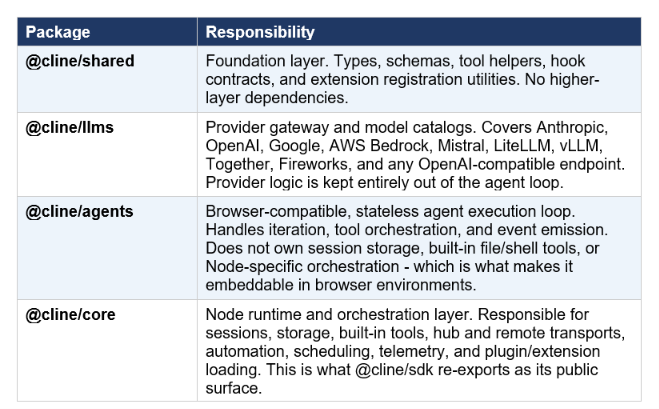
The hot take on this architecture: making @cline/agents browser-compatible and stateless is the decision that everything else depends on. It's what allows the agent loop to run in serverless environments, edge functions, or a VS Code webview without modification. Separating provider logic into @cline/llms means switching from Claude to Gemini to a local vLLM model is a config change, not a code change. Every serious agent platform eventually needs to make this separation - Cline made it upfront.
3. What's New in Cline 2.0: The Rebuilt Agent Harness
The SDK release coincides with what Cline is calling Cline 2.0, a significant rewrite of the prompt engineering and agent loop that goes beyond just extracting code into packages.
With Cline 2.0, the team rewrote the prompts, simplified the loop, tightened context management, improved feedback loops and error handling, and rethought how tools are defined and surfaced to the model. These aren't incremental polish improvements. Cline's prompt design was originally built around Claude Sonnet 3.5 in 2024 - the first model capable of sustaining a meaningful agentic coding loop. Running that same prompting strategy against Claude Opus 4.7 or Kimi K2.6 in 2026 is not getting the most out of either model.
The rebuild also changes Cline's role from IDE extension to platform. Cline is no longer the only place this runtime can live - it's one product built on top of the same SDK they're opening up. That's a meaningful strategic shift for any team that has been building on or around Cline's existing architecture.
4. Benchmark Results: Cline SDK vs Claude Code vs OpenCode
Cline published Terminal Benchmark 2.0 results alongside the SDK release, and the numbers are the strongest argument for taking the rebuilt harness seriously.
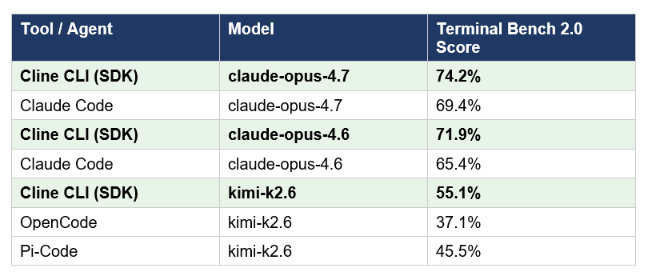
A few important caveats before reading too much into these numbers. The frontier model runs (claude-opus-4.7 and claude-opus-4.6) use Anthropic's own published Claude Code scores as the comparison baseline - those are independent and not run by Cline. The open-weight model runs (kimi-k2.6) were performed by the Cline team themselves, since neither OpenCode nor Pi-Code had published benchmark numbers on open-weight models as of May 8, 2026. For the frontier model comparisons, the benchmark is Terminal Bench 2.0 from tbench.ai, which measures an agent's ability to complete complex tasks in a terminal environment. For context on how these scores sit relative to the broader model landscape, our best AI models leaderboard tracks Terminal Bench 2.0 scores across all major models and agents.
The honest interpretation: a 4.8 percentage point gap over Claude Code on claude-opus-4.7 (74.2% vs 69.4%) is genuinely significant for a terminal benchmark where single-digit improvements take months of engineering. The open-weight comparison is harder to evaluate without independent verification, but a 10-point gap over Pi-Code on kimi-k2.6 is notable if it holds up. What this tells you is that the rebuilt harness and tighter context management are doing real work, not just delivering cosmetic improvements.
Don't just use ChatGPT. Learn to build custom LLM agents, RAG pipelines, and full-stack Agentic AI apps in our intensive 6-week program.
5. The Plugin System and Extensibility Layer
One of the most practically useful additions for developer teams is the plugin architecture. Previously, customizing Cline meant forking the repository and wrestling with internal APIs. With the SDK, you implement against a public surface. A plugin written for @cline/sdk can register new tools, observe lifecycle events, add rules and commands, and shape what the agent sees in context - all without touching the core runtime.
Plugins load from configured paths or workspace locations, and the lifecycle is designed for gradual formalization: you start with a local .ts or .js module, test it in your workspace, and later promote it to a package directory with a cline.plugins manifest when you're ready to share it across teams or publish it.
Beyond plugins, the SDK exposes three additional extensibility points. Custom tools let you define domain-specific actions the agent can invoke. MCP connectors bring in any Model Context Protocol server - giving the agent access to your databases, APIs, calendars, and internal systems through the same protocol Claude Code supports. Skills let you package reusable agent knowledge into installable modules, which is the same mechanism Cline's own team uses internally.
To add a custom LLM provider that isn't covered by the built-in catalog, you implement an ApiHandler interface and register it using the registerProvider function from @cline/llms. New models within existing providers use registerModel. The architecture documentation makes both exported functions the explicit supported path, which means the API surface is intended to be stable rather than an internal workaround.
6. Multi-Agent Support: Native Subagents Without an Orchestrator
Multi-agent coordination in most frameworks requires a separate orchestration layer on top of the base runtime. In LangGraph, you build a graph that controls how agents hand off to each other. In CrewAI, you define crew roles that sit above individual agents. For a detailed look at how those patterns compare, our AI agent frameworks guide walks through LangGraph, CrewAI, AutoGen, and Swarm side by side.
The Cline SDK takes a different approach: multi-agent coordination is native to @cline/core rather than layered on top of it. Agent teams and subagents are built-in primitives. A session can delegate to specialist subagents, track their progress, and exchange handoff notes - all inside the same runtime. Each subagent runs with its own model, tool set, and system prompt, which is how you build a team where one agent searches documentation, another writes the code, and a third runs the tests, without needing to wire up an external orchestration system.
The practical benefit for teams is that the session-level durability described in the architecture section applies to multi-agent workflows too. Sessions persist across surfaces. Long-running work no longer dies with a UI restart. Subagent handoffs are checkpointed, not ephemeral.
7. How to Install and Run Your First Agent
The SDK requires Node.js 22 or later. Installation is a single npm command:
# Full SDK - recommended starting point npm install @cline/sdk
 # CLI globally npm i -g @cline
# Or add the Cline SDK skill to your coding agent npx skills add cline/sdk-skill
For teams that want a smaller footprint, the packages are individually installable. @cline/agents and @cline/shared together give you the browser-compatible stateless loop without pulling in the full Node runtime. @cline/llms and @cline/shared give you the provider layer alone if you're building an LLM proxy or gateway.
A minimal first agent looks like this:
import { Agent } from "@cline/sdk"  const agent = new Agent({   providerId: "anthropic",
  modelId: "claude-sonnet-4-6",
apiKey: process.env.ANTHROPIC_API_KEY,
  maxIterations: 10, })
 agent.subscribe((event) => {
if (event.type === "assistant-text-delta")
   process.stdout.write(event.text ?? "") })
 const result = await agent.run(
  "Write a Python function to check if a number is prime." )
The Agent class (which is an alias for AgentRuntime) exposes run(), continue(), abort(), subscribe(), restore(), and snapshot() as its core interface. Documentation lives at docs.cline.bot/sdk. Working examples including plugin examples and multi-agent builds are in the sdk/apps/examples directory of the Cline GitHub repository. The release is licensed under Apache 2.0.
8. Who Should Build on Cline SDK Today?
If you are already building on Cline's VS Code extension and want to extend it without forking the repo, the SDK is the right move. The plugin system is designed for this exact use case, and the public API surface is stable. If you want to run Cline-quality coding agents in CI or serverless environments where a VS Code process makes no sense, the headless CLI approach via Cline SDK is more architecturally correct than shimming the extension. If you're building a product that needs an embedded coding agent and you don't want to wire up your own LLM provider layer, session storage, scheduling, and tool orchestration from scratch, @cline/sdk gives you all of that under Apache 2.0. The comparable proprietary approaches - building on top of Claude Code or Codex CLI - give you better model performance in some benchmarks but far less control over the underlying infrastructure.
Who should wait: teams that want stable, production-hardened multi-provider reliability before committing. The VS Code and JetBrains extensions are still being migrated, which means you might be running on a newer version of the SDK than the IDE extension was built for. If your team's entire workflow runs inside an IDE and you don't need the CLI or embedding capabilities, there's no urgent reason to build directly on the SDK until the extension migration completes.
The bigger picture: @cline/sdk is the first serious open-source agent runtime designed from the ground up for production coding agent use cases rather than research or general-purpose LLM wrapping. The benchmark numbers are real, the architecture is clean, and the Apache 2.0 license means you can build commercial products on it without paying Cline anything. That combination doesn't exist anywhere else in the current ecosystem.
The only comprehensive program designed to take you from basic prompting to building interactive Artifacts, custom integrations, and deploying production-ready code with Claude Code.
Frequently Asked Questions
What is the Cline SDK?
The Cline SDK (@cline/sdk) is an open-source TypeScript framework for building agentic coding applications, released on May 13, 2026. It's the same agent runtime that powers Cline's VS Code extension, CLI, and Kanban - extracted into a standalone package that any team can install, extend, and embed in their own products. It ships under Apache 2.0.
Is the Cline SDK open source?
Yes. The Cline SDK is fully open source under the Apache 2.0 license. The source code is available on GitHub, the package is published to npm as @cline/sdk, and there are no usage fees or commercial restrictions. Individual sub-packages (@cline/agents, @cline/llms, @cline/shared, @cline/core) are also individually installable.
How do I install @cline/sdk?
Run npm install @cline/sdk in a Node.js 22 or later project. For the CLI, run npm i -g @cline. For lighter-weight installs, you can install individual packages: @cline/agents and @cline/shared for just the stateless agent loop, or @cline/llms and @cline/shared for just the provider layer.
What is the difference between @cline/sdk and @cline/agents?
@cline/sdk is the full public API surface, re-exporting everything from @cline/core (the Node runtime layer including sessions, storage, scheduling, and telemetry). @cline/agents is just the browser-compatible, stateless agent execution loop - it handles iteration, tool orchestration, and event emission but does not include session persistence, built-in file/shell tools, or Node-specific orchestration. Use @cline/agents when you need to embed a lightweight loop in a browser or serverless environment; use @cline/sdk when you need the full production stack.
How does Cline SDK compare to Claude Code?
Claude Code is a closed-source terminal agent built and maintained by Anthropic - excellent model performance, tight integration with Anthropic's infrastructure, but limited extensibility and no embedding capability. Cline SDK is an open-source runtime you can embed in any product, extend with plugins, run with any supported LLM provider, and deploy headlessly in CI. On Terminal Bench 2.0, the rebuilt Cline CLI running claude-opus-4.7 scored 74.2% versus Claude Code's 69.4% on the same model - a 4.8-point advantage that the team attributes to the tighter context management and rebuilt prompt engineering in Cline 2.0.
Does Cline SDK support multi-agent workflows?
Yes, natively. Multi-agent coordination is built into @cline/core rather than requiring a separate orchestration layer. Agent teams and subagents are first-class primitives: a session can delegate to specialist subagents, each running with its own model, tool set, and system prompt, with progress tracking and handoff notes handled by the runtime. CRON scheduling, checkpointing, and session persistence across surfaces are also native to the SDK.
What models does the Cline SDK support?
The @cline/llms package supports Anthropic (Claude), OpenAI (GPT), Google (Gemini), AWS Bedrock, Mistral, LiteLLM, and any OpenAI-compatible endpoint including vLLM, Together AI, and Fireworks AI. Switching providers is a one-line config change because provider logic is kept entirely out of the agent loop. Custom providers can be added by implementing an ApiHandler and registering it with registerProvider from @cline/llms.
What is Cline 2.0?
Cline 2.0 refers to the ground-up rebuild of Cline's agent harness that ships alongside the SDK release. It includes rewritten prompts, a simplified and tightened agent loop, improved context management, better feedback loops and error handling, and redesigned tool definitions. The Cline CLI 2.0 already runs on the new architecture; the VS Code and JetBrains extensions are in the process of being migrated.
Recommended Blogs
- Best AI Agent Frameworks in 2026 - Build Autonomous AI Agents Fast
- Claude Code vs Codex: Which Terminal AI Tool Wins in 2026?
- Cline Review 2026: Open-Source VS Code Coding Agent
- LangGraph Review 2026: Production Agent Framework from LangChain
- Claude Skills: The Complete 2026 Guide - Build, Install and Use
- Claude MCP Setup Guide: Connect Any Tool in 10 Minutes (2026)
References
- Cline - Introducing Cline SDK: the Upgraded Agent Runtime (Official Blog)
- Cline SDK Documentation - docs.cline.bot/sdk
- Testing Catalog - Cline Releases Open-Source Agent Runtime SDK
- MarkTechPost - Cline Releases Cline SDK: An Open-Source Agent Runtime Now Powering Its CLI and Kanban
- Essa Mamdani - Cline Rebuilt Its Harness: Why That Matters for Every Developer
- Product Hunt - Cline SDK Launch (May 15, 2026)
- Cline - cline.bot/sdk (Official SDK Landing Page)