



Perplexity works best when you use it like a research system rather than a generic chatbot. Give it the exact question, the scope, the evidence standard and the output you need. Its current product includes Search, Pro Search, Research, file analysis, Projects and asset creation, with Pro Search able to synthesize multiple sources and Research designed for deeper autonomous research.
The 100 prompts below follow the Build Fast with AI copy-paste library format. Replace bracketed values such as [topic], [company], [URL], [file], [audience], [date range] and [budget] before using them. For changing facts, always specify the time window you care about.

THE PERPLEXITY PROMPT FORMULA
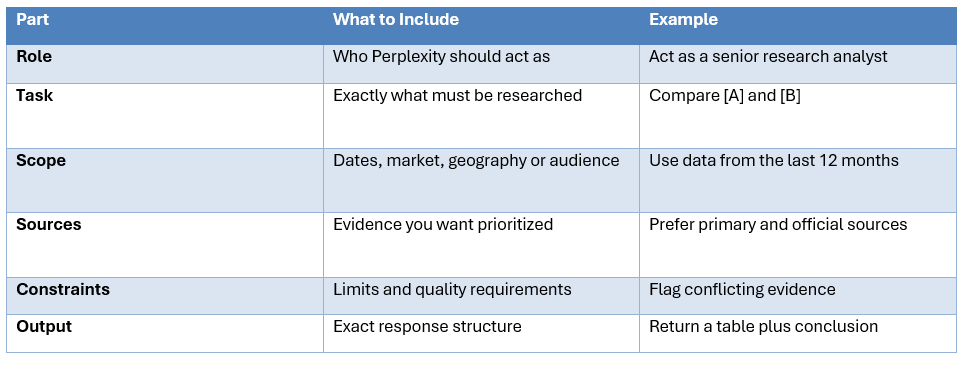
How to Use These Prompts
- Copy the prompt, then replace every bracketed placeholder.
- Use standard Search for straightforward lookups, Pro Search for deeper multi-source questions and Research for complex reports.
- For research, ask for primary sources and request the publication date of important evidence.
- For comparisons, define the criteria before asking Perplexity to recommend a winner.
- For files, specify whether the upload is the source of truth or should be checked against the web.
- For important claims, open the cited source yourself. Citations make answers auditable, not automatically correct.
Search & Fact-Finding
1. Find a Direct Answer
Find the answer to [question]. Use current web sources and give the direct answer first. Prefer official or primary sources, then list the strongest evidence and links.
2. Latest Information
Find the latest information about [topic] published or updated between [start date] and [end date]. Ignore older articles unless they provide essential context.
3. Fact-Finding List
Research [topic] and give me the 10 most important verified facts a beginner should know. Cite each important claim.
4. Primary Sources
Find the five strongest primary sources for [topic]. For each, tell me what it proves, its publication date and why it should be trusted.
5. Timeline
Build a timeline of [topic] from [start year] to today. Include dates, major developments and source links.
6. Fact Check
Fact-check this claim: [claim]. Search for evidence supporting and contradicting it. End with a verdict and confidence level.
7. Source Disagreement
Find conflicting claims about [topic]. Explain why the sources disagree and which interpretation has stronger evidence.
8. Explain a Concept
Explain [concept] for an intelligent beginner. Give one simple example, one technical example, three misconceptions and source links.
9. Latest Numbers
Find the latest reliable numbers for [metric]. Include the value, date, geography, source and methodology where available.
10. Short Verified Answer
Answer [question] in under 300 words. Use only information you can verify and explicitly say when evidence is incomplete.
Deep Research
11. Deep Research Report
Research [topic] as an expert analyst. Break the problem into sub-questions, search widely, cross-check important claims and produce findings, evidence, disagreements and open questions.
12. Company Due Diligence
Conduct due diligence on [company]. Cover product, technology, customers, financial signals, competition, leadership, risks and unresolved questions using recent evidence.
13. Product Investigation
Investigate [product]. Cover capabilities, pricing, limitations, user feedback, competitors, recent changes and whether its marketing claims match available evidence.
14. Market Analysis
Research [market] for [year range]. Identify the 10 most important trends, the evidence behind them and what could change the outlook.
15. Technology Landscape
Map the current state of [technology]. Compare major approaches, leading implementations, benchmarks, limitations and open research problems.
16. Claim Investigation
Investigate whether [claim] is actually true. Search primary evidence, independent tests and credible counterarguments. Separate facts from inference.
17. Competitor Deep Dive
Compare [company A] and [company B] using current evidence. Analyze products, users, pricing, distribution, technical advantage and strategic risk.
18. Source Triangulation
Research [topic] using official documentation, academic or technical research and reputable reporting. Explain where the sources agree and conflict.
19. Executive Brief
Create an executive report on [topic]. Include a concise summary, key facts, implications, risks, recommendation and links to primary evidence.
20. Recent Developments
Find the most meaningful developments about [topic] from the last 30 days. Exclude articles that merely repeat an older announcement.
Academic & Student Research
21. Paper Finder
Find 10 high-quality academic papers about [topic]. Give the research question, method, key finding, limitation, year and link.
22. Literature Review
Create a literature-review outline for [topic]. Organize it by themes, major findings, disagreements and research gaps.
23. Hypothesis Test
Find evidence for and against this hypothesis: [hypothesis]. Prefer recent peer-reviewed research and distinguish correlation from causation.
24. Paper Explainer
Explain this paper [paper title or URL]. Cover method, dataset, findings, limitations and practical implications.
25. Study Guide
Create a study guide for [subject]. Include definitions, important frameworks, examples, common mistakes and practice questions.
26. Three-Level Explanation
Explain [topic] at high-school, undergraduate and graduate levels without changing the factual core.
27. Exam Quiz
Quiz me on [subject] one question at a time. Grade each response, explain mistakes and increase difficulty as I improve.
28. Research Debate
Compare the strongest competing explanations for [phenomenon]. Give evidence for each, the strongest criticism and the current consensus.
29. Source-Based Notes
Turn these sources into study notes: [sources]. Keep important caveats and attach source links to major claims.
30. Research Gap
Research [topic] and identify the most defensible unanswered questions that could become student research projects.
Coding & Technical Research
31. Fix an Error
Debug this error: [error]. Search current official documentation, known issues and recent discussions. Give the likely cause, fix and verification steps.
32. Best Current Implementation
Find the current recommended way to implement [task] in [language/framework]. Prefer official documentation and flag deprecated approaches.
33. Library Comparison
Compare [library A] and [library B] for [use case]. Evaluate performance, API design, ecosystem, maintenance, licensing and migration risk.
34. Architecture Research
Find a suitable architecture for [system] under [constraints]. Return components, data flow, failure points and rationale.
35. Production Readiness
Research whether [technology] is production-ready in 2026. Evaluate maturity, adoption, security, documentation and breaking-change risk.
36. Repository Review
Review this GitHub repository [URL] as a senior engineer. Identify architecture strengths, likely bugs, maintenance risks and high-impact improvements.
37. API Research
Find the current official documentation for [API]. Show the minimal implementation pattern and list common integration mistakes.
38. AI Coding Model Comparison
Compare current AI coding models for [task]. Prioritize real coding reliability, tool use, latency and price over generic leaderboard position.
39. Migration Plan
Research a migration from [old system] to [new system]. Include compatibility risks, testing, rollback and likely effort.
40. Scale Failure Analysis
Explain how this architecture could fail at scale: [architecture]. Identify bottlenecks, failure modes and concrete mitigations.
Writing & Content
41. Technical Article
Research [topic] and build an evidence-backed article outline for [audience]. Identify the best source for each major section.
42. Rewrite for Clarity
Rewrite this text for clarity and authority: [text]. Preserve meaning, remove repetition and keep important facts intact.
43. Three Introductions
Create three introductions for [topic]. Each should establish the problem, explain why it matters now and create curiosity without clickbait.
44. Comparison Table
Compare [items] across [criteria]. Return a concise table, explain the important tradeoffs and flag claims that need verification.
45. Notes to Blog
Turn these research notes into a complete blog: [notes]. Preserve verified facts, remove repetition and add useful headings and FAQs.
46. Executive Summary
Summarize this report [report] in under 300 words. Include situation, critical findings, business impact, recommendation and risks.
47. FAQ Generator
Generate 10 FAQs for [topic]. Focus on questions a reader is likely to search next and answer them directly with evidence.
48. Fix AI Draft
Improve this AI-generated draft: [draft]. Remove generic phrasing, unsupported claims and repetition while keeping useful detail.
49. LinkedIn Research Post
Research [insight] and write a LinkedIn post with one strong claim, supporting evidence and one practical takeaway.
50. Content Angles
Generate 20 genuinely different content angles for [topic]. Prioritize useful search intent and avoid generic variations.
Data & Analysis
51. CSV Analysis
Analyze this dataset: [CSV/schema]. Identify data-quality problems, major trends, outliers and the three most important insights.
52. Dataset Questions
Explore [dataset] and tell me which questions it can answer reliably, which fields are weak and what additional data would improve the analysis.
53. SQL Research
Research the correct SQL approach for [requirement] on [database]. Account for NULLs, duplicates, date logic and performance.
54. Anomaly Analysis
Find anomalies in [dataset]. Look for impossible values, duplicates, missingness and distribution shifts and rank them by importance.
55. KPI Framework
Design a KPI framework for [product]. Define the north-star metric, supporting metrics, formulas, data sources and common interpretation errors.
56. Query Explanation
Explain this SQL query: [SQL]. First explain business intent, then each clause, then correctness and performance risks.
57. A/B Test
Analyze these experiment results: [data]. Check uncertainty, practical significance, confounders and whether the evidence supports a decision.
58. Data Story
Turn these findings into a clear story: [findings]. Identify the central message, strongest evidence, caveats and recommended chart sequence.
59. Data Validation
Design validation checks for [schema]. Cover missing values, duplicates, invalid ranges, referential integrity and suspicious changes.
60. Benchmark Research
Find current benchmarks relevant to [dataset/model/system]. Explain methodology differences before comparing the scores.
Business & Product
61. Business Strategy
Build a strategy for [company] entering [market]. Analyze customers, competition, differentiation, pricing, distribution and risks, then give a 90-day plan.
62. Competitor Analysis
Analyze [competitor] using current evidence. Identify positioning, strengths, weaknesses, likely strategy and opportunities to compete.
63. GTM Plan
Create a go-to-market plan for [product] aimed at [audience]. Include ICP, positioning, channels, pricing, sales motion, timeline and success metrics.
64. PRD Research
Turn this idea into a research-backed PRD: [idea]. Include problem, goals, non-goals, requirements, user stories, acceptance criteria and metrics.
65. Pricing Research
Research pricing for [product]. Compare flat, usage, seat and hybrid models and show how competitors price similar products.
66. Customer Feedback
Analyze this customer feedback: [feedback]. Group themes, identify recurring pain points and rank opportunities by impact.
67. Outbound Email
Research [prospect/company] and write a concise outreach email for [product]. Use a credible pain point and avoid generic personalization.
68. Marketing Calendar
Build a 30-day content calendar for [brand]. Balance education, proof, product and engagement content across [channels].
69. Feature to Benefit
Convert these features into customer benefits: [features]. For each, give problem, benefit, proof point and target audience.
70. AI Product Evaluation
Evaluate [AI product] for [use case]. Score capability, reliability, price, privacy, integration effort and switching risk.
Learning, Career & Productivity
71. Learn a Topic
Teach me [topic] from fundamentals to practical use. Use short explanations, examples, exercises and a final project.
72. Study Plan
Build a [weeks]-week learning plan for [skill]. Include daily practice, review, projects and a final assessment.
73. Career Skills
Research the skills most requested in current [role] job postings in [market]. Group them into must-have, useful and emerging.
74. Resume Review
Review this resume for [role]: [resume]. Compare it with current job requirements and identify missing skills, proof and keywords.
75. Interview Prep
Research current interview expectations for [role] and then interview me one question at a time, grading each answer.
76. Salary Research
Research current salary ranges for [role] in [location]. Explain variation by experience, company type and source methodology.
77. Portfolio Projects
Find five portfolio projects that demonstrate the skills needed for [role]. Prioritize projects that can be completed in [time].
78. Decision Memo
Help me decide between [option A] and [option B]. Define criteria, collect evidence, score both and state what information could change the recommendation.
79. Prioritize My Tasks
Turn this list into a prioritized action plan: [tasks]. Identify dependencies, quick wins, high-impact work and tasks that should be dropped.
80. Tool Research
Research the best current tools for [workflow]. Compare setup time, cost, automation potential, limitations and learning curve.
Files, Fact-Checking & Source Verification
81. PDF Summary
Analyze the uploaded PDF. Extract purpose, claims, important numbers, risks, decisions and unresolved questions.
82. PDF Number Extraction
Read this PDF and extract every important number into a table with source page or section. Flag suspicious or inconsistent values.
83. Compare Documents
Compare these documents: [A] and [B]. Identify changed claims, numbers, dates, responsibilities and omissions.
84. Contract Review
Review this agreement for obligations, payment terms, termination, renewal, liability and unusual clauses. Flag items for human review.
85. Meeting Actions
Turn this meeting transcript into decisions, action items, owners, deadlines, dependencies and unresolved questions.
86. Evidence Finder
Answer [question] using only the uploaded documents. Return directly relevant evidence with source location.
87. Fact-Check Article
Fact-check this article: [URL or text]. Return a table with claim, verdict, correction and strongest source.
88. Trace the Original Source
Find the original source behind this claim or statistic: [claim]. Trace it back as far as possible and explain any distortion.
89. Source Credibility
Evaluate these sources: [sources]. Rank them for authority, methodology and relevance and explain conflicts of interest.
90. File Plus Web Verification
Use the uploaded file as the starting point and current web sources to verify [question]. Clearly label file-derived evidence and external evidence.
Perplexity, Search Modes & Prompt Optimization
91. Choose Search Mode
Given this task [task], tell me whether I should use Search, Pro Search or Research and explain why before answering.
92. Build a Research Prompt
Rewrite this vague question into an expert Perplexity prompt: [question]. Add scope, source requirements, evidence rules and output format.
93. Primary-Source Prompt
Research [topic] using official documentation, filings or original research first. Use secondary sources only when primary evidence is unavailable.
94. Date-Locked Research
Research [topic] using only information published since [date]. Flag any claim that depends on older material.
95. Evidence Table
Research [question] and return a table with claim, supporting evidence, source, source date and confidence.
96. Conflict Resolver
Research [topic] and identify conflicting sources. Explain the likely reason for disagreement before giving the best-supported conclusion.
97. Red-Team Search
Research [claim], but actively search for evidence that would disprove it. Do not stop after finding confirming sources.
98. Long-Context File Prompt
Analyze this large file [file] for [question]. Focus only on relevant evidence and cite the exact section or page where possible.
99. Project Research Prompt
Within my project context, research [topic]. Use existing project files first, then fill gaps with current web evidence.
100. Reusable Research Template
Create a reusable Perplexity prompt template for [workflow] with variables for goal, scope, sources, evidence, constraints and output.
How to Turn These Into Reusable Templates
- Keep [task], [context], [constraints], [date range] and [output] as explicit variables.
- Build a small benchmark of real questions before deciding a prompt is better.
- Ask for source dates and primary evidence whenever the topic changes quickly.
- Use a clear table format when comparing products, companies, papers or model benchmarks.
- Use uploaded files as evidence sources, but say explicitly whether they should be trusted or verified.
- Keep the prompt focused. A longer prompt is not automatically a better prompt.
Search vs Pro Search vs Research: Which Should You Use?
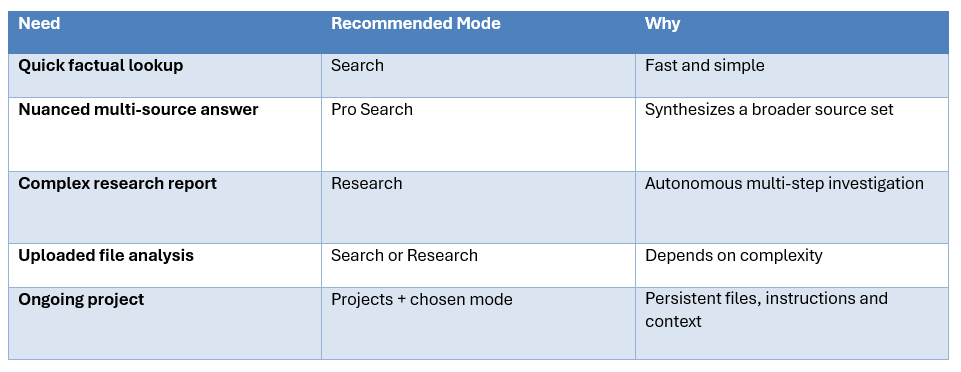
Perplexity describes Research as its advanced research workflow that can perform dozens of searches, read many sources, reason about next steps and synthesize a report. Pro Search is designed for nuanced, thorough answers using multiple high-quality sources. Projects provide a persistent workspace for ongoing work.
Frequently Asked Questions
What are the best Perplexity prompts?
The strongest prompts define the task, scope, source requirements, evidence standard and output format. The best prompt depends on whether you are researching, coding, writing, analyzing data or making a decision.
How do I write prompts for Perplexity?
State exactly what you want, what dates count as current, which sources should be prioritized and what format the final answer should use.
What are the best Perplexity Deep Research prompts?
Use focused research questions that require multiple sources, source checking, conflicting evidence and a structured report with conclusions and open questions.
What is the best Perplexity prompt for research?
A useful research template is: research [topic] for [purpose], use sources from [date range], prioritize [source types], separate evidence from inference and return [output format].
Can Perplexity analyze PDFs and files?
Yes. Perplexity supports text, code, PDF, image, audio and video uploads and can use uploaded files as context for follow-up questions.
How do I get better sources in Perplexity?
Ask it to prioritize primary sources, official documentation, filings or original research, and request source dates and direct links.
Should I use Search, Pro Search or Research?
Use Search for simple lookups, Pro Search for deeper multi-source questions and Research for complex autonomous research reports.
Can Perplexity be used for coding?
Yes. Use prompts that include the exact error, repository context, versions and desired behavior, and ask it to prioritize current official documentation.
Can Perplexity fact-check information?
Yes. Ask it to find evidence supporting and contradicting the claim and to distinguish primary evidence from secondary interpretation.
Can I keep research context across sessions?
Projects are designed as persistent workspaces containing conversations, files, instructions, tools and accumulated context for ongoing work.
Recommended Blogs
- 100 Best DeepSeek Prompts 2026 (Copy-Paste)
- 100 Best Veo 3 Prompts 2026 (Copy-Paste)
- What Is Context Engineering? Complete Guide (2026)
- Model Routing for AI Coding Agents: How to Cut Costs Without Losing Quality
- Best Open Source AI Models August 2026: Full Collection
- Gemini Omni 1.1 Flash Review: Accuracy, Price & Is It Worth It? (2026)
Resources & Community
Join our community of 70,000+ AI enthusiasts and learn to build powerful AI applications. Whether you're a beginner or an experienced developer, Build Fast with AI helps you understand and implement AI in your projects.
- Website - buildfastwithai.com
- LinkedIn - Build Fast with AI
- Instagram - @buildfastwithai
- Founder Twitter - @satvikps
- Twitter - @BuildFastWithAI
Agentic AI Launchpad 2026
A structured 6-week cohort program that takes you from AI basics to building and deploying real-world agentic AI systems. Includes live sessions, expert mentorship, project reviews and a builder community network.
Ready to go from learning to building? Join the next cohort: Agentic AI Launchpad 2026
Free AI Resources
Access free tools, workshops and micro-learning to keep building.
- AI Workshops - Free resources, upcoming events and past recordings
- Unrot - Learn AI in 5 minutes a day
References
- Perplexity Help Center - What is Perplexity?
- Perplexity Help Center - What is Pro Search?
- Perplexity Help Center - What is Research mode?
- Perplexity Help Center - File Uploads
- Perplexity Help Center - What are Projects?
- Perplexity Help Center - Creating assets with Perplexity
- Perplexity Help Center - Advanced Deep Research

