



Muse Personal AI Agent Review: Can Meta's New AI Actually Take Work Off Your Plate?
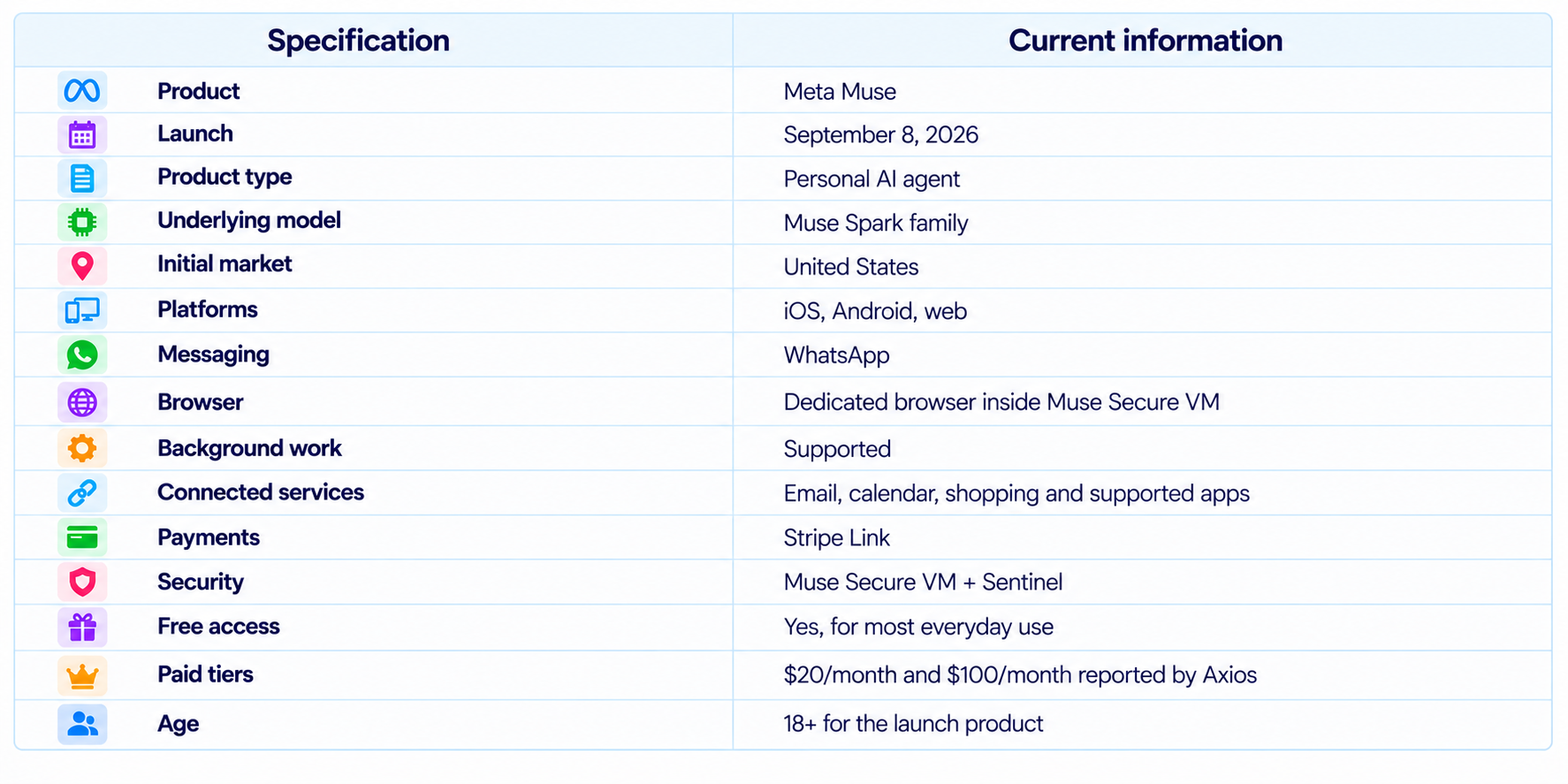
Meta Muse is a new personal AI agent designed to move beyond chat and actually complete digital tasks on a user's behalf. Meta launched Muse on September 8, 2026, positioning it as a personal agent that can take goals, turn them into plans, use connected services, browse the web, complete forms, make purchases and keep working after the user leaves the app.
The product combines several systems rather than being just another language model. Muse is powered by Meta's Muse models, runs inside a dedicated Muse Secure VM with its own browser, and uses a separate Sentinel agent to control internet access and sensitive actions. Users decide which services Muse can access, can require approval for consequential actions, and can inspect an audit trail of what the agent has done.
This makes Muse one of the clearest examples yet of Meta's move toward personal AI agents. It is initially rolling out in the United States on iOS, Android and the web, with WhatsApp access and AI-glasses support planned. Meta says the core experience is free for most users, while Axios reports $20 and $100 monthly subscription tiers for people who need more computing capacity.
QUICK ANSWER
Meta Muse is a personal AI agent that does not stop after giving you an answer. You can give it a goal such as arranging travel, managing email, finding a better deal, organizing an event or working through a longer project, and Muse can plan the steps and act on them using a browser and connected services. Meta says Muse can continue working after you close the app and return when an approval or a new decision is needed.
The most distinctive technical feature is Muse Secure VM. Each Muse runs on a dedicated cloud computer with its own browser, while a separate Sentinel agent controls internet access. Credentials are stored in secure systems instead of being exposed directly to Muse, and Meta says users can control permissions, review an audit trail and disconnect services whenever they choose.
Muse also has a strong consumer-product advantage: it is designed to live where people already communicate. The first rollout includes iOS, Android, the web and WhatsApp, and Meta plans to bring it to AI glasses. Most everyday use is free, with Axios reporting $20 and $100 paid tiers for heavier usage.
My verdict: 9.0/10 overall. Muse is one of the most capable consumer personal AI agent concepts available because it combines planning, browser control, personal memory, connected apps and background execution. The main issue is not whether it can act. It is whether users will trust an agent with enough access to make those actions genuinely useful.
1. What Is Meta Muse?
Muse is Meta's dedicated personal AI agent product. It should be separated from Muse Spark, which is the model family powering Meta's newer AI systems. Muse is the complete product: the model, secure computer, browser, memory, connected services, approvals and user interface work together as one agent.
Meta launched Muse as part of its broader personal-superintelligence strategy. The company describes the product as something people can give a goal to rather than a sequence of instructions. Muse can then develop a plan, use tools and continue the work until it reaches a useful result or requires the user's approval.
That changes the basic AI interaction model. A chatbot answers a question. An AI assistant may suggest what to do next. A personal AI agent is supposed to carry out the next steps itself.
2. Muse Personal AI Agent at a Glance
3. How Muse Works
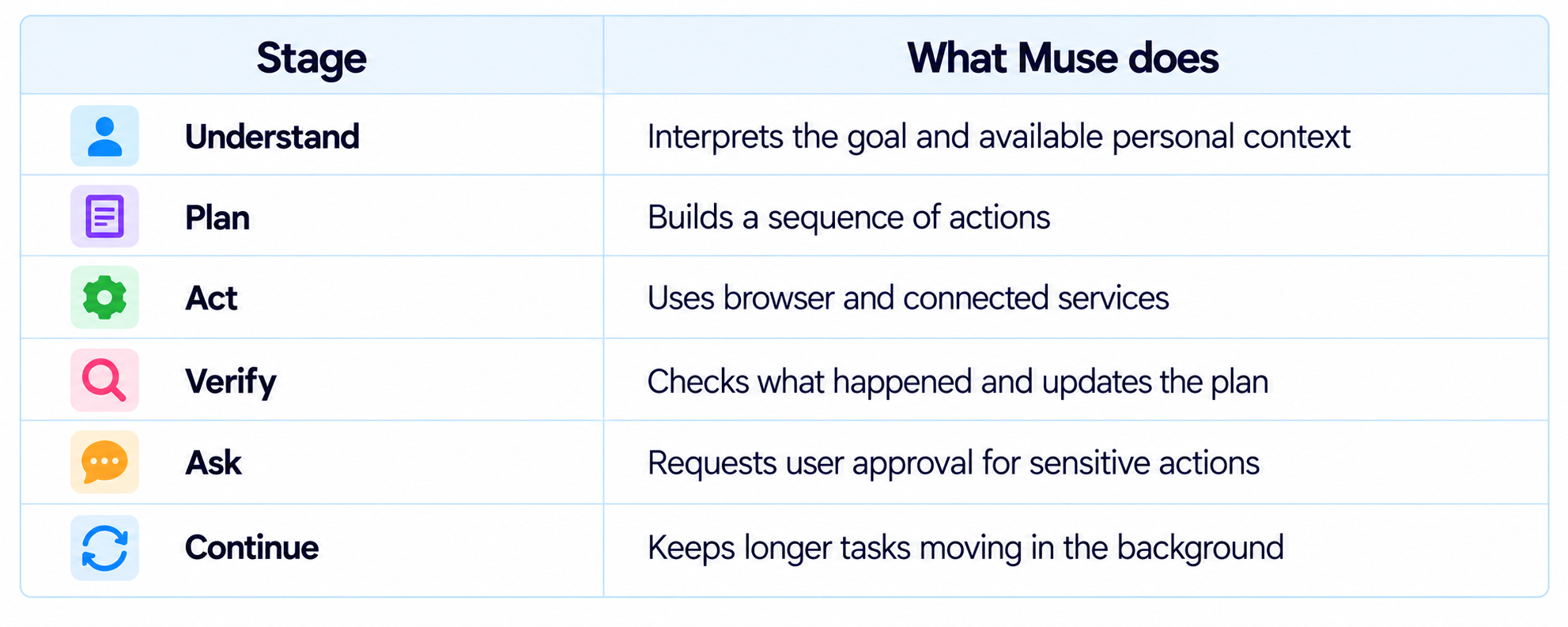
Muse starts from the user's desired outcome. Instead of asking which website to open or which fields to fill, the user describes the result they want. Muse can decide which steps are necessary, build context from the connected services and move through the workflow.
For example, a travel task can include researching options, comparing prices, checking the user's schedule and preparing a booking. A shopping task can include product research, comparing offers and checkout. An email task can include reading relevant information, drafting a reply and waiting for approval before sending it. Meta explicitly describes these kinds of workflows in its launch announcement.
4. What Can Muse Do?
Muse is deliberately broader than a conventional office assistant. It is designed to operate across the digital services people use every day.
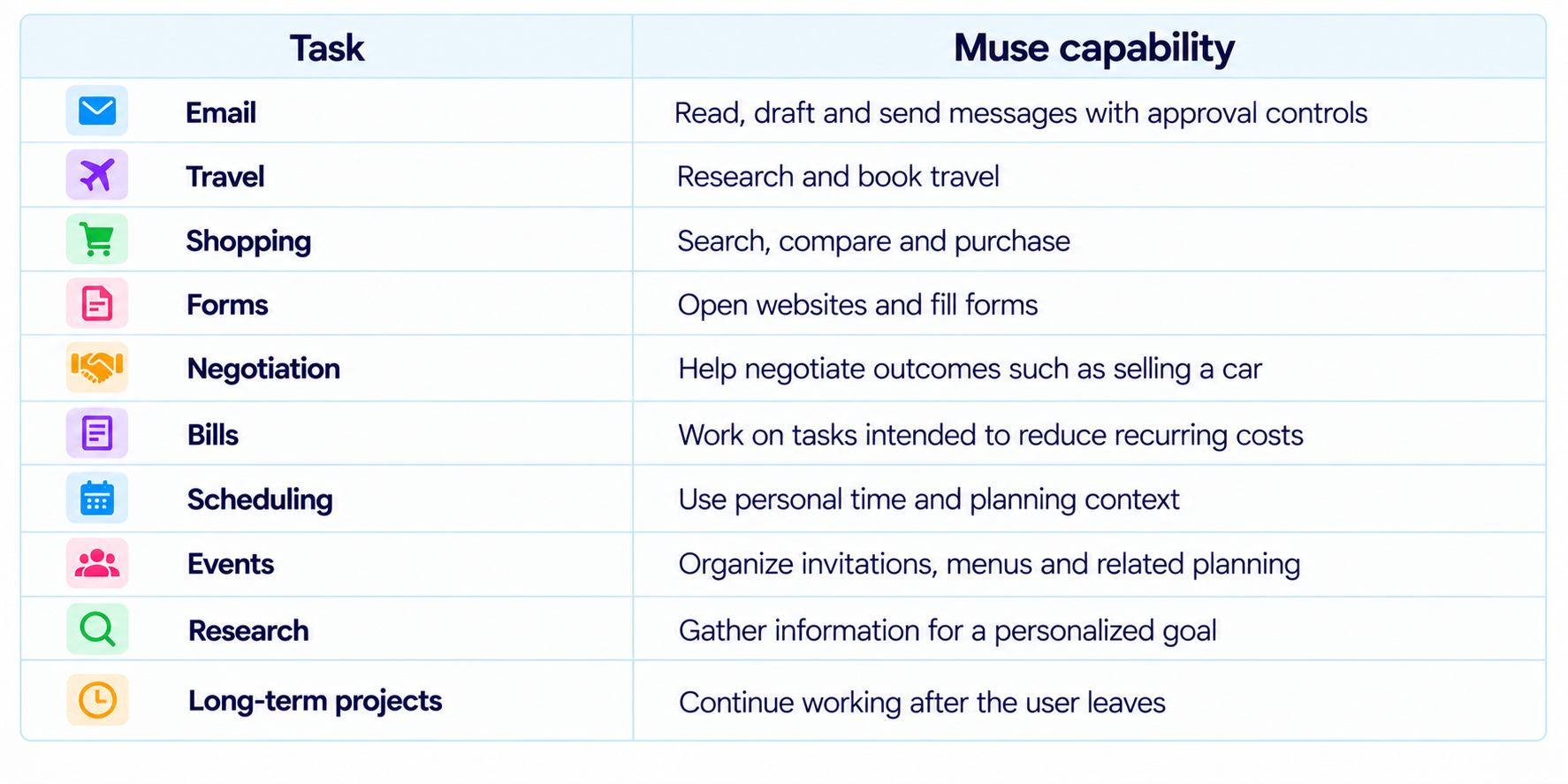
The interesting part is that these capabilities can share context. Muse can remember something the user mentioned earlier and use that detail later in a different workflow. Meta gives the example of using an Instagram recipe, building a grocery list and remembering friends' dietary restrictions when organizing an event.
5. Personal Memory Makes Muse Different
Personal memory is central to the Muse concept. Meta says Muse can remember what matters to a person and use that information to make suggestions without being explicitly told every time. That lets the agent behave more like an assistant who understands preferences than a fresh chatbot session.
The benefit is convenience. The user does not have to repeat dietary preferences, recurring plans, saved interests or project context in every conversation. The risk is equally obvious: personal memory becomes a valuable store of sensitive context. Meta says users can ask Muse to forget specific things it has learned, which is an important control for a persistent personal agent.
6. Muse Secure VM
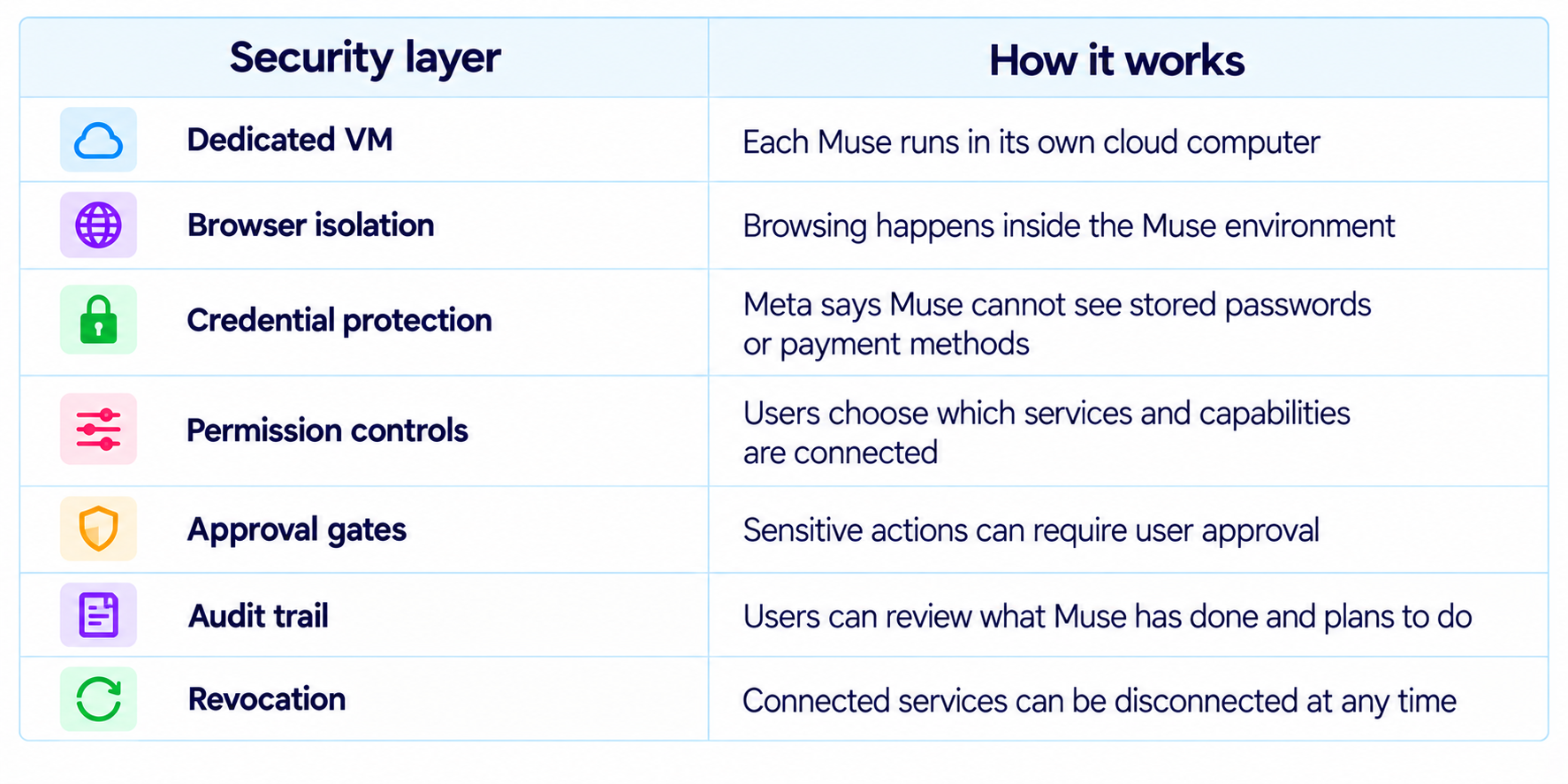
Muse Secure VM is the foundation of the product's security model. Meta built a dedicated virtual computer for Muse rather than allowing the agent to operate directly on the user's personal device. That VM contains the agent, its browser and the data and credentials associated with connected services.
The design matters because browser automation creates a new class of risk. If an agent can visit arbitrary websites, fill forms and make purchases, it needs a controlled place to act. A dedicated virtual machine creates a boundary between the autonomous agent and the user's physical computer.
7. What Is Sentinel?
Sentinel is a second agent that sits alongside Muse and acts as a control layer. Meta says Sentinel is isolated from Muse at the system level and decides whether Muse's actions can reach the internet. It can approve an action, block it or defer the decision to the user.
This separation is important because the system doing the work is not supposed to be the only component deciding whether an external action is allowed. Muse can pursue the goal, while Sentinel provides an additional policy boundary around internet access and high-impact actions.
8. Shopping and Payments
Muse is designed to go beyond shopping recommendations and actually complete purchases. Meta says Muse can check out using Link from Stripe. Link's agent wallet creates a one-time-use card for purchases, keeping the user's real payment card details hidden from the merchant. Meta also says eligible purchases are covered by Link's purchase protections.
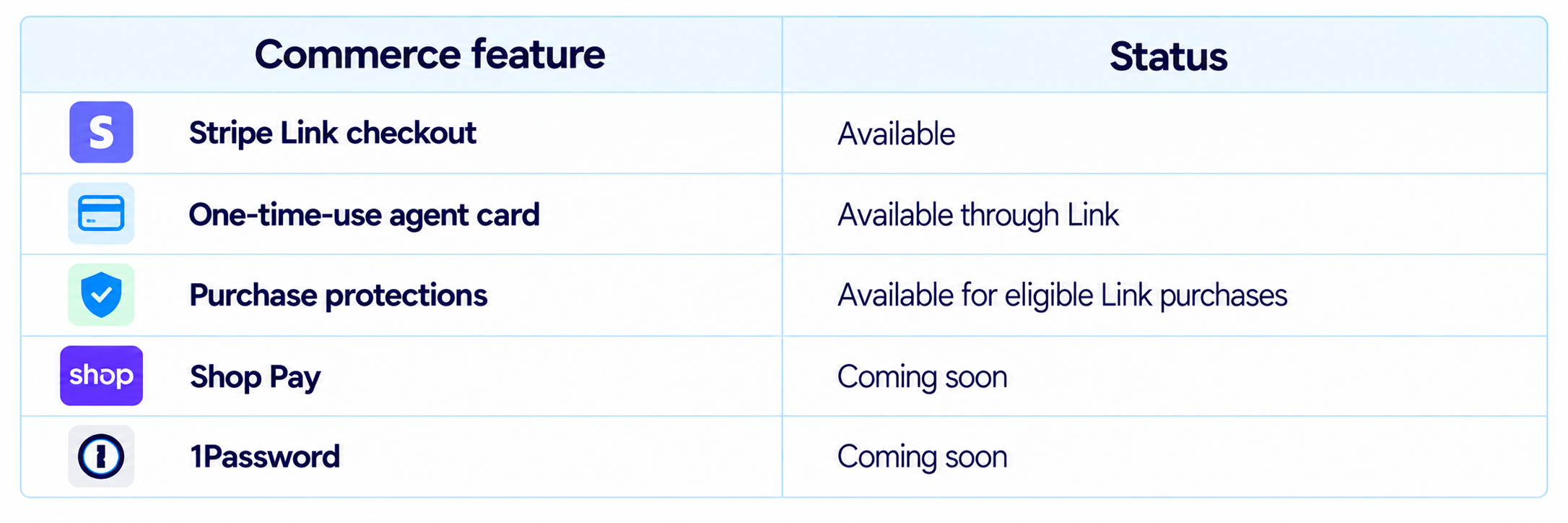
This matters because payments are where agent autonomy becomes genuinely useful and genuinely risky. A product can search the web all day without much consequence. Once it can spend money, the authorization model becomes part of the product itself.
9. Background Execution
Muse is designed to keep working after the user leaves the app. Meta says longer tasks can continue in the background and that the agent can return when something changes or when approval is required.
This is one of the most important differences between a personal AI agent and a conventional chatbot. A user can assign work, close the interface and come back to a completed result or a request for the next decision.
That makes Muse useful for tasks that are inherently asynchronous, such as tracking an ongoing process, monitoring changes, completing a long research workflow or waiting for a price or scheduling condition to change.
10. Muse App, Web and WhatsApp
Meta designed Muse around familiar messaging rather than a technical agent console. The initial rollout includes a dedicated Muse experience on iOS, Android and the web, plus WhatsApp access. Meta also says Muse is coming to AI glasses.
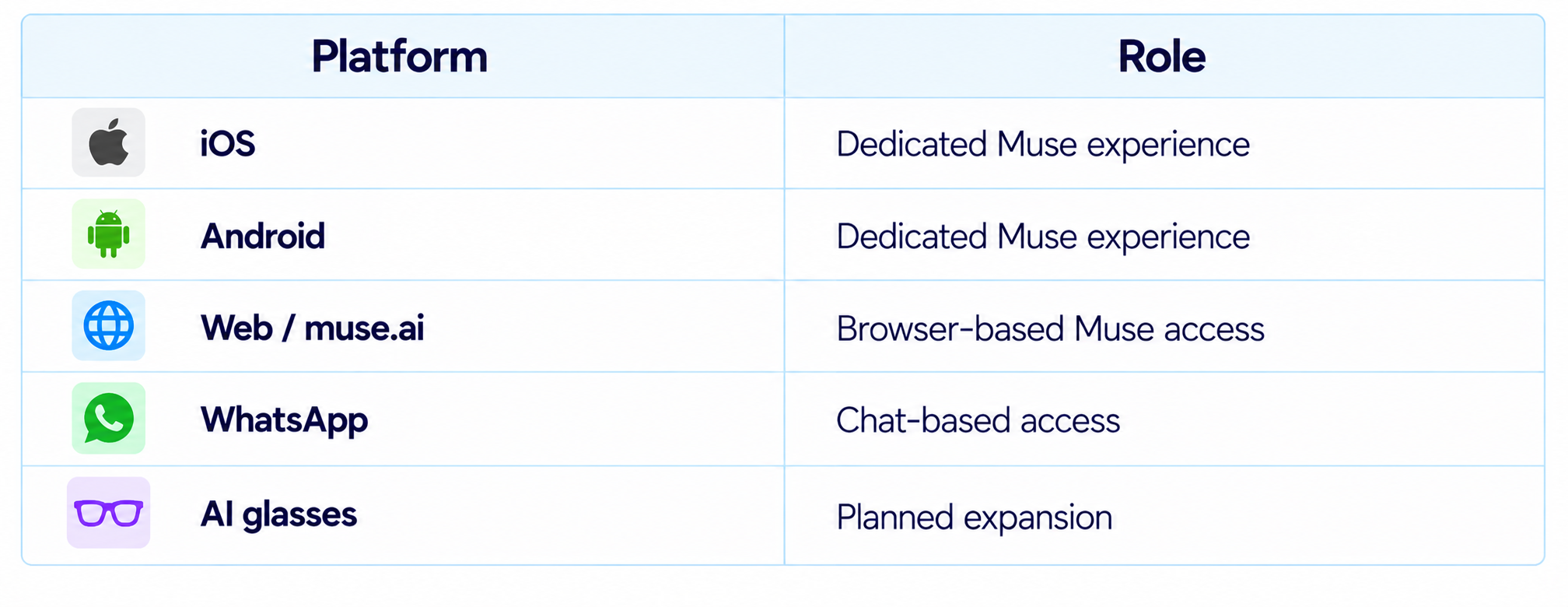
The interface is designed to make agentic computing feel like conversation. Users do not need to understand APIs or workflow graphs to get started.
11. Muse Pricing
Meta's launch announcement says Muse is free for most of what people need and offers subscription plans for users who want more. Axios reports the two paid tiers at $20 per month and $100 per month, with the higher levels aimed at power users who need more compute.
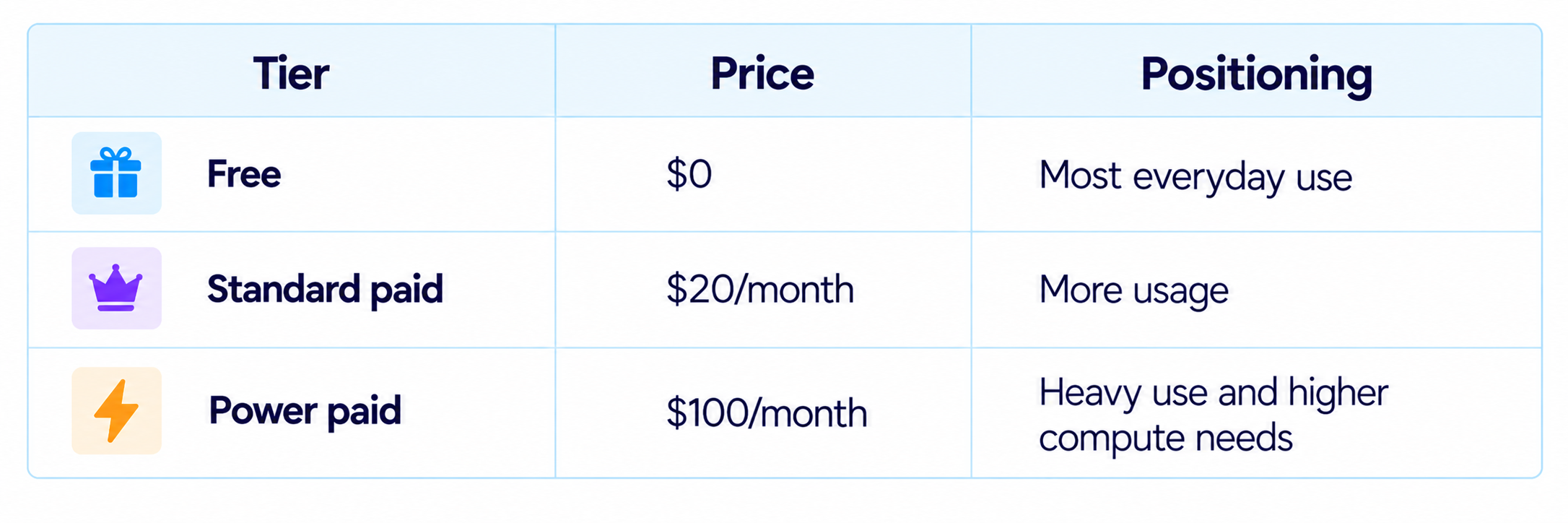
The important caveat is that Meta's main launch page does not publish a detailed quota table for those subscriptions. That makes price-per-month less useful than cost-per-completed task. One complex personal request can trigger a long chain of browsing, reasoning and service actions.
12. Is Muse Available in India?
Not at the initial launch. Meta says Muse is rolling out in the United States on iOS, Android and muse.ai, with expansion planned. The fact that Meta AI itself is available in more markets does not mean the autonomous Muse product is available everywhere at the same time.
For users outside the U.S., the practical issue is therefore availability rather than capability. Muse is a distinct product rollout with its own access requirements.
13. Privacy and Data Controls
Meta has made privacy a major part of Muse's product design. The company says Muse's conversations and VM data are not shared with its advertising systems, users can opt out of their interactions being used to train Meta's AI models, and connected permissions can be changed or removed.
The strongest privacy feature is credential handling. Meta says Muse does not have visibility into the user's passwords or payment methods. Instead, credentials can be stored securely so Muse can use the connected service without directly reading the secret.
Later in 2026, Meta plans to introduce Muse Confidential VM, where the whole VM, including data and conversations, is encrypted with a key only the user holds. Meta says that would mean even Meta could not access the encrypted VM contents.
14. Is Muse Actually Safe?
The architecture gives Muse stronger isolation than an ordinary chatbot, but no autonomous agent should be treated as risk-free. Reuters reported that internal testing found mixed results, including disconnects, unexpected data uploads and serious security concerns involving personal data. Meta says Muse meets its safety and privacy standards, but the reported incidents show why the approval layer and permissions controls matter.
For users, the practical lesson is to treat access as a privilege rather than a default. Give Muse only the apps it needs for the job, keep sensitive actions behind approval and review the audit trail after long-running workflows.
15. Muse vs Gemini Spark
Muse and Google's Gemini Spark are the clearest direct competitors in the consumer personal-agent category. Both can execute multi-step workflows, use connected services and work toward ongoing goals. The distinction is in the surrounding ecosystem and architecture.
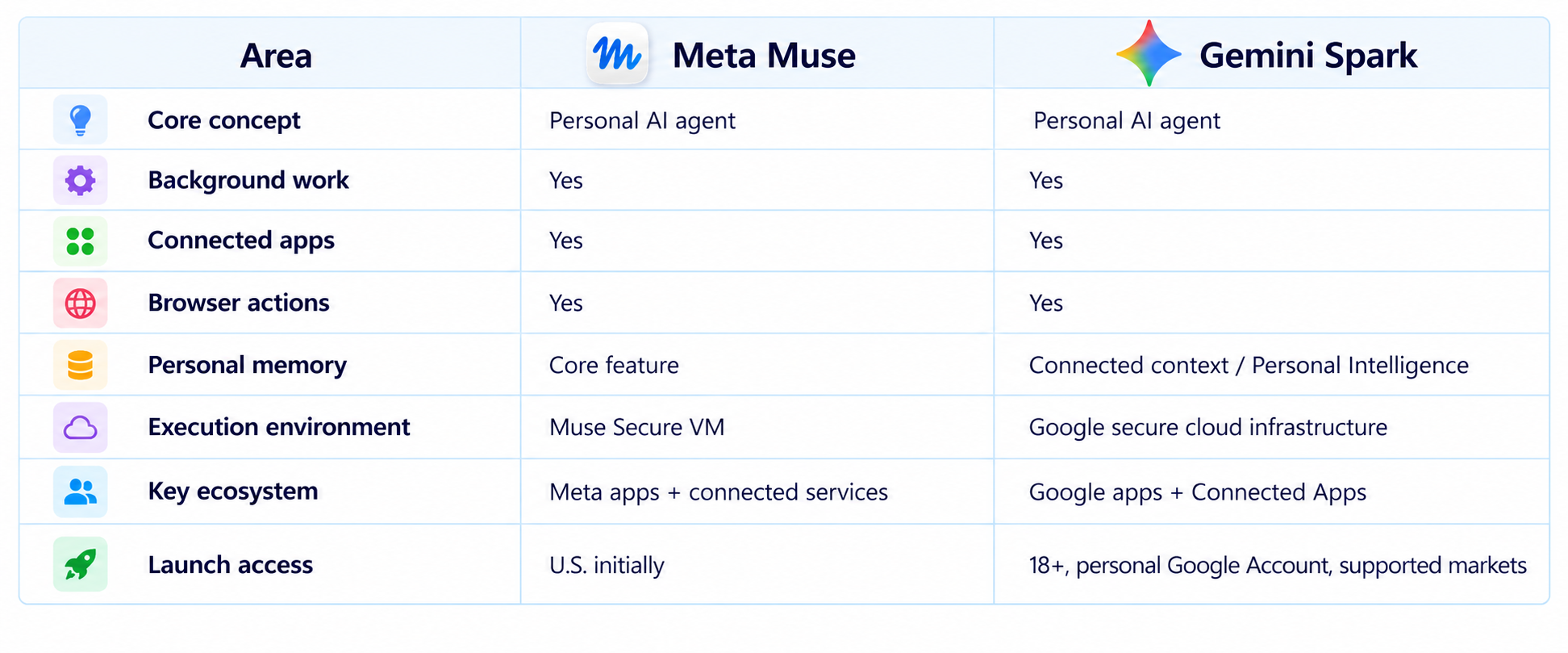
Google's Gemini Spark is already designed to manage schedules, connected apps and complex workflows, while Muse emphasizes its dedicated secure computer, Sentinel and Meta's social ecosystem.
16. Where Muse Is Strongest
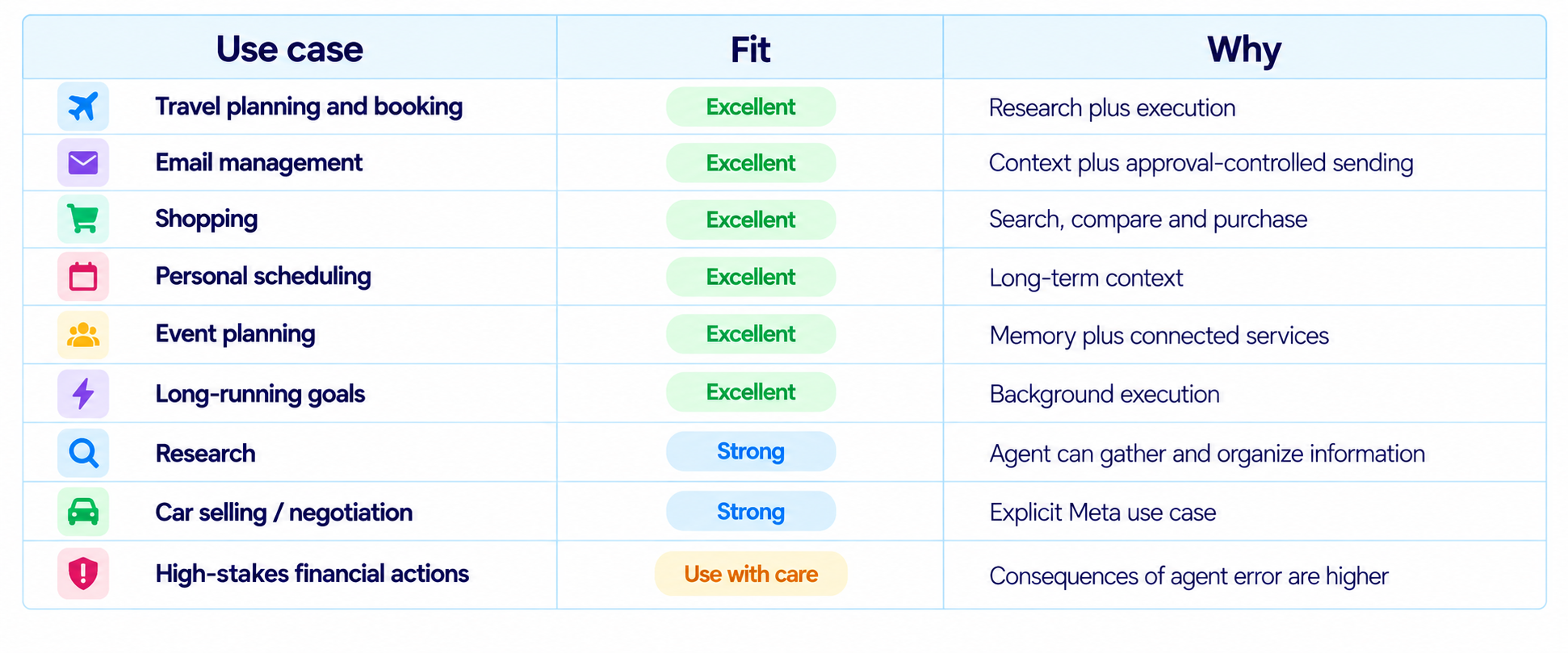
17. Limitations You Should Know
- Muse is initially available in the United States, not globally.
- The main launch announcement does not provide detailed quotas for the reported $20 and $100 subscription tiers.
- Autonomous browser tasks can still encounter website errors, changing interfaces or ambiguous instructions.
- More connected apps create more capability and more potential consequences when an action goes wrong.
- Shop Pay and 1Password are planned integrations rather than launch-day features.
- Security reports from internal testing show why permissions, approval gates and auditing are important.
- Users still need to judge whether a task is appropriate for autonomous execution instead of assuming the agent should handle everything.
18. Recommended Muse Setup
The safest way to adopt a personal AI agent is to start small. Give Muse low-risk tasks first, observe how it behaves and then expand access only when the workflow is reliable.
- Start with research, scheduling and organization.
- Connect only the apps required for the task.
- Keep email sending and purchases behind approval.
- Review the audit trail after long-running tasks.
- Use memory selectively and remove information you no longer want stored.
- Treat health, financial and highly sensitive accounts as high-risk connections.
19. How to Evaluate Muse Yourself
The best personal-agent benchmark is not a leaderboard. It is a set of tasks you actually need every week.
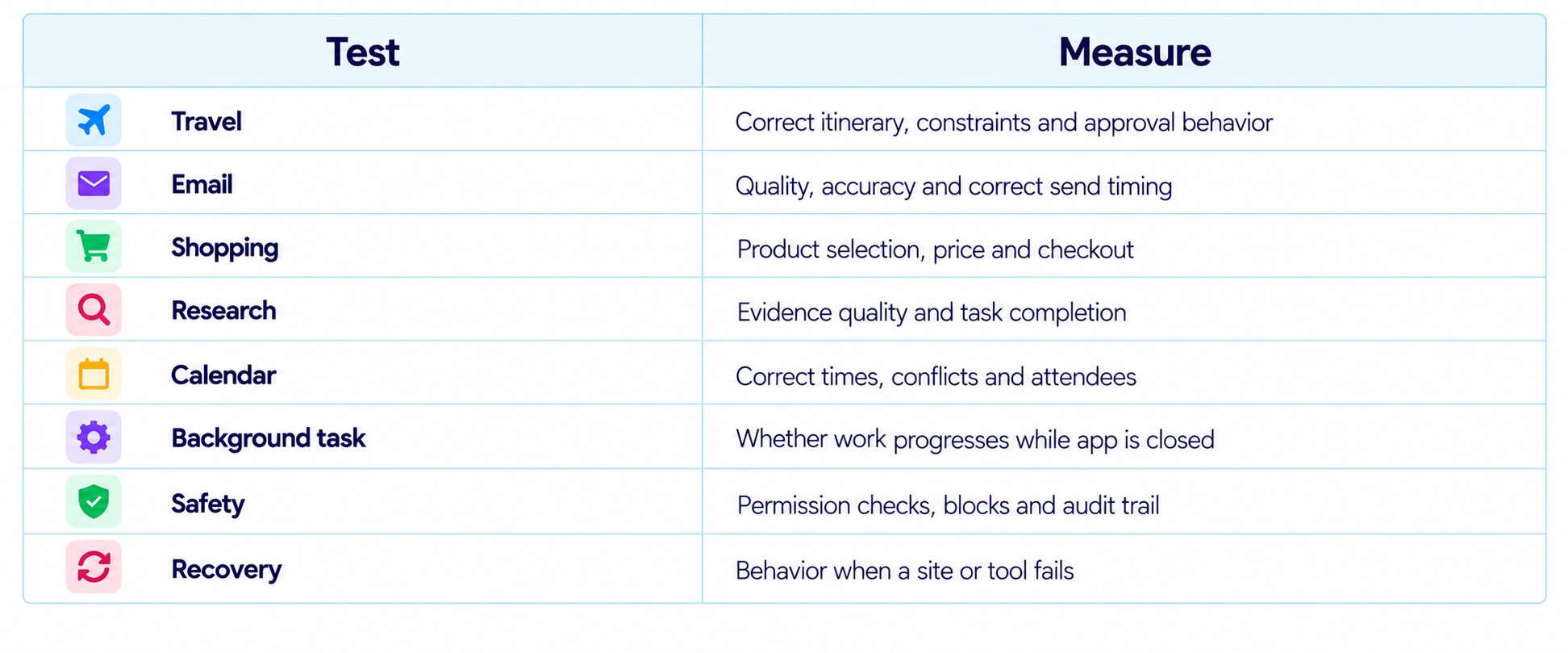
Run the same tasks repeatedly and record completion, retries, time saved and intervention rate. The most useful number is how much real work Muse removes without creating cleanup.
20. Is Muse Worth It?
Muse is worth using for people who want an AI system that can execute everyday digital work rather than only explain it. The combination of browser automation, connected apps, memory and background execution gives it a clear reason to exist.
The free access tier makes the product easier to try, while the reported $20 and $100 plans are designed for higher usage. The value of those tiers will depend on their exact limits and how much autonomous work a user completes each month.
The bigger question is trust. More context and permissions make Muse more useful, but they also raise the consequences of mistakes. That makes Secure VM, Sentinel, approvals and auditing central to the product.
21. Final Verdict
Meta Muse is one of the most ambitious personal AI agents released in 2026 because it changes the role of an assistant from answering to acting. Meta is not asking users to become workflow designers. It wants them to state a goal and let Muse work through the digital steps required to reach it.
The architecture is equally important. Muse runs inside a dedicated Secure VM, uses a separate Sentinel layer for internet control, protects connected credentials, supports approval before sensitive actions and exposes an audit trail. Those controls give the product a more serious security model than simply giving a language model unrestricted browser access.
The breadth is what makes Muse compelling. Email, travel, shopping, scheduling, research, forms, negotiation and long-running personal goals all fit into the same product. Link-based payments push it another step toward a genuine digital operator, while planned 1Password and Shop Pay support could make account-based workflows easier.
The main concern is trust rather than ambition. Reuters reported security problems during internal testing, showing that the risks grow as the agent's permissions grow. That does not invalidate the product, but it makes careful access control essential.
My rating: 9.3/10 for task automation, 9.1/10 for usability, 9.1/10 for agent architecture, 8.3/10 for trust and safety, and 9.0/10 overall.
Bottom line: Muse is worth testing if you want a personal AI agent that can actually perform digital chores, not just recommend what you should do. Start with low-risk tasks, keep consequential actions behind approval and expand access only when the agent proves reliable in your real workflow.
Frequently Asked Questions
What is Meta Muse?
Muse is Meta's personal AI agent designed to plan and execute digital tasks across connected services, websites and apps.
What can Muse do?
Muse can handle tasks such as email, travel, shopping, forms, research, scheduling, negotiation and longer-running personal goals.
What is Muse Secure VM?
It is a dedicated cloud virtual machine with a browser and protected data environment where each Muse operates.
Can Muse send emails?
Yes. Muse can work with email and Meta says sensitive actions such as sending can require user approval.
Can Muse make purchases?
Yes. Meta says Muse can check out using Stripe Link, including a one-time-use card for agent transactions.
How much does Muse cost?
Meta says Muse is free for most needs. Axios reports paid tiers at $20 and $100 per month.
Is Muse available in India?
Not at launch. Meta says the initial rollout is in the United States.
Can Muse work when I close the app?
Yes. Meta says longer tasks can continue in the background and return for updates or approval.
Is Muse safe?
Meta built Secure VM, Sentinel, approvals, permission controls and audit trails into the product. Reuters has also reported security concerns found during internal testing, so users should manage access carefully.
Muse vs Gemini Spark: which is better?
Both are personal AI agents. Muse emphasizes Secure VM, Sentinel and the Meta ecosystem, while Gemini Spark is closely integrated with Google services and Connected Apps.
Is Muse worth it?
Yes for users who want an AI agent to execute everyday digital work. Its value is strongest when it saves real time without requiring excessive supervision.
Recommended Blogs
Meta Muse Spark 1.3 Review: Coding, Price & Is It Worth It? (2026)
Gemini 3.8 Flash Review: Accuracy, Price & Is It Worth It? (2026)
Quasar 438B Review: Benchmarks, Speed, Price & Is It Worth It? (2026)
Mercury 2.5 AI Model Review: Speed, Price & Is It Worth It? (2026)
How to Secure AI Coding Agents: Permissions, Sandboxing, MCP & Secrets
Model Routing for AI Coding Agents: How to Cut Costs Without Losing Quality
Best AI Coding Agents 2026: Claude Code vs Codex vs Muse Code vs Cursor
Resources & Community
Join our community of 70,000+ AI enthusiasts and learn to build powerful AI applications. Whether you're a beginner or an experienced developer, Build Fast with AI helps you understand and implement AI in your projects.
Agentic AI Launchpad 2026
A structured 6-week cohort program that takes you from AI basics to building and deploying real-world agentic AI systems. Includes live sessions, expert mentorship, project reviews and a builder community network.
Ready to go from learning to building? Join the next cohort: Agentic AI Launchpad 2026
Free AI Resources
Access free tools, workshops and micro-learning to keep building.
References
Meta - Introducing Muse: The World's First Personal AI Agent Built for Everyone
Axios - Meta debuts Muse, its long-planned personal AI agent
Reuters - Meta launches AI agent that can access other apps to send emails and make payments
AP News - Meta launches personal AI agent, Muse, emphasizes safety and privacy
The Verge - Meta bets on AI agent Muse to catch up in AI race
Financial Times - Meta unveils AI personal assistant linked to WhatsApp and Instagram

