



ChatGPT Images 2.5 Review: Is OpenAI's New Image Model Good Enough to Become Your Everyday Design Tool?
ChatGPT Images 2.5 is OpenAI's latest image-generation and editing release, launched on September 8, 2026. The upgrade is aimed at the part of image creation that happens after the first generation: preserving the subject, making targeted edits, keeping the composition stable across multiple turns and giving users more direct ways to communicate visual intent.
OpenAI says Images 2.5 produces sharper details, richer textures and more natural lighting. It is also better at preserving people and animals from reference photos, following editing instructions and maintaining consistency across longer editing conversations. OpenAI reports image-generation latency up to 50% lower than Images 2.0.
The product is also more interactive. Sketch lets users draw an idea directly in ChatGPT, comments let them target a specific image area, and templates help start common formats such as posters and merch. For developers, OpenAI is offering GPT-Image-2.5 Flare for most applications and GPT-Image-2.5 Sunburst for premium creative workflows that need tighter edit control.
QUICK ANSWER
ChatGPT Images 2.5 is a major upgrade to OpenAI's image-generation experience. The strongest improvements are sharper detail, richer textures, more natural lighting, better preservation of reference-photo subjects, more precise editing and better consistency across multiple editing turns. OpenAI says latency is up to 50% lower than Images 2.0.
The new interaction tools are just as important. Sketch lets you draw the rough shape or placement of an idea directly in ChatGPT. Comments let you target an exact region for an edit, while templates provide structured starting points for popular creative formats. OpenAI also lets users share the prompt behind an image so others can adapt the same idea with their own photos and details.
For developers, GPT-Image-2.5 Flare is the default API option for most applications. OpenAI says Flare brings higher-quality images than GPT-Image-2 with 50% lower latency. GPT-Image-2.5 Sunburst is the premium option for detailed creative workflows where edit precision matters more than generation time.
My verdict: 9.3/10 overall. Images 2.5 is especially strong when the job is not just creating an image, but creating an image and then refining it repeatedly without losing the important parts.
1. What Is ChatGPT Images 2.5?
ChatGPT Images 2.5 is OpenAI's newest image creation and editing experience inside ChatGPT. It is a combined model and product update designed around three things: better visual output, more controlled editing and a more direct creative workflow.
OpenAI says the model is state-of-the-art for its image-generation stack, and the product is now available to ChatGPT, ChatGPT Work and Codex users across desktop, mobile and web.
The API side is separate but connected. OpenAI is introducing GPT-Image-2.5 Flare and GPT-Image-2.5 Sunburst so developers can use the same generation and editing improvements inside their own applications.
2. ChatGPT Images 2.5 Specifications
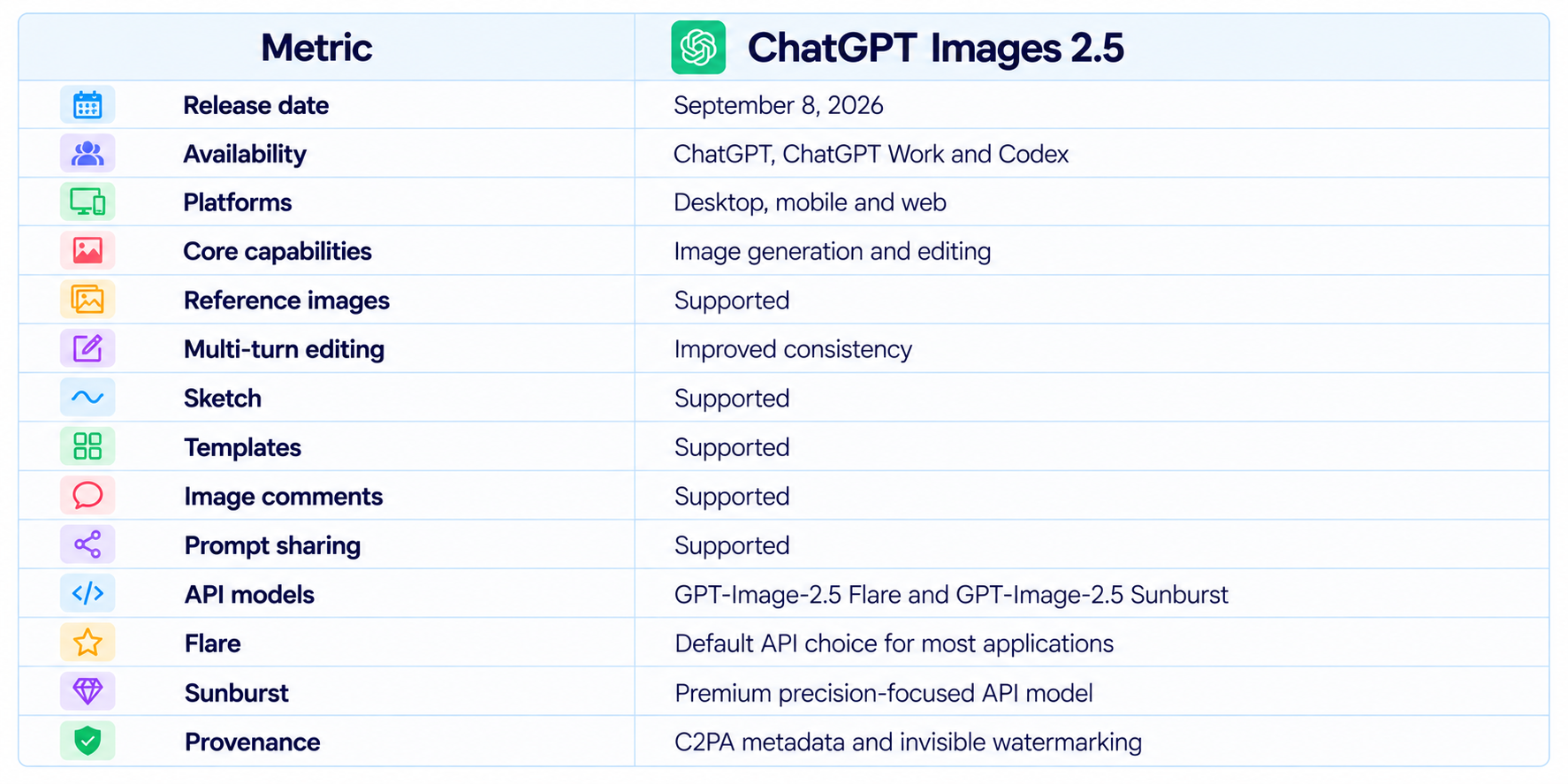
OpenAI's launch announcement emphasizes that Images 2.5 is not only a model upgrade. The surrounding product experience has also been redesigned to make visual instructions easier to express and iterative editing easier to control.
3. Image Quality: Sharper Detail and Better Lighting
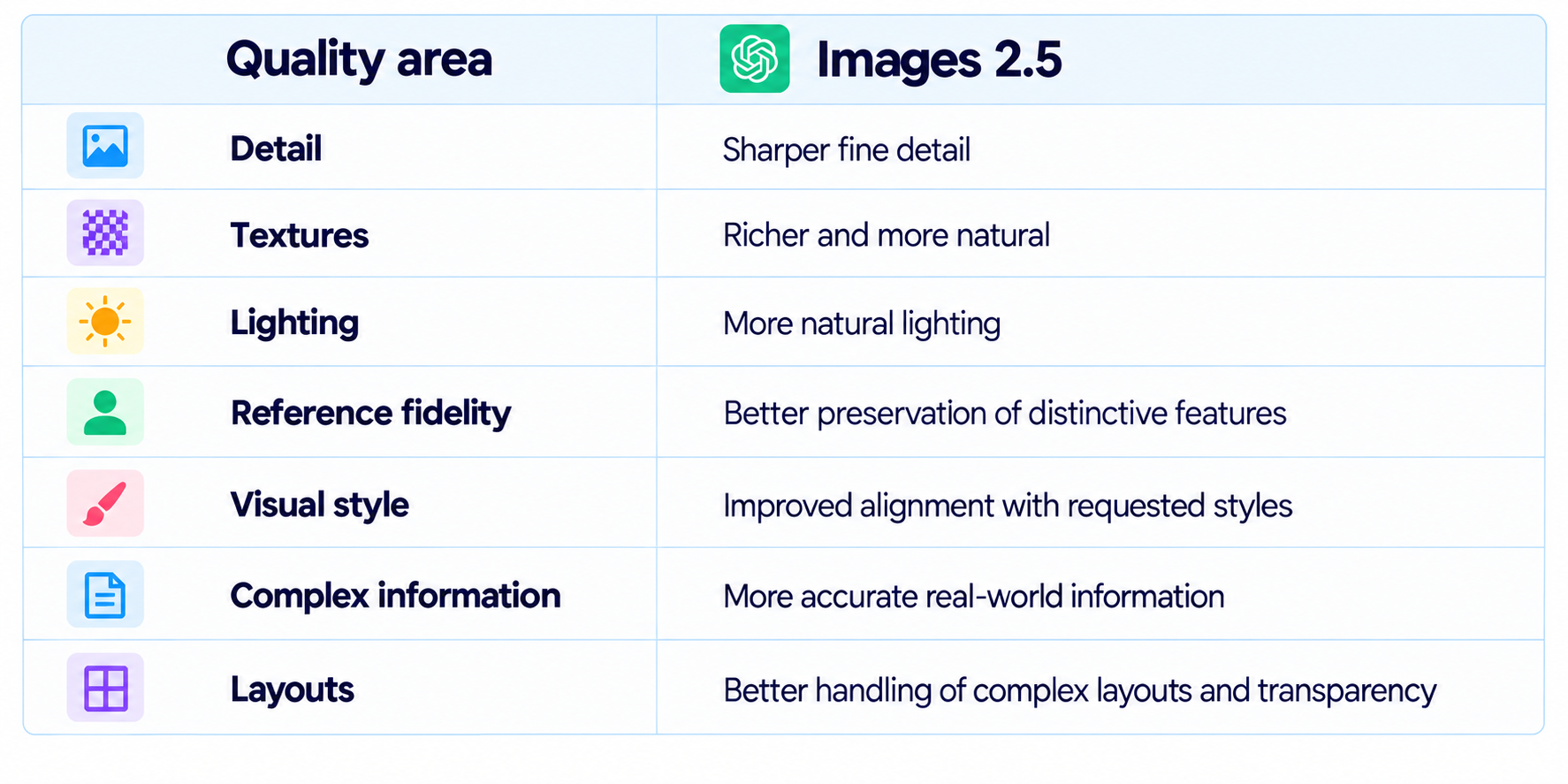
OpenAI says Images 2.5 produces sharper details, richer textures and more natural lighting. These changes are most noticeable when the image contains complex surfaces, realistic materials or subtle lighting relationships.
That improvement matters because modern image generation is no longer judged only on whether an image looks impressive at first glance. Product photography, advertising, editorial graphics and character work all require the model to maintain believable details across repeated variations.
4. Reference-Photo Fidelity
Reference fidelity is one of the most important practical improvements in Images 2.5. OpenAI says the model is better at using a reference photo as an anchor when transforming a familiar subject into a different setting, style or composition.
That includes people and animals, where small identity changes can make an otherwise good generation unusable. Better preservation means a creator can keep the important characteristics of a subject while changing the surroundings.
The same capability matters for products. A brand can provide the original product image and ask for a different background, scene or marketing treatment while keeping the product itself recognizable.
5. Precision Editing
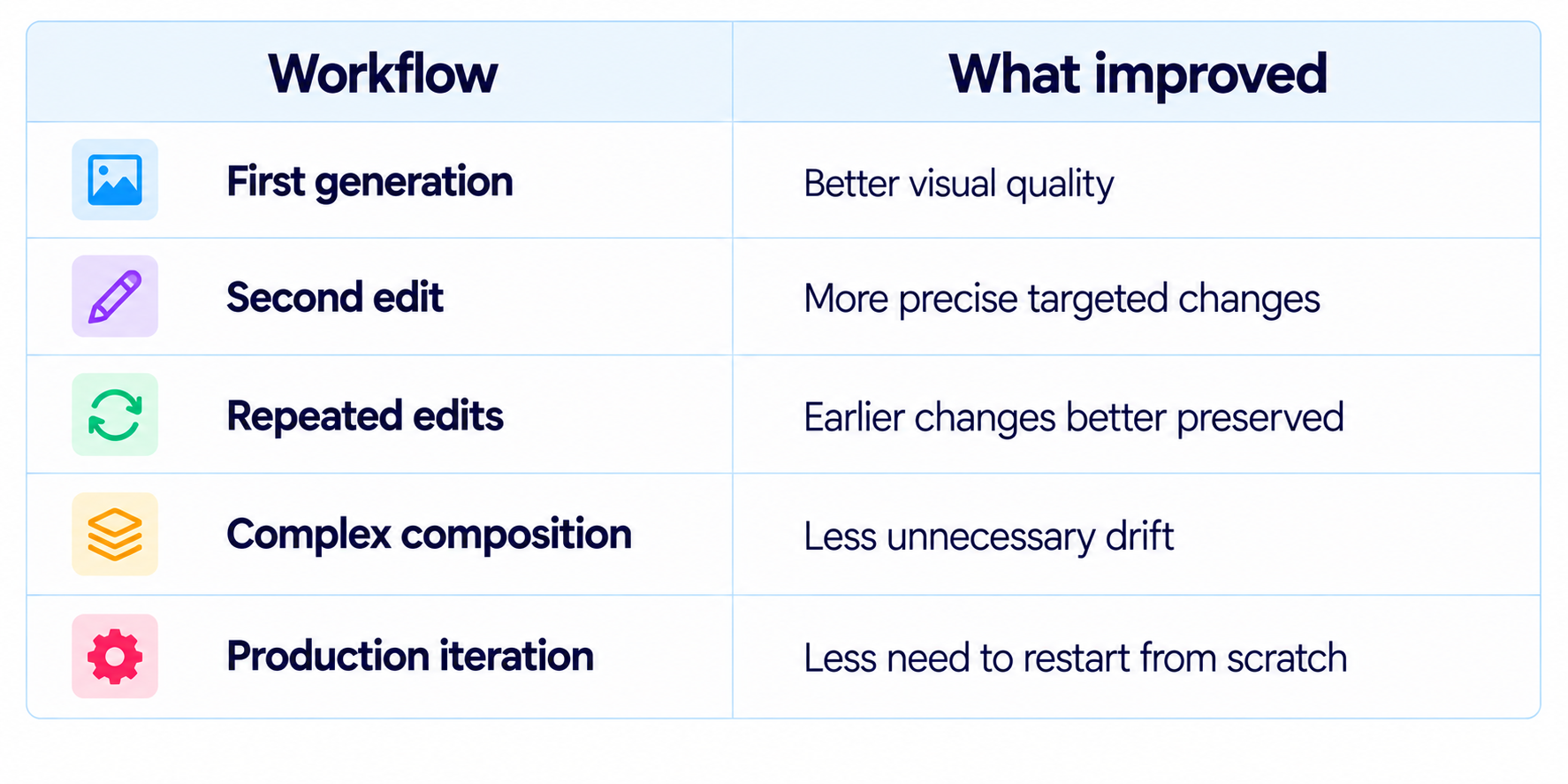
Images 2.5 improves the ability to modify one part of an image without unnecessarily changing everything else. OpenAI specifically highlights edits to individual products, backgrounds or pieces of copy while preserving the surrounding subject, composition and brand treatment.
This is the difference between an image generator and a practical image editor. In a production workflow, the first image is often only the starting point. A user may need to change a jacket color, move a product, alter a background, update a headline or remove one object. A good editing model should make those changes without introducing unrelated drift.
The value is cumulative. Better precision means fewer regeneration cycles, which saves both time and compute.
6. Multi-Turn Editing Consistency
OpenAI says Images 2.5 is more consistent across long editing conversations. Earlier changes are more likely to remain intact while new edits build on the existing image without progressively degrading it.
This is arguably the biggest upgrade because real creative work is iterative. A single image can go through many rounds of changes before it is ready for publication.
7. Sketch: Draw Instead of Describing Everything
Sketch adds a direct visual input method. Users can draw an idea inside ChatGPT and use that drawing as a reference for the generated image.
This is useful for layout and spatial relationships. Instead of explaining that a product should sit in the lower-right corner, a subject should stand behind another object, or an element should occupy a particular shape, a user can draw the relationship.
Sketch is especially useful for rough ideas. The drawing does not need to be polished because its purpose is to communicate intent rather than serve as the final artwork.
8. Templates
Images 2.5 introduces templates for popular creative formats. OpenAI gives examples such as posters and merch, where users can start from a predefined format and then specify the information, design elements and style.
Templates reduce the amount of prompt engineering required for repeatable tasks. Instead of teaching the model the broad structure every time, the interface gives the user a starting framework.
For teams, this can turn image generation into a repeatable content process rather than a collection of one-off prompts.
9. Image Comments
Image comments let users place feedback directly on an image and describe what should change in that location. OpenAI introduced the feature specifically to make focused editing easier.
This is a natural fit for collaborative creative work. A reviewer can point to the exact region that needs attention rather than writing a long description of where the problem occurs.
It also improves individual workflows. When an image has many small objects, spatially anchored feedback can be easier to understand than text alone.
10. Prompt Sharing
Images 2.5 allows users to share an image together with the prompt that created it. Another person can then reuse the concept with their own images and details.
This creates a useful bridge between inspiration and reproducibility. A good visual prompt can become a reusable template rather than disappearing inside a private conversation.
For creators and teams, that can make prompt libraries more practical because the prompt is attached to the visual result that demonstrates what it is supposed to do.
11. Speed: Up to 50% Lower Latency
OpenAI says Images 2.5 reduces image-generation latency by up to 50% compared with Images 2.0. This is a relative improvement rather than a fixed generation time for every request, so actual waiting time will vary with the image, workload and serving conditions.
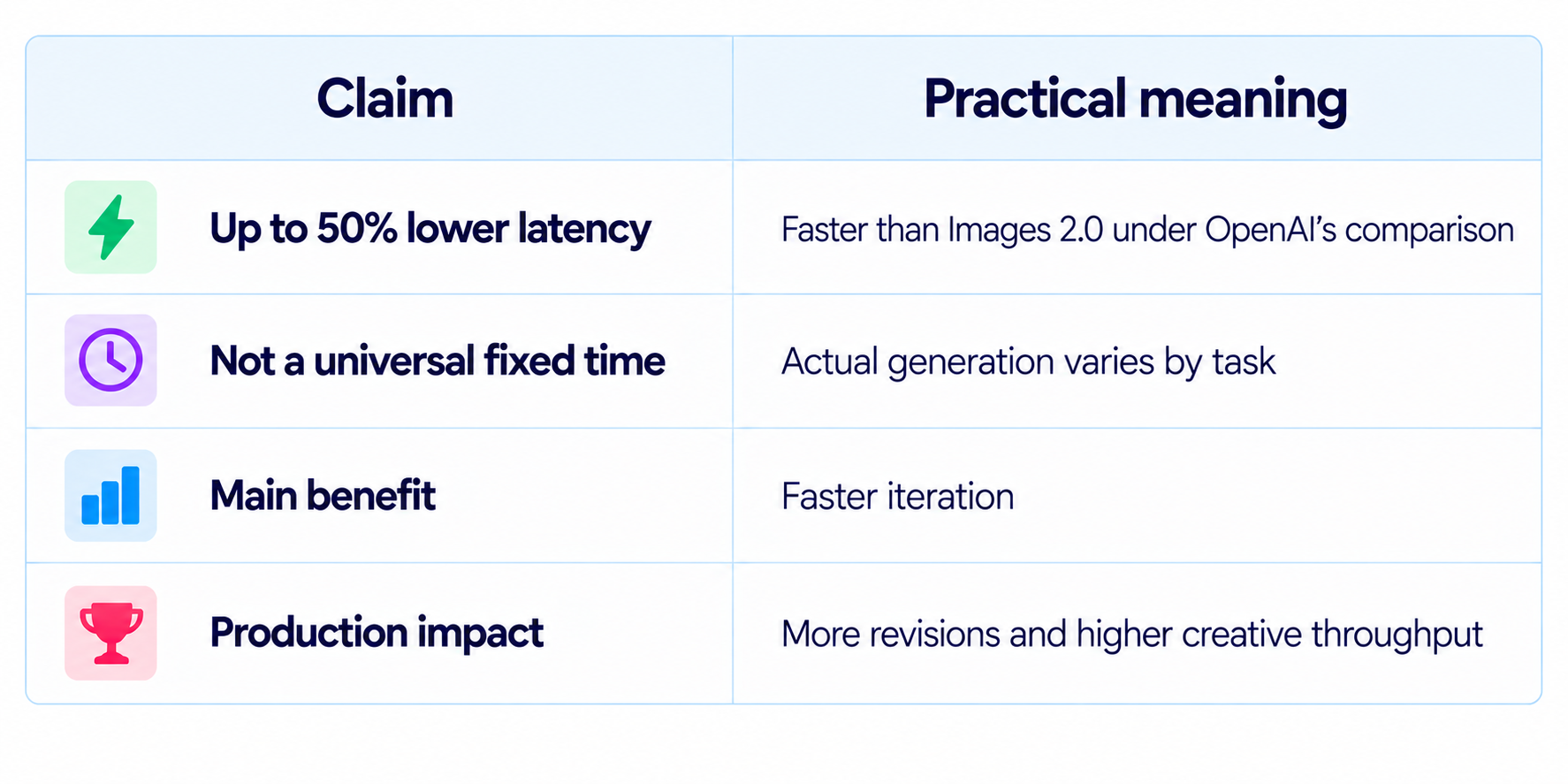
For image editing, speed has a multiplier effect. The faster the user gets feedback, the more likely they are to make another revision instead of accepting the first acceptable image.
12. GPT-Image-2.5 Flare vs Sunburst
OpenAI is carrying Images 2.5 into the API through two models with different goals. GPT-Image-2.5 Flare is the default model for most applications and is designed around quality, editing and lower latency. GPT-Image-2.5 Sunburst is for premium workflows where tighter precision across detailed edits is more important than generation time.
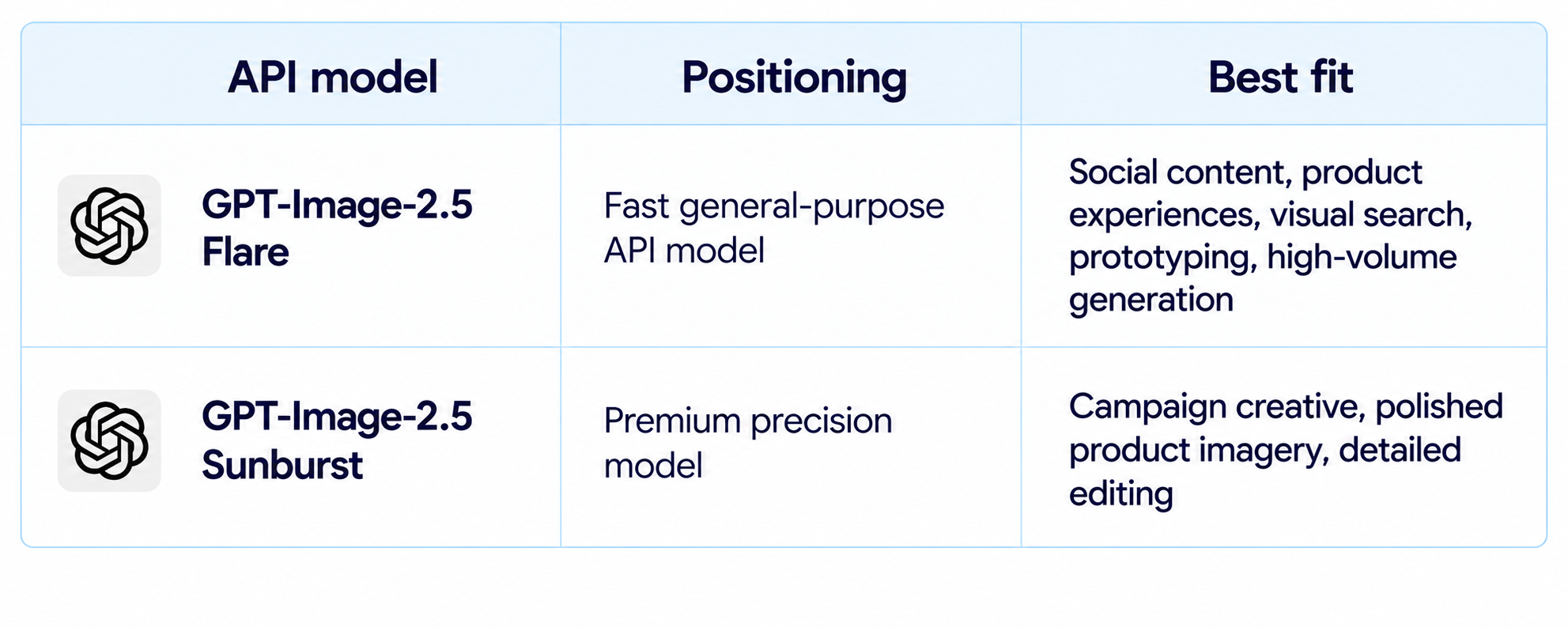
This split is sensible for developers because not every image deserves the same latency or compute budget. A high-volume content pipeline can stay on Flare while a smaller set of high-value creative assets can use Sunburst.
13. ChatGPT Images 2.5 Availability
OpenAI says Images 2.5 is rolling out to ChatGPT, ChatGPT Work and Codex users across all tiers on desktop, mobile and web. The API versions, GPT-Image-2.5 Flare and GPT-Image-2.5 Sunburst, are available through the API.
This makes the release unusually broad. Users do not need to move to a separate image product simply to access the new model experience. Developers can also use the API versions directly in production applications.
14. ChatGPT Images 2.5 vs Images 2.0
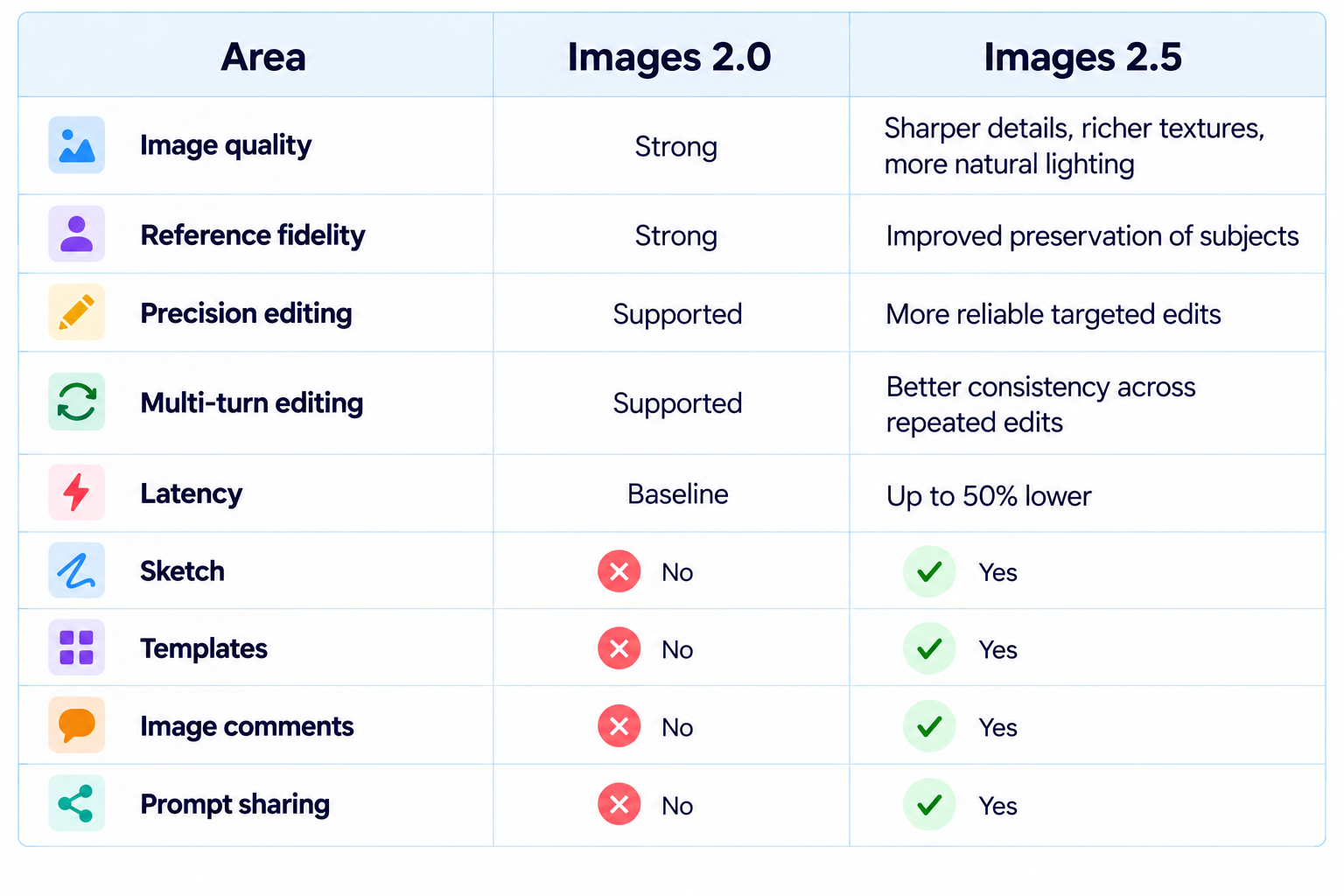
The biggest change is therefore not a single visual benchmark. It is the combined improvement in generation, editing and interaction. Images 2.5 turns the image conversation into a more persistent creative workspace.
15. ChatGPT Images 2.5 vs Google Pics
Google Pics is another 2026 image tool built around creation and editing, but its workflow is centered on Google's productivity ecosystem. ChatGPT Images 2.5 puts more emphasis on conversational iteration and new interaction tools such as Sketch and comments.
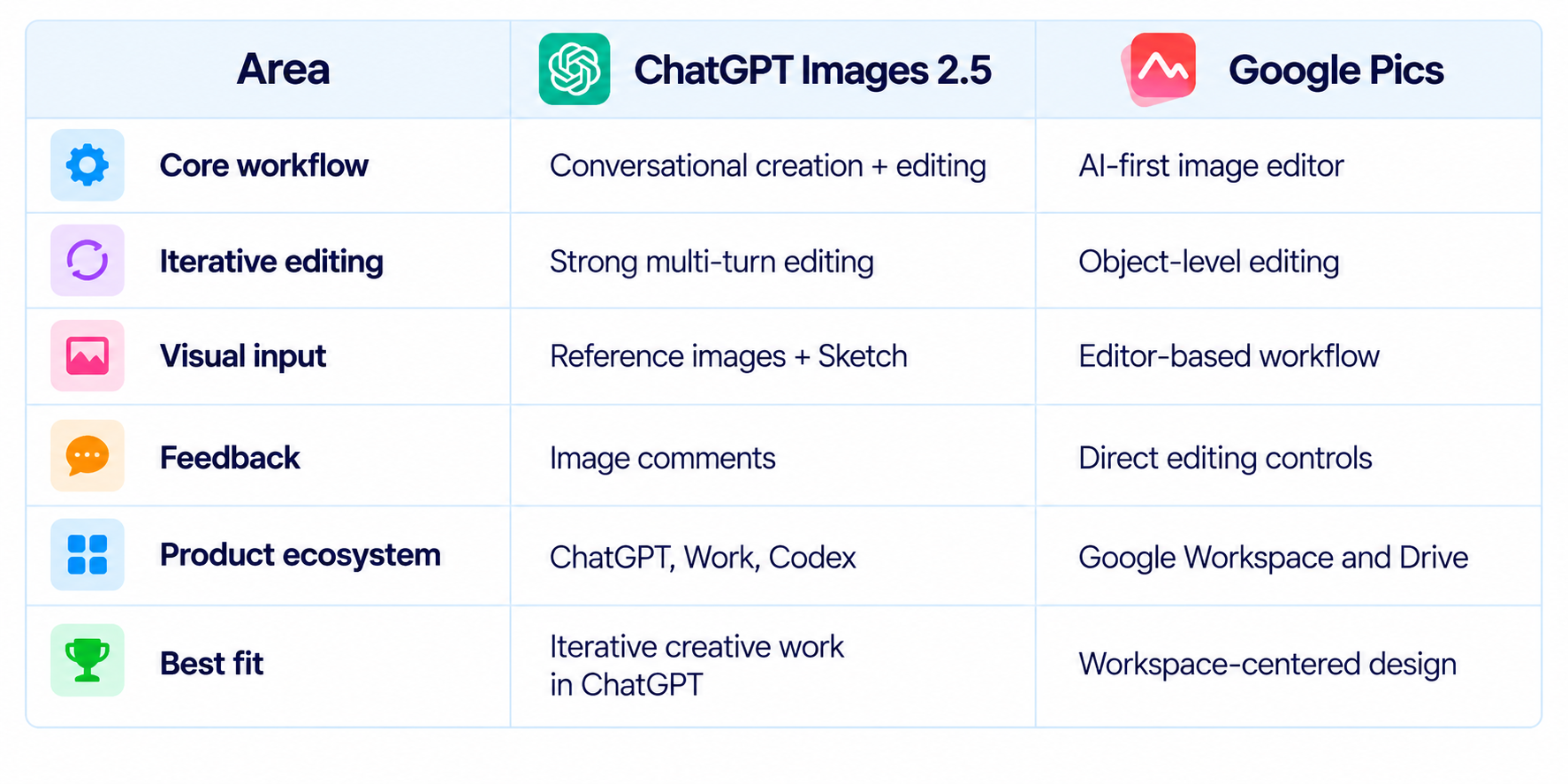
See our Google Pics Review: Features, Price & Is It Worth It? (2026) for the full breakdown.
16. Text, Layouts and Visual Intelligence
OpenAI says Images 2.5 is better at understanding complex visual instructions, producing accurate real-world content and handling more complex layouts, including transparent backgrounds. It also says the model is better at reflecting requested visual styles.
This matters for professional design because the output usually has several constraints at once. A visual may need a particular hierarchy, composition, style, product placement and information structure.
The model's improved visual intelligence is therefore valuable not only for artistic images but also for presentation graphics, product concepts, social media assets and branded creative.
17. Safety and Provenance
OpenAI says Images 2.5 continues its image-safety system with checks on prompts and images. The company also continues using C2PA metadata and invisible watermarking to help identify images made with its tools.
For commercial teams, provenance can be useful when images move from generation into publishing systems. These mechanisms are an identification layer, not a substitute for human review or broader content-governance processes.
18. Best Use Cases
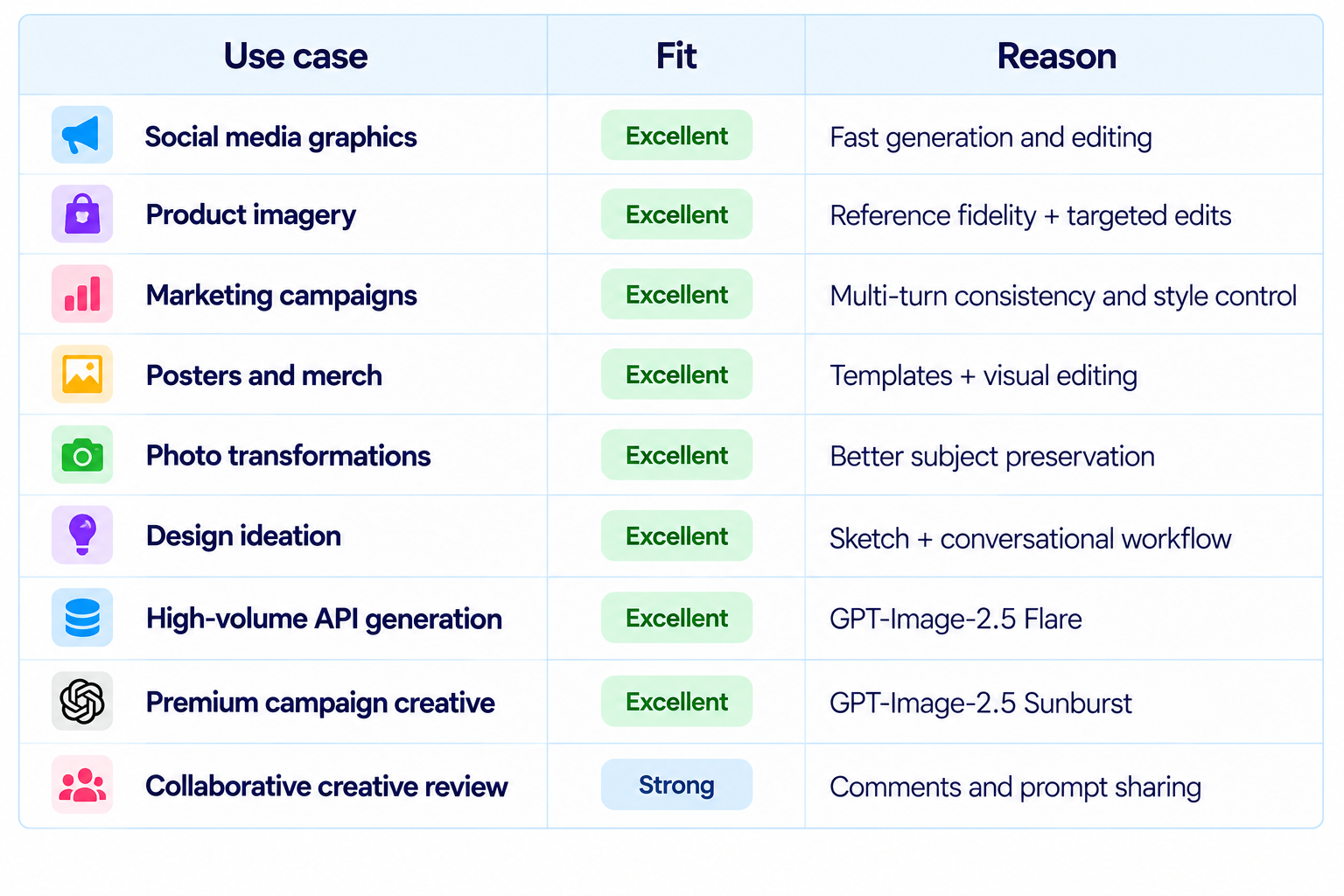
19. Limitations You Should Know
- The 'up to 50%' latency improvement is a relative comparison, not a fixed generation time.
- High-value production assets still need human review for text, branding, people and product details.
- Flare and Sunburst are designed for different workload profiles rather than being interchangeable in every application.
- Image generation inside ChatGPT and API deployment are separate experiences with different integration and billing considerations.
- Reference fidelity has improved, but difficult transformations can still require several iterations.
- Provenance metadata and watermarking help identify generated content but do not solve every attribution problem.
20. Recommended Production Workflow
The strongest workflow is to treat Images 2.5 as an iterative editor rather than a one-shot generator.
- Start with a clear prompt describing subject, composition, style and intended use.
- Add a reference image when identity or product fidelity matters.
- Use Sketch when spatial placement is easier to draw than describe.
- Make targeted edits one at a time so changes are easier to control.
- Use image comments for localized feedback.
- Use templates for repeatable creative formats.
- Use GPT-Image-2.5 Flare for most production API requests.
- Use Sunburst for premium creative where edit precision justifies the additional generation time.
- Review important text, product details and branding before publishing.
21. How to Evaluate ChatGPT Images 2.5 Yourself
A useful evaluation should measure both first-generation quality and editing reliability. Compare Images 2.0 and Images 2.5 using the same source material, then run repeated edits in the same conversation.
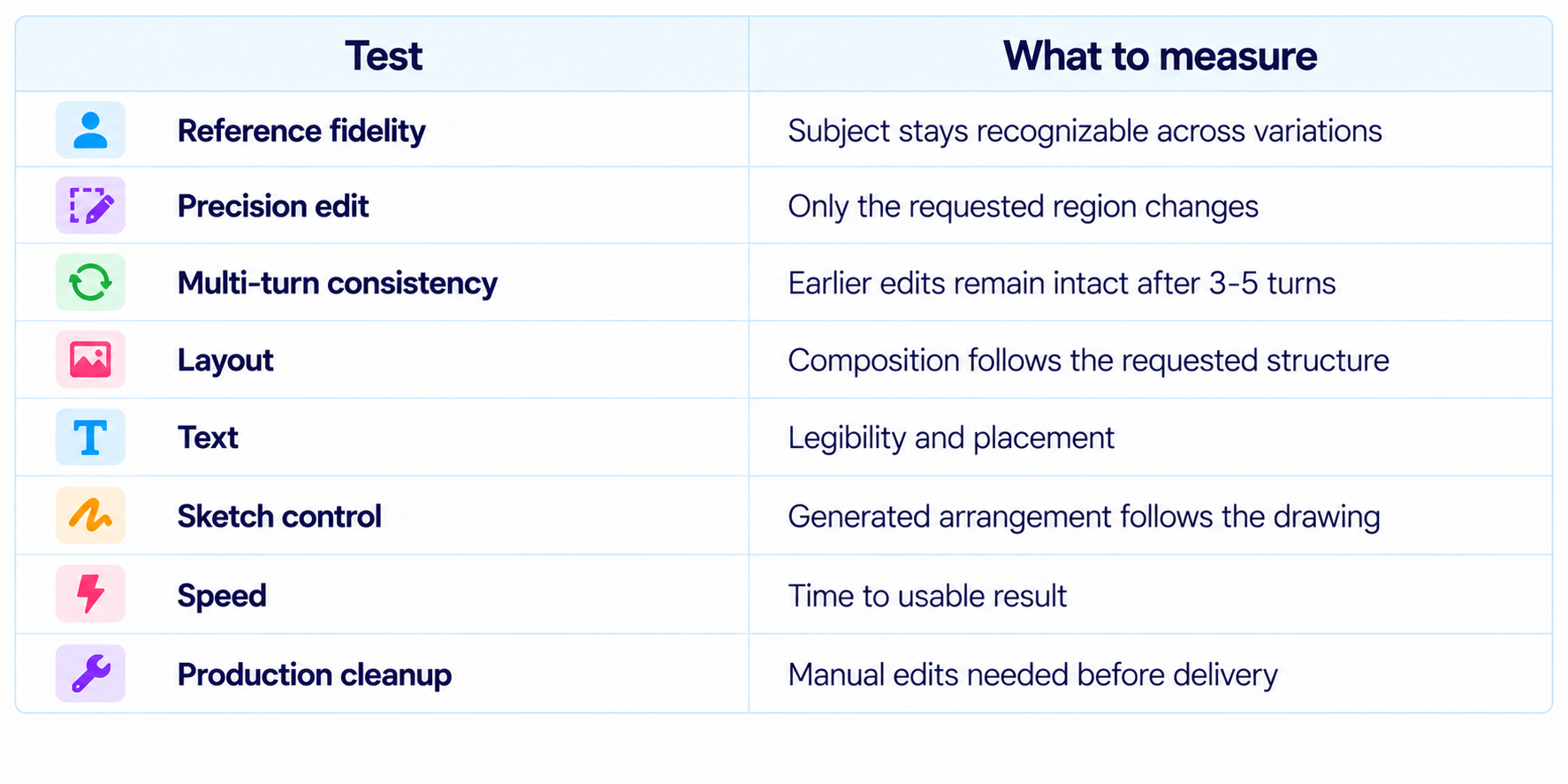
The most important measurement is not simply visual quality. It is the amount of human correction required to get to the final asset. A model that needs fewer restarts can be much more productive even when the first generations of two models look similar.
22. Is ChatGPT Images 2.5 Worth It?
Yes. Images 2.5 is especially valuable when the work involves repeated changes rather than a single generation. Better reference fidelity, more precise editing and stronger multi-turn consistency directly reduce the friction of real creative production.
The new interaction tools strengthen that advantage. Sketch gives users a faster way to communicate spatial ideas, comments make feedback more precise and templates make repeatable formats easier to start.
For developers, the Flare and Sunburst split is also practical. Most applications can prioritize speed and throughput with Flare, while premium creative workflows can pay for tighter control with Sunburst.
23. Final Verdict
ChatGPT Images 2.5 is a substantial improvement because OpenAI is upgrading more than the image generator itself. The model produces sharper detail, richer textures and more natural lighting, while the editing system is better at preserving subjects and making targeted changes. OpenAI also reports up to 50% lower latency than Images 2.0.
The biggest improvement is iterative control. Images 2.5 is better suited to the way professional creative work actually happens: generate, adjust, review, edit again and keep refining. Multi-turn consistency means those edits are less likely to destroy earlier work, which can save more time than a modest improvement in first-generation quality.
Sketch, templates and image comments push the product beyond a text prompt box. Users can draw, point and iterate instead of translating every visual idea into long descriptions. That makes the workflow more accessible to non-prompt specialists while still giving experienced creators more control.
The API split is equally important. GPT-Image-2.5 Flare is the default general-purpose choice, while Sunburst is built for premium creative workflows.
My rating: 9.5/10 for editing, 9.3/10 for image quality, 9.2/10 for speed, 9.4/10 for workflow and 9.3/10 overall.
Bottom line: ChatGPT Images 2.5 is not just a better image generator. It is a better image-editing workflow, and that makes it one of the strongest all-round choices for creators, marketers and teams that need to generate and refine visual assets repeatedly.
Frequently Asked Questions
What is ChatGPT Images 2.5?
It is OpenAI's latest image generation and editing experience in ChatGPT, with improvements in detail, reference fidelity, precise editing, multi-turn consistency and speed.
When was ChatGPT Images 2.5 released?
OpenAI launched ChatGPT Images 2.5 on September 8, 2026.
How much faster is Images 2.5?
OpenAI says image-generation latency is up to 50% lower than Images 2.0.
Does Images 2.5 preserve reference photos better?
Yes. OpenAI says distinctive subject features are more likely to remain recognizable across transformations.
What is Sketch?
Sketch lets you draw directly in ChatGPT and use the drawing as a reference for the generated image.
Can Images 2.5 edit existing images?
Yes. Precision editing and multi-turn editing are central parts of the release.
What are GPT-Image-2.5 Flare and Sunburst?
Flare is the default API model for most applications. Sunburst is designed for premium creative workflows that benefit from tighter editing control.
Is ChatGPT Images 2.5 available on mobile?
Yes. OpenAI says it is available across desktop, mobile and web.
Does Images 2.5 support prompt sharing?
Yes. Users can share the image prompt so another person can adapt the idea with their own photos and details.
Is ChatGPT Images 2.5 worth it?
Yes, particularly for iterative image creation where reference fidelity, precise edits and consistency across multiple revisions matter.
Recommended Blogs
Google Pics Review: Features, Price & Is It Worth It? (2026)
Gemini Omni 1.1 Flash Review: Accuracy, Price & Is It Worth It? (2026)
Best AI Video Models 2026: Ranked by Quality, Speed, Price & Use Case
Resources & Community
Join our community of 70,000+ AI enthusiasts and learn to build powerful AI applications. Whether you're a beginner or an experienced developer, Build Fast with AI helps you understand and implement AI in your projects.
Agentic AI Launchpad 2026
A structured 6-week cohort program that takes you from AI basics to building and deploying real-world agentic AI systems. Includes live sessions, expert mentorship, project reviews and a builder community network.
Ready to go from learning to building? Join the next cohort: Agentic AI Launchpad 2026
Free AI Resources
Access free tools, workshops and micro-learning to keep building.

