Inkling 2 Mini Review: A Coding Model That Runs on a Laptop
Inkling 2 Mini Review: A Coding Model That Runs on Your Laptop
For most of the last two years, 'good coding model' and 'runs on my laptop' didn't belong in the same sentence. The models that could actually fix real bugs lived in data centres, and the ones you could run at home were fine for autocomplete and not much else. Inkling 2 Mini, released by Thinking Machines Lab on November 20, is one of the clearest signs that this is changing. In their launch demo it ran fully offline on a MacBook Pro and built a working flight simulator. It's open-weight, Apache 2.0 licensed, small enough to fit on decent consumer hardware, and its coding scores sit far above what you'd expect from its size. In this review I'll cover what it is, how the clever architecture works, what the benchmarks really mean, what hardware you need, and who should actually use it.
What Is Inkling 2 Mini?
Inkling 2 Mini is a small open-weight language model built mainly for coding, from Thinking Machines Lab, the AI startup founded by former OpenAI CTO Mira Murati. It follows the original Inkling, which we covered in our Thinking Machines Inkling review, and it's the lab's first model designed specifically to run well on local hardware.
Three things define it. It's open-weight under Apache 2.0, which means you can download it, run it, modify it and use it commercially without asking anyone. It's a mixture-of-experts model, so although it has 26.4 billion parameters in total, only about 3.4 billion are active for each token, which keeps it fast. And it uses a looped design, which I'll explain in a moment, to squeeze more reasoning out of that small active size.
The pitch is simple: a model that does real coding work, runs privately on your own machine, costs nothing per token and doesn't need an internet connection. For developers who care about privacy, work offline, or are tired of API bills, that's a compelling combination.
Key Specs at a Glance
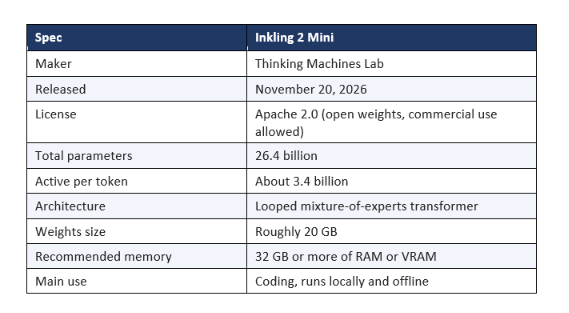
The numbers that matter most for a local model are the last few. Twenty gigabytes of weights and a 32 GB memory recommendation put it within reach of a well-specced MacBook, a desktop with a good GPU, or a workstation, rather than requiring a server.
The Looped Transformer, Explained Simply
Here's the clever part, and it's worth understanding because it explains why such a small model punches above its weight.
A normal transformer passes each token through a stack of layers once, from bottom to top. More layers usually means more capability, but also more memory and more compute. Inkling 2 Mini does something different: it runs its middle layers three times for every token. Think of it like reading a hard paragraph three times instead of once. You don't need a bigger brain, you just give the same brain more passes at the problem.
The benefit is that you get some of the reasoning depth of a much larger model without storing all the extra layers in memory. That's exactly the trade-off a local model wants, because memory is usually the thing your laptop runs out of first. The cost is a bit more computation per token, but since only about 3.4 billion parameters are active, the model stays quick enough for interactive coding.
It's not a magic trick, and looped models have limits. Repeating the same layers isn't the same as having genuinely more knowledge, so Inkling 2 Mini won't know as many facts as a giant model. But for reasoning through code, where thinking a problem through matters more than recalling trivia, it's a smart design choice.
Benchmarks: What the Numbers Say
Let me separate the company's own numbers from the independent ones, because they tell slightly different stories.
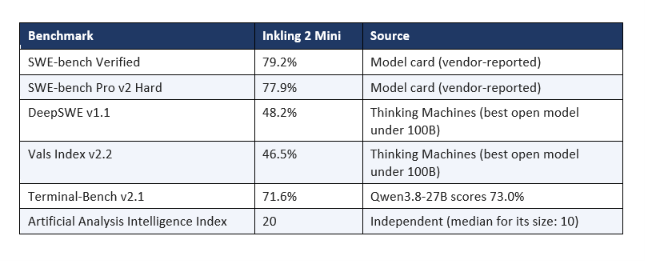
The headline is strong. A 79.2 percent score on SWE-bench Verified would have been frontier territory not long ago, and Thinking Machines says Inkling 2 Mini leads every open-weight model under 100 billion parameters on DeepSWE and the Vals Index. Those are the company's figures, and I couldn't find independent reproductions of the coding scores yet, so read them as a best case.
The independent number is more grounded. Artificial Analysis scores it 20 on its Intelligence Index, which is double the median of 10 for open models of similar size. That's a genuinely good result. But it ties Qwen3.8-27B rather than beating it, and Qwen edges it on Terminal-Bench. So the fair summary is: Inkling 2 Mini is one of the top two or three small open coding models, not a runaway winner. For context on how small models compare with the big cloud ones, our best AI models of October 2026 ranking is a useful reference.
Can It Really Run on Your Laptop?
Yes, with a realistic caveat about which laptop. Here's what you actually need.
- Memory: Thinking Machines recommends 32 GB or more of RAM or VRAM. The weights alone are about 20 GB, and you need headroom for context and the rest of your system.
- Apple Silicon Macs: a MacBook Pro or Mac with 32 GB or more of unified memory is the sweet spot. The launch demo ran on a MacBook Pro, offline.
- Windows and Linux: a desktop GPU with enough VRAM, or a machine with plenty of system RAM, works. Smaller GPUs can run quantized versions with some quality loss.
- 16 GB machines: expect to need a heavily quantized build, and quality and speed will drop noticeably. It's possible, but not the intended experience.
If you've followed the local model scene, these requirements will feel familiar. They're close to what you'd need for other strong mid-size models. Our guide to AI models that run on 24GB of VRAM covers the hardware side in more depth if you're deciding what to buy.
How to Run Inkling 2 Mini Locally
The exact steps depend on your setup, but the general path is the same for most people.
- Check your memory. Confirm you have at least 32 GB available, or plan to use a quantized version.
- Download the weights. Get the official weights from Thinking Machines' release (the model card lists the files and recommended settings).
- Pick a runner. Use a local inference tool you're comfortable with. Popular options for local models include llama.cpp-based tools, LM Studio, Ollama and MLX on Macs, as community builds and quantizations become available.
- Start with the recommended settings. Use the context length and sampling settings from the model card before you experiment.
- Connect it to your editor. Most local runners expose an OpenAI-compatible endpoint, which many coding tools and extensions can point at.
- Test it on real work. Give it a few genuine tasks from your projects and compare the results with whatever you use today.
One tip from experience with local models: don't judge it on the first prompt. Small models are more sensitive to prompt style and settings than big cloud models, so spend a little time tuning before deciding. The same workflow applies to other local models; our walkthrough on running Qwen 3.8 Max locally covers similar steps.
Inkling 2 Mini vs Qwen3.8-27B
The obvious comparison is Qwen3.8-27B, Alibaba's similarly sized open model, which ties Inkling 2 Mini on the independent index. Here's how they line up.
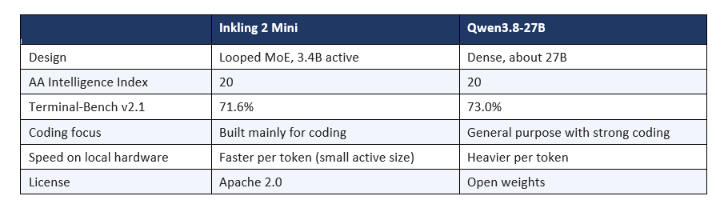
On raw scores they're very close, with Qwen slightly ahead on terminal-based tasks. The real difference is practical. Because Inkling 2 Mini only activates about 3.4 billion parameters per token, it should feel snappier on the same hardware than a dense 27B model, which matters a lot when you're waiting on a coding assistant. Qwen, on the other hand, is a more general model, so it may be the better choice if you also want writing, analysis or multilingual help from the same local setup. If your main use is coding on a laptop, I'd start with Inkling 2 Mini. If you want one local model for everything, try Qwen first.
Strengths and Weaknesses
Where it shines
- Excellent coding scores for its size, with a 79.2% SWE-bench Verified claim.
- Runs fully offline on a good laptop, so your code never leaves your machine.
- Apache 2.0 license, so commercial use and fine-tuning are fine.
- Fast in practice thanks to the small active parameter count.
- No per-token cost once you have the hardware.
Where it falls short
- Still clearly behind cloud frontier models on hard, long tasks.
- Most headline benchmarks are vendor-reported, with no independent coding reproductions yet.
- Needs 32 GB or more for a good experience, which rules out many laptops.
- Less general knowledge than larger models, so it's weaker outside coding.
Who Should Use It
Inkling 2 Mini is a great fit if you:
- Work with private or sensitive code that you'd rather not send to a cloud API.
- Code offline, while travelling, or on unreliable internet.
- Want to cut API costs for routine coding help.
- Build products and want an open, commercially usable model to fine-tune or embed.
- Already own a Mac or PC with 32 GB or more of memory.
It's probably not the right primary tool if you regularly tackle large, complex engineering tasks where the best cloud models are noticeably better, or if your machine has 16 GB or less. In that case, use it alongside a cloud model rather than instead of one.
My Verdict
Inkling 2 Mini is one of the most interesting small models of the year. The looped design is a genuinely smart answer to the main problem with local AI, which is that laptops run out of memory long before they run out of time to think. The result is a model that does real coding work, runs privately and costs nothing per token, under a license that lets you do almost anything with it.
Keep your expectations honest, though. It ties rather than crushes Qwen3.8-27B on independent testing, its best scores are self-reported, and it won't replace a frontier cloud model for the hardest problems. My recommendation: if you have a machine with 32 GB or more and care about privacy, cost or offline work, download it and make it your default local coding model. Use a cloud model for the tough stuff, and let Inkling 2 Mini handle everything else.
Frequently Asked Questions
What is Inkling 2 Mini?
Inkling 2 Mini is an open-weight coding model from Thinking Machines Lab, released on November 20, 2026. It has 26.4 billion total parameters with about 3.4 billion active per token, uses a looped transformer design, and is released under the Apache 2.0 license.
Can Inkling 2 Mini run on a laptop?
Yes, on a well-equipped one. Its weights are about 20 GB and Thinking Machines recommends 32 GB or more of memory. It was demonstrated running offline on a MacBook Pro. Machines with less memory can run quantized versions with some loss in quality.
How good is Inkling 2 Mini at coding?
Very good for its size. Thinking Machines reports 79.2% on SWE-bench Verified and says it leads open-weight models under 100B parameters on DeepSWE and the Vals Index. Independently, it scores 20 on the Artificial Analysis Intelligence Index, double the median for similar models.
Is Inkling 2 Mini open source?
It's open-weight under the Apache 2.0 license, which allows you to download, modify, fine-tune and use it commercially. That makes it one of the most permissively licensed strong coding models available.
Inkling 2 Mini vs Qwen3.8-27B: which is better?
They tie on the Artificial Analysis Intelligence Index at 20, and Qwen3.8-27B is slightly ahead on Terminal-Bench (73.0% vs 71.6%). Inkling 2 Mini should feel faster locally because fewer parameters are active per token, while Qwen is more general purpose.
What does a looped transformer mean?
It means the model runs its middle layers several times per token, three times in Inkling 2 Mini's case. This gives a small model more reasoning depth without storing extra layers in memory, which is ideal for running on local hardware.
Is Inkling 2 Mini free?
The model itself is free to download and use under Apache 2.0. Running it locally has no per-token cost, but you need hardware with enough memory, ideally 32 GB or more.
Recommended Blogs
- Thinking Machines Inkling Review
- AI Models That Run on 24GB VRAM
- Run Qwen 3.8 Max Locally
- Best AI Models of October 2026
- Best Open-Source AI Models (October 2026)
References

Founder at Build Fast with AI. AI Engineer, educator, and researcher passionate about agentic AI workflows, LLM application architecture, and training the next generation of AI builders.